
Page Meteo Center 66223 - Weather Station SOEHNLE - Free user manual and instructions
Find the device manual for free Page Meteo Center 66223 SOEHNLE in PDF.


| Product type | Weather station |
| Brand | Soehnle |
| Model | Page Meteo Center 66223 |
| Dimensions (approx.) | 15 x 10 x 3 cm |
| Weight | Approx. 200 g |
| Power supply | Batteries (type not specified) or mains adapter |
| Main functions | Indoor/outdoor temperature, humidity, atmospheric pressure, weather forecasts, time and date display, alarm |
| Number of outdoor sensors | 1 wireless sensor |
| Sensor range | Up to 30 meters (in open field) |
| Display | Backlit LCD screen |
| Maintenance and cleaning | Clean with a soft, dry cloth. Avoid solvents. |
| Safety | Do not expose to excessive humidity, extreme temperatures or shocks. |
| Batteries | Use alkaline batteries of type AA or AAA depending on the device |
| Package contents | Base station, outdoor sensor, mains adapter, user manual |
Frequently Asked Questions - Page Meteo Center 66223 SOEHNLE
User questions about Page Meteo Center 66223 SOEHNLE
0 question about this device. Answer the ones you know or ask your own.
Ask a new question about this device
Download the instructions for your Weather Station in PDF format for free! Find your manual Page Meteo Center 66223 - SOEHNLE and take your electronic device back in hand. On this page are published all the documents necessary for the use of your device. Page Meteo Center 66223 by SOEHNLE.
USER MANUAL Page Meteo Center 66223 SOEHNLE
- Safety information 11
- Display weather station 12
- Weather station operating elements 12
- Scale operating elements 12
- Outdoor sensor operating elements 13
- Start-up operation 13
- Settings 13
7.1 Setting the weather forecast 13
7.2 Setting date and time 13
7.3 Setting the time format 24h/12h 14
7.4 Setting the alarm function 14
7.5 Setting the timer 14
8. Weighing 15
8.1 Tare and add-weight 15
9. Wall installation 15
10. Messages 16
11. Technical data 16
12. Battery disposal 16
13. Disposal of the scale 17
14. Declaration of conformity 17
15. Guarantee 18
1. Safety information
Danger
- Never throw used batteries into open flame. Danger of explosion!
- Never short-circuit batteries!
- Keep the device away from small children.
- Batteries contain chemicals. A leakage of these chemicals could result in damages on objects or bodily injuries.
- If battery acid comes into contact with the eye, immediately rinse the eye with plenty of water and contact a physician.
Attention
- This appliance can be used by children aged from 8 years and above and persons with reduced physical, sensory or mental capabilities or lack of experience and knowledge if they have been given supervision or instruction concerning use of the appliance in a safe way and understand the hazards involved. Children shall not play with the appliance. Cleaning and user maintenance shall not be made by children without supervision.
Note
- Clean the parts of this device only with a damp cloth and some mild cleaning agents if required. Corrosive or abrasive cleaning agents will cause damages.
- The scale is not water-tight and must never be submerged in water or placed in the dishwasher.
- For additional safety information please visit: www.soehnle.de / service / safety_instructions
EN
2. Display weather station (Dia. 3)
- Radio clock reception 🙏 time signal search ➤ i ≲
-
Mode display: TIME / DATE / Daylight savings time (DST) / YEAR / MONTH
-
Time display
- 24h or 12 h display
-
Alarm function activated
-
Alarm function in snooze mode Zz
-
Timer activated ⏻
-
Outdoor sensor/display OUT
-
Indoor sensor/display IN
-
Batteries (indoor/outdoor) nearly spent 📋
-
Display of selected radio channel (3 total) CH2
-
Display for channel changing query 🔒
-
Link connection outdoor sensor/Page Meteo Center 📋
-
Outdoor/indoor temperature display
-
Outdoor/indoor humidity display
-
Forecast FORECAST sunny cloudy rainy
3. Weather station operating elements (Dia. 4)
MODE select display of time, year, date, alarm
UP/DOWN settings
WEATHER setting the weather forecast
C/F select temperature display °C/°F
CHANNEL change radio channel 1-3
SET time/date
RESET to factory settings
4. Scale operating elements (Dia. 5)
ON/OFF
TARE Tare function
C ⏻ D Timer
C △ ∩ Timer settings
g ➔ lb Switching units
5. Outdoor sensor operating elements (Dia. 6)
TX immediate transmission of a signal to the scale
RESET test button for function test (LED)
CH1CH2CH3 select radio channel (in case of different devices with radio connection in same range)
EN
6. Start-up operation
- Insert batteries (2 x 1.5 V AAA) into outdoor sensor (Dia. 2).
- Insert batteries (3 x 1.5 V AAA) into scale (Dia. 1).
7. Settings
If no key is pressed for 60 seconds during setting, the display switches back to normal mode.
7.1 Setting the weather forecast
-
After inserting batteries or after pushing the RESET button, all LCD elements are displayed for 3 seconds. The display then switches to the flashing sun symbol 🙏.
-
Use the UP/DOWN keys to set the current weather condition based on your personal weather observation (sunny, cloudy, rainy)
-
Confirm using SET key.
Then the weather station searches for the radio signal of the outdoor sensor and displays the current radio channel and the measured values of the outdoor sensor (takes up to 30 minutes). The outdoor sensor transmits measured values every 5 minutes. The weather forecast is updated hourly.
Note: To set the weather forecast at a later time, push and hold the WEATHER key for 2 seconds until the display flashes.
Note regarding weather forecast: the weather forecast is based only on temperature and air humidity measurement according to the following principle:
Recalibration occurs once daily (11:00 a.m.) based on the measured temperature and air humidity values.
The forecast is then determined once every hour, on the hour, based on the comparison of the current and the last measured values.
A detailed description of the weather forecast is available at www.soehnle.com/service/pagemeteocenter".
7. 2 Setting date and time
After setting the weather forecast the integrated radio clock attempt to capture (about 10 minutes) the time signal (Date and time). Could the time signal be detected, 📋 is displayed permanently.
If the time signal cannot be received or in case of poor reception, λ is displayed. In this case we recommend placing the scale at a different location. The device attempts to receive the time signal for 10 minutes every hour, until it has been received.
In normal operation the time is synchronized with the time signal daily at 2 a.m., 3 a.m., 8 a.m., 2 p.m. und 8 p.m.
Alternatively, the clock can also be set manually.
- Push and hold the SET key for 2 seconds.
- Set the year using the UP/DOWN key. Confirm using the SET key.
- Set month/day and confirm.
- Set time (hours/minutes) and confirm.
7.3 Setting the time format 24 h / 12 h
Push and hold the UP key for 2 seconds to change the time format.
7.4 Setting the alarm function
- Push the MODE key repeatedly until the alarm time is displayed
- Then hold the SET key for 2 seconds until the alarm time flashes.
- Use the UP/DOWN key to set the hours, use SET to confirm.
-
Use the UP/DOWN key to set the minutes, use SET to confirm.
-
The ⚙ symbol indicates that the alarm has been activated. The alarm function can be deactivated by pushing the UP key. Snooze function: to pause the alarm signal for 5 minutes, push the △key.
7.5 Setting the timer
- Push and hold the ⏻ key for 2 seconds.
- Set alarm time using the △ key.
-
Use the ⏻ key to start the timer.
-
Use the ⏻ key or the ▲ to stop the alarm signal.
8. Weighing (Dia. 7)
Place scale on a smooth and level surface.
- Switch on using the ⏻ key
- Wait until "0" is displayed. If the display does not show 0 g, push the TARE key.
- The weighing process can now start. Place goods to be weighed on the scale and read the value. If a load is placed on the scale, it switches off automatically after 8 minutes without any weighing activity (or after approx. 4 minutes if no load is on the scale). The scale can also be switched off manually by pushing the ⏻ key for 2 seconds.
8.1 Tare and add-weight (Dia. 7)
- After a container has been placed on the scale, it can be tared using the TARE key. If goods to be weighed are then placed on the scale, the display shows only that weight.
- If several ingredients are to be weighed in one single container, the TARE key must be pushed between each individual ingredient so that "O" is displayed each time and the next ingredient can be added.
- If the TARE key is pushed once again after the last ingredient and if the container is then removed from the scale, the total weight (to include container) is displayed with a negative algebraic sign.
- Please note that the remaining, usable, maximum load capacity is reduced by the tared weight values.
9. Wall installation (Dia. 8)
The scale can be placed on a surface using the folding base feet or it can be attached on the wall. You will need appropriate tools and installation material.
The outdoor sensor should also be attached to a protected outside wall with a screw.
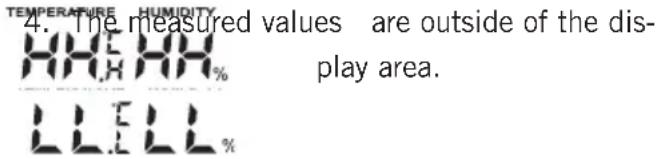
- Batteries spent. Insert new batteries.
- Overload: the maximum weighing range of

the scale is 5,000 g.
- Contact to outdoor sensor failed. Push
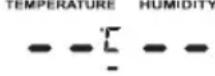
RESET key on outdoor sensor and scale simultaneously to restart the device.
The location of the outdoor sensor should be checked if the dashes are displayed for longer than 3 hours.
If several devices transmit on the same radio channel, changing the channel may help (Key CHANNEL).
11. Technical data
Scale
Weighing range: 0 - 5,000 g, 0 - 11 lb
Graduation: 1 g, 0.1 oz
Temperature display Indoors -9.9 - 70.0 °C / 13.9 - 158.0 °F
Outdoors -35.0 - 70.0 °C / -31.0 - 158.0 °F
Increments 0.1 °C / 0.1 °F
HumiditydisplayRange 25 - 95 %
Increments 1 %
Batteries Scale 3 x 1.5 V AAA
Outdoor sensor 2 x 1.5 V AAA
12. Battery disposal

Batteries do not belong in your household waste. As a consumer you are legally obligated to return spent batteries.
You can return your used batteries to public collection points in your municipality or wherever batteries of the respective type are sold.
13. Disposal of the product
The symbol on the product or its packaging indicates that this product cannot be treated as normal household waste but that it must be returned to a collection point for the recycling of electric and electronic devices.
Your municipality, your municipal waste disposal providers, or the business where you purchased the product can provide more information.
14. Declaration of conformity
Hereby Leifheit AG declares that this device Page Meteo Center is in compliance with essential requirements and other relevant provisions of Directive 1995/5/EC.
The declaration of conformity may be consulted at www.soehnle.com.
Note: Extreme electromagnetic influences, e.g. operation of a radio transmitter in the immediate proximity of the device, can influence the measurement results. After removal of the influence, the product will be fully functional again. However, it might be necessary to switch the device off and back on.
15. Guarantee
Leifheit AG grants you 3 years guarantee as of the date of purchase (or for order upon receipt of the goods) for the quality product at hand. The guarantee claims must be asserted immediately upon occurrence of the defect within the guarantee period. The guarantee is limited to the quality of the products.
The following are excluded from the guarantee:
(1) wear caused by proper use or natural causes;
(2) damage caused by improper use or handling (e.g. impact, bump, fall);
(3) damage caused by non-compliance with stated operating instructions;
(4) the rechargeable battery
In case of a guarantee claim, Leifheit will at its own discretion provide either repair of defective parts or replace the product. If a repair is not possible and if an identical product is no longer available within the product range for replacement, you will receive a replacement product that is, insofar as possible, of equal value. In case of a guarantee claim, the purchase price cannot be reimbursed. This guarantee also does not grant compensation rights. This guarantee furthermore does not grant any claims for damages.
To assert the guarantee, please contact the seller where you purchased the product and present the defective product, the purchase receipt (copy) and the guarantee slip.
The guarantee is valid globally.
Your statutory rights, in particular warranty rights, continue to be valid and are not limited by this warranty.
www.soehnle.com/service/pagemeteocenter
8.1 Tarage (figure 7)
Graduation 0.1 °C/0.1 °F
-
Veiligheidsvoorschriften 35
-
Weergave weerstation 36
-
Bedieningselementen weerstation 36
-
Bedieningselementen weegschaal 36
-
Bedieningselementen buitensensor 37
-
Ingebruikname 37
-
Instellingen 37
SOEHNLE
Quality & Design by
Leifheit AG
Leifheitstraße 1
56377 Nassau / Germany
Service +49 (0) 2604 977-0
www.soehnle.com




- SAFETY INFORMATION
- DANGER
- ATTENTION
- NOTE
- EN
- DISPLAY WEATHER STATION (DIA. 3)
- WEATHER STATION OPERATING ELEMENTS (DIA. 4)
- SCALE OPERATING ELEMENTS (DIA. 5)
- OUTDOOR SENSOR OPERATING ELEMENTS (DIA. 6)
- START-UP OPERATION
- SETTINGS
- 7.1 SETTING THE WEATHER FORECAST
- NOTE REGARDING WEATHER FORECAST: THE WEATHER FORECAST IS BASED ONLY ON TEMPERATURE AND AIR HUMIDITY MEASUREMENT ACCORDING TO THE FOLLOWING PRINCIPLE
- 2 SETTING DATE AND TIME
- 7.3 SETTING THE TIME FORMAT 24 H / 12 H
- 7.4 SETTING THE ALARM FUNCTION
- 7.5 SETTING THE TIMER
- WEIGHING (DIA. 7)
- 8.1 TARE AND ADD-WEIGHT (DIA. 7)
- WALL INSTALLATION (DIA. 8)
- TECHNICAL DATA
- BATTERY DISPOSAL
- DISPOSAL OF THE PRODUCT
- DECLARATION OF CONFORMITY
- GUARANTEE
- 8.1 TARAGE (FIGURE 7)
- SOEHNLE
Brand : SOEHNLE
Model : Page Meteo Center 66223
Category : Weather Station