
AD 1600 - Washing machine HOTPOINT - Free user manual and instructions
Find the device manual for free AD 1600 HOTPOINT in PDF.


User questions about AD 1600 HOTPOINT
0 question about this device. Answer the ones you know or ask your own.
Ask a new question about this device
Download the instructions for your Washing machine in PDF format for free! Find your manual AD 1600 - HOTPOINT and take your electronic device back in hand. On this page are published all the documents necessary for the use of your device. AD 1600 by HOTPOINT.
USER MANUAL AD 1600 HOTPOINT
Instructions for installation and use
Waschvollautomat
text_image
Cartoon illustration of a smiling computer character next to a blackboard with numbers and diagrams, likely depicting a math or logic problem.Dispositif antibalourds.
natural_image
Cartoon illustration of a person looking through a window with expressive eyes and hand gestures (no text or symbols)text_image
Technical diagram of a car interior showing labeled parts and a directional arrow indicating movement or flow.
Départ différé
natural_image
Simple line drawing of a curved shape with an arrow labeled 'H' pointing downward (no text or symbols beyond the label)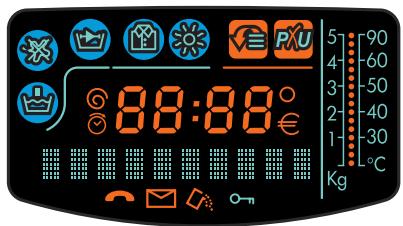
text_image
88:88 € 5 -90 4 -60 3 -50 2 -40 1 -30 Kg
natural_image
Illustration of a person wearing glasses and holding a card, with no visible text or symbolstext_image
Technical diagram of a car interior showing labeled components and directional arrowstext_image
Technical diagram of a mechanical component with numbered parts and an arrow indicating directionBac 3: Additifs (assouplissants, parfums, etc.)
text_image
Diagram showing a spray can with an inset highlighting the 'MAX' label, likely illustrating a precision or measurement setup.natural_image
Cartoon illustration of a smiling washing machine character holding a fan (no text or symbols)
natural_image
Black-and-white cartoon illustration of a muscular figure with a frowning expression and a kneeling figure holding an open book (no text or symbols present)A FAIRE A NE PAS FAIRE
natural_image
Cartoon illustration of a washing machine with a person lying on it (no text or symbols)natural_image
Cartoon illustration of a person running away from a computer monitor (no text or symbols)natural_image
Cartoon illustration of a character with large eyes and open mouth (no text or symbols)natural_image
Cartoon illustration of a smiling document character with arms and legs, standing on a surface with floating objects (no text or symbols)natural_image
Cartoon illustration of a character with a book and floating bubbles (no text or symbols)natural_image
Illustration of a woman pushing a smiling washing machine with a newspaper nearby (no text or symbols)natural_image
Diagram of a faucet with tubing and a hanging handle (no text or symbols)natural_image
Illustration of a woman holding a newspaper with falling items, while another figure in the background shows a smiling character waving (no text or symbols)natural_image
Diagram of a mechanical component with a lever and directional arrows, labeled Fig. 1 (no text or symbols on the diagram itself)natural_image
Technical diagram showing a circular component mounted on a wall, labeled Fig. 2 (no text or symbols within the diagram itself)natural_image
Technical line drawing of a mechanical assembly with no visible text or symbolsFig. 3
text_image
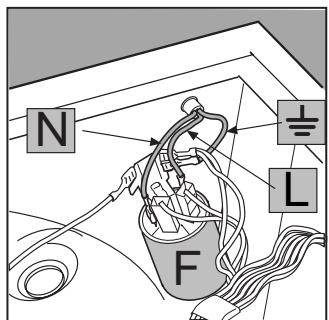
N F LFig. 4
natural_image
Illustration of hands installing or adjusting a component with a tool (no text or symbols visible)Fig. 5
natural_image
Line drawing of a refrigerator front panel with buttons and ventilation slots (no text or symbols)Fig. 6
MARGHERITA DIALOGIC
MARGHERITA DIALOGIC AD 160
AD 1600
The secrets of fabrics
How to get better results
ARISTON
Instructions for installation and use

■ Class A at 40°C
The first washing machine to give a perfect wash at only 40°C
Cashmere Gold
The first washing machine to have "The Woolmark Company" recognition
Ecological rinse
The first washing machine to eliminate all detergent residue
MARGHERITA DIALOGIC, sees the birth of a new interactive dialogue
Quick guide to
MARGHERITA DIALOGIC
Here are the 10 topics explained in this manual. Read, learn and have fun: you will discover many secret ways to get a better wash, more easily and making your washing machine last longer.....and especially keeping an eye on safety.
1. Installation and removal (p. 24)
Installation, after delivery or transport, is the most important operation for the correct functioning of your MARGHERITA DIALOGIC washing machine. Always check:
- That the electric system complies with the law;
- That the inlet and draining pipes are connected correctly. Never use hoses that have already been used, always use the new ones provided with your machine.
- That the washing machine is levelled properly; something worth checking for the life of your washing machine and the quality of your wash;
- That the drum's fixing screws have been removed from the back of the washing machine.
2. What goes in your washing machine and how to start your MARGHERITA DIALOGIC (p. 16)
A correct distribution of your laundry is vital to both the successful outcome of the wash and the life of the washing machine. Learn all the tips and secrets to dividing your linen: colour, type of fabric and tendency of creating fuzz are the most important criteria.
3. Guide to understanding labels (p. 19)
The symbols on the labels of your garments are easy to understand and equally important for the success of your wash. The guide includes simple instructions to help you choose the right temperature, wash cycles and ironing methods.
4. Useful tips to avoid mistakes (p. 20)
Yeras back, our grandmothers were the ones who gave us good advice - and in those days synthetic fibres did not exist: washing was easy. Today, MARGHERITA DIALOGIC offers you helpful advice allowing you to wash cashmere and wool even better than an expert laundress would by hand.
5. The detergent dispenser (p. 21)
How to use the detergent dispenser and the bleach compartment.
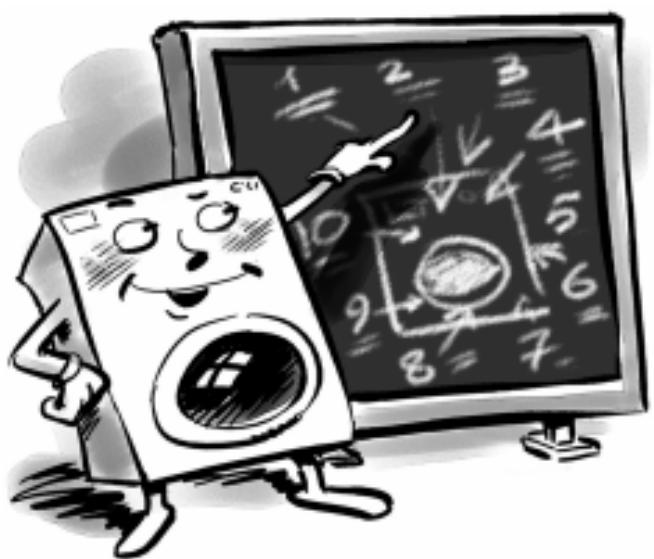
6. Understanding the control panel (p. 17 - 18)
MARGHERITA DIALOGIC's control panel is very simple. It has only a few essential buttons to help you choose any type of wash cycle, ranging from the most energetic, capable of cleaning a mechanic's overalls, to the most delicate for cashmere. Familiarising with it will help you get the best out of your wash while helping your washing machine last longer. It's easy.
text_image
Cartoon illustration of a computer with a smiling computer character and a chalkboard showing numbers and symbols, likely related to computer science or math.7. Care and maintenance (p. 25)
MARGHERITA DIALOGIC is a true friend. With just a bit of care, it will repay you with loyalty and devotion.
With the necessary upkeep, it will wash for years and years to come.
8. Problems and solutions (p. 22 and 23)
Before calling a technician, read these pages: immediate solutions may be found for a number of problems. If the problem persists, call Ariston customer services and any failure will be repaired, as soon as possible.
9. Technical characteristics (p. 23)
Herein are the technical features of your washing machine: model type number, electric and water specifications, size, capacity, speed of the spin cycle and compliance with Italian and European rules and regulations.
10. Safety for you and your children (p. 26)
Here you will find the necessary guidelines for the safety of your entire household, because safety is very important indeed.
What goes in your washer?
Before washing, you can do a great deal for better results. Divide your garments according to fabric and colour. Read the labels, follow their indications and alternate small items with large ones.
Dividing your garments according to fabric and colour, is very important for good results
Before washing.
Divide your washing according to the type of fabric and colour resistance: sturdy fabrics should be separated from delicate ones. Light colours should be separated from dark ones.
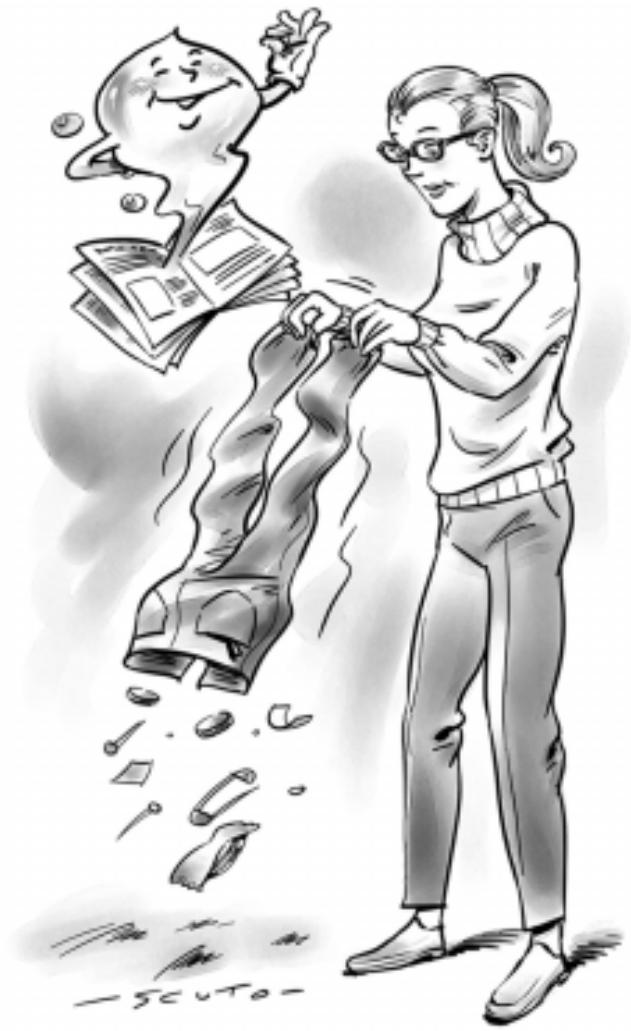
Empty all pockets (coins, paper, money and small obejects) and check the buttons. Mend immediately or remove loose buttons as they could fall off during the wash cycle.
The labels say it all.
Always look at the labels: they tell you everything about your garment and how to wash it in the best way possible.
The table on page 19 shows you all the secrets of the symbols found on labels. Their indications are a valuable guide to a better wash and to longer lasting clothes.
Big and small happily together.
This washing machine has a special electronic control device for distributing the wash load evenly: before the spin cycle starts, this device allows the washing to position itself as uniformly as possible in the drum, according to the type of
washing and initial positioning. For this reason, even at top spin, the washing machine does not vibrate or make any noise.
Starting the washer
Once you have installed your new appliance, run an empty wash cycle by turning the knob completely to the left and setting a temperature of 90 degrees.
Starting MARGHERITA DIALOGIC in the right way is important for the quality of your wash, for preventing problems and for lengthening the life of your appliance. After loading your washing and pouring in the detergent together with any additives, always check that:
For more delicate garments: protect underwear, tights and stockings and delicate items by placing them in a canvas pouch
- The door is correctly shut.
- The plug is inserted in the socket.
- The water tap is open.
At the end of the wash cycle wait for symbol Ⓞ to come off and the word END to appear.
Then turn MARGHERITA DIALOGIC off by pressing on-off button C (OFF position). You can now open the washing machine door safely. After having removed the freshly cleaned washing, leave the door open or ajar so that the humidity left inside can evaporate.
Always close the water tap.
Remember that, in the event of a power failure, or should the washing machine switch itself off, the programme chosen will be memorised.
natural_image
Illustration of a woman washing clothes from a large washing machine, surrounded by scattered debris (no text or symbols)How to eliminate the most common stains
Ink and biro Dab with a wad of cotton soaked in methyl alcohol or alcohol at 90°.
Tar Dab with fresh butter, rub in turpentine then wash immediately.
Wax Scrape away, then run a hot iron between two sheets of absorbent paper. Then rub in cotton with turpentine or methyl alcohol.
Chewing gum Rub in nail polish remover and wipe with a clean rag.
Mold Cotton and white linen should be placed in a solution of 5 parts water, one bleach and a spoon of vinegar, then washed immediately. For other white fabrics, use hydrogen peroxide at 10 volumes and wash immediately.
Lipstick Dab with ether on wool or cotton. Use tricloroetilene for silk.
Nail polish Place a sheet of absorbent paper on the side of the stain, wet it with nail polish remover, shifting the garment as the sheet gradually changes colour.
Grass Dab with a wad of cotton soaked in methyl alcohol.
Understanding the control panel
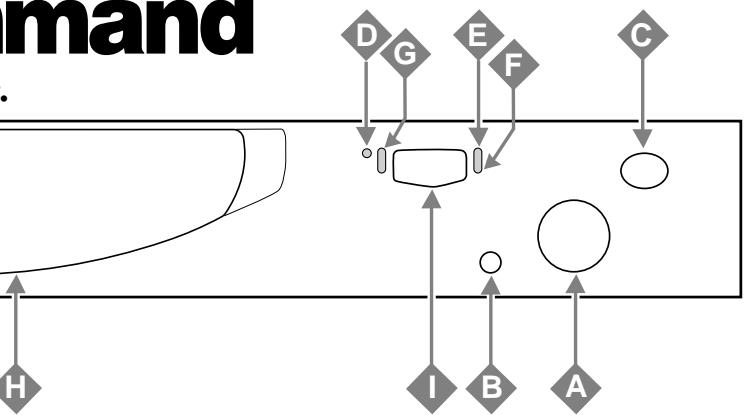
Here I'm in command
Making the right choice is important. And it's easy.

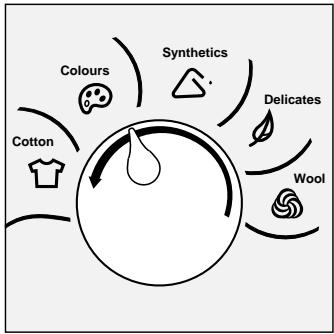
Knob
Use the knob to select the most delicate fabric in your laundry load and MARGHERITA DIALOGIC will set the most suitable wash cycle accordingly.
Turn the knob to the left to obtain a greater wash intensity.
flowchart
graph TD
    A["Cotton"] --> B["Colours"]
    B --> C["Synthetics"]
    C --> D["Delicates"]
    D --> E["Wool"]
    E --> F["End"]
The DELICATES sector is highly recommended for silk and curtains.

Start /Reset
This button allows you to start the selected wash programme or to interrupt it.
If you press it briefly, the button functions as Start, if you press it for at least 3 seconds, then it functions as Reset.
After the Start of the appliance, moving the programme selector knob will have no effect whatsoever:

On-off
When button C is pressed, the washing machine is switched on, when it is not the machine is switched off. Turning the appliance off does not cancel the selected programme.

natural_image
Cartoon illustration of a person looking through a window with expressive eyes and hand gestures (no text or symbols)The detergent dispenser with the additional bleach compartment is here.
text_image
Technical diagram of a mechanical component with numbered parts and an arrow indicating direction
Delay timer

This button allows you to delay the start of the wash programme from 1 to 24 hours.
The selection of the delayed start is indicated by the symbol ⬇ coming on and by the amount of time left shown on the display until the wash cycle itself starts.

Temperature ⚠️
This button allows you to reduce the normal temperature for the selected wash programme, right down to a cold wash (OFF).
Press it again to set temperatures from 90^ C to 60^ C (where available).
This option is available with all wash programmes.

Spin cycle adjustment ©
This button allows you to reduce the normal spin cycle speed for the selected wash programme, right down to the exclusion of the spin cycle altogether (OFF).

flowchart
graph TD
    A["Command"] --> B["D"]
    A --> C["G"]
    A --> D["E"]
    A --> E["F"]
    A --> F["C"]
    B --> G["Circle"]
    C --> G
    D --> G
    E --> G
    F --> G
    G --> H["Circle"]
    G --> I["Circle"]
    G --> J["Circle"]
    G --> K["Circle"]
text_image
88:88 5 -90 4 -60 3 -50 2 -40 1 -30 Kg
Mode Ⓜ / Select Ⓢ
Press Ⓜ to scroll through the options on the display.
Go to the desired option: the corresponding symbol will begin to flash and the word OFF will appear on the display which you can change to ON by pressing Ⓗ. To confirm your selection and access the subsequent option, press M again.
The appliance will in any case memorise the last selection made if no buttons are pressed for a few seconds.
The options selected will appear on the display, and will stay lit for the entire duration of the wash programme.

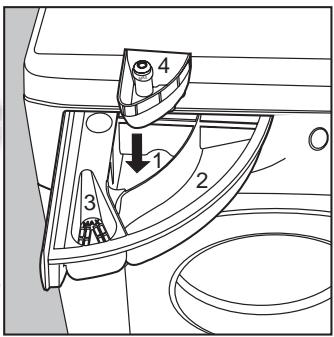
Detergent dispenser
It is divided into three compartments:
- Detergent for pre-washing;
- Detergent for the wash cycle;
- Fabric softeners.
The washing machine is equipped with extra compartment 4 (provided) for the bleach, to be inserted in compartment 1.

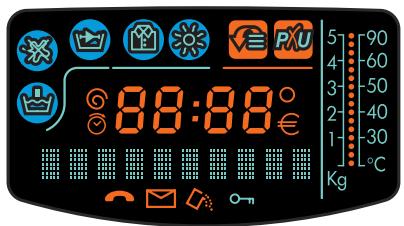
Display
Only the options corresponding to the wash programme selected will light up and therefore be available for selection.
The options indicated on the display which you can select by pressing button Ⓜ are as follows:
Pre-wash
Press Ⓜ to select the desired function.
Use this function to run a pre-wash on all the wash programmes except for the wool programme and the special programmes ↗.
To select it, press ⑤ until the word ON appears on the display. The selection of this option is indicated by symbol 🔊 appearing.
Note: this function is not available with the Stain Removal option.
Stain removal ✗ (see page 21)
Press Ⓜ to select the desired function.
Thanks to this option, the appliance will carry out a more intensive wash that optimises the effectiveness of the liquid additives, thus allowing more resistant stains to be removed.
To select it, press ⑤ until the word ON appears on the display. The selection of this option is indicated by symbol ✗ appearing.
Note: this function is not available with the Pre-wash and No iron options.
Rapid
Press Ⓜ to select the desired function.
This function reduces the length of the wash programme by about 30%.
To select it, press ⑤ until the word ON appears on the display. The selection of this option is indicated by symbol ↗/appearing.
Note: this function cannot be used in conjunction with the
Wool and Delicates wash programmes.
No iron

Press Ⓜ to select the desired function.
This option allows you to obtain crease-free washing which is easier to iron.
The appliance optimises the washing conditions according to the type of fabrics that are being washed.
To select it, press 5 until the word ON appears on the display. In the Synthetics and Delicates, programmes the wash cycle is interrupted and the washing is left to soak in water before the appliance is drained. To complete the cycle, press the Start button.
The selection of this option is indicated by symbol 📋 appearing.
Note: this function is not available with the Stain Removal option.
Special programmes

Press Ⓜ to select the desired function.
If you set this option, the following options will be displayed:
- Special (OFF)
- Rinse only
- Spin cycle only
- Drain
To select the desired "special programme", press Ⓢ, to confirm your selection press Ⓜ. If you don't wish to select a special programme, press Ⓜ when the wording "Special" (OFF) comes up on the display.
Settings
Press buttons Ⓧ and Ⓞ at the same time for at least 4 seconds to access the personalisation menu, where you can choose your language and the display brightness.
The word “LANGUE” (LANGUAGE) will appear, press 📋 to display the language set. If you want to change the language set, just scroll along the languages available by pressing 📋 and confirm your selection by pressing Ⓜ.
To adjust the brightness of the display, press both buttons ⑤ and Ⓤ at the same time for at least 4 seconds: the word "LANGUE" (LANGUAGE) will come up; press Ⓜ to display the wording "LUMINOSITE ECRAN" (DISPLAY BRIGHTNESS).
Press Ⓢ to display the brightness set; if you want to change it, scroll along the three brightness levels available with Ⓢ and select the desired one with Ⓜ.
Special displays
After the first wash cycle.....
The water hardness level is displayed for 10 seconds, and you can adjust the amount of detergent you use accordingly:
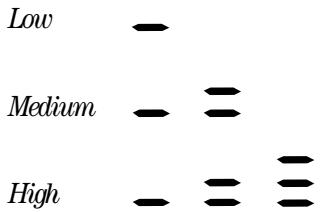
text_image
Low Medium Highand subsequently:
- the indication of the fabric sector selected (COTTON, COLOURS, SYNTHETICS, DELICATES and WOOL)
• the temperature corresponding to the wash programme set
• the recommended wash load:
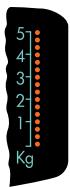
- after pressing Start, the estimated duration of the cycle is displayed; if you have set the Delay timer the countdown to the wash programme start is displayed.
During the wash cycle...
The following are displayed:
• the amount of time left
- the temperature, during the heating phase (on the scale on the right-hand side of the display); once heating is over and for the entire duration of the cycle, the weight of the load inside the appliance:
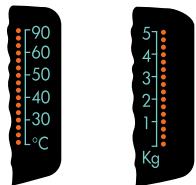
- the wash phases (pre-wash, heating...)
- the options selected.
Door locked
Symbol ⊙ on indicates that the washing machine door is locked to prevent it from being opened accidentally. Wait for symbol ⊙ to turn off before you open the appliance door.
Error message
In the event of a fault, a message is displayed, (e.g. F-01), which should be communicated to the Service Centre.
End of the programme
At the end of the programme, the word END is displayed.
If you have used too large a dose of detergent, symbol lights up.
This washing machine nevertheless guarantees a perfect rinse.
HYDROSTOP
To look after your garments, the appliance may sometimes stop with water in the tub, leaving the wash to soak.
Press Ⓢ to end the wash cycle.
Demo Mode
The appliance is equipped with a demo mode.
If the wording "DEMO MODE" appears among the wording that appears on the display, you should disable it by following these few simple steps:
- turn the appliance off at the ON-OFF (C) button.
- keep Start/Reset (B) button pressed and turn the appliance back on at the same time.
From now on the demo mode is no longer enabled.
Special wash programmes
Class A at 40°C: Your MARGHERITA DIALOGIC has a special programme to obtain excellent wash results even at low temperatures.
The results are the same as you would get with a 60^ C wash, thanks to the washing machine's action and to the increase in the duration of the wash.
To set this programme, place the mark situated on the knob completely to the left and set the temperature to 40^ C.
The wording "CLASS A" will appear on the display.
Daily: MARGHERITA DIALOGIC has a programme designed to wash lightly soiled garments in a short amount of time.
You can wash different types of fabrics together (except for wool and silk), with a maximum load of 3 kg. This programme allows you to save on both time and energy as it only lasts approximately 30 minutes.
WE RECOMMEND THE USE OF LIQUID DETERGENT.
To set this programme, turn the index situated on the knob to any position in the synthetics sector, select a temperature of 30^ and select the Rapid option ☐.
The wording "DAILY" will appear on the display.
Note: these programmes were designed to provide you with the best performance levels and therefore cannot be modified; you may only reduce the spin cycle speed and delay the programme start.
Understanding labels
Learn the meaning of these symbols and you will get better results, your garments will last longer and your machine will repay you by washing better.
All over Europe, garment labels contain messages expressed in small yet important symbols. Understanding them is very important if you want to get better results and treat your garments the way they deserve to be treated.
These symbols are divided in five different categories and shapes: washing ☐, bleaching △, ironing △, dry cleaning ○ and drying □.
Useful tips
Turn shirts inside out to get better results and make them last longer.
Always empty pockets of their contents.
Look at the label: it will always give you useful advice.
When loading your washing, alternate large and small garments.
natural_image
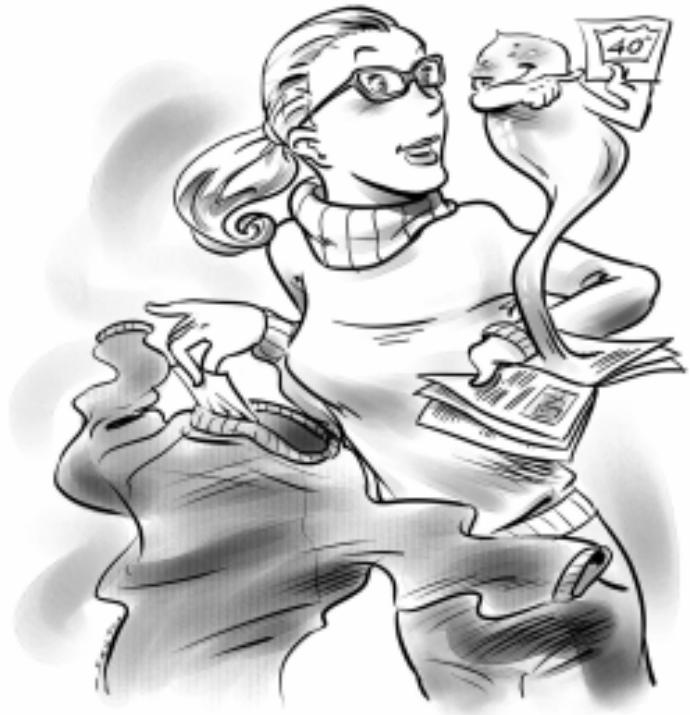
Illustration of a person with glasses and a smiling face, holding documents and a paper (no text or symbols present)Make sure you select the right temperature!
Consult and learn the symbols in this table: they will help you obtain a better wash, treat your clothes properly, and get a better performance out of your Ariston MARGHERITA DIALOGIC.
 Wash Wash  — — |  Bleaching Bleaching |  Ironing Ironing |  Dry cleaning Dry cleaning |  Drying Drying | |
| Strongaction Delicat-e action | HighTemp. | LowTemperat. | |||
 Wash at95°C Wash at95°C  |  Bleaching only incold water Bleaching only incold water |  Hot iron atmax 200°C Hot iron atmax 200°C |  Dry clean with anysolvent Dry clean with anysolvent |  |  Machine dryable Machine dryable |
 Wash at60°C Wash at60°C  |  Do not bleach Do not bleach |  Medium hotironing atmax 150°C Medium hotironing atmax 150°C |  Dry clean only withperchloride, benzineav., pure alcohol,R111 and R113 Dry clean only withperchloride, benzineav., pure alcohol,R111 and R113 |  Do not machinedry Do not machinedry | |
 Wash at40°C Wash at40°C  |  Iron at max110°C Iron at max110°C |  Dry clean with av.benzine, purealcohol and R113 Dry clean with av.benzine, purealcohol and R113 |  Spread to dry Spread to dry | ||
 Wash at30°C Wash at30°C  |  Not ironable Not ironable |  Do not dry clean Do not dry clean | Hang to drywithout spindrying |  | |
 Hand wash Hand wash  |  |  | Dry on clotheshanger |  | |
| Notwashable inwater [IMAGE] | |||||
Useful tips to avoid mistakes
■ Never use your washing machine to wash... torn, fraying or non-hemmed linen. If it is absolutely neccessary, place it in a bag for protection. Brightly coloured linen with whites.
■ Watch the weight!
For best results, do not exceed the weight limits stated below (figures show weight when dry):
- Resistant fabrics: 5.5 kg maximum
- Synthetic fabrics: 2.5 kg maximum
- Delicate fabrics: 2kg maximum
- Pure new wool: 1 kg maximum
How much does it weigh?
1 sheet 400-500 gr.
1 pillow case 150-200 gr.
1 tablecloth 400-500 gr.
1 bathrobe 900-1,200 gr.
1 towel 150-250 gr.
Coloured T-shirts, printed ones and shirts last longer if turned inside out before washing. Printed T-shirts and sweatshirts should always be ironed inside out.
Salopette alert.
Very popular “salopette” type overalls have straps with hooks that can damage the drum of your washing machine or other garments during the wash. By placing the hooks in the bib pocket and fastening them with safety pins, all risks are avoided.
■ Holidays: unplug the appliance.
When you go on holiday, we recommend that you unplug your washing machine, shutting off the water inlet tap and leaving the door opened or ajar. In this way, both the drum and the gasket will remain nice and dry and unpleasant odours will not develop inside the washing machine.
WOOL CYCLE
For best results, we recommend you use a specific detergent, taking care not to wash more than 1 kg of laundry.
How to wash almost anything
Curtains.
Curtains tend to crease a great deal. Here is a tip to reduce creasing: fold the curtains and place them in a pillow case or mesh bag. Do not load anything else, so that the overall weight does not exceed the half load. Remember to use the specific programme which automatically excludes the spin cycle.
■ Quilted coats and wind-cheaters.
You can wash quilted coats and wind-cheaters, too, if they are padded with goose or duck down. Do not load more than 2-3 kg and never load 5.5 kg. Repeat rinse once or twice using the gentle spin.
Trainers.
Once you have removed mud and dirt from trainers, you can wash them with jeans and other tough garments. Do not wash trainers with whites.
EXCLUSIVE
Cashmere Gold: As gentle as a hand wash
The first Washing Machine to have "The Woolmark Company" recognition.
The Cashmere Gold wash programme has been studied for machine washing even the most delicate and valuable wool and Cashmere garments.
"The Merloni Elettrodomestici wool wash cycle has been tested and approved by The Woolmark Company for washing Woolmark garments labelled as "hand wash". This is the first gentle action hand wash cycle approved by The Woolmark Company." M.00221
This has been made possible thanks to the speed of the drum at 90 rpm, even during the rinse cycle, thus preventing the fibres from rubbing.
Always use programme 📋 with garments bearing the hand wash symbol: the washbasin and hand.
To take care of your woollen items, we recommend you use special detergents.

It's important for a good wash
The secrets of the detergent dispenser
The first secret is the easiest: the detergent dispenser is opened by rotating it outwards.
You must add detergent and any additives following the dosage recommended by the manufacturers: generally, all the indications you need are on the box. Doses vary according to wash load, the water hardness and how soiled the washing is. Experience will help you select the right dosage almost automatically: it will become your secret.
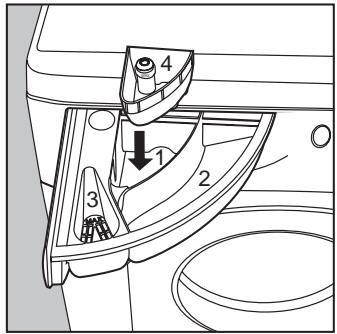
Before pouring in the detergent for pre-washing in compartment 1, make sure that the extra compartment for bleach 4 has not been inserted.
When pouring in the softener in compartment 3, avoid making it overflow from the grate.
The washing machine automatically adds the softener to the wash in each programme.
text_image
Technical diagram of a car interior showing labeled components and directional arrowsLiquid detergent is to be poured into compartment 2 only a few seconds before starting the wash cycle.
Remember that liquid detergent is particularly indicated for wash cycles of up to 60 degrees and those not requiring pre-washing. Liquid or powder detergents are sold together with special containers that are to be placed directly inside the washing machine drum, according to the instructions found on the detergent box.
Never use hand wash detergent, because it may form too much foam, which could damage the washing machine.
Detergents that are specifically indicated for both hand and machine wash are an exception. One last secret: when washing with cold water, always reduce the amount of detergent you use: it dissolves less easily in cold water than in hot water, so part of it would be wasted.
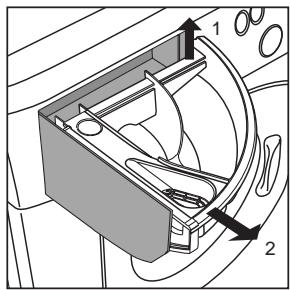
The detergent dispenser can be removed and cleaned: just lift it up and pull it outwards, as indicated in the figure. Then leave it under running water for a few minutes.
text_image
Technical diagram of a mechanical component with numbered parts and an arrow indicating directionIn compartment 1:
Detergent for pre-washing (powder)
In compartment 2:
Detergent for washing
(powder or liquid)
In compartment 3:
Additives (softeners, perfumes, etc.)
In compartment 4:
Bleach and delicate bleach.
Bleach cycle
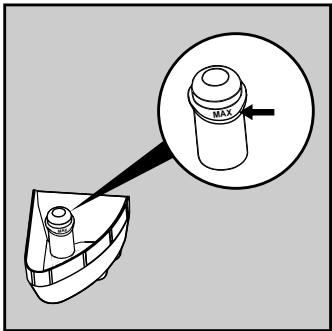
If bleaching is necessary, the extra case 4 (provided) must be inserted into compartment 1 of the detergent dispenser.
When pouring in the bleach, be careful not to exceed the "max" level indicated on the central pivot (see illustration).
The use of the additional bleach container excludes the possibility of using the pre-wash cycle. Traditional bleach can only be used on sturdy white fabrics, whereas delicate bleach can be used for coloured fabrics, synthetics and for wool.
text_image
Diagram showing a mechanical component with an inset magnified view highlighting a cylindrical component labeled 'MAX'.The Stain removal option is not available in the Delicates fabric sector and with "Special wash programmes" Class A at 40°C and Daily.
Should you wish to bleach separately, you should pour the bleach into the extra compartment 4, set special programme Rinse only and the Stain removal option.
Should you wish to bleach during the normal wash cycle, pour the detergent and bleach in their respective compartments and enable the Stain removal option.
Cutting costs efficiently
MAXIMISE THE LOAD SIZE
Achieve the best use of energy, water, detergent and time by using the recommended maximum load size.
SAVE up to 50% energy by washing a full load instead of 2 half loads.
DO YOU NEED TO PRE-WASH?
For heavily soiled laundry only!
SAVE detergent, time, water and between 5 to 15% energy consumption by NOT selecting Prewash for slight to normally soiled laundry.
IS A HOT WASH REQUIRED?
Pretreat stains with stain remover or soak dried in stains in water before washing to reduce the necessity of a hot wash programme.
SAVE up to 50% energy by using a 60°C wash programme.
BEFORE USING A DRYING PROGRAMME ...
SAVE energy and time by selecting a high spin speed to reduce the water content in laundry before using a drying programme.
A guide to environmentally friendly and economic use of your appliance.
Troubleshooting
Before calling, read the following
Your washing machine could fail to work. In most cases, the problems arising can be easily solved without having to call for a technician. Before calling for assistance, always check these points.
The washing machine fails to start.
Is the plug correctly inserted into the socket? It could have been moved whilst cleaning.
Is there electricity in the house?
A circuit breaker could have gone off, perhaps because too many appliances are on at the same time. Or perhaps because of a general power failure in your entire area.
Is the washing machine door closed properly?
For safety reasons, the
washing machine cannot work if the door is open or not shut properly.
Is the On/Off button pressed?
If it is, then a programmed start has been set.
■ Has the Start/Reset button been pressed?
If it is, then a programmed start has been set.
Is the water tap open? For safety reasons, if the washing machine does not load water, it cannot start a wash cycle.

natural_image
Black-and-white cartoon illustration of a muscular figure and a kneeling figure with exaggerated facial features, both surrounded by open books (no text or symbols)RIGHT
Close the tap after every wash cycle. Limit the use of the washing machine's hydraulic system and eliminate leakage risks when no-one is at home.
Always leave the appliance door ajar to avoid bad odours.
Clean the appliance's exteriors delicately. To clean the exteriors and the rubber parts of the appliance, always use a rag dipped in lukewarm water and soap.
WRONG
Leave the washing machine plugged in while cleaning. Even during maintenance, the appliance should always be unplugged.
Use solvents and aggressive abrasives. Never use solvents or abrasives to clean the external and rubber parts of the washing machine.
Neglect the detergent dispenser. It is removable and can easily be cleaned by leaving it under running water.
Go on holiday without thinking about her. Before leaving, always make sure that the washing machine is unplugged and that the water tap is closed.
But where did all the water go?
Simple: with the new Ariston technology, you need less than half of it, to get good results on twice as much! This is why you cannot see the water through the door: because there is little, very little of it, to respect the environment yet without renouncing maximum cleanliness. And, on top of that, you are also saving electricity.

natural_image
Cartoon illustration of a smiling washing machine character holding a magnifying glass (no text or symbols)
The washing machine fails to load water.
■ Is the tap correctly attached to the pipe?
Is there a water shortage? There could be work in progress in your building or street.
Is there enough pressure? The autoclave may be malfunctioning.
Is the tap filter clean? If the water is very calcareous, or if work has recently been carried out on the water piping, the tap filter could be clogged with particles and debris.
Is the rubber hose bent? The tract of the rubber hose bringing water to the washing machine must be as straight as possible. Make sure it is not squashed or bent.

natural_image
Cartoon illustration of a washing machine with a person pushing it, no text or symbols presentThe washing machine continuously loads and unloads water.
Is the drain hose positioned too low? It must be installed at a height ranging from 60 to 100 cm.
Is the hose's mouth immersed in water?
- Does the wall drainage system have a breather pipe? If the problem persists even after these checks, close the water tap, switch the appliance off and call for assistance.
If you live on an upper floor of your building, there may be a problem with your drain trap. To solve this problem, a special valve must be installed.
MARGHERITA DIALOGIC

natural_image
Cartoon illustration of a person running away from behind a computer monitor (no text or symbols)The washing machine does not drain or spin.
Is the "No iron" function selected? Complete the programme by pressing the Start button.
Is the drain pump clogged? To check it, close the tap, unplug the washing machine and follow the instructions on page 25, or call for technical assistance.
Is the drain hose bent? The tract of the drain hose must be as straight as possible. Make sure it is not squashed or bent.
Is the washing machine's drain duct clogged? Is there an extension of the drain hose? If so, is it positioned incorrectly, blocking the water flow?

natural_image
Cartoon illustration of a character with large eyes and open mouth (no text or symbols)The washing machine vibrates too much during the spin cycle.
■ Has the internal floating unit been correctly unblocked during installation? See the following page on installation procedures.
Has the washing machine been levelled correctly? The levelling of the appliance should be checked periodically. In time, the machine could move imperceptibly. Adjust the feet and check them with a level.
Is the appliance closed in between furniture and a wall? If it is not a built-in model, the washing machine needs to oscillate a bit during the spin cycle. A few cm of space should therefore be left around it.

natural_image
Cartoon illustration of a smiling computer monitor with arms and legs, floating on a surface (no text or symbols)The washing machine leaks.
Is the metal ring of the inlet hose properly attached? Close the tap, unplug the appliance and try tightening its attachment without forcing it.
Is the detergent dispenser obstructed? Try extracting it and washing it under tap water.
Is the drain hose well attached? Close the tap, unplug the appliance and try tightening its attachment.

natural_image
Cartoon illustration of a character with a book and floating bubbles (no text or symbols)Too much foam.
Is the detergent appropriate for machine washing? Check whether its label reads the definition “for machine wash” or “hand and machine wash”, or other similar indications.
Is the correct amount being used? An excessive amount of detergent, besides producing too much foam, does not guarantee a more effective wash, and causes scaling in the internal parts of the appliance.
If, despite all checks, the washing machine fails to function and the problem persists, call your nearest authorised Customer Service Centre, providing the following information:
- the type of malfunctioning
- the model type no. (Mod. ....)
- the serial number (S/N ....)
These indications can be found on the data plate situated on the back of the washing machine.
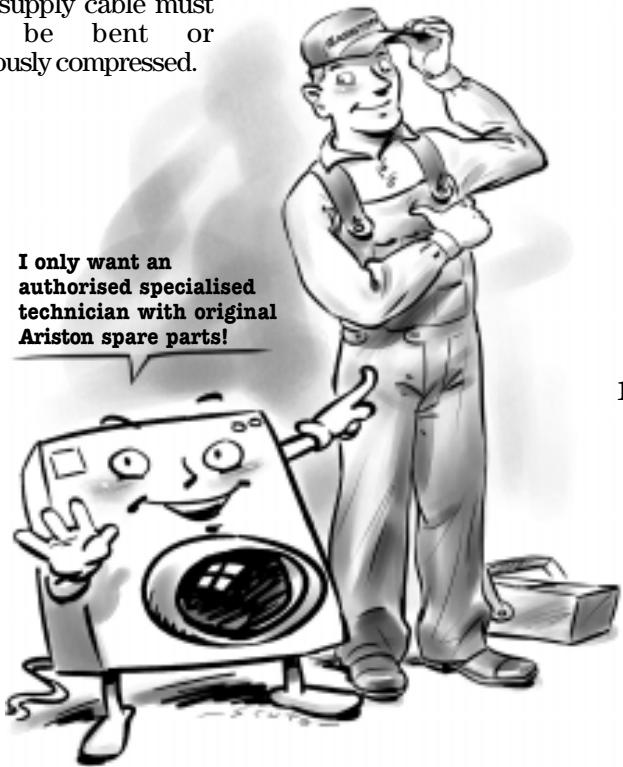
Always get assistance from authorised technicians and always insist on original spare parts.
Technical characteristics
| Model | AD 1600 |
| Dimensions | width 59,5 cmheight 85 cmdepth 53,5 cm |
| Capacity | from 1 to 5,5 kg |
| Electrical connections | voltage 220/230 Volt 50 Hzmaximum absorbed power 1850 W |
| Water connections | maximum pressure 1 MPa (10 bar)minimum pressure 0,05 MPa (0,5 bar)drum capacity 46 litre |
| Spinning speed | up to 1600 rpm |
| Control programs in compliance with IEC regulation 456 | Turn the knob completely to the left and select a temperature of 60°C.Carried out with 5,0 kg load. |
| This appliance conforms with the following E.E.C. directives:- 73/23/EEC of 19/02/73 (Low Voltage) and subsequent modifications- 89/336/EEC of 03/05/89 (Electromagnetic Compatibility) and subsequent modifications |
Installation and removal
When the washer arrives
Whether new or just transported to a new house, installation is extremely important for the correct functioning of your washing machine.
After removing the appliance from its packaging, check that it is intact. If in doubt, contact a qualified technician immediately. The inside of the machine is blocked, for transportation, by four screws on the back panel.
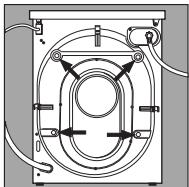
Before using the washing machine, remove the screws, remove the rubber with the aid of the special spacer (keeping all the parts) and use the plastic tabs provided to fill in the holes.
Important: Use the cap (provided) to close the 3 holes which housed the stop pin, situated in the right-hand part of the lower back of the washing machine.
Levelling
The washing machine must be levelled appropriate in order to guarantee its correct functioning. To level the appliance, the front feet must be adjusted; the angle of inclination, measured according to the worktop, must not exceed 2^ . When placed on carpet, make sure the ventilation is not hampered within its surroundings.
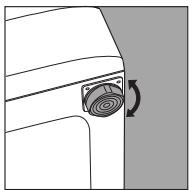
The front feet are adjustable.
Do not throw the blocking screws and the spacers away. In the event of a removal, they can be used to block the components inside the appliance again and so to protect it during transport.
Connection to the water mains
Water pressure must range within the values indicated on the data plate on the rear of your washing machine. If the water pipes are new or left unused, then before connecting the machine run the water until clear to remove debris. Connect the inlet hose to a cold water tap having a 34 " BSP thread. Ensure that the rubber sealing washers are fitted at each end of the inlet hose, with the fitter washer at the tap end.
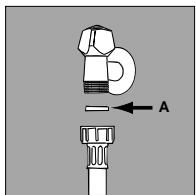
The rubber gasket.
Connect the inlet hose to the threaded connector on the machine rear.
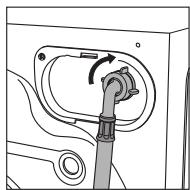
Water pipe inlet at the top right.
Connecting the drain hose
There are two hooks (right or left) on the rear of your washing machine to which the drain hose is to be fixed. Insert the other end in a duct or place it on the edge of a sink or tub avoiding excessive kinks and bending. It should be placed at a height ranging from 60 to 100 cm. In case it is necessary to fix the end of the hose at a height below 60 cm from the ground, it must be fixed in the appropriate hook placed on the upper part of the back panel.
natural_image
Illustration of a woman pushing a washing machine with a newspaper nearby (no text or symbols)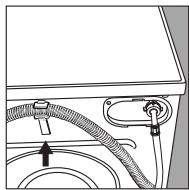
The hook to be used in case the drain hose ends at a height below 60 cm.
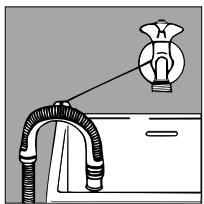
If the tube drains into a tub or sink, apply the plastic guide and tie it to the tap.
natural_image
Diagram of a faucet with a valve and tubing, no text or symbols presentThe guide for draining into tubs and sinks.
It must never remain immersed in water.
Extensions are unadvisable. In case of absolute need, the extension must have the same diameter as the original hose and must not exceed 150 cm. In case of wall draining pipes, their efficiency must be checked by a qualified technician. If the dwelling is on one of the upper floors of a building, there may be drain trap problems causing the washing machine to load and unload water continuously.
In order to avoid such an inconvenience, special anti-drain trap valves are available in shops.
Electric connection
Before connecting the appliance to the electric socket, be sure that:
1) the electric socket is able to sustain the appliance's maximum power load indicated on the data plate and in compliance with the law;
2) the supply voltage is included within the values indicated on the data plate;
3) the socket is compatible with the appliance's plug. If not, do not use adapters, but replace either the socket or the plug;
4) electric household appliances must be equipped with an "earthing" system.
Warning!
The company denies all liability if and when these norms are not respected.
Plastic bags, expanded styrofoam, nails and other packaging parts are not children's toys, and are potentially dangerous.
Treat her well and she'll be your
friend forever
Your washing machine is a reliable companion in life and on the job. It is just as important for you to keep it in shape.
MARGHERITA DIALOGIC is a washing machine designed to last a lifetime without any problems. A few simple steps help keep it in shape and last longer. Firstly, you must close the water tap after each wash: the constant pressure of water could warp a few of the component parts.
In addition, by doing so, you will avoid the risk of leaks when no-one is at home.
If the water in your area is too hard, use a delimming product (water is hard if it often leaves whitish stains around taps or drains, especially of bath tubs.
For more accurate information as to the type of water in your system, call the local water works or a local plumber).
Pockets must always be emptied removing even pins, badges and any other hard object.
The washing machine exterior should be cleaned with a rag dipped in lukewarm water and soap.
It is important to wash the detergent dispenser regularly. To prevent dried washing powder from accumulating, place the dispenser under running water for a few minutes.
Never exaggerate with doses.
Normal detergents already contain deliming agents. Only if the water is particularly hard, that is, rich in lime content, do we recommend the use of a specific product at every wash.
A periodical wash cycle with a dose of a deliming product, without detergents or washing, may prove useful.
Never use too much detergent or additives because this could cause an excess amount of foam, scaling and possible damage to the component parts of your washing machine.
natural_image
Illustration of a woman holding a newspaper with falling items, while another figure in the background shows a smiling character waving (no text or symbols)Do not forget to empty all pockets: small objects can cause damage to your friend MARGHERITA DIALOGIC.
When in need, check the pump and the rubber hose.
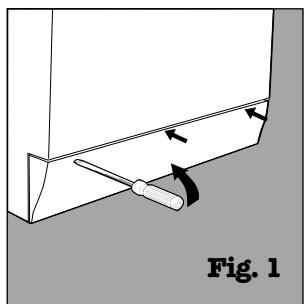
MARGHERITA DIALOGIC comes equipped with a self-cleaning pump that does not require any cleaning or maintenance. Small objects may accidentally fall into the pump: coins, hair clips, loose buttons and other small items. To avoid possible damage, they are withheld in an accessible pre-chamber, situated at the lower end of the pump.
natural_image
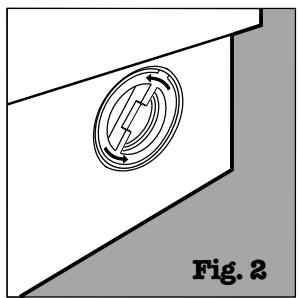
Diagram of a mechanical component with a lever and directional arrows, labeled Fig. 1 (no text or symbols on the diagram itself)To access this pre-chamber, just remove the panel covering the bottom of the washing machine using a screwdriver (figure 1); then lift the cover rotating it anti-clockwise (figure 2) and check its contents accurately.
The rubber hose
Check the rubber hose at least once a year. If you see any cracks, replace it immediately. When you use your washing machine, water pressure is very strong and a cracked tube could easily split open.
natural_image
Diagram showing a circular component with directional arrows, labeled Fig. 2 (no text or symbols on the diagram itself)Attention: make sure that the wash cycle has come to a full stop and unplug the appliance before removing the lid as well as before any type of maintenance procedure. It is normal to find that a little water comes out after removing the lid. When replacing the panel, make sure you insert the hooks situated at the bottom of the washing machine in the right slots before pushing it back against the appliance.
More and more important
Your safety and that of
your children
MARGHERITA DIALOG has been built in compliance with the strictest international safety regulations. To protect you and all your family.
Read these indications and all the information in this manual carefully: they are an important source, not only of numerous useful tips, but also of vital information on safety, use and maintenance.
- MARGHERITA DIALOGIC should not be installed in an outdoor environment, not even when a roof shelters the area, because it may be very dangerous to leave it exposed to rain and thunderstorms.
- It must only be used by adults and exclusively for washig clothes following the instructions provided in this manual.
- Should it have to be moved, proceed with the help of two or three people and handle it with the utmost care. Never try to do this alone, because the appliance is very heavy.
-
Before loading the washing machine, make sure the drum is empty.
-
Never touch the washing machine when barefoot or with wet or damp hands or feet.
-
Never use extensions or multiple plugs, which are particularly dangerous in humid environments. The power supply cable must never be bent or dangerously compressed.
-
Never open the detergent dispenser while the appliance is functioning; do not use hand wash detergent because the abundance of foam could damage its internal parts.
-
Never pull on the plug or the washing machine to disconnect it from the wall socket: it is extremely dangerous.
- While the appliance is functioning, do not touch the drain water as it could reach very high temperatures. The appliance door, during wash cycles, tends to become heated; keep it out of children's reach. Never force the washing machine door because this could damage the safety block on the opening, which serves to protect from accidental openings.
- In case of malfunctioning, first close the water tap and unplug the appliance from the wall socket; do not under any circumstances touch internal parts in order to attempt repairs.
text_image
supply cable must be bent or ously compressed. I only want an authorised specialised technician with original Ariston spare parts!How to change the power supply cable
The MARGHERITA DIALOGIC power supply cable is special and can be purchased exclusively from authorised Technical Service Centres.
To replace it, do as follows: 1. Make sure that MARGHERITA DIALOGIC is switched off and unplugged.
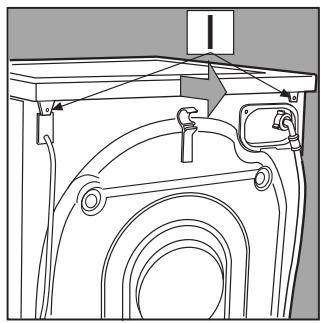
- Remove the covering lid by unscrewing the two screws I, and then pull it towards you [fig. 3].
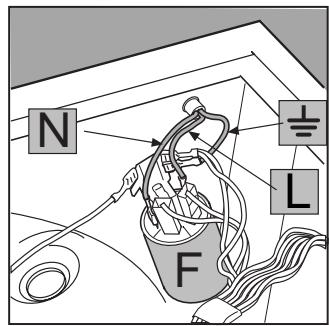
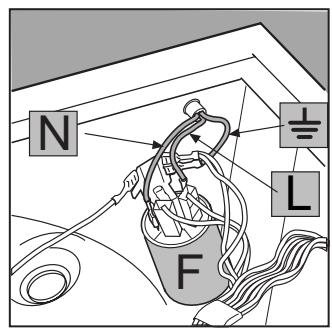
- Disconnect the wires from the radio interference suppressor F [fig. 4] taking care as to their position (Blue=N wire; Brown=L wire) leaving the earth wire until last ± .
N.B.: letters L, N and the symbol ± are indicated on the radio interference suppressor.
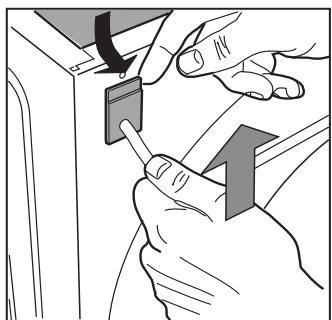
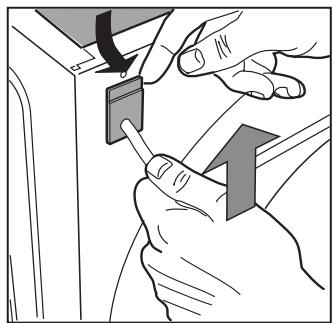
4. Remove the upper part of the cord lead slightly from the back panel of the appliance, pull the power supply cable upwards and take it out [fig. 5].
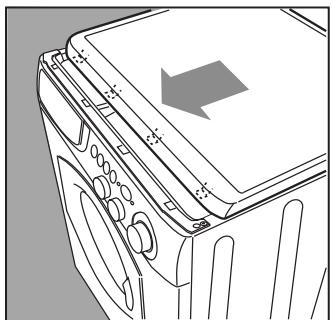
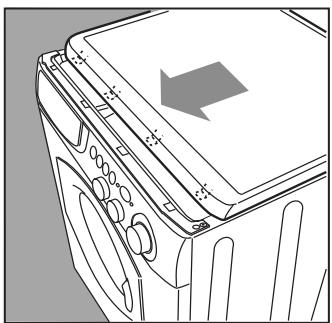
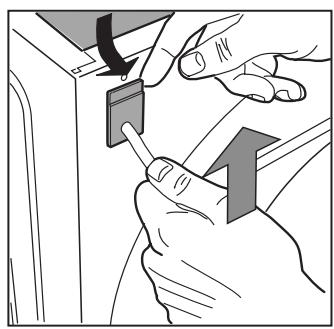
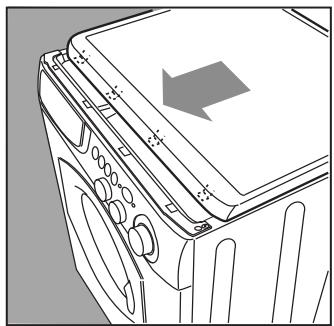
To connect the new power supply cable, do the reverse. To put the covering lid back on, rest it on the washing machine [fig. 6] and let it slide forwards until the hooks situated on the front slide into the special slots formed into the control panel and tighten the screws back on.
natural_image
Technical line drawing of a mechanical assembly with no visible text or symbolsFig. 3
text_image
N F L 1/2Fig. 4
natural_image
Illustration of hands using a tool to adjust or install a component, with no visible text or symbolsFig. 5
natural_image
Line drawing of a washing machine front panel with buttons and a gray arrow indicating direction (no text or symbols)Fig. 6
MARGHERITA DIALOGIC
ARISTON
Installations- und
natural_image
Illustration of a person washing clothes from a washing machine, surrounded by puzzle pieces (no text or symbols)natural_image
Cartoon illustration of a character pointing at a document with expressive eyes and surprised expression (no text or symbols)text_image
Technical diagram of a mechanical component with numbered parts and an arrow indicating direction
Delay timer (Startvorwahl)
natural_image
Illustration of a person holding documents and a sign, no text or symbols presenttext_image
Technical diagram of a car interior showing labeled components and directional arrowstext_image
Technical diagram of a mechanical component with numbered parts and an arrow indicating directionIn Kammer 1:
text_image
Diagram showing a mechanical component with an inset magnified view highlighting a cylindrical component labeled 'MAX'.natural_image
Cartoon illustration of a smiling washing machine character holding a fan (no text or symbols)
natural_image
Black-and-white cartoon illustration of a winged figure and a kneeling figure with hands clasped, both surrounded by open books (no text or symbols)RICHTIG
natural_image
Cartoon illustration of a washing machine with a person pushing it, no text or symbols presentnatural_image
Cartoon illustration of a character running away from a computer monitor (no text or symbols)natural_image
Cartoon illustration of a character with large eyes and open mouth (no text or symbols)natural_image
Cartoon illustration of a smiling document character standing on a surface with arms outstretched (no text or symbols)natural_image
Cartoon illustration of a character with a large book and floating bubbles (no text or symbols)natural_image
Illustration of a woman pushing a smiling washing machine next to an open book (no text or symbols present)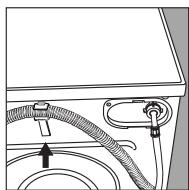
natural_image
Diagram of a faucet with tubing and a valve, no text or symbols presentnatural_image
Illustration of a woman holding a newspaper with falling items, while another figure in the background shows a smiling character waving (no text or symbols)natural_image
Diagram of a mechanical component with a lever and curved arrow, labeled Abb. 1 (no text or symbols on the diagram itself)natural_image
Diagram of a mechanical component with a circular feature and directional arrows, labeled Abb. 2 (no text or symbols on the diagram itself)natural_image
Technical line drawing of a mechanical assembly with no visible text or symbolsAbb. 3
herausgezogen ist.
natural_image
Illustration of hands using a tool to adjust or install a component, with no visible text or symbols.Abb. 5
natural_image
Line drawing of a refrigerator interior with no visible text or symbolsAbb. 6
MARGHERITA DIALOGIC
ARISTON
4. Handige was adviezen (blz. 48)
natural_image
Illustration of a woman washing clothes from a large washing machine, surrounded by scattered clothes (no text or symbols)natural_image
Cartoon illustration of a character pointing at a document or board (no text or symbols present)text_image
Technical diagram of a mechanical component with numbered parts and an arrow indicating direction or force
Delay timer
was □, bleken △, strijken △,
stomen ○ en drogen □.
Handige tips
natural_image
Illustration of a person holding up a document and a sign, with no visible text or symbolstext_image
Technical diagram of a mechanical component with numbered parts and a downward arrow indicating directionIn bakje 1:
text_image
Diagram showing a mechanical component with an inset magnified view highlighting a cylindrical component labeled 'MAX'.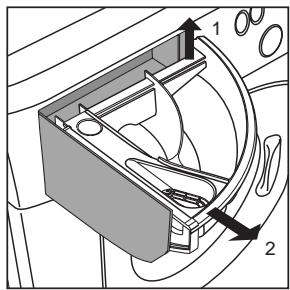
text_image
Technical diagram of a car interior showing labeled components and directional arrowsnatural_image
Cartoon illustration of a smiling washing machine character with arms and legs, holding a magnifying glass (no text or symbols)
natural_image
Black-and-white cartoon illustration of a winged figure and a kneeling figure with a book, no text or symbols presentZO HOORTHET DIT IS VERKEERD
natural_image
Cartoon illustration of a washing machine with a potted plant nearby (no text or symbols)natural_image
Cartoon illustration of a character holding a computer monitor (no text or symbols)natural_image
Simple line drawing of a cartoon character with expressive eyes and limbs (no text or symbols)natural_image
Cartoon illustration of a smiling paper with eyes and arms, floating on a surface (no text or symbols)De wasmachine lekt.
natural_image
Cartoon illustration of a character with a book and floating bubbles (no text or symbols)natural_image
Illustration of a woman pushing a smiling refrigerator with a newspaper nearby (no text or symbols)natural_image
Diagram of a faucet with a handle and outlet pipe, no text or symbols presentnatural_image
Illustration of a woman holding a newspaper with falling items, while another figure in the background shows a smiling character waving (no text or symbols)natural_image
Diagram of a mechanical component with a lever and curved arrow, labeled 'Afb. 1' (no text or symbols on the diagram itself)natural_image
Pure technical diagram showing a circular component with directional arrows, no text or symbols presentnatural_image
Technical line drawing of a mechanical assembly with no visible text or symbolsAfb. 3
text_image
N F LAfb. 4
natural_image
Illustration of hands using a switch to adjust a component (no text or symbols visible)Afb.5
natural_image
Line drawing of a washing machine front panel with no text or symbolsAfb.6