
Fusion 1100L - Laminator GBC - Free user manual and instructions
Find the device manual for free Fusion 1100L GBC in PDF.


| Product type | Large format laminator |
| Brand | GBC |
| Model | Fusion 1100L |
| Max lamination width | 1100 mm |
| Recommended film thickness | 80 to 250 microns |
| Lamination speed | 1.5 m/min |
| Preheat time | 5 minutes |
| Lamination modes | Hot and cold |
| Dimensions (L x W x H) | 1350 x 320 x 250 mm |
| Weight | 28 kg |
| Power supply | 220-240 V / 50-60 Hz |
| Power consumption | 1500 W |
| Compatible film type | Pouches and rolls |
| Maintenance and cleaning | Soft cloth, roller cleaner |
| Safety | Automatic jam shutdown, thermal protection |
| Available spare parts | Rollers, belts, cleaning kit |
| Warranty | 2 years |
Frequently Asked Questions - Fusion 1100L GBC
Refer to the manual for specific procedures.
User questions about Fusion 1100L GBC
0 question about this device. Answer the ones you know or ask your own.
Ask a new question about this device
Download the instructions for your Laminator in PDF format for free! Find your manual Fusion 1100L - GBC and take your electronic device back in hand. On this page are published all the documents necessary for the use of your device. Fusion 1100L by GBC.
USER MANUAL Fusion 1100L GBC
GB instruction manual 4
lamination made simple!
Welcome to the GBC Fusion 1100L laminator which is simple to use with GBC lamination. Perfectly designed for the occasional users, at home or in the small office.
For best lamination results and performance, use only GBC branded pouches.
Please take a little time to study these instructions to ensure you get the best results out of your machine.
safety instructions

Your safety as well as the safety of others is important to ACCO® Brands. In this instruction manual and on the product are important safety messages. Read these messages carefully.

The safety alert symbol precedes each safety message in this instruction manual. This symbol indicates a potential personal safety hazard that could hurt you or others, as well as cause product damage or property damage.

WARNING

Electrical shock hazard. Do not open. No user serviceable parts inside. Refer servicing to qualified service personnel.
The following warning is found on the product in several languages.
This safety message means that you could be seriously hurt or killed if you open the product and expose yourself to hazardous voltage.
points to note

- Use this unit only for its intended use of laminating documents
- Do not laminate an empty pouch
- The unit must be connected to a supply voltage corresponding to the electrical rating shown on the unit
- Do not use a carrier with this machine
- Ensure the machine is clear of pouches prior to starting the next pouch
- Clean the lamination rollers on a regular basis
• Maximum A4 document pouch 303mm x 210mm on A4 GBC Fusion 1100L laminator
• Maximum A3 document pouch 426mm x303mm on A4 GBC Fusion 1100L laminator - Failure to comply will result in damage and invalidate guarantee


service
Do not attempt to service or repair the pouch laminator yourself. Unplug the unit and contact an authorised GBC service representative for any required repairs.
technical specifications
| Electrical A4: 220-240V AC /50Hz/60Hz / 1.6A / 400WA3: 220-240V AC /50Hz/60Hz / 1.6A / 400W |
| Machine Dimensions A4: 370x107.5x80mmA3: 465x109x81mm |
| Machine Weight A4: 1.4kgA3: 1.72kg |
| Maximum Pouch Width A4: 241 mmA3: 303mm |
| Maximum Pouch Thickness | 2x125micron (total 250) |
| Maximum Thru-put Thickness | 0.7mm |
| Warm-Up Time Approximately 4 minutes | |
| Speed 330 mm per minute | |
getting ready to laminate
Easy Set Up
1 Take the electrical plug and place in an appropriate power source, which is near the table you intend to use.
2 The laminator will respond with a single beep and a sequence of brief flashes across the control panel.
3 To use the laminator move the slider to the right from the ☐ to the 75 mic or 125 mic position depending on which pouch selected. Below the slider you will see a white line, this indicates that you have switched the laminator on.


Visual & Audible Ready Alerts
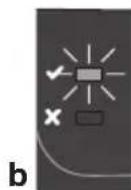
4 The laminator will start to warm up - an orange light will be illuminated to the right of the 'X' (a). When the laminator is ready to use the green light next to the 'tick √' is illuminated (b) and a series of two beeps are heard.
NOTE: only use 75micron/80 micron, 100 micron or 125 micron pouches with this laminator.
NOTE: Your new laminator may emit a slight odour during the initial operation. Its is normal and will diminish after a few hours of operation.
loading the pouch
1 Take your item to be laminated and place in to the appropriate sized laminating pouch, ensuring it is firmly located along the sealed edge. This is to help ensure that you get optimal quality output.

A3, A4, A5, etc. Irregular shaped item
NOTE: Do not cut pouches prior to lamination.

Before laminating important or unique documents, always run a test pouch through the laminator using a similar type document.
laminating
1 On the front of the laminator there are line indicators to help you feed your pouch accurately. Using the indicators feed the sealed edge of the pouch, into the laminator. The laminator will grip the pouch and guide it through.
2 Upon exiting remove your laminated item immediately and lay on a flat surface to ensure optimal quality.
3 When you are finished laminating push the slider switch back to the 'O' position and unplug.
Manual Release
NOTE: If the pouch does not appear at the back of the laminator or you have mis-fed the pouch - press and hold the release button (indicated with the 8v) and pull the pouch towards you out of the laminator.
Feed a cleaning card or sheet of paper through the laminator to clean the rollers before continuing.

Intelligent Power Off
NOTE: For added safety and environmental reasons the laminator will automatically stop heating after 30 minutes of activity. You will see a green and orange light to indicate this state. Re-set to 'O' before next usage.
cleaning

WARNING: UNPLUG THIS PRODUCT BEFORE CLEANING THE EXTERIOR. WIPE EXTERIOR ONLY WITH A DAMP CLOTH AND DO NOT USE DETERGENTS OR SOLVENTS.
Regularly feed a cleaning card or sheet of paper through the laminator to clean the rollers. Cleaning sheet order code: EK50000.
guarantee
Operation of this machine is guaranteed for two years from date of purchase, subject to normal use. Within the guarantee period, ACCO Brands Europe will at its own discretion either repair or replace the defective machine free of charge. Defects due to misuse or use for inappropriate purposes are not covered under the guarantee. Proof of date of purchase will be required.
Repairs or alterations made by persons not authorised by ACCO Brands Europe will invalidate the guarantee. It is our aim to ensure that our products perform to the specifications stated.
This guarantee does not affect the legal rights which consumers have under applicable national legislation governing the sale of goods.
Intelligentes Power-off
Arnoldstrasse 5, 73614 Schorndorf, Germany
Tel: +49 7181 887 120 Fax:+49 7181 887 198 info.de@acco.com
AUS Pelikan Artline Pty Ltd,
2 Coronation Avenue, Kings Park, NSW, Australia 2148
Tel: +61 2 9674 9000 Fax: +61 2 9674 0910 custsupport@pelikanartline.com.au
B ACCO Brands Benelux B.V.,
Peppelkade 64, 3992AK Houten, Nederland/Les Pays-Bas
Tel: 0800-73362 Fax: 02-4140784 info@accobenelux.be www.accobenelux.be
BD ACCO Brands Asia Pte Ltd,
47 Ayer Rajah Crescent, #05-08/17, Singapore 139947
Tel: +65 6776 0195 Fax: +65 6779 1041 webmaster@accobrandsasia.com
Arnoldstrasse 5, 73614 Schorndorf, Germany
Tel: +49 7181 887 120 Fax:+49 7181 887 198 info.de@acco.com
DK ACCO Brands Nordic AB,
Makadamgatan 5, 254 64 Helsingborg, Sweden
Tel: +46 42 38 36 00 Fax: +46 42 38 36 10 service.nordic@acco.com
F ACCO Brands Iberia SL,
P Isaac Peral 19, 28820 Coslada (Madrid)
Tel: 902 500 182 ext. 2 Fax: 91 309 6412 servicio.tecnico@acco.com
FST ACCO Brands Nordic AB,
Makadamgatan 5, 254 64 Helsingborg, Sweden
Tel: +46 42 38 36 00 Fax: +46 42 38 36 10 service.nordic@acco.com
F Acco Brands France SAS,
Service après-vente, ZAC Excellence 2000, 6 rue Robert Schuman, 21800 Chevigny Saint Sauveur
Tel: +33 3 80 68 60 30 Fax: +33 3 80 68 60 49 contact@vmbs.fr
GB ACCO Service Division,
Hereward Rise, Halesowen, West Midlands, B62 8AN
Tel: 0845 658 6600 Fax: 0870 421 5576 www.acco.co.uk/service
H OPI Customer Service
Tel.: +359 2 80 99 166 Exportee@accoeu.local
ACCO Brands Italia Srl,
Servizio post-vendita, Via Oberdan, 33, 28070 Tornaco (NO)
Tel: 800-87-86-16 Fax: 0321-88-01-27 servizio.clienti@acco.com
IND ACCO Brands Asia Pte Ltd,
47 Ayer Rajah Crescent, #05-08/17, Singapore 139947
Tel: +65 6776 0195 Fax: +65 6779 1041 webmaster@accobrandsasia.com
IRL ACCO-Rexel Ltd,
Clonshaugh Business & Technology Park, Clonshaugh, Dublin 17, Ireland
Tel: 01 816 4346 Fax: 01 816 4302 admin@accoservice.eu www.accorexel.ie
IS ACCO Brands Nordic AB,
Makadamgatan 5, 254 64 Helsingborg, Sweden
Tel: +46 42 38 36 00 Fax: +46 42 38 36 10 service.nordic@acco.com
JPN GBC-Japan K.K.,
14F Harmony Tower, 1-32-2 Honcho, Nakano-ku, Tokyo 164-8721
Tel: (81)-03-5351-1801 Fax: (81)-03-5351-1831 serv@gbc-japan.co.jp www.gbc-japan.co.jp
LT ACCO Brands Nordic AB,
Makadamgatan 5, 254 64 Helsingborg, Sweden
Tel: +46 42 38 36 00 Fax: +46 42 38 36 10 service.nordic@acco.com
LUX ACCO Brands Benelux B.V.,
Peppelkade 64, 3992AK Houten, Nederland/Les Pays-Bas
Tel: 0800-21132 Fax: 02-4140784 info@accobenelux.be www.accobenelux.be
IV ACCO Brands Nordic AB,
Makadamgatan 5, 254 64 Helsingborg, Sweden
Tel: +46 42 38 36 00 Fax: +46 42 38 36 10 service.nordic@acco.com
N ACCO Brands Nordic AB,
Makadamgatan 5, 254 64 Helsingborg, Sweden
Tel: +46 42 38 36 00 Fax: +46 42 38 36 10 service.nordic@acco.com
NL ACCO Brands Benelux B.V.,
Peppelkade 64, 3992AK Houten, Nederland/Les Pays-Bas
Tel: 030-6346060 Fax: 030-6346070 info@accobenelux.nl www.accobenelux.nl
P ACCO Brands Iberia SL,
P Isaac Peral 19, 28820 Coslada (Madrid)
Tel: 902 500 182 ext. 2 Fax: 91 309 6412 servicio.tecnico@acco.com
PAK ACCO Brands Asia Pte Ltd,
47 Ayer Rajah Crescent, #05-08/17, Singapore 139947
Tel: +65 6776 0195 Fax: +65 6779 1041 webmaster@accobrandsasia.com
PL ACCO Polska Sp. z o.o,
Al. Jerozolimskie 184, 02-486 Warszawa
Tel.+48 22 570-18-29 fax +48 22 570-18-33 www.acco.pl
S ACCO Brands Nordic AB,
Makadamgatan 5, 254 64 Helsingborg, Sweden
Tel: +46 42 38 36 00 Fax: +46 42 38 36 10 service.nordic@acco.com
SK XERTEC a.s.,
Kloknerova 2278/24 (vchod z ulice Koštířova, budova CeWe Color - Fotolab), 148 00 Praha 4 - Chodov
Tel: 225 004 411 Fax: 225 004 162 servis@xertec.cz http://www.xertec.cz
UA DataLux Distribution Company,
ZA Rexel Office Products (PTY) Ltd,
Crusher Road, Crown Ext.3, PO Box 102, Crown Mines, Johannesburg 2025, South Africa
Tel: +27 (0)11 226 3300 service@rexelsa.co.za

natural_image
Line drawing of a printer or printer with no visible text, numbers, or symbolsnatural_image
Simple line drawing of a closed box with red straps, no text or symbols presentRexel Shredding / Destructeurs / Aktenvernichter
natural_image
Illustration of a vintage typewriter or typewriter with no visible text or symbols on its bodyGBC Binding / Perforelieuses / Bindegeräte

natural_image
Line drawing of a stapler on a red background (no text or symbols)

- lamination made simple!
- safety instructions
- WARNING
- points to note
- service
- technical specifications
- getting ready to laminate
- Easy Set Up
- Visual & Audible Ready Alerts
- loading the pouch
- laminating
- Manual Release
- Intelligent Power Off
- cleaning
- WARNING: UNPLUG THIS PRODUCT BEFORE CLEANING THE EXTERIOR. WIPE EXTERIOR ONLY WITH A DAMP CLOTH AND DO NOT USE DETERGENTS OR SOLVENTS.
- guarantee
- Intelligentes Power-off
Brand : GBC
Model : Fusion 1100L
Category : Laminator