Creative CL90 - Laminator GBC - Free user manual and instructions
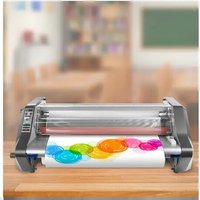
Find the device manual for free Creative CL90 GBC in PDF.


| Product Type | Pouch Laminator |
| Brand | GBC |
| Model | Creative CL90 |
| Max. Laminating Width | 230 mm (A4) |
| Max. Pouch Thickness | 250 microns (2 x 125 microns) |
| Laminating Speed | 300 mm/min |
| Warm-up Time | 3 minutes |
| Number of Rollers | 2 |
| Heating Technology | Hot lamination |
| Dimensions (W x D x H) | 450 x 150 x 100 mm |
| Weight | 2.0 kg |
| Power Supply | 220-240 V, 50/60 Hz |
| Power Consumption | 300 W |
| Auto Shut-off | Yes, after 30 minutes of inactivity |
| Overheat Protection | Yes |
| Maintenance | Clean rollers with a damp cloth after use; no lubricant needed |
| Spare Parts & Repairability | No user-serviceable parts; contact GBC support for service |
| Included Accessories | User manual, sample pouches |
Frequently Asked Questions - Creative CL90 GBC
User questions about Creative CL90 GBC
0 question about this device. Answer the ones you know or ask your own.
Ask a new question about this device
Download the instructions for your Laminator in PDF format for free! Find your manual Creative CL90 - GBC and take your electronic device back in hand. On this page are published all the documents necessary for the use of your device. Creative CL90 by GBC.
USER MANUAL Creative CL90 GBC
Important safety instructions
YOUR SAFETY AS WELL AS THE SAFETY OF OTHERS IS IMPORTANT TO GBC. IN THIS INSTRUCTION MANUAL AND ON THE PRODUCT ARE IMPORTANT SAFETY MESSAGES. READ THESE MESSAGES CAREFULLY.
THE SAFETY ALERT SYMBOL PRECEDES EACH SAFETY MESSAGE IN THIS INSTRUCTION MANUAL. THIS SYMBOL INDICATES A POTENTIAL PERSONAL SAFETY HAZARD THAT COULD HURT YOU OR OTHERS, AS WELL AS CAUSE PRODUCT DAMAGE OR PROPERTY DAMAGE.

On
O
Str
er
Photo Paper
Important safeguards
WARNING: FOR YOUR PROTECTION DO NOT CONNECT THE POUCH LAMINATOR TO
ELECTRICAL POWER UNTIL YOU READ THESE INSTRUCTIONS COMPLETELY. KEEP THESE INSTRUCTIONS IN A CONVENIENT LOCATION FOR FUTURE REFERENCE. TO GUARD AGAINST INJURY, THE FOLLOWING BASIC SAFETY PRECAUTIONS MUST BE OBSERVED IN THE SET-JIP AND USE OF THIS PRODUCT.
General safeguards
- Use the unit only for its intended purposes
- Do not place anything in the throat opening of the unit other than pouches/documents
- Place unit on a secure, stable work area to prevent the unit from falling and possibly causing personal injury and damage to the unit.
• Follow all warnings and instru
- The socket outlet shall be installed near the equipment and shall be easily accessible.
Electrical safeguards
- The unit must be connected to a supply voltage corresponding to the electrical rating.
- Unplug the unit before moving it, or when it is not in use for an extended period of time.
- Do not operate with a damaged supply cord or plug, if it is damaged, or malfunctions. - Do not overload electrical outlets beyond their capacity, fire or electrical shock could result
• The unit is intended for indoor use only.
• Do not spill liquid of any kind on this product.
- Close supervision is required when this product is used near children.
Service
- Do not attempt to service or repair the pouch laminator yourself. Unplug the unit and contact an authorized GPO service representative for any required repair.
authorized GBC service representative for any required repairs.
endorseings of 8 fl flucurine film.
PRODUCTOS O A LA PROPIEDAD.
Connect power cord to appropriate power source.
① Choose the right temperature setting (1)
GBC Creative Laminalor A4 CL90 is designed for 2 x 125 mic. (Total 250 mic.) pouch use only.
The laminator has 2 temperature settings:
'Std. Paper' – use 2x125 micron pouches (total 250 micron) when laminating with Standard paper
(iesb than 200 g per sq. motor)
Three paper use LTRS micron position (total 200 m/s) when tanning with notes paper (more than 200 a per sq. meter).
(2) Push the social invested on the
The "Ready" indicator lamp will glow green when the laminator reaches lamination temperature (2)
③ Position the item to be laminated into a GBC 2 x 125 micron (total 250 micron) laminating
so that the document is aligned to the folded edge and right and left borders are equal (3).
④ Insert the pouch and its content straight into the machine, leading with the folded edge (4)
5 The laminated item will automatically exit at the rear of the pouch laminator (5). After the pouch has
stopped moving, place it on a flat surface to cool for one minute before hat
If you have finished laminating, then move the switch to the "off" position.
Do not laminate an empty pouch.
Cleaning
A Caution: Unplug this product before cleaning.
- Wipe exterior only with a damp cloth. Do not use detergents or solvents.
| Specifications | |
| GBC Creative Laminator A4 CL90 | |
| Electrical | 220-240 V / 50 Hz / 1.1 A / 250 - 260 W |
| Machine Dimensions | 360 € 81 x 133 mm |
| Machine Weight | 1.9 kg |
| Maximum Pouch Width | 242 mm |
| Maximum Pouch Thickness | 2 x 125 mic. TOTAL 250 (only) |
| Warm-Up Time | 6-8 minutes |
Guarantee
Operation of this machine is guaranteed for one year from date of purchase, subject to normal use. Within the guarantee period, GBC will at its own discretion either repair or replace the defective machine free of charge. Defects due to misuse or use for inappropriate purposes are not covered under the guarantee. Proof of date of purchase will be required. Repairs or alterations made by persons not authorised by GBC will invalidate the guarantee. It is our aim to ensure that our products perform to the specifications stated. This guarantee does not affect the legal rights which consumers have under applicable national legislation governing the sale of goods.
Register this product online at www.GBCOffice.com
Fonctionnement
STIP RESEARCH OF HEALTH & COUNCUMBER
Reinigung
m = 311
Müködtetés


Brand : GBC
Model : Creative CL90
Category : Laminator