
SmallStar FC8284 - Vacuum Cleaner PHILIPS - Free user manual and instructions
Find the device manual for free SmallStar FC8284 PHILIPS in PDF.


| Product Type | Canister Vacuum Cleaner |
| Model | SmallStar FC8284 |
| Brand | Philips |
| Noise Level | 82 dB(A) |
| Suction Power Control | Electronic, adjustable |
| Filtration System | Clean Air HEPA outlet filter (service code 4222 459 48841) |
| Filter Cylinder | Replaceable, part number FC8028 |
| HEPA Filter Replacement Interval | Every 12 months |
| Dust Container Capacity | Not specified (approx. 1.5 L based on typical models) |
| Cord Length | Approx. 5 m (typical for this class) |
| Weight | Approx. 4.5 kg (typical) |
| Dimensions (HxWxD) | Approx. 40x30x25 cm (estimated) |
| Accessories Included | Hose with handgrip, telescopic tube with extension tube, combination nozzle (2-in-1), crevice nozzle, small nozzle, brush nozzle |
| Special Features | Parking slot, storage slot, cord rewind button, swivel wheel |
| Safety | Do not vacuum liquids or hot ashes; never use without filter cylinder; static electricity may occur |
| Power Supply | Mains voltage (check local voltage) |
| Warranty | Standard Philips warranty; register at www.philips.com/welcome |
Frequently Asked Questions - SmallStar FC8284 PHILIPS
User questions about SmallStar FC8284 PHILIPS
0 question about this device. Answer the ones you know or ask your own.
Ask a new question about this device
Download the instructions for your Vacuum Cleaner in PDF format for free! Find your manual SmallStar FC8284 - PHILIPS and take your electronic device back in hand. On this page are published all the documents necessary for the use of your device. SmallStar FC8284 by PHILIPS.
USER MANUAL SmallStar FC8284 PHILIPS
Register your product and get support at
www.philips.com/welcome
FC8286, FC8284, FC8282, FC8280


ENGLISH 6
БЪЛГАРСКИ 11
ČEŠTINA 16
EESTI 21
HRVATSKI 26
MAGYAR 31
КАЗАКША 36
LIETUVIŠKAI 41
LATVIEŠU 46
POLSKI 51
ROMÂNĂ 56
РУССКИЙ 61
SLOVENSKY 67
SLOVENŠČINA 72
SRPSKI 77
УКРАЇНСЬКА 82
90 فارسی
94 العربية
Introduction
Congratulations on your purchase and welcome to Philips! To fully benefit from the support that Philips offers, register your product at www.philips.com/welcome.
General description (Fig. 1)
A Vacuum cleaner
1 Cover release tab
2 Cover
3 Filter cylinder case
4 Filter cylinder
5 Dust container lid
6 Dust container
7 Hose connection opening
8 Hose connector
9 Top handle
10 Electronic suction power control
11 Cord rewind button
12 Parking slot
13 Mains plug
14 Clean Air HEPA outlet filter
15 Filter grille
16 On/off button
17 Front handle
18 Swivel wheel
19 Storage slot
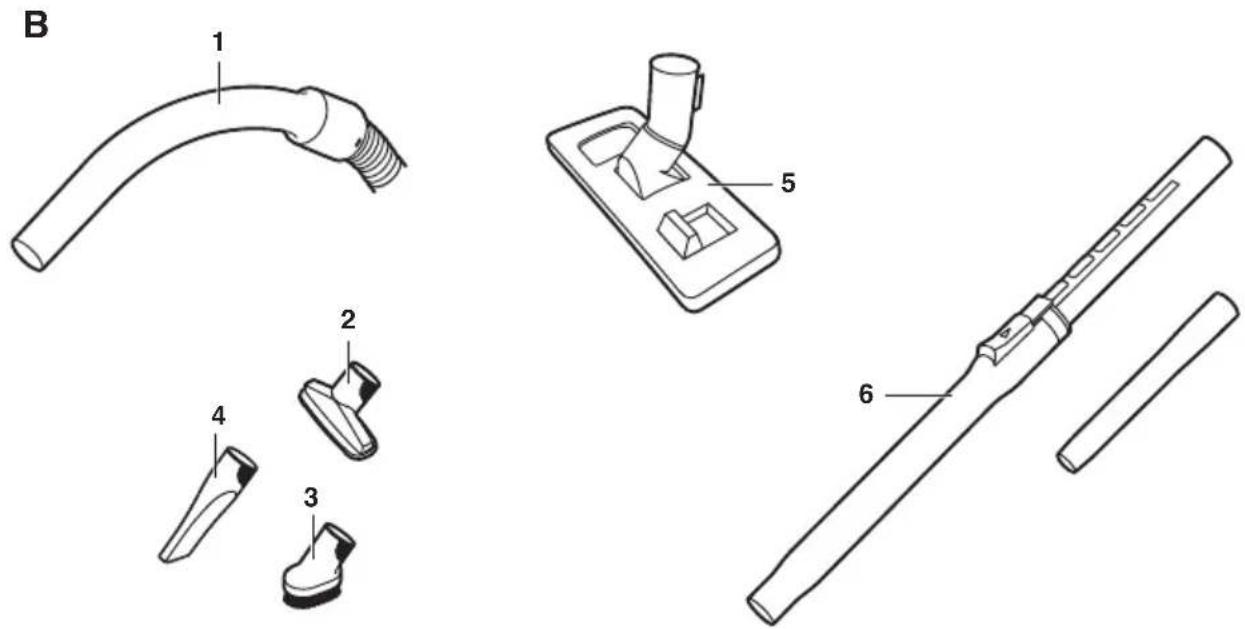
B Accessories
1 Hose with handgrip
2 Small nozzle
3 Brush nozzle
4 Crevice nozzle
5 Combination nozzle with 2 rocker switches
6 Telescopic tube with extension tube
Important
Read this user manual carefully before you use the appliance and save it for future reference.
Danger
- Never suck up water or any other liquid. Never suck up flammable substances and do not suck up ashes until they are cold.
Warning
- Check if the voltage indicated on the appliance corresponds to the local mains voltage before you connect the appliance.
- Do not use the appliance if the plug, the mains cord or the appliance itself is damaged.
- If the mains cord is damaged, you must have it replaced by Philips, a service centre authorised by Philips or similarly qualified persons in order to avoid a hazard.
- This appliance is not intended for use by persons (including children) with reduced physical, sensory or mental capabilities, or lack of experience and knowledge, unless they have been given supervision or instruction concerning use of the appliance by a person responsible for their safety.
- Children should be supervised to ensure that they do not play with the appliance.
- Do not point the hose, the tube or any other accessory at the eyes or ears nor put it in your mouth when it is connected to the vacuum cleaner and the vacuum cleaner is switched on.
- The appliance does not work if the dust container is not properly placed.
Caution
- Do not suck up large objects as this may cause the air passage in the tube or hose to become obstructed.
- When you use the appliance to vacuum ashes, fine sand, lime, cement dust and similar substances, the pores of the filter cylinder become clogged. If you notice a strong decrease in suction power, clean the filter cylinder.
- Never use the appliance without the filter cylinder. This damages the motor and shortens the life of the appliance.
- Only use the Philips filter cylinder supplied with the appliance.
- The filter cylinder is not waterproof and cannot be cleaned with water, cleaning agents or flammable substances. Follow the instructions in chapter 'Cleaning'.
- During vacuum cleaning, especially in rooms with low air humidity, your vacuum cleaner builds up static electricity. As a result you can experience electric shocks when you touch the tube or other steel parts of your vacuum cleaner. These shocks are not harmful to you and do not damage the appliance. To reduce this inconvenience we advise you:
1 to discharge the appliance by frequently holding the tube against other metal objects in the room (for example the legs of a table or chair, a radiator etc.) (Fig. 2)
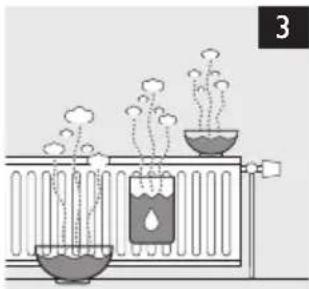
2 to raise the air humidity level in the room by placing water in the room. For example, you can hang containers filled with water from your radiators or place bowls filled with water on or near your radiators (Fig. 3).
General
- Noise level: Lc = 82 dB(A).
Electromagnetic fields (EMF)
This Philips appliance complies with all standards regarding electromagnetic fields (EMF). If handled properly and according to the instructions in this user manual, the appliance is safe to use based on scientific evidence available today.
Preparing for use
Hose
1 To connect the hose, push it into the appliance (1) and turn it clockwise (2) (Fig. 4).
Note: To disconnect the hose, turn it anticlockwise and pull it out of the appliance.
Telescopic tube with extension tube
1 To connect the extension tube to the bottom part of the telescopic tube, insert the narrow section into wider section and turn a little.
Note: To disconnect the tube parts from each other, pull and turn a little.
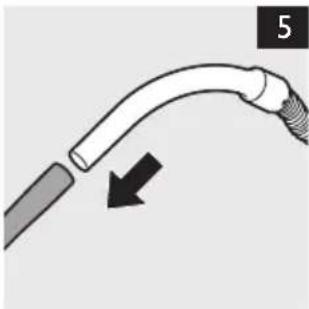
2 To connect the tube to the handgrip of the hose, insert the narrow section into the wider section and turn a little (Fig. 5).
Note: To disconnect the tube from the handgrip, pull and turn a little.
3 To adjust the length of the tube to the length you find most comfortable during vacuuming, push the slide on the tube upwards (1) and push the upper tube part downwards or pull it upwards (2) (Fig. 6).
Nozzles
Connecting a nozzle to the tube
1 To connect a nozzle to the tube, insert the tube into the nozzle and turn a little (Fig. 7).
Note: To disconnect a nozzle from the tube, pull and turn a little.
Combination nozzle with 2 rocker switches
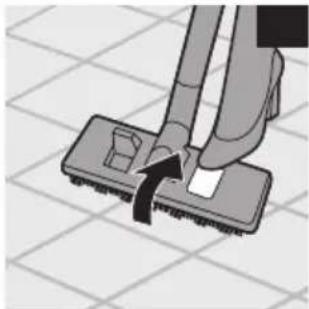
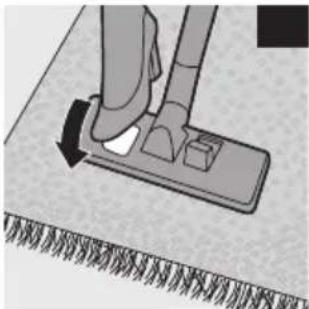
You can use the combination nozzle on carpet (with the brush strips folded in) or on hard floors (with the brush strips folded out).
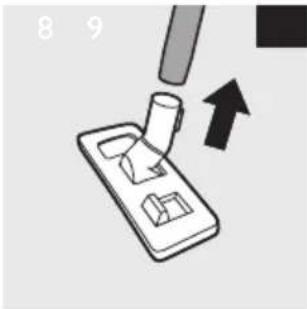
- To clean hard floors, push the rocker switch on top of the combination nozzle with your foot to make the brush strips come out of the nozzle housing (Fig. 8).
- To clean carpet, push the rocker switch on the other side to make the brush strips disappear into the housing (Fig. 9).
Small nozzle, crevice nozzle and brush nozzle
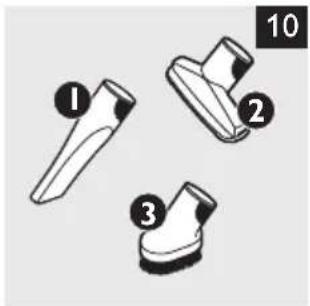
1 Connect the small nozzle, crevice nozzle or brush nozzle directly to the handgrip or to the tube (Fig. 10).
1 Crevice nozzle: use this nozzle to clean narrow corners or hard-to-reach places.
2 Small nozzle: use this nozzle to clean small areas, e.g. the seats of chairs and sofas.
3 Brush nozzle: use this nozzle to clean computers, bookshelves etc.
Using the appliance
Vacuum cleaning
- You can carry the vacuum cleaner by the handle at the front or on top of the appliance (Fig. 11).
1 Pull the mains cord out of the appliance and put the mains plug in the wall socket.
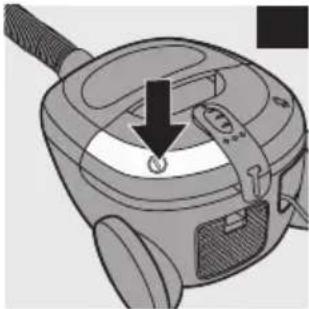
2 Press the on/off button on top of the appliance with your foot to switch on the appliance (Fig. 12).
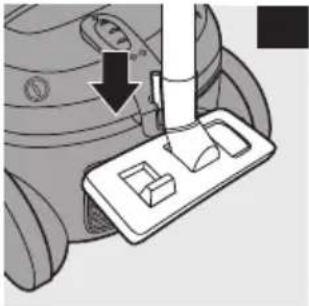
- If you want to pause for a moment, insert the ridge on the nozzle into the parking slot to park the tube in a convenient position (Fig. 13).
Note: To ensure stable parking of the telescopic tube, adjust the tube to the shortest length.
3 To switch off the appliance, press the on/off button again.
Adjusting suction power
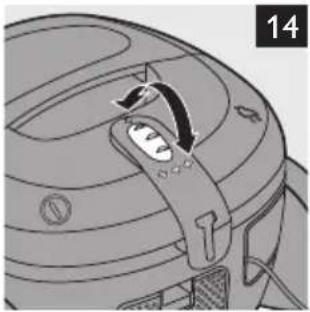
- You can adjust the suction power with the electronic suction power control on the vacuum cleaner (Fig. 14).
Cleaning
Always switch off and unplug the appliance before you remove and clean any parts.
Do not clean any part of the vacuum cleaner in the dishwasher. If necessary, clean the parts with a moist cloth.
1 Clean the appliance with a damp cloth.
Dust container and filter cylinder
For optimal performance, always empty the dust container after use and clean the filter cylinder regularly.
1 Disconnect the hose from the appliance.
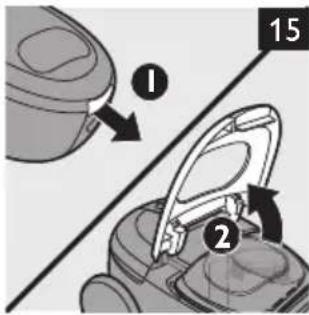
2 Pull at the cover release tab (1) and open the cover (2) (Fig. 15).
3 Remove the dust container from the appliance (Fig. 16).
4 Remove the lid of the dust container (Fig. 17).
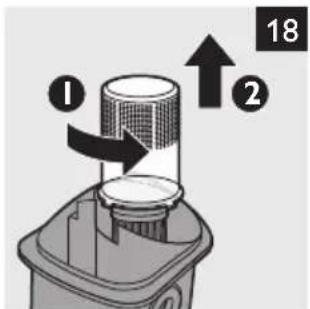
5 To remove the filter cylinder case, turn it anticlockwise (1) and lift it out of the dust container (2) (Fig. 18).
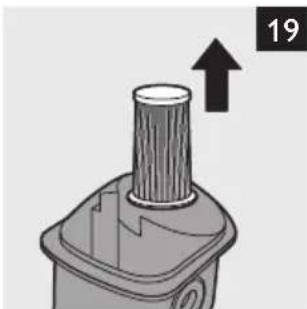
6 Remove the filter cylinder from the dust container (Fig. 19).
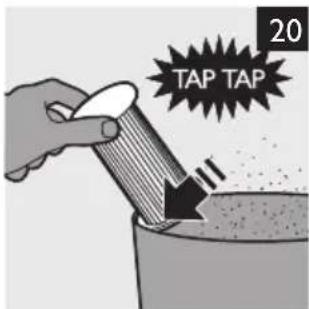
7 To clean the filter cylinder, tap it against the side of a dustbin (Fig. 20).
8 Empty the dust container into a dustbin (Fig. 21).
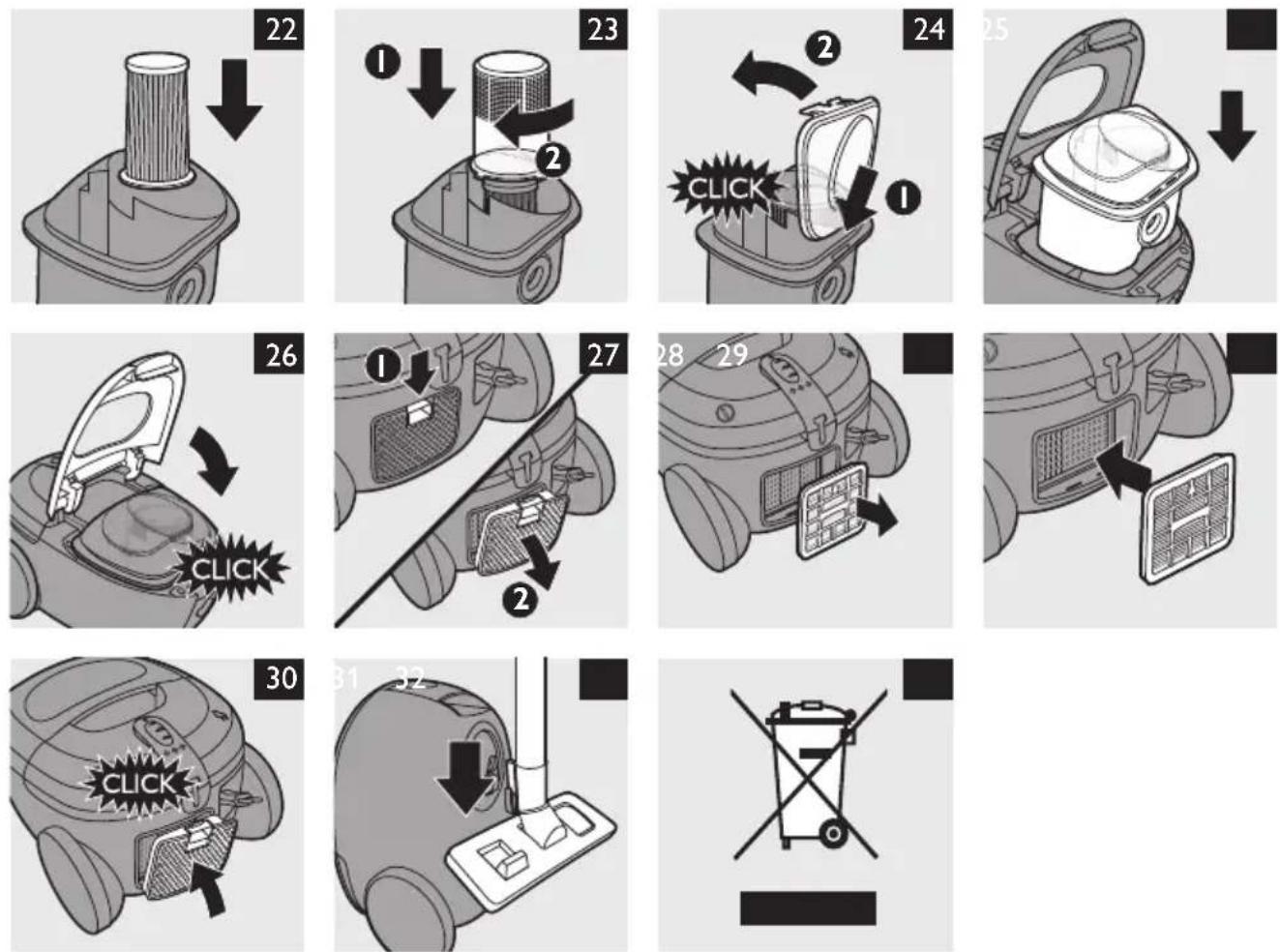
9 Put the filter cylinder back into the dust container (Fig. 22).
10 Put the filter cylinder case back onto the filter cylinder (1) and turn it clockwise to fix it (2) (Fig. 23).
11 Reattach the lid of the dust container (1) and close it ('click') (2) (Fig. 24).
12 Put the dust container back into the appliance (Fig. 25).
13 Close the cover ('click') (Fig. 26).
Replacing the Clean Air HEPA outlet filter
Your vacuum cleaner is equipped with a Clean Air HEPA outlet filter (service code 4222 459 48841).
Replace the Clean Air HEPA outlet filter every 12 months.
1 Switch off and unplug the appliance.
2 Pull at the grip on the filter grille (1) and remove it from the appliance (2) (Fig. 27).
3 Remove the Clean Air HEPA outlet filter. (Fig. 28)
4 Insert a new Clean Air HEPA outlet filter into the appliance. (Fig. 29)
5 Reattach the filter grille to the appliance ('click') (Fig. 30).
Storage
1 Switch off the appliance and remove the mains plug from the wall socket.
2 Press the cord rewind button to rewind the mains cord.
3 Put the appliance in upright position. To attach the nozzle to the appliance, insert the ridge on the nozzle into the storage slot (Fig. 31).
Note: To ensure stable storage of the telescopic tube, adjust the tube to the shortest length.
Accessories
If you have any difficulties obtaining filters or other accessories for this appliance, please contact the Philips Consumer Care Centre in your country or consult the worldwide guarantee leaflet.
- Clean Air HEPA outlet filters are available under type number service code 4222 459 48841.
- Filter cylinders are available under type number FC8028.
Environment
- Do not throw away the appliance with the normal household waste at the end of its life, but hand it in at an official collection point for recycling. By doing this, you help to preserve the environment (Fig. 32).
Guarantee and service
If you need service or information or if you have a problem, please visit the Philips website at www.philips.com or contact the Philips Consumer Care Centre in your country (you find its phone number in the worldwide guarantee leaflet). If there is no Consumer Care Centre in your country, go to your local Philips dealer.
Troubleshooting
This chapter summarises the most common problems you could encounter with the appliance. If you are unable to solve the problem with the information below, contact the Consumer Care Centre in your country.
Problem Possible cause Solution
| The suction power is insufficient. | The dust container is full. | Empty the dust container. |
| The filter cylinder is dirty. | Clean the filter cylinder (see chapter 'Cleaning'). | |
| The Clean Air HEPA outlet filter is dirty. | Replace the Clean Air HEPA outlet filter (see chapter 'Replacing the Clean Air HEPA outlet filter). | |
| The electronic suction power control is set to a low setting. | Set the electronic suction power control to a higher setting. | |
| The nozzle, tube or hose may be blocked. | Disconnect the blocked-up item and connect it (as far as possible) the other way around. Switch on the vacuum cleaner to force the air through the blocked-up item in opposite direction. |
УВОА
The image is too blurry to recognize any text content.






- INTRODUCTION
- GENERAL DESCRIPTION (FIG. 1)
- IMPORTANT
- DANGER
- WARNING
- CAUTION
- GENERAL
- ELECTROMAGNETIC FIELDS (EMF)
- PREPARING FOR USE
- HOSE
- TELESCOPIC TUBE WITH EXTENSION TUBE
- NOZZLES
- CONNECTING A NOZZLE TO THE TUBE
- COMBINATION NOZZLE WITH 2 ROCKER SWITCHES
- SMALL NOZZLE, CREVICE NOZZLE AND BRUSH NOZZLE
- USING THE APPLIANCE
- VACUUM CLEANING
- ADJUSTING SUCTION POWER
- CLEANING
- DUST CONTAINER AND FILTER CYLINDER
- REPLACING THE CLEAN AIR HEPA OUTLET FILTER
- STORAGE
- ACCESSORIES
- ENVIRONMENT
- GUARANTEE AND SERVICE
- TROUBLESHOOTING
- УВОА
- THE IMAGE IS TOO BLURRY TO RECOGNIZE ANY TEXT CONTENT
Brand : PHILIPS
Model : SmallStar FC8284
Category : Vacuum Cleaner