Gembird DCAM-004 - Dash cam

DCAM-004 - Dash cam Gembird - Free user manual and instructions

Find the device manual for free DCAM-004 Gembird in PDF.

📄 11 pages English EN Download 💬 AI Question 10 questions ⚙️ Specs
Notice Gembird DCAM-004 - page 2
Pick your language and provide your email: we'll send you a specifically translated version.
Product TypeElectronic Cash Register
BrandPartner Tech
ModelPT-6910
Dimensions (W x D x H)410 x 410 x 150 mm
Weight7.5 kg (approx.)
Power SupplyAC 100-240V, 50/60Hz with DC adapter
DisplayDual-sided LCD (operator and customer)
PrinterThermal receipt printer, 80mm paper width
Cash DrawerSupported (optional, 12V interface)
Main FunctionsSale, return, void, subtotal, tax calculation, discount, payment by cash/card
KeypadProgrammable alphanumeric keys with departmental keys
Memory StorageSupports up to 3000 PLUs (Price Look Up)
ConnectivityRS-232, USB, optional Ethernet (for receipt printer/pc link)
Maintenance & CleaningWipe exterior with dry soft cloth; avoid liquids; clean print head regularly
Safety CertificationsCE, RoHS compliant
Spare Parts & RepairabilityThermal paper rolls, cash drawer, power adapter; user-replaceable print head
Warranty1 year limited warranty
General InformationDesigned for retail and hospitality use; multi-language support; energy-saving mode

Frequently Asked Questions - DCAM-004 Gembird

How do I load the receipt paper?
Open the printer cover, ensure the paper roll unwinds from the bottom, insert it into the paper guide, and pull the paper outward until it extends. Close the cover and test by pressing the feed button.
What type of paper roll does the PT-6910 use?
It uses 80mm wide thermal paper rolls with a maximum diameter of 80mm. Ensure the paper is thermal (heat-sensitive) to work with the printer.
How do I program the tax rate?
Enter programming mode (usually by pressing [MODE] key and selecting 2 or PGM), select tax setup, enter the tax rate (e.g., 8.25 for 8.25%), and confirm. Refer to the manual for exact key sequences.
The cash drawer does not open automatically. What should I check?
Ensure the cash drawer cable is securely connected to the register’s drawer port. Check the drawer’s power (some require batteries). Also verify that the register is programmed to open the drawer after a sale.
How do I reset the register to factory default?
Turn off the register, press and hold the [CLEAR] key while turning on the power. Continue holding until a beep sounds. This will erase all programmed data, so use only if necessary.
Can I use the register on battery?
The PT-6910 is designed for AC power only. For portable use, an optional battery pack or UPS may be available from Partner Tech.
The printer prints blank or faint lines. What could be wrong?
This usually indicates a dirty print head. Clean the thermal print head with a cotton swab dipped in isopropyl alcohol. Avoid abrasive materials. Also check that the paper is correctly loaded with the thermal side facing the print head.
How do I set the date and time?
Enter programming mode, select date/time setting, enter the current date (MMDDYY) and time (HHMM), then confirm. Some models require a specific sequence like [TIME] key.
What do I do if the register displays 'Overflow'?
This error typically means the transaction total exceeded the register’s limit. Complete the current transaction and start a new one. If persistent, check the maximum total setting in programming.
Can I connect the register to a computer?
Yes, via the RS-232 or USB port. You may need specific software from Partner Tech to manage PLUs or download reports. Use a standard serial or USB cable.

User questions about DCAM-004 Gembird

0 question about this device. Answer the ones you know or ask your own.

Ask a new question about this device

The email remains private: it is only used to notify you if someone responds to your question.

No questions yet. Be the first to ask one.

Download the instructions for your Dash cam in PDF format for free! Find your manual DCAM-004 - Gembird and take your electronic device back in hand. On this page are published all the documents necessary for the use of your device. DCAM-004 by Gembird.

USER MANUAL DCAM-004 Gembird

MINI HD DASHCAM WITH NIGHT VISION

MINI HD DASHCAM MIT NACHTSICHTFUNKTION

  • Compact in-car HD camera with built-in microphone and night vision
    • Real 720p resolution without interpolation, interpolated 1080p HD resolution
    • 120 degrees wide angle lens with 4X digital zoom
  • Automatically starts recording when motion is detected or when the car is started
  • Stores hours of video material on removable Micro SD card (not included)
  • G-sensor – automatically saves and locks video in case of accidents
    • Built-in 1.5" color LCD screen
    • Uninterrupted seamless cycle recording
  • Adjustable record section time

Specifications

  • Interface: USB 2.0
    • Image sensor: 5MP HD Sensor
    • Video Resolution: max. 1920 x 1080 pixels (30 fps),
    • Video file format: AVI
    • Video file size: 2.5 MB/s (1920 x 1080)
    • Memory: Supports TF/Micro SD Cards (Speed class 10, max. 32 GB)
  • Battery: internal rechargeable battery, 180 mAh
    • Power input: 5 V DC/ 800 mA
    • Dimensions: 50 x 65 x 40 mm (L x W x H)
    • Length of USB cable: 80 cm
    • Length of car charging cable: 380 cm
  • Net weight: 60 g

CE RoHS MADE IN CHINA

(① Menu / / / SOS / / Class 10 micro 268 Class 10


Illustration of a wrench, calendar, and clock with no visible text or symbols

Close-up of a black FHD 1080P camera display showing two cars in a tunnel (no visible text or symbols on the device itself)

2x

2013-01-01-15-01-00 YYYY-MM-DD-hh-mm-ss

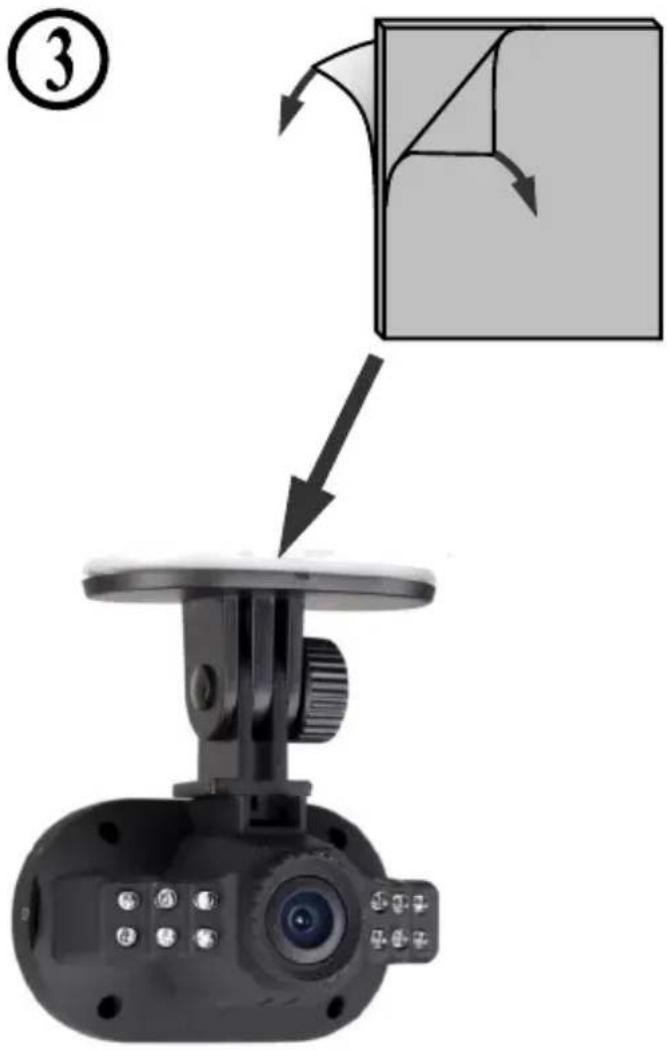
Diagram showing a camera mounted on a display with an instructional arrow indicating folding or adjustment steps.


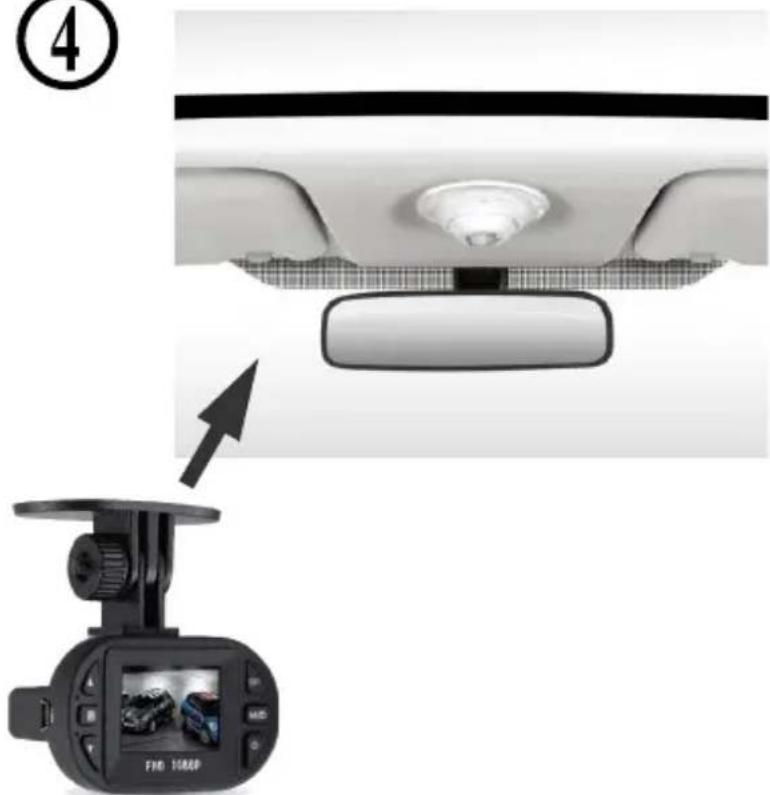
Rear view of a car dashboard and camera module, showing front and rear views with no visible text or symbols


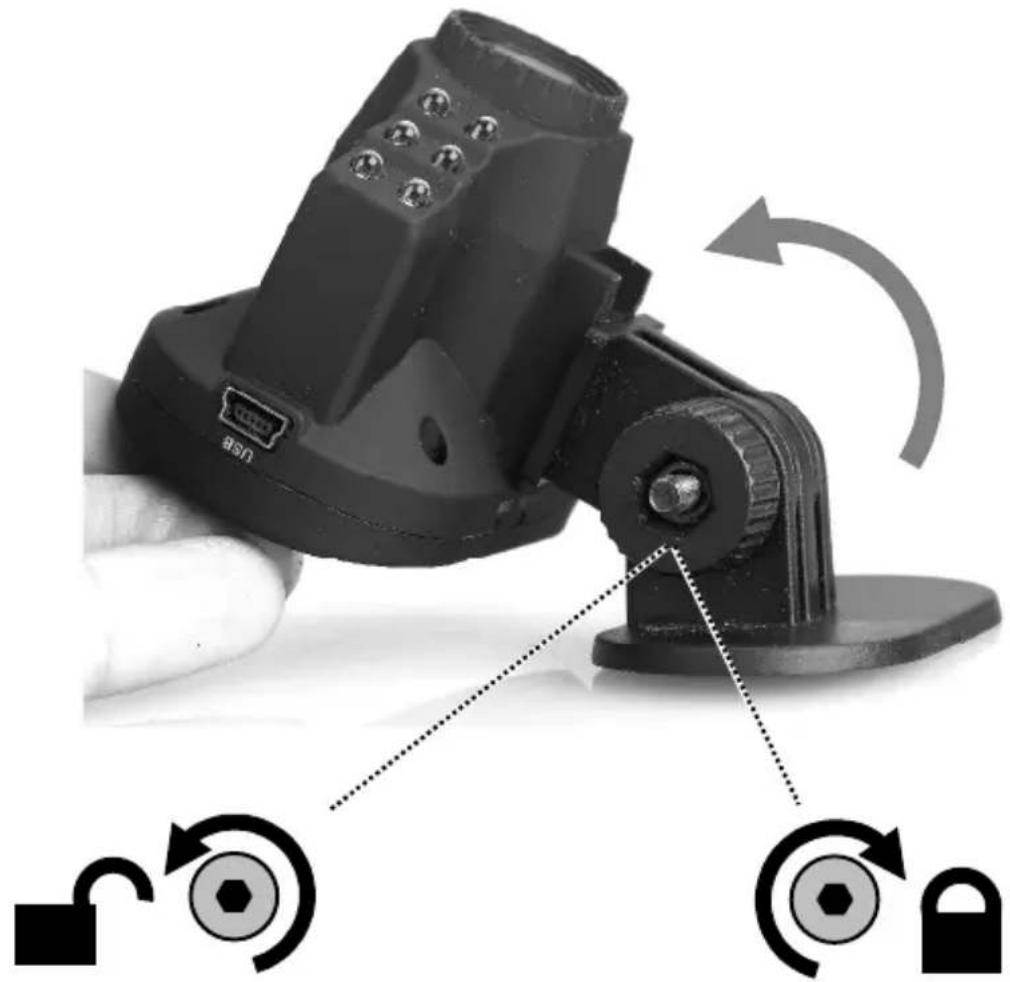
Close-up of a black mechanical device with attached mounting base and directional arrows indicating rotation (no text or symbols)

This product is tested and complies with the essential requirements of the laws of member states concerning EMC(2004/108/EC). The CE declaration can be found under www.gembird.eu

Safety warning sign showing a sun and a person with fever, crossed by a diagonal line indicating no heat.

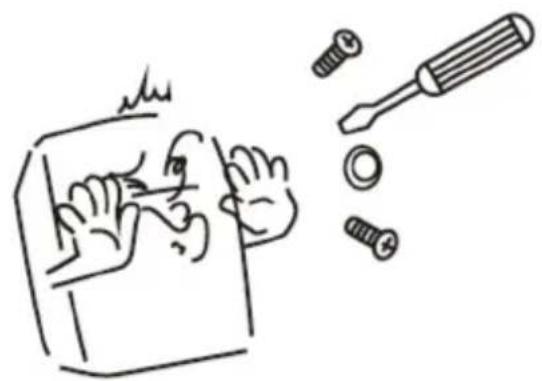
Simple line drawing of a hand using a tool to cut a screwdriver into a screw (no text or symbols)

Simple line drawing of a hand holding a bag with a diagonal line crossing through it, no text or symbols present.

Waste disposal:

Gembird DCAM-004 - Waste disposal: - 1

Do not deposit this equipment with the household waste. Improper disposal can harm both the environment and human health. For Information about waste collection facilities for used electrical and electronic devices, please contact your city council or an authorized company for the disposal of electrical and electronic equipment.
Table of contents Click a title to access it
Manual assistant
Powered by Anthropic
Waiting for your message
Product information

Brand : Gembird

Model : DCAM-004

Category : Dash cam