
DCAM-001 - Dash cam Gembird - Free user manual and instructions
Find the device manual for free DCAM-001 Gembird in PDF.


| Product Type | Dash Cam |
| Brand | Gembird |
| Model | DCAM-001 |
| Dimensions (approx.) | 10 x 5 x 3 cm |
| Weight (approx.) | 100 g |
| Power Input | USB 5V / 1A |
| Video Resolution | Full HD 1080p (1920x1080) at 30 fps |
| Lens Angle | 120° wide angle |
| Storage Media | microSD card up to 32 GB (Class 10 recommended) |
| Recording Features | Loop recording, motion detection, G-sensor for impact detection |
| Night Vision | Low light performance with built-in IR LEDs |
| Display | 2.0 inch LCD screen |
| Battery | Built-in rechargeable lithium battery (200 mAh) |
| Mounting | Suction cup mount for windshield |
| Maintenance | Clean lens with soft dry cloth; keep vents free of dust |
| Safety | Use only supplied USB cable and charger; keep away from moisture |
| Spare Parts / Repairability | Spare mounts and USB cables available; battery replacement possible by professionals |
| Supported Languages | English, French, German, Spanish, Italian, Portuguese |
| Package Contents | Dash cam, suction mount, USB cable, car charger, user manual |
Frequently Asked Questions - DCAM-001 Gembird
User questions about DCAM-001 Gembird
0 question about this device. Answer the ones you know or ask your own.
Ask a new question about this device
Download the instructions for your Dash cam in PDF format for free! Find your manual DCAM-001 - Gembird and take your electronic device back in hand. On this page are published all the documents necessary for the use of your device. DCAM-001 by Gembird.
USER MANUAL DCAM-001 Gembird
natural_image
Abstract logo design featuring a stylized arrow and 'GE' letters, no readable text or symbols beyond the graphic elements.GEMBIRD®
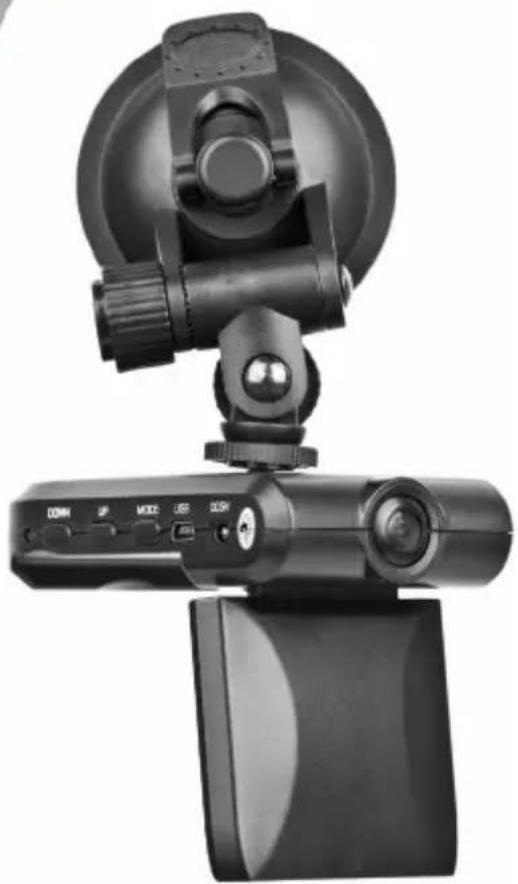
natural_image
Black-and-white photo of a remote control camera with a circular head and mounted device (no visible text or symbols)DASH CAM
• In-car HD camera with built-in microphone
• 120 degrees wide angle lens
• Automatic brightness adjustment
• Automatically starts recording when the car is started
- Stores hours of video material on removable SD/SDHC card (not included)
• Built-in pivoting LCD screen
- Suction cup window mount
Specifications
- Interface: USB 2.0
• Image sensor: 1/4 color CMOS WXGA HD Sensor
• Video Resolution: 640 x 480 / 720 x 480 / 1280 x 960
• Video file format: MPEG4
• Memory: Supports SDHC/MMC Cards (Max. 32 GB) - Battery: internal rechargeable battery
• Power consumption: 5 V DC up to 0.25 A
• Dimensions: 100 mm x 62 mm x 23 mm (L x W x H)
• Length of USB cable: 96 mm
• Length of car charging cable: 345 mm - Net weight: 99 g

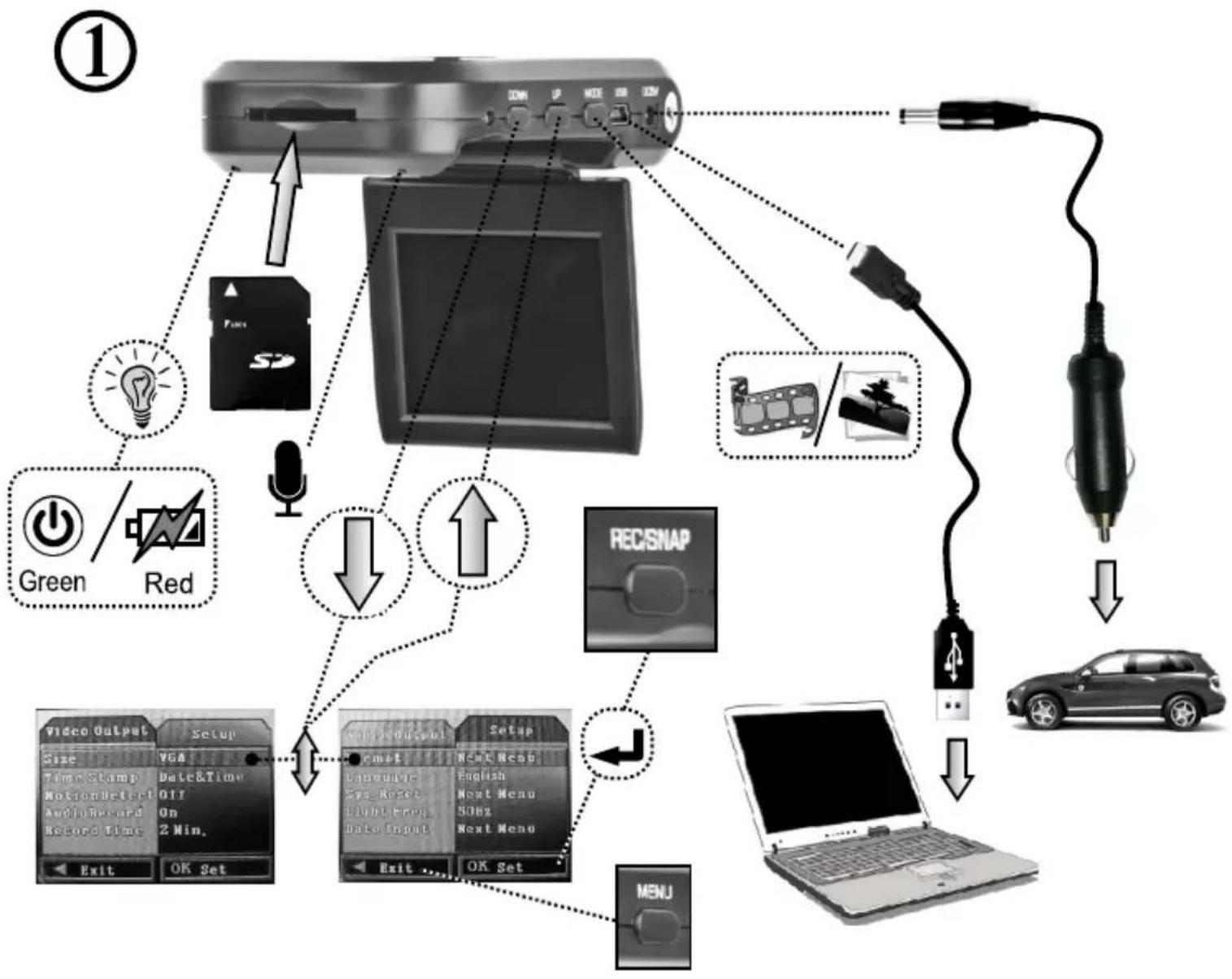
flowchart
graph TD
    A["Computer"] -->|Connection| B["Audio"]
    A -->|Connection| C["Car"]
    A -->|Connection| D["Laptop"]
    B --> E["Camera"]
    B --> F["Ear"]
    B --> G["Display"]
    C --> H["Laptop"]
    D --> I["Car"]
    style A fill:#f9f,stroke:#333
    style B fill:#ccf,stroke:#333
    style C fill:#cfc,stroke:#333
    style D fill:#fcc,stroke:#333

flowchart
graph TD
    A["Input: Mouse Tree"] --> B["Camera with Display"]
    B --> C["Recovery to Image"]
    C --> D["Video Output Setup"]
    D --> E["Video Output Setup"]
    E --> F["English (En / Ch / Jp / Ru)"]
    G["Computer monitor"] --> H["Power/Power Mode Icon"]
    H --> I["OK Set"]
③

natural_image
Mechanical clamp device with directional arrow and finger icon (no text or symbols)④

natural_image
Diagram showing a camera mounted on a screen with an arrow indicating rotation (no text or symbols present)
natural_image
Black circular icon with an exclamation mark symbol (no text or numbers)
natural_image
Simple line drawing of a hand washing a cup with water droplets falling (no text or symbols)
natural_image
Illustration showing a hand using a tool to clean and stop a window with a crossed-out hand (no text or symbols)EC Declaration of Conformity
We hereby certify that the following product complies with all the relevant
Safety Requirements of § 4 EMVG and of the Directives 2006/95/EC; 93/68/EEC and 2004/108/EC.
Applicant :
Gembird Europe BV
Wittevrouwen 56,
1358CD, Almere, The Netherlands
Equipment :
Computer parts
Model Nos. :
DCAM-001
Product description :
DCAM-001 Dash cam
European standards:
EN55022:2006; EN55024:1998+A1:2001+A2:2003; EN61000-3-2:2000+
A2:2005; EN61000-3-3:1995+A1:2001+A2:2005;
The following manufacturer/WITHIN Europe is responsible for this declaration:
Gembird Europe BV
Wittevrouwen 56, 1358CD, Almere, The Netherlands
Tel: +31-(0)36-5211588. Fax: +31-(0)36-5347835
Director
Authorized signature
Waste disposal:

Do not deposit this equipment with the household waste. Improper disposal can harm both the environment and human health. For Information about waste collection facilities for used electrical and electronic devices, please contact your city council or an authorized company for the disposal of electrical and electronic equipment.


Brand : Gembird
Model : DCAM-001
Category : Dash cam