
DCAM-006 - Dash cam Gembird - Free user manual and instructions
Find the device manual for free DCAM-006 Gembird in PDF.


| Product Type | Dash Cam (Car Camera Recorder) |
| Brand | Gembird |
| Model | DCAM-006 |
| Dimensions | Approx. 60 x 50 x 30 mm |
| Weight | Approx. 50 g |
| Power Supply | 5V DC via USB car charger (included) |
| Recording Resolution | Full HD 1080p @ 30 fps |
| Lens Angle | 120° wide angle |
| Storage Media | microSD card (up to 32 GB, not included) |
| Loop Recording | Yes, automatic overwriting |
| G-Sensor | Built-in, for impact detection and file protection |
| Night Vision | Yes, with IR LEDs or low-light sensor |
| Motion Detection | Yes, activates recording when motion is detected |
| Parking Mode | Monitors vehicle while parked (requires hardwire kit) |
| Display | 2.0 inch LCD screen |
| Mounting | Suction cup mount for windshield |
| Battery | Built-in rechargeable battery (200 mAh) |
| Connectivity | USB 2.0 for data and power; HDMI output (optional) |
| Audio Recording | Built-in microphone, with mute option |
| Date/Time Stamp | Yes, embedded on video |
| Maintenance | Keep lens clean; format SD card regularly |
| Safety | Use only supplied charger; avoid extreme temperatures |
| Spare Parts / Repairability | Replaceable mount and USB cable; consider professional service for internal repairs |
| Additional Features | Loop recording, G-sensor, motion detection, night vision |
Frequently Asked Questions - DCAM-006 Gembird
User questions about DCAM-006 Gembird
0 question about this device. Answer the ones you know or ask your own.
Ask a new question about this device
Download the instructions for your Dash cam in PDF format for free! Find your manual DCAM-006 - Gembird and take your electronic device back in hand. On this page are published all the documents necessary for the use of your device. DCAM-006 by Gembird.
USER MANUAL DCAM-006 Gembird
natural_image
Abstract logo design featuring a stylized arrow and 'GE' letters, no readable text or symbols beyond the graphic elements.GEMBIRD®

natural_image
Black digital camera with lens and control buttons (no visible text or symbols)• Dual-lens in-car HD camera with built-in microphone and IR night vision
• 720P Resolution without interpolation
• 120 degrees wide angle front lens with 4X digital zoom
- 180 degrees rotating second lens for filming side window view or inside the car
- Easy selection for front only, side only or dual-lens filming
- Automatically starts recording when motion is detected or when the car is started
- Stores hours of video material on removable Micro SD card (not included)
- G-sensor & SOS button – Easy save and lock videos in case of accidents
• Built-in 2.7" color widescreen LCD display
• Uninterrupted seamless cycle recording
- Adjustable record section time
Specifications
- Interface: USB 2.0
• Image sensor: CMOS HD sensor
• Video Resolution single Lens mode:
• Max. 1280*720P
• Video Resolution dual lens mode: - Max:1920*720P
• Video File Format: MOV
• Video output: 1X Mini HDMI
• Memory: Supports TF/Micro SD Cards (Speed class 10, max. 32 GB) - Battery: internal rechargeable battery, 300 mAh
• Power input: 5 V DC/ 800 mA - Dimensions: 120 × 52.5 × 33.2 ~mm (L x W x H)
• Length of USB cable: 80 cm
• Length of car charging cable: 350 cm - Net weight: 84 g





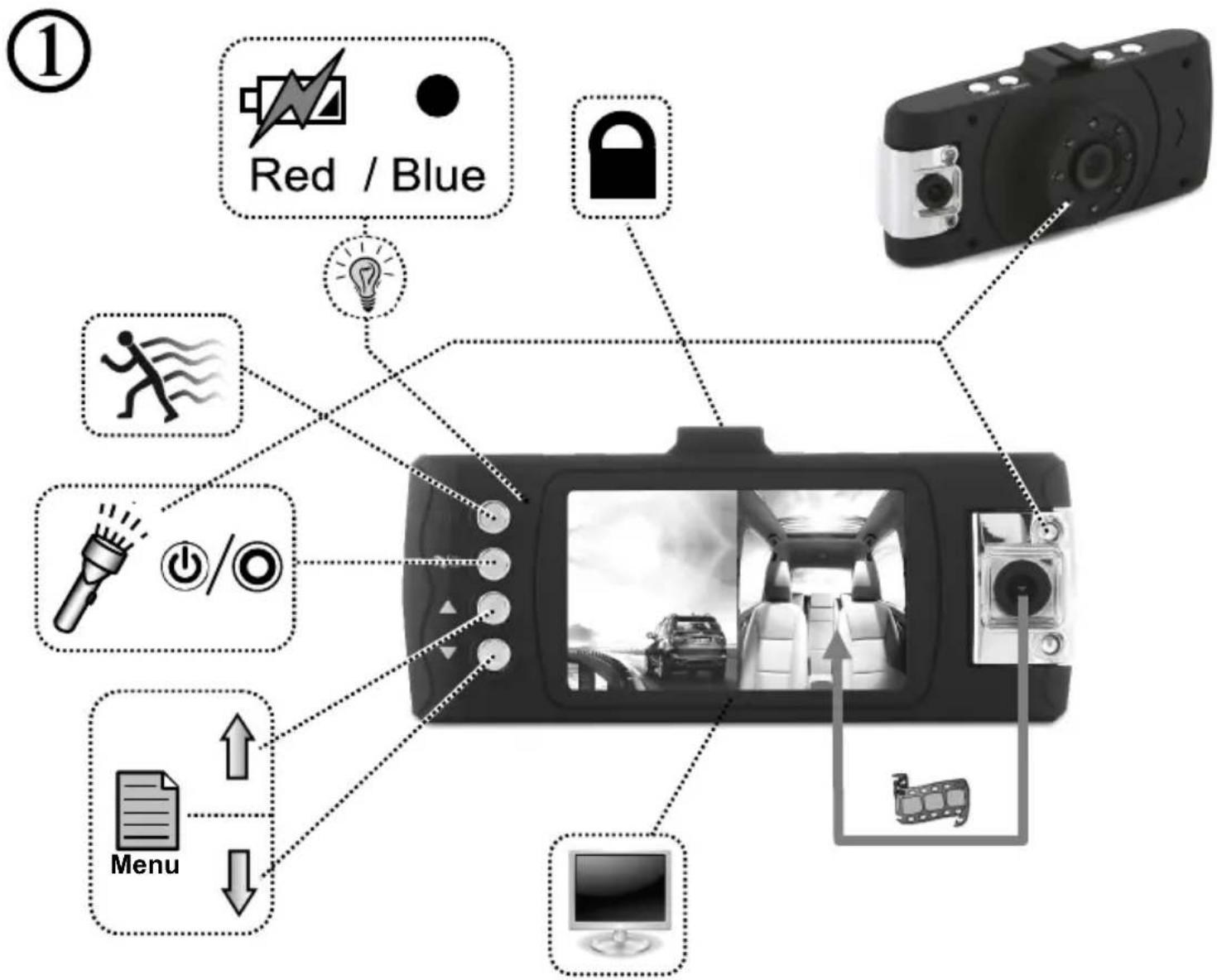
flowchart
graph TD
    A["Red / Blue"] --> B["Light Bulb"]
    C["Lock"] --> B
    D["Menu"] --> E["Power Icon"]
    F["Light Bulb"] --> G["Running Icon"]
    H["Power Icon"] --> I["Light Bulb"]
    J["Power Icon"] --> K["Light Bulb"]
    L["Power Icon"] --> M["Light Bulb"]
    N["Light Bulb"] --> O["Light Bulb"]
    P["Light Bulb"] --> Q["Light Bulb"]
    R["Light Bulb"] --> S["Light Bulb"]
    T["Light Bulb"] --> U["Light Bulb"]
    V["Light Bulb"] --> W["Light Bulb"]
    X["Light Bulb"] --> Y["Light Bulb"]
    Z["Light Bulb"] --> AA["Light Bulb"]
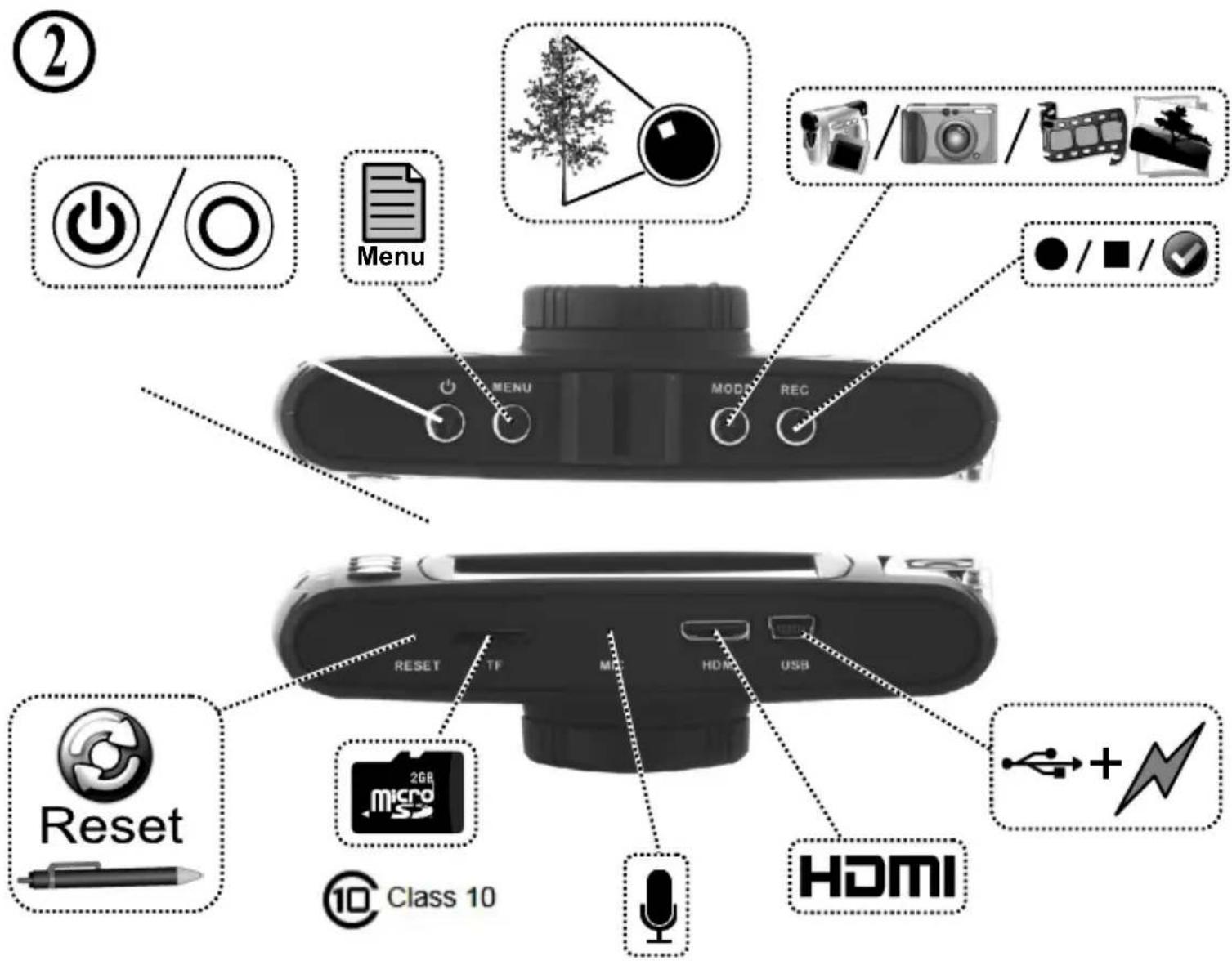


Menu
| Image Settings | Mode | Menu | Select the setting | Remarks |
| Video | Resolution | Dual Lens: 1920x720P/1280x400PSingle Lens: 1280x720P/720x480P | ||
| Cyclic Record | 30 Sec / 1 Min / 1 Min 30 Sec | Set the recording time | ||
| Audio Recording | Off / On | |||
| Video mode | Video mode L+R /Video mode L / Video mode R | |||
| Gravity sensing | Off / Medium / High | |||
| White Balance | Auto / Daylight / Cloudy / Tungsten / Fluorescent | |||
| Still | Resolution | Dual Lens: 1920x720P/1280x400PSingle Lens: 1280x720P/720x480P | Like the greater the greater number of files | |
| White Balance | Auto / Daylight / Cloudy / Tungsten / Fluorescent | Can change the image effect | ||
| ISO | Auto / 100 / 200 / 400 | |||
| Capture mode | Single/ 2S Timer / 5S Timer / 10S Timer / Sequence | Automatically set the camera and shooting a few pieces of | ||
| Video mode | Video mode L+R /Video mode L / Video mode R | Can change the camera mode | ||
| Playback | Delete | Delete current? / Delete all? | Cancel / Ok | |
| Format | TF Card: Cancel / Ok | All data will be deleted | ||
| Protect | Lock One / Unlock One / Lock all / Unlock all | |||
| Setup | Date/Time | YY/MM/DD | ||
| Beep Sound | Off / On | |||
| Language | English/German/French/Spanish/Italian/ Portuguese / Traditional Chinese / Simplified Chinese / Japanese / Russian / Korean / Polish / Dutch | |||
| Frequency | 50Hz / 60Hz | |||
| Format | TF Card: Cancel / Ok | All data will be deleted | ||
| Default settings | Cancel / Ok | Return menu settings to default | ||
| Date stamp | Off / On | |||
| Version | The machine's current software version number | |||
④
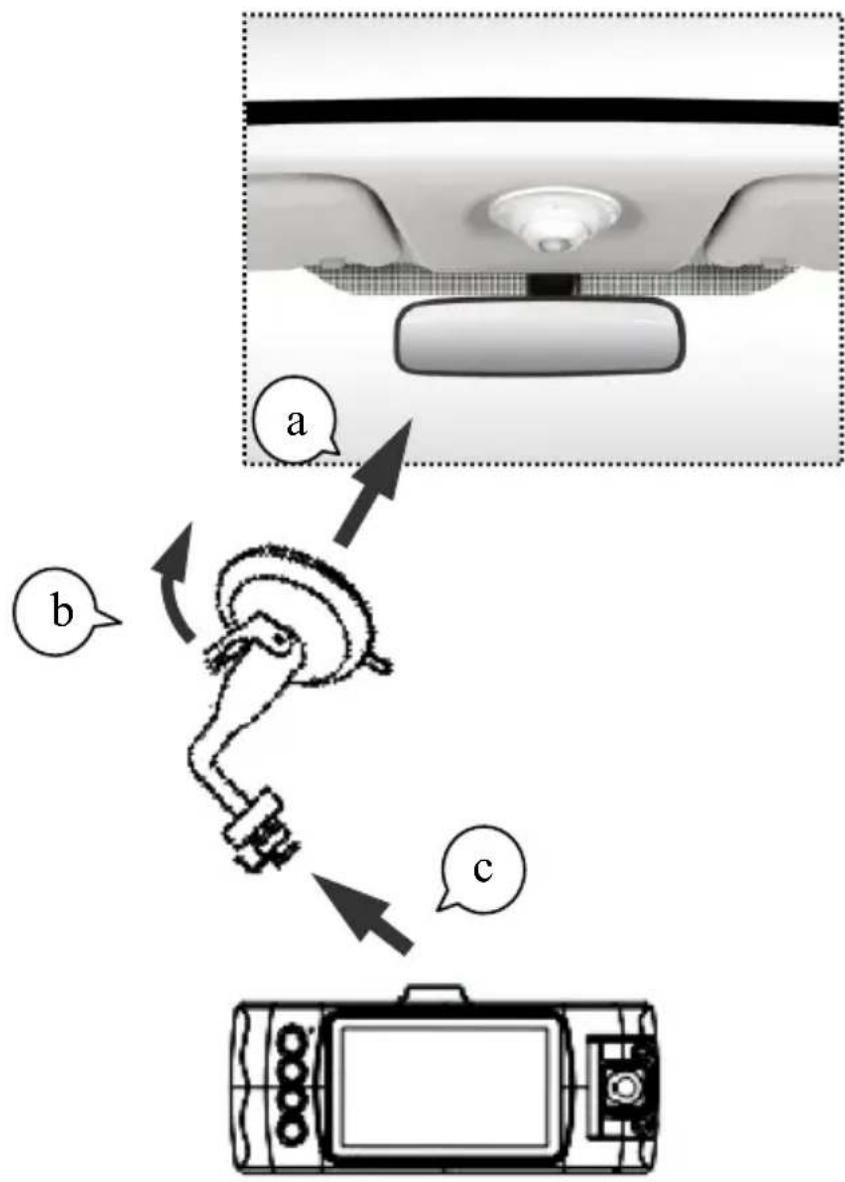
This product is tested and complies with the essential requirements of the laws of member states concerning EMC(2004/108/EC). The CE declaration can be found under www.gembird.eu
natural_image
Simple line drawing of a hand washing hands with water droplets (no text or symbols)

natural_image
Simple line drawing of a hand using a tool to cut a screwdriver into a screw (no text or symbols)
natural_image
Simple line drawing of a hand holding a bag with a diagonal line crossing through it, no text or symbols present.Waste disposal:

Do not deposit this equipment with the household waste. Improper disposal can harm both the environment and human health. For Information about waste collection facilities for used electrical and electronic devices, please contact your city council or an authorized company for the disposal of electrical and electronic equipment.


Brand : Gembird
Model : DCAM-006
Category : Dash cam