
EM5000 - Steam cleaner UFESA - Free user manual and instructions
Find the device manual for free EM5000 UFESA in PDF.


| Product type | Steam cleaner |
| Brand | UFESA |
| Model | EM5000 |
| Dimensions (L x W x H) | 30 x 25 x 20 cm |
| Weight | 2.5 kg |
| Power supply | 220-240 V ~ 50/60 Hz |
| Power | 1500 W |
| Water tank capacity | 1 L |
| Heating time | 3 minutes |
| Maximum steam pressure | 3 bars |
| Steam temperature | 100°C |
| Main functions | Steam cleaning, disinfection, degreasing |
| Included accessories | Round brush, squeegee, protective glove, pouring spout |
| Power cord length | 4 m |
| Care and cleaning | Regular descaling with white vinegar or descaling solution |
| Safety | Automatic shut-off in case of overheating, safety lock |
| Spare parts | Available (tank, seal, brush, etc.) |
| Repairability index | 7/10 |
| Body material | Heat-resistant plastic |
Frequently Asked Questions - EM5000 UFESA
User questions about EM5000 UFESA
0 question about this device. Answer the ones you know or ask your own.
Ask a new question about this device
Download the instructions for your Steam cleaner in PDF format for free! Find your manual EM5000 - UFESA and take your electronic device back in hand. On this page are published all the documents necessary for the use of your device. EM5000 by UFESA.
USER MANUAL EM5000 UFESA
05 1 Chemicals and Coatings, SA
电话:010-6875977
[Unreadable]
[Unreadable]
- 美国大学
natural_image
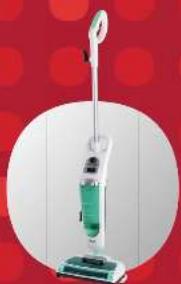
Exterior view of a vacuum cleaner with green liquid and white head (no text or symbols visible)steam map with electronic brush
natural_image
Exterior view of a white and green vacuum cleaner against a red background (no text or symbols visible)www.ufesa.es
ufesa
A





[Unreadable]
Pension of the most recent 1980s in the United States, Canada who could not have taken a new policy for how to deliver an exceptional plan to produce. For further, as well as the state is otherwise that provides the best way to provide the U.S. state and the U.S. state has been produced.
Congratulations on your choice of our appliance, and welcome among the users of ufesa products. In order to achieve best possible results we recommend using exclusively original ufesa accessories. They have been specially designed for this product. Please read this instruction manual carefully. Pay special attention to important safety instructions. Keep this User's Guide for future reference.
Operation and safety precautions
Before starting to use the appliance, become familiar with the whole content of this user manual.
Make sure that you understand the instructions given below.
DANGER! / WARNING! Health hazard

- Do not turn on the unit if the cord, body or handle are visibly damaged. Take the unit to your local service centre.
- If the supply cord is damaged, it must be replaced by the manufacturer, a service agent or a qualified person in order to avoid a hazard.
- The appliance can be repaired only by qualified technicians. If failures appear, take the unit to a specialist ufesa service centre.
- Before cleaning, assembling or disassembling, always unplug the unit.
- This appliance can be used by children aged from 8 years and above and persons with reduced physical, sensory or mental
capabilities or lack of experience and knowledge if they have been given supervision or instruction concerning use of the appliance in a safe way and understand the hazards involved. Children shall not play with the appliance. Cleaning and user maintenance shall not be made by children without supervision.
- Do not damage, bend, stretch, twist and tie the cord. Do not place heavy objects on the cord or lay the cord between such objects. Keep the cord away from heated surfaces. Do not run the unit over the cord. Do not pull or carry the unit by cord. A damaged cord poses risk of fire or electric shock.
- Do not leave the mop of the unit plugged in and without supervision. Always unplug when not in use or before cleaning.
Before unplugging the unit, turn off all controls. Unplug the unit by holding it by the plug not the cord.
• To avoid electric shock never operate the unit with wet hands or without shoes. Never immerse the unit in water.
- Never direct steam towards people, animals plants, electric wires or electric appliances.
- Keep your hair, loose clothing, fingers or body parts away from openings and moving parts of the unit.
• Take special caution when cleaning stairs and steps.

- Warning - steam!
Some components of the unit (cleaning pad, cleaning cloths, bottom of cleaning head) may become hot when in operation. Do not touch any hot surfaces! Never direct steam towards people, animals or plants – risk of scalding! Do not use the unit on clothes on people or animals!
CAUTION!
Not observance can result in damage to possessions

Always plug in the appliance to a mains outlet (alternating current only) with the voltage corresponding to that indicated on the appliance rating plate and equipped with a grounding prong. Do not use an extension power cord set without grounding!
Do not use the unit with the steam function without any water in the tank. When finished, pour the remaining water out of the tank.
Do not pick up:
anything that is on fire or gives off smoke (i.e. cigarettes, matches or hot ash);
- flammable or explosive substances (i.e. petrol or lighter fluid) or use in areas where such substances are used;
• toxic materials such as chlorine, bleaches or drain cleaners.
Do not use the unit in direct surroundings of flammable, explosive or toxic fumes, such as these that may be given off when using oil paints, thinners, some moth-proofing substances or in rooms where flammable dust occurs.
Do not pour liquids other than water into the water tank, i.e. perfumes, stain removers or liquids containing alcohol, as this may damage the unit.
Heat and steam may affect some cleaned surfaces.
Always test the action of the unit on a small isolated area to make sure that it is not sensitive to the action of the steam mop.
Do not direct steam towards devices containing electric components, such as the inside of ovens.
Never use the steam mop on silk or velour, very thin material, unsecured floor panels, laminates, hard industrial floors, ceilings, plastered surfaces, car paints, electronics or items using electricity.
SUGGESTION
Information on the product and suggestions for its use

The shaver is for household use only.
Do not use the unit inconsistently with its intended use.
Do not use the steam mop for purposes other than those described in this user manual.
Use the mop only with the provided accessories.
Technical data

The type and parameters of the steam mop are stated on its rating plate.
The steam mop is a class I device, equipped with the cord with a protective conductor and a plug with a ground contact.
The appliance meets the requirements of the applicable standards.
The appliance is in conformity with the requirements of the directives:
-Electrical equipment designed for use within specific voltage limits (LVD) - 2006/95/EC.
-Electromagnetic compatibility (EMC) - 2004/108/EC.
Noise level: max. 65 dB/A
The appliance was marked by a CE sign on the rating label.
Features

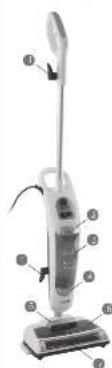
1 Cord wrap
2 Water tank hook
3 Water tank
4 Water softening filter
5 Waste container handle
6 Waste containers
7 Electrobrush
8 Pad release tab
9 Cord
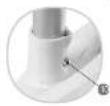
10 Tube lock
11 Tube with handle
12 Trigger
13 Cleaning head
14 Microfiber cloths for persistent stains (2 cloths)
15 Regular cleaning cloths (2 cloths)
16 Cleaning pad
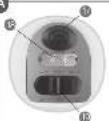
17 Electrobrush on/off button
18 Indicator lights (calor - heating, vapor - steam, barrer - electrobrush)
19 calor on/off switch
Operating the unit
The unit has two steam functions that you can choose from. The steam mop generates hot steam for easy removal of dirt from hard floors, but may also be used as an electrobrush for sweeping hard floors or carpets.
Assembling the tube with the holder

- Remove all the parts from the package.
1 Put the end of the tube into the steam mop base and push the tube base together until it locks into place.
2 Wind the excess cord around the cord wraps.
Sweep function

1 Connect the unit to an appropriate outlet.
2 Press the button to turn on the electrobrush.
The electrobrush may be used on hard level floors both with or without the cleaning pad.

On short pile carpets, the electrobrush should be used without the cleaning pad.

3 After use turn off the electrobrush by pressing the button.
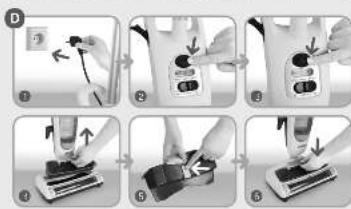
4 To empty the waste container, lift it by the holder located in the upper lid.
5 Push the release button located on the back of the container to remove the waste.
6 Close the emptied waste container and refit it until it clicks into place.
Before using the sweep function make sure that the waste container is fitted in the unit.

Do not lift the electrobrush from the floor when in operation.

Steam function

To use the steam function, follow the instructions below.
1 Match and attach the micro-fibre cloth to the cleaning pad.
Make sure that the velcros on the cleaning pad and on the cloth fit well.

2 To fit the cleaning pad onto the unit, gently lower the cleaning head onto the cleaning pad, so that head wheels click into the notch in the cleaning pad. To detach the cleaning pad, hold the pad release tab with your foot and lift the cleaning head.
Never use the mop with the steam function without the micro-fibre cloth attached.

3 Remove the water tank by releasing the hook of the water tank and pulling the tank towards you.
4 Turn the water tank upside down and unscrew the cap. Fill the tank with water, replace the cap (make sure that it is screwed all the way in) and refit the tank.
Do not use the steam mop with the steam function with no water in the tank.

- Plug in the unit to an appropriate outlet.
5 Slide the calor switch to the on position.
6 The unit will start heating water. The calor indicator light will illuminate.
When the vapor indicator light illuminates the unit is ready for operation with the steam function.

7 To start operation, press and hold the trigger.
The mop will stop steaming when you release the trigger.

If the unit runs out of water during operation, slide the calor switch to the off position and refill the water tank (see sections 4 and 5).

When the micro-fibre cloth becomes very wet or dirty, replace it with a clean and dry one.

The micro-fibre cloth becomes very hot when using the steam mop. Use caution when replacing.

In order to thoroughly sanitize an area of your floor, wait 60 seconds for the unit to heat up, then mop the selected area with a short forward and backward motion about 15 seconds.

8 After use, slide the calor switch to the off position and wait until no steam is emitted from the cleaning head.
9 Empty the water tank and unplug the unit from the outlet.
After use / Cleaning and maintenance

After use
- When finished steam cleaning, make sure that the calor switch is in the off position, then unplug the unit from the outlet.
- Pour out water from the water tank.
- The micro-fibre cloths are machine washable (at max. 60°C).
If the cloths are very dirty, before washing soak them in warm water with some detergent or stain remover.

• Thoroughly dry the cloths before storage.
Replacing the water softening filter

The water softening filter helps to remove minerals from water which may impact the performance of your steam mop. How often the filter should be replaced depends on how hard your water is and how often you use the unit. We suggest that you replace the water softening filter every 6 months or so.
The degree of filter contamination may impact the performance of your steam mop.

Before replacing the filter, unplug the unit from the outlet.

1 Remove the water tank (see the "Steam function" section 3).
2 Pull the filter up and remove it from the unit.
3 Replace the used filter with a new one. Press the new filter so that it touches the unit base closely.
4 Refit the water tank.
Cleaning the electrobrush

Over time pieces of threads, strings, hair, fabrics, etc accumulate on the roller of the electrobrush. They impact the sweeping performance and therefore the roller should be periodically cleaned (at least once monthly).

Before cleaning the electrobrush, unplug the unit from the outlet.

The roller of the electrobrush may be removed for thorough cleaning.
1 Turn the roller lock located at the bottom of the cleaning head to the position.
2 Remove the roller lock and the roller from the unit.
3 Using scissors or a sharp knife, carefully clean the roller of the electrobrush. Using scissors or a sharp knife, cut hair or threads rolled around the roller.
Be careful no to damage the bristle and the roller of the electrobrush.

4 When cleaned, refit the roller.
5 Refit the roller lock and turn it to the position. The roller is now locked.
Disassembling the holder and storing the unit

The holder is detachable for easy storage of the unit in low cabinets.
1 Twist the upper cord wrap downwards.
2 Unwind the cord from the wraps.
3 Press the tube lock and slide out the tube with the holder upwards.
Trouble Shooting
Some problems may be easily removed on your own. Before you contact the service centre, see the table below for a possible solution to your problem with the unit. If the problem persists, contact the info line or your local service centre.
| PROBLEM POSSIBLE REASON SOLUTION | ||
| The appliance will not turn on. | The appliance is not correctly plugged in to the outlet or is not turned on. | Insert the plug of the appliance into an appropriate outlet (see the rating plate on the appliance) and turn on the appliance. |
| The outlet is damaged. Plug the appliance into other outlet. | ||
| The appliance will not emit steam (or steam emission is reduced) when working with the steam function. | The water tank is empty. Fill the water tank. | |
| The indicator light calor illuminates but the calor switch is not put correctly in the on position. | Make sure that the calor switch is in the on position. | |
| Large obstacles have blocked the nozzle. | Remove the obstacles from the nozzle. | |
| The roller of the electrobrush will not roll. | Hair, threads or large obstacles had been accumulated in the roller and blocked its operation. | Turn off the appliance and unplug it from the outlet. Then remove the obstacles blocking the roller (see the Electrobrush cleaning section). |
| The appliance still will not operate correctly. | Contact the service centre. | |
Advice on disposal
Our goods come in optimised packaging. This basically consists in using non-contaminating materials which should be handed over to the local waste disposal service as secondary raw materials.
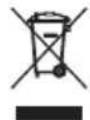
This product complies with EU Directive 2002/96/EC. The crossed wheelie bin symbol shown on the appliance indicates that when it comes to dispose of the product it
must not be included in with household refuse. It must be taken to a special refuse collection point for electric and electronic appliances or returned to the distributor when purchasing a similar appliance. Under current refuse disposal regulations, users who fail to take discarded appliances to special refuse collection points may be penalised. Correct disposal of discarded appliances means that they can be recycled and processed ecologically, helping the environment and allowing materials used in the product to be reused.
For more information on available waste disposal schemes contact your local refuse service or the shop where the product was purchased. Manufacturers and importers are responsible for ecological recycling, processing and disposal of products, whether directly or via a public system.
Your local town council can provide you with information about how to dispose of obsolete appliances.
The manufacturer/importer does not accept any liability for any damages resulting from unintended use or improper handling. The manufacturer/importer reserves his rights to modify the product any time in order to adjust it to law regulations, norms, directives, or due to construction, trade, aesthetic or other reasons, without notifying in advance.

Cher client,

PROBLEME CAUSE POSSIBLE SOLUTION
19 Interruptor calor (on - ligar, off - desligar)
PROBLEMA POSSÍVEL CAUSA SOLUÇÃO
- ufesa
- Operation and safety precautions
- DANGER! / WARNING! Health hazard
- - Warning - steam!
- CAUTION!
- Not observance can result in damage to possessions
- SUGGESTION
- Information on the product and suggestions for its use
- Technical data
- Features
- Operating the unit
- Assembling the tube with the holder
- Sweep function
- Steam function
- After use / Cleaning and maintenance
- After use
- Replacing the water softening filter
- Cleaning the electrobrush
- Disassembling the holder and storing the unit
- Trouble Shooting
- Advice on disposal
Brand : UFESA
Model : EM5000
Category : Steam cleaner