
BOT FURTIV - Vacuum Cleaner E.zicom - Free user manual and instructions
Find the device manual for free BOT FURTIV E.zicom in PDF.


| Product type | Robot vacuum |
| Brand | E.zicom |
| Model | BOT FURTIV |
| Dimensions (L x W x H) | 33 x 33 x 8 cm |
| Weight | 3 kg |
| Power supply | Rechargeable Li-ion battery 14.4V / 2600mAh |
| Battery life | Approximately 90 minutes |
| Charging time | Approximately 4 hours |
| Dustbin capacity | 0.5 L |
| Noise level | 55 dB |
| Main functions | Automatic vacuuming, scheduling, anti-drop and anti-collision sensors, automatic return to base |
| Cleaning modes | Random, edge, spot, scheduled |
| Filter | High-efficiency HEPA filter |
| Brushes | Main brush and side brushes |
| Maintenance and cleaning | Empty the dustbin after each use, clean the brushes and filter regularly |
| Safety | Drop sensors, obstacle protection, automatic shutoff when lifted |
| Spare parts and repairability | Filter, side brush, main brush, battery available |
| General information | E.zicom BOT FURTIV robot vacuum, delivered with charging station, power adapter, spare filter |
| Warranty | 2 years |
Frequently Asked Questions - BOT FURTIV E.zicom
User questions about BOT FURTIV E.zicom
0 question about this device. Answer the ones you know or ask your own.
Ask a new question about this device
Download the instructions for your Vacuum Cleaner in PDF format for free! Find your manual BOT FURTIV - E.zicom and take your electronic device back in hand. On this page are published all the documents necessary for the use of your device. BOT FURTIV by E.zicom.
USER MANUAL BOT FURTIV E.zicom


A. VUE DE DESSUS DE L'ASPIRATEUR ROBOT
B. RECHARGEMENT MANUEL


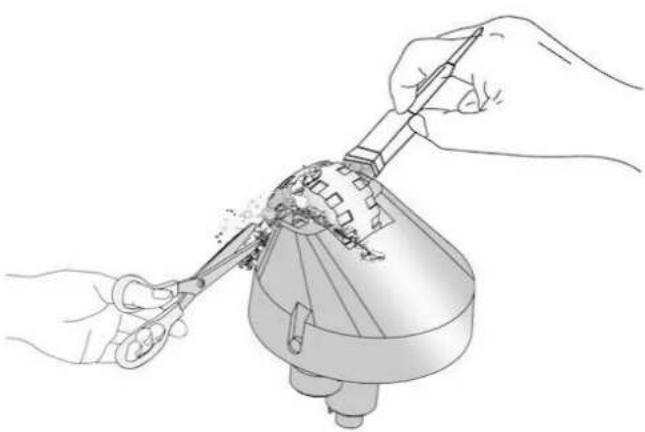

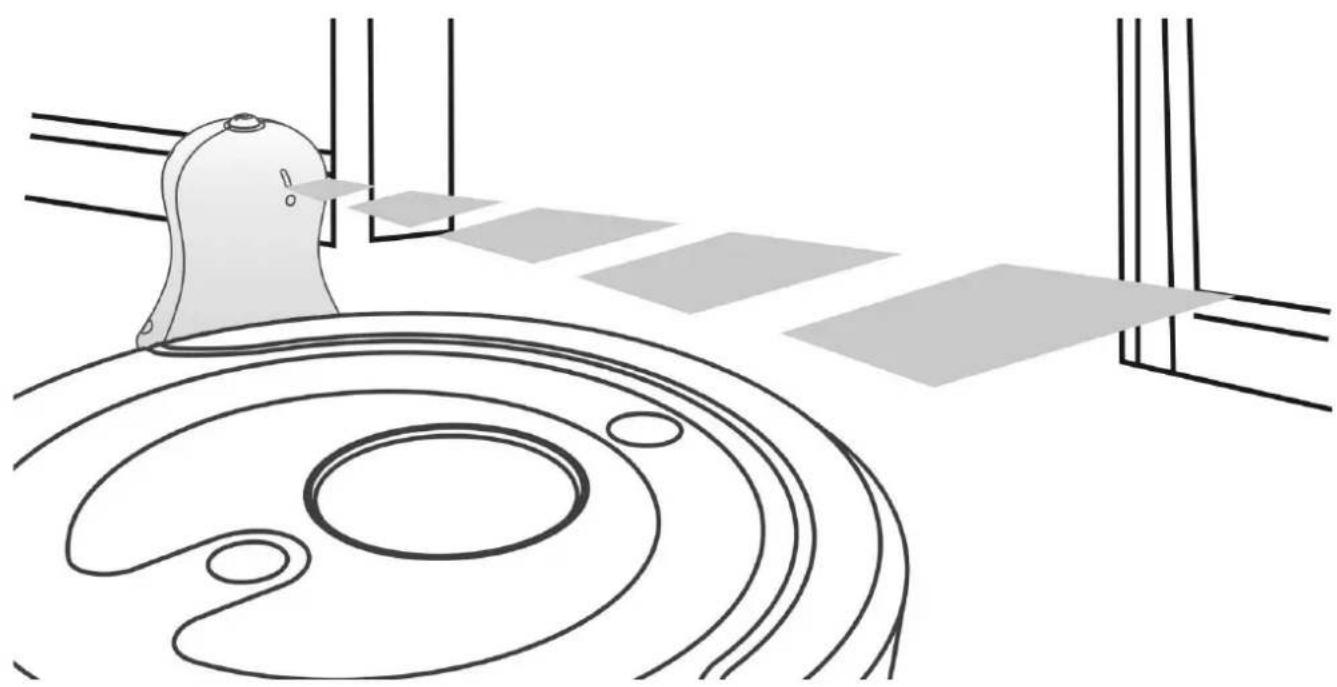
B. POSITIONNEMENT DU MUR VIRTUEL
E.ZICOM®
MADE IN INNOVATION
e.ziclean®
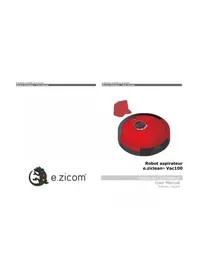
E.ziclean® BOT Robot vacuum
User manual

Welcome to E.ZICOM
Welcome to E.ZICOM
Table of Contents
-
Introduction......4
-
Precautions for use....4
-
Box contents....5
A. HARDWARE AND ACCESSORIES PROVIDED....5
B. TECHNICAL SPECIFICATIONS....6
- Familiarize yourself with your product's features....7
A. TOP VIEW....7
B. BOTTOM VIEW....7
C. SIDE VIEWS....7
D. VIEW OF THE REMOTE CONTROL....8
E. CONTROL SCREEN....8
- Installation of the charging base and recharging your robot....10
A. AUTOMATIC CHARGING....10
B. MANUAL CHARGING....10
C. INSTRUCTIONS FOR DOCKING AT THE CHARGING BASE....11
- Programming the cleaning schedule....12
A. SET THE TIME ON YOUR E.ZICLEAN® BOT....12
B. PROGRAMMING THE CLEANING DAYS AND TIMES....13
C. DELETING THE PROGRAMING SETTINGS....14
-
E.ziclean® BOT robot navigation modes....14
-
E.ziclean® BOT robot cleaning modes....15
A. AUTOMATIC CLEANING MODE:....15
B. SPOT CLEANING MODE:....15
C. EDGE CLEANING MODE:....15
D. ZIGZAG CLEANING MODE:....15
E. QUICK CLEANING MODE:....15
F. UV LAMP: 15
-
Update of the e.ziclean® BOT robot with e.zigenius....16
-
Maintenance of the e.ziclean® BOT robot vacuum cleaner....16
A. EMPTY THE DUST CONTAINER AND CLEAN THE FILTER....16
B. CLIPPING - UNCLIPPING THE MAIN DUAL BRUSHES....17
C. CLIPPING - UNCLIPPING THE LATERAL BRUSHES....18
D. CLEANING THE FRONT WHEEL....18
- Battery installation....19
A. INSTALLATION OF THE VIRTUAL WALL BATTERIES....19
B. REPLACING THE REMOTE CONTROL BATTERIES....19
C. BATTERY MAINTENANCE AND SAFETY MEASURES....19
- Using the virtual wall....20
A. FEATURES OF THE VIRTUAL WALL....20
B. POSITIONING THE VIRTUAL WALL....20
-
Using the cleaning mop....21
-
ERROR codes and troubleshooting....22
-
Frequently asked questions....22
-
Warranties and certificates....23
1. Introduction
Thank you for the trust you have placed in our range of e.ziclean® robots. We are pleased to count you among our clients and we are confident that you will enjoy the precious time that your multi-surface vacuum cleaner robot will save you.
E.ziclean® robots are equipped with different features and are supplied with accessories allowing you to optimize their maintenance and adapt them to your environment. In order to facilitate the use of your appliance, please read this user manual carefully. Once familiar with our products, our autonomous robots will quickly become an essential tool for the management of your chores, whether at home or in the office.
Exclusively for indoor use, it can be used to clean various types of flooring such as parquet, linoleum, carpet, and tile. Carpet that is not very thick carpet can also be vacuumed.
We hope that you will be satisfied with your product and we now let you take note of the following operating instructions.
Register your product
Register your e.ziclean® robot in order to benefit from our responsive customer service during and after the manufacturer's warranty period. As such, should you need to contact our E.ZICOM support team or to request a repair, we will be able to access your file and quickly check the status of your product coverage.
In order to do so, visit our site at www.e-zicom.com, heading: About/Register your robot.
2. Precautions for use
The e.ziclean® BOT robot vacuum is only intended for domestic maintenance as specified in this user manual.
- In order to maintain the 2-year manufacturer's warranty, do not disassemble the device without our company's consent.
- Be sure to use the adapters provided with the robot. All other power sources could lead to the device overheating and cause serious damage.
• Always turn the vacuum cleaner robot off when cleaning the brushes and other compartments. - Keep the appliance away from sources of heat or flammable products.
- When not using the appliance for a long period of time, remember to remove the battery from the robot and store the elements in a dry place.
- e.ziclean® robot vacuums are not intended for outdoor use.
- Do not leave fragile objects, electrical objects or carpet fringes in the robot's path.
3. Box contents
A. HARDWARE AND ACCESSORIES PROVIDED
| E.ziclean® BOT FURTIV Robot vacuum | |
| Robot vacuum (1) | Set of mops (2) |
| Docking station (1) | Side brushes (2) |
| Virtual wall (1) | Main nylon brush (1) |
| Power supply (1) | HEPA filter (1) |
| Mopping kit (1) | |
| Screwdriver (1) | |
| Maintenance kit (1) | |
| User's manual (1) | |
E.ziclean® BOT CORNER Robot vacuum
| Robot vacuum (1) | Set of mops (2) |
| Docking station (1) | Side brushes (2) |
| Virtual wall (1) | Main nylon brush (1) |
| Power supply (1) | HEPA filter (1) |
| Mopping kit (1) | USB connector (1) |
| Screwdriver (1) | |
| Maintenance kit (1) | |
| User's manual (1) |
E.ziclean® BOT PETS Robot vacuum
| Robot vacuum (1) | Set of mops (2) |
| Docking station (1) | Side brushes (2) |
| Virtual wall (1) | Main nylon brush (1) |
| Power supply (1) | Main PETS brush (2) |
| Mopping kit (1) | HEPA filter (1) |
| Screwdriver (1) | Scented stick kit (1) |
| Maintenance kit (1) | USB connector (1) |
| User's manual (1) |
E.ziclean® BOT PRO Robot vacuum
| Robot vacuum (1) | Set of mops (2) |
| Docking station (1) | Side brushes (4) |
| Virtual wall (1) | Main nylon brush (2) |
| Power supply (1) | Main PETS brush (2) |
| Mopping kit (1) | HEPA filter (1) |
| Screwdriver (1) | Scented stick kit (2) |
| Maintenance kit (1) | USB connector (1) |
| User's manual (1) |
B. TECHNICAL SPECIFICATIONS
| E.ziclean® BOT Robot vacuum | |
| Dimensions | 360 mm x 92 mm |
| Weight | 3.5 kg |
| Voltage | 18-30 W |
| Average cleaning time | Approximately 120 minutes |
| Average charging time | Approximately 3-4 hours. |
| Charge voltage | DC 24 V 1 A |
| Decibels | 48 db |
| Dust container capacity | 800 mL |
| Battery capacity | 2200 mAh lithium ion |
| Maximum course speed | 300 mm/sec |
| Normal passing speed | 150 mm/sec |
| Remote control | |
| Dimensions | 150 mm x 46 mm x 15 mm |
| Batteries | 2 AAA. Not included |
| Scope of action | 12 meters |
| Charging base | |
| Dimensions | 188 mm x 143 mm x 113 mm |
| Power supply | AC 100-240 V 50-60 Hz |
| Virtual wall | |
| Dimensions | 90 x 99 mm |
| Batteries | 2 R14. Not included |
| Scope of action | 4 meters |
4. Familiarize yourself with your product's features
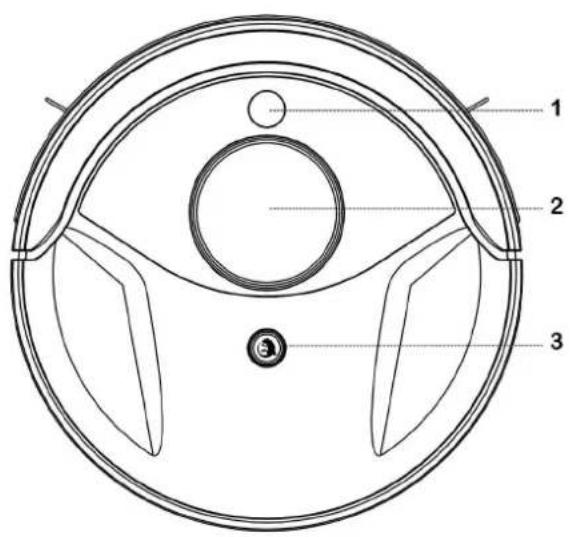


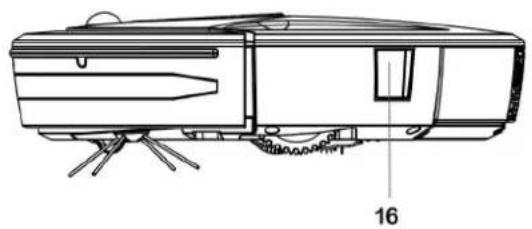
| A. TOP VIEW | |
| 1. Infra-red | 3. Container opening button |
| 2. Touch screen | |
| B. BOTTOM VIEW | |
| 4. Void detectors (3) | 10. Charging base contact switches (2) |
| 5. Front wheel | 11. UV sterilizing lamp |
| 6. Side brushes (2) | 12. Main brush |
| 7. Battery | 13. Secondary main brush |
| 8. Drive wheels (2) | 14. Ventilation access |
| 9. Mopping kit | |
| C. SIDE VIEWS | |
| 15. Start - Charging input | 16. Connector access for Updates* |
* Not available for the e.ziclean® BOT FURTIV model
D. VIEW OF THE REMOTE CONTROL

| 1. POWER. Start button |
| 2. SPOT: Target Cleaning Mode |
| 3. SPEED: Cleaning Speed Setting |
| 4. CHARGE: Return to dock |
| 5. Manual robot control |
| 6. Automatic cleaning mode |
| 7. MUTE. Sound off |
| 8. EDGE: Wall length cleaning mode |
| 9. ZIGZAG: Zigzag cleaning mode |
| 10. UV: Activation of the UV lamp |
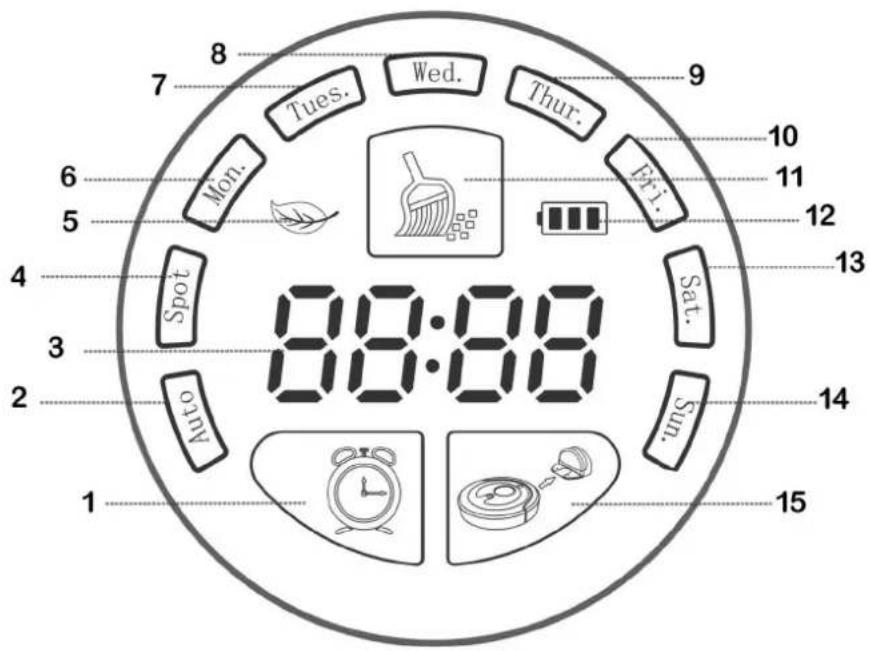
E. CONTROL SCREEN

| 1. Timer. ERROR code display | 9. Thursday |
| 2. Launch the AUTOMATIC cleaning mode | 10. Friday |
| 3. Time display | 11. Automatic cleaning mode status |
| 4. Status of the SPOT cleaning mode | 12. Battery status |
| 5. UV lamp status | 13. Saturday |
| 6. Monday | 14. Sunday |
| 7. Tuesday | 15. Return to the charging base. |
| 8. Wednesday |
F. VIRTUAL WALL

| 1. Start button |
| 2. Infra-red beam |
| 3. Indicator light |
5. Installation of the charging base and recharging your robot
A. AUTOMATIC CHARGING
① Install the charging base on a flat area against a wall.
② Make sure to respect the lateral and frontal areas identified below:

The correct positioning of the charging base will facilitate the anchoring of the robot vacuum cleaner anchoring phase upon returning to its charging base.
③ Connect the charging base to its power supply. Consider passing the wire along the wall to avoid the risk of it getting tangled with the robot vacuum cleaner. Any excess cable can be stored inside the charging base:

B. MANUAL CHARGING
It is possible to connect the power cable directly to the robot vacuum cleaner. The power slot is located just below the On/Off button, located on the side of the robot vacuum cleaner.
C. INSTRUCTIONS FOR DOCKING AT THE CHARGING BASE
① Press the

button on the robot vacuum cleaner's screen. The e.ziclean®BOT will
then go into charging base search mode.
② You can also order the robot vacuum cleaner to return to the charging base by using the CHARGE button on the remote control.

Tips
In the event that the robot vacuum cleaner has difficulty returning to its base, make sure that there is no obstacle impeding its navigation, and that its charging base is placed in a sufficiently spacious area.
6. Programming the cleaning schedule
A. SET THE TIME ON YOUR E.ZICLEAN® BOT
. Selecting the day.
① Remove the robot from its base.
② Turn the robot vacuum cleaner on using the device's On/Off button, and press
the button

on the screen. The Mon. box is highlighted.
For your information:
| Mon. | Tue. | Wed. | Thu. | Fri. | Sat. | Sun. |
| Monday | Tuesday | Wednesday | Thursday | Friday | Saturday | Sunday |
③ To select the DAY, press the button

on the screen. Once the desired
DAY is highlighted, confirm by pressing the button 2 times

. Selecting the time.
④ To adjust the time, press the button
on the screen. Press this button once again
until the 1st number of the display
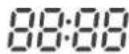
is highlighted.
⑤ Now, adjust the hours and the minutes by scrolling through the numbers from 0 to 9 from the
button , and validate your selection using
⑥ Continue selecting the hours and the minutes in the same manner. When the Mon.
is highlighted, confirm the setting of the hours and minutes by pressing the button 2 times
AUTOMATIC CLEANING

B. PROGRAMMING THE CLEANING DAYS AND TIMES
The e.ziclean® BOT robot vacuum cleaner can launch an automatic cleaning program for each day of the week.
. Selecting the day.
① Remove the robot from its base.
② Turn the robot vacuum cleaner on using the device's On/Off button.
③Press on the button . Make your selection by scrolling through the days using the
button
. Once the desired DAY is highlighted, confirm your choice by pressing the
button

2 times.
. Select the time.
④ To adjust the time, press the button

on the screen. Press this button once again
until the 1st number of the display 88:88 is highlighted.
⑤ Now, adjust the hours and the minutes by scrolling through the numbers from 0 to 9 from the
button , and validate your selection using
⑥ Continue selecting the hours and the minutes in the same manner. When the Mon.
is highlighted, confirm the setting of the hours and minutes by pressing the
AUTOMATIC CLEANING button

twice.

Please note
The e.ziclean® BOT will leave its base on the day and at the time programmed, only if it is fully charged.
C. DELETING THE PROGRAMING SETTINGS
To change a program for a day of the week, follow the following steps:
① Press the . The previously programmed days light up.
② In order to change the DAY, reach the desired day by scrolling through the days using the
button , and de-select it by pressing the button twice .
7. E.ziclean® BOT robot navigation modes
The e.ziclean® BOT offers optimized cleaning coverage by means of an intelligent movement system that combines different navigation plans.

![graph TD A["Square Process Step"] --> B["Arrow to Center"] style A fill:#f9f,stroke:#333 style B fill:#ccf,stroke:#333](/content/2026/06/1268327/images/fd0dec26980a53d56ea83f5fcc4b7ea0679707c4a6bdfe3e36aa288f523fedfa.jpg)


These navigation modes can also be enabled specifically:
① AUTOMATIC: The e.ziclean® BOT will automatically combine all the navigation plans above, and depending on the layout of the rooms to cover. It will clean until its batteries run out and will return to charge on its charging base.
To initiate this cleaning mode manually, press AUTO CLEAN on the remote control.
② SPIRAL: The robot will focus on a restricted area for a period of 1 to 4 minutes and then shut down. In this mode, the unit will not return to its base once its work is done. It is ideal for relatively small and a particularly dirty areas.
To initiate this cleaning mode manually, press the SPOT button on the remote control.
③ SQUARE: The robot focuses on the area and widens its cleaning in a square pattern.
④ ZIGZAG: The robot performs comings and goings throughout the room.
To initiate this cleaning mode manually, press the ZIGZAG button on the remote control.
⑤ ALONG THE WALLS: The robot moves toward a wall of the room and moves along it next to skirting boards and corners.
To initiate this cleaning mode manually, press the EDGE button on the remote control.
8. E.ziclean® BOT robot cleaning modes
A. AUTOMATIC CLEANING MODE:
The AUTOMATIC cleaning mode provides optimal cleaning coverage of your rooms for a period of approximately 120 minutes, depending on the floor type. Once its batteries are spent, the e.ziclean® BOT returns to its base to charge itself.
Press the AUTO CLEAN button on the remote control or

on the robot in order to launch
this cleaning mode.
B. SPOT CLEANING MODE:
The SPOT cleaning mode allows the robot vacuum cleaner to concentrate its cleaning action a small area, and for a period of 3 minutes. This method of cleaning is ideal to clean a particularly dirty area.
Once the task completed, the e.ziclean® BOT will stop on the spot. Its return to the charging base must be performed manually from the DOCK button on the remote control or on the device.
Press the SPOT button on the remote control in order to initiate this cleaning mode.
C. EDGE CLEANING MODE:
The EDGE mode corresponds exclusively to cleaning along skirting boards and in corners, for about 25 minutes.
Once the task has been completed, the e.ziclean® BOT will stop automatically and return to its charging base.
Press the EDGE button on the remote control in order to initiate this cleaning mode.
D. ZIGZAG CLEANING MODE:
In ZIGZAG mode, the robot travels over wide straight lines to increase its field of action. Therefore, this mode provides effective coverage to clean large rooms with little furniture.
After a complete cycle of approximately 120 minutes, the e.ziclean® BOT will automatically return to its base to recharge.
Press the ZIGZAG button on the remote control in order to initiate this cleaning mode.
E. QUICK CLEANING MODE:
By default, the e.ziclean® BOT's navigation speed for all the cleaning modes is set to normal. It can be accelerated manually.
Press the SPEED button on the remote control in order to enable or disable this option.
F. UV LAMP:
UV lamp offers an antibacterial and allergen sterilization action on floors.
Press the UV button on the remote control in order to enable or disable this option.
9. Update of the e.ziclean® BOT robot with e.zigenius
E.ziclean® BOT* robot vacuums can be updated with e.zigenius™ free of charge, which will allow your device to adapt its cleaning and navigation behaviour to your home configuration.
This update is optional. In fact, your robot vacuum cleaner comes equipped with all of the functions needed to work in your home with complete autonomy.
In order to discover the e.zigenius™ services, we invite you to visit the e.ziclean® BOT product page on our website – www.e-zicom.com. You can consult the installation procedure.
* Not available for the e.ziclean® BOT FURTIV model
10. Maintenance of the e.ziclean® BOT robot vacuum cleaner
The e.ziclean® BOT robot vacuum cleaner requires regular maintenance. The proper monitoring of the robot vacuum cleaner's maintenance stages will ensure optimal efficiency.
A. EMPTY THE DUST CONTAINER AND CLEAN THE FILTER
① Press the dust container extraction button and remove it from its compartment. Pinch the opening of the vacuum cleaner module, in order to free its access.

② Press the 2 yellow buttons on the side of the container to release the cover from the dust container. Make sure you have the cleaning kit provided with your product to clean the tray and the HEPA filter.

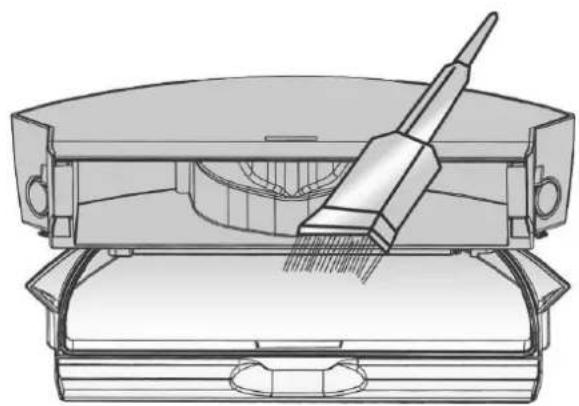
③ Re-assemble it all, then re-insert the dust container into its compartment.
B. CLIPPING – UNCLIPPING THE MAIN DUAL BRUSHES
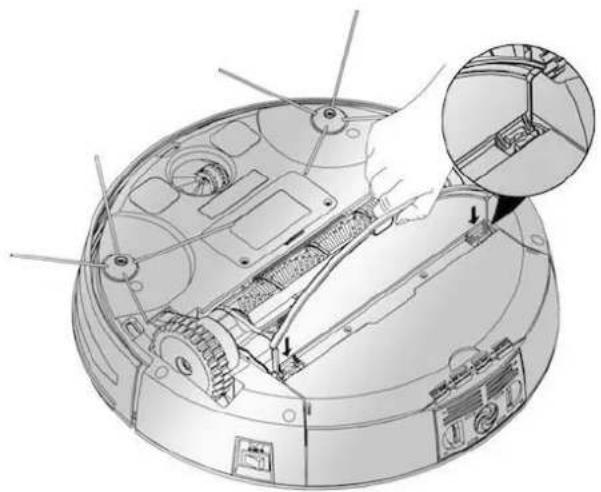
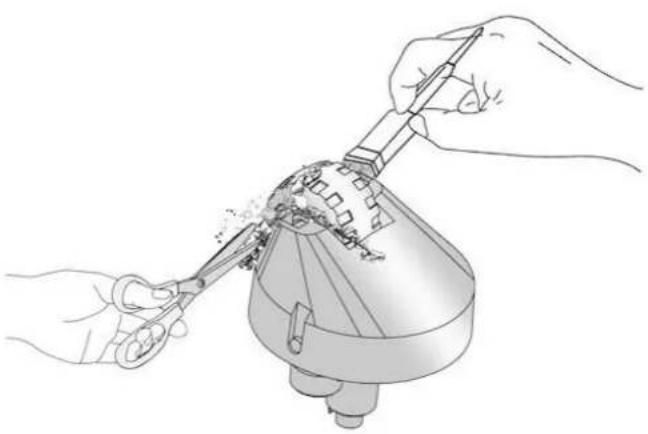
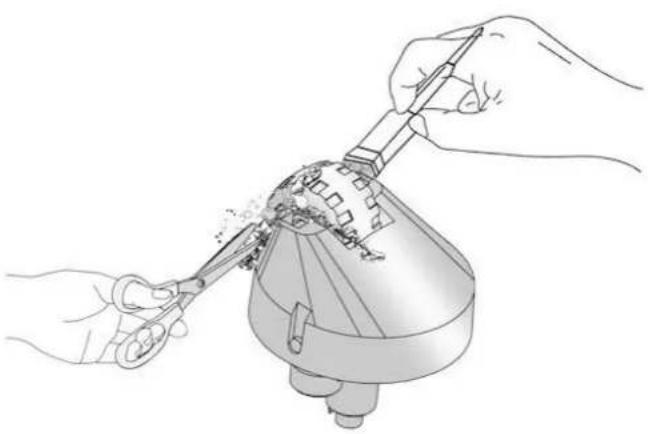
① Open the maintenance bar of the anti-tangle grate by opening the 2 safety latches. Remove the 2 main brushes and clean them.

② The main brushes have moveable extremities. You can thus remove the plastic blades for easy maintenance.
② Place it inside the compartment and replace the protection grate by first inserting part (A) and locking the safety latches again (B).
C. CLIPPING – UNCLIPPING THE LATERAL BRUSHES


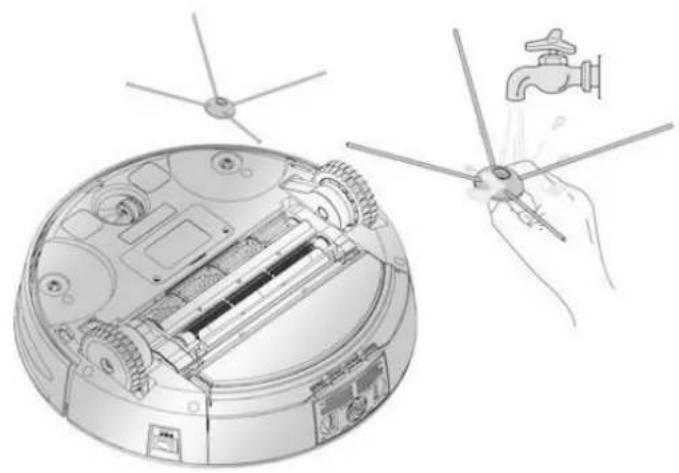
Keep the side brush against the base of the robot vacuum cleaner, and unscrew the fastening screw using the Phillips screwdriver provided with your device.
Once cleaned, reposition the side brushes in their compartment, making sure that the base of the side brushes is also clean.

Please note
In order to clip the side brushes in the right direction, you must line up the side brush with the L (left) mark on the R (right) part of the robot jack. In the same manner, the R (Right) side brush must be aligned with the L (Left) robot jack.

Tips
When the side brushes appear damaged, it is possible to return them to their original shape by soaking them in water for a few minutes.
D. CLEANING THE FRONT WHEEL


Use a flat-head screwdriver, in order to perform a leverage effect and remove the front wheel. Once dust, fur and hair has been dislodged, reposition the wheel on its base.
11. Battery installation
A. INSTALLATION OF THE VIRTUAL WALL BATTERIES
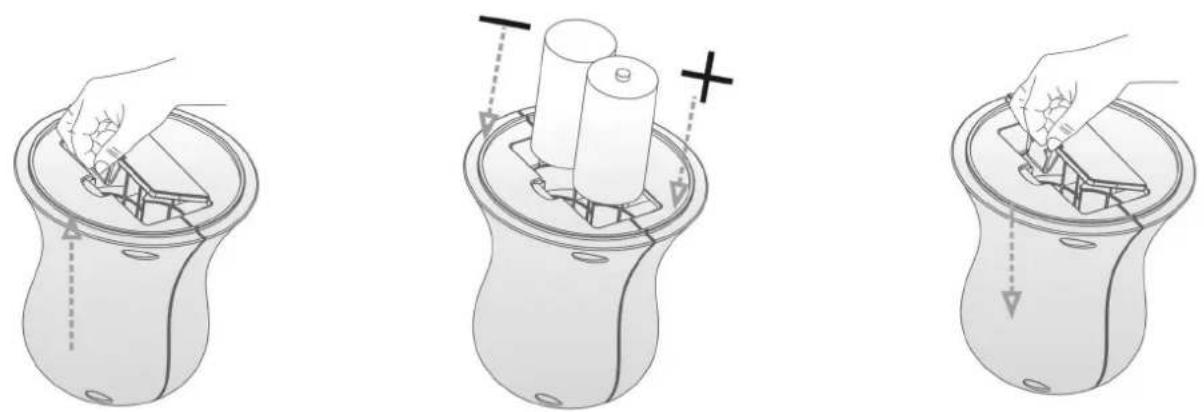
① Unclip the base from the virtual wall.
② Insert 2 R14 batteries. The battery polarization direction is indicated inside the battery installation compartment.
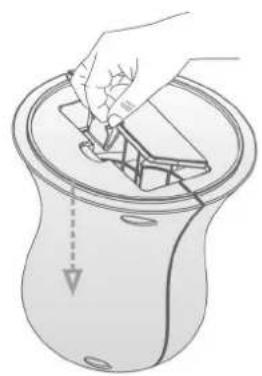
③ Clip on the base. The virtual wall is now ready to use.
B. REPLACING THE REMOTE CONTROL BATTERIES

① Open the remote control cover.
② Insert 2 AAA batteries according to the polarization direction indicated.
③ Replace the cover. The remote control is now ready to use.
C. BATTERY MAINTENANCE AND SAFETY MEASURES
① Remove the batteries from the device if you do not intend to use your e.ziclean ® BOT for a long period.
② Turn the devices off when installing the batteries.
③ Once the batteries are spent, dispose of them in a recycling container provided for this purpose.
12. Using the virtual wall
A. FEATURES OF THE VIRTUAL WALL
The virtual wall's functionality allows you to partition specific cleaning areas for the robot vacuum cleaner.
Thus, it is possible to determine the rooms or places that are to be exclusively cleaned.
The virtual wall has a range of 4 meters.
4m


B. POSITIONING THE VIRTUAL WALL
① Position the virtual wall at ground level, and press the On button.
② Position the virtual wall more than 3 metres away from the charging base in order to avoid interference.
③ The charging base must not be installed within the range or in front of the virtual wall.
13. Using the cleaning mop
The e.ziclean® BOT vacuum cleaner comes with a mop kit. This mop will be particularly useful in order to optimize the cleaning of hard floors, such as parquet and tiles.
It is suggested that the mop be moistened with a floor cleaning solution. The installation and removal of the mop kit is carried out in the following manner:

① Position the slightly damp mop on its kit.
② Clip the mop kit onto the notches provided for this purpose.
14. ERROR codes and troubleshooting
In the event of an error, a digit or a letter will appear on the LCD screen of the e.ziclean ® BOT robot vacuum cleaner. Below you will find a summary of the sources of possible failures, as well as the troubleshooting procedure to follow:
| Error code | Meaning | Solutions |
| E001 | Vacuum motor problem or contact with the dust container. | Check the condition of the vacuum module and make sure that the dust container is correctly clipped in place. |
| E002 | Main brush motor problem. | Check the condition of the module supporting the main brushes. Perform maintenance checks in order to ensure that no obstacle is hampering proper operation. |
| E003 | Void detector problem. | Check the condition of the void detectors. If needed, clean them using a dry cloth. |
| E004 | The battery is empty. | Recharge the device on its base. |
| E005 | Left wheel motor problem. | Check the condition of the left drive wheel. |
| E006 | Right wheel motor problem. | Check the condition of the right drive wheel. |
15. Frequently asked questions
A. My e.ziclean® BOT is not working.
Make sure your device is powered on - On/Off Switch
- Check that the components of your dust container and main and side brushes are clean.
- Check the condition of your battery.
B. My remote control is no longer working.
- Check the condition of the batteries in your remote control.
- Make sure your e.ziclean® BOT is switched on.
- Make sure that your remote control is pointing in the right direction and not too far from your robot vacuum cleaner.
- Perform a synchronization procedure: Turn the robot vacuum off. Press the remote control's POWER button and turn on the robot at the same time. The proper synchronization of your 2 devices is confirmed by means of a beep.
C. My robot vacuum is not auto-charging.
- Check the condition of your charging base. When on, its red light must be on
- In the event that the batteries of your robot vacuum cleaner are weak, recharge your e.ziclean ® BOT directly on the charging base.
- Make sure nothing blocks the front contracts of your robot vacuum.
- Use the "DOCK" button on your remote control.
D. My robot vacuum cleaner is more noisy than usual.
- Thoroughly clean the dust compartments, filters etc.
- Make sure that your main and side brushes are clean and properly positioned.
E. The vacuum cleaner is moving backwards
- Do not operate your vacuum cleaner robot on a very dark floor, or in rooms that are too sunny.
- Check the condition of your front bumper.
F. My robot vacuum fell down the stairs
- Clean the void detectors located under your robot vacuum well.
16. Warranties and certificates.
The e.ziclean® BOT robot vacuum is under warranty for a period of 2 years from the date of purchase, aside from the consumables. The terms of service are available at www.e-zicom.com.
For more information:
. My robot vacuum cleaner's warranty and after-sales return
Contact us directly through our official Internet site:
http://www.e-zicom.com
. The operation of my e.ziclean® robot vacuum cleaner.
Contact your supplier or visit our Internet site
. Find accessories for your e.ziclean® vacuum
All the e.ziclean® accessories are available at: http://www.e-zicom.com
E.ZICOM SAS
1 rue Léon Bocquet
94100 Saint Maur des Fossés
FRANCE
Tel.+339 72 40 73 29

E.ZICOM®
MADE IN INNOVATION
e.ziclean®
e.ziclean® BOT-Saugroboter
Benutzerhandbuch


A. DRAUFSICHT DES SAUGROBOTERS
B. MANUELLES AUFLADEN



E.ZICOM®
MADE IN INNOVATION
e.ziclean®
Aspiratore robot e.ziclean® BOT
Manuale utente


A. VISTA DALL'ALTO DELL'ASPIRATORE ROBOT
E. SCHERMO DI CONTROLLO
B. RICARICA MANUALE


E.ZICOM®
MADE IN INNOVATION
e.ziclean®
Robots aspiradores e.ziclean® BOT
Manual de usuario


A. IMAGEN DE LA PARTE SUPERIOR DEL ROBOT ASPIRADOR
B. RECARGA MANUAL


E.ZICOM®
MADE IN INNOVATION
- Rechargement manuel
- Positionnement du mur virtuel
- E.zicom®
- Made in innovation
- E.ziclean®
- Welcome to E.zicom
- Table of contents
- Introduction
- Register your product
- Precautions for use
- Box contents
- Familiarize yourself with your product's features
- View of the remote control
- Control screen
- Virtual wall
- Installation of the charging base and recharging your robot
- Automatic charging
- Manual charging
- Instructions for docking at the charging base
- Programming the cleaning schedule
- Set the time on your e.ziclean® bot
- Selecting the day
- Selecting the time
- Programming the cleaning days and times
- Select the time
- Deleting the programing settings
- E.ziclean® bot robot navigation modes
- E.ziclean® bot robot cleaning modes
- Automatic cleaning mode
- Spot cleaning mode
- Edge cleaning mode
- Zigzag cleaning mode
- Quick cleaning mode
- Uv lamp
- Update of the e.ziclean® bot robot with e.zigenius
- Maintenance of the e.ziclean® bot robot vacuum cleaner
- Empty the dust container and clean the filter
- Clipping – unclipping the main dual brushes
- Clipping – unclipping the lateral brushes
- Please note
- Tips
- Cleaning the front wheel
- Battery installation
- Installation of the virtual wall batteries
- Replacing the remote control batteries
- Battery maintenance and safety measures
- Using the virtual wall
- Features of the virtual wall
- Positioning the virtual wall
- Using the cleaning mop
- Error codes and troubleshooting
- Frequently asked questions
- My e.ziclean® bot is not working
- My remote control is no longer working
- My robot vacuum is not auto-charging
- My robot vacuum cleaner is more noisy than usual
- The vacuum cleaner is moving backwards
- My robot vacuum fell down the stairs
- Warranties and certificates
- For more information
- Manuelles aufladen
- Schermo di controllo
- Ricarica manuale
- Robots aspiradores e.ziclean® bot
- Recarga manual
Brand : E.zicom
Model : BOT FURTIV
Category : Vacuum Cleaner