E.ziclean Furtiv - Vacuum Cleaner E.zicom - Free user manual and instructions
Find the device manual for free E.ziclean Furtiv E.zicom in PDF.

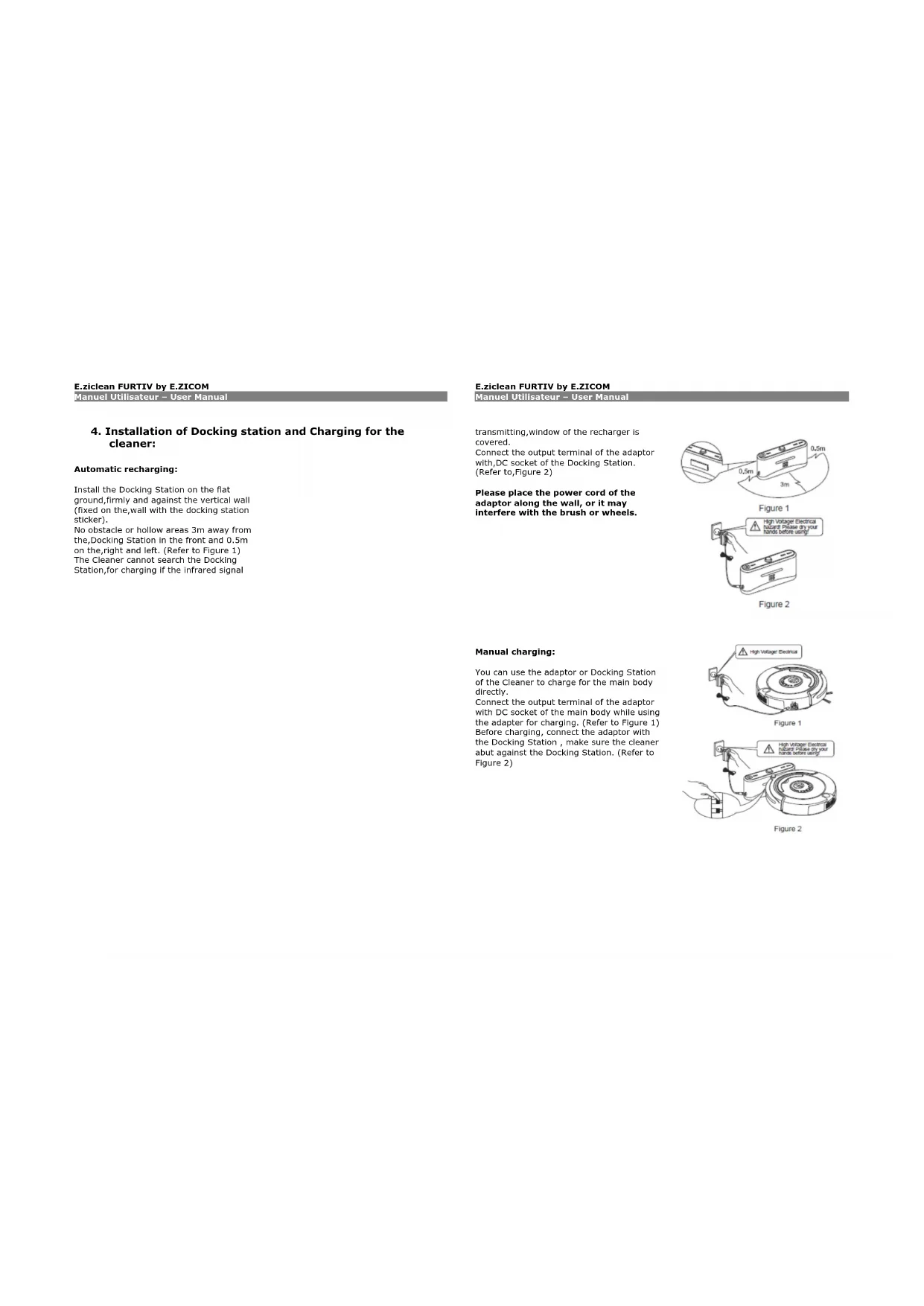

| Product Type | Autonomous robot vacuum cleaner |
| Brand | E.zicom |
| Model | E.ziclean Furtiv |
| Power Supply | Integrated rechargeable battery, power adapter included |
| Charging | Automatic via charging dock or manual via cable |
| Cleaning Modes | Auto mode, Spot mode |
| UV Lamp | Yes, antibacterial sterilizing function |
| Scheduling | Scheduling cleaning days and times via remote control |
| Remote Control | Included, with remote control and scheduling |
| Virtual Wall | Included, allows delimiting areas (range 0 to 8 m) |
| Mopping Kit | Included with 2 washable cloths for smooth floors |
| Brushes | Double main brush + side brush |
| Dustbin Capacity | Not specified |
| Filter | Washable filter, replacement kit included |
| Floor Types | Hardwood, linoleum, carpet, tile, low-pile rugs |
| Obstacle Detectors | Front and infrared sensors |
| Cliff Sensors | 4 sensors under the device to prevent falls |
| Maintenance | Regular cleaning of the filter, brushes, and sensors |
| Warranty | 2-year manufacturer's warranty (excluding consumables) |
| Included Accessories | Charging dock, remote control, virtual wall, mopping kit, replacement brushes, cleaning tool |
Frequently Asked Questions - E.ziclean Furtiv E.zicom
User questions about E.ziclean Furtiv E.zicom
0 question about this device. Answer the ones you know or ask your own.
Ask a new question about this device
Download the instructions for your Vacuum Cleaner in PDF format for free! Find your manual E.ziclean Furtiv - E.zicom and take your electronic device back in hand. On this page are published all the documents necessary for the use of your device. E.ziclean Furtiv by E.zicom.
USER MANUAL E.ziclean Furtiv E.zicom
E.ziclean FURTIV by E.ZICOM
E.ziclean FURTIV by E.ZICOM
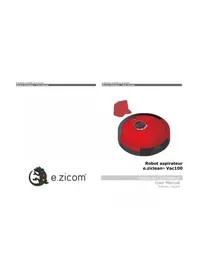
Robot aspirateur E.ziclean Furtiv®
E.ziclean Furtiv® Cleaning Robot
E.ziclean FURTIV by E.ZICOM
E.ziclean FURTIV by E.ZICOM
E.ziclean FURTIV by E.ZICOM
E.ziclean FURTIV by E.ZICOM
E.ziclean FURTIV by E.ZICOM
E.ziclean FURTIV by E.ZICOM
E.ziclean FURTIV by E.ZICOM
Figure 1
Figure 2
E.ziclean FURTIV by E.ZICOM
E.ziclean FURTIV by E.ZICOM
E.ziclean FURTIV by E.ZICOM
E.ziclean FURTIV by E.ZICOM
E.ziclean FURTIV by E.ZICOM
E.ziclean FURTIV by E.ZICOM
E.ziclean FURTIV by E.ZICOM
Figure 1
Figure 2
E.ziclean FURTIV by E.ZICOM
E.ziclean FURTIV by E.ZICOM
E.ziclean FURTIV by E.ZICOM
E.ziclean FURTIV by E.ZICOM
E.ziclean FURTIV by E.ZICOM
E.ziclean FURTIV by E.ZICOM
E.ziclean FURTIV by E.ZICOM
E.ziclean FURTIV by E.ZICOM
E.ziclean FURTIV by E.ZICOM
E.ziclean FURTIV by E.ZICOM
E.ziclean FURTIV by E.ZICOM
E.ziclean FURTIV by E.ZICOM
Thank you for purchasing our new robotic vacuum cleaner E.ziclean Furtiv. please read carefully this manual before using.
No one else can disassemble, maintain or transform the product except the maintenance technicians designated by our company, or it may cause fire, electric shock or personal injury.
Don't touch high-voltage power cord of the electric appliance with your wet hand, or it may cause electric shock.
Don't twist your clothes or any part of your body (head, finger, etc.) into the brush or wheel of the Robot, or it may cause personal injury.
Don't use other charger but the equipped one of the Robot, or it may cause product damage, electric shock or fire due to high voltage.
Don't bend the power cord overly or place weight on it, or it may cause power cord damage, fire or electric shock.
Don't approach cigarette, lighter, match and other heat objects or combustible materials such as the gasoline cleaner.
E.ziclean Furtiv® Cleaning Robot
USER GUIDE - English version
E.ziclean FURTIV by E.ZICOM
Don't forget to turn off the power while transporting or storing the cleaner for long, or the battery may be damaged.
Check whether the charger and socket is connected well, or it may cause charging failure or even fire.
Please use the Cleaner cautiously in the presence of the children to avoid frightening or harming them.
Don't make the Cleaner take in water and other liquors for fear of the product damage.
Don't use the Cleaner outdoors, or it may cause the product damage.
Don't leave movable thread, wire and other objects with the length of more than 150mm on the ground or the brush may be entangled.
The Cleaner is not for use of the disabled (people with physical or mental handicap), children and those who use the Cleaner before reading the User Manual carefully.
Insert the power cord of the charger well or it may cause electric shock, short circuit, smoking or fire.
Remove all easily damaged objects (Including luminous objects, fabrics, glass bottles, etc.) before using, or it may cause damage to these objects or affect the using of the cleaner.
Don't stand or sit on the Cleaner, or it may cause damage to the Cleaner or personal injury.
Don't use the Cleaner on small tables and chairs or other small space, otherwise the Cleaner may be damaged.
Don't use the Cleaner in commercial places, or the Cleaner may be damaged by excessive use.
E.ziclean FURTIV by E.ZICOM
The product, mainly applicable to home, hotel rooms and small office, is good for cleaning to various short-haired carpet, wood floor, hard floor, ceramic tile, etc.
2. Function Introduction:
E.zicom introduces its new vacuum robot cleaner, E.ziclean Furtic; with rechargeable battery, controlled by advanced intelligent program, with the following function: automatic vacuum cleaning, mopping, sterilizing, timing cleaning, "full go" cleaning, wireless remote control, speed selection; easy to use and clean.
3. Components of the cleaner:
- Your E.ziclean Furtiv vacuum
• 1 Remote control
• 1 Auto charging docking station
• 1 AC/DC Adaptor
• 1 Space isolator
• 1 Trailing bar - 2 mop pads
- Dust Brudh
2 Side Brushes
2 Filters
E.ziclean FURTIV by E.ZICOM
E.ziclean FURTIV by E.ZICOM
a. Control Panel of main body
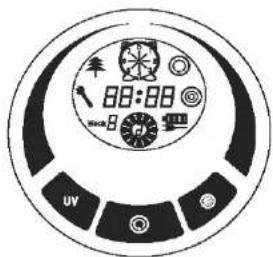

Date /Week set display

Wheel rotation / Speed display

UV lamp display

Auto cleaning display

Spot cleaning display

Current week display

malfunction display

Charging/power display

Time/error code display

UV lamp key

Auto cleaning key

Spot cleaning key
E.ziclean FURTIV by E.ZICOM
E.ziclean FURTIV by E.ZICOM
Make sure full charged 5/6 hours (the battery should be charged and discharged for about 2 or 3 times before reaching the best performance).
Turn on the power switch, the buzzer will ring once and the display will show as follows:
| Week 8 | displays the current date per week automatically based on the date. |
| displays in case of malfunction, | |
| displays the battery, three grids mean full power, or decreased power with less grids. | |
| BB: BB | displays the timing cleaning time, current time per day and malfunction code. |
| means running Speed ; fast speed on speed 1, or slow on speed 2. | |
| displays the UV lamp is on when the Cleaner is working, when open the UV lamp , it can sterilize. or off when not working. | |
| displays the Cleaner is cleaning in the spot cleaning mode. | |
| displays the Cleaner is cleaning in the auto cleaning mode. |
E.ziclean FURTIV by E.ZICOM
E.ziclean FURTIV by E.ZICOM
The following display functions will only be selected and set in the remote control:
| [K24X] | means selecting cleaning day or some days or everyday of one week. |
| 88: 88 | displays the time and timing cleaning setting |
 | means adjusting the speed of the wheel. |
| Week 8 | displays the current date per week. |
| Operating Function of Touch Keys | Function Description |
Automatic cleaning Key  | Clear up gadgets or obstacles in the room before cleaning, and then press Automatic Cleaning Key , it will clean by spiral, linear, zigzag, follow the wall modes automatically.You can choose fast or slow running when cleaning.The Cleaner will stop running in case of low battery, then it will ring ten times and search the docking station for charging automatically.The Cleaner will stop cleaning if you press any keys during cleaning. |
Spot cleaning key  | Press Spot Cleaning Key , it will enter the area about 1m2 and clean by the spiral mode.Choose the fast cleaning time of about 2 minutes and low cleaning time of about 4 minutes, and it will stop automatically after the cleaning.The Cleaner will stop cleaning if you press any keys during cleaning. |
| UV key Turn on UV | on the power of the main body, the display will light.Press the UV Key, the Icon will be display, UV lamp will be on if the Cleaner is working, or off if the Cleaner stops working.If the UV lamp is unused, press the key to turn off, then the icon will be off.The on/off mode of UV lamp will be memorized automatically. |
E.ziclean FURTIV by E.ZICOM
E.ziclean FURTIV by E.ZICOM
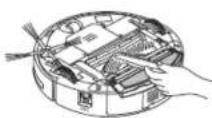
Bottom of main body

E.ziclean FURTIV by E.ZICOM
4. Installation of Docking station and Charging for the cleaner:
Automatic recharging:
Install the Docking Station on the flat ground, firmly and against the vertical wall (fixed on the wall with the docking station sticker).
No obstacle or hollow areas 3m away from the, Docking Station in the front and 0.5m on the, right and left. (Refer to Figure 1) The Cleaner cannot search the Docking Station, for charging if the infrared signal
E.ziclean FURTIV by E.ZICOM
transmitting, window of the recharger is covered.
Connect the output terminal of the adaptor with, DC socket of the Docking Station. (Refer to, Figure 2)
Please place the power cord of the adaptor along the wall, or it may interfere with the brush or wheels.

Figure 1
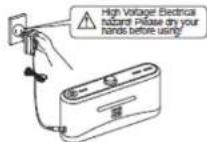
Figure 2
Manual charging:
You can use the adaptor or Docking Station of the Cleaner to charge for the main body directly.
Connect the output terminal of the adaptor with DC socket of the main body while using the adapter for charging. (Refer to Figure 1) Before charging, connect the adaptor with the Docking Station, make sure the cleaner abut against the Docking Station. (Refer to Figure 2)
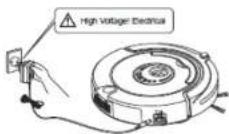
Figure 1
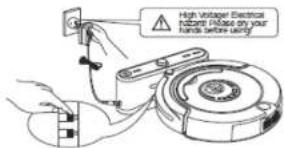
Figure 2
E.ziclean FURTIV by E.ZICOM
E.ziclean FURTIV by E.ZICOM
The Cleaner may fail to find the Docking Station due to the obstacle, decreased battery and complex condition, so the Docking Station should be put in wide space.
When the cleaner finish cleaning, the temperature of the battery is very high; so charging time will be longer.
Press DOCKING in the remote control if you want to charge for the main body, the Cleaner will search the Docking Station for charging within available scope automatically. (Refer to Figure 3)
Press any key in host panel or POWER OFF and DOCKING keys in the remote control while the Cleaner is searching for the Docking Station, the Cleaner will then stop searching.
After the battery is used up, the first grid of the charging icon will flicker, when the second and then the third grid will flicker showing it is charging, stop flickering after completing the charging. (Refer to Figure 4 and Figure 5)
Turn on the Cleaner, full three grids show enough power, one grid missing means the decreased power, and it should be charged after three grids missing. (Refer to Figure 6)


Figure 4
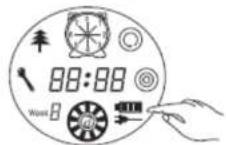
Figure 5
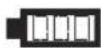
Figure 6
E.ziclean FURTIV by E.ZICOM
E.ziclean FURTIV by E.ZICOM
5. Assembly & Dissassembly and Cleaning of Dustbin:
Assembly & Disassembly of Dustbin:
Extract the dustbin by pressing the red key on top. (Refer to Figure 1 and Figure 2)
- Press the orange button on it, and then the blower will pop up automatically. (Refer to Figure 3)
- Reverse the blower, release 2 fasteners and open the cover. (Refer to Figure 4 and Figure 5)
- Open the bracket and the filter will appear. (Refer to Figure 6)
- Change a new filter, press the semicircle bracket by one hand to release the fastener from the filter screen, and remove the filter grid by the other hand and then change a new one. (Refer to Figure 7)
![graph TD A["Figure 1"] --> B["Figure 2"] B --> C["Figure 3"] C --> D["Figure 4"] D --> E["Figure 5"] E --> F["Figure 6"] F --> G["Figure 7"]](/content/2026/02/365954/images/f7e405192334a060d1a10843234bf1cb648df33bfda82387355ef8866ceeba6d.jpg)
E.ziclean FURTIV by E.ZICOM
- Reverse the dustbin, tear out the mop, release the trailing bar and then unplug the right and left fasteners on the bottom of the dustbin (Refer to Figure 8 and Figure 9). All parts should be assembled as before disassembly.
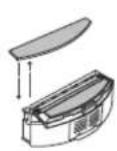
Figure 8
![graph TD A["Raw Material"] --> B["Internal Component"] B --> C["Product"]](/content/2026/02/365954/images/5f52c3c641836c5b2883fbd47e99e85f95329cb9c43a0a273c4f9f90528b2fbe.jpg)
Figure 9
Don't use the mop and trailing bar on the carpet or uneven ground.
E.ziclean FURTIV by E.ZICOM
Cleaning of Dustbin and Blower:
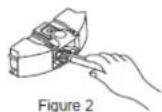
First dump the dust, and then clean it with Dust Brush. (Refer to Figure 1)
Pop up the blower, and then clean the air inlet/outlet with dust brush. (Refer to Figure 2 and Figure 3)
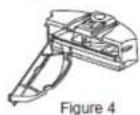
Don't clean the blower in water! Pop up the blower, take out the filter, and then clean the dustbin in water. (Refer to Figure 4)
Clean the filter by hairdryer or Dust brush. (Refer to Figure 5 and Figure 6)
After cleaning, you can assemble it firmly as before the disassembly.



E.ziclean FURTIV by E.ZICOM
6. Assembly & Disassembly and Cleaning of Main Brush, Floor Brush, Side Brush:
a. Assembly & Disassembly of Mid Cleaning Brush and Floor Brush:
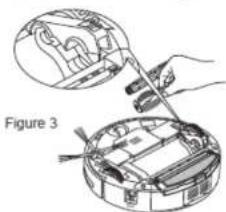
Force the locking bar forward and raise the cover by right thumb, and then raise rod of the mid cleaning brush by your left hand. (Refer to Figure 1 and Figure 2)
Take out the main brush and floor brush. (Refer to Figure 3)
Insert the main brush and floor brush into the holes before closing the cover in assembly.

b. Assembly & Disassembly of Side Brush:
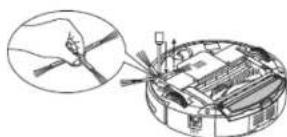
Release the screw in the main shaft of the side brush before changing the side brush. Press the side brush against the main shaft and then fasten the screw. (Refer to the figure)
c. Cleaning of Main Brush and Floor Brush:
Clear the hair or big dust particles on the brush and floor brush regularly to improve the cleaning performance. Clean the dust at the air intake. Clean the wastepaper or small particles by dust brush directly. Rotate the brush carefully and cut by scissors or pull by hand

E.ziclean FURTIV by E.ZICOM
the hair, yarn and other twisted objects.
The cleaning of the main brush and floor brush can be done by reference to the assembly & disassembly.
c. Cleaning of Sensor and Infrared Transparent Window:
Clean the sensor and infrared transparent window with the cotton swab or soft cloth.
The wall detection sensor is in front of the Cleaner, while the ground detection sensor and infrared transparent window are at the bottom of the Cleaner. (Refer to the figure below)
Please keep the transparent window clean so as to make the Robot work better.

E.ziclean FURTIV by E.ZICOM
6. Replacement of Battery:
Battery replacement of the Cleaner:
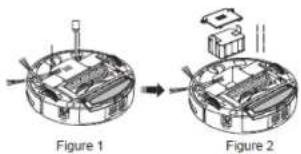
Release the screw with the screwdriver, open its base plate and then take out the battery. (Refer to Figure 1 and Figure 2) Please place the positive and negative electrode correctly for fear of the damage due to wrong electrode! Please set the Cleaner in charging state to keep the best of the battery while the Cleaner is unused.
Battery replacement of the Space Isolator:
spin the pivot as per figure 1 and the cover will open.
Please place the batteries (not included) with correct polarity (+/-) (Refer to Figure 2)
The right place of battery. (Refer to Figure 3)
Please take out the battery if it was unused for long.
Battery replacement of the remote control:
Open the battery cover and then replace the battery. (Refer to Figure 1)
Please place the batteries (not included) with correct polarity (Refer to Figure 2)
Please take out the battery if it was unused for long.


E.ziclean FURTIV by E.ZICOM
Please don't forget to take out the battery before discarding the Cleaner. Please remember to turn off the switch before taking out the battery from the Cleaner and Space Isolator.
Please don't place the battery in the high-temperature environment above 45°C or in the water.
Please don't exert external force to the battery or drop them from high place.
The battery should be recycled with safe disposal. Please don't discard it freely or throw it into fire for fear of explosion!
E.ziclean FURTIV by E.ZICOM
MON : Timing set / Monday
WED/UV: UV sterilizing / Wednseday
: Spot cleaning / Friday
SUN/DOCK : Automatic recharging / Sunday
TUE: Time Set / Tuesday
: Automatic cleaning / Thursday
SAT/V : Speed selection / Saturday
FULL GO : It will work automatically once your battery is full


: Turn Off / Cancel
E.ziclean FURTIV by E.ZICOM
b. Using Method & Functional Status of Control Panel:
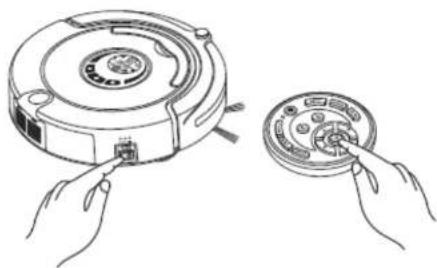
You should check code of the remote control or cleaner.
Check the remote control and Cleaner have enough power, turn off the Cleaner, press OK on the remote control for more than 4s, and then turn on the Cleaner without releasing OK.
After the Cleaner toots twice, release OK, then the code check set is finished. If you fail to hear toot during the code check, just repeat the above process.
E.ziclean FURTIV by E.ZICOM
E.ziclean FURTIV by E.ZICOM
| Auto Cleaning | Press the key, the Cleaner will clean in the auto cleaning mode;Press the key again, the Cleaner will stop running. |
| Spot Cleaning | Press the key, the Cleaner will clean in the spot mode;Press the key again, the Cleaner will stop running. |
| Week & Time SettingWeekBB:BB | 1. Tum on the Cleaner.2. Press true on the remote controller, the icon → β in the LCD screen of cleaner will flicker.3. Press correct week button on the remote controller; there is display in icon → β, 1 means Sunday, 2 means Monday, ...accordingly, 7 means Saturday.4. After setting correct week, then you can set time5. Press ▶ to enter time setting, the Icon BB-00 in the LCD screen of the cleaner will flicker.6. Press ▲ or ▼ to set the correct hour.7. Press ▶ again BB-00 will flicker8. Press or to set the correct minute9. After finishing Week & Time Setting, press “OK” to save it |
| Timing Cleaning SettingBB:BB | Cleaning Week setting:1. Tum on the Cleaner.2. Press Timing Cleaning setting button MON △, then the icon 📄 in the LCD screen of the cleaner will flicker.3. Press any week button /some week buttons or all week buttons you want to set timing cleaning on any day or days or everyday of a week, then the selected date or dates will flicker. In 📄, 1 means Sunday, 2 means Monday, accordingly, 7 means Saturday.4. If you want to cancel any setting day or days, just press the week button again.5. after set the clean day of each week, it is possible to set the starting time of cleaning.Cleaning time setting:1. Press ▶ to enter cleaning time setting, the Icon BB-00 in the LCD screen of the cleaner will flicker.2. Press ▲ or ▼ to select the timing cleaning hour.3. Press ▶ again BB-00 will flicker4. Press ▲ or ▼ to set the timing cleaning minute.5. After finishing Week & Time Setting, press “OK” to save it.When the cleaner is connected to the Docking Station, at the setting time it will start cleaning automatically (when the battery is fully charged); when the cleaning is finished or the battery is low, the cleaner will go back to the Docking Station automatically. |
| Turn off/cancel/stop | 1. Turn on the power switch of the cleaner, and press the key can turn on/off the Cleaner.2. You can stop the running mode by pressing the key.3. You can delete and return to the original setting if you get wrong sets or want to stop setting.4. Press the key for more than 5s, you can delete all set and memory and return to the initial status |
| OK key | You must press “OK” to save any setting you did |
| UV lamp key | You can turn on/off UV lamp by pressing the “UV” key while the cleaner is in the Standby mode or running. The on/off set will be memorized automatically. |
| Auto Docking Key | While the Cleaner is in the Standby mode or running, the Cleaner will search the Docking Station for charging after you press “SUN/DOCK” key. |
| ▲ Forward key | Press “Forward”, the Cleaner will run forward cleaning press can stop. It will stop automatically in case of the obstacle. |
| ▼ Backward key | Press ▼ for long, the Robot will run backward cleaning, and it will stop after you release the key. |
| ◀ Turn left key | Press ◀ and release till the Cleaner turn left to the direction you want. It will stop automatically in case of the obstacle. |
| ▶ Turn right key | Press ▶ and release till the Cleaner turn right to the direction you want. It will stop automatically in case of the obstacle. |
You should use the remote control within 10m (radio signal scope), or you may fail to control the main body.
The Cleaner may fail to find the Docking Station due to the obstacle, complex condition or because the battery' power used up.
E.ziclean FURTIV by E.ZICOM
8. Auto charging Dock station
a. Docking station display and control panel

- LED decorative light (a little essence can be placed above)
- Decorative light switch
- Power LED
- Charging indicator
- Signal transmitting
- Charging positive electrode
- Charging negative electrode
- Charging power DC socket
| 1 LED decorative light Turn on the decorative light to activate the atmosphere. | |
| 2 Decorative light switch Press the switch to turn on/off while the decorative light is on. | |
| 3 Power LED The Power LED will light when the Docking Station is connected with the power, or turn off if not connected. | |
| 4 Charging indicator The indicator will flicker while the recharger is connected with the cleaner. | |
| 5 Signal transmitting Transmitting signal is the only way to lead the cleaner to return the Docking Station for charging, so the signal transmitting position should be clean for long without any obstacle on it. | |
| 6 - 7 Recharging positive & negative electrode | The electrode and that of the Cleaner are connected to charge under contact mode, so the position should be clean without any obstacle on it while using, or there will be impact to the charging. |
| 8 Charging power DC socket | The power DC socket, called recharger for short, used to connect output terminal DC24V of the adaptor, is the charging transit station between the Cleaner and adaptor, so the recharger should be placed against the wall firmly and the adaptor cable should be away from the recharger, or the Robot may have impact and winding during cleaning. |
E.ziclean FURTIV by E.ZICOM
a ⏻ Turn off
b ○ Low
c Middle
d ● High
Space Isolator, an accessory of the cleaner, can block area by sending special infrared signal so as to prevent the Cleaner from entering some unnecessary areas.
N° NAME FUNCTION INFORMATION
| 1 | Toggle switch | You can switch the function by sliding repeatedly:Turn off, Low, Middle and High. |
| a Turn off | Slide to the position, then the power is off. | |
| b Low | Slide to Low and turn on the power, you can selectthe distance within 4m as required by infrared wall. | |
| c Middle | Slide to Middle and turn on the power, you can selectthe distance within 6m as required by infrared wall. | |
| d High | Slide to High and turn on the power, you can selectthe distance within 6m as required by infrared wall. | |
| 2 | Infrared wall transmit-ting signal head | Slide, then you can adjust the distance of the SpaceIsolator. |
| 3 | Near-infrared transmittinghead | The near-infrared transmitting signal makes the Cleanerrun outside the Space Isolator scope of 50-100cm withoutany impact to it. |
| 4 | Power LED | The Power LED will flicker once every 8s until the lowbattery after you slide to Low, Middleand High, and the Cleaner works normally. |
E.ziclean FURTIV by E.ZICOM
10. Installation method of Space isolator
- The Space Isolator is placed at the entrance to the stair or room generally.
- You can place the Space Isolator at proper position to stop the Cleaner passing through some places.
- Remove obstacles from the area you want to block in front of the Space Isolator as much as possible for fear of poor effect.

The Space Isolator should be placed at the same level of the ground where the E.ziclean is running.
You should check whether the Cleaner can pass the Space Isolator while using it first.
The distance between the Space Isolator and recharger should be more than 3m, or there will be interference.
The Docking Station should not be installed within the signal scope of the Space Isolator.
E.ziclean FURTIV by E.ZICOM
The Cleaner doesn't work or clean poorly:
- Check whether turning on the switch.
- Check whether the dustbin, filter and intake are clean, and whether the side brush works.
- Check whether the battery voltage declines greatly.
The remote control doesn't work:
- Check the battery status of the remote control.
- Check the battery status of the Robot.
- Whether check code between the remote control and main body.
- Check whether the remote control is within the available scope of the signal transmitting.
The Cleaner can not charge automatically:
- Check whether the adaptor is connected well with the charger and whether power LED of the recharger lighting
- Check whether the battery power is too low; If so, charge the Cleaner with the adaptor directly.
- Make sure there is no barrier in front of the Docking Station
- Use the remote controller to let the cleaner go back to the Docking Station
Increased noise in cleaning:
- Clean the dustbin and filter.
- Check whether the brush or side brush is too dirty.
- If the noise still too big, you may send back the cleaner to the after sale service maintenance to add Lubricants..
The Cleaner stops working suddenly and rings intermittently:
-
Check whether the set cleaning time is over
-
Check whether there are failure codes on the display by reference of the followings
The cleaner back off continuously:
- Avoid use in sunlight or dark color carpet.
- Pat the front bumper.
The cleaner dropped from the stair:
Clean the ground detection sensors at the front bottom of the cleaner
The cleaner can not Auto-Charging after didn't use in a long time
Use the adaptor to full charged first.
The cleaner stop to work, but no error code display
Don't disassemble and maintain it by yourself, contact the after sale service maintenance
E.ziclean FURTIV by E.ZICOM
E.ziclean FURTIV by E.ZICOM
12. Failure Information which may appear during using:
Failure Code Failure Cause How to solve
| E001 Ground detection sensors Clean the sensors at the front bottom of the cleaner |
| E002 Middle brush Clean the rubbish such as hair, thread wrapped on the brush |
| E003 Power off Use the adaptor to charge , after full charged , then use again |
| E004 Left &right wheel Check the left and right wheels , clean the rubbish on it |
| E005 Dustin poor contact Check the dustbin and re-fix the dustbin after cleaning |
If the failure still exist after the above check, please contact the after-sale service maintenance, professional maintenance staff or the technical center of the company, don't disassemble and maintain it by yourself.
Contact Information:
E.zicom
www.e-zicom.com
Your E.ziclean Furtiv warranty is 2 years.
Please check on our website our After Sales Conditions for any further Information.

- E.ZICLEAN FURTIV BY E.ZICOM
- FUNCTION INTRODUCTION
- COMPONENTS OF THE CLEANER
- INSTALLATION OF DOCKING STATION AND CHARGING FOR THE CLEANER
- AUTOMATIC RECHARGING
- MANUAL CHARGING
- ASSEMBLY & DISSASSEMBLY AND CLEANING OF DUSTBIN
- ASSEMBLY & DISASSEMBLY OF DUSTBIN
- CLEANING OF DUSTBIN AND BLOWER
- ASSEMBLY & DISASSEMBLY AND CLEANING OF MAIN BRUSH, FLOOR BRUSH, SIDE BRUSH
- ASSEMBLY & DISASSEMBLY OF MID CLEANING BRUSH AND FLOOR BRUSH
- ASSEMBLY & DISASSEMBLY OF SIDE BRUSH
- CLEANING OF MAIN BRUSH AND FLOOR BRUSH
- CLEANING OF SENSOR AND INFRARED TRANSPARENT WINDOW
- REPLACEMENT OF BATTERY
- BATTERY REPLACEMENT OF THE CLEANER
- BATTERY REPLACEMENT OF THE SPACE ISOLATOR
- BATTERY REPLACEMENT OF THE REMOTE CONTROL
- USING METHOD & FUNCTIONAL STATUS OF CONTROL PANEL
- AUTO CHARGING DOCK STATION
- DOCKING STATION DISPLAY AND CONTROL PANEL
- INSTALLATION METHOD OF SPACE ISOLATOR
- THE CLEANER DOESN'T WORK OR CLEAN POORLY
- THE REMOTE CONTROL DOESN'T WORK
- THE CLEANER CAN NOT CHARGE AUTOMATICALLY
- INCREASED NOISE IN CLEANING
- THE CLEANER STOPS WORKING SUDDENLY AND RINGS INTERMITTENTLY
- THE CLEANER BACK OFF CONTINUOUSLY
- THE CLEANER DROPPED FROM THE STAIR
- THE CLEANER CAN NOT AUTO-CHARGING AFTER DIDN'T USE IN A LONG TIME
- THE CLEANER STOP TO WORK, BUT NO ERROR CODE DISPLAY
- FAILURE INFORMATION WHICH MAY APPEAR DURING USING
- CONTACT INFORMATION
Brand : E.zicom
Model : E.ziclean Furtiv
Category : Vacuum Cleaner