
HIF-1995BT - DJ Equipment ROADSTAR - Free user manual and instructions
Find the device manual for free HIF-1995BT ROADSTAR in PDF.


| Product Type | DJ Equipment |
| Brand | Roadstar |
| Model | HIF-1995BT |
| Dimensions (approx.) | 300 x 200 x 100 mm |
| Weight (approx.) | 2.0 kg |
| Power Supply | AC 100-240 V, 50/60 Hz power adapter |
| Power Consumption | 15 W (max) |
| Wireless Connectivity | Bluetooth 5.0 for audio streaming |
| USB Player | Yes, compatible with USB flash drives up to 32 GB (FAT32) |
| SD Card Reader | Yes, SD/SDHC cards up to 32 GB |
| Radio Receiver | FM stereo, auto search |
| Microphone Input | 6.35 mm jack with volume and echo control |
| Audio Output | Built-in stereo speakers (2 x 15 W RMS) |
| Additional Functions | Karaoke, recording, equalizer, DJ effects |
| Housing Material | ABS plastic |
| Color | Black with silver accents |
| Operating Temperature | 5 °C to 35 °C |
| Operating Humidity | 20% to 80% non-condensing |
| Maintenance and Cleaning | Clean with a soft, dry cloth. Do not use abrasive products. |
| Safety | Do not expose to water or moisture. Unplug before cleaning. Use only the supplied adapter. |
| Spare Parts and Repairability | Contact Roadstar after-sales service for repairs. Parts available on request. |
| Included Accessories | Power adapter, RCA audio cable, remote control, wired microphone |
| Warranty | 2 years |
Frequently Asked Questions - HIF-1995BT ROADSTAR
User questions about HIF-1995BT ROADSTAR
0 question about this device. Answer the ones you know or ask your own.
Ask a new question about this device
Download the instructions for your DJ Equipment in PDF format for free! Find your manual HIF-1995BT - ROADSTAR and take your electronic device back in hand. On this page are published all the documents necessary for the use of your device. HIF-1995BT by ROADSTAR.
USER MANUAL HIF-1995BT ROADSTAR
HOME HI-FI SYSTEM WITH CD / USB / FM RADIO / TURNTABLE AND BLUETOOTH FUNCTION.
HIF-1995BT.

Bluetooth®
Instruction manual
Bedienungsanleitung
- Your new unit was manufactured and assembled under strict ROADSTAR quality control. Thank you for purchasing our product. Before operating the unit, please read this instruction manual carefully. Keep it also handy for further future references.
The exclamation point within the triangle is a warning sign alerting the user of important instructions accompanying the product.

The lightening flash with arrowhead symbol within the triangle is a warning sign alerting the user of "dangerous voltage" inside the unit.

To reduce the risk of electric shock, do not remove the cover. No user serviceable parts inside the unit. Refer all servicing to qualified personnel.
230v\~
This unit operates on 230V \~ 50Hz. If the unit is not used for a long period of time, remove the plug from the AC mains.

This unit must not be exposed to moisture or rain.

The power switch in this unit is mounted on the secondary circuit and does not disconnect the whole unit from the mains in OFF position.

Ensure all connections are properly made before operating the unit.

This unit should be positioned so that it is properly ventilated. Avoid placing it, for example, close to curtains, on the carpet or in a built-in installation such as a bookcase.

Do not expose this unit to direct sunlight or heat radiating sources.
Correct Disposal of This Product (Waste Electrical & Electronic Equipment)
This marking shown on the product or its literature, indicates that it should not be disposed with other household wastes at the end of its working life. To prevent possible harm to the environment or human health from uncontrolled waste disposal, please separate this from other types of wastes and recycle it responsibly to promote the sustainable reuse of material resources. Household users should contact either the retailer where they purchased this product, or their local government office, for details of where and how they can take this item for environmentally safe recycling. Business users should contact their supplier and check the terms and conditions of the purchase contract. This product should not be mixed with other commercial wastes for disposal.
2
EnglishEng
HIF-1995BT.
CD/MP3 PLAYER WITH TURNABLE, CASSETTE, STEREO RASSO ENCODING AND BLUETOOTH
INSTRUCTION MANUAL
Please read this instruction manual carefully and familiarize yourself with your new HiFi system before using it for the first time. Please retain this manual for future reference.
LOCATION OF CONTROLS
the infra-red transmitter requires 2 pcs CR-2025 size battery for operation.

37) OPEN / CLOSE CD DOOR.
38) RECin cd or phono mode, press to active recording function.
39) REPEAT BUTTON
40) PLAY/PAUSE▶II in cd/usb mode, press once to start playback. press again to enter pause mode.
41) skip/search backward press once to skip to previous tack.press & hold for search backward.
42) SKIP/SEARCH forward ▶▶press once to skip to next track, press & hold for search forward.
43) STOP ■ in cd/usb mode, press to stop playback or cancel the stored program.
44) + 10 Track Button
45) - 10 Track Button
46) RANDOM BUTTON in cd/ush mode press to active random function
47) DELETE button
48) PROGRAM in CD/USBb mode, press to active programming function.


EnglishEng
CONNECTING TO POWER
Before switching on make sure that the voltage of your electricity supply is the same as that indicated on the rating plate.
For your own safety read the following instructions carefully before attempting to connect this unit to the mains.
This unit is designed to operate on AC 230V 50Hz current only. Connecting it to other power sources may damage the unit.
CAUTION
To prevent electric shock disconnect from the mains before removing cover. No user serviceable parts inside. Refer servicing to qualified service personnel.
SAFETY PRECAUTION
Do not allow this unit to be exposed to rain or moisture.
Mains Supply: 230V 50Hz - AC only

This symbol means that this unit is double insulated. An earth connection is not required.
POWER SUPPLY
Remove the stereo carefully from the box, retaining the packaging for future use.
Press the POWER button 1 second to turn ON the unit.
Press and hold the POWER button 3 seconds to turn OFF the unit.
When stop playing song, if nobody switch OFF the unit is switch OFF itself
automatically after 15 minutes.
FMTUNER
Press the ON / OFF button for one second to switch ON the unit. The ON indicator
- Tune to the desired FM radio station by turning the Tuning control (21).
ANTENNA
• For FM reception there is a 75 Ohm FM antenna connector (28) at the rear of the unit.
Connect the Cable FM signal for best reception.
FM & FM-STEREO RECEPTION
- Stereo reception is possible when the tuned FM station is broadcasting in stereo.
- When in FM Stereo mode and the station is broadcasting in Stereo, the STEREO
indicator (19) lights up.
BLUETOOTH FUNCTION
Press the ON / OFF button for one second to switch ON the unit. The ON indicator ON (17) light up.

5
1) Press the BT button (12), the BT indicator will light up.
2) Select from your portable device (Smartphone, Tablet...) the ID Bluetooth tagged as "CBT", then confirm connection.
3) Now you can transfer the music to the HIF-1995BT. and all operations can only be
operated from your mobile device.
TURNTABLE OPERATION
Preparation
Open the Record Player Cover.
Unscrew the two TRANSIT SCREWS by using a coin.
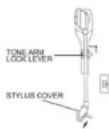
Release the Tonearm Clamp, and remove the stylus protector.


Listening to Records
- Press the PHONO button (31) to select the TURNTABLE function.
- Place a record on the turntable, over the central spindle. Place the EP adapter over the central spindle when playing 17cm EP records.
- Set the Speed Selector (24) to 33 / 78 or 45 rpm according to the record.
- Release the tonearm clamp, and remove the protective cap from the stylus.
- Lift the Tonearm with the Tonearm Lift Lever.
- Move the tonearm to the beginning of the record, or to the start of a particular track.
- Gently lower the tone arm onto the record with the Tonearm Lift lever to start playing.
- When the record is finished the tonearm will automatically stop. Lift the tonearm from the record and return it to the rest.
- To stop manually, lift the tonearm from the record and return it to the rest.
Notes: Do not stop or turn the platter manually.
Moving or jarring the turntable without securing the Tonearm clamp could result in damage to the Tonearm. Replace the protective cap on the stylus when not in use.
6
EnglishEng
PLAYING COMPACT DISC
- To start
- Press function selector (26) to select "CD/USB" mode.
- Press "OPEN/CLOSE" button (11) to open the cd door (10).
- Place a cd with the printed side facing up inside the tray & then close the co door.
- focus search is performing, the first track will start playback.
- Playback / Pause / Stop
- To interrupt, press the "STOP" button (32) once, the total number of tracks compare on the lcd display (18). press again PLAY/PAUSE to resume normal playback.
- Skip/search mode (skip/search up ▶/ skip/search down )
- During play or pause mode, if "skip up" button (3) is pressed. It will go to next track and display the track no. and then remain the play or pause mode.
- During play or pause mode, if "skip down" button (3) is pressed. it will go back to the beginning of the track, original track no. is display and remain the play or pause mode.
- After step 2, press "skip down" button (3) again will go to the previous track and remain the play or pause mode.
- If press and hold the "skip up/down button" (3) during cd/mp3 playabck, the playing track will go fast forward or backward until the button being released.
- To skip 10 tracks UP or DOWN press the TRACK+10 or TRACK-10 button on Remote Control.
NOTE:
TO SWITCH ON THE UNIT, KEEP PRESSED THE ON/OFF BUTTON FOR 1 SECOND.
TO SWITCH OFF THE UNIT, KEEP PRESSED THE ON/OFF BUTTON 3 SECONDS.

7
MP3/WMA TRACK FORMAT REQUIREMENT:
- MP3 bit rate : 32 kbps\~256 kbps and wma bit rate : 32 kbps \~ 320 kbps
- The performance of playing MP3 disc is various from the quality of recording disc and the method of recording. Furthermore, the searching lead-time for MP3-CD is longer than normal cd due to difference format.
REPEAT/RANDOM MODE
Press the REPEAT button from Remote Control or PLAY MODE from main unit to activate this function. All the tracks can be played in difference mode as follow:
FOR CD

FOR MP3/WMA DISC

- Repeat play
You can listen the desired tracks or folder repeatedly by this function.
- Random play
You can listen all the tracks or folder in a random order by this function
CD DISC PROGRAMMING
Up to 99 tacks can be programmed for MP3 (20 in CD) and play in any order. before use, be sure the system is at stop mode before programming:
- Press CD/USB mode & stop the cd playback.
- Press the "PLAY MODE" button, "P* will appear on LCD display (18). Moreover, it will indicate program no. and digits for track no. to be programmed.
- Select a desired track by pressing SKIP ▶▶ or ◀◀ buttons (3).
- Press the "PLAY MODE" button to store the trace into memory.
- Repeat steps 3 and 4 to enter additional tracks into the memory if necessary.
- When all the desired tracks have been programmed, press cd "PLAY/PAUSE — (2) to play the disc in assigned order.
- To cancel the programmed file, press "STOP" button
856
EnglishEng
PLAYBACK OF MP3/WMA SONG VIA USB STORAGE MEDIA
The system is able to decode and playback all MP3 /WMA file which stored in the memory media with USB connecting port
- Set function selector (15) at CD/USB mode and then press FUNCTION button (6) to select "USB.
- Plug-in the USB plug with the face up & make sure it going into completely.
- Connecting the USB upside down or backwards could damage the audio system or the storage media (usb thumb drive). Check to be sure the direction is correct before connection.
- The system will start reading the storage media automatically after connecting, and LCD display (18) will show the total number of MP3/WMA files
- Repeat the same playback procedure as playing CD/MP3 disc as above.
REMARK
- The system can detect and read the file under mp3 and wma format only though the usb port.
- If connect the system to MP3 player via the usb socket, due to variances in MP3 encoding format, some mp3 player may not be able to play via the usb socket. this is not a maul-function of the system.
LISTENING TO TAPE
GENERAL OPERATION
Cassette Playback:
Set the Function button (6) to "TAPE" mode.
The system will start playback automatically after inserting the cassette tape.

Fast Forward:
Press "TAPE FORWARD / EJECT" Button (33) half inwards during playback mode. The tape will wind forward.
Slightly press the "TAPE FORWARD / EJECT" Button (33) again to resume playback.
Stop and Eject :
Press the" TAPE FORWARD / EJECT " Button (33) completely inwards and the cassette tape will be ejected through the cassette door cover (34).

PLAY

FAST FORWARD


EJECT
ENCODING OF CD/PHONO INTO MP3 FILE
The system is able to ENCODE normal CD, CASSETTE or TURNTABLE to MP3 format and recording at memory media with USB connecting port.
A) CD ENCODING
I) Ecnoding
- perform normal playback of the cd track you want to encode & record,
- press "RECORD" button (9) twice during the playback of the desire track, unit will display. Encoding is performing now.
- Press the STOP button to finish recording the track.
II) Encoding 1 disc
- Place a cd with the printed side facing up inside the tray & then close the co door
-
press the "RECORD" button (9) twice after focus search completed. unit will display "REC". Encoding is performing now.
-
After completing of encoding, unit will stop playback automatically.
REMARK:
- The recording speed is 1:1 and according to the actual plying time of the cd track
- The system will creat a "RECORD" folder and then store the encoding track in it.
- The recording format is preset at - MP3 bit rate : 128 kbps, sampling rate : 44.1khz
- No song title will be recorded during encoding mode
- To interrupt the recoding, press the "RECORD" button again during record mode.
- Recording will be completed only entire song being encoded, if terminate the encoding process intermediately, there is no track being recorded nor stored to the USB.
III) COPYING OF MP3/WMA FILE
If putting a MP3/WMA disc instead of a CD-DISC, the system will copy the files to the USB or SD card if press the "RECORD" button (9). The operation procedures is same as cd encoding as stipulate on above, and the system will switch to copying mode only if MP3/WMA file being read.
10
EnglishEng
B) PHONO ENCODING
1) Insert the USB device.
2) Press the function button to "PHONO".
3) Start playback at PHONO for the track which you want to record to USB.
4) Press the RECORD button two times to start encoding.
5) The display show REC.
4) After finish of recoding, press the STOP button to stop recording.
C) CASSETTE ENCODING
1) Insert the USB device.
2) Press the function button to "TAPE".
3) Start playback at TAPE for the track which you want to record to USB.
4) Press the RECORD button two times to start encoding.
5) The display show REC.
4) After finish of recoding, press the STOP button to stop recording.
REMOVING OF USB / MEMORY CARD
To remove the USB, turn off the power or switch the function mode to either CD, AUX or TUNER first. Un-plug it by pulling out the USB socket directly.
DELETE TRACKS FROM USB
1) Insert the USB device.
2) Press the function button to "CD/USB".
3) Press the button FUNCTION to select USB device.
4) During playback or STOP condition, press the button DELETE from Remote Control to delete the current track.
SPECIFICATIONS
Power Supply
AC: 230V \~ 50Hz
RC Battery: CR-2025
Radio Frequency Coverage
FM: 87.5 - 108MHz
Design and specifications are subject to change without notice.
SICHERHEITSHINWEISE

(1) REPEAT 1 → (2) REPEAT 1 FOLDER → (3) REPEAT ALBUM → (6) OFF MODE ← ← ← ←
• Wiederholung
● Mode lecture/pause/stop (play / pause / stop)
● Lecture aléatoire (random play)
natural_image
Two-step diagram showing hand positioning and movement of a device (no text or symbols)
ENGLISH (turntable adjustment)
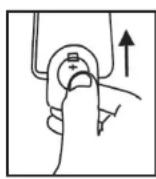
To make sure the turntable can play the record with different standard completely, a hole with ‘ SERVICE ONLY ’ pvc plate located at the back of he unit to adjust the screw inside the turntable. When the turntable stop early and auto- return, pls. use a screw driver to turn the screw inside the hole about 45 degree in clockwise direction. If the record still can not be played completely, stop play and re-turn the screw 45 degree in clockwise direction again, till the turntable can play the record completely and then auto-return. When the turntable cann’t stop and auto-return, but keep turning after playing the record completely, pls. use a screw driver to turn the screw inside the hole about 45 degree in couter-clockwise direction. If the turntable still cann’t stop and auto-return, stop play and re-turn the screw 45 degree in couter-clockwise direction again, till the turntable can stop and auto- return after playing the record completely.
natural_image
Line drawing of a hand using a tool to interact with a grid-patterned device inside a rectangular frame (no text or symbols)


- Correct Disposal of This Product (Waste Electrical & Electronic Equipment)
- HIF-1995BT.
- CD/MP3 PLAYER WITH TURNABLE, CASSETTE, STEREO RASSO ENCODING AND BLUETOOTH
- LOCATION OF CONTROLS
- CONNECTING TO POWER
- CAUTION
- SAFETY PRECAUTION
- POWER SUPPLY
- FMTUNER
- ANTENNA
- FM & FM-STEREO RECEPTION
- BLUETOOTH FUNCTION
- TURNTABLE OPERATION
- Preparation
- Listening to Records
- PLAYING COMPACT DISC
- - To start
- - Playback / Pause / Stop
- - Skip/search mode (skip/search up ▶/ skip/search down )
- MP3/WMA TRACK FORMAT REQUIREMENT:
- REPEAT/RANDOM MODE
- - Repeat play
- - Random play
- CD DISC PROGRAMMING
- PLAYBACK OF MP3/WMA SONG VIA USB STORAGE MEDIA
- REMARK
- LISTENING TO TAPE
- GENERAL OPERATION
- Fast Forward:
- Stop and Eject :
- ENCODING OF CD/PHONO INTO MP3 FILE
- A) CD ENCODING
- B) PHONO ENCODING
- C) CASSETTE ENCODING
- REMOVING OF USB / MEMORY CARD
- DELETE TRACKS FROM USB
- SPECIFICATIONS
- SICHERHEITSHINWEISE
- ENGLISH (turntable adjustment)
Brand : ROADSTAR
Model : HIF-1995BT
Category : DJ Equipment