
T-350 - Weather Station HAMA - Free user manual and instructions
Find the device manual for free T-350 HAMA in PDF.


| Product type | Wireless weather station |
| Brand | Hama |
| Model | T-350 |
| Screen dimensions | 150 x 100 mm |
| Main unit weight | 250 g |
| Power supply | 2 AAA batteries (not included) or 5V mains adapter |
| Outdoor sensors | 1 wireless sensor (temperature and humidity) |
| Signal range | Up to 100 m in open field |
| Main features | Indoor/outdoor temperature, humidity, weather forecast, moon phase, radio-controlled time, alarm |
| Display | Backlit LCD with trend display |
| Maintenance and cleaning | Clean with a soft, dry cloth; do not use abrasive products |
| Safety | Do not expose to excessive moisture; use indoors only |
| Spare parts and repairability | Standard batteries; mains adapter available as option |
| General information | 2-year warranty; operating temperature: -10°C to +50°C |
Frequently Asked Questions - T-350 HAMA
User questions about T-350 HAMA
0 question about this device. Answer the ones you know or ask your own.
Ask a new question about this device
Download the instructions for your Weather Station in PDF format for free! Find your manual T-350 - HAMA and take your electronic device back in hand. On this page are published all the documents necessary for the use of your device. T-350 by HAMA.
USER MANUAL T-350 HAMA
OperatingInstructions
Bedienungsanleitung
Moded'emploi
Instruccionesdeuso
Οδηγίεςχρήσης
Instrukcjaobstugi
Használatiútmutató
Návodk p oužití
Návodnapoužitie
Manualdeinstruções
Manualdeutilizare
Bruksanvisning
Käyttöohje
Работнаинструкция
GR
PL
H
CZ
P
RO
S
FIN
BG



ControlsandDisplays
- Outdoor temperature display
- Indoortemperature display
- MAX / MIN button for outdoor temperature = loadsthestoredmax./min.valuesforoutdoortemperature
- RESET – button for outdoor temperature = R esetsthestoredmax./min.valuesforoutdoortemperature
- MAX / MIN button for indoor temperature = loadsthestoredmax./min.valuesforindoortemperature
- RESET – button for indoor temperature = R esetsthestoredmax./min.valuesforindoortemperature
- Outdoorsensor
- Opening for wall mounting
- Stand
- Batterycompartmentcover
1. ExplanationofWarningSymbolsandNotes
Warning
This symbol is used to indicate safety instructions to draw your attention to specific hazards and risks.

Note
This symbol is used to indicate additional information or important notes.

2.PackageContents
• L CDT-350thermometer
- 1 AAbattery
• Theseoperatinginstructions
3. Safety Instructions
• T heproductisintendedforprivate,non-commercialuseonly.
• U setheproductforitsintendedpurposeonly.
- Protect the product from dirt, moisture and overheating, and only use it in a dry environment.
- Do not operate the product outside the power limits given in the specifications.
• D o n otusetheproductinmoistenvirnmentsandavoidsplashes.
- Do not use the product in the immediate vicinity of heaters or other heat sources or indirect sunlight.
- Do not use the product in areas where the use of electronic devices is not permitted.
• D o n otdroptheproductanddonotexposeittoanymajorshocks. - Do not open the device or continue to operate it if it becomes damaged.
- Do not attempt to service or repair the product yourself. Leave any and all service worktoqualifiedexperts.
- D isposeofpackagingmaterialimmediatelyaccordingtolocallyapplicable regulations.
- Do not modify the product in any way. Doing so voids the warranty.
Warning-Batteries

- When inserting batteries, note the correct polarity (+ and - markings) and insert the batteries accordingly. Failure to do so could result in the batteries leaking orexploding.
- Only use batteries (or rechargeable batteries) that match the specified type.
- Before you insert the batteries, clean the battery contacts and the polar contacts.
• D o n otallowchildrentochangebatterieswithoutsupervision. - Do not mix old and new batteries or batteries of a different type or make.
- Remove the batteries from products that are not being used for an extended period(unlessthesare b eingkeptreadyforanemergency).
• D o n otshort-circuitbatteries. - Donotchargebatteries.
- Do not throw batteries in a fire.
- Keepbatteriesoutofthereachofchildren.
- N everopen,damageorswallowbatteriesorallowthemtoenterthe environment.Theycancontaintoxic,environmentallyharmfulheavymetals.
- I immediatelyremoveanddisposeofdeadbatteriesfromtheproduct.
- A voidstoring, chargingorusing the device in extreme temperatures and extremely low atmospheric pressure (forexample, at high altitudes).
4. Getting Started
Open the battery compartment (10), insert one AA battery, ensuring that the battery is inserted correctly in terms of polarity, and then close the battery compartment (10). The thermometerisnowreadyforuse.
5. Installation
You can either stand the thermometer on an even surface using the fold-out stand (9) on the back of the device, or attach it to a wall using the opening (8) on the back of the device.

Note
- In order to measure the temperature outside, the outdoor sensor (7) must be located outside of the building.
- Ensure that the outdoor sensor is protected from direct sunlight and rain.
- N otethatthemaximumdistancebetweenethermometerandtheoutdoor sensor (7) is approximately 150 cm due to the length of the cable. For this reason, we recommend placing the thermometer near a window or a door.
- Ensure that the outdoor sensor cable is not bent, placed on sharp edges or otherwisedamaged.
Warning

Before mounting, check that the wall you have chosen is suitable for the weight to be mounted. Also make sure that there are no electric, water, gas or other lines running through the wall at themountingsite.
6.Operation
- If you do not change the settings, the thermometer is set in the factory to display the current outdoor and indoor temperature on the display(1/2).
- T hethermometerautomaticallystoresthemaximumandminimumvaluesforthe outsidetemperature a ndinsidetemperature.
- Press the MAX/MIN button for outdoor temperature (3) / MAX/MIN button for indoor temperature (5) to display the maximum outdoor temperature/indoor temperature s incethelaststart/reset.
- Press the MAX/MIN button for outdoor temperature (3) / MAX/MIN button for indoor temperature (5) again to display the minimum outdoor temperature/indoor temperature s incethelaststart/reset.
- Press the MAX/MIN button for outdoor temperature (3) / MAX/MIN button for indoor temperature (5) a third time to display the current outdoor temperature/indoortemperature.
- Press the RESET button for outdoor temperature (4) / RESET button for indoor temperature (6) while the maximum or minimum temperature is being displayed in ordertoresetthetemperature c currently shown.
Note- R eplacingthebatteries

Thethermometerisresetautomaticallyoncethebatteryrunsoutand/orisreplaced.
7. Care and Maintenance
Only clean this product with a slightly damp, lint-free cloth and do not use aggressive cleaningagents. Makesure that water does not enter the product.
8.WarrantyDisclaimer
Hama GmbH & Co KG assumes no liability and provides no warranty for damage resulting from improper installation/mounting, improper use of the product from failure to observe the operating instructions and/or safety notes.
9.Specifications
| LCD T -350thermometerOutdoorsensor | ||
| Powersupply | 1,5V1 x A A b artery(alkaline) | - |
| Measuringrange Temperature | -10°C - +50°C | -50°C - +70°C |
| Cablelength150cm | ||
AftertheimplementationoftheEuropeanDirective2012/19/EUand2006/66/EU inthenationallegalsystem, the following applies:
Electricandelectronicdevicesaswellasbatteriesmustnotbedisposedof with household waste. Consumers are obliged by law to return electrical and electronicdevicesaswellasbatteriesattheendoftheirservicelivestothe
public collecting points set up for this purpose or point of sale. Details to this are defined by the national law of the respective country. This symbol on the product, the instruction manual or the package indicates that a product is subject to these regulations. By recycling, reusing the materials or other forms of utilising old devices/Batteries, you are making an important contributiontoprotectingourenvironment.
CZ Pokynyk likvidaci
All listed brands are trademarks of the corresponding companies. Errors and omissions excepted, and subject to technical changes. Our general terms of delivery and payment are applied.
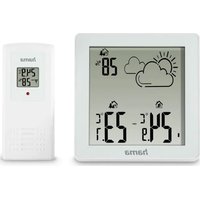



Brand : HAMA
Model : T-350
Category : Weather Station