
CF201 - Heated blanket TRISTAR - Free user manual and instructions
Find the device manual for free CF201 TRISTAR in PDF.


| Product type | Heated blanket |
| Brand | TriStar |
| Model | CF201 |
| Dimensions | 140 x 180 cm (double size) |
| Weight | Approximately 1 kg |
| Power supply | 230 V ~ 50 Hz |
| Power | 120 W |
| Temperature settings | 3 levels (low, medium, high) |
| Timer | Automatic shut-off after 1 to 9 hours |
| Automatic shut-off function | Yes, built-in safety |
| Fabric | Soft and comfortable microfiber |
| Machine washable | Yes, disconnect the controller and machine wash at 30°C |
| Detachable controller | Yes, to facilitate washing |
| Safety | Overheating protection |
| Certifications | CE, conformity marking |
| Color | White/ecru (depending on availability) |
| Warranty | 2 years |
Frequently Asked Questions - CF201 TRISTAR
User questions about CF201 TRISTAR
0 question about this device. Answer the ones you know or ask your own.
Ask a new question about this device
Download the instructions for your Heated blanket in PDF format for free! Find your manual CF201 - TRISTAR and take your electronic device back in hand. On this page are published all the documents necessary for the use of your device. CF201 by TRISTAR.
USER MANUAL CF201 TRISTAR
natural_image
Folded gray towel with a medical pressure monitor attached, placed on a white surface (no text or symbols visible)USER GUIDE / HANDLEIDING / MANUEL D'UTILISATEUR BEDIENUNGSANLEITUNG / MANUAL DE USUARIO BRUKSANVISNING / BRUGERVEJLEDNING ANVÄNDARHANDBOK / KÄYTTÖOHJE / MANUALE D'USO MANUAL DO UTILIZADOR / UŽIVATELSKÁ PŘÍRUČKA ODHΓIEΣ XPHΣΗΣ / HASZNÁLATI ÚTMUTATÓ / INSTRUKCJA OBSŁUGI UŽÍVATEL'SKÝ MANUÁL/ РУКОВОДСТВО ПОЛЬЗОВАТЕЛЯ
V1.0 - 10/12
CE
UK The features described in this manual are published with reservation to modifications.
NL De in deze handleiding beschreven mogelijkheden worden gepubliceerd onder voorbehoud van wijzigingen.
FR Les possibilités décrites dans ce manuel sont publiées sous réserve de modifications.
DE Die in dieser Bedienungsanleitung beschriebenen Leistungsmerkmale werden unter dem Vorbehalt von Änderungen veröffentlicht.
ES Las características descritas en este manual pueden ser objeto de futuras modificaciones.
SE Funktionerna i denna bruksanvisning publiceras med reservation för ändringar.
DK Vi forbeholder os retten til ændringer af de specifikationer, der er beskrevet i denne brugsanvisning.
NO Funksjoner beskrevet i denne manualen kan endres uten nærmere informasjon.
FI Tässä ohjekirjassa julkaissut tiedot voivat muuttua ilman ennakkoilmoitusta.
PT As características descritas neste manual são publicadas sob reserva de modificação.
CZ Možnost úpravy funkcí popsaných v této příručce vyhrazena.
PL Właściwości opisane w niniejszej instrukcji obsługi są publikowane z zatrzeżeniem prawa wprowadzenia zmian.
SK Vlastnosti popísané v tejto príručke sú publikované s vyhradeným právom na zmenu.
IT Le caratteristiche descritte nel presente manuale vengono pubblicate con riserva di modifica.
HG A jelen használati útmutatóban leírt adatokra a gyártó fenntartja a változtatás jogát.
GR Οι λειτουργίες που περιγράφονται στο παρόν εγχειρίδιο, δημοσιεύονται με επιφύλαξη τυχόν τροποποιήσεων.
RU Для рассмотренных в этом руководстве возможностей сохранено право на изменения.
IMPORTANT INSTRUCTIONS RETAIN FOR FURTHER USE
This instruction manual is part of the BW-4770. It contains important information about setting up the device, safety aspects and correct use. The instruction manual must always be kept close by the device. It must be read and followed by anyone responsible for operating the device, resolving faults and/or cleaning it. Keep this instruction manual safely and if you sell the device please give it to the next owner.
1 Intended Purpose
The BW-4770 generates a suiting warmth. A wonderful way to relieve stress.
This heating blanket is fitted with a special safety appliance which can automatically regulate the temperature by turning the power on and off at regular intervals. The maximum temperature of the heating blanket is limited to ensure safe use.
2 Copyright
This documentation is protected by copyright.
All rights, including those of total or partial photomechanical reproduction, duplication and distribution by means of particular processes (such as data processing, data carriers and data networks), and substantive and technical changes are reserved.
3 Safety advice
WARNING
- The device is only intended for the purpose described in this user guide. The manufacturer cannot be held liable for personal injuries or damages occurring as a result of inappropriate or careless use.
- Follow the basic safety precautions for all electronic equipment when using this device.
- This device is not a toy. Don't let children play with it.
- The device is only for private indoor use and is not intended for commercial purposes.
• This appliance is not intended for medical use in hospitals. - This unit is not waterproof. Don't expose this device to rain or moisture.
- Do not leave the device unattended when plugged in. Unplug the device immediately from the main power after use.
• Make sure that the device is not too close to heat sources such as ovens, radiators or direct sunlight.
DANGER - Risk of electrocution
- Ensure that the supply voltage stated on the rating plate is compatible with your mains supply.
- Do not use the blanket if there is visible damage to the blanket, controls or leads.
- Do not use the device if it is not working properly, dropped or damaged.
• Repairs to electrical appliances must only be carried out by qualified persons. Incorrect repairs can lead to considerable danger for the user. In the event of repairs, please contact our customer service or an authorized dealer. - Don't disassemble this device. It doesn't contain parts that can be repaired by the user.
- Do not insert objects into any opening.
- Do not place the unit in a damp room and at a distance of less than 1.5 m away from a water source. Do not use the device too long. Extensive use could lead to a shorter lifetime.
- Never carry, pull or turn the heating blanket by the mains lead and do not let the lead get tangled.
- Never use the appliance during a thunderstorm.
- Keep the mains lead away from hot surfaces.
- Never touch a device that has fallen into water. Unplug the device from the mains outlet immediately.
- Do not use the heating blanket when wet.
WARNING - Heating blanket precautions
• Only use the control unit (KDA6-FT) that is supplied with the heating blanket and marked on the label.
- This device is not intended to be used by person (including children) with mental, sensory or physical handicaps or person with lack of experience and/or knowledge to use this device. For their safety is it is necessary to keep close supervision and give them clear instructions when they are using the device.
- Do not use this blanket on helpless persons, small children or persons insensitive to heat.
- It is not allowed to use the heating blanket If you are fitted with a cardiac pacemaker, implant or other aid. Individuals with pacemaker should consult their doctor before use.
- Carefully check the heating blanket before each use.
- Do not fold or crease the heat blanket during use before connecting the device to your power supply.
- Neither pierce the blanket with, nor attach safety pins or other spiky or sharp objects to the blanket.
- Do not tuck in.
- This blanket is intended to be used as a "THROW" or "OVER BLANKET" and therefore should always be placed on top of an individual, not under them, or on the top of a bed sheet. It is not to be used as an "under blanket".
- Do not use the heat blanket on children or persons who are disabled, a sleep or insensitive to heat.
- Make sure that the mains lead will not be in a position that could cause people to fall over it.
- The blanket has to be on top of the individual and not underneath them. Do not tuck it in around or under the person. It should remain loose so as not to prohibit the user's movement.
- When using as an "Over Blanket" on a bed, it should be placed above a top sheet on top of the person and not under them on a mattress.
- The blanket should be positioned so that the controller is within easy reach of the user. The controller must not be placed under covers, pillows or quilt and not have any pressure on it.
- Never apply the blanket unsupervised.
- Prolonged use of the heating blanket at a high setting could lead to skin burns.
- Do not cover the blanket with any other cushions. The control switch should not be covered or placed on or below the blanket while the unit is in operation.
- Should you have any concerns about health issues, consult your doctor before using the heat blanket.
- Do not use the appliance to heat animals.
- Do not use with other heating appliances.

WARNING - Risks of fire
• Do not activate the blanket when it is still packed in the box. Extensive heat can occur and cause fire.
- Do not place the heating blanket under inflammable objects, especially not under paper or curtains.
Generation and Prevention of Electric Blanket Static
After the electric blanket is powered on, some users will feel an electric short when their dry bodies slightly touch the blanket. After their bodies cling to the blanket, they do not have such a feeling. This is called electric induction. When the heating wire is powered on, an AC magnetic field is generated. Due to the AC magnetic field, electric charge is gathered on the surface of the blanket. When our skin touches the blanket with static, electric charge is discharged.
Static is a natural phenomenon. Due to friction, underclothes made of chemical fiber, carpets, cushions and wall paper will generate static. Home appliances will also generate static when they are being used.
The following methods of eliminating static are simple and easily used:
- When indoor air humidity is less than 30%, static is easily generated. If humidity is increased to 45%, static is hard to be generated. As a result, in dry weather, sprinkle water in the house or place one to two basins to hold water at the places where sprinkling water is inapplicable to increase indoor air humidity.
- Static particulates are generated around screens of TV sets and computers. These particulates will adsorb floating dust and be absorbed on to our skins. As a result, wash your hands and face before going to sleep.
- It is recommended that elders, children, and static-sensitive persons should wear underclothes completely made of cotton in winter, and frequently bathe and change clothes to avoid influence of static.
- Walk barefoot helps discharge of static on the body surface. As a result, walk barefoot before going to the bed, which effectively eliminates static on the body surface.
- On the electric blanket, bed sheets or bedspreads completely made of cotton are preferred.
4 Description
The heating blanket is equipped with a digital controller unit.
- 1 - Five temperature level LED indicator
- 2 - Timer indicator (1 hour up to 8 hours)
- 3 - Power LED
- 4 - ON/OFF switch
- 5 - Cancel button: will switch off the heating
- 6 - Timer button: set the heating times (from 1 up to 8 hours)
- 7 - Temperature set button: select the temperature level (5 levels)
- Check that the control unit switch (4) is in the OFF-position (0) before connecting it to the mains socket.
5 Connecting to the mains
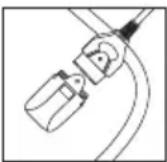
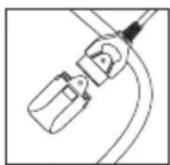
- The heating blanket plug and mains plug are fixed to the control unit.
- Connect the heating blanket plug to the heating blanket connector.
- Connect the mains plug to the mains socket (230V AC/50Hz).

WARNING
The mains socket must be close and easy accessible.


6 Using the over blanket
Is is advised to preheat the electric blanket for 30 minutes before use.
- Switch the controller to the ON-position (1) & the power indicator LED (3) will illuminate.
- Push the temperature button (7) until all 5 temperature level LED's (1) are illuminated (Maximum heat). It takes at least 30 minutes to get to maximum heat.
- Once it has reached maximum heat, you can alter the heat level by pushing the temperature key (7),
IMPORTANT
To prevent the blanket from getting too hot, the heat level will automatically reduce to a low heat level after being on maximum heat for one hour. When the blanket is likely to be used for an extended period, it is suggested that the controller should be adjusted to low heat level 1 or 2 (1 or 2 LED's illuminate).
7 Times modes
The controller has a timer function (+/-1 to +/-8 hours).
- Push the timer button repeatedly to select the desired time (example - 3 times to use the blanket for +/-3 hours).
- To cancel the timer, push the cancel button (5). All settings will reset.
This table indicates which Timer indicator LED's (2) will illuminate, depending on the selected time.
| P r | e | s | s | t | i | m | e | s | 1 | 2 ... | 3 |
| Corresponding Timer indicator LED on | |||||||||||
| Selected time 1 hr 2 hr 3hr 4hr 5hr 6hr 7hr 8hr 1hr | ... | ||||||||||
8 Reset
If the Timer indicator (2) lights (LED's) alternately flash, check the connector (socket) and ensure the controller is fully connected to the blanket. Press the cancel button (5) to cancel the flashing and set to the required function again.
If the indicator lights (LED's) simultaneously flash, check if the throw/over blanket is folded or tucked. Spread the throw/over blanket and press the cancel button (5). After a few minutes, set to the required function again.
If you cannot cancel the flashing, unplug the blanket from the mains and check the lead is not damaged.
If the flashing continues, the appliance must not be used and be checked by a qualified repairer.
9 Technical data
| Dimensions (W/H/D)WeightRated voltagePower consumptionMaterial | 160 cm x 130 cm870 gInput: AC 220-240 V / 50 Hz120 W100% polyester |
10 Cleaning


- Machine washing of the blanket is possible; however, hand wiping will prolong the life of the blanket.
• To machine wash, remove the control unit and place the blanket in a net bag and seal it. - Use a small amount of detergent and set the washing machine to a "Delicate Wash" with a maximum temperature of 40^ . When washed, remove the blanket from the net bag and drape it over a clothes line to dry.
- Do not use clothes pegs to secure it.
- Allow the blanket to dry naturally.

WARNING
• Never use abrasive cleaners, brushes, gasoline, kerosene, glass polish or paint thinner to clean.
- Do not wring out the blanket
- Do not dry using a tumble dryer
- Do not iron the blanket
- Do not dry clean.
- Don't connect the blanket to power supply to dry it.
• Don't dry it in the sun or iron it, which will cause safety problems because of the aging of the insulating layer.
- Do not use an appliance such as a hair dryer to dry it
- Do not submerse the controller in water or get it all wet.
11 Maintenance & storage
Store the heating blanket only if it is dry.
The dry electric heating blanket should be folded without any crease. Don't place it under quilt or other things in order to avoid any pressure.

WARNING
- Don't use any mothproofing agent like naphthalene, which will damage the insulation material.
- Do not try to repair a fuse link or thermal link. The appliance must be returned to the manufacturer or his agent if the link has ruptured.
- Examine the appliance frequently for signs of wear or damage. If there are such signs or if the appliance has been misused, return it to the supplier prior to any further use.
- Avoid creasing the appliance.
- If the supply cord is damaged, it must be replaced by the manufacturer, its service agent or similarly qualified persons in order to avoid a hazard.
12 Disposal of the device (environment)
At the end of the device lifecycle, you should not throw this device into the normal household garbage but bring the device to a collection point for the recycling of electrical and electronic equipments. The symbol on the device, user guide and/or box indicate this.
Some of the device materials can be re-used if you bring them to a recycling point. By re-using some parts or raw materials from used devices you make an important contribution to the protection of the environment. Please contact your local authorities in case you need more information on the collection points in your area.

13 Topcom warranty
13.1 Warranty period
The devices have a 24-month warranty period. The warranty period starts on the day the new unit is purchased.
Consumables or defects causing a negligible effect on operation or value of the equipment are not covered. The warranty has to be proven by presentation of the original or copy of the purchase receipt, on which the date of purchase and the unit-model are indicated.
13.2 Warranty exclusions
Damage or defects caused by incorrect treatment or operation and damage resulting from use of non-original parts or accessories are not covered by the warranty.
The warranty does not cover damage caused by outside factors, such as lightning, water and fire, nor any damage caused during transportation.
No warranty can be claimed if the serial number on the units has been changed, removed or rendered illegible.
Any warranty claims will be invalid if the unit has been repaired, altered or modified by the buyer.

This device is in compliance with the essential requirements and other relevant provisions of the directive 2004/108/EC. The Declaration of conformity can be found on:
www.tristar.eu
BELANGRIJKE INSTRUCTIES BEWAREN VOOR LATER GEBRUIK
natural_image
Three-panel line drawing showing a mechanical or electrical component with wires and connectors, no text or symbols present.natural_image
Three-panel line drawing showing a mechanical or electrical component with wires and connectors, no text or symbols present.natural_image
Three-panel line drawing showing a mechanical or electrical component with wires and connectors, no text or symbols present.6 Uso de la manta
natural_image
Three-panel line drawing showing a mechanical or electrical component with wires and connectors, no text or symbols present.ADVARSEL - Brandfare


natural_image
Three-panel diagram showing a mechanical or electrical component with wires, no text or symbols presentnatural_image
Three-panel line drawing showing a mechanical or electrical component with wires and connectors, no text or symbols present.natural_image
Three-panel line drawing showing a mechanical or electrical component with wires and connectors, no text or symbols present.natural_image
Three-panel line drawing showing a mechanical or electrical component with wires and connectors, no text or symbols present.natural_image
Three-panel line drawing showing a mechanical or electrical component with wires and connectors, no text or symbols present.natural_image
Three-panel line drawing showing a mechanical or electrical component with wires and connectors, no text or symbols present.


- IMPORTANT INSTRUCTIONS RETAIN FOR FURTHER USE
- Intended Purpose
- Copyright
- Safety advice
- WARNING
- DANGER - Risk of electrocution
- WARNING - Heating blanket precautions
- WARNING - Risks of fire
- Generation and Prevention of Electric Blanket Static
- Description
- Connecting to the mains
- Using the over blanket
- IMPORTANT
- Times modes
- Reset
- Technical data
- Cleaning
- Maintenance & storage
- Disposal of the device (environment)
- Topcom warranty
- Warranty period
- Warranty exclusions
- BELANGRIJKE INSTRUCTIES BEWAREN VOOR LATER GEBRUIK
- Uso de la manta
- ADVARSEL - Brandfare
Brand : TRISTAR
Model : CF201
Category : Heated blanket