
EL-PIR70 - Motion detector HQ - Free user manual and instructions
Find the device manual for free EL-PIR70 HQ in PDF.


| Product type | Infrared motion detector |
| Brand | HQ |
| Model | EL-PIR70 |
| Dimensions (W x H x D) | 10 x 6 x 6 cm |
| Weight | 150 g |
| Power supply | 2 AA batteries (not included) or 9V AC adapter |
| Detection range | Up to 12 meters |
| Detection angle | 180° |
| Main functions | Motion detection, twilight sensor, adjustable timer |
| Usage | Indoor |
| Operating temperature | -10 °C to +40 °C |
| Protection rating | IP20 |
| Available settings | Sensitivity, timer (10s-10min), day/night threshold |
| Output | Relay (dry contact) 230V, max 1000W |
| Housing material | ABS plastic |
| Color | White |
| Maintenance and cleaning | Clean with a soft dry cloth. Do not use abrasive products. |
| Safety | Install with power off. Do not expose to moisture. |
| Spare parts and repairability | Not available. Device not user repairable. |
| Package content | Detector, mounting screws, wall plugs, user manual |
Frequently Asked Questions - EL-PIR70 HQ
User questions about EL-PIR70 HQ
0 question about this device. Answer the ones you know or ask your own.
Ask a new question about this device
Download the instructions for your Motion detector in PDF format for free! Find your manual EL-PIR70 - HQ and take your electronic device back in hand. On this page are published all the documents necessary for the use of your device. EL-PIR70 by HQ.
USER MANUAL EL-PIR70 HQ
MANUAL
MODE D'EMPLOI
MANUALE
HASZNÁLATI ÚTMUTATÓ
BRUKSANVISNING
MANUAL DE UTILIZARE
ANLEITUNG
GEBRUIKSAANWIJZING
MANUAL DE USO
KÄYTTÖOHJE
NÁVOD K POUŽITÍ
This sensor is an active motion detector. The integrated HF sensor emits high-frequency electro-magnetic wave (5.8GHz) and receives their echo. The sensor detects the change in echo from even the slightest movement in the light's detection zone. A microprocessor then triggers the "switch light ON" command. Detection is possible through doors, panes of glass or thin walls.
Detection zones for ceiling mounting
1) Minimum reach 1m dia.
2) Maximum reach 8m dia.
Detection zones for wall mounting
3) Minimum reach 1m dia.
4) Maximum reach 8m dia.

Important: persons or objects moving towards the light are detected best!
Installation procedures
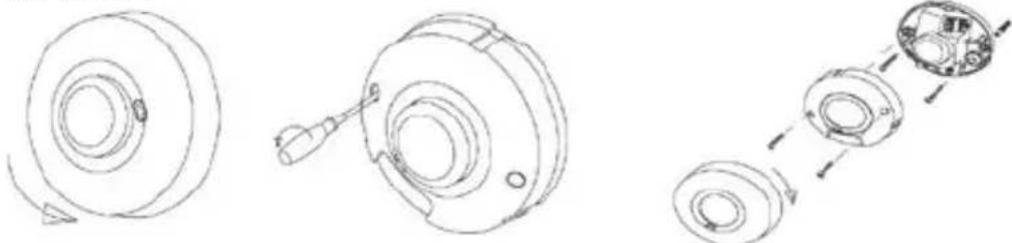
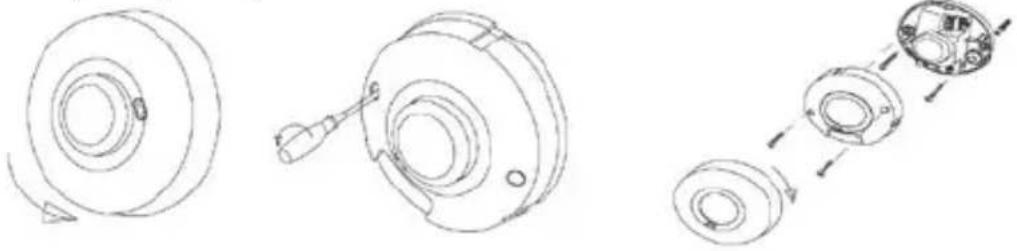
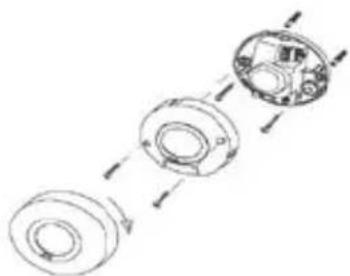
- Take down the top cover by turning it anti-clockwise (see fig.1), and then tighten off the two screws fixing middle cover (see fig. 2);
- Hold base against the wall and mark drill holes, paying attention to any existing wiring in the wall;
- Drill the holes, insert wall plugs (6mm dia);
- Put the power wire and load wire through the base holes;
- Screw the base into place (see fig. 3);
- Connect the mains power supply and the load wire to the connection terminal according to connection-wire mark.
- Close the middle cover (see fig. 3) and adjust knob to setting;
- Fit glass shade and turn it clockwise (see fig. 3).
fig 1 fig 2 fig 3
Technical specifications
power supply: 220-240VAC
power frequency: 50/60Hz
Installation sit: indoors, wall/ceiling mounting
HF system: 5.8GHz CW radar, ISM band
transmission power: <10mW
rated load:1200W: 220-240VAC
detection angle: 360°, 160°
reach:1-8m (dia.), adjustable
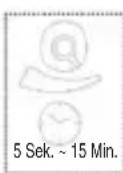
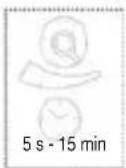
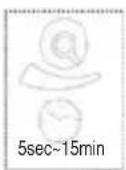
time setting: 5sec to 15min
light control: 2\~2000LUX
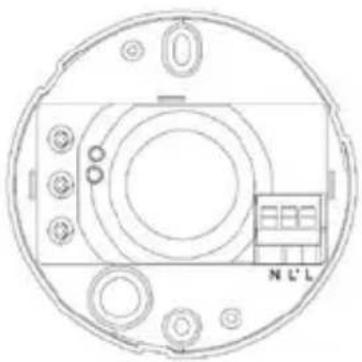
Connection illumination
connect N,L with power; connect N, L' with load
Reach setting (sensitivity)
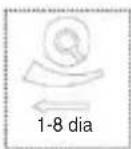
Reach is the term used to describe the diameter of the more or less circular detection zone produced on the ground after mounting the sensor at a height of 2.5m, turn the reach control fully anticlockwise to select minimum reach (approx.1 m dia), and fully
clockwise to select maximum reach (approx. 8m dia).
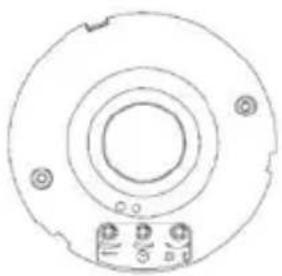
Time setting

The light can be set to stay ON for any period of time between approx. 5sec (turn fully anticlockwise) and a maximum of 15min (turn fully clockwise). Any movement detected before this time elapse will re-start the timer. It is recommended to select the shortest time for adjusting the detection zone and for performing the walk test.
NOTE: after the light switches OFF, it takes approx. 1sec before it is able to start detecting movement again. The light will only switch on in response to movement once this period has elapsed.
Light-control setting
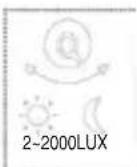
The chosen light response threshold can be infinitely from approx. 2-2000lux. Turn it fully anti-clockwise to select dusk-to-dawn operation at about 2 lux. Turn it fully clockwise to select daylight operation at about 2000lux. The knob must be turned fully clockwise when adjusting the detection zone and performing the walk test in daylight.
Troubleshooting
| Malfunction Cause | Remedy | |
| The load will not work • wrong light-control setting selected | • Adjust setting | |
| • load faulty | ||
| • mains switch OFF | ||
| The load work always • continuous movement in the detection zone | • check zone setting | |
| The load work without any identifiable movement | • the sensor not mounted for detecting movement reliably | • securely mount enclosure |
| • movement occurred, but not identified by the sensor(movement behind wall, movement of a small object in immediate lamp vicinity etc.) | • Check zone setting | |
| The load will not work despite movement | • rapid movements are being suppressed to minimize malfunctioning or the detection zone you have set is too small | • Check zone setting |
NOTE: the high-frequency output of the HF sensor is <10Mw- that is just one 100th of the transmission power of a mobile phone or the output of a microwave oven.

Safety precautions:

To reduce risk of electric shock, this product should ONLY be opened by an authorized technician when service is required. Disconnect the product from mains and other equipment if a problem should occur. Do not expose the product to water or moisture.
Maintenance:
Clean only with a dry cloth. Do not use cleaning solvents or abrasives.
Warranty:
No guarantee or liability can be accepted for any changes and modifications of the product or damage caused due to incorrect use of this product.
General:
Designs and specifications are subject to change without notice.
All logos brands and product names are trademarks or registered trademarks of their respective holders and are hereby recognized as such.
Attention:
This product is marked with this symbol. It means that used electrical and electronic products should not be mixed with general household waste. There is a separate collections system for these products.
Copyright ©


EL-PIR70
MANUAL
MODE D'EMPLOI
MANUALE
HASZNÁLATI ÚTMUTATÓ
BRUKSANVISNING
MANUAL DE UTILIZARE
ANLEITUNG
GEBRUIKSAANWIJZING
MANUAL DE USO
KÄYTTÖOHJE
NÁVOD K POUŽITÍ
Technische Daten:
Zeiteinstellung
MANUAL
MODE D'EMPLOI
MANUALE
HASZNÁLATI ÚTMUTATÓ
BRUKSANVISNING
MANUAL DE UTILIZARE
ANLEITUNG
GEBRUIKSAANWIJZING
MANUAL DE USO
KÄYTTÖOHJE
NÁVOD K POUŽITÍ
Image 1 Image 2 Image 3
Réglage de la durée

MANUAL
MODE D'EMPLOI
MANUALE
HASZNÁLATI ÚTMUTATÓ
BRUKSANVISNING
MANUAL DE UTILIZARE
ANLEITUNG
GEBRUIKSAANWIJZING
MANUAL DE USO
KÄYTTÖOHJE
NÁVOD K POUŽITÍ
Technische specificaties
Voedingsspanning: 220-240 Volt AC
MANUAL
MODE D'EMPLOI
MANUALE
HASZNÁLATI ÚTMUTATÓ
BRUKSANVISNING
MANUAL DE UTILIZARE
ANLEITUNG
GEBRUIKSAANWIJZING
MANUAL DE USO
KÄYTTÖOHJE
NÁVOD K POUŽITÍ
Specifiche tecniche
MANUAL
MODE D'EMPLOI
MANUALE
HASZNÁLATI ÚTMUTATÓ
BRUKSANVISNING
MANUAL DE UTILIZARE
ANLEITUNG
GEBRUIKSAANWIJZING
MANUAL DE USO
KÄYTTÖOHJE
NÁVOD K POUŽITÍ
MANUAL
MODE D'EMPLOI
MANUALE
HASZNÁLATI ÚTMUTATÓ
BRUKSANVISNING
MANUAL DE UTILIZARE
ANLEITUNG
GEBRUIKSAANWIJZING
MANUAL DE USO
KÄYTTÖOHJE
NÁVOD K POUŽITÍ
Időzítés beállítása

MANUAL
MODE D'EMPLOI
MANUALE
HASZNÁLATI ÚTMUTATÓ
BRUKSANVISNING
MANUAL DE UTILIZARE
ANLEITUNG
GEBRUIKSAANWIJZING
MANUAL DE USO
KÄYTTÖOHJE
NÁVOD K POUŽITÍ
Kytkentä valaistus
Ajan asetus
MANUAL
MODE D'EMPLOI
MANUALE
HASZNÁLATI ÚTMUTATÓ
BRUKSANVISNING
MANUAL DE UTILIZARE
ANLEITUNG
GEBRUIKSAANWIJZING
MANUAL DE USO
KÄYTTÖOHJE
NÁVOD K POUŽITÍ
Tekniska specifikationer:
HF-system: 5.8GHz CW radar, ISM band
TIDSINSTÄLLNING

MANUAL
MODE D'EMPLOI
MANUALE
HASZNÁLATI ÚTMUTATÓ
BRUKSANVISNING
MANUAL DE UTILIZARE
ANLEITUNG
GEBRUIKSAANWIJZING
MANUAL DE USO
KÄYTTÖOHJE
NÁVOD K POUŽITÍ
Schéma připojení
Časové nastavení

MANUAL
MODE D'EMPLOI
MANUALE
HASZNÁLATI ÚTMUTATÓ
BRUKSANVISNING
MANUAL DE UTILIZARE
ANLEITUNG
GEBRUIKSAANWIJZING
MANUAL DE USO
KÄYTTÖOHJE
NÁVOD K POUŽITÍ
Specificatii tehnice
220-240V CA
Frecvență: 50/60Hz
Conexiuni electrice


- DETECTION ZONES FOR CEILING MOUNTING
- DETECTION ZONES FOR WALL MOUNTING
- INSTALLATION PROCEDURES
- TECHNICAL SPECIFICATIONS
- CONNECTION ILLUMINATION
- REACH SETTING (SENSITIVITY)
- TIME SETTING
- LIGHT-CONTROL SETTING
- SAFETY PRECAUTIONS
- MAINTENANCE
- WARRANTY
- GENERAL
- ATTENTION
- EL-PIR70
- TECHNISCHE DATEN
- ZEITEINSTELLUNG
- RÉGLAGE DE LA DURÉE
- TECHNISCHE SPECIFICATIES
- SPECIFICHE TECNICHE
- IDŐZÍTÉS BEÁLLÍTÁSA
- KYTKENTÄ VALAISTUS
- AJAN ASETUS
- TEKNISKA SPECIFIKATIONER
- TIDSINSTÄLLNING
- SCHÉMA PŘIPOJENÍ
- ČASOVÉ NASTAVENÍ
- SPECIFICATII TEHNICE
- CONEXIUNI ELECTRICE
Brand : HQ
Model : EL-PIR70
Category : Motion detector