
35.1063 - Weather Station TFA - Free user manual and instructions
Find the device manual for free 35.1063 TFA in PDF.


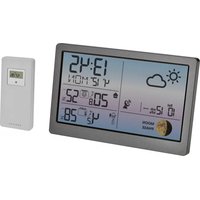
| Product type | Digital weather station |
| Brand | TFA |
| Model | 35.1063 |
| Dimensions (main unit) | 108 x 108 x 22 mm |
| Weight (main unit) | 145 g |
| Power supply | 2 AA (LR6) 1.5V batteries (not included) |
| Outdoor sensor | Wireless, 1 channel, max range 30 m (open field) |
| Display | LCD with backlight |
| Indoor measurements | Temperature and humidity |
| Outdoor measurements | Temperature and humidity (via sensor) |
| Weather forecast | Trend symbol (sunny, cloudy, rainy) |
| Alarm function | Temperature alarm (adjustable thresholds) |
| Time display | Clock and date (manual setting) |
| Value memory | Min/max temperature and humidity values |
| Maintenance and cleaning | Clean with a soft, dry cloth. Do not use solvents. |
| Safety | Use only recommended batteries. Do not expose to water or excessive heat. |
| Spare parts and repairability | Replacement outdoor sensor available. For repairs, contact TFA customer service. |
| Package contents | Main station, outdoor sensor, quick guide |
Frequently Asked Questions - 35.1063 TFA
User questions about 35.1063 TFA
0 question about this device. Answer the ones you know or ask your own.
Ask a new question about this device
Download the instructions for your Weather Station in PDF format for free! Find your manual 35.1063 - TFA and take your electronic device back in hand. On this page are published all the documents necessary for the use of your device. 35.1063 by TFA.
USER MANUAL 35.1063 TFA
Operating Instructions
Mode d'emploi
Istruzioni
Gebruiksaanwijzing
SIGMA PLUS - Wireless weather station

1. Functions
• Outdoor temperature wireless (433 MHz), distance range up to 60 m (free field)
- Expandable up to 3 outdoor transmitters, also for the temperature control of remote rooms, e.g. children's room, wine-cellar
- Indoor temperature and humidity with comfort level indicator of indoor climate
• Trend indicator and maximum/minimum values
- Weather forecast with symbols and tendency of atmospheric pressure
- Radio controlled clock with alarm, date and snooze function
- For wall mounting or table standing
• Very simple installation, no cables required
2. Elements
2.1 Receiver (Display unit)
LCD
• Weather forecast with barometer pressure trend
• Outdoor temperature with trend indicator
- Indoor temperature and humidity with trend indicator, comfort level indicator
- Clock
Buttons
• ALARM ON/OFF button - Select alarm and alarm time setting
- MEM button – Recall of maximum and minimum values
• MODE button – Select mode and confirm setting
- ▲ button – Decrement of digits
- button – Increment of digits and channel searching
• CHANNEL button - Change channel 1 - 2 - 3
- SNOOZE button
2.2. Sensor Unit (Transmitter)
- LED indicator – Flashes once when the remote unit transmits a reading
- Flashes twice when the battery of the remote unit is low
- RESET button
- °C/°F button
• CHANNEL Selecting Switch
11
SIGMA PLUS – Wireless weather station
- Wall Mount Hole
- Battery Compartment - 2 x 1.5V AA batteries
3. Getting started
3.1 Insert battery
- Open the battery compartment of the display unit and the transmitter and place both instruments on a desk with a distance of approximately 1.5 meter. Check that no other electronic devices are close. Insert the batteries first into the battery compartment of the transmitter and immediately afterwards in the display unit, observing the correct polarity.
3.2 Radio controlled time reception
- After the initial setup, the clock is trying to receive the radio signal for 3-5 minutes. When the time code is received, the DCF symbol appears and the radio-controlled time will be displayed.
- If the time reception was not successful, appears on the display. Remove battery and reinsert after 1 min. for retry. In case the clock cannot detect the DCF-signal (for example due to disturbances, transmitting distance, etc.), the time can be set manually. The clock will then work as a normal quartz clock.
- The time base for the radio controlled time is a Caesium Atomic Clock operated by the Physikalisch Technische Bundesanstalt Braunschweig which has a time deviation of less than one second in one million years. The time is coded and transmitted from Mainflingen near Frankfurt via frequency signal DCF-77 (77.5 kHz) and has a transmitting range of approximately 1,500 km. Your radio-controlled alarm clock receives this signal and converts it to show the precise time in summer or wintertime. The quality of the reception depends greatly on the geographic location. In normal cases, there should be no reception problems within a 1,500 km radius around Frankfurt.
Please take note of the following:
- Recommended distance to any interfering sources like computer monitors or TV sets is a minimum of 1.5 - 2 metres.
- Within ferro-concrete rooms (basements, superstructures),
SIGMA PLUS - Wireless weather station

the received signal is naturally weakened. In extreme cases, please place the unit close to a window and/or point its front or back towards the Frankfurt transmitter.
- During night-time, the atmospheric disturbances are usually less severe and reception is possible in most cases. A single daily reception is adequate to keep the accuracy deviation below 1 second.
3.3 Reception of Thermo / Hygro Sensor
- The display unit automatically starts scanning the RF 433MHz signal to register the Thermo Hygro Sensor Unit after batteries are inserted. If the reception of outdoor values fails, "-" appears on the display. Check the batteries and try it again. Check if there is any source of interference. Manual initialization by pressing the ▼ button for 2 seconds can be helpful.
- The wave display shows the signal receiving status of the main unit:
| Searching mode | |
| Readings are registered | |
| No signals | -· °C |
4. How to operate
4.1 Settings
Language setting of weekday and °C/°F
- Hold "MODE" button for 2 seconds. The language indicator is flashing. Press ▼ or ▲ button to adjust day-of-week language: English (EN), German (DE), Spanish (SP), Italian (IT), French (FR). Confirm with MODE button.
- The temperature display is flashing. Press ▼ or ▲ button to adjust °C or °F. Confirm with MODE button.
Manual time setting
- Now the time can be set manually in case the clock cannot detect the DCF-signal.
- Set Year, Month, Day, Date (Day/Month (D/M) or Month/Day (M/D), 12/24 hour system, Hours, Minutes.
SIGMA PLUS – Wireless weather station

Time zone setting
- The time zone is used for the countries where the DCF signal can be received but the time zone is different from the German time (e.g. + 1=one hour later). Press MODE button until ZONE is displayed. Hold MODE button for 2 seconds. Press ▼ or ▲ button to adjust the time zone in intervals of 30 minutes.
4.2 Alarm Clock Function
- Select your desired alarm time by the ALARM ON/OFF button:
-
W = Weekday Alarm (only on weekdays)
-
S = Single Alarm (once)
-
PRE-AL = will be activated if outdoor temperature is under or equal zero degree
-
Set the alarm time in the desired alarm mode. Hold ALARM ON/OFF button for 2 seconds. The hour digits are flashing. Press ▼ or ▲ button to adjust the time. Confirm with ALARM ON/OFF button. Set minutes in the same way. In PRE-ALM mode you can choose to be awaken 15, 30, 45, 60 or 90 minutes earlier.
- To deactivate the respective alarm function press ▼ button. OFF appears on the display. To activate press ▲ button. The corresponding icon appears or disappears on the display.
- Once the alarm starts to ring, you can activate the snooze function by pressing the top button SNOOZE. The alarm will be interrupted for 8 minutes.
- If you leave the alarm sound on for 2 minutes, it will enter snooze mode automatically with maximum 3 times.
4.3 Display of date
Each press on the MODE button will change the display between:
- Clock with hour, minutes and seconds
• Clock with hour, minutes and day of week
• Zone time with hour, minutes and day of week
• Zone time with hour, minutes and seconds - Day and month
SIGMA PLUS – Wireless weather station

4.4 Thermometer and hygrometer
4.4.1 Display change
- Press CHANNEL button to change between the outdoor transmitters CH1, 2 or 3.
4.4.2 Trend pointers
- The trend pointers displayed on the LCD indicate if the trend of temperature and humidity is increasing, steady or decreasing.
4.4.3 Comfort zone
- There are 3 different indicators for the comfort zone of indoor climate: COMFORT: Ideal values (20-25°C/68-77°F, 40-70%)
WET: Too wet (> 70%)
DRY: Too dry (< 40%)
4.4.4 Maximum / Minimum function
- Press MEM button to show the minimum (MIN) values of temperature and humidity of indoor and outdoor transmitters. Press MEM button again to show the maximum (MAX) values.
- Hold MEM button for 2 seconds to clear the recorded maximum and minimum reading.
4.5 Weather Forecast
- There are 5 different weather symbols (sunny, slightly cloudy, cloudy, rainy, heavy rain) and 3 different symbols for the trend of atmospheric pressure (increasing, steady, decreasing).
- The weather forecast relates to a range of 12 to 24 hours and indicates only a general weather trend. The accuracy is about 70% .
4.6 Outdoor thermo hygro sensor
- By pressing the pick hole on the sensor unit with a pointed object the temperature unit on the sensor display can be changed from °C to °F .
- Press RESET to re-start in case of problems.
SIGMA PLUS – Wireless weather station

• After successful installation screw up the battery compartment of transmitter carefully.
- For having additional external transmitters (maximum3), proceed as described in chapter 3. Select for each sensor a different channel by the CHANNEL button before inserting batteries.
4.7 Positioning of display unit and transmitter
- Choose a shady and dry position for the transmitter. (Direct sunshine falsifies the measurement and continuous humidity strains the electronic components needlessly)
- Place the Display Unit at the final position. Avoid the vicinity of any interfering field like computer monitors or TV sets and solid metal objects.
- Check the transmission of 433 MHz signal from the transmitter to the Display Unit (transmission range 60 m free field). Within ferro-concrete rooms (basements, superstructures), the received signal is naturally weakened.
- If necessary chose another position for transmitter and/or display unit.
• Fix the transmitter by using plastic hanger.
5. Battery Replacement
- When the batteries are used up, low battery icon appears at the indoor or outdoor temperature row.
- Use alkaline batteries 1.5 V AA only. Observe correct polarity.
Attention:
Please do not dispose of old electronic devices and empty batteries in household waste. To protect the environment, take them to your retail store or to appropriate collection sites according to national or local regulations.
6. Notes
- Always read the users manual carefully before operating the unit.
- Avoid placing the clock near interference sources/metal frames such as computer or TV sets.
- Do not expose the instrument to extreme temperatures, vibration or shock.
SIGMA PLUS - Wireless weather station

7. Liability Disclaimer
• The product is not a toy. Keep it out of reach of children.
- The product is not to be used for medical purpose or for public information, but is determined for home use only.
- Improper use or unauthorized opening of housing will mean the loss of warranty.
- No part of this manual may be reproduced without written consent of manufacturer.
8. Specifications
Measuring range:
Indoor temperature: -5...+50°C (23...+122°F)
Outdoor temperature: -20...+60°C (-4...+140°F)
Humidity: 25...90% RH
Resolution: 0,1°C/0,2°F/1% RH
Batteries: 2 x 1,5 V AA for main unit and
2 x 1,5 V AA for transmitter
(included)
SIGMA PLUS – Wireless weather station

EC-DECLARATION OF CONFORMITY
Produkt: TE424NL (Kat. Nr. 35.1063)
This product contains the approved transmitter and complies with the essential requirements of Article 3 of the R&TTE 1999/5/EC Directives, if used for its intended use and that the following standard(s) has/have been applied:
Efficient use of radio frequency spectrum (Article 3.2 of the R&TTE Directive)
applied standard(s) EN 300 220-1,3:2000
Electromagnetic compatibility (Article 3.1.b of the R&TTE Directive) applied standard(s) EN 301 489-1,3:2000
EC-Declaration page Electromagnetic compatibility applied standard(s) EN 300 339 : 1998
Low voltage directive
applied standard(s) EN 60950-1 : 2001
applied standard(s) EN 50371 : 2002
Additional information:
The product is therefore conform with the Low Voltage Directive 73/23/EC, the EMC Directive 89/336/EC and R&TTE Directive 1999/5/EC (appendix II) and carries the respective CE marking.
RTTE Compliant Countries:
All EU countries, Switzerland CH and Norway N
QA MANAGER : H.Y.WANG
K.S plastic factory
Guan Lan / Shen Zhen / China

C€ 0125
18

DRY: Trop sec (< 40%)
4.4.4 Fonction maximum / minimum


- SIGMA PLUS - WIRELESS WEATHER STATION
- FUNCTIONS
- ELEMENTS
- 2.1 RECEIVER (DISPLAY UNIT)
- LCD
- BUTTONS
- SENSOR UNIT (TRANSMITTER)
- SIGMA PLUS – WIRELESS WEATHER STATION
- GETTING STARTED
- 3.1 INSERT BATTERY
- 3.2 RADIO CONTROLLED TIME RECEPTION
- PLEASE TAKE NOTE OF THE FOLLOWING
- 3.3 RECEPTION OF THERMO / HYGRO SENSOR
- HOW TO OPERATE
- 4.1 SETTINGS
- LANGUAGE SETTING OF WEEKDAY AND °C/°F
- MANUAL TIME SETTING
- TIME ZONE SETTING
- 4.2 ALARM CLOCK FUNCTION
- 4.3 DISPLAY OF DATE
- 4.4 THERMOMETER AND HYGROMETER
- 4.4.1 DISPLAY CHANGE
- 4.4.2 TREND POINTERS
- 4.4.3 COMFORT ZONE
- 4.4.4 MAXIMUM / MINIMUM FUNCTION
- 4.5 WEATHER FORECAST
- 4.6 OUTDOOR THERMO HYGRO SENSOR
- 4.7 POSITIONING OF DISPLAY UNIT AND TRANSMITTER
- BATTERY REPLACEMENT
- ATTENTION
- NOTES
- LIABILITY DISCLAIMER
- SPECIFICATIONS
- MEASURING RANGE
- EC-DECLARATION OF CONFORMITY
- EFFICIENT USE OF RADIO FREQUENCY SPECTRUM (ARTICLE 3.2 OF THE R&TTE DIRECTIVE)
- LOW VOLTAGE DIRECTIVE
- 4.4.4 FONCTION MAXIMUM / MINIMUM
Brand : TFA
Model : 35.1063
Category : Weather Station