
TV8405/06 - Heating SOLAC - Free user manual and instructions
Find the device manual for free TV8405/06 SOLAC in PDF.


| Product type | Fan heater |
| Brand | Solac |
| Model | TV8405/06 |
| Category | Supplementary heating |
| Power supply | 220-240 V ~ 50/60 Hz |
| Maximum power | 2000 W |
| Dimensions (L x D x H) | 25 x 15 x 30 cm |
| Weight | 1.5 kg |
| Main functions | Heating with 2 power levels (1000/2000 W), fan only mode, adjustable thermostat |
| Safety | Overheat protection, tip-over switch |
| Maintenance and cleaning | Unplug and clean with a dry cloth |
| Spare parts and repairability | Available from Solac after-sales service |
| General information | Mobile heating appliance for indoor use |
Frequently Asked Questions - TV8405/06 SOLAC
User questions about TV8405/06 SOLAC
0 question about this device. Answer the ones you know or ask your own.
Ask a new question about this device
Download the instructions for your Heating in PDF format for free! Find your manual TV8405/06 - SOLAC and take your electronic device back in hand. On this page are published all the documents necessary for the use of your device. TV8405/06 by SOLAC.
USER MANUAL TV8405/06 SOLAC
TERMOVENTILADOR VERTICAL DIGITAL INSTRUCCIONES DE USO DIGITAL VERTICAL THERMO-VENTILATOR INSTRUCTIONS FOR USE RADIATEUR SOUFFLANT VERTICAL NUMÉRIQUE MODE D'EMPLOI DIGITALER SCHNELLHEIZER GEBRAUCHSANLEITUNG TERMOVENTILADOR VERTICAL DIGITAL INSTRUÇÕES DE USO TERMOVENTILATORE VERTICALE DIGITALE ISTRUZIONI PER L'USO STAANDE DIGITALE VENTILATORKACHEL GEBRUIKSAANWIJZING DIGITÁLNÍ VERTIKÁLNÍ TERMO-VENTILÁTOR NÁVOD K POUZITÍ CYFROWY PIONOWY TERMOWENTYLATOR INSTRUCJA OBSLUGI DIGITÁLNY VERTIKÁLNY TERMO-VENTILÁTOR NÁVOD NA POUZITIU DIGITÁLIS ÁLLÓ FÚTŐVENTILÁTOR HASNÁLATI UTASÍTÁS ЦИФРОВ ВЕРТИКАЛЕН ТЕРМО-ВЕНТИЛАТОР инструкция за употреба DIGITALNA VERTIKALNA GRIJALICA UPUTE ZA UPOTREBU
natural_image
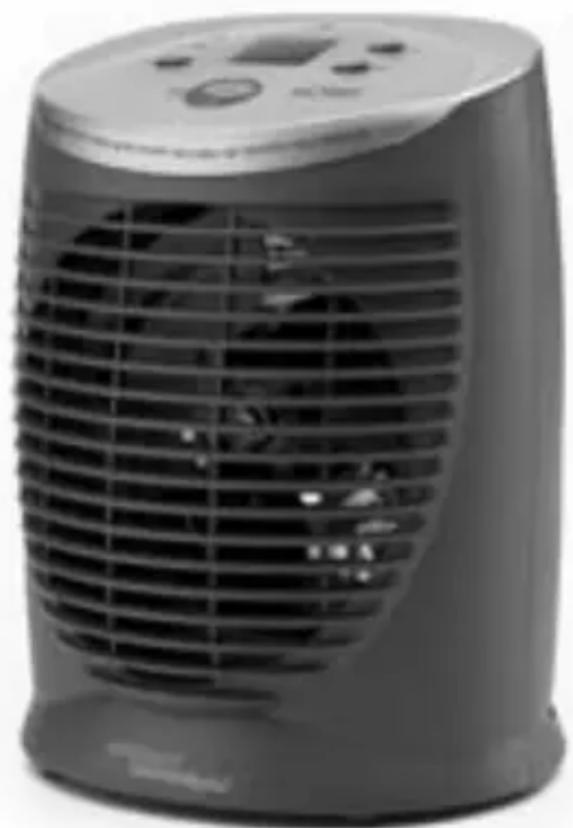
Exterior view of a modern electric heating fan with cooling fins and a digital display (no visible text or symbols)5- 8 • ESPAÑOL
9-11 • ENGLISH
12-15 • FRANÇAIS
16-19 • DEUTSCH
20-23 • PORTUGUÊS
24-27 • ITALIANO
28-31 • NEDERLANDS
32-34 • ČESKY
35-38 · POLSKA
39-41 • SLOVENSKY
42-46 • MAGYAR
47-50 • българск
51-53 · HRVATSKA

ATENCION
- Please read these instructions carefully before using the appliance.
- Before connecting the appliance, make sure the voltage shown on the specifications plate is the same as the mains supply at your home.
- Remove all elements used for protection during transport or for sales promotions, such as paper or plastic bags, plastic sheets, cardboard and stickers from inside or outside the appliance.
- Do not place any objects on top of vents or openings since there is a danger of electrical shock.
- Keep your thermo-ventilator away from inflammable materials.
- Do not obstruct the air intakes and do not stand it on soft surfaces, such as a bed.
- Do not place the thermo-ventilator directly below a mains socket.
- Do not use your thermo-ventilator if the wiring is damaged wiring or you notice any other kind of fault. For safety reasons, take it to an authorised technical service centre.
• Always make sure you turn off and unplug the appliance from the mains when it is not in use. - NEVER COVER the appliance, due to risk of FIRE.
- Do not place the cable under carpets or rugs, or any other kind of material.
- Do not place the cable on top of the appliance when the latter is hot.
- Do not use the appliance near a bath, shower or swimming pool.
- Do not stand the appliance near baths, showers or other types of containers with water. If the thermo-ventilator falls into the water, DO NOT try to take it out. Unplug it from the mains.
- Do not use the thermo-ventilator for drying clothes, and do not place furniture at less than 50 cm from the front of the appliance, or in rooms with less than 4m ^2 of floor space.
- Keep the appliance out of the reach of children.
- The appliance is fitted with an OVERHEATING DISCONNECTION system. If a problem occurs, this system automatically disconnects the appliance. If this happens, please proceed as follows:
1) Unplug the appliance from the mains.
2) Leave it to cool for 15 minutes.
3) Clean the intake grille with a vacuum cleaner, if necessary.
If the appliance still fails to work as normal, please contact the technical service.
MAIN COMPONENTS:
1.- Programmer pilot light
2.- High-power pilot light
3.- Low-power pilot light
4.- Programmer switch
5.- High/medium-power selector
6.- Digital Screen
7.- On/off switch
8.- Regulator – Increase
9.- Regulator – Decrease
10.- Main body of the appliance
11.- Ventilation grille
OPERATION
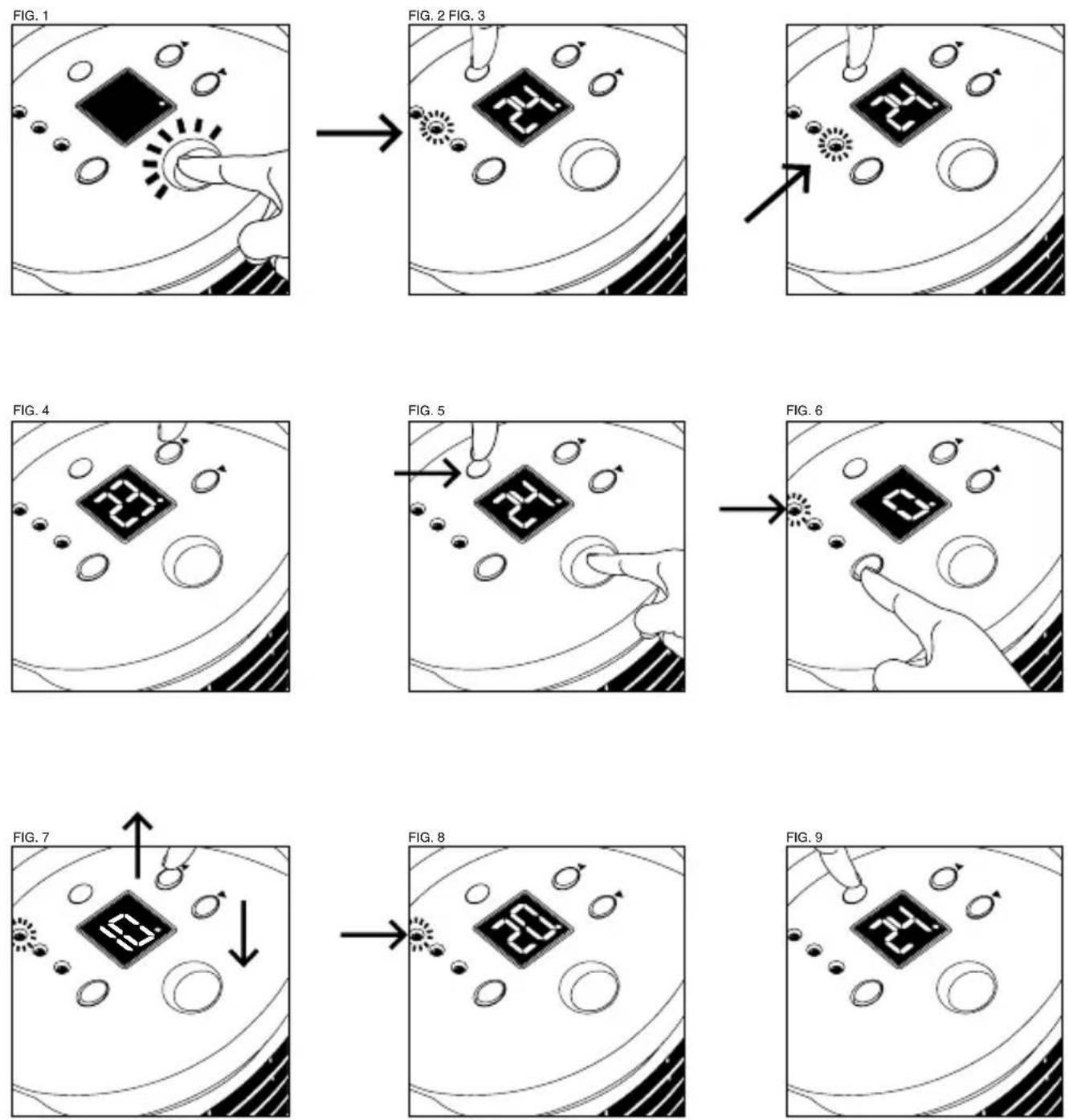
- Plug the thermo-ventilator into the mains and turn the switch (7) on (Fig.1).
POWER SELECTOR
- Choose the power you want:
- High power: Press the button (5) until the high-power pilot light (2) comes on (Fig. 2).
- Low power: Press the button (5) until the medium-power pilot light (3) comes on (Fig. 3).
TEMPERATURE
- The thermo-ventilator can be regulated for constant room temperature.
- Select the desired power as explained above and press buttons ▲ (8) or ▲ (9). The screen (6) displays the selected temperature and flashes on and off. Then the room temperature is displayed.
- Remember that if the selected temperature is the same as or lower than the room temperature, the latter will flash on and off and the thermo-ventilator will turn itself off.
- N.B. Select the desired temperature (between 5°C and 35°C) by pressing the buttons ▲ (8) or ▼ (9) (Fig.4). The appliance comes pre-programmed at 24°C.
TIMER
- The thermo-ventilator has a timer that can automatically turn the appliance on or off.
1.- To turn the thermo-ventilator on at the required time
- The start timer lets you set the time when you want the thermo-ventilator to come on: in 1, 2 and 3 hours' time, etc., up to 16 hours. The "0" means that the thermo-ventilator is not programmed.
- Turn the switch (7) to the "on" position. Make sure that NO power has been selected (pilot lights 2 and 3 must be off) (Fig. 5). To do so, use button (5).
- Press the timer button (4). The pilot light (1) comes on and a "0" (Fig. 6) is displayed on the screen. Press the buttons ▲ (8) or ▼ (9) until the screen indicates the number you want (Fig.7). In a few seconds, the room temperature appears on the screen and the pilot light (1) stays on (Fig. 8).
- When the programmed time is reached, the thermo-ventilator automatically turns itself on and the pilot light (1) goes off.
- If you wish to turn the programmer off before the selected time, press the power selector button (5) (Fig. 9).
- If the room temperature is higher than the programmed temperature at the selected time, the appliance will not come on.
2.- To turn the thermo-ventilator off at the required time
- The end timer will allow you to set the time when you want the thermo-ventilator to go off: in 1, 2 and 3 hours' time, etc., up to 16 hours. The "0" means that the thermo-ventilator is not programmed.
- Turn the switch (7) to the "on" position and select the desired power and temperature.
- Press the timer button (4). The pilot light (1) comes on and a "0" (Fig. 6) is displayed on the screen. Press the buttons ▲ (8) or ▼ (9) until the screen indicates the number you want (Fig.7). In a few seconds, the room temperature appears on the screen and the pilot light (1) stays on (Fig. 8).
- When the programmed time is reached, the thermo-ventilator switches itself off automatically and the pilot light (1) goes off.
- If you wish to turn the programmer off before the selected time, press the power selector button (5) (Fig. 9).
- N.B. If the room temperature has reached the same or a higher temperature than the one programmed before the set time, the appliance turns itself off.
CLEANING AND MAINTENANCE
- Before cleaning the appliance, make sure it is switched off and unplugged from the mains.
- Clean the outside of the appliance with a dry cloth.
- Clean the inside of the appliance regularly, using a low-power vacuum cleaner from the outside.
- We recommend you clean the appliance with a cloth after each period of use and store it in its box in a dry place. When you go to use the appliance again, make sure it is in a perfect state of repair.
ATTENTION


Brand : SOLAC
Model : TV8405/06
Category : Heating