
Image One Bluetooth - Earphones KLIPSCH - Free user manual and instructions
Find the device manual for free Image One Bluetooth KLIPSCH in PDF.


| Product Type | Bluetooth On-Ear Headphones |
| Brand | Klipsch |
| Model | Image One Bluetooth |
| Color | Black |
| Dimensions (folded) | 16.5 x 14.0 x 5.0 cm |
| Weight | 190 g |
| Battery Type | Rechargeable lithium-ion |
| Battery Life | Up to 12 hours |
| Charging Time | Approximately 2 hours |
| Connectivity | Bluetooth 4.0 |
| Bluetooth Range | Up to 10 meters |
| Frequency Response | 20 Hz – 20 kHz |
| Impedance | 32 ohms |
| Inputs | 3.5mm jack input (cable included) |
| Built-in Microphone | Yes, for hands-free calls |
| Controls | Volume buttons, play/pause, call answer |
| Care and Cleaning | Wipe with a soft, dry cloth. Do not use chemicals. |
| Safety | Do not expose to water or moisture. Use at a reasonable volume to protect hearing. |
| Spare Parts and Repairability | Ear cushions are replaceable. For other parts, contact customer service. |
| Included Accessories | Micro-USB charging cable, 3.5mm audio cable, carrying case |
| Warranty | 2 years |
Frequently Asked Questions - Image One Bluetooth KLIPSCH
User questions about Image One Bluetooth KLIPSCH
0 question about this device. Answer the ones you know or ask your own.
Ask a new question about this device
Download the instructions for your Earphones in PDF format for free! Find your manual Image One Bluetooth - KLIPSCH and take your electronic device back in hand. On this page are published all the documents necessary for the use of your device. Image One Bluetooth by KLIPSCH.
USER MANUAL Image One Bluetooth KLIPSCH
1) READ these instructions.
2) KEEP these instructions.
3) HEED all warnings.
4) FOLLOW all instructions.
5) DO NOT use this apparatus near water.
6) CLEAN ONLY with dry cloth.
7) DO NOT block any ventilation openings. Install in accordance with the manufacturer's instructions.
8) DO NOT install near any heat sources such as radiators, heat registers, stoves, or other apparatus (including amplifiers) that produce heat.
9) DO NOT defeat the safety purpose of the polarized or grounding type plug. A polarized plug has two blades with one wider than the other. A grounding type plug has two blades and a third grounding prong. The wider blade or the third prong are provided for your safety. If the provided plug does not fit into your outlet, consult an electrician for replacement of the obsolete outlet.
10) PROTECT the power cord from being walked on or pinched, particularly at plugs, convenience receptacles, and the point where they exit from the apparatus.
11) ONLY USE attachments/accessories specified by the manufacturer.
12) UNPLUG this apparatus during lightning storms or when unused for long periods of time.
13) REFER all servicing to qualified service personnel. Servicing is required when the apparatus has been damaged in any way, such as power-supply cord or plug is damaged, liquid has been spilled or objects have fallen into the apparatus, the apparatus has been exposed to rain or moisture, does not operate normally, or has been dropped.
14) DO NOT expose this apparatus to dripping or splashing and ensure that no objects filled with liquids, such as vases, are placed on the apparatus.
15) To completely disconnect this apparatus from the AC Mains, disconnect the power supply cord plug from the AC receptacle.
16) The mains plug of the power supply cord shall remain readily operable.
17) DO NOT overload wall outlets or extension cords beyond their rated capacity as this can cause electric shock or fire.
18) NEVER operate a motor vehicle while listening to or wearing your headphones. Not only dangerous, it is illegal in many places.
19) NEVER operate heavy machinery while listening to or wearing your headphones.
20) We don't recommend you use the headphones while riding a bicycle, running, or walking in heavy traffic areas.
WarNINg:
Except in case of emergency, Klipsch recommends you do not use these headphones or headsets (headphones plus microphone) as aviation communication equipment as they are not engineered for many environmental conditions common in commercial or non-commercial aircraft (including, but not limited to: altitude, temperature, noise conditions, unpressurized aircraft, ect) resulting in possible interference to critical communications
WarNINg: To reduce the risk of fire or electrical shock, do not expose this apparatus to rain or moisture.
WarNINg: No naked flame sources - such as candles - should be placed on the product.
BaTTery INfOrmaTION:
THIS PRODUCT CONTAINS A LITHIUM-POLYMER BATTERY PACK. IF MISUSED OR ABUSED THIS CAN RESULT IN:

Smoke / gas hazard
Heat hazard
Fire hazard
Explosion hazard
WarNINg: Batteries (battery pack or batteries installed) shall not be exposed to excessive heat such as sunshine, fire or the like.
WarNINg: Risk of leakage. Do not handle leaking or damaged Lithium batteries.
WarNINg: Do not place batteries in mouth or ingest. Keep out of reach of children and pets.
Please dispose of any used batteries properly following any local regulations. Do not incinerate.
pleaSe IISTeN reSpONSIBly
The Occupational Safety Health Administration (OSHA) has issued headphone usage recommendations for maximum daily exposure and sound pressure levels (measured in decibels (dB)). A decibel is a unit of measure of sound, and decibels increase exponentially as sound gets louder. For example, conversational speech is typically around 60dB, and a rock concert in a stadium is often about 110dB.
OSha guldelINeS fOr NOISE expOSure llmITS
| Sound Pressure Level | Recommended Maximum Exposure Per Day |
| 90dB 8 hours | |
| 95dB 4 hours | |
| 100dB 2 hours | |
| 105dB 1 hours | |
| 110dB 30 minutes | |
| 115dB 15 minutes | |
| 120dB | Avoid as damage may occur |
eu COmpllaNCe INfOrmaTION
Eligible to bear the CE mark; Conforms to European Union Low Voltage Directive 2006/95/EC; European Union EMC Directive 2004/108/EC; European Union RoHS Directive 2002/95/EC; European Union WEEE Directive 2002/96/EC; European Union Registration, Evaluation, Authorization and Restriction of Chemicals (REACH) Directive 2006/121/EC; European Union Radio and Telecommunications Terminal Equipment (R&TTE) Directive 1999/5/EC.
This product contains batteries that are covered under the 2006/66/EC European Directive, which cannot be disposed of with normal household waste. Please follow local regulations.
fCC aNd CaNada emC COmpllaNCe INfOrmaTION
This device complies with part 15 of the FCC Rules. Operation is subject to the following two conditions:
(1) This device may not cause harmful interference, and (2) this device must accept any interference received, including interference that may cause undesired operation.
NOTE: This equipment has been tested and found to comply with the limits for a Class B digital device, pursuant to part 15 of the FCC Rules. These limits are designed to provide reasonable protection against harmful interference in a residential installation. This equipment generates, uses and can radiate radio frequency energy and, if not installed and used in accordance with the instructions, may cause harmful interference to radio communications. However, there is no guarantee that interference will not occur in a particular installation. If this equipment does cause harmful interference to radio or television reception, which can be determined by turning the equipment off and on, the user is encouraged to try to correct the interference by one or more of the following measures:
Reorient or relocate the receiving antenna.
Increase the separation between the equipment and receiver.
Connect the equipment into an outlet on a circuit different from that to which the receiver is connected.
Consult the dealer or an experienced radio/TV technician for help.
Approved under the verification provision of FCC Part 15 as a Class B Digital Device.
Caution: Changes or modifications not expressly approved by the manufacturer could void the user's authority to operate this device.
Caution: To comply with the limits of the Class B digital device, pursuant to Part 15 of the FCC Rules, this device is to comply with Class B limits. All peripherals must be shielded and grounded. Operation with non-certified peripherals or non-shielded cables my result in interference to radio or reception.
This Class B digital apparatus complies with Canadian ICES-003.
Note: This mark applies only to countries within the European Union (EU) and Norway. This appliance is labeled in accordance with European Directive 2002/96/ EC concerning waste electrical and electronic equipment (WEEE). This label indicates that this product should not be disposed of with household waste. It should be deposited at an appropriate facility to enable recovery and recycling.

WlreleSS TraNSmlTTer CImpllaNCe INfOrmaTION:
The term "IC:" before the radio certification number only signifies that Industry Canada technical specifications were met.
This device complies with part 15 of the FCC Rules and the applicable Industry Canada license-exempt RSS standard(s). Operation is subject to the following two conditions: (1) this device may not cause harmful interference, and (2) this device must accept any interference, including interference that may cause undesired operation of the device.
Range: Up to 10m (33 feet)
Input rating: 5V DC, 0.5A
STATUS INDICATOR
Example: ○—○—○—RRBB
B Blinks Blue R Blinks Red Time Between Blinks
WHAT'S INSIDE
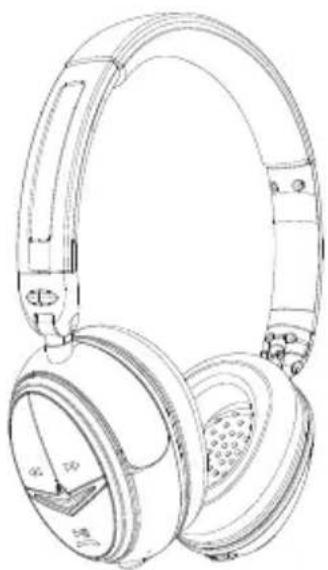
Image ONE Bluetooth Headset

Direct Connect Audio Cable

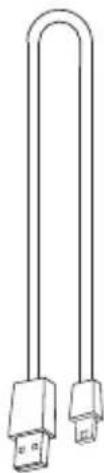
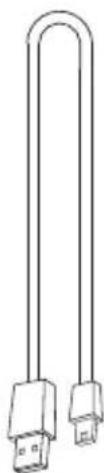
Travel Case Micro USB Charging Cable


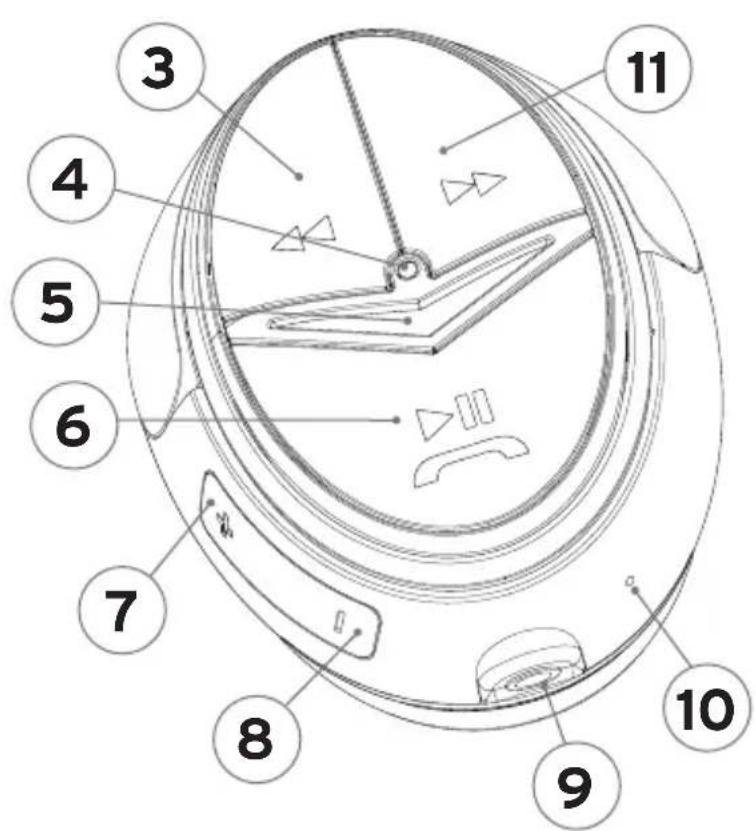
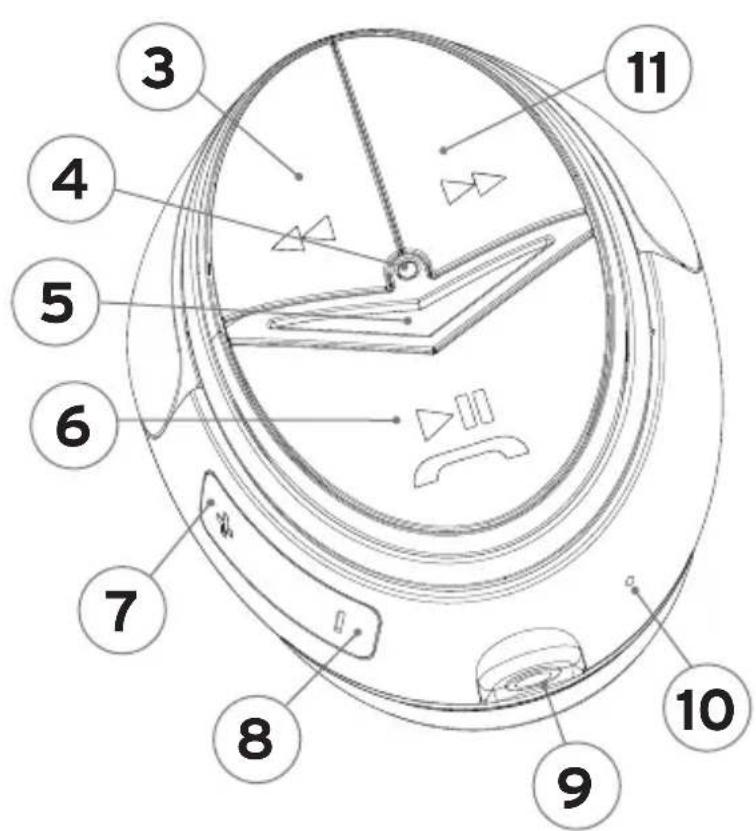
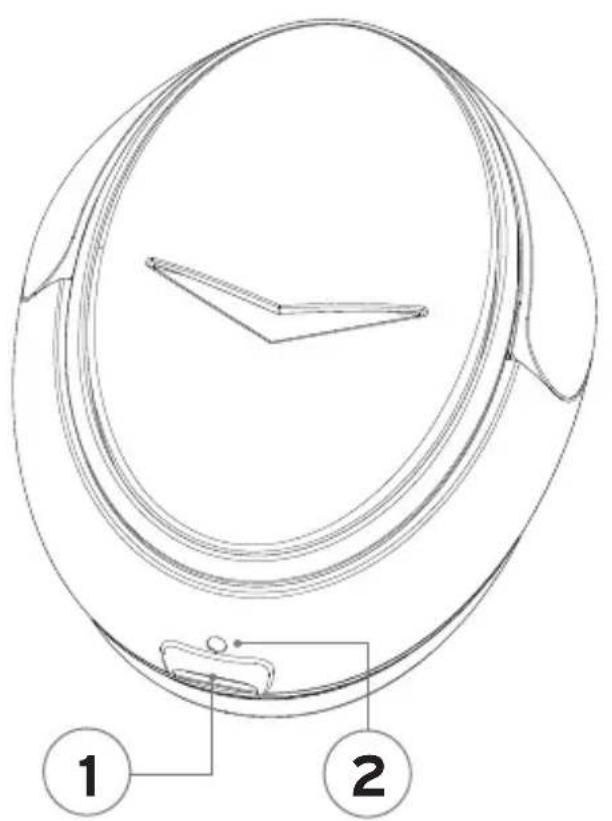
- Charging Jack
- Battery Status Indicator
- Track Back
- Status Indicator
- Power/Pairing
-
Play/Pause, Answer/End Call
-
Volume +
- Volume -
- Audio Jack
- Microphone
- Track Forward
CHARGING
Charge for 1 hour before first use.
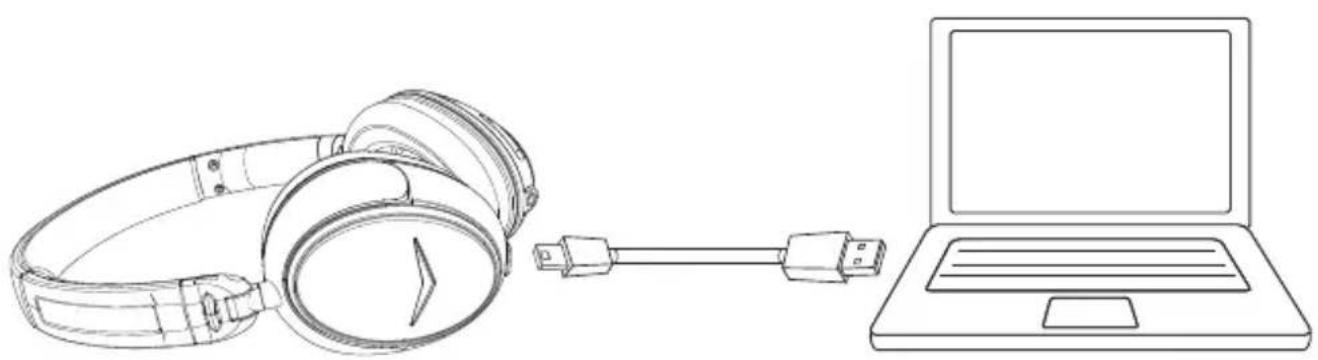
When fully charged the battery will provide up to 10 hours of talking and/or music time. You can continue to use the headset while charging.
Low battery (Battery Status Indicator): R—R—R
PAIRING
Before using the headset for the first time it must be paired with a Bluetooth device (mobile phone, etc.).
- Ensure the headset is off.
- Hold the Power/Pairing button for 5 seconds. The headset will turn on B B B B B ○ then the status indicator will rapidly flash R B R B ○
- Turn on Bluetooth on the device and set it to search for Bluetooth devices.
- Select "Klipsch BT ImageONE" from the device list.
- If prompted to enter a passcode enter 0000.
Once a device has been paired the headset will remember it. When the headset is turned on it will automatically scan for remembered devices, beginning with the most recently paired. Up to 8 devices are memorized.
TuRNING ON/Off
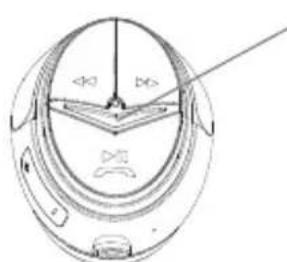
Hold 3 seconds
Status Indicator
ON BBBBB
OFF RRRRR
VOlume & music CONTROIs

CAIls
Make calls as normal from the phone, when the headset is connected the audio will automatically go to the headset.
Power/Pairing
- Mute - Press once
- Transfer audio between headset and phone
- Hold 2 seconds

Play/Pause, Answer/End Call
- Answer/End call - Press once
- Reject call - Hold 2 seconds
DIsCONNeCT THE HeADseT
To disconnect the headset from a device, power the headset off or disconnect it in the Bluetooth menu of the device.
ReCONNeCT THE HeADseT
To connect to the most recently used device, power the headset on. If Bluetooth is enabled on the device they will automatically reconnect. To connect to another remembered device, select “Klipsch BT Image ONE” from the Bluetooth menu of the device.
CleARING RememBeReD DeVICes
To clear the paired device memory from the headset:
- Power headset off
- Hold Power/Pairing & Volume buttons together for 8 seconds
RRRBBB

using WITH The DiReCT CONNeCT AuDIO CABLE
The headset can be connected to an audio source using the direct connect audio cable. Note: When the audio cable is connected the Bluetooth function and controls are disabled.

STATUS INDICATOR
B Blinks Blue R Blinks Red Time Between Blinks
| General and Standby | |
| Pairing | ○R RRR RRB BBB BB ○○○ |
| Low Battery | R—R—R |
| Standby (Bluetooth Connected) | ○B BBB BB ○—○○ |
| Standby (Bluetooth Not Connected) | ○R RRR RR ○—○○ |
| A2DP (Streaming Audio) | |
| A2DP active, SBC codec | ○B BBB BB ○—○○ |
| A2DP active, AAC codec | ○B BBB BBB BB—○○○ |
| A2DP active, aptX codec | ○B BB BB BB B ○○ |
| HSP (Phone Calls) | |
| Incoming / Outgoing call | B BBB BB ○—○—○—○ |
| Active Call | ○B BBB BB ○—○○ |
The Bluetooth® word mark and logos are owned by the Bluetooth SIG, Inc. and any use of such marks by Klipsch Group, Inc. is under license. Other trademarks and trade names are those of their respective owners.
The “aptX® software is copyright CSR plc or its group companies. All rights reserved. The aptX® mark and the aptX logo are trade marks of CSR plc or one of its group companies and may be registered in one or more jurisdictions.”
Alcance: Hasta 10 m (33 pies)
Valor nominal de entrada: 5 V CC, 0.5 A
INDICADOR DE ESTADO
Ejemplo: ○—○—○—RRBB

INDICADOR DE ESTADO
Câble audio de branchement direct

Étui de transport
Câble de recharge micro-USB

Piste suivante
Lecture/Pause
APPels
Alimentation/Appariement
RRRBBB
uTllIsATION AVeC le CÂBle AuDIO De BRANCHemeNT DIReCT
INDICATEUR D'ÉTAT
Profile: A2DP v1.2, AVRCP v1.0, HSP v1.2, HFP v1.6
A2DP-Codecs: SBC, AAC, aptX®
Image ONE Bluetooth-Headset

Reiseetui Mikro-USB-Ladekabel

STATUSANZEIGE

闪烁蓝光

闪烁红光 闪烁间隔时间
包装物品

旅行夹 微型 USB 充电线

按住 3 秒
状态指示灯
播放/暂停,接听/结束通话
- 接听/结束通话 - 按一下
- 拒绝通话 - 按住 2 秒
断开耳机
使用直接连接音频线
状态指示灯
B 闪烁蓝光
R 闪烁红光 闪烁间隔时间
3502 WOODVIEW TRACE, INDIANAPOLIS, IN, USA
klipsch.com
©2012, Klipsch Group, Inc.


- WARNING
- BATTERY INFORMATION
- PLEASE IISTEN RESPONSIBLY
- EU COMPLLANCE INFORMATION
- FCC AND CANADA EMC COMPLLANCE INFORMATION
- WLRELESS TRANSMLTTER CIMPLLANCE INFORMATION
- STATUS INDICATOR
- WHAT'S INSIDE
- CHARGING
- PAIRING
- TURNING ON/OFF
- VOLUME & MUSIC CONTROIS
- CAILS
- DISCONNECT THE HEADSET
- RECONNECT THE HEADSET
- CLEARING REMEMBERED DEVICES
- USING WITH THE DIRECT CONNECT AUDIO CABLE
- INDICADOR DE ESTADO
- APPELS
- UTLLISATION AVEC LE CÂBLE AUDIO DE BRANCHEMENT DIRECT
- INDICATEUR D'ÉTAT
- STATUSANZEIGE
- 断开耳机
- 使用直接连接音频线
- 状态指示灯
Brand : KLIPSCH
Model : Image One Bluetooth
Category : Earphones