
Mode M40 - Earphones KLIPSCH - Free user manual and instructions
Find the device manual for free Mode M40 KLIPSCH in PDF.


| Product Type | Wireless Over-Ear Headphones with Active Noise Cancellation |
| Brand | Klipsch |
| Model | Mode M40 |
| Dimensions (L x W x H) | 7.5 x 6.5 x 3.5 in (190 x 165 x 89 mm) |
| Weight | 8.8 oz (250 g) |
| Power Source | Built-in rechargeable lithium-ion battery |
| Battery Life | Up to 20 hours (with ANC on) |
| Wireless Technology | Bluetooth 4.0 with aptX support |
| Active Noise Cancellation | Yes, with ambient aware mode |
| Driver Size | 40 mm dynamic drivers |
| Frequency Response | 20 Hz – 20 kHz |
| Microphone | Built-in with noise suppression |
| Controls | On-ear buttons for volume, playback, and calls |
| Foldable Design | Yes, for easy portability |
| Ear Cushions | Memory foam with leatherette covering |
| Headband | Padded, adjustable |
| Cleaning | Wipe ear cushions and exterior with a dry, soft cloth. Do not use liquids or harsh cleaners. |
| Safety | Keep away from water and extreme temperatures. Do not disassemble. Use only approved chargers. |
| Spare Parts Available | Replacement ear cushions and charging cables available from Klipsch |
| Repairability | Limited; contact Klipsch support for service options |
| Additional Features | Inline remote, carrying case, 3.5 mm audio cable for wired use |
Frequently Asked Questions - Mode M40 KLIPSCH
User questions about Mode M40 KLIPSCH
0 question about this device. Answer the ones you know or ask your own.
Ask a new question about this device
Download the instructions for your Earphones in PDF format for free! Find your manual Mode M40 - KLIPSCH and take your electronic device back in hand. On this page are published all the documents necessary for the use of your device. Mode M40 by KLIPSCH.
USER MANUAL Mode M40 KLIPSCH
Welcome to Klipsch. Listen with Passion.
Congratulations on your purchase and thank you for selecting Klipsch MODE headphones. These active noise cancelling headphones have been crafted with the finest materials - high-grade leather, professional grade memory foam, HiFi inspired woven cables and high-strength polymers - to create a product unmatched in the industry for superior quality and comfort, with the audio performance you would expect from Klipsch.
As a Klipsch headphone owner, you belong to an elite circle of highly discerning listeners that's 65 years in the making. Every product we make - from headphones to home theater - reflects our no-compromise attitude and commitment to delivering the industry's most powerful, detailed and emotional sound experience.
Your Klipsch MODE headphones have been designed and manufactured to the highest quality standards. Each pair undergoes rigorous testing before leaving the factory and comes with a limited two-year warranty. This attention to detail guarantees years of reliable performance. We hope these headphones bring new life to your music and years of comfortable listening.
Register your product today at klipsch.com/register
Important Safety Information
1) READ these instructions.
2) KEEP these instructions.
3) HEED all warnings.
4) FOLLOW all these instructions.
5) If you hear ringing or experience pain or discomfort in your ears during or after using any headphone audio product, that is a sign you are listening too loud. When your ears are exposed to high volumes (in excess of 85dB) for over an hour, you may be permanently damaging your hearing.
6) Turn down your listening device's volume to zero before you insert the Klipsch headphones and turn on the device. Once you have the headphones in, gradually increase the volume to a comfortable, moderate volume.
7) Clean your headphones with an antiseptic wipe. This improves the acoustic quality of your headphones.
8) NEVER operate a motor vehicle while listening to or wearing your headphones. Not only dangerous, it is illegal in many places.
9) NEVER operate heavy machinery while listening to or wearing your headphones.
10) We don't recommend you use the headphones while riding a bicycle, running, or walking in heavy traffic areas. If you do, listen at a lower volume so you can hear ambient noise.
WARNING:
Except in case of emergency, Klipsch Group, Inc. (KGI) recommends you do not use these headphones or headsets (headphones plus microphone) as aviation communication equipment as they are not engineered for many environmental conditions common in commercial or non-commercial aircraft (including, but not limited to: altitude, temperature, noise conditions, unpressurized aircraft, etc.) resulting in possible interference to critical communications. The Occupational Safety Health Administration (OSHA) has issued headphone usage recommendations for maximum daily exposure and sound pressure levels (measured in decibels (dB)). A decibel is a unit of measure of sound, and decibels increase exponentially as sound gets louder. For example, conversational speech is typically around 60dB, and a rock concert in a stadium is often about 110dB.
"Made for iPod," "Made for iPhone," and "Made for iPad" mean that an electronic accessory has been designed to connect specifically to iPod, iPhone, or iPad, respectively, and has been certified by the developer to meet Apple performance standards. Apple is not responsible for the operation of this device or its compliance with safety and regulatory standards.
OSHA Guidelines for Noise Exposure Limits
| Sound Pressure Level Recommended Maximum Exposure Per Day | |
| 90dB 8 hours | |
| 95dB 4 hours | |
| 100dB 2 hours | |
| 105dB 1 hours | |
| 110dB 30 minutes | |
| 115dB 15 minutes | |
| 120dB Avoid as damage may occur | |
EU COMPLIANCE INFORMATION
Eligible to bear the CE mark, Conforms to European Union EMC Directive 2004/108/EC.
WEEE NOTICE
Note: This mark applies only to countries within the European Union (EU) and Norway. This appliance is labeled in accordance with European Directive 2002/96/ EC concerning waste electrical and electronic equipment (WEEE). This label indicates that this product should not be disposed of with household waste. It should be deposited at an appropriate facility to enable recovery and recycling.

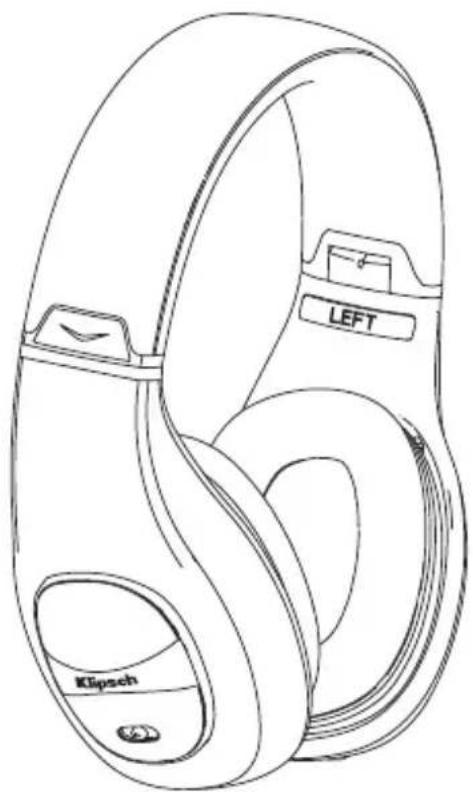
Klipsch Mode headphones

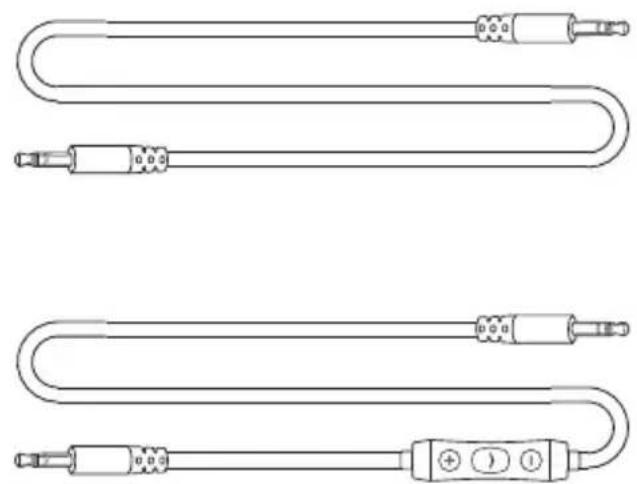
Standard headphone cable


AAA battery Apple 3-button controller cable


Leather carrying case Microfiber carrying case
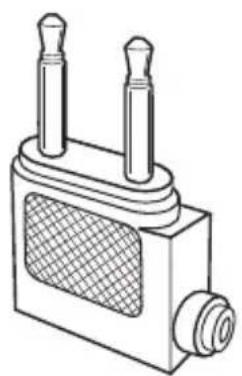
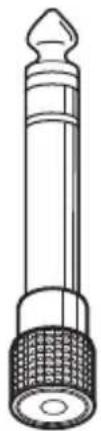
Airline adapter 1/4" Stereo adapter
CABLES
Klipsch Mode headphones are compatible with all audio sources with a 3.5mm headphone jack using the included standard headphone cable.
The included Apple 3-button controller cable provides enhanced functionality with compatible Apple devices. See chart below for complete compatibility.
This accessory works with the following (Audio is supported by all iPod models):
- iPhone 4
- iPhone 3GS
- iPod touch (4th generation)
- iPod touch (3rd generation)
- iPod touch (2nd generation)
- iPod classic (120GB, 160GB)
- iPod nano (6th generation)
- iPod nano (5th generation)
- iPod nano (4th generation)
- iPod shuffle (4th generation)
- iPod shuffle (3rd generation)
- iPad
- iPad 2
Made for

iPod 📋 iPhone 📋 iPad
Visit Klipsch.com
for latest compatibility info.

1/4" STEREO ADAPTER

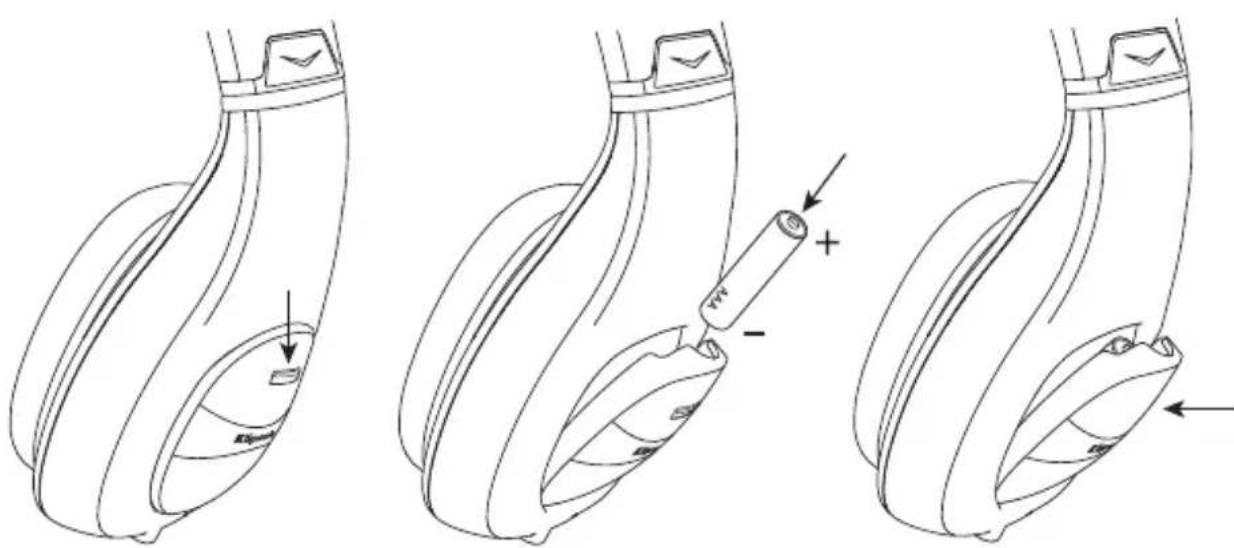
BATTERY INSTALLATION
BATTERY LIFE & REPLACEMENT BATTERY
While it will vary by usage, battery life will average around 45 hours. The power indicator light will begin flashing when there is approximately 10% battery life remaining.
NOISE CANCELLING

Audio source with noise cancelling
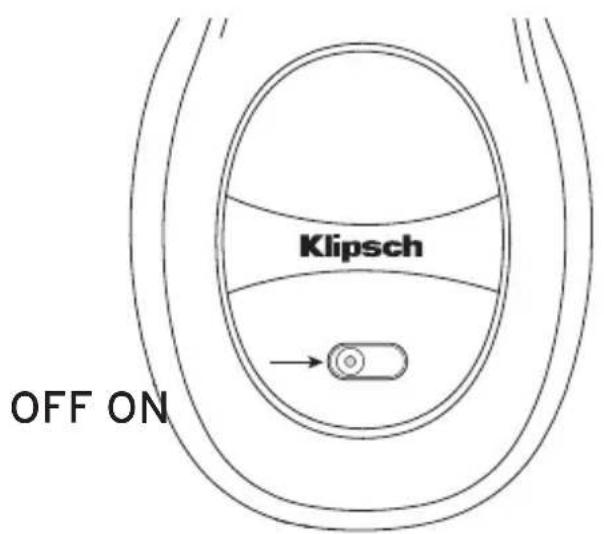
To use the headphone with noise cancelling, connect the headphone to an audio source and move the power switch forward to the on position. The power indicator will illuminate red when noise cancelling is powered on.
Audio Source without noise cancelling
Klipsch Mode headphones have the ability to function without noise cancelling turned on. Simply connect one of the included cables to an audio source and use with the power switch in the off position. There may be reduction in bass quality when used without noise cancelling.
Noise cancelling only
The noise cancelling function can be used without a music source to block out ambient noise. When using noise cancelling without music, there is no need to connect a cable.
REATTACHING EARCUPS

STORING THE HEADPHONES


USING WITH IN-FLIGHT ENTERTAINMENT SYSTEMS
Audio jack configurations on airplanes vary. Note jack configurations in the chart below:
 | A single, 3.5 mm jackNo adapter needed. |
 | One 3.5 mm jack and one power jackUse the single plug in the 3.5 mm jack.The power jack does not need a connection. |
 | Two 3.5 mm jacksUse the included airline adapter |
 | One power jack and two 3.5 mm jacksUse the included airline adapter for the two 3.5 mm jacks.The power jack does not need a connection. |
TROUBLESHOOTING
Low or no volume
Check that audio source is powered on and that the volume is turned up.
Check that the audio cable is properly connected and not damaged.
The headphones will not work if the power is switched on and the battery is fully discharged. Replace AAA battery or use with power switch in the off position.
No noise cancelling
Check that power switch is in on (forward) position.
Replace AAA battery.
Sound in one side only or crackling sound
Check that the audio cable is properly connected and not damaged.
Power indicator flashing
Replace AAA battery
Klipsch is a registered trademark of Klipsch Group, Inc.
Klipsch®
3502 WOODVIEW TRACE, INDIANAPOLIS, IN, USA
klipsch.com
©2011, Klipsch Group, Inc.


- WELCOME TO KLIPSCH. LISTEN WITH PASSION
- IMPORTANT SAFETY INFORMATION
- WARNING
- OSHA GUIDELINES FOR NOISE EXPOSURE LIMITS
- EU COMPLIANCE INFORMATION
- WEEE NOTICE
- CABLES
- 1/4" STEREO ADAPTER
- BATTERY INSTALLATION
- BATTERY LIFE & REPLACEMENT BATTERY
- NOISE CANCELLING
- AUDIO SOURCE WITH NOISE CANCELLING
- AUDIO SOURCE WITHOUT NOISE CANCELLING
- NOISE CANCELLING ONLY
- USING WITH IN-FLIGHT ENTERTAINMENT SYSTEMS
- TROUBLESHOOTING
- LOW OR NO VOLUME
- NO NOISE CANCELLING
- SOUND IN ONE SIDE ONLY OR CRACKLING SOUND
- POWER INDICATOR FLASHING
- KLIPSCH®
Brand : KLIPSCH
Model : Mode M40
Category : Earphones