
C01U PRO - Microphone SAMSON - Free user manual and instructions
Find the device manual for free C01U PRO SAMSON in PDF.


| Product type | USB condenser microphone |
| Brand | Samson |
| Model | C01U PRO |
| Capsule type | Large diaphragm condenser (19 mm) |
| Polar pattern | Cardioid |
| Frequency response | 20 Hz - 20 kHz |
| Sampling | Up to 44.1 kHz / 16 bits |
| Connectivity | USB Type B (USB cable included) |
| Headphone output | 3.5 mm stereo jack |
| Power supply | Via USB port (5V DC) |
| Dimensions (L x W x H) | 183 x 51 x 51 mm |
| Weight | 540 g (with stand and cable) |
| Housing material | Metal and plastic |
| Stand included | Adjustable table stand |
| Main features | Direct USB recording, zero-latency headphone monitoring, gain control, mute button |
| Care and cleaning | Wipe with a soft, dry cloth. Do not use chemical products. |
| Safety | Avoid shocks and moisture. Do not open the housing. |
| Spare parts and repairability | Contact Samson customer service or an authorized center. No consumer spare parts. |
| General information | Plug-and-Play USB microphone compatible with Windows, Mac, and Linux. |
Frequently Asked Questions - C01U PRO SAMSON
User questions about C01U PRO SAMSON
0 question about this device. Answer the ones you know or ask your own.
Ask a new question about this device
Download the instructions for your Microphone in PDF format for free! Find your manual C01U PRO - SAMSON and take your electronic device back in hand. On this page are published all the documents necessary for the use of your device. C01U PRO by SAMSON.
USER MANUAL C01U PRO SAMSON
User Manual of Product 1:
Samson 29/C01UPRO USB Microphone, Silver
C01UPRO
USB Studio Condenser Microphone

natural_image
Close-up of a metallic audio recording device with mesh grille and earplugs (no readable text or symbols beyond brand name)Owner's Manual
SAMSON®

If you want to dispose this product, do not mix it with general household waste. There is a separate collection system for used electronic products in accordance with legislation that requires proper treatment, recovery and recycling.
Private household in the 28 member states of the EU, in Switzerland and Norway may return their used electronic products free of charge to designated collection facilities or to a retailer (if you purchase a similar new one).
For Countries not mentioned above, please contact your local authorities for a correct method of disposal.
By doing so you will ensure that your disposed product undergoes the necessary treatment, recovery and recycling and thus prevent potential negative effects on the environment and human health.
Copyright 2014, V2
Samson Technologies
45 Gilpin Avenue
Hauppauge, New York 11788-8816
Phone: 1-800-3-SAMSON (1-800-372-6766)
Fax: 631-784-2201
www.samsontech.com
Apple, Mac, Mac OS, and iPad are trademarks of Apple Inc., registered in the U.S. and other countries.
Introduction
Congratulations on your purchase of the Samson C01U Pro USB studio condenser microphone. The C01U Pro is the follow up to the ground breaking Samson C01U, and is a product of Samson's position on the leading edge of digital microphone technology. It features a large, 19mm ultra thin diaphragm capsule with high-quality on-board digital converters, USB interface, as well as a headphone output for zero-latency monitoring.
Just plug in the supplied USB cable, launch your favorite audio software and start recording. The C01U Pro faithfully reproduces a variety of sound sources including vocals, acoustic instruments and overhead cymbals, to name a few. It is also great for VoIP, chatting and webcasting. The extended frequency and fast transient response ensures an accurate reproduction with linear characteristics from bottom to top.
Whether you're recording your latest song idea, a podcast, or your band's next big hit, the C01U Pro is the simplest and most comprehensive solution for high-quality recording on a Mac or PC. Just plug it in and start creating!
In these pages, you'll find a description of the features of the C01U Pro USB Studio Condenser Microphone, step-by-step instructions for its setup and use, and full specifications. With proper care your C01U Pro will operate trouble free for many years.
Should your unit ever require servicing, a Return Authorization number (RA) must be obtained before shipping your unit to Samson. Without this number, the unit will not be accepted. We recommend you record your serial number for future reference. Please call Samson at 1-800-3SAMSON (1-800-372-6766) for a Return Authorization number prior to shipping your unit. Please retain the original packing materials and if possible, return the unit in the original carton and packing materials.

Features
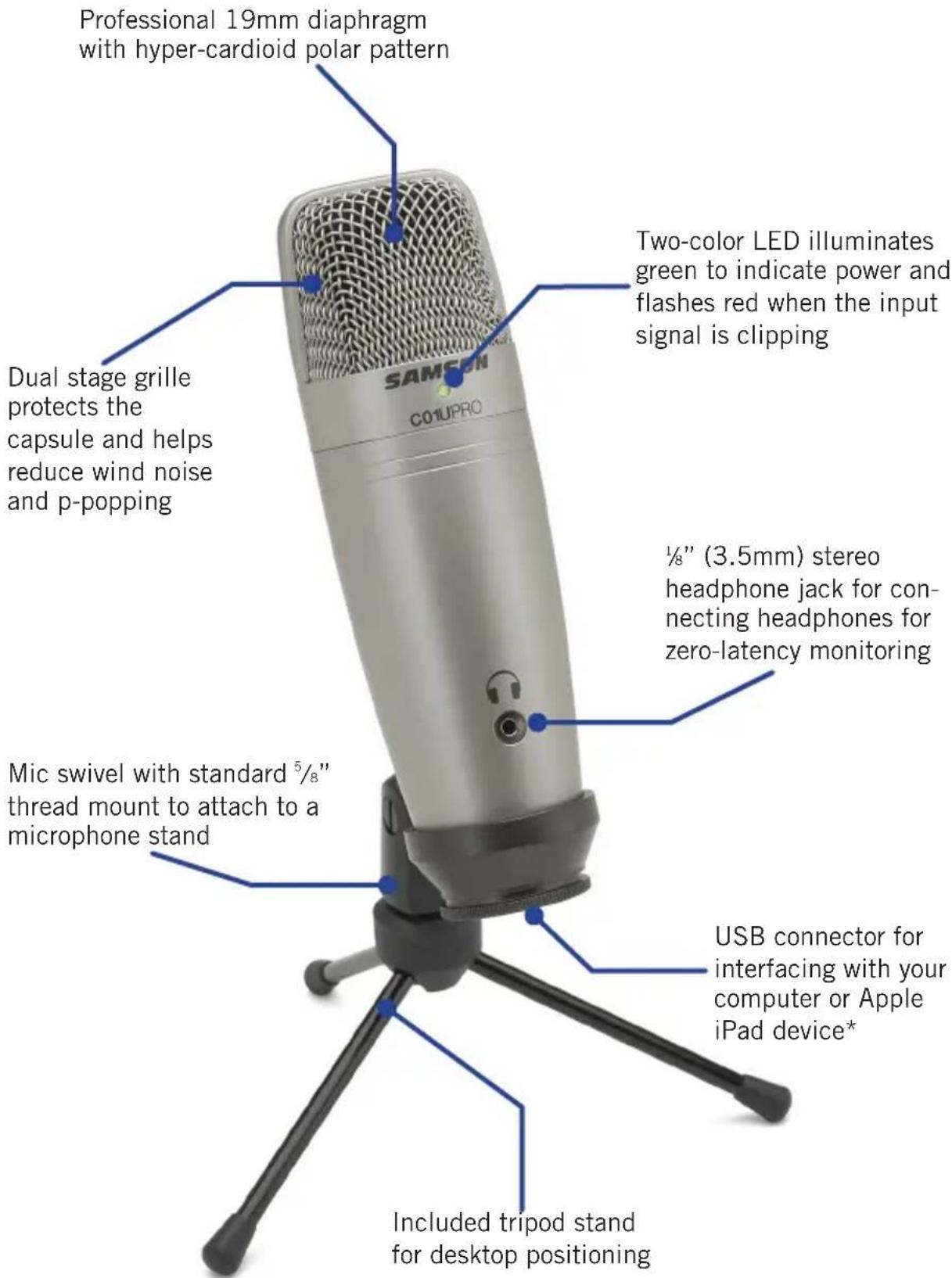
*To connect directly to an iPad, you will need to use the Apple iPad Camera Connection Kit or Lightning to USB Camera Adapter (not included).
Quick Start
1
Affix the C01U Pro to the tripod base or microphone stand using the included microphone swivel.
Position the microphone facing the sound source that you will be recording.

natural_image
Line drawing of a desktop microphone on a tripod stand (no text or symbols)2
Connect the included USB cable into the USB socket on the bottom of the microphone and into an available USB port on your computer.
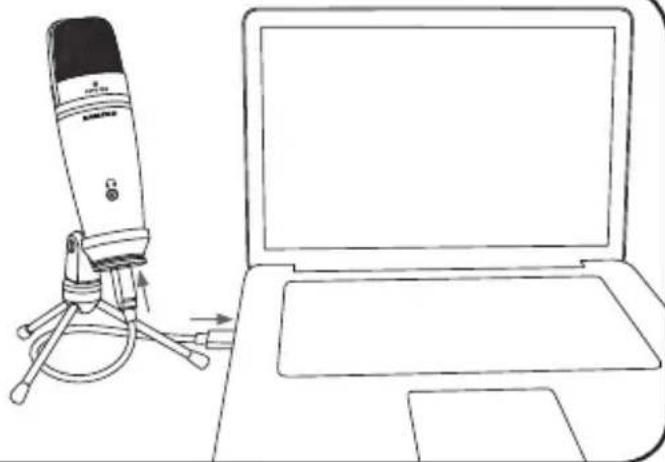
natural_image
Line drawing of a desktop microphone next to a laptop (no text or symbols)3

natural_image
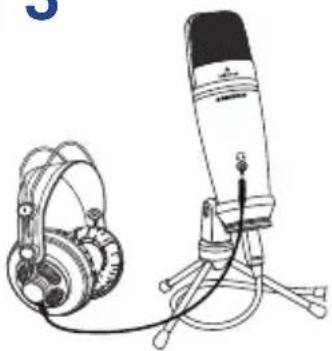
Line drawing of a desktop microphone with headphones and a stand (no text or symbols)Next, connect your headphones to the headphone output located on the front of the CO1U Pro. See the section on "Computer Setup" on page 6 to learn how to adjust the headphone output level.
4
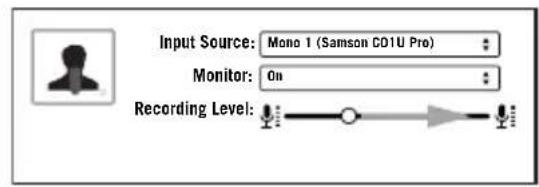
Launch your audio software and select the C01U Pro as the audio input and output devices.
Set up a mono record track in your software.
My instrument is connected with:

Samson C01U Pro


Mono 1

Quick Start cont.
4
Set the level of the C01U Pro by slowly raising the level of the microphone while singing or playing an instrument into the microphone at the performance
level. If you see the peak indicator illuminate red, your signal will be distorted. Turn the microphone level control down until it no longer flashes red.

natural_image
Line drawing of a hand playing acoustic guitar with a microphone on a tripod (no text or symbols)5
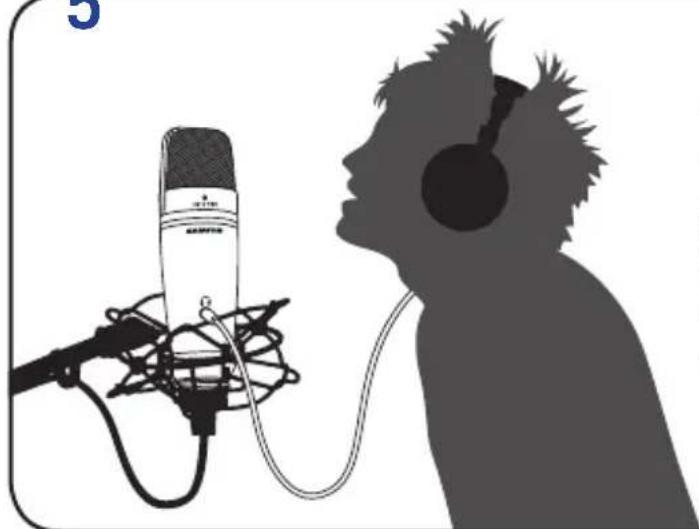
natural_image
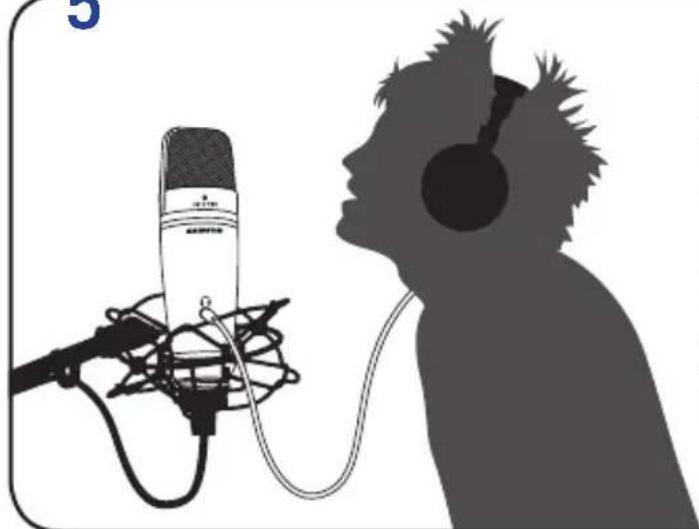
Silhouette of a person listening to a microphone with headphones, head tilted upward (no text or symbols)The headphones will provide a mix of the direct signal that the microphone is picking up and the return audio from your software. If you want to only hear the audio back from your software you will need to turn off the direct monitoring (see "Computer Setup" on page 6).
6

Press RECORD and start capturing your performance!
Computer Setup
Installing the C01U Pro is a simple procedure that takes just a few minutes. Simply connect the included USB cable and begin recording. The following sections of this manual provide detailed instructions on setting up your C01U Pro in Windows or MAC OS.
Windows
- The first time you plug the C01U Pro into a USB port, Windows will install the universal USB drivers for that port.
- To set the C01U Pro as your default input/recording device, or to change its settings, open the Control Panel, Hardware & Sound settings, then click SOUND. Under Recording tab, you can select the Samson C01U Pro from the list of devices and press the Set Default button to set it as the default audio input device.
- To set the gain of the microphone, click the Properties button, and then select the Levels tab. Slide the control until the desired level is reached. If you Find that the microphone red clip LED is lighting frequently, turn this control down until the LED no longer flashes red.
- To set the headphone level, select the Playback tab, open the C01U Pro Properties, then select the Level tab and adjust the computer's Master Volume slider.
- To turn direct monitoring on or off, open the Speaker Properties, select the Level tab, then click the Microphone speaker icon.
Apple MAC OSX
- To start using the Samson C01U Pro, simply plug it in. The LED will illuminate to indicate it is receiving USB power. The MAC will recognize the USB audio device and automatically install a universal driver.
- To select the C01U Pro as the computer's audio input, open System Preferences from the dock or the main Apple Menu.
- Next, open the Sound preferences, choose the Input tab and select C01U Pro. To set the gain of the microphone, adjust the Input volume slider at the bottom of the Sound dialog box. The Input Level meter will show the recording level.
- To set the playback volume, click in the Output tab and select C01U Pro, adjust the Output volume slider at the bottom of the Sound dialog box.
- To turn direct monitoring on or off, open the Audio/MIDI Setup utility located in the Utility folder inside the Applications folder. Select the C01U Pro, then click the check-box in the Thru column in Audio/MIDI Setup.
Recording Techniques
The C01U Pro is a great microphone choice for many instrument miking situations. Below is a brief guide on using the C01U Pro in some typical applications:
Vocals
Position the microphone directly in front of the artist so that the microphone grille is between 6 to 24 inches away. The closer the artist moves to the microphone, the more the bass or low response increases; this is called proximity effect. To achieve the fullest sound, the vocalist should aim the microphone center line towards their mouth. If p-popping (turbulent bursts of air produced when uttering consonants) is occurring, rotate the microphone a little bit away from the artist so that sound arrives at the microphone slightly off-center. If space allows, it is preferable to prevent p-popping through the use of an external pop filter like the Samson PS01. If recording a group of singers, ensure that they position themselves around the front of the microphone close to one another.
Acoustic Guitar
There are a variety of ways that the C01U Pro can be used to mike an acoustic guitar. Optimal microphone placement will depend on the type of instrument, and what kind of sound you're looking to capture. It may be necessary to experiment with various positions to achieve full and balanced tone. When miking a standard steel string acoustic, it is suggested that you begin with the microphone at a distance of 6–12 inches from the sound hole, positioned slightly off-axis, and pointing towards the edge of the fingerboard. From this position, moving the microphone towards the sound hole will cause the mic to capture more low frequencies. If, instead, you wish to capture more high-end, or to remove any unwanted boominess, move the microphone toward the fingerboard. Unlike a steel string acoustic guitar, the sound of a nylon string acoustic guitar that is played by finger picking is usually naturally warmer. To record an even, full tone, it is suggested that you begin by positioning the microphone 3–6 inches above the center of the bridge. This will help emphasize the higher frequencies and pick up the attack sound of the finger picking. If the microphone is picking up too much low frequency from the sound hole, move the microphone so that it is slightly off-axis from the guitar. If you have a pair of C01U Pro microphones, try one positioned at the fingerboard and the second over the bridge of the guitar, or have one microphone positioned close to the guitar and the second a few feet away to pick up the sound of the room, blending the two sources together.
Piano
The grand piano is a very challenging instrument to capture, and can be miked in a variety of ways. For close miking the piano, position the C01U Pro just inside the piano, centered between the soundboard and the open lid. The closer you move the microphone toward the instrument the more low frequencies the microphone will pick up. For an ambient recording like that used in a classical performance, position the microphone outside the piano, facing into the open lid. For a more contemporary ensemble sound, place two C01U Pros in the piano, positioning one over the low strings and one over the high strings at a distance of 6–12 inches apart. When miking an upright piano with a single microphone, position the microphone just above and in front of the piano with the top open, centered over the
Recording Techniques
instrument. If you have a pair of C01U Pros, position the microphone over the open top of the piano with one microphone over the bass strings and one over the high strings. You can also position two mics in front of the kickboard area approximately 8 inches over the bass and high strings.
Guitar Amp
Placement of the microphone when recording an electric guitar can impact the tone as much as the choice of instrument and amplifier. Guitar amps are usually close-miked but consideration must be made for the type of signal the amp will produce. While condenser microphones like the C01U Pro have fast transient response, they cannot handle extreme high SPL's. The C01U Pro should be placed approximately 4 inches from the grill of the amp. For a brighter sound, the microphone should face the center of the amplifier's speaker cone. By moving the microphone off of the center of the speaker, the sound becomes mellow, rolling off some of the high frequencies. To add more of the room sound, the microphone can be angled away from the amplifier, or placed further away from the speaker.
Overhead Drum Kit
Because of its extended high frequency response and fast transient response, the C01U Pro performs exceptionally well when used as an overhead drum set microphone. You can position the microphone approximately centered 5 feet in front of the drum kit 12–24 inches above the kit. For stereo miking, use two microphones placed over the drum set at a distance of three to five feet. Even though overhead mics are mostly for the cymbals, you can get the entire kit to sound great with just two microphones. You should experiment with the exact placement depending on the size of the room and whether you're looking for an ambient or close-miked sound.
Specifications
Frequency Response 20\~18000 HZ
Polar pattern Super-cardioid
Element type
Diaphragm thickness
Digital sensitivity
Minimum Gain
Maximum Gain
SPL
Weight
Dimensions
Shipping Weight
Back condenser type
3 microns
-40 dBFS/Pa
-4 dBFS/Pa
130 dB
1.06 lbs. (.48 kg)
Height: 7" (180 mm)
Width: 2.125" (54 mm)
Depth: 2.125" (54 mm)
2.5 lbs.(1.15 Kg)
At Samson, we are continually improving our products, therefore specifications and images are subject to change without notice.

line
| X Value | 0° | 180° | |---------|--------|--------| | 20 | -5 | -20 | | 50 | -4 | -22 | | 100 | -3 | -25 | | 200 | -2 | -23 | | 1K | 0 | -22 | | 2K | 1 | -21 | | 5K | 2 | -20 | | 10K | 3 | -19 | | 20K | 4 | -18 | | 500 | 5 | -17 | | 1K | 6 | -16 | | 2K | 7 | -15 | | 5K | 8 | -14 | | 10K | 9 | -13 | | 20K | 10 | -12 | | 5000 | 11 | -11 | | 1K | 12 | -10 | | 2K | 13 | -9 | | 5K | 14 | -8 | | 10K | 15 | -7 | | 20K | 16 | -6 | | 50000 | 17 | -5 | | 1K | 18 | -4 | | 2K | 19 | -3 | | 5K | 20 | -2 | | 10K | 21 | -1 | | 20K | 22 | 0 | | 50000 | 23 | 1 | | 1K | 24 | 2 | | 2K | 25 | 3 | | 5K | 26 | 4 | | 10K | 27 | 5 | | 20K | 28 | 6 | | 50000 | 29 | 7 | | 1K | 30 | 8 | | 2K | 31 | 9 | | 5K | 32 | 10 | | 10K | 33 | 11 | | 20K | 34 | 12 | | 50000 | 35 | 13 | | 1K | 36 | 14 | | 2K | 37 | 15 | | 5K | 38 | 16 | | 10K | 39 | 17 | | 20K | 40 | 18 | | 50000 | 41 | 19 | | 1K | 42 | 20 | | 2K | 43 | 21 | | 5K | 44 | 22 | | 10K | 45 | 23 | | 20K | 46 | 24 | | 50000 | 47 | 25 | | 1K | 48 | 26 | | 2K | 49 | 27 | | 5K | 50 | 28 | | 10K | 51 | 29 | | 20K | 52 | 30 | | 50000 | 53 | 31 | | 1K | 54 | 32 | | 2K | 55 | 33 | | 5K | 56 | 34 | | 10K | 57 | 35 | | 20K | 58 | 36 | | 50000 | 59 | 37 | | 1K | 60 | 38 | | 2K | 61 | 39 | | 5K | 62 | 40 | | 10K | 63 | 41 | | 20K | 64 | 42 | | 50000 | 65 | 43 | | 1K | 66 | 44 | | 2K | 67 | 45 | | 5K | 68 | 46 | | 10K | 69 | 47 | | 20K | 70 | 48 | | 50000 | 71 | 49 | | 1K | 72 | - | | 2K | - | - | | 5K | - | - | | 10K | - | - | | 20K | - | - | | ... | ... | ... | | ... | ... | ... | | ... | ... | ... | | ... | ... | ... | | ... | ... | ... | | ... | ... | ... | | ... | ... | ... | | ... | ... | ... | | ... | ... | ... | | ... | ... | ... | | ... | ... | ...```
radar
| Angle | Value | |-------|-------| | 0° | 5 | | 45° | 5 | | 90° | 5 | | 135° | 5 | | 180° | 5 | | 225° | 5 | | 270° | 5 | | 315° | 5 | | 360° | 5 | | 405° | 5 | | 450° | 5 | | 495° | 5 |System Components
- Samson C01U Pro USB Studio Condenser Microphone
- Microphone Swivel
- Tripod Stand
- One (1) USB Cable
- Owner's Manual
Optional Accessory
- Samson SP01 Shock mount
Minimum System Requirements
Windows (PC)
• Windows XP/Vista/Win 7/Win 8
- 800MHz or higher, 256MB RAM or larger, USB port
Mac OS
• Mac OS X 10.4.9 or higher
- 733MHz or higher, 512MB RAM or larger, USB port
THIS DEVICE COMPLIES WITH PART 15 OF THE FCC RULES CLASS B. OPERATION IS SUBJECT TO THE FOLLOWING TWO CONDITIONS:
(1) THIS DEVICE MUST NOT CAUSE HARMFUL INTERFERENCE, AND
(2) THIS DEVICE MUST ACCEPT ANY INTERFERENCE RECEIVED INCLUDING INTERFERENCE THAT MAY CAUSE UNDESIRED OPERATION. SUITABLE FOR HOME OR OFFICE USE.

natural_image
Line drawing of a desktop microphone on a tripod stand (no text or symbols)2
natural_image
Line drawing of a desktop microphone next to a laptop (no text or symbols)3

natural_image
Line drawing of a desktop microphone and headphones (no text or symbols)natural_image
Line drawing of a hand playing acoustic guitar with a microphone on a tripod (no text or symbols)5

natural_image
Silhouette of a person listening to a microphone with headphones, no text or symbols present• Support anti-vibrations Samson SP01
Configuration minimale requise
Windows (PC)
• Windows XP/Vista/Win 7/Win 8
• 800 MHz ou plus, 256 Mo de RAM ou plus, port USB
Mac OS
natural_image
Line drawing of a desktop microphone on a tripod stand (no text or symbols)2
natural_image
Line drawing of a desktop microphone next to a laptop (no text or symbols)3

natural_image
Line drawing of a desktop microphone with headphones and a stand (no text or symbols)
natural_image
Line drawing of a hand playing acoustic guitar with a microphone on a tripod (no text or symbols)5
natural_image
Silhouette of a person listening to a microphone with earphones, head tilted upward (no text or symbols)natural_image
Line drawing of a desktop microphone on a tripod stand (no text or symbols)2
natural_image
Line drawing of a desktop microphone next to a laptop (no text or symbols)3
natural_image
Line drawing of a desktop microphone and headphones (no text or symbols)natural_image
Line drawing of a hand playing acoustic guitar with a microphone on a tripod (no text or symbols)5

natural_image
Silhouette of a person listening to audio equipment with a microphone and earphones (no text or symbols visible)Anchura: 54 mm (2,125 pies)
Fondo: 54 mm (2,125 pies)
natural_image
Line drawing of a desktop microphone on a tripod stand (no text or symbols)2
natural_image
Line drawing of a desktop microphone next to a laptop (no text or symbols)3

natural_image
Line drawing of a desktop microphone and headphones on a stand (no text or symbols)natural_image
Line drawing of a hand playing acoustic guitar with a microphone on a tripod (no text or symbols)5

natural_image
Silhouette of a person listening to a microphone with headphones, head tilted upward (no text or symbols)natural_image
Close-up of a metallic C01UPRO audio recording device on a tripod, with headphones visible in the background (no text or symbols on the device itself)
- User Manual of Product 1:
- C01UPRO
- SAMSON®
- Introduction
- Features
- Quick Start
- 1
- 2
- 3
- 4
- Quick Start cont.
- 5
- 6
- Computer Setup
- Windows
- Apple MAC OSX
- Recording Techniques
- Vocals
- Acoustic Guitar
- Piano
- Guitar Amp
- Overhead Drum Kit
- Specifications
- System Components
- Optional Accessory
- Minimum System Requirements
- Windows (PC)
- Mac OS
- Configuration minimale requise
Brand : SAMSON
Model : C01U PRO
Category : Microphone