
CD-BTB200 - Built-in kit PIONEER - Free user manual and instructions
Find the device manual for free CD-BTB200 PIONEER in PDF.


| Product Type | Car stereo installation kit |
| Brand | Pioneer |
| Model | CD-BTB200 |
| Dimensions (W x H x D) | 178 x 100 x 150 mm |
| Weight | 0.5 kg |
| Material | ABS plastic |
| Color | Black |
| Power supply | 12 V DC (via car stereo) |
| Main functions | Securing and recessing the car stereo |
| Compatibility | Pioneer car stereos single/double DIN format |
| Kit contents | Mounting frame, screws, connectors, installation guide |
| Care and cleaning | Clean with a soft, dry cloth. Do not use abrasive products. |
| Safety | Attach securely to prevent movement during use. |
| Spare parts and repairability | Parts available upon request from Pioneer customer service. |
| Warranty | 1 year |
| Country of origin | Japan |
Frequently Asked Questions - CD-BTB200 PIONEER
User questions about CD-BTB200 PIONEER
0 question about this device. Answer the ones you know or ask your own.
Ask a new question about this device
Download the instructions for your Built-in kit in PDF format for free! Find your manual CD-BTB200 - PIONEER and take your electronic device back in hand. On this page are published all the documents necessary for the use of your device. CD-BTB200 by PIONEER.
USER MANUAL CD-BTB200 PIONEER
EU Representative's:
Pioneer Europe NV
Haven 1087, Keetberglaan 1, B-9120
Melsele, Belgium
CE
English:
Hereby, Pioneer declares that this unit CD-BTB200 is in compliance with the essential requirements and other relevant provisions of Directive 1999/5/EC.
Suomi:
Pleasereadthroughtheseoperatinginstructionssoyouwillknowhowtooperate yourmodelproperly.Afteryouhavefinishedreadingtheinstructions,keepthismanualinasafeplaceforfuturereference.
01 BeforeYouStart
Aboutthisunit5
Operatingenvironment5
Visitourwebsite5
Aboutthismanual5
Incaseoftrouble6
AboutBluetooth6
Resettingthisunit6
- Resetting this unit without erasing the data about phone 6
- Resetting this unit with clearing all memory7
02 BluetoothTelephone
Hands-freephoningwithcellularphones featuringBluetoothwireless technology8
Aboutthetelephonesource9
-Standbymode9
Settingupforhands-freephoning9
Basicoperationofhands-freephoning10
-Makingaphonecall10
-Takingaphonecall10
Introductionofadvancedhands-freephoning operation11
Connectingacellularphone12
-Searchingforavailablecellular phones12
-Usingacellularphonetoinitiatea connection12
Disconnectingacellularphone13
Registeringconnectedcellularphone13
Deletingaregisteredphone13
Connectingtoaregisteredcellular phone14
-Connectingtoaregisteredphone manually14
-Connectingtoaregisteredphone automatically14
UsingthePhoneBook14
-TransferringentriestothePhone Book15
-ChangingthePhoneBookdisplay order15
-CallinganumberinthePhone Book15
-SearchinganumberinthePhone Book16
-EditingthenameofaPhoneBook entry16
-Editingphonenumber17
-ClearingaPhoneBookentry17
Clearingmemory17
UsingtheCallHistory18
-DisplayingtheCallHistory18
-CallinganumberfromtheCall History18
Usingpresetnumbers18
-Assigningpresetnumbers18
-Recallingpresetnumbers19
Makingacallbyenteringphonenumber19
Echocancelingandnoisereduction19
Switchingtheringtone19
Settingtheautomaticrejecting20
Settingtheautomaticanswering20
DisplayingBD(BluetoothDevice) address20
03 BluetoothAudio
ListeningtosongsonBTAudio(Bluetooth audioplayer)21
ConnectingaBluetoothaudioplayer22
PlayingsongsonBluetoothaudioplayer22
DisconnectingaBluetoothaudioplayer23
DisplayingBD(BluetoothDevice) address23
Contents
04 InitialSettings
EnteringPINcodeforBluetoothwireless connection24
05 Operatingwithdifferentheadunits
Usingasanexternalunit25
Functioncompatibilitycharts26
-Headunitgroup126
-Headunitgroup227
-Headunitgroup329
-Headunitgroup430
Connectingacellularphone31
-Usingacellularphonetoinitiatea connection32
Registeringconnectedcellularphone32
Disconnectingacellularphone32
Voicerecognition32
Settingtheautomaticanswering33
Connectingtoaregisteredphone automatically33
Settingtheringtone33
Displayingthedeviceinformationofthis unit33
ConnectingaBluetoothaudioplayer34
DisconnectingaBluetoothaudioplayer34
06 Connections
Connectingtheunits36
07 Installation
Installingthisunit37
-MountingwithVelcrofasteners37
Installingthemicrophone37
-Wheninstallingthemicrophoneonthe sunvisor38
-Wheninstallingthemicrophoneonthe steeringcolumn38
Adjustingthemicrophoneangle39
AdditionalInformation
Errormessages40
Specifications40
BeforeYouStart

If you want to dispose this product, donot mix it with general household waste. There is a separate collection system for use electronic products in accordance with legislation that requires propertreatment, recovery and recycling.
Privatehouseholdsinthe25memberstatesof theEU,inSwitzerlandandNorwaymayreturn theirusedelectronicproductsfreeofcharge todesignatedcollectionfacilitiesortoaretailer(ifyoupurchaseasimilarnewone).
For countries not mentioned above, please contact your local authorities for the correct method of disposal.
Bydoingsoyouwillensurethatyourdisposed productundergoesthenecessarytreatment, recoveryandrecyclingandthuspreventpotentialnegativeeffectsontheenvironment andhumanhealth.
Aboutthisunit
ThisunitistheadapterforaPioneerheadunit toconnectcellularphonefeaturingBluetooth wirelesstechnologyforhands-freeandlisten tosongsonBluetoothaudioplayer.
- Thisunitisdesignedforuseinvehicles only.

CAUTION
- Donotallowthisunittocomeintocontact with liquids. Electricalshockcouldresult. Also, thisunitdamage, smoke, and overheat could result from contact with liquids.
- Keep this manual handy as a reference for operating procedures and precautions.
•Alwayskeepthevolumelowenoughsothat youcanhearsoundsfromoutsidethevehicle.
- Protectthisunitfrommoisture.
- Should this product fail to operate properly, contact your dealer or nearest authorized PioneerServiceStation.
Operatingenvironment
Thisunitshouldbeusedwithinthetemperaturerangesshownbelow.
Operatingtemperaturerange:-10°Cto+60°C (14°Fto140°F)
EN300328ETCtesttemperature:-20°Cand
+55°C(-4°Fand131°F)
Visitourwebsite
Visitusatthefollowingsite:

- Registryyourproduct.Wewillkeepthedetailsofyourpurchaseonfiletohelpyou refertothisinformationintheeventofan insuranceclaimsuchaslossortheft.
- Weofferthelatestinformationabout PioneerCorporationonourwebsite.
Aboutthismanual
Operatethisunitwiththeconnectedhead unit.InstructionsinthismanualuseAVH-P7800DVD(Russianmodel)asanexampleof headunit.
- WhenusingwithAVH-P6800DVD(Russian model), refertotheoperationmanualsuppliedwithitforoperatinginstructions.
- Whenusingtheheadunitsotherthan AVH-P7800DVD(Russianmodel)andAVH-P6800DVD(Russianmodel),refertoUsing asanexternalunitonpage25. Werecommendthatyoufamiliarizeyourself withthefunctionsandtheiroperationbyreadingthroughthemanualbeforeyoubegin usingthisunit.Itisespeciallyimportantthat youreadandobserveWARNINGSandCAUTIONsinthismanual.
Incaseoftrouble
Should this product fail to operate properly, contact your dealer or nearest authorized PioneerServiceStation.
AboutBluetooth

Bluetooth®
Bluetoothisashort-rangewirelessradioconnectivitytechnologythatisdevelopedasa cablereplacementformobilephones,hand-heldPCsandotherdevices.Bluetoothoperatesin2.4GHzfrequencyrangeandtransmits voiceanddataatspeedsupto1megabitper second.Bluetoothwaslaunchedbyaspecial interestgroup(SIG)thatcomprisesofEricsson Inc.,IntelCorp.,NokiaCorp.,ToshibaandIBM in1998,anditiscurrentlydevelopedbynearly 2000companiesworldwide.
•TheBluetoothwordmarkandlogosare ownedbytheBluetoothSIG,Inc.andany useofsuchmarksbyPioneerCorporation isunderlicense.Othertrademarksand
tradenamesarethoseoftheirrespective owners.
Resettingthisunit

CAUTION
PressingRESETbuttonofthisunitwiththeignitionswitchON(ACCON)erasingthecontentsof theunit'smemory.
Resettingthisunitwithout erasingthedataaboutphone
PressingRESETbuttonofthisunitletsyou resettheunittoitsinitialsettingswithout erasingthedataaboutphone.Howeverthe valueofthefollowingsettingsarecleared:
•PHONEBOOKNAMEVIEW
• AUTOANSWER
• REFUSEALLCALLS
• RINGTONE
• AUTOCONNECT
• ECHOCANCEL
When using as an external unit, the value of the following settings are cleared:
• automaticanswering
- automaticconnection
- ringtone
Thisunitmustberesetunderthefollowing conditions:
- Priortousingthisunitforthefirsttime afterinstallation
- Whenthisunitandtheheadunitarere-connected
- Iftheunitfailstooperateproperly
- Whenstrangeorincorrectmessagesappearonthedisplay
- IfthereappeartobeproblemswiththeoperationoftheHands-freePhoningfunction
1TurntheignitionswitchOFF.
BeforeYouStart
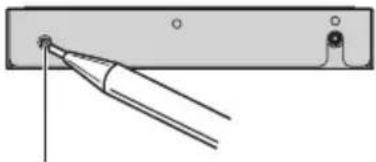
2PressRESETwithapentiporother pointedinstrument.
natural_image
Pure diagram of a tool interacting with a rectangular object, no text or symbols presentRESETbutton
Resettingthisunitwith clearingallmemory
Toprotectpersonalandprivateinformation, dataaboutthephonestoredinthisunitcan bedeleted.
1TurntheignitionswitchtoACCorON position.
2PressRESETwithapentiporother pointedinstrument.
Allmemoryisnowcompletelycleared.
- Ittakesabout10secondstodeletethedata. Tomakeitsure,leavetheignitionswitchACCor ONpositionfor10secondsafteryouoperatethe deletion.
■Pleaseconfirmifalldatahavebeencompletelycleared.Forconfirmationofthedatastatus, refertoRegisteringconnectedcellularphoneon page13.Ifallphone'sstatusesareblank,data hasbeencompletelycleared.
Hands-freephoningwith cellularphonesfeaturing Bluetoothwirelesstechnology

If your cellular phone features Bluetooth wireless technology, you can us this adapter to connect to a Pioneer head unit for hands-free, wireless calls, even while driving.

Important
Sincethisunitisonstandbytoconnectwithyour cellularphonesviaBluetoothwirelesstechnology,usingthisunitwithoutrunningtheengine canresultinbatterydrainage.
①Sourceicon
Showswhichsourcehasbeenselected.
②Sourcename
Showstheselectedsourcename.
③Phonenumber
Showsthephonenumberyouselected.
④Usernumberindicator
Showstheregistrationnumberofthecellularphone.
⑤Devicename
Showsthedevicenameofthecellular phone.
⑥Voicerecognitionindicator
Showswhenthevoicerecognitionfunction ison(formoredetails,refertoVoicerecognitiononpage10).
⑦Incomingcallnoticeindication
Showswhenanincomingcallhasbeenreceivedandnotcheckedyet.
⑧Automaticansweringindicator
Showswhentheautomaticansweringfunctionison(formoredetails,refertoSetting theautomaticansweringonpage20).
⑨Batterystrengthindicator
Showsthebatterystrengthofcellular phone.
- Batterystrengthindicatormaydiffer fromtheactualbatterystrength.
- If the battery strength is not available, nothing is displayed in the battery strength indicator area.
⑩Signallevelindicator
Showsthesignalstrengthofcellularphone.
• Signallevelindicatormaydifferfromthe actualsignallevel.
- Depending on the cellular phones featuring Bluetooth wireless technology, radio field intensity is not available.
⑪Telephoneindicator
Showswhenaphoneconnectionusing Bluetoothwirelesstechnologyisestablished(formoredetails,refertoConnecting acellularphoneonpage12).
⑫Presetdiallistdisplay
ShowsthePresetdiallist.

Notes
- Thisunit'sphonecallreceptionisonstandby whenignitionswitchissettoACCorON.
BluetoothTelephone
- Theline-of-sightdistancebetweenthisunit andyourcellularphonemustbe10metersor lessforsendingandreceivingvoiceanddata viaBluetoothwirelesstechnology.However, thetransmissiondistancemaybecomeshort-erthantheestimateddistance,dependingon theenvironmentinuse.
- InordertouseBluetoothwirelesstechnology, devicesmustbeabletointerpretcertainprofiles. Thisunitiscompatiblewiththefollowing profiles.
—GAP(GenericAccessProfile)
—SDP(ServiceDiscoveryProtocol)
—OPP(ObjectPushProfile)
—HSP(HeadSetProfile)
—HFP(HandsFreeProfile)
—A2DP(AdvancedAudioDistributionProfile)
—AVRCP(Audio/VideoRemoteControlProfile)
- WhenyouuseRDS(radiodatasystem)or DAB(digitalaudiobroadcasting)andturnthe announcementstandbyon, phonecallmaybe interruptedbyreceivinganannouncement signal.
- Whenphoneisselecteddasasource, volume andequalizercurveareautomaticallychangedtosuitablesettingsforthephonesource. Whenthesourceisreturnedtoanother source, volumeandequalizersettingsautomaticallyreturntotheoriginalsetting.
- Equalizercurveforthephonesourceis fixed.
Aboutthetelephonesource Standbymode
OnceconnectedviaBluetoothwirelesstechnology,theheadunitwillremainontelephonesourcestandbyinthebackgroundallthewhiletheconnectionissustained.Thismeansyoucanfreelyusetheotherfunctionsoftheheadunit,butstillbereadytoreceiveacall.
●Touchthesourceiconandthentouch
Telephonetoselectthetelephone.
- Whenthesourceiconisnotdisplayed, you candisplayitbytouchingthescreen.
Settingupforhands-free phoning
Beforeyoucanusethehands-freephoning functionyouwillneedtosetuptheunitfor usewithyourcellularphone. ThisentailsestablishingaBluetoothwirelessconnectionbetweenthisunitandyourphone, registering yourphonewiththisunit, and adjusting the volumelevel.
1Connection
Fordetailedinstructionsonconnectingyour phonetothisunitviaBluetoothwirelestechnology,refertoConnectingacellularphoneon page12.
- Yourphoneshouldnowbetemporarilyconnected;however,tomakebestuseofthetechnology,werecommendyouregisterthephoneto thisunit.
2Registration
Toregistryourtemporarilyconnectedphone, refertoRegisteringconnectedcellularphone onpage13.
3Volumeadjustment
Adjusttheearpiecevolumeonyourcellular phoneforcomfort.Whenadjusted,thevolume levelismemorizedinthisunitasthedefault setting.
- Caller'svoicevolumeandringvolumemay varydependingonthetypeofcellularphones.
■ If the difference between the ranging volume and caller's voice volume is big, overall volume level may become unstable.
■ Before disconnecting cellular phone from this unit, makes sure to adjust the volumetoproper level. If the volume has been muted (zerolevel) on your cellular phone, the volume level of your cellular phoneremains muted even after the cellular phone is disconnected from this unit.
Basicoperationofhands-freephoning
These are the basic operation of household free phoning via Bluetooth wireless technology. More advanced hands-free phoning operations are explained starting on Introduction of advanced hands-free phoning operation on then next page.

Important
Advanced operation that require your attention such as dialing numbers on the monitor, using phonebook, etc., are prohibited while you are driving. When you need to set these advanced operations, stop your vehicle in a safe place and operate.
Makingaphonecall
Voicerecognition
If your cellular phone features voicerecognition technology, you can make acall by voice commands.
- Operationvariesdependingonthetypeof yourcellularphone.Refertotheinstruction manualthatcamewithyourcellularphone fordetailedinstructions.
- This function can be operated only when the connection is established with HFP (HandsFreeProfile).
1TouchVOICEtoturnthevoicerecognitionfunctionon.
Voicedialiconappearsontheinformationbar. Voicerecognitionfunctionisnowready.
■Ifyourcellularphonedoesnotfeaturevoice recognitionfunction,youcannottouchVOICE.
2 Pronouncethenameofyourcontact.
Takingaphonecall
Answeringanincomingcall
EvenwhenasourceotherthanTelephoneis selectedorwhenthisunitisturnedoff,you canstillanswerincomingcalls.Ifyousetthis unittoautomaticallyansweringincoming calls,refertoSettingtheautomaticanswering onpage20.
1Whenacallcomesin,touch
■Iftheprivatemodeisselectedonthecellular phone,hands-freephoningmaynotbeperformed.
2Toendthecall,touch.
Theestimatedcalltimeappearsinthedisplay (thismaydifferslightlyfromtheactualcall time).
■You may hearanois when you disconnect the phone.
Rejectinganincomingcall
You can reject an incoming call. Toreject all incoming calls automatically, referto Setting the automatic rejecting on page 20.
- Whenacallcomesin,touch
Thecallisrejected.
BluetoothTelephone

Note
Themanuallyrejectedcallisrecordedinmissed callhistorylist.Aboutthemissedcallhistorylist, refertoUsingtheCallHistoryonpage18.
Answeringacallwaiting
Ifwhileyouaretalkingonthephoneanother callcomesin,thenumber(ornameifitisin yourphonebook)ofthenewcallerappearson thedisplaytosignalthatyouhaveacallwaiting.Youcanputthefirstcalleronholdwhile youanswerthecallwaiting,oryoucanchoose torejectthecall.
1Touch

toansweracallwaiting.
2Touch

toendthecall.
■Thecalleryouhavebeentalkingtoisnowon hold.Toendthecall,bothyouandyourcaller needtohangupthephone.
■Whileyourcallersholdtheline,touching switchesbetweencallers.
Rejectingacallwaiting
If you would rather not interrupt your current call to answer a call waiting, you can reject it.
●Touch

torejectacallwaiting.
■Thenumberyouhaverejectedisnotaddedto thecallhistorylist.
Introductionofadvanced hands-freephoningoperation


Important
Toperformthisoperation,besuretoparkyourvehicleandapplytheparkingbrake.
①Functiondisplay
1SelectTelephoneasasource.
2TouchAVMENUtodisplayMENU.
MENUappearsonthedisplay.
■WhenAVMENUisnotdisplayed,youcandisplayitbytouchingthescreen.
■YoucanalsodisplayMENUbyclickingthe joystick.
3TouchFUNCTIONtodisplaythefunctionnames.
The function names are displayed and operable ones are highlighted.
■ To return to the previous display, touch BACK.
■Toreturntotheplaybackdisplay,touch
ESC.
Connectingacellularphone
Touseaphonewirelesslywiththisunit,itis necessaryfirsttoestablishaconconnection using Bluetoothwirelestechnology.Thereareseveralwaysyoucandothis.
- ConnectionisnormallyestablishedbyHFP, whichgivesyouafullcontroloffunctions availableonthetelephonesource.However,insomecaseswhenyoumakeconnectionfromyourcellularphone,the connectionmaybemadebyHSPandseveralfunctionsmaynotbeavailable.
- AphonemaybeconnectedviaBluetooth wirelessstechnologybutnotyetregistered withthisunit.Inthiscaseitissaidtobe temporarilyconnected,andtheavailable featuresarelimited.Totakefulladvantage ofallthefeaturesavailable,werecommend youregistryyourphonewiththisunit. RefertoRegisteringconnectedcellular phoneonthenextpageformoreonthis.
Searchingforavailablecellular phones
Youcan havethisunitsearchforanyavailable phonesintheareathathaveBluetoothwirelesstechnology, thenselectwhichyouwantto connecttofromalistdisplayedon-screen.
1TouchPHONECONNECTonthefunction menu.
2TouchSearchtosearchforavailablecel-lularphones.
Whilesearching, SEARCHING is displayed. When available cellular phones featuring Bluetooth wireless technology are found, device names or NameNotFound (if names cannot be obtained) are displayed.
■ If this unit fail to find any available cellular phones, NOT FOUND is displayed.
3Touchthedevicenameyouwantto connect.
Whileconnecting, CONNECTING is displayed. Tocompletetheconnection, please check the device name (PioneerBTunit) and enter the linkcode on your cellular phone. If the connection is established, CONNECTED is displayed.
■ Thelinkcodeissetto0000asdefault.You canchangethiscodeintheinitialsetting.Refer toEnteringPINcodeforBluetoothwirelessconnectiononpage24.
Usingacellularphoneto initiateaconconnection
PuttingtheunitinConnectionopenmodeallowsyoutoestablishaBluetoothwirelessconnectionfromyourphone.Youmayneedto refertotheoperationmanualthatcamewith yourphoneifyouareunsurehowtoinitiatea connectionfromyourphone.
1TouchPHONECONNECTonthefunction menu.
2TouchCONNECTIONOPEN.
Theunitisnowonstandbyforconnection fromcellularphone.
3Usecellularphonetoconnecttothis unit.
■Operationvariesdependingonthetypeof yourcellularphone.Refertotheinstructionmanualthatcamewithyourcellularphonefordetailedinstructions.
■Youmayneedtoenterthelinkcodeonyour cellularphonetocompletetheconnection.
■ Thelinkcodeissetto0000asdefault.You canchangethiscodeintheinitialsetting.Refer toEnteringPINcodeforBluetoothwirelessconnectiononpage24.
BluetoothTelephone
Disconnectingacellularphone
Whenyouaredoneusingyourphonewiththis unit,youcanclosetheBluetoothwirelessconnection.
1TouchPHONECONNECTonthefunction menu.
2TouchDISCONNECTtodisconnectthe currentlyconnectedcellularphonefrom thisunit.
Afterthedisconnectioniscompleted, NOCONNECTIONisdisplayed.
Registeringconnected cellularphone
Youcanregisteraphonethatistemporarily connectedtothisunitinordertotakefulladvantageofthefeaturesavailablewithBluetoothwirelesstechnology.Atotaloffive phonescanberegistered:threeusercellular phonesandtwoguestphones.Whenregisteredasauserphone,allthepossiblefunctionsareavailableforuse.Whenregisteredas aguestphone,somefunctionsarelimited.
1TouchPHONEREGISTERonthefunction menu.
2Touchandholdoneoftheregistration assignmentstoregisterthecurrentlyconnectedphone.
Selectfromthefollowing:
1 (user 1)—2 (user 2)—3 (user 3)—G (guest 1)—G(guest2)
If theregistration is succeeded, the device name of the connected phone is displayed in these selected assignment.
■Iftheassignmentisempty,thedevicenameis notdisplayed.Iftheassignmentisalreadytaken, thedevicenameappears.Toreplaceanassign-
mentwithanewphone,firstdelete the current assignment.Formore detailed instructions,see Deleting a registered phone on this page.
■ If theregistrationfailed, device name of the connected phone is not displayed in these selected assignment. In this case, return to step1 and try again.

Note
Audioadjustmentcanbesetindependentlyfor eachuser.
Deletingaregisteredphone
If you nolongerneedtousearegistered phonewith this unit, you candeteit from the registration assignment for another phone.
1TouchPHONEREGISTERonthefunction menu.
2TouchDELETEnexttothedevicename youwanttodelete.
Aconfirmationdisplayappears.Touch YES to deletethephone.
- Ittakesabout10secondstodeletethedata. Tomakeitsure,leavetheignitionswitchACCor ONpositionfor10secondsafteryouoperatethe deletion.
■Tocanceldeletingaregisteredphone,touch NO.
Connectingtoaregistered cellularphone
Onceyourphoneisregisteredwiththisunitit isasimplemattertoestablishaBluetooth wirelessconnection,eithermanuallybyselect-ingaregistrationassignment,orautomatically whenaregisteredphoneiswithinrange.
Connectingtoaregistered phonemanually
Selectaphonefromtheregistrationassignmentstoconnecttothephonemanually.
1TouchPHONECONNECTonthefunction menu.
2TouchDIRECTCONNECT.
3Touchthedevicenameyouwantto connect.
Whileconnecting, CONNECTING is flashing. If the connection is established, CONNECTED is displayed.
Connectingtoaregistered phoneautomatically
WhenAutomaticConnectionisactivetheunit willautomaticallyestablishaconnectionwith a registeredphonewhenitcomesintorange.
- If this unit fail to find registered phones, this unit connects automatically to a phone registered as 1 (user1).
- Thisfeaturemaynotworkwithallphones. Ifyourregisteredphonefailstoconnect withautomaticconnection,usethemanual connectionmethodexplainedinConnectingtoaregisteredphonemanuallyonthis page.
- Withsomecellularphones, you may be required to make a confirmation on the cellular phone in connecting this unit. In
suchcase,theconnectionmaynotbe madeuntilyouconfirmitonthephone eveniftheAutomaticConnectionofthis unitissettoon.Ifpossible,setyourcellularphonetonotseekingaconfirmationfor theBluetoothconnection.Fordetails, pleaserefertotheoperationmanualthat camewithyourcellularphone.
- ThisfeatureisnotpossibleifyouareplayingbacksongsonyourBluetoothaudio playerviaBluetoothwirelesstechnology.In suchcase,stopthe playbackandswitchto anothersourceforyourcellularphoneto connecttothisunitthroughthisfunction.
- While you are operating in the function menu of Telephones source or BTAUDIO source, this unit does not initiate an automatic connection to your registered phone.
- Thisfeaturecannotbesetforeachdifferentuserphone.
- TouchAUTOCONNECTonthefunction menutoturntheAutomaticConnection functionon.
If your cellular phone is set ready for Bluetooth wireless connection, the connection to this unit will be automatically established.
■Toturnautomaticconnectionoff,touch AUTOCONNECTagain.
UsingthePhoneBook
ThePhoneBookcanstoreupto500names andnumbers.UsethePhoneBooktobrowse fornumbersontheunit'sdisplayandselect numberstocall.Namesandphonenumbers storedineregistereduserphone'saddress bookcanbetransferredtothePhoneBook,allowingyoutofillthePhoneBookquicklyand easilywithyourcontacts.
BluetoothTelephone
- Themaximumnumberofcharacterswhich canbedisplayedisdifferentdependingon yourcellularphone.Thisunitcandisplay upto24to48letters.
Transferringentriestothe PhoneBook
TopopulatethePhoneBookyoucantransfer thenumbersinaregistereduserphone'saddressbook.
ThePhoneBookcanholdatotalof500entries;300fromUser1,150fromUser2,and50fromUser3.
- OncethetransferringPhoneBookfunction starts,theBluetoothconnectionisdisconnectedandthehands-freephoningisnot possible.Inordertorestartthehands-free phoning,connectyourcellularphoneto thisunitagain.Iftheautomaticconnection ofthisunitisturnedon,however,theconnectionwillbeautomaticallyestablished severaltensofsecondsafterthephoneis disconnectedforthetransferring.
- Somesymbolsusedinthephonenumber of the phonebookentries cannot be transferred to this unit. Only +, # and * can be correctly recognized by this unit.
- Withsomecellularphones, it may not be possible to transfer whole phone book at a time. In this case, transfer phone book entries one by one from your phone by using your cellular phone.
- Depending on the cellular phone connected via Bluetooth wireless technology, this unit cannot display the PhoneBook correctly. (Some characters maybe garbled.)
- If the phonebook in the cellular phone contains imagedata, phonebook may not be correctly transferred.
1TouchPHONEBOOKTRANSFERonthe functionmenu.
2TouchSTARTtoturnthePhoneBook Transferfunctionon.
ThePhoneBookTransferisnowonstandby.
3Usecellularphonetoperformphone booktransfer.
Performphonebooktransferusingthecellularphone. Fordetailedinstructiononthis, refertotheinstructionmanualthatcamewith yourcellularphone.
■Whiletransferringthephonebook,hourglass iconisdisplayed.
■Thedisplayindicateshowmanyentrieshave beentransferredandthetotalnumbertobe transferred.
■Tocancelthetransferringprocess,touch STOP.
4Completedisdisplayedandphone booktransferiscompleted.
ChangingthePhoneBook displayorder
YoucanchoosetodisplaythePhoneBook sortedalphabeticallybyfirstnameorlast name.
- Withsomecellularphones, this feature may not be possible.
●TouchPHONEBOOKNAMEVIEWonthe functionmenutoturnPhoneBookName Viewfunctionon.
DisplayorderforthePhoneBookischanged.
■Tochangetotheotherdisplayorder,touch PHONEBOOKNAMEVIEWagain.
CallinganumberinthePhone Book
YoucanselecttheentryinthePhoneBook andmakethecall.
1TouchPHONEBOOKtodisplaythe PhoneBook.
2TouchaPhoneBookentryyouwantto call.
ThedisplayisswitchedtothePhoneBookedit display.
■TouchPREVorNEXTtodisplayotherphone bookentries.
3TouchphonenumberofthePhone Bookentryyouwanttocall.
If several phonenumbers are entered to an entry, touch one you want to call.
Thedisplayreturnstothenormaldisplayand thePhoneBookentryyouselecteddisdisplayedontheinformationbar.
4Touch tomakeacall.
Theestimatedcalltimeappearsinthedisplay (thismaydifferslightlyfromtheactualcall time).
■Foraninternationalcall,touchadd"+"toadd
+tothephonenumber.
5Toendthecall,touch.
Theestimatedcalltimeappearsinthedisplay (thismaydifferslightlyfromtheactualcall time).
Searchinganumberinthe PhoneBook
AfterfindingthenumberinthePhoneBook youwanttocall,youcanselecttheentryand makethecall.
1TouchPHONEBOOKtodisplaythe PhoneBook.
2TouchSEARCHtodisplaythePhone Booksearchdisplay.
3Touchanalphabetlettertoselectthe firstletterofthenameyouarelookingfor.
4TouchENTERtoshowentriesstarting withtheletteryouchose.
ThedisplayshowsthefirstsixPhoneBookentriesstartingwiththatletter(e.g."Ben", "Brian" and "Burt" when "B" is selected).
■TouchPREVorNEXTtodisplayotherphone bookentries.
■Torefinethesearchwithadifferentletter, touchCLEAR.
5TouchaPhoneBookentryandmakea call.
SeesteptwotofiveonCallinganumberinthe PhoneBookonthepreviouspageforhowto dothis.
EditingthenameofaPhone Bookentry
YoucaneditthenamesofPhoneBookentries. Eachnamecanbeupto16characterslong.
1TouchPHONEBOOKtodisplaythe PhoneBook.
2SelectaPhoneBookentryyouwantto edit.
SeesteptwotothreeonCallinganumberin thePhoneBookonthepreviouspageforhow todothis.
3TouchEDITnexttothePhoneBook entryname.
ThedisplayischangedtothePhoneBookedit display.
4Touch123orABCtoselectthedesired charactertype.
TouchingABCswitchesthecharactertypesin thefollowingorder.
BluetoothTelephone
Alphabet(uppercase), numbersandsymbols—alphabet(lowercase)—numbersandsymbols—Russiancharacters
■OnlywhenyouuseaRussianmodel,youcan switchthecharactertypetoRussian.
5Touchalettertoenter.
■Todeleteacharacterandleaveaspace,touch ____.
6TouchMEMORYtostorethenew name.
Editingphonenumbers
YoucaneditthephonenumbersofPhone Bookentries.
1TouchPHONEBOOKtodisplaythe PhoneBook.
2SelectaPhoneBookentryyouwantto edit.
SeesteptwotothreeonCallinganumberin thePhoneBookonpage15forhowtodothis.
3TouchEDITnexttothephonenumber youwanttoedit.
ThedisplayischangedtothePhoneBookdialeditdisplay.
4Touch0—9toinputnumbers.
■Foraninternationalcall,touchadd"+"toadd
+tothephonenumber.
■TouchCLEARtodeletethenumber.
5Touch◄or►tomovethecursorand editthenumber.
Repeat the seven steps until you have finished changing.
6TouchENTERtostorethenewnumber.
ClearingaPhoneBookentry
YoucandeletePhoneBookentriesinthe PhoneBookonebyone.
ToclearallofyouentriesinthePhoneBook, refertoClearingmemoryonthispage.
1TouchPHONEBOOKtodisplaythe PhoneBook.
2SelectaPhoneBookentryyouwantto delete.
SeesteptwotothreeonCallinganumberin thePhoneBookonpage15forhowtodothis.
3TouchDELETEtodeletethePhoneBook entry.
Aconfirmationdisplayappears.Touch YES to deletetheentry.
■ Ittakesabout10secondstodeletethedata.
Tomakeitsure, leavetheignitionswitchACCor ONpositionfor10secondsafteryouoperatethe deletion.
■ If you donot want to clear a Phone Book entry that you have selected, touch NO.
Clearingmemory
Youcanclearmemoryofeachitem;Phone Book,dialled/received/missedcallhistorylist andpresetphonenumber.
1TouchCLEARMEMORYonthefunction menu.
2TouchCLEARnexttotheitemyouwant todeletefromthememory.
Selectfromthefollowing:
PHONEBOOK(phonebook)—DIALEDCALLS
(dialledcallhistory)—RECEIVEDCALLS(receivedcallhistory)—MISSEDCALLS(missedcallhistory)—PRESETDIALS(presetphone numbers)
Afterselectingadesireditem,aconfirmation displayappears.TouchOKtodeletethememory.
■ If you want to clear all the Phone Book, dialled/received/missed call history list and preset phonenumber, touch CLEARALL.
- Ittakesabout10secondstodeletethedata. Tomakeitsure,leavetheignitionswitchACCor ONpositionfor10secondsafteryouoperatethe deletion.
■If you donotwant to clear memory that you have selected, touch CANCEL.
UsingtheCallHistory
The12mostrecentcallsmade(dialled),receivedandmissed,arestoredintheCallHistory.YoucanbrowsetheCallHistoryandcallnumbersfromit.
DisplayingtheCallHistory
TheCallHistoryisdividedintothreegroups: Missedcalls,Dialledcalls,andReceivedcalls. Youcanseethenumber(andnameifthe numberisinthePhoneBook).
●TouchLOGtodisplaytheCallHistory.
TouchingLOGrepeatedlyswitchesbetween the followingcallhistories: Missedcall—Dialledcall—Receivedcall
■ Ifnophonenumbershavebeenstored in the selectedlist, nothing is displayed.
■Youcanswitchbetweenphonenumberand name(ifentered)bytouchingABC/123.
CallinganumberfromtheCall History
1Displaythelistandselectaphonenum-ber.
Displaythephonenumberyouwanttomakea call.
2Touchaphonenumberorname(ifentered)youwanttocall.
Thedisplayreturnstothenormaldisplayand thephonumberyouselecteddisdisplayed ontheinformationbar.
■TouchPREVorNEXTtodisplayotherphone numberorname(ifentered).
3Touchtomakeacall.
Theestimatedcalltimeappearsinthedisplay (thismaydifferslightlyfromtheactualcall time).
■Foraninternationalcall,touchadd"+"toadd
+tothephonenumber.
4Toendthecall,touch.

Usingpresetnumbers
Assigningpresetnumbers
Numbersthatyoudialfrequentlycanbeassignedtopresetsforquickrecall.
Youcanassignuptosixfrequentlycalled phonenumberstonumberpresets(P1-P6).
1Selectadesiredphonenumberfrom thePhoneBookortheCallHistory.
Seetheinstructionsexplainedinprevious pagesforhowtoselectadesiredphonenum-berfromthePhoneBookortheCallHistory. Thedisplayshouldnowbethenormaldisplay andtheselectedphonenumberisdisplayed ontheinformationbar.
BluetoothTelephone
2TouchLISTtodisplaypresetnumbers P1-P6.
3KeeptouchingoneofP1-P6topreset thephonenumber.
Thephonenumberyouselectedisstoredin presets.
■ Upto30phonenumbers(sixphonenumbersforeachofthethreeregisteredphonesandtwoguestphones)canbestoredinmemory.
Recallingpresetnumbers
Youcaneasilyrecallthepresetphonenumbers.
1TouchLISTtodisplaypresetnumbers P1-P6.
PresetnumbersP1-P6appearinthedisplay.
2TouchoneofpresetnumbersP1-P6.
Theselectedphonenumbershouldnowbe displayedontheinformationbar.
3Touch tomakeacall.
4Toendthecall,touch
Theestimatedcalltimeappearsinthedisplay (thismaydifferslightlyfromtheactualcall time).
Makingacallbyentering phonenumber
Youcanmakeacallbydirectlyenteringphone numbersonthisunit.
1TouchDIRECTtodisplaythedirectdial display.
2Touch0—9toinputnumbers.
■Foraninternationalcall,touchadd"+"toadd
+tothephonenumber.
■TouchCLEARtodeletethenumber.
■Upto24digitscanbeentered.
3Whenyoucompletedenteringthe number,touch tomakeacall.
4Toendthecall,touch
Theestimatedcalltimeappearsinthedisplay (thismaydifferslightlyfromtheactualcall time).
Echocancelingandnoise reduction
When you are operating hands-free phoning in the vehicle, you may hear undesire decho. This function reduces the echo and noise and keeps acertains sound quality.
- Thisfeaturecannotbesetforeachdifferent userphone.
●TouchECHOCANCELonthefunction menutoturnEchoCancelfunctionon.
■Toturnechocancelingoff,touch ECHOCANCELagain.
Switchingtheringtone
Theunitoffersyoutoturntheringtoneforin- comingcallsonoroff.
- Theringtoneyouselectforthisunithasno effectontheringtoneusedbyyourphone. Ifyoudonotwantyourphoneandthisunit toringatthesametime, were recommend youturntheringtoneofoneortheother off.
●TouchRINGTONEonthefunctionmenu toturntheringtoneon.
■Toturntheringtoneoff,touchRINGTONE again.
Settingtheautomatic rejecting
If this function is on, this unit automatically rejects all incoming calls.
- Thisfeature cannot be set for each different userphone.
- Therejectedcallisnotmemorizedinreceivedormissedcallhistorylist.
- TouchREFUSEALLCALLSonthefunctionmenutoturntheautomaticcallrejectionon.
ONappearsinthedisplay.
■Toturntheautomaticcallrejectionoff,touch REFUSEALLCALLSagain.
Settingtheautomatic answering
If this function is on, this unit automatically answers all incoming calls.
- Thisfeature cannot be set for each different userphone.
- TouchAUTOANSWERonthefunction menutoturntheautomaticansweron.
ONappearsinthedisplay.
■Toturntheautomaticansweroff,touch
AUTOANSWERagain.

Note
If both the automatic reject and automatic answer functions a reset to on, the automatic reject
isprioritizedandallincomingcallsareaautomaticallyrejected.
DisplayingBD(Bluetooth Device)address
EachdevicefeaturingBluetoothwirelestechnologyisallocatedaunique48-bitdeviceaddress.Eachdeviceaddressconsistsofa12-digitofhexadecimalstring.
YoucandisplaytheBDaddressofyourcellularphoneandthisunit.
Should this unit fail to operate properly and you consult with dealer for repair, you maybe asked to indicate the system version of this unit and of Bluetooth module. You can display the versions and confirm them.
- TouchDEVICEINFOonthefunction menutodisplaytheBDaddress.
Various information regarding the bluetooth wirelessstechnology are displayed.
• BDADDRESS(systemaddress)
• SYSTEMNAME(systemname)
• SYSTEMVER.(version)
- BTMODULEVER.(Bluetoothmodule version)
ListeningtosongsonBTAudio (Bluetoothaudioplayer)

If you connect this adapter to a Pioneerhead unit, you can control a Bluetooth audioplayer via Bluetooth wireless technology.

Important
- This unit can control a Bluetooth audioplayer via A2DP or AVRCP profile. Bluetooth audio players (or Bluetooth adapters) compatible with those profiles can be connected to this unit.
—A2DPprofile(AdvancedAudioDistribution Profile): Only playing back songs on your audioplayer is possible.
—AVRCPprofile(Audio/VideoRemoteControlProfile):Playingback,pausing,selectingsongs,etc.,arepossible.
- SincethereareanumberofBluetoothaudio playersavailableonthemarket,operations withyourBluetoothaudioplayerusingthis unitvaryingreatrange.PleaserefertotheinstructionmanualthatcamewithyourBluetoothaudioplayeraswellasthismanual whileoperatingyourplayeronthisunit.
• Informationaboutsongs(e.g.theelapsed playingtime,songtitle,songindex,etc.)can-notbedisplayedonthisunit.
- WhileyouarelisteningtosongsonyourBlue-toothaudioplayer, pleaserefrainfromoperatingonyourcellularphoneasmuchas possible.Ifyoutryoperatingonyourcellular
phone, the signal from your cellular phone may cause anoise on the song playback.
- When you are talking on the cellular phone connected to this unit via Bluetooth wireless technology, the song playback from your Bluetooth audioplayer connected to this unit is muted.
- Evenifwhileyouarelisteningtosongonyour Bluetoothaudioplayeryouswitchtoanother source,theplaybackofsongcontinuesto elapse.
①Sourceicon
Showswhichsourcehasbeenselected.
②Sourcename
Showstheselectedsourcename.
③Devicename
Showsthedevicenameoftheconnected Bluetoothaudioplayer(orBluetoothadapter).
④Bluetoothaudioindicator
ShowswhenaBluetoothaudioplayerconnectionisestablished(formoredetails, refertoConnectingaBluetoothaudioplayeronthenextpage).
- Touch the source icon and thentouch BTAUDIO to select the Bluetooth audio source.

Note
Theline-of-sightdistancebetweenthisunitand yourcellularphonemustbe10metersorlessfor sendingandreceivingvoiceanddataviaBluetoothwirelesstechnology.However,thetransmissiondistancemaybecomeshorterthanthe estimateddistance,dependingontheenvironmentuse.

ConnectingaBluetooth audioplayer
①Functiondisplay
The function names are displayed and operable ones are highlighted.
■Toreturntothepreviousdisplay,touchBACK.
■Toreturntotheplaybackdisplay,touchESC.
3TouchCONNECTIONOPEN.
ONisdisplayed. This unit is now on standby for connection from Bluetooth audioplayer. If your Bluetooth audioplayer is set ready for Bluetooth wireless connection, connection to this unit will be automatically established.

Note
Beforeyoucanuseaudioplayersyoumayneed toenterthePINcodeintothisunit.Ifyourplayer requiresaPINcodetoestablishaconnection, lookforthecodeontheplayerorinitsaccompanyingdocumentation.EnterthePINcodereferringtoEnteringPINcodeforBluetoothwireless connectiononpage24.
PlayingsongsonBluetooth audioplayer

Important
OperationvariesdependingonthetypeofyourBluetoothaudioplayer.Refertotheinstruction manualthatcamewithyourBluetoothaudio playerfordetailedinstructions.
1Touch▶/II.
Playbackstarts.
■Whenyouwanttopauseasong,touch▶/Ⅱ again.
2 Toskipbackorforwardtoanother track, touch | ◀◀ or ▶▶.
Touching▶▶Skipstothestartofthenext track.Touching▶◀▶onceskipstothestartof thecurrenttrack.Touchingitagainwillskipto theprevioustrack.
■Youcanalsoskipbackorforwardtoanother trackbypassing ◀or▶ buttonormovingthe joystickleftorright.
3Toperformfastforwardorreverse, keeptouching|◄◄or►►|.
■Youcanalsoperformfastreverse/fastforward bypassingandholding◄or►buttonorholding thejoystickleftorright.
■Whenyouperformfastforwardorreverse, thereisasoundornot. Thisdifferencedepends ontheBluetoothaudioplayerwhichyouuse.
4Tostop playback, touch ■.

BluetoothAudio
DisconnectingaBluetooth audioplayer
WhenyouaredoneusingyourBluetooth audioplayerwiththisunit,youcancosethe Bluetoothwirelessconnection.
1TouchAVMENUtodisplayMENU.
MENUappearsonthedisplay.
■WhenAVMENUisnotdisplayed,youcandisplayitbytouchingthescreen.
■YoucanalsodisplayMENUbyclickingthe joystick.
2TouchFUNCTIONtodisplaythefunctionnames.
The function names are displayed and operable ones are highlighted.
■ To return to the previous display, touch BACK.
■Toreturntotheplaybackdisplay,touchESC.
3TouchDISCONNECT.
Afterthedisconnectioniscompleted,
Disconnectedisdisplayed.
DisplayingBD(Bluetooth Device)address
EachdevicefeaturingBluetoothwirelestechnologyisallocatedaunique48-bitdeviceaddress.Eachdeviceaddressconsistsofa12-digitofhexadecimalstring. YoucandisplaytheBDaddressofthisunit. Shouldthisunitfailstooperateproperly and youconsultwithdealerforrepair,youmaybe askedtoindicatethesystemversionsofthis unitandofBluetoothmodule.Youcandisplay theversionsandconfirmthem.
1TouchAVMENUtodisplayMENU.
MENUappearsonthedisplay.
■WhenAVMENUisnotdisplayed,youcandisplayitbytouchingthescreen.
■YoucanalsodisplayMENUbyclickingthe joystick.
2TouchFUNCTIONtodisplaythefunctionnames.
The function names are displayed and operable ones are highlighted.
■ To return to the previous display, touch BACK.
■Toreturntotheplaybackdisplay,touchESC.
3TouchDEVICEINFOtodisplaytheBD address.
Variousinformationregardingthebluetooth wirelessstechnologyaredisplayed.
• BDADDRESS(systemaddress)
• SYSTEMNAME(systemname)
• SYSTEMVER.(version)
• BTMODULEVER.(Bluetoothmodule version)
EnteringPINcodefor Bluetoothwirelessconnection
With some Bluetooth audioplayers, you may berequired to enter to this unit in advance PINcode of your Bluetooth audioplayer, in ordertoset this unit ready for a connection from your Bluetooth audioplayer.
1Touchthesourceiconandthentouch OFFtoturnthisunitoff.
- When the source icon is not displayed, you can display it by touching the screen.
2TouchAVMENUandthentouchINITIAL todisplaythefunctionnames.
The function names are displayed and operable ones are highlighted.
■WhenAVMENUisnotdisplayed,youcandisplayitbytouchingthescreen.
■YoucanalsodisplayMENUbyclickingthe joystick.
■Togotothenextgroupoffunctionnames, touchNEXT.
■Toreturntothepreviousgroupoffunction names,touchPREV.
■Toreturntothepreviousdisplay,touchBACK.
■Toreturntothedisplayofeachsource,touch ESC.
3TouchPINCODEINPUT.
PINcodeinputdisplayappears.
4Touch0—9toinputthePINcodeof yourBluetoothaudioplayer.
■TouchCtodeletethenumber.
5AfterinputtingPINcode(upto16digits),touchENTER.
ThePINcodeyouenteredisstoredinthis unit.
Operatingwithdifferent headunits
Usingasanexternalunit
The following headunitsoperatethisunitas anexternalunit.Formoredetailsabouttheexternalunit,refertotheheadunit'smanual.
- 1KEY to 6KEY doesn't be used to operate thisunit.
- WhenselectingTELasasource, AUTO/MANUAL(A/M)doesn'tbeusedto operatethisunit.
- Whenselecting BTAUDIO asasource, FUNC3(F3)/FUNCTION3 and FUNC4(F4)/FUNCTION4 doesn't be used to operate this unit.
Headunitgroup1
The following head units featuring FUNCTION button operation or SOFTKEY operation.
DEH-P9600MP, DEX-P90RS, DEH-P7700MP, DEH-P7600MP, DEH-P77MP ^1 , DEH-P6800MP, DEH-P6700MP, DEH-P6600R, DEH-P5900MP, DEH-P5800MP, DEH-P5700MP, DEH-P5600MP, DEH-P55BT ^2 , DEH-P4800MP, DEH-P3600MP, DEH-P2600R, DEH-P40MP, DVH-P580MP, DVH-P5000MP, KEH-P7020R, KEH-P6020R
Headunitgroup2
The following head units featuring MULTI-CONTROL operation. DEH-P8600MP, DEH-P88RS, DEH-P80MP, DEH-P70BT ^4
Headunitgroup3
The following head units featuring touch panel key operation. AVH-P7500DVDⅡ, AVH-P6600DVD, AVH-P5700DVD
Headunitgroup4
RS-D7R,RS-D7RII

Important
- Sincethisunitisonstandbytoconnectwith yourcellularphonesviaBluetoothwireless technology,usingthisunitwithoutrunning theenginecanresultinbatterydrainage.
-
InordertouseBluetoothwirelesstechnology, devicesmustbeableointerpretcertainprofiles.Whenusingasanexternalunit,thisunit iscompatiblewiththefollowingprofiles.
—GAP(GenericAccessProfile)
—SDP(ServiceDiscoveryProtocol)
—HSP(HeadSetProfile)
—HFP(HandsFreeProfile)
—A2DP(AdvancedAudioDistributionProfile)
—AVRCP(Audio/VideoRemoteControlProfile) -
ThisunitcancontrolaBluetoothaudioplayer viaA2DPorAVRCPprofile.Bluetoothaudio players(orBluetoothadapters)compatible withthoseprofilescanbeconnectedtothis unit.
—A2DPprofile(AdvancedAudioDistribution Profile): Onlyplayingbacksongsonyour audioplayerispossible.
—AVRCPprofile(Audio/VideoRemoteControlProfile):Playingback,pausing,selectingsongs,etc.,arepossible.
- Whenusingthisunitasanexternalunit,the PINcodeissetto0000.Youcannotchange thePINcode.Thisunitcanconnectonlythe Bluetoothaudioplayerwhichrequest0000as thePINcodeordoesnotrequestanyPIN code.
^*1 It is necessary to use remote control (sold separately) to perform the operations by ▲/▼/◄/►.
*2 YoucanusethisunitasanexternalunittocontrolonlytheBluetoothaudiofunctions.
Operatingwithdifferent headunits
- SincethereareanumberofBluetoothaudio playersavailableonthemarket,operations withyourBluetoothaudioplayerusingthis unitvaryingreatrange.PleaserefertotheinstructionmanualthatcamewithyourBluetoothaudioplayeraswellasthismanual whileoperatingyourplayeronthisunit.
• Informationaboutsongs(e.g.theelapsed playingtime,songtitle,songindex,etc.)cannotbedisplayedonthisunit. - While you are listening to song your Bluetooth audioplayer, pleaserefrain from operating your cellular phone as much as possible. If you try operating your cellular phone, the signal from your cellular phone may cause anoise on the song playback.
- When you are talking on the cellular phone connected to this unit via Bluetooth wireless technology, the song playback from your Bluetooth audioplayer connected to this unit is muted.
- Evenifwhileyouarelisteningtosongonyour Bluetoothaudioplayeryouswitchtoanother source,theplaybackofsongcontinuesto elapse.
- Operationvariesdependingonthetypeof yourcellularphoneandBluetoothaudio player.Refertotheinstructionmanualthat camewiththemfordetailedinstructions.

Notes
- Thisunit's phonecall reception is on stand by whenignitionswitchissettoACCorON.
-
Theline-of-sightdistancebetweenthisunit andyourcellularphonemustbe10metersor lessforsendingandreceivingvoiceanddata viaBluetoothwirelesstechnology.However, thetransmissiondistancemaybecomeshort-erthantheestimateddistance,dependingon theenvironmentinuse.
-
TELandBTAUDIOaresettothesamevolumeandthesameSLA(SourceLevelAdjustment)volume.Changethevolumevaluefor TELorBTAUDIOeachtime,ifneeded.
- IftheremotecontrolhavePGMbutton,you canperformfollowingoperationswithit: —WhenselectingTELasasource,youcan scrollaphonenumberinthecallhistory. —WhenselectingBTAUDIOasasource, youcanpauseasong.
Functioncompatibilitycharts Headunitgroup1
ControlsofBluetoothtelephone
| SelectTEL/BTAUDIO asasource | PressSOURCE. |
| SwitchbetweenTEL and BTAUDIO | WhenselectingTEL/BTAUDIOasasource,pressBAND. |
| PuttheunitinVOICE ONmode * | WhenselectingTELasa source,pressandholdBAND. |
| Takeaphonecall | Whenacallcomesin,press▲. |
| EndacallPress▼. | |
| Displaythereceived/ missedcallhistory | Press◀. |
| Displaythedialled callhistory | Press▶. |
| Selectaphonenum- berfromthedialled orreceived/missed callhistory | Whendisplayingthedialled orreceived/missedcallhist- tory,press◀or▶. Ifyouwanttoreturntothe telephonestandbydisplay, press▼. |
| Makeacall | Whenselectingaphone numberfromthedialledand receivedcallhistory,press▲. |
Operatingwithdifferent headunits
ControlsofBluetoothtelephone
| Selectafunction | WhenselectingTELasa source,pressFUNCTION (FUNC). |
| Scrollaphonenum-berinthecallhistory | WhenselectingTELasa source,press▲or▼in FUNC1(F1). |
| Puttheunitin C.OPENmode | WhenselectingTELasa source,pressandhold▲or▼inFUNC1(F1). |
| PuttheunitinRE-GISTmode | WhenselectingTELasa source,press▲or▼in FUNC2(F2). |
| PuttheunitinDIS-CONN.mode | WhenselectingTELasa source,pressandhold▲or▼inFUNC2(F2). |
| Turntheautomatic answeringonoroff | WhenselectingTELasa source,press▲or▼in FUNC3(F3). |
| Turntheautomatic connectiononoroff | WhenselectingTELasa source,pressandhold▲or▼inFUNC3(F3). |
| Turntheringtononoroff | WhenselectingTELasa source,press▲or▼in FUNC4(F4). |
| Displayandswitch thedeviceinformation | WhenselectingTELasa source,pressandhold▲or▼inFUNC4(F4). |
ControlsofBluetoothaudio
| SelectTEL/BTAUDIO asasource | PressSOURCE. |
| SwitchbetweenTEL and BTAUDIO | WhenselectingTEL/BTAUDIOasasource,pressBAND. |
| Skipbackorforward toanothersong *1 | WhenselectingBTAUDIOasasource,press◀or▶. |
| Fastforward/reverse *2 | WhenselectingBTAUDIOasasource,pressandhold◀or▶. |
ControlsofBluetoothaudio
| Selectafunction | WhenselectingBTAUDIO asasource,pressFUNC-TION(FUNC). |
| Pauseasong | WhenselectingBTAUDIO asasource,press▲or▼in FUNC1(F1). |
| Puttheunitin C.OPENmode | WhenselectingBTAUDIO asasource,pressandhold ▲or▼inFUNC1(F1). |
| Playsongs | WhenselectingBTAUDIO asasource,press▲or▼in FUNC2(F2). |
| PuttheunitinDIS-CONN.mode | WhenselectingBTAUDIO asasource,pressandhold ▲or▼inFUNC2(F2). |
| Switchbetween AUTOandMANUAL | WhenselectingBTAUDIO asasource,press◀or▶in AUTO/MANUAL(A/M). |

Note
When using as an external unit, this unit doesn't automatically return to the original source after a phone call. Selectadesired source manually after a phone call.
Headunitgroup2
| ControlsofBluetoothtelephone | |
| SelectTEL/BTAUDIO asasource | PressSOURCE. |
| SwitchbetweenTEL and BTAUDIO | WhenselectingTEL/BTAUDIOasasource,pressBAND. |
| PuttheunitinVOICE ONmode *3 | WhenselectingTELasa source,pressandholdBAND. |
| Takeaphonecall | Whenacallcomesin,push MULTI-CONTROLup. |
*1 YoucanusethisfunctionwhenyouselectAUTOinAUTO/MANUAL(A/M).
*2 YoucanusethisfunctionwhenyouselectMANUALinAUTO/MANUAL(A/M).
*3 Youcanusethisfunctionifyourcellularphonefeaturesvoicerecognitiontechnology.
Operatingwithdifferent headunits
ControlsofBluetoothtelephone
| Endacall | PushMULTI-CONTROldown. |
| Displaythereceived/missedcallhistory | PushMULTI-CONTROLleft. |
| Displaythedialled callhistory | PushMULTI-CONTROLright. |
| Selectaphonenum-berfromthedialled orreceived/missed callhistory | Whendisplayingthedialled orreceived/missedcallhist- tory,pushMULTI-CONTROL leftorright. Ifyouwanttoreturntothe telephonestandbydisplay, pushMULTI-CONTROL down. |
| Makeacall | Whenselectingaphone numberfromthedialledand receivedcallhistory,push MULTI-CONTROLup. |
| Selectafunction | WhenselectingTELasa source,useMULTI-CON- TROL. |
| Scrollaphonenum- berinthecallhistory | WhenselectingTELasa source,pressMULTI-CON- TROLinFUNC1(F1). |
| Puttheunitin C.OPENmode | WhenselectingTELasa source,pressandhold MULTI-CONTROLinFUNC1 (F1). |
| PuttheunitinRE- GISTmode | WhenselectingTELasa source,pressMULTI-CON- TROLinFUNC2(F2). |
| PuttheunitinDIS- CONN.mode | WhenselectingTELasa source,pressandhold MULTI-CONTROLinFUNC2 (F2). |
| Turntheautomatic answeringonoroff | WhenselectingTELasa source,pressMULTI-CON- TROLinFUNC3(F3). |
| Turntheautomatic connectiononoroff | WhenselectingTELasa source,pressandhold MULTI-CONTROLinFUNC3 (F3). |
ControlsofBluetoothhtelephone
| Turntherington or off | Whenselecting TELasa source,pressMULTI-CON-TROLinFUNC4(F4). |
| Display and switch the device information | Whenselecting TELasa source,pressandhold MULTI-CONTROLinFUNC4 (F4). |
ControlsofBluetoothaudio
| SelectTEL/BTAUDIO asasource | PressSOURCE. |
| SwitchbetweenTEL and BTAUDIO | WhenselectingTEL/BTAUDIOasasource,pressBAND. |
| Skipbackorforward toanothersong*1 | WhenselectingBTAUDIO asasource,pushMULTI-CONTROLleftorright. |
| Fastforward/reverse*2 | WhenselectingBTAUDIO asasource,pushandholdMULTI-CONTROLleftor right. |
| Selectafunction | WhenselectingBTAUDIO asasource,useMULTI-CONTROL. |
| Pauseasong | WhenselectingBTAUDIO asasource,pressMULTI-CONTROLinFUNC1(F1). |
| Puttheunitin C.OPENmode | WhenselectingBTAUDIO asasource,pressandholdMULTI-CONTROLinFUNC1(F1). |
| Playsongs | WhenselectingBTAUDIO asasource,pressMULTI-CONTROLinFUNC2(F2). |
Operatingwithdifferent headunits
ControlsofBluetoothaudio
| PuttheunitinDIS-CONN.mode | WhenselectingBTAUDIO asasource,pressandhold MULTI-CONTROLinFUNC2 (F2). |
| Switchbetween AUTOandMANUAL | WhenselectingBTAUDIO asasource,pressMULTI-CONTROLinAUTO/MAN-UAL(A/M). |

Note
When using as an external unit, this unit doesn't automatically return to the original source after a phone call. Selectadesired source manually after a phone call.
Headunitgroup3
| ControlsofBluetoothtelephone | |
| SelectTEL/BTAUDIO asasource | PressSOURCE. |
| SwitchbetweenTEL and BTAUDIO | WhenselectingTEL/BTAUDIOasasource,touchBAND. |
| PuttheunitinVOICE ONmode *1 | WhenselectingTELasa source,keptouchingBAND. |
| Takeaphonecall | Whenacallcomesin,tou-ch▲. |
| EndacallTouch▼. | |
| Displaythereceived/ missedcallhistory | Touch◀. |
| Displaythedialled callhistory | Touch▶. |
| Selectaphonenum- berfromthedialled orreceived/missed callhistory | Whendisplayingthedialled orreceived/missedcallhist- tory,touch◀or▶. Ifyouwanttoreturntothe telephonestandbydisplay, touch▼. |
ControlsofBluetoothhtelephone
| Makeacall | Whenselectingaphone numberfromthedialledand receivedcallhistory,touch▲. |
| Selectafunction | WhenselectingTELasa source,touchAVMENUand thentouchFUNCTION. |
| Scrollaphonenum-berinthecallhistory | WhenselectingTELasa source,touch▲▼inFUNC-TION1. |
| PuttheunitinC.OPENmode | WhenselectingTELasa source,keptouching▲▼in FUNCTION1. |
| PuttheunitinREGISTmode | WhenselectingTELasa source,touch▲▼inFUNC-TION2. |
| PuttheunitinDIS-CONN.mode | WhenselectingTELasa source,keptouching▲▼in FUNCTION2. |
| Turntheautomatic answeringonoroff | WhenselectingTELasa source,touch▲▼inFUNC-TION3. |
| Turntheautomatic connectiononoroff | WhenselectingTELasa source,keptouching▲▼in FUNCTION3. |
| Turntheringtononoroff | WhenselectingTELasa source,touch▲▼inFUNC-TION4. |
| Displayandswitch thedeviceinformation | WhenselectingTELasa source,keptouching▲▼in FUNCTION4. |
ControlsofBluetoothaudio
| SelectTEL/BTAUDIO asasource | PressSOURCE. |
| SwitchbetweenTEL andBTAUDIO | WhenselectingTEL/BTAUDIOasasource,press BAND. |
| Skipbackorforward toanothersong *2 | WhenselectingBTAUDIO asasource,touch◀or▶. |
Operatingwithdifferent headunits
ControlsofBluetoothaudio
| Fastforward/re-verse*1 | WhenselectingBTAUDIO asasource,keeptouching◀ or▶. |
| Selectafunction | WhenselectingBTAUDIO asasource,touchAV MENUandthentouch FUNCTION. |
| Pauseasong | WhenselectingBTAUDIO asasource,touch▲▼in FUNCTION1. |
| Puttheunitin C.OPENmode | WhenselectingBTAUDIO asasource,keeptouching ▲▼inFUNCTION1. |
| Playsongs | WhenselectingBTAUDIO asasource,touch▲▼in FUNCTION2. |
| PuttheunitinDIS-CONN.mode | WhenselectingBTAUDIO asasource,keeptouching ▲▼inFUNCTION2. |
| Switchbetween AUTOandMANUAL | WhenselectingBTAUDIO asasource,touch◀or▶in AUTO/MANUAL(A/M). |

Note
When using as an external unit, this unit doesn't automatically return to the original source after a phone call. Selectadesired source manually after a phone call.
Headunitgroup4
| ControlsofBluetoothtelephone | |
| SelectTEL/BTAUDIO asasource | PressSOURCE(AUX). |
| SwitchbetweenTEL and BTAUDIO | WhenselectingTEL/BTAUDIOasasource,pressBAND. |
ControlsofBluetoothhtelephone
| PuttheunitinVOICEONmode *2 | WhenselectingTELasa source,pressandhold BAND. |
| Takeaphonecall | Whenacallcomesin,press▲. |
| EndacallPress▼. | |
| Displaythereceived/missedcallhistory | Press◀. |
| Displaythedialled callhistory | Press▶. |
| Selectaphonenum-berfromthedialled orreceived/missed callhistory | Whendisplayingthedialled orreceived/missedcallhist- tory,press◀or▶. Ifyouwanttoreturntothe telephonestandbydisplay, press▼. |
| Makeacall | Whenselectingaphone numberfromthedialledand receivedcallhistory,press▲. |
| Selectafunction | WhenselectingTELasa source,openthecoverofthe remotecontrol. |
| Scrollaphonenum-berinthecallhistory | WhenselectingTELasa source,pressFUNCTION button1. |
| PuttheunitinC.OPENmode | WhenselectingTELasa source,pressandhold FUNCTIONbutton1. |
| PuttheunitinRE-GISTmode | WhenselectingTELasa source,pressFUNCTION button2. |
| PuttheunitinDIS-CONN.mode | WhenselectingTELasa source,pressandhold FUNCTIONbutton2. |
| Turntheautomatic answeringonoroff | WhenselectingTELasa source,pressFUNCTION button3. |
| Turntheautomatic connectiononoroff | WhenselectingTELasa source,pressandhold FUNCTIONbutton3. |
*1 YoucanusethisfunctionwhenyouselectMANUALinAUTO/MANUAL(A/M).
*2 Youcanusethisfunctionifyourcellularphonefeaturesvoicerecognitiontechnology.
Operatingwithdifferent headunits
ControlsofBluetoothtelephone
| Turntheringtoneon oroff | WhenselectingTELasa source,pressFUNCTION button4. |
| Displayandswitch thedeviceinformation | WhenselectingTELasa source,pressandhold FUNCTIONbutton4. |
ControlsofBluetoothaudio
| SelectTEL/BTAUDIO asasource | PressSOURCE(AUX). |
| SwitchbetweenTEL and BTAUDIO | WhenselectingTEL/BTAUDIOasasource,pressBAND. |
| Skipbackorforward toanothersong *1 | WhenselectingBTAUDIOasasource,press◄or►. |
| Fastforward/reverse *2 | WhenselectingBTAUDIOasasource,pressandhold◄or►. |
| Selectafunction | WhenselectingBTAUDIOasasource,openthecover oftheremotecontrol. |
| Pauseasong | WhenselectingBTAUDIOasasource,pressFUNCTIONbutton1. |
| Puttheunitin C.OPENmode | WhenselectingBTAUDIOasasource,pressandholdFUNCTIONbutton1. |
| Playsongs | WhenselectingBTAUDIOasasource,pressFUNCTIONbutton2. |
| PuttheunitinDIS-CONN.mode | WhenselectingBTAUDIOasasource,pressandholdFUNCTIONbutton2. |
| Switchbetween AUTOandMANUAL | WhenselectingBTAUDIOasasource,pressFUNCTIONbutton5. |

Note
When using as an external unit, this unit doesn't automatically return to the original source after a phone call. Selectadesired source manually after a phone call.
Connectingacellularphone
Touseaphonewirelesslywiththisunit,itis necessaryfirsttoestablishaconnection using Bluetoothwirelesstechnology.
- ConnectionisnormallyestablishedbyHFP, whichgivesyouafullcontroloffunctions availableonthetelephonesource.However,insomecaseswhenyoumakeconnectionfromyourcellularphone,the connectionmaybemadebyHSPandseveralfunctionsmaynotbeavailable.
- AphonemaybeconnectedviaBluetooth wirelessstechnologybutnotyetregistered withthisunit.Inthiscaseitissaidtobe temporarilyconnected,andtheavailable featuresarelimited.Totakefulladvantage ofallthefeaturesavailable,werecommend youregistryourphonewiththisunit. RefertoRegisteringconnectedcellular phoneonthenextpageformoreonthis.
- If this unit is used as an external unit, this unit does not search for available cellular phones. Use your cellular phoneto establish connection.
Operatingwithdifferent headunits
Usingacellularphoneto initiateaconconnection
PuttingtheunitinC.OPENmodeallowsyouto establishaBluetoothwirelessconnection fromyourphone.Youmayneedtorefertothe operationmanualthatcamewithyourphone ifyouareunsurehowtoinitiateaconconnection fromyourphone.
1PuttheunitinC.OPENmode
RefertoFunctioncompatibilitychartsonpage 26.
■ BeforeyouputtheunitinC.OPENmode NOTELisdisplayed.
2Usecellularphonetoconnecttothis unit.
Whentheconnectionisestablished, TEL is displayed.
■Operationvariesdependingonthetypeof yourcellularphone.Refertotheinstructionmanualthatcamewithyourcellularphonefordetailedinstructions.
■Youmayneedtoenterthelinkcodeonyour cellularphonetocompletetheconnection.
Registeringconnected cellularphone
Youcanregisteraphonethatistemporarily connectedtothisunitinordertotakefulladvantageofthefeaturesavailablewithBluetoothwirelesstechnology.Onlyonecellular phonecanberegistered.
1PuttheunitinREGISTmode
RefertoFunctioncompatibilitychartsonpage 26.
BeforeyouputtheunitinREGISTmodeTELis displayed.
2Usecellularphonetoregistertothis unit.
Whenteregistrationiscompleted, TELREG. isdisplayed.
■Operationvariesdependingonthetypeof yourcellularphone.Refertotheinstructionmanualthatcamewithyourcellularphonefordetailedinstructions.
■Youmayneedtoenterthelinkcodeonyour cellularphonetocompletetheconnection.
Disconnectingacellularphone
When you are done using your phonewith this unit, you can close the Bluetooth wireless connection.
●PuttheunitinDISCONN.mode
RefertoFunctioncompatibilitychartsonpage 26.
Afterthedisconnectioniscompleted, NOTEL isdisplayed.
Voicerecognition
If your cellular phone features voicerecognition technology, you can make acall by voice commands.
- Operationvariesdependingonthetypeof yourcellularphone.Refertotheinstruction manualthatcamewithyourcellularphone fordetailedinstructions.
- Thisfunctioncanbeoperatedonlywhen theconnectionisestablishedwithHFP (HandsFreeProfile).
1PuttheunitinVOICEONmode.
2 Pronouncethenameofyourcontact.

Operatingwithdifferent headunits
Settingtheautomatic answering
If this function is on, this unit automatically answers all incoming calls.
●Turntheautomaticansweringonoroff
RefertoFunctioncompatibilitychartsonpage 26.
Thestatuswillbedisplayed(e.g.,
ANSWON).
Connectingtoaregistered phoneautomatically
WhenAutomaticConnectionisactivetheunit will automaticallyestablishaconnectionwith a registeredphonewhenitcomesintorange.
- Thisfeaturemaynotworkwithallphones.
- Withsomecellularphones, you may be required to make a confirmation on the cellular phone in connecting this unit. In such case, the connection may not be made until you confirm it on the phone even if the Automatic Connection of this unit is settoon. If possible, set your cellular phonet on seeking a confirmation for the Bluetooth connection. Ford details, pleasereferto the operation manual that camewith your cellular phone.
- ThisfeatureisnotpossibleifyouareplayingbacksongsonyourBluetoothaudio playerviaBluetoothwirelestechnology.In suchcase,stopthe playbackandswitchto anothersourceforyourcellularphoneto connecttothisunitthroughthisfunction.
●Turntheautomaticconnectiononor off
RefertoFunctioncompatibilitychartsonpage 26.
Thestatuswillbedisplayed(e.g.,AUTOON).
■Whenyouturntheautomaticconnection on andthisunitissearchingfortheregisteredcellularphone,SEARCHisdisplayed.
- Whenyouturntheautomaticconnectionon andthisunitisestablishingaconconnectionwith theregisteredcellularphone, WAITisdisplayed.
Settingtheringtone
Theunitoffersyoutoturntheringtoneforin-comingcallsonoroff.
Theringtoneyouselectforthisunithasnoeffectontheringtoneusedbyyourphone.If youdonotwantyourphoneandthisunitto ringatthesametime, werecommendyou turntheringtoneofoneortheotheroff.
●Turntheringtoneonoroff.
RefertoFunctioncompatibilitychartsonpage 26.
Thestatuswillbedisplayed(e.g.,BEEPON).

Displayingthedevice informationofthisunit
Youcandisplaythedeviceinformationofthis unitsuchastheBDaddressandthedevice name.
Should this unit fail to operate properly and you consult with dealer for repair, you maybe asked to indicate the system version of this unit and of Bluetooth module. You can display the versions and confirm them.
- EachdevicefeaturingBluetoothwireless technologyisallocatedaunique48-bitdeviceaddress.Eachdeviceaddressconsists ofa12-digitofhexadecimalstring.
Operatingwithdifferent headunits
●Displayandswitchthedeviceinformation
RefertoFunctioncompatibilitychartsonpage 26.
EachtimeyouoperateaccordingtoFunction compatibilitychartstheinformationchanges inthefollowingorder:
BD(BluetoothDevice)address—Devicename (PIONEER)—Systemversion—Bluetoothmoduleversion
■ Onyourcellularphone, you can confirm the device name of this unit as PioneerBTunit.

ConnectingaBluetooth audioplayer
ForthisunittocontrolyourBluetoothaudio playeritneedstoestablishaBluetoothwire- lessconnection.
This function initiates the connection via Bluetooth wireless technology.

Important
When using this unit as an external unit, the PIN code is set to 0000. You cannot change the PIN code. This unit can connect only the Bluetooth audioplayer which requests 0000 as the PIN code or does not request any PIN code.
1PuttheunitinC.OPENmode
RefertoFunctioncompatibilitychartsonpage 26.
Thisunitisnowonstandbyforconnection fromBluetoothaudioplayer.
If your Bluetooth audioplayerissetready for Bluetoothwireless connection, connection to this unit will be automatically established.
■ BeforeyouputtheunitinC.OPENmode
NOAUDIO is displayed.
2UsetheBluetoothaudioplayertoconnecttothisunit.
Whentheconnectionisestablished, BTAUDIO is displayed.
■Operationvariesdependingonthetypeof yourBluetoothaudioplayer.RefertotheinstructionmanualthatcamewithyourBluetoothaudio playerfordetailedinstructions.
■Youmayneedtoenterthelinkcodeonyour Bluetoothaudioplayertocompletetheconnection.
DisconnectingaBluetooth audioplayer
WhenyouaredoneusingyourBluetooth audioplayerwiththisunit,youcanclosethe Bluetoothwirelessconnection.
●PuttheunitinDISCONN.mode.
RefertoFunctioncompatibilitychartsonpage 26.
Afterthedisconnectioniscompleted,
NOAUDIOisdisplayed.
Connections

Important
- This unit cannot be installed in a vehicle that does not have an ACC (accessory) position on the ignition switch.

ACC position

No ACC position
- Use this unit in other than the following conditions could result in fireormal function. —Vehicles with a 12-volt battery and negative grounding.
- Topreventshort-circuit,overheatingormal-function,besuretofollowthedirections below.
—Disconnectthenegativeterminalofthe batterybeforeinstallation.
—Securethewiringwithcableclampsoradhesivetape.Toprotectthewiring,wrapadhesivetapearoundthemwheretheylie againstmetalparts.
—Placeallcablesawayfrommovingparts, suchasgearshiftandseatrails.
—Placeallcablesawayfromhotplaces, suchasneartheheateroutlet.
—Donotpasstheyellowcablethrougha holeintotheenginecompartmenttoconnecttoabattery.
—Coveranydisconnectedcableconnectors withinsulatingtape.
—Donotshortenanycables.
—Nevercuttheinsulationofthepowercable ofthisunitinordertosharethepowerto otherequipment.Currentcapacityofthe cableislimited.
—Useafuseoftheratingprescribed.
- Refertotheowner'smanualfordetailson connectingthepowerampandotherunits, thenmakeconnectionscorrectly.
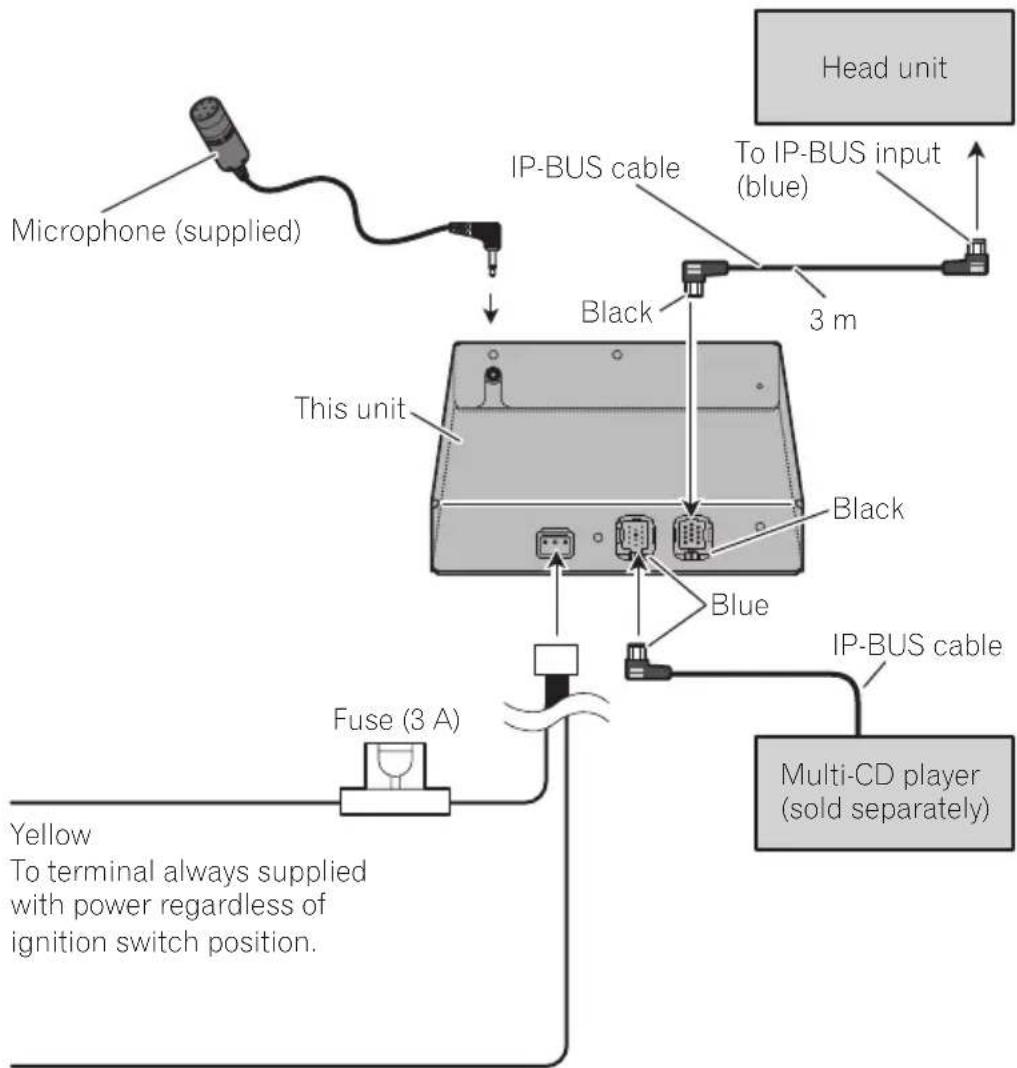
- IP-BUSconnectorsarecolor-coded.Besure toconnectconnectorsofthesamecolor.
Cordfunctionmaydifferaccordingtothepro- duct,evenifcordcoloristhesame.Whencon- nectingthissystem,besuretocheckall manualsandconnectcordscorrectly.
Connectingtheunits
flowchart
graph TD
    A["Microphone (supplied)"] --> B["IP-BUS cable"]
    B --> C["This unit"]
    C --> D["Blue"]
    D --> E["Multi-CD player (sold separately)"]
    F["Fuse (3 A)"] --> C
    G["Head unit"] --> H["To IP-BUS input (blue)"]
    I["Black"] --> C
    J["Blue"] --> C
    K["3 m"] --> B
    L["Yellow"] --> M["To terminal always supplied with power regardless of ignition switch position."]
Black (ground)
To vehicle (metal) body.


Important
- Checkallconnectionsandsystemsbefore finalinstallation.
- Donotuseunauthorizedparts.Theuseofun- authorizedpartsmaycausemalfunctions.
- Consultwithyourdealerifinstallationrequiresdrillingofholesorothermodifications ofthevehicle.
- Installtheunitwhereitdoesnotgetinthedriver'swayandcannotinjurethepassengerif thereisasuddenstop,likeanemergency stop.
- Wheninstallingthisunit,besuretomakesufficientspaceonitstopsurface.Thereisanantennaunderthetopsurfaceandcoveringit maycausetroubletotheradiotransmission andreception.
- Dependingonthelocationofthisunit,some noisecouldbeheardduringplaybackofthe songsonBluetoothaudioplayer.Inthissituation,movethisunitsoastoreducenoise.
- Whenmountingthisunit, makesurenoneof theleadsaretrappedbetweenthisunitand thesurroundingmetalworkorfittings.
- Donotmountthisunitneartheheateroutlet, whereitwouldbeaffectedbyheat,ornearthe doors,whererainwatermightsplashontoit.
- Beforedrillinganymountingholesalways checkbehindwhereyouwanttodrillthe holes.Donotdrillintothegasline,brakeline, electricalwiringorotherimportantparts.
- If this unit installed in the passenger compartment, anchor it securely so it does not break freewhile the vehicle is moving, and cause injury or an accident.
- If this unit is installed under a front seat, makes sure it does not obstruct seat movement. Route all leads and cord scarefully around the sliding mechanism so they don't catch for pinched in themechanism and cause short-circuit.
Installingthisunit
MountingwithVelcrofasteners
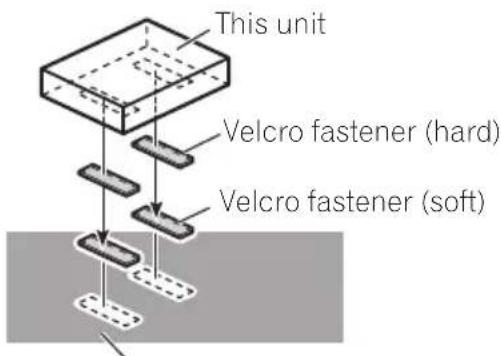
Thoroughlywipeoffthesurfacebeforeaffixing theVelcrofasteners.
- IftheVelcrofasteners(hard)adheretothe carmatdirectly,youmayinstallthisunit withoutusingtheVelcrofasteners(soft).
●MountthisunitusingtheVelcrofasteners.
Car mat or chassis

Installingthemicrophone

CAUTION
Itisextremelydangeroustoallowthemicrophoneleadtobecomewoundaroundthesteeringcolumnorgearstick.Besuretoinstallthe unitinsuchawaythatitwillnotobstructdriving.

Note
Installthemicrophoneinapositionandorientationthatwillenableittopickupthevoiceofthe personoperatingthesystem.
Wheninstallingthe microphoneonthesunvisor
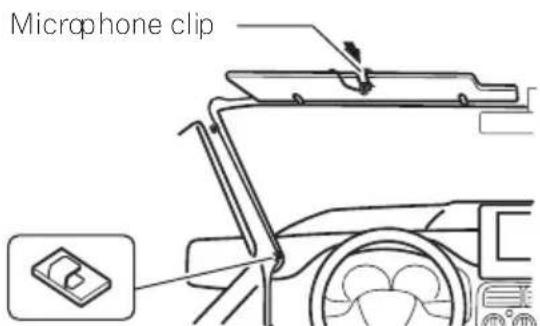
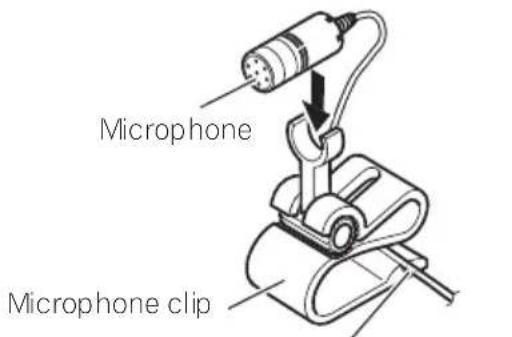
1Installthemicrophoneonthemicro-phoneclip.

2Installthemicrophonecliponthesun visor.
With the sunvisorup, install them microphone clip. (Lowering the sunvisor reduce these recognition rate for voice operations.)
Clamps
Use clamps to secure the lead where necessary inside the vehicle
Wheninstallingthemicrophone onthesteeringcolumn
1Installthemicrophoneonthemicro-phoneclip.
Fit the microphone lead into theg roove
2Installthemicrophonecliponthesteeringcolumn.

Install the microphone clip on the rear side of the steering column.

natural_image
Interior view of a car showing steering wheel and dashboard with a close-up inset of a small component (no text or symbols)Clamps
Use clamps to secure the lead where necessary inside the vehicle.

Installation
Adjustingthemicrophone angle
Themicrophoneanglecanbeadjustedby movingforwardorbackwardthemicrophone clipangle.

natural_image
Diagram of a medical or laboratory device with a probe inserted, showing internal components and a curved arrow indicating motion (no text or symbols present)
AdditionalInformation
Errormessages
Whenyoucontactyourdealeroryournearest PioneerServiceCenter,besuretorecordthe errormessage.
MessageCauseAction
| ERROR-10Built-inBlue-toothuniten-counteredan error | Turntheignition OFFandON. |
| ERROR-80Built-inFLASH ROMencounteredanerror | Turntheignition OFFandON. |

Specifications
General
Powersource....14.4VDC(10.8Vto15.1V allowable)
Max.currentconsumption 0.2A
Dimensions(W×H×D)...146×25×90mm
Weight....0.37kg
Version......Bluetooth1.2certified
Outputpower....+4dBmMax. (Powerclass2)
Profile......GAP(GenericAccessProfile) SDP(ServiceDiscoveryProtocol) HSP(HeadSetProfile) HFP(HandsFreeProfile) A2DP(AdvancedAudioDistributionProfile) AVRCP(AudioVideoRemoteControlProfile) OPP(ObjectPushProfile)

Note
Specificationsandthedesignaresubjecttopossiblemodificationswithoutnoticeduetoim-provements.
natural_image
Pure technical diagram showing a tool interacting with a component, no text or symbols presentBotónRESET
natural_image
Interior view of a car showing steering wheel and dashboard (no text or symbols)Abrazaderas
natural_image
Technical line drawing of a mechanical device with a cylindrical component and attached base (no text or symbols)
natural_image
Pure technical diagram showing a tool interacting with a component, no text or symbols presentTasteRESET
natural_image
Diagram of a car interior showing steering wheel and dashboard, with an inset close-up of a small component (no text or symbols)Klemmvorrichtungen
natural_image
Diagram of a mechanical device with a cylindrical component and curved arrow indicating rotation (no text or symbols)
natural_image
Pure technical diagram of a tool interacting with a rectangular block, no text or symbols presentToucheRESET
Réinitialisercetappareilen effaçanttoutelamémoire
Installationdumicrophone

PRÉCAUTION
natural_image
Diagram of a car interior showing steering wheel and dashboard, with a close-up inset of a small component (no text or symbols)Serre-fils
natural_image
Diagram of a mechanical device with a cylindrical component and curved arrow indicating rotation (no text or symbols)
Dimensions(L×H×P).....146×25×90mm
Poids....0,37kg
Version.....CertifiéBluetooth1.2
Puissancedesortie......+4dBmMax.
Visit www.pioneer.co.uk (or www.pioneer-eur.com) to register your product.
4-1,MEGURO1-CHOME,MEGURO-KU
TOKYO153-8654,JAPAN
PIONEERELECTRONICS(USA)INC.
P.O.Box1540, LongBeach, California90801-1540, U.S.A.
TEL:(800)421-1404
PIONEEREUROPENV
Haven1087,Keetberglaan1,B-9120Melsele,Belgium
TEL:(0)3/570.05.11
PIONEERELECTRONICSASIACENTREPTE.LTD.
253AlexandraRoad,#04-01,Singapore159936
TEL:65-6472-7555
PIONEERELECTRONICSAUSTRALIAPTY.LTD.
178-184BoundaryRoad, Braeside, Victoria3195, Australia
TEL:(03)9586-6300
PIONEERELECTRONICSOFCANADA, INC.
300AllstateParkway, Markham, OntarioL3ROP2, Canada
TEL:1-877-283-5901
PIONEERELECTRONICSDEMEXICO,S.A.deC.V.
Blvd.ManuelAvilaCamacho13810piso
Col.LomasdeChapultepec,Mexico,D.F.11000
TEL:55-9178-4270
先鋒股份有限公司
總公司:台北市中山北路二段44號13樓
電話:(02)2521-3588
先鋒電子(香港)有限公司
香港九龍尖沙咀海港城世界商業中心
9樓901-6室
電話:(0852)2848-6488
PublishedbyPioneerCorporation.
Copyright©2007byPioneerCorporation.
Allrightsreserved.
PubliéparPioneerCorporation. Copyright
©2007parPioneerCorporation.Tous
droitsréservés.

- Pioneer Europe NV
- CE
- English:
- Suomi:
- BeforeYouStart
- BluetoothTelephone
- BluetoothAudio
- Contents
- InitialSettings
- Operatingwithdifferentheadunits
- Connections
- Installation
- AdditionalInformation
- BeforeYouStart
- Aboutthisunit
- CAUTION
- Operatingenvironment
- Visitourwebsite
- Aboutthismanual
- Incaseoftrouble
- AboutBluetooth
- Bluetooth®
- Resettingthisunit
- Resettingthisunitwithout erasingthedataaboutphone
- Resettingthisunitwith clearingallmemory
- 1TurntheignitionswitchtoACCorON position.
- 2PressRESETwithapentiporother pointedinstrument.
- Hands-freephoningwith cellularphonesfeaturing Bluetoothwirelesstechnology
- Important
- ①Sourceicon
- ②Sourcename
- ③Phonenumber
- ④Usernumberindicator
- ⑤Devicename
- ⑥Voicerecognitionindicator
- ⑦Incomingcallnoticeindication
- ⑧Automaticansweringindicator
- ⑨Batterystrengthindicator
- ⑩Signallevelindicator
- ⑪Telephoneindicator
- ⑫Presetdiallistdisplay
- Notes
- BluetoothTelephone
- Aboutthetelephonesource Standbymode
- Settingupforhands-free phoning
- 1Connection
- 2Registration
- 3Volumeadjustment
- Basicoperationofhands-freephoning
- Makingaphonecall
- Voicerecognition
- 1TouchVOICEtoturnthevoicerecognitionfunctionon.
- Pronouncethenameofyourcontact.
- Takingaphonecall
- Answeringanincomingcall
- 1Whenacallcomesin,touch
- 2Toendthecall,touch.
- Rejectinganincomingcall
- - Whenacallcomesin,touch
- Note
- Answeringacallwaiting
- 1Touch
- toansweracallwaiting.
- 2Touch
- toendthecall.
- Rejectingacallwaiting
- ●Touch
- torejectacallwaiting.
- Introductionofadvanced hands-freephoningoperation
- ①Functiondisplay
- 1SelectTelephoneasasource.
- 2TouchAVMENUtodisplayMENU.
- 3TouchFUNCTIONtodisplaythefunctionnames.
- Connectingacellularphone
- Searchingforavailablecellular phones
- 1TouchPHONECONNECTonthefunction menu.
- 2TouchSearchtosearchforavailablecel-lularphones.
- 3Touchthedevicenameyouwantto connect.
- Usingacellularphoneto initiateaconconnection
- 2TouchCONNECTIONOPEN.
- 3Usecellularphonetoconnecttothis unit.
- Disconnectingacellularphone
- 2TouchDISCONNECTtodisconnectthe currentlyconnectedcellularphonefrom thisunit.
- Registeringconnected cellularphone
- 1TouchPHONEREGISTERonthefunction menu.
- 2Touchandholdoneoftheregistration assignmentstoregisterthecurrentlyconnectedphone.
- Deletingaregisteredphone
- 2TouchDELETEnexttothedevicename youwanttodelete.
- Connectingtoaregistered cellularphone
- Connectingtoaregistered phonemanually
- Connectingtoaregistered phoneautomatically
- UsingthePhoneBook
- Transferringentriestothe PhoneBook
- 2TouchSTARTtoturnthePhoneBook Transferfunctionon.
- 3Usecellularphonetoperformphone booktransfer.
- ChangingthePhoneBook displayorder
- ●TouchPHONEBOOKNAMEVIEWonthe functionmenutoturnPhoneBookName Viewfunctionon.
- CallinganumberinthePhone Book
- 1TouchPHONEBOOKtodisplaythe PhoneBook.
- 2TouchaPhoneBookentryyouwantto call.
- 3TouchphonenumberofthePhone Bookentryyouwanttocall.
- 4Touch tomakeacall.
- 5Toendthecall,touch.
- Searchinganumberinthe PhoneBook
- 3Touchanalphabetlettertoselectthe firstletterofthenameyouarelookingfor.
- 4TouchENTERtoshowentriesstarting withtheletteryouchose.
- 5TouchaPhoneBookentryandmakea call.
- EditingthenameofaPhone Bookentry
- 2SelectaPhoneBookentryyouwantto edit.
- 3TouchEDITnexttothePhoneBook entryname.
- 4Touch123orABCtoselectthedesired charactertype.
- 5Touchalettertoenter.
- 6TouchMEMORYtostorethenew name.
- Editingphonenumbers
- 3TouchEDITnexttothephonenumber youwanttoedit.
- 4Touch0—9toinputnumbers.
- 5Touch◄or►tomovethecursorand editthenumber.
- 6TouchENTERtostorethenewnumber.
- ClearingaPhoneBookentry
- 2SelectaPhoneBookentryyouwantto delete.
- 3TouchDELETEtodeletethePhoneBook entry.
- Clearingmemory
- 1TouchCLEARMEMORYonthefunction menu.
- 2TouchCLEARnexttotheitemyouwant todeletefromthememory.
- UsingtheCallHistory
- DisplayingtheCallHistory
- ●TouchLOGtodisplaytheCallHistory.
- CallinganumberfromtheCall History
- 1Displaythelistandselectaphonenum-ber.
- 2Touchaphonenumberorname(ifentered)youwanttocall.
- 3Touchtomakeacall.
- Usingpresetnumbers
- Assigningpresetnumbers
- 1Selectadesiredphonenumberfrom thePhoneBookortheCallHistory.
- 2TouchLISTtodisplaypresetnumbers P1-P6.
- 3KeeptouchingoneofP1-P6topreset thephonenumber.
- Recallingpresetnumbers
- 1TouchLISTtodisplaypresetnumbers P1-P6.
- 2TouchoneofpresetnumbersP1-P6.
- 3Touch tomakeacall.
- 4Toendthecall,touch
- Makingacallbyentering phonenumber
- 1TouchDIRECTtodisplaythedirectdial display.
- 2Touch0—9toinputnumbers.
- 3Whenyoucompletedenteringthe number,touch tomakeacall.
- Echocancelingandnoise reduction
- ●TouchECHOCANCELonthefunction menutoturnEchoCancelfunctionon.
- Switchingtheringtone
- Settingtheautomatic rejecting
- Settingtheautomatic answering
- DisplayingBD(Bluetooth Device)address
- ListeningtosongsonBTAudio (Bluetoothaudioplayer)
- ③Devicename
- ④Bluetoothaudioindicator
- - Touch the source icon and thentouch BTAUDIO to select the Bluetooth audio source.
- ConnectingaBluetooth audioplayer
- 3TouchCONNECTIONOPEN.
- PlayingsongsonBluetooth audioplayer
- 1Touch▶/II.
- Toskipbackorforwardtoanother track, touch | ◀◀ or ▶▶.
- 3Toperformfastforwardorreverse, keeptouching|◄◄or►►|.
- BluetoothAudio
- DisconnectingaBluetooth audioplayer
- 1TouchAVMENUtodisplayMENU.
- 2TouchFUNCTIONtodisplaythefunctionnames.
- 3TouchDISCONNECT.
- 3TouchDEVICEINFOtodisplaytheBD address.
- EnteringPINcodefor Bluetoothwirelessconnection
- 1Touchthesourceiconandthentouch OFFtoturnthisunitoff.
- 2TouchAVMENUandthentouchINITIAL todisplaythefunctionnames.
- 3TouchPINCODEINPUT.
- 4Touch0—9toinputthePINcodeof yourBluetoothaudioplayer.
- 5AfterinputtingPINcode(upto16digits),touchENTER.
- Operatingwithdifferent headunits
- Usingasanexternalunit
- Headunitgroup1
- Headunitgroup2
- Headunitgroup3
- Headunitgroup4
- Functioncompatibilitycharts Headunitgroup1
- 1PuttheunitinC.OPENmode
- 2Usecellularphonetoconnecttothis unit.
- 1PuttheunitinREGISTmode
- 2Usecellularphonetoregistertothis unit.
- ●PuttheunitinDISCONN.mode
- 1PuttheunitinVOICEONmode.
- ●Turntheautomaticansweringonoroff
- ●Turntheautomaticconnectiononor off
- Settingtheringtone
- ●Turntheringtoneonoroff.
- Displayingthedevice informationofthisunit
- ●Displayandswitchthedeviceinformation
- 2UsetheBluetoothaudioplayertoconnecttothisunit.
- ●PuttheunitinDISCONN.mode.
- Connections
- Installingthisunit
- MountingwithVelcrofasteners
- Installingthemicrophone
- Wheninstallingthe microphoneonthesunvisor
- 2Installthemicrophonecliponthesun visor.
- Wheninstallingthemicrophone onthesteeringcolumn
- Installation
- Adjustingthemicrophone angle
- Errormessages
- Specifications
- General
- Réinitialisercetappareilen effaçanttoutelamémoire
- Installationdumicrophone
- PRÉCAUTION
Brand : PIONEER
Model : CD-BTB200
Category : Built-in kit