
RPS500PLL - Radio MPMAN - Free user manual and instructions
Find the device manual for free RPS500PLL MPMAN in PDF.


| Brand | Mpman |
| Model | RPS500PLL |
| Product type | Portable AM/FM radio |
| FM frequency range | 87.5 - 108 MHz |
| AM frequency range | 520 - 1710 kHz |
| PLL synthesizer | Yes, for improved tuning accuracy |
| Number of presets | 20 stations (10 FM + 10 AM) |
| Power supply | 2 AA batteries (not included) or AC adapter (not included) |
| Supply voltage | 3 V DC (batteries) or 5 V DC (adapter) |
| Battery life | Approximately 40 hours (depending on type and usage) |
| Dimensions (W × H × D) | 20 × 12 × 6 cm |
| Weight (without batteries) | 450 g |
| Housing material | ABS plastic |
| Speaker | 1 × 3 W, 76 mm diameter |
| Display | Backlit LCD display |
| Headphone jack | 3.5 mm stereo jack |
| Auxiliary input | 3.5 mm jack (external audio input) |
| Antenna | Telescopic FM/AM antenna |
| Additional functions | Alarm, sleep, timer, clock display |
| Care and cleaning | Clean with a soft, dry cloth; do not use chemicals |
| Safety | Do not expose to moisture; keep out of reach of children |
| Spare parts and repairability | Not available; device not user-serviceable |
| User manual | Available in PDF format at notice-facile.com |
Frequently Asked Questions - RPS500PLL MPMAN
User questions about RPS500PLL MPMAN
0 question about this device. Answer the ones you know or ask your own.
Ask a new question about this device
Download the instructions for your Radio in PDF format for free! Find your manual RPS500PLL - MPMAN and take your electronic device back in hand. On this page are published all the documents necessary for the use of your device. RPS500PLL by MPMAN.
USER MANUAL RPS500PLL MPMAN
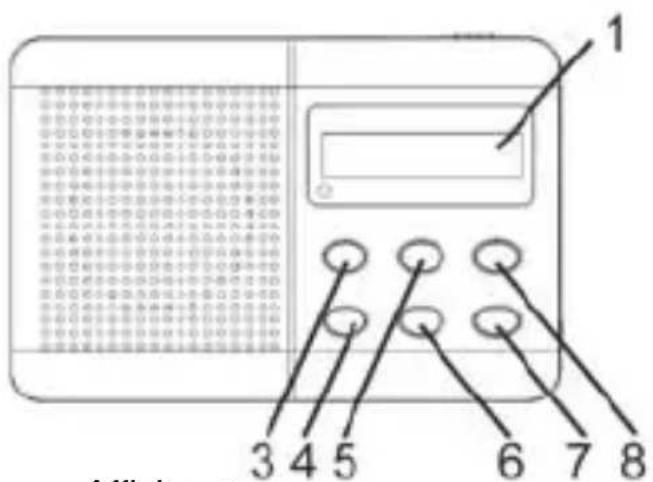
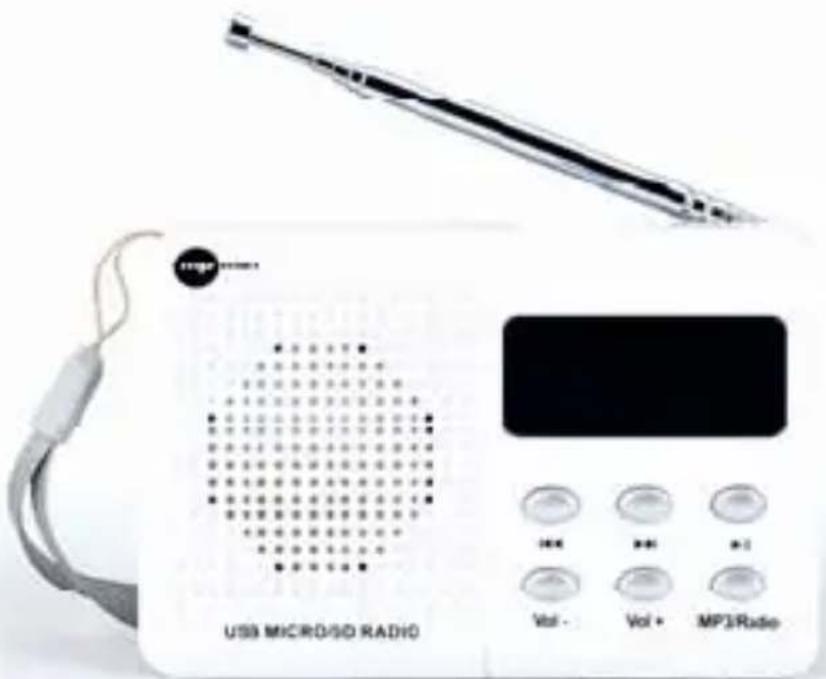
- Display
- Power ON/OFF
- Previous
- Volume -
- Next
- Volume +
- Play/Pause
- MP3/Radio
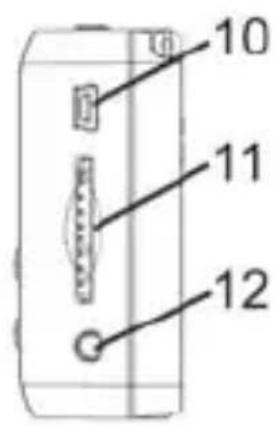
- FM Antenna
- DC 5V USB Cable connector
- SD/MMC Card Slot
- Headphone Jack
- TF Card Slot
- USB Connector
Open the battery compartment and insert as indicated in the compartment one Rechargeable Batteries, Li-ion 3.7V
Battery Charging
Connect the unit by inserting the USB cable into DC 5V IN jack, and inserting the other end into the USB interface or USB charger. The charging time is around 2 hours. The charging indicator will flash during
battery charging.
To use 5V AC/DC adapter for external DC charging, plug the connecting cable to the DC jack. (Voltage adapter is an optional accessory. Do not charge the battery with the AC / DC adapter for more than 24 hours.)
IMPORTANT
If the unit has not been used for a long period of time, the rechargeable battery may be completely discharged into a “sleep mode” condition. This is the characteristics of all the rechargeable battery. For the first time to recharge (to wake up) the battery, it is recommended to charge for a period exceed 5 hours but not exceed 24 hours.
Radio
- Switch Power button to ON position to switch on the unit.
- Press Next or Previous button for a second to start radio scanning.
- Adjust the sound volume by pressing Vol- & Vol+
- Switch Power button to OFF position to switch off the unit.
Radio Preset
- Press Play Button for 2 seconds to start Auto-Scan Preset Stations. It will auto-stop when all the stations have been found out.
- Press Next or Previous button once to select preset stations.
To improve reception:
Pull out the telescopic aerial. To improve FM Reception incline and turn the aerial, reduce its length if the FM-signal is too strong (very close to a transmitter).
USB, SD/MMC CARD, TF Card PLAYBACK
Able to decode and playback all MP3 files which stored in the memory media with USB connector, SD or MMC Card Slot, TF Card.
- Press MP3/Radio once to MP3 mode.
- Before connecting the USB media to the unit, make sure the port is in correct direction and will connect. Or insert SD/MMC/TF Card straightly without bending.
- The system will automatically start reading the MP3 files in the USB Storage Media, SD or MMC Card, TF Card.
- Press Next / Previous / PLAY Buttons for Next / Previous / PLAY FUNCTION.
Wrongly connect the USB Storage Media, or SD/MMC/TF Card upside down could damage the unit or the USB Storage Media or SD/MMC/TF Card. A locked SD/MMC/TF Card cannot be detected or playback.
SPECIFICATIONS
Power Output: 1W RMS Input Power: DC 5V
Rechargeable Battery: DC Li-ion 3.7V 400mAh
PRECAUTIONS:
-
Do not expose the unit to extreme temperature nor high humidity to ensure normal functioning for a long lifetime.
For instances, never place the unit in bathing areas nor around stoves and radiators. -
If you find the unit is not working properly, please take it to your nearest services centre. Do not attempt to repair by yourself.
WARNING:
To prevent fire or shock hazard, do not expose the unit to rain or moisture. To avoid electrical shock, do not open the cabinet, refer to service agent or qualified engineer only.

This is to certify that RPS500PLL is in conformity with:
Council directive 89/336/EEC (EMC direction):
Applicable standards:
EN55013:2001+A1:2003+A2:2006
EN61000-3-2:2006+A1:2009+A2:2009
EN61000-3-3:2008
EN55020:2007
Made in PRC
For more information please visit our website www.mpmaneurope.com

RECEPTEUR USB SD DIGITAL FM



RICEVITORE DIGITALE FM USB SD

Modello Num.: RPS500PLL
MANUALE D'USO


RIPRODUZIONE USB, SD/MMC CARD, TF Card
RECEPTOR FM DIGITAL USB SD


-
Ecrã
-
Power ON/OFF
-
Anterior
-
Volume -
-
Seguinte
-
Volume +
-
Play/Pause
-
MP3/Radio
-
Antena FM
-
Conector de Cabo USB DC 5V
-
Ranhura de Cartão SD/MMC
-
Entrada de Fones
-
Ranhura de Cartão TF
-
Conector USB
Directiva de concelho 89/336/EEC (direcção EMC):
Padrões aplicáveis:
EN55013:2001+A1:2003+A2:2006
EN61000-3-2:2006+A1:2009+A2:2009
EN61000-3-3:2008
EN55020:2007
Fabricado na RPC


Brand : MPMAN
Model : RPS500PLL
Category : Radio