
Sonicfresh SFT-150 - Toothbrush REMINGTON - Free user manual and instructions
Find the device manual for free Sonicfresh SFT-150 REMINGTON in PDF.


| Product type | Sonic toothbrush |
| Brand | Remington |
| Model | Sonicfresh SFT-150 |
| Power supply | Lithium-ion rechargeable battery, inductive charger |
| Battery life | Approximately 2 weeks of normal use |
| Charging time | Approximately 16 hours |
| Brushing speed | Up to 40,000 movements per minute |
| Brushing modes | Daily cleaning, Whitening, Gum care, Polishing |
| Timer | 2-minute timer with 30-second intervals |
| Pressure sensor | Yes, light alert in case of excessive pressure |
| Water resistance | IPX7 (waterproof up to 1 meter for 30 minutes) |
| Dimensions (brush head) | Approximately 2.5 cm x 1.5 cm (compact) |
| Weight | Approximately 120 grams (main body) |
| Material | ABS plastic body, soft nylon head |
| Available spare parts | Replacement brush heads (model SFT-150R) |
| Maintenance and cleaning | Rinse the head after use, clean the body with a damp cloth |
| Safety | Complies with CE standards, automatic shut-off after 2 minutes |
| Warranty | 2 years |
| Color | White with silver accents |
| Included accessories | 1 toothbrush, 1 inductive charger, 1 user manual |
Frequently Asked Questions - Sonicfresh SFT-150 REMINGTON
User questions about Sonicfresh SFT-150 REMINGTON
0 question about this device. Answer the ones you know or ask your own.
Ask a new question about this device
Download the instructions for your Toothbrush in PDF format for free! Find your manual Sonicfresh SFT-150 - REMINGTON and take your electronic device back in hand. On this page are published all the documents necessary for the use of your device. Sonicfresh SFT-150 by REMINGTON.
USER MANUAL Sonicfresh SFT-150 REMINGTON

SFT-150
Thank you for buying your new Remington® product. Please read these instructions carefully and keep them safe. Remove all packaging before use.

IMPORTANT SAFETY INSTRUCTIONS
WARNING – TO REDUCE THE RISK OF BURNS, ELECTROCUTION, FIRE, OR INJURY TO PERSONS:
1 This appliance can be used by children aged from 8 years and above and persons with reduced physical, sensory or mental capabilities or lack of experience and knowledge if they have been supervised/instructed and understand the hazards involved. Children shall not play with the appliance. Cleaning and user maintenance shall not be done by children unless they are older than 8 and supervised. Keep the appliance and cable out of reach of children under 8 years.
2 An appliance should never be left unattended when plugged into a power outlet, except when charging.
3 Do not use this product if it is not working correctly, if it has been dropped or damaged, or dropped in water.
4 Do not twist or kink the cable and don't wrap it around the appliance.
5 Store the product at a temperature between 15° C and 35° C.
6 Do not use attachments other than those we supply.
7 Make sure the power plug and cord do not get wet.
8 Do not plug or unplug the appliance with wet hands.
9 Keep the charger away from water and heated surfaces.
10 This appliance is not intended for commercial or salon use.
11 Use only as instructed.
12 This toothbrush is designed for wet use and may be used in the shower.
13 DO NOT fully submerge in water.
CAUTION: ensure this product is suitable for you:
- Consult your dentist prior to use if you have had oral or gum surgery in the last 2 months.
- If you have a pacemaker or implanted device, consult your doctor or the manufacturer of your device prior to use.
- Consult your doctor prior to use if you have any medical concerns.
- If you experience excessive bleeding after using Sonicfresh, or bleeding continues after 1 week of use, consult your dentist.
- If you experience any pain or discomfort, stop using this product and contact your doctor.
- If you wish to share this product with other users, ensure you change the brush head. Do not share brush heads between multiple users.

KEY FEATURES
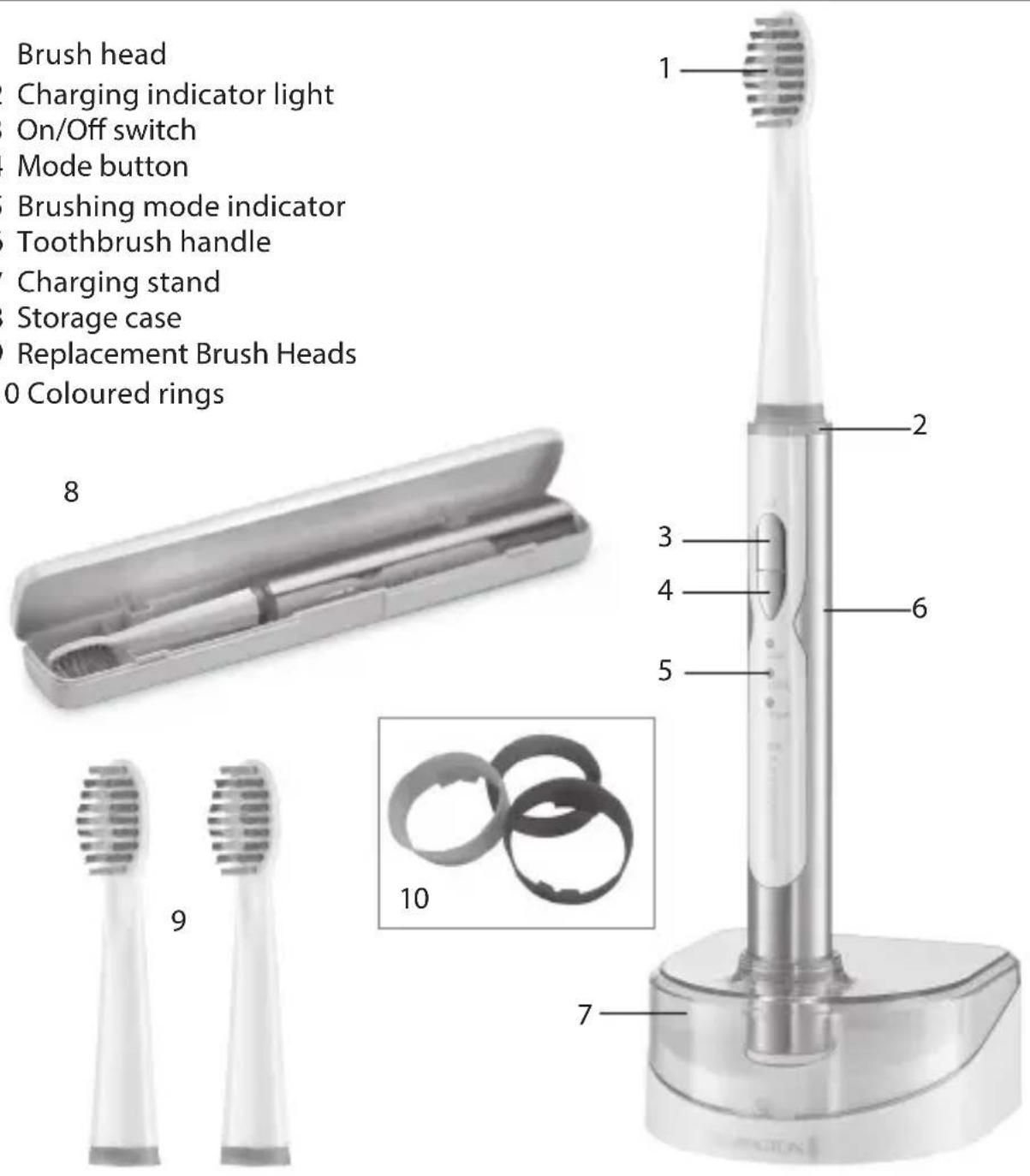
1 Brush head
2 Charging indicator light
3 On/Off switch
4 Mode button
5 Brushing mode indicator
6 Toothbrush handle
7 Charging stand
8 Storage case
9 Replacement Brush Heads
10 Coloured rings

GETTING STARTED
Be patient when first using your Sonicfresh Toothbrush as with any new product, it may take a little while to familiarise yourself with the product. Take the time to acquaint yourself with your toothbrush, as we are confident you will receive years of enjoyable use and complete satisfaction.
INSTRUCTIONS FOR CHARGING
• Always ensure that your hands, toothbrush and mains adapter are dry before charging.
- Before using your toothbrush for the first time, ensure the product is fully charged. One full charge will take 16 hours.
• Plug the charger into a wall socket.
- Place the handle on the charging stand.
- The charging indicator light ring will glow red whilst the toothbrush is charging.
- When the toothbrush is fully charged, the charging indicator light will turn blue.
• One full charge allows up to 2 weeks cordless usage time.
NOTE: If the battery charge is low, the indicator light will flash from blue to red whilst in use.
• We recommend keeping your toothbrush on the charger when not in use in order to keep a full battery.
- Your toothbrush cannot be overcharged, however, if the product is not going to be used for an extended period (2-3 months), unplug it from the mains and store. Fully recharge your toothbrush when you want to use it again.
★ QUICK CHARGE FUNCTION
• The toothbrush is also equipped with a quick charge function.
• To utilise this function, charge the toothbrush for 1 hour.
• This will provide approximately 4 (2 minute) uses
INSTRUCTIONS FOR USE
This product is suitable for wet use and may be used in the shower.
• DO NOT submerge in water.
PERSONALISE YOUR BRUSH HEAD
• Coloured rings are supplied to help identify your brush head.
• To change the coloured rings:
- Remove the coloured ring from the brush by gently pulling (fig. A).
- Place a new coloured ring on the brush head, ensuring the ridges in the ring are aligned with the holes on the brush head (fig. B).
Fig. A
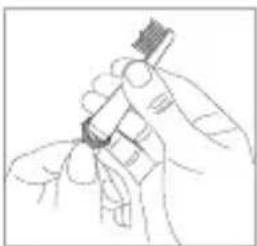
Fig. B

BRUSHING:
1 Run the brush head under water to wet the bristles and add toothpaste.
2 Hold the brush so the bristles are touching the teeth at a slight angle (facing towards the gum line) Fig.1.
3 Press the on/off switch to turn on the toothbrush.
4 Apply light pressure and brush the teeth in back and forth motions.
Fig. 1

TIMER & INTERVAL PACER
5 The recommended brushing time is 2 minutes, twice a day.
6 To help ensure you brush for the recommended time, the toothbrush has a 2 minute timer.
7 The brush will switch off after 2 minutes to indicate the end of the brushing time.
8 To ensure thorough cleaning, clean the teeth a section at a time.
9 We recommend 4 sections.
10 The interval timer will pulse every 30 seconds to indicate when to move to the next section.
11 Repeat until all 4 sections have been cleaned.
NOTE: If you change cleaning mode during brushing, the timer will set back to zero and the 2 minute timer will start again.
BRUSHING MODES
• The toothbrush has 3 brushing modes:
1 Clean: Daily clean (2 minutes)
2 Sensitive: For sensitive teeth and gums (2 minutes)
3 Massage: To gently stimulate and massage the gums (2 minutes)
- To select the brushing mode, press the Mode button. The green LED light indicates the selected mode.
REPLACING THE BRUSH HEAD
- For best results, we recommend replacing the brush head approximately every 3 months.

★ REMOVING THE BRUSH HEAD
- Hold the brush handle with one hand.
- With the other hand, twist the brush head anti-clockwise and gently pull the head upwards until it comes off. Fig.2.
ATTACHING THE BRUSH HEAD
- Slide the brush head onto the handle and turn clockwise until secure. Fig.3.

- Your toothbrush comes with 3 brush heads.
- Replacement Brush Head Model Number: RS401
- Contact your nearest Remington service centre for more information.
CLEANING AND MAINTENANCE
- To ensure long lasting performance of your toothbrush, clean the brush head and the handle regularly.
- Ensure the toothbrush is switched off before cleaning.
• DO NOT attempt to clean any part of this product in a dishwasher.
• DO NOT submerge the brush handle or charging stand in water.
★ Brush Head: Rinse the brush head and bristles after each use.
★ Brush Handle: Remove the brush head and rinse the shaft under warm water.
Fig. 4. To clean the handle, wipe with a damp cloth.

Charging Stand: Wipe with a damp cloth.
CAUTION: Ensure all parts are dry before connecting the charger into a wall socket.

BATTERY REMOVAL
• The battery must be removed from the toothbrush before it is scrapped.
- The appliance must be disconnected from the supply mains when removing the battery.
• To remove the rechargeable battery Fig.5.
- Run the toothbrush until the motor stops.
• Use a small screw driver to remove the screw cover and battery door.
- Hold the handle upside down, press the toothbrush shaft and remove the two hooks to release the internal components of the handle.
- Insert the screwdriver next to the battery connections and twist to break the connections.
• Pry the battery from the handle.
- Dispose of the battery safely.
Fig. 5


ENVIRONMENTAL PROTECTION
To avoid environmental and health problems due to hazardous substances in electrical and electronic goods, appliances marked with this symbol must not be disposed of with unsorted municipal waste, but recovered, reused or recycled.
SNELLE OPLAADFUNCTIE
REEMPLACER LA TÊTE BROSSE
UDSKIFTNING AF B∅RSTEHOVED
A FOGKEFE-FEJ CSERÉJE
Remington ® is a Registered Trade Mark of Spectrum Brands, Inc.,
or one of its subsidiaries
VARTA Consumer Batteries GmbH & Co. KGaA, Alfred-Krupp-Str. 9, 73479 Ellwangen, Germany
www.remington-europe.com
© 2014 SBI
- IMPORTANT SAFETY INSTRUCTIONS
- KEY FEATURES
- GETTING STARTED
- INSTRUCTIONS FOR CHARGING
- ★ QUICK CHARGE FUNCTION
- INSTRUCTIONS FOR USE
- PERSONALISE YOUR BRUSH HEAD
- BRUSHING
- TIMER & INTERVAL PACER
- BRUSHING MODES
- REPLACING THE BRUSH HEAD
- ★ REMOVING THE BRUSH HEAD
- ATTACHING THE BRUSH HEAD
- CLEANING AND MAINTENANCE
- BATTERY REMOVAL
- ENVIRONMENTAL PROTECTION
- SNELLE OPLAADFUNCTIE
- REEMPLACER LA TÊTE BROSSE
- UDSKIFTNING AF B∅RSTEHOVED
- A FOGKEFE-FEJ CSERÉJE
Brand : REMINGTON
Model : Sonicfresh SFT-150
Category : Toothbrush