
MobileCinema i50S - Projector AIPTEK - Free user manual and instructions
Find the device manual for free MobileCinema i50S AIPTEK in PDF.


| Product type | Portable DLP/LED projector |
| Brand | AIPTEK |
| Model | MobileCinema i50S |
| Native resolution | 854 x 480 (WVGA) |
| Brightness | 100 lumens |
| Contrast ratio | 1000:1 |
| Light source | LED, lifespan 20,000 hours |
| Image size | 20 to 100 inches |
| Projection distance | 0.5 to 3 meters |
| Battery life | Approximately 1.5 hours |
| Power supply | Rechargeable lithium-ion battery, AC adapter 5V/2A |
| Connectivity | HDMI, USB, 3.5mm audio output |
| Supported video formats | MP4, AVI, MKV (via USB) |
| Audio system | Built-in 1W speaker |
| Dimensions (L x W x H) | 12 x 8 x 3 cm |
| Weight | 300 g |
| Special features | Manual keystone correction, manual focus |
| Maintenance | Clean the lens with a soft, dry cloth |
| Safety | Do not expose to moisture, use in a ventilated area |
| Included accessories | Remote control, HDMI cable, AC adapter, USB cable |
| Repairability | Online after-sales service, contact AIPTEK support |
Frequently Asked Questions - MobileCinema i50S AIPTEK
User questions about MobileCinema i50S AIPTEK
0 question about this device. Answer the ones you know or ask your own.
Ask a new question about this device
Download the instructions for your Projector in PDF format for free! Find your manual MobileCinema i50S - AIPTEK and take your electronic device back in hand. On this page are published all the documents necessary for the use of your device. MobileCinema i50S by AIPTEK.
USER MANUAL MobileCinema i50S AIPTEK
Care and Safety Information
- Keep the device and packaging materials out of the reach of infants and children.
- Avoid subjecting the power adapter and other contacts to dripping or splashing water and dry your hands before you use it. Do not place objects filled with liquids such as vases, etc. on or near the device.
- Make sure that the used power outlet is always readily available and never hidden. In case of emergency, use the power adapter to separate the device from the power network.
- Keep your device away from all flames such as candles and do not set them up in the vicinity of the device.
- Keep the unit at least 10 cm away from other objects. Make sure the ventilation is not covered by newspapers, tablecloths, curtains, etc.
- For your own safety, do not use the projector during thunderstorms or lightning.
- Relative Humidity is 5\~35°C, 80% (Max.), non-condensing.
- The battery is integrated with the device. Do not dissemble and modify. The battery should be replaced by qualified service staff only.
- Ensure that the ambient room temperature is within -10\~55°C
- During the operation, this product may heat lightly, which is normal.
- Wait before using if the device has been moved from a cold location into a warm one. Any condensation that has formed may in certain circumstances destroy the device. As soon as the device has reached room temperature it can be used without risk.
- Handle the product with care. Avoid contact with sharp objects. Keep device away from metallic objects.
- Place the projector on a flat surface. Any collision or falling to the ground is likely to damage the product.
- Do not drop or disassemble the product otherwise the warranty voids. Opening or removing covers may expose you to dangerous voltage or other hazards. Refer all servicing to qualified service personnel.
- Use only the accessories supplied by the manufacturer.
- Both product and user's manual are subject to further improvement or supplement without further notice.
- Avoid facing directly into the projector's lens.

User's Manual
User's Manual
FCC Compliance Statement:
This device complies with Part 15 of the FCC Rules. Operation is subjected to the following two conditions: (1) this device may not cause harmful interference, and (2) this device must accept any interference received, including interference that may cause undesired operation.

This equipment has been tested and found to comply with limits for a Class B digital device, pursuant to Part 15 of the FCC rules. These limits are designed to provide reasonable protection against harmful interference in residential installations. This equipment generates, uses, and can radiate radio frequency energy, and if not installed and used in accordance with the instructions, may cause harmful interference to radio communications.
However, there is no guarantee that interference will not occur in a particular installation. If this equipment does cause interference to radio or television equipment reception, which can be determined by turning the equipment off and on, the user is encouraged to try to correct the interference by one or more of the following measures:
- Reorient or relocate the receiving antenna.
- Move the equipment away from the receiver.
- Plug the equipment into an outlet on a circuit different from that to which the receiver is connected.
- Consult the dealer or an experienced radio/television technician for additional suggestions.
You are cautioned that any change or modifications to the equipment not expressly approved by the party responsible for compliance could void your authority to operate such equipment.

(EN)
If the time arises to throw away your product, please recycle all the components possible.
Batteries and rechargeable batteries are not to be disposed in your domestic waste! Please recycle them at your local recycling point.
Together we can help to protect the environment.
User's Manual

(DE)
User's Manual
Charging the product
Connect one end of the bundled USB cable to the Micro USB port of the product and the other end to PC / Notebook or iPhone USB power adapter for charging.
* The Product can be fully charged around 5 hrs from empty.

Z
Charging for iPhone
-
Connect the iPhone to the product.
-
Press the iPhone charging mode button to start or stop charging for iPhone.

natural_image
Illustration of a mobile phone and a circular device with a pink indicator light (no text or symbols)LED Indicator Modes
| LED Status Indication | |
| 3 white LEDs stay on Power capacity is between 80% to 100% | |
| 2 white LEDs stay on Power capacity is between 45% to 80% | |
| 1 white LED stays on Power capacity is between 10% to 45% | |
| 1 white LED blinks Power capacity is below 10% | |
| LED Marquee Product is being charged | |
| LED blinks Charging for iPhone |
User's Manual
三
Turning on/off the projector
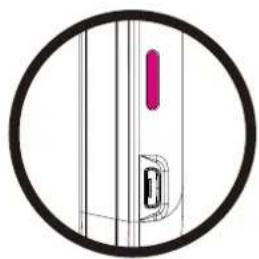
Press the Projection Mode Button for 3 seconds to turn ON or turn OFF the projector.
natural_image
Pure diagram of a vertical structure with a circular outline, no text or symbols presentAdjusting the Focus
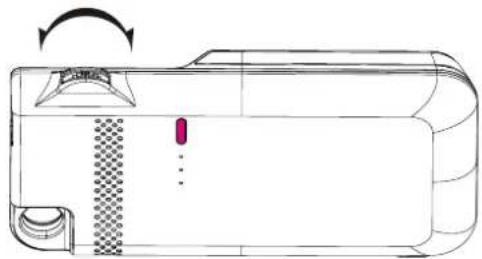
Adjust the focus by using the focus wheel to get a sharper and clear picture.
natural_image
Technical line drawing of a device casing with a checkered pattern and directional arrow (no text or symbols)Projecting photos and videos via iPhone native app
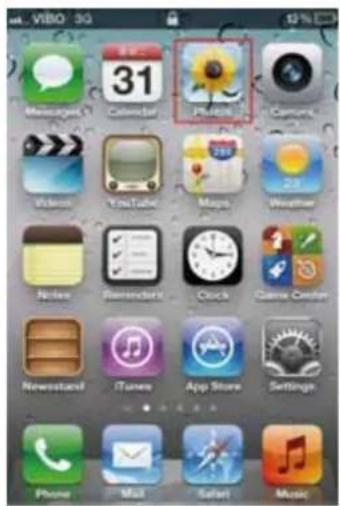
- Select the "Photos" manually icon on iPhone main menu.
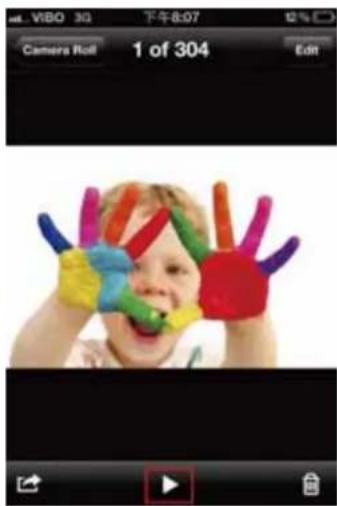
- Choose the photo or video you want to project.
* Photos can only be projected as a slideshow.
**Please push the volume control button on iPhone to adjust the volume during playback.

User's Manual
Product specifications
| Item Description | |
| Optical Technology DLP | |
| Light Source RGB LED | |
| Resolution 640 x 480 Pixels (VGA) | |
| Luminous Flux Up to 35 lumens | |
| Projection Image Size 152 mm ~ 1524 mm (6" ~ 60" Diagonal) | |
| Operating System iOS4, iOS5 | |
| Projection Source iPhone 4, iPhone 4S | |
| Power Input 5V / 1A | |
| Power Output 5V / 1A | |
| Battery Type Embedded 1850 mAh, Li-polymer rechargeable battery | |
| Battery Life | Projection mode: 120 miniPhone charging mode: 80% iPhone battery capacity |
| Power Consumption | Projection mode: 4.5WiPhone charging mode: 5W |
| Operation Temperature | 5 °C ~ 35 °C |
| Dimension (L x W x H) | 126 x 68 x 20 mm |
| Weight | 125 g |
| Package Content | Pico Projector, User's Manual, USB cable |
* All specifications are subject to change without notice.
User's Manual
四
Troubleshooting
| Symptom Check Point | |
| The projector can not turn on. | Ensure the battery is fully charged. |
| The projecting image is too dark. | * Use the Projector in a darker environment.* Decrease the size of projecting image. |
| The projecting image is too blurry. | Adjust the focus by using focus wheel. |
| The projector can turn on, but the image can not be projected. | Ensure the App is equipped with TV-out function. |
| The temperature of the projector's surface is warm. | It is normal for this projector to generate moderate heat during normal operation. |
When connecting the iPhone to the projector and see the error message displayed in iPhone screen as below.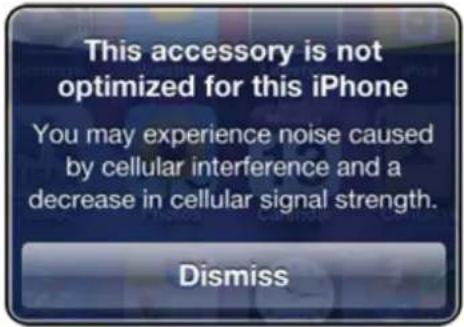 | It may cause the bad connection between iPhone and the projector.Please reconnect iPhone and the projector again. |
Benutzerhandbuch
Produktübersicht

natural_image
Illustration of a mobile phone and a circular device with a pink indicator light (no text or symbols)LED Anzeigemodi
natural_image
Pure diagram of a vertical structure with a circular outline, no text or symbols present四
natural_image
Line drawing of a device with a checkered pattern and directional arrow (no text or symbols)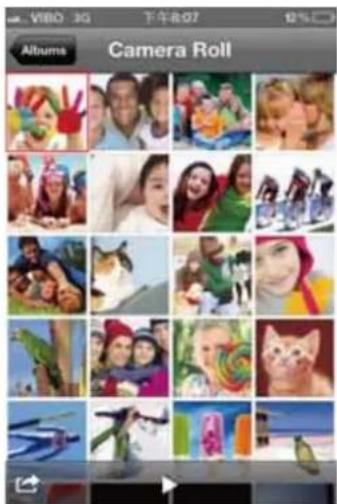

Benutzerhandbuch
Technische Daten
natural_image
Illustration of a mobile phone and a circular device with a pink indicator light (no text or symbols)natural_image
Pure diagram of a vertical structure with a central vertical bar and a circular outline, no text or symbols present.
natural_image
Technical line drawing of a device casing with internal components and a rotation arrow (no text or symbols)Ricarica per iPhone
natural_image
Illustration of a mobile phone and a circular device with a pink indicator light (no text or symbols)natural_image
Pure diagram of a vertical structure with a circular outline, no text or symbols presentnatural_image
Technical line drawing of a device casing with internal components and a rotation arrow (no text or symbols)
Manuale utente
Carga del iPhone
natural_image
Illustration of a mobile phone and a circular device with a pink indicator light (no text or symbols)Modos del indicator LED
natural_image
Pure diagram of a mechanical component with no text or symbolsAjuste del enfoque
natural_image
Technical line drawing of a mechanical device with no visible text or symbolsnatural_image
Illustration of a mobile phone and a circular device with a pink indicator light (no text or symbols)iPhone شحن جهاز
natural_image
Pure diagram of a mechanical component with no text or symbolsقاف تشغيل ج/اتشغيل
natural_image
Line drawing of a device with a button and scroll, showing internal components and a rotation arrow (no text or symbols)ضبط التركيز


مواصفات المنتج
| الوصف | العNPRI |
| ΔjημA YθOΓ4F2FHDLP | |
| πε ειμωPYBμωRGB | |
| (VGA)δFA480×640 | Δχ14 |
| PYBμ35 | πε μj ΔμγΨΘδ94 ΓγΟρ |
| ΔλτA6Ω4· ΔλτA6)ψγ15244· ψγ152(Δjητκ γμσ | νήό7 Γέτλ ψηπε |
| iOS4, iOS5 | 4θθθ43Υψσ |
| iPhone 4, iPhone 4S | νήό7 ειμω |
| 5V / 1A | ΔχΥτ4ΗΧΩ |
| 5V / 1A | ΔχΥτ4ΝήΧ |
| ηθ4Α c7 ωτ3 Βψ γη18501βTθ7 ΓΩΥ.ÜC | ημεYτAΔjεYτB4ωτσ |
| ΔQθ20: iY6O ΔjεΔαγ%80 :iPhone ΒΤη iοςiPhone | νήό7 ἰoΔjε'YτΒ74 co ηθ'ΥΜ ηφό7 |
| E 4.5 : νήό7E 5 :iPhone'Y6O ΒΤη iος | iος ΔχΥτ4 φρ6Θγ |
| 5 °C ~ | 35 °C 4θθθ4 Γε ηΣ ΔΟέΩ |
| ψ20 x 68 x 126 | xνήό7 πγΦΑρω'Υ (ΗέΜ |
| η η∅25 | qίτ4 |
| 4Bς γυ8894 4θ4Ω | fFθA νήö iY6ΩμύT4 E'YjθΤω |
τXdot6Ω ηβγEYYλΔY Y πH
natural_image
Illustration of a mobile phone and a circular device with a pink indicator light (no text or symbols)natural_image
Pure diagram of a vertical structure with a central vertical bar and a circular inset showing a rectangular object (no text or symbols)Focus instellen
natural_image
Technical line drawing of a device casing with internal components and a rotation arrow (no text or symbols)Foto's en video's projecteren via iPhone native app


Handleiding
Product specificaties
natural_image
Illustration of a mobile phone and a circular device with a pink indicator light (no text or symbols)Modos do Indicador LED
natural_image
Pure diagram of a vertical structure with a central rectangular component and a magenta vertical line, enclosed in a circle (no text or symbols)Ajustando o Foco
natural_image
Technical line drawing of a device casing with internal components and a rotation arrow (no text or symbols)natural_image
Simple circular diagram with a pink horizontal bar and dots, no text or symbols present.LED 指示燈模式
natural_image
Pure diagram of a vertical structure with a circular outline, no text or symbols present調整焦點
natural_image
Technical line drawing of a device casing with internal components and a rotation arrow (no text or symbols)使用手册
產品規格
natural_image
Pure diagram of a vertical structure with a circular outline, no text or symbols present调节焦点
natural_image
Technical line drawing of a device with a button and scroll, showing internal components and a rotation arrow (no text or symbols)natural_image
Simple circular diagram with a pink horizontal bar and dots, no text or symbols present.LED 表示灯モード
natural_image
Pure diagram of a vertical structure with a central vertical bar and a circular arrow, no text or symbols present.焦点の調節
natural_image
Technical line drawing of a device with a button and arrow indicating rotation (no text or symbols)ユーザーマニュアル
製品仕様
natural_image
Simple circular diagram with a pink horizontal bar and dotted lines, no text or symbols present.LED 표시등 모드
natural_image
Pure diagram of a vertical structure with a circular outline, no text or symbols present♀
초점 조절하기
초점 훨을 이용해 초점을
조절하여 더 날카롭고 선명한
화면을 얻습니다.

natural_image
Line drawing of a device casing with internal components and a rotation arrow (no text or symbols)사용자 설명서
제품 사양


- Care and Safety Information
- User's Manual
- FCC Compliance Statement:
- (EN)
- (DE)
- Charging the product
- Charging for iPhone
- LED Indicator Modes
- Turning on/off the projector
- Adjusting the Focus
- Projecting photos and videos via iPhone native app
- Benutzerhandbuch
- Ricarica per iPhone
- Manuale utente
- Carga del iPhone
- Modos del indicator LED
- Ajuste del enfoque
- iPhone شحن جهاز
- Focus instellen
- Foto's en video's projecteren via iPhone native app
- Handleiding
- Ajustando o Foco
- 調整焦點
- 使用手册
- 调节焦点
- 焦点の調節
- ユーザーマニュアル
- 초점 조절하기
- 사용자 설명서
Brand : AIPTEK
Model : MobileCinema i50S
Category : Projector