TW927 Yamaha Factory Racing - Watch TW Steel - Free user manual and instructions
Find the device manual for free TW927 Yamaha Factory Racing TW Steel in PDF.


User questions about TW927 Yamaha Factory Racing TW Steel
0 question about this device. Answer the ones you know or ask your own.
Ask a new question about this device
Download the instructions for your Watch in PDF format for free! Find your manual TW927 Yamaha Factory Racing - TW Steel and take your electronic device back in hand. On this page are published all the documents necessary for the use of your device. TW927 Yamaha Factory Racing by TW Steel.
USER MANUAL TW927 Yamaha Factory Racing TW Steel
natural_image
Two identical white circular shapes on a black background, no text or symbols present.TW STEEL®
BIG IN OVERSIZED WATCHES
MANUAL
INSTRUCTIONS FOR THE PILOT WATCH
text_image
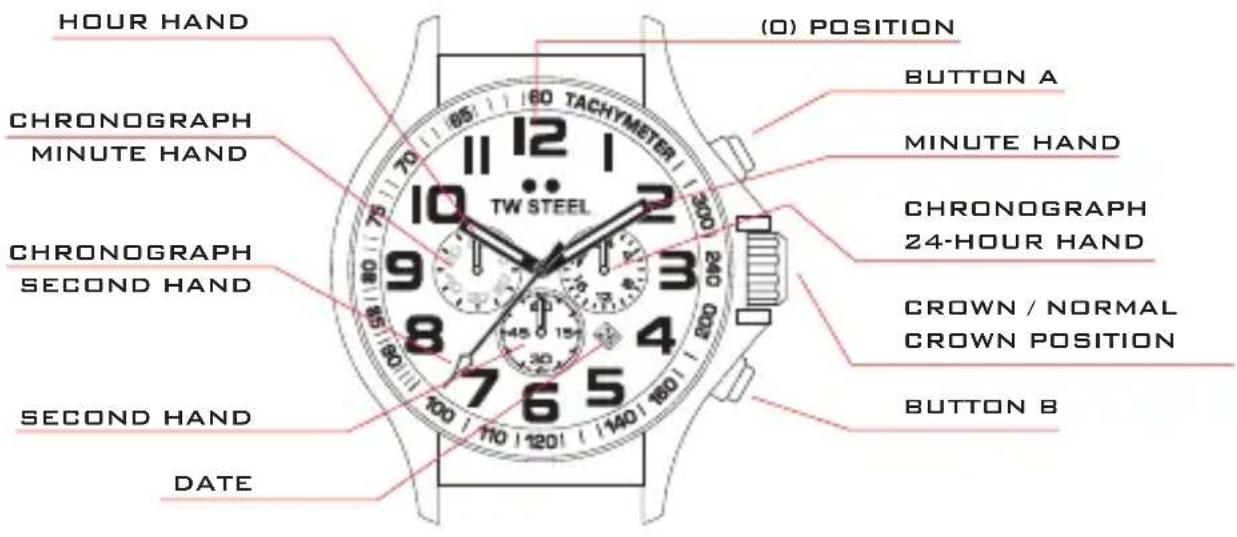
HOUR HAND CHRONOGRAPH MINUTE HAND CHRONOGRAPH SECOND HAND SECOND HAND DATE (0) POSITION BUTTON A TACHYMETER 12 10 9 8 7 6 5 4 3 2 1 0 100 110 1201 1400 1600 1800 2000 TW STEEL CHRONOGRAPH 24-HOUR HAND CROWN / NORMAL CROWN POSITION BUTTON BUSE OF THE CROWN
ADJUSTING THE TIME
USE OF THE CROWN
To adjust the time or set the date you pull out the crown to its 1st or 2nd position.
Follow the next instructions to adjust the time and date.
ADJUSTING THE TIME
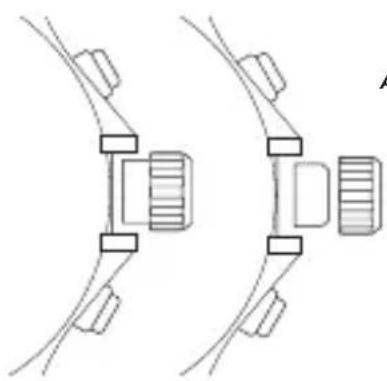
Pull out the crown to the 2nd click position so that the second hand stops at (O) position. Turn the crown to set the hour and minute hands.
After adjusting the time push the crown back to the normal position.
natural_image
Pure mechanical diagram showing two connected components with no text or symbolsADJUSTING THE TIME
ADJUSTING THE DATE ADJUS
ADJUSTING THE DATE
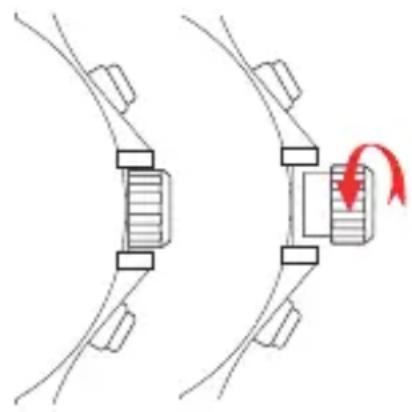
Pull out the crown to the 1st position. Turn the crown to the left to set the date.
After the date has been set, push the crown back to the normal position.
ADJUSTING THE DATE
natural_image
Diagram showing two mechanical components with a red arrow indicating rotation or movement (no text or symbols)CAUTION: IF THE CROWN IS NOT PRESSED IN PROPERLY, THE WATCH IS NO LONGER WATERPROOF AND THE MOVEMENT CAN BE SERIOUSLY DAMAGED!
MEASURING TIME WITH THE CHRONOGRAPH
USING THE CHRONOGRAPH
The chronograph is able to measure and display the time in 1/1 second united up to an maximum of 1 hour. The chronograph can be started and stopped each time button A is pressed. Pressing button B resets the chronograph. All hands return to their (O) position.
If the chronograph second hand does not return to the (O) position after the chronograph has been reset or after replacing the battery, you should do the
following: Pull out the crown to the 2nd position. Press button A to set the chronograph second hand to the (O) position.
The chronograph hands can be advanced rapidly by continuously pressing button A or B. Once the chronograph second hand has returned to the (O) position, push the crown back to the normal position.