
CE2004 CEO Tonneau - Wristwatch TW Steel - Free user manual and instructions
Find the device manual for free CE2004 CEO Tonneau TW Steel in PDF.


| Product Type | Wristwatch |
| Brand | TW Steel |
| Model | CE2004 CEO Tonneau |
| Case Shape | Tonneau (barrel) |
| Case Material | Stainless Steel |
| Case Diameter | Approx. 45 mm |
| Case Thickness | Approx. 12 mm |
| Band Material | Stainless Steel or Leather (depending on variant) |
| Band Width | 22 mm |
| Movement Type | Quartz (battery-powered) |
| Display Type | Analog (hands) |
| Water Resistance | 5 ATM (50 meters) |
| Crystal | Mineral Glass |
| Functions | Hours, minutes, seconds, date |
| Power Source | One silver oxide battery (e.g., SR626SW) |
| Battery Life | Approx. 2-3 years |
| Weight | Approx. 150 g (with metal bracelet) |
| Clasp Type | Deployment buckle or push-button clasp |
| Care Instructions | Wipe clean with a dry cloth; avoid exposure to chemicals and extreme temperatures |
| Spare Parts / Repairability | Battery replacement by a professional; straps are interchangeable |
| Safety Information | Not suitable for diving; remove before showering or swimming |
| General Information | Designed for everyday wear; oversized style typical of TW Steel |
Frequently Asked Questions - CE2004 CEO Tonneau TW Steel
User questions about CE2004 CEO Tonneau TW Steel
0 question about this device. Answer the ones you know or ask your own.
Ask a new question about this device
Download the instructions for your Wristwatch in PDF format for free! Find your manual CE2004 CEO Tonneau - TW Steel and take your electronic device back in hand. On this page are published all the documents necessary for the use of your device. CE2004 CEO Tonneau by TW Steel.
USER MANUAL CE2004 CEO Tonneau TW Steel
BIG IN OVERSIZED WATCHES

CEO Canteen 5
CEO Tonneau 10
CEO Goliath 13
CEO Tech 15
CEO Pilot 16
TW STEEL - CEO
TW Steel is a watch brand harmoniously combining both design and innovation. ‘The Watch in Steel’ leads the oversized market with style and quality guaranteed.
TW Steel values the most important relationship of all – the one with the consumer. To express this, we hereby give you all the information that you need to enjoy your TW Steel CEO watch to the fullest.
CEO CANTEEN
THE CHRONOGRAPH MODELS

USE OF THE CROWN
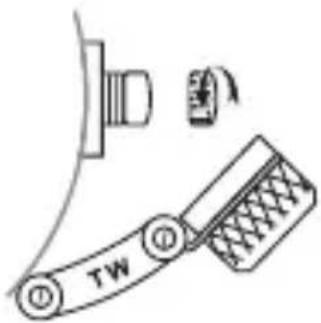
To adjust the time or set the date, unscrew the crown cap by turning it anti-clockwise. Once you have unscrewed it, you will see the (small) crown. Follow the instructions below to adjust the time and date. After adjusting them, screw the crown cap back by turning it clockwise.

ADJUSTING THE TIME
Pull out the crown to the 2nd position so that the second hand stops at the (0) position. Turn the crown to set the hour and minute hands.

ADJUSTING THE DATE
Pull out the crown to the 1st position. Turn the crown anti-clockwise to set the date. After the date has been set, push the crown back to its normal position.
USING THE CHRONOGRAPH
The chronograph is able to measure and display the time accurately to 1/20th of a second, up to a maximum of 59 minutes and 59 seconds. The retrograde chronograph 1/20 second hand keeps running continuously for 30 seconds after starting and then stops at the (0) position. Press button B to change the watch to
the chronograph mode. The second hand stops at the (0) position and changes to the chronograph 1/20 second hand.
The chronograph can be started and stopped at any time by pressing button A.
Pressing button B resets the chronograph. All hands will then return to their (0) position. The chronograph second hand can be restarted by pressing button B once again.
If the chronograph second hand and the chronograph 1/20 second hand do not return to the (0) position after the chronograph has been reset or after the battery has been replaced, you should do the following. Pull out the crown to the 2nd position. Press button A to set the chronograph second hand to the (0) position.
Press button B to set the chronograph 1/20 second hand to the (0) position. The chronograph second hands can be advanced rapidly by continuously pressing button A or B. Once the hands have returned to the (0) position, return the crown to its normal position and screw the crown cap clockwise back to the case.
CAUTION: IF THE CROWN IS NOT PRESSED IN PROPERLY, THE WATCH IS NO LONGER WATERPROOF AND THE MOVEMENT CAN BE SERIOUSLY DAMAGED!
THE 3-HAND MODELS
USE OF THE CROWN
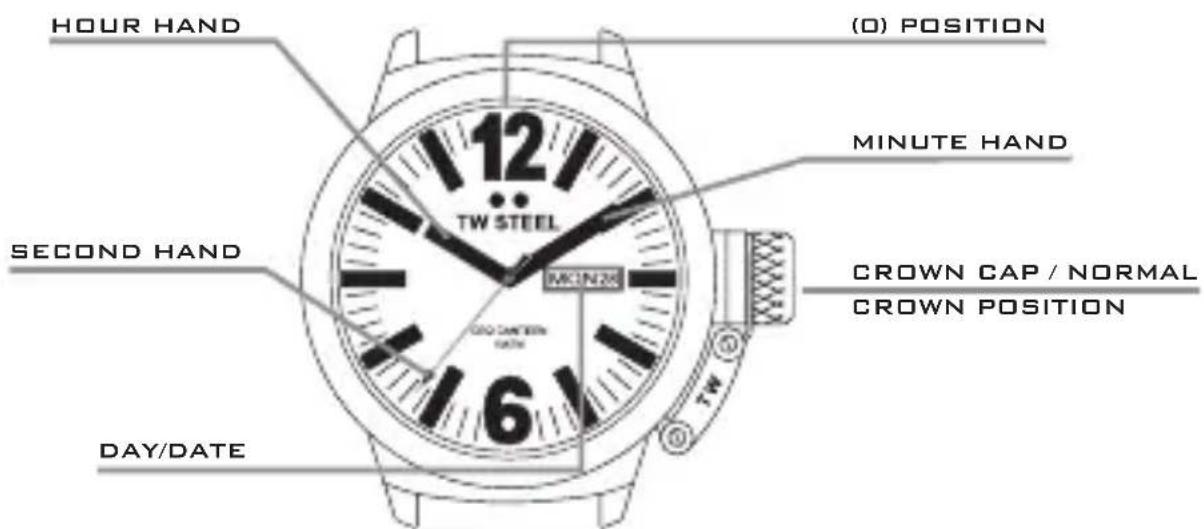
To adjust the time or set the date, unscrew the crown cap by turning it anti-clockwise. Once you have unscrewed it, you will see the (small) crown. Follow the instructions below to adjust the time and date. After adjusting them, screw the crown cap back by turning it clockwise.

ADJUSTING THE TIME
Pull out the crown to the 2nd position. Turn the crown to set the hour and minute hands.
ADJUSTING THE DATE*
Pull out the crown to the 1st position. Turn the crown anti-clockwise to set the date.


ADJUSTING THE DAY**
Pull out the crown to the 1st position.
Turn the crown clockwise to adjust the day.
The days can be displayed in English or Spanish.

Once the date and/or day has been set, push the crown back to its normal position and screw the crown cap clockwise back to the case.
CAUTION: IF THE CROWN IS NOT PRESSED IN PROPERLY, THE WATCH IS NO LONGER WATERPROOF AND THE MOVEMENT CAN BE SERIOUSLY DAMAGED!
* For the Swiss Made diamond model, the crown must be turned clockwise in order to set the date.
** The Swiss Made CEO Canteen models feature a Swiss movement without day display.
CEO TONNEAU
THE CHRONOGRAPH MODELS

USE OF THE CROWN
To adjust the time or set the date, unscrew the crown by turning it anti-clockwise. Then follow the instructions for adjusting the date and time and using the chronograph on the CEO Canteen Style chronograph models.
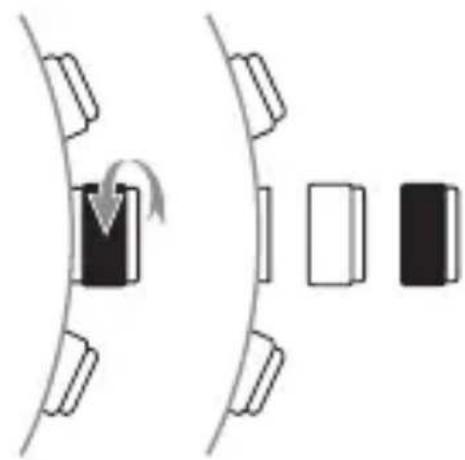
Once you have set the date or time or adjusted the chronograph second hand, push the crown back to its normal position and screw the crown clockwise back to the case.
THE SWISS MADE MODELS FEATURING A SWISS CHRONOGRAPH MOVEMENT
To set the time or date, you must first unscrew the crown by turning it anticlockwise.
SETTING THE TIME
Pull out the crown to the 2nd position so that the second hand stops in the (0) position. Turn the crown to set the hour and minute hands.
SETTING THE DATE
Pull out the crown to the 1st position. Next, turn the crown anticlockwise to set the date.
Once you have set the date, push the crown back to its normal position and screw the crown clockwise back to the case.
USING THE CHRONOGRAPH
The chronograph can measure and display the time accurately to 1/10th of a second, up to a maximum of 30 minutes.
You can use button A to activate and deactivate the chronograph at any time.
If you have stopped the time using button A, you can then reset the chronograph with button B — all hands will then return to the (0) position.
The chronograph also has an interval-timing function.
HOW TO USE THE INTERVAL-TIMING FUNCTION
You can activate the chronograph using button A. If you wish to temporarily stop the time, press button B. The time has now been deactivated but continues to run in the background. If you would like to continue using the stopwatch function, press button B again – the hands will now display the correct time, which was running in the background all along. You can repeat this action as often as necessary. Press button A to stop the time – the final time will now be displayed.
If you press button B next, the chronograph will be reset and all hands will return to the (0) position.
If the hands of the chronograph do not return to the (0) position after you have reset the chronograph or replaced the battery, please complete the following steps: pull out the crown to the 2nd position. Press buttons A and B simultaneously for at least 2 seconds – this will activate the corrective mode. You can now adjust the hands. Use button A to adjust the large second hand (1), the 1/10th second hand (2) and the minute hand (3). You can use button B to select one of these hands. Once the hands have returned to the (0) position, push the crown back to its normal position and screw the crown clockwise back to the case.
CAUTION: IF THE CROWN IS NOT PRESSED IN PROPERLY, THE WATCH IS NO LONGER WATERPROOF AND THE MOVEMENT CAN BE SERIOUSLY DAMAGED!
CEO GOLIATH
THE CHRONOGRAPH MODELS
USE OF THE CROWN
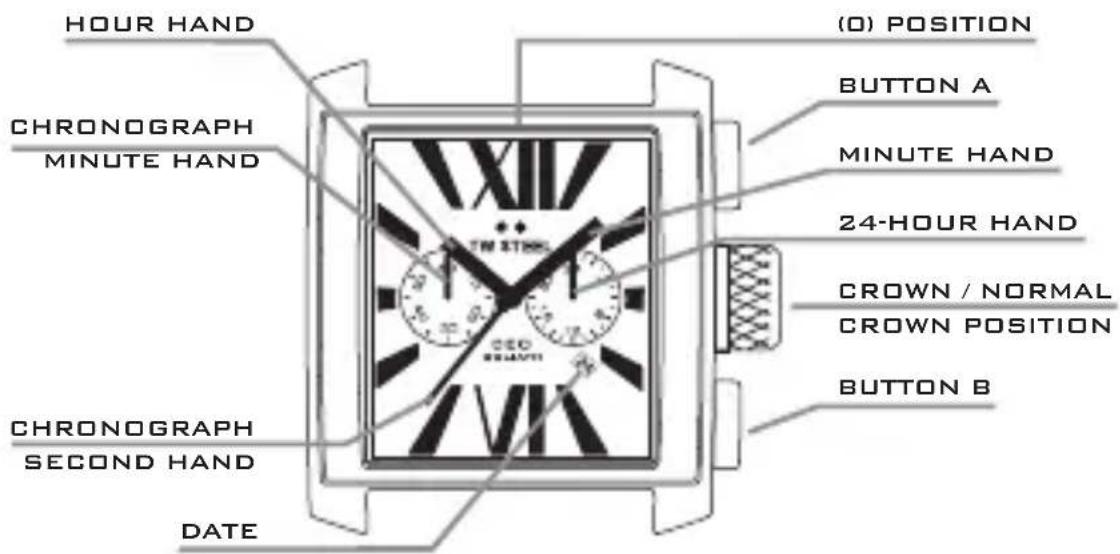
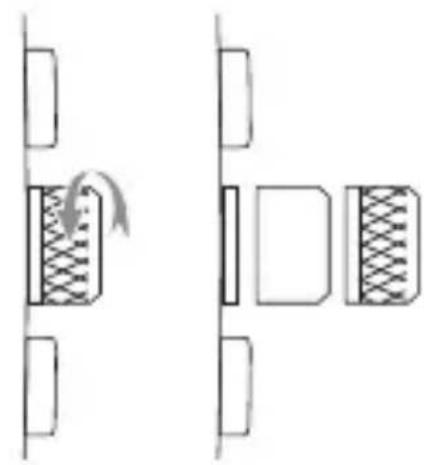
To adjust the time or set the date, pull out the crown to the 1st or 2nd position. Then follow the instructions for adjusting the date and time on the CEO Canteen Style chronograph models.
After the date or time has been set, push the crown back to its normal position.
USING THE CHRONOGRAPH
The chronograph is able to measure and display the time accurately to 1/1 of a second, up to a maximum of 59 minutes and 59 seconds.
The chronograph can be started and stopped at any time by pressing button A. Pressing button B resets the chronograph. All hands will then return to their (0) position. The chronograph second hand can be restarted by pressing button B once again.
If the chronograph second hand does not return to the (0) position after the chronograph has been reset or after the battery has been replaced, you should do the following. Pull out the crown to the 2nd position. Press button A to set the chronograph second hand to the (0) position. Push button A continuously until the second hand returns to the (0) position. The chronograph second hand can be advanced rapidly by continuously pressing button A. Once the hand returns to the (0) position, push the crown back to its normal position.
CAUTION: IF THE CROWN IS NOT PRESSED IN PROPERLY, THE WATCH IS NO LONGER WATERPROOF AND THE MOVEMENT CAN BE SERIOUSLY DAMAGED!
THE 3-HAND MODELS
USE OF THE CROWN
To adjust the time or set the date, pull out the crown to the 1st or 2nd position. Then follow the instructions for the CEO Canteen Style 3-hand models.
(Please note: this model does not display the day).
CEO TECH
THE CHRONOGRAPH MODELS

USE OF THE CROWN
To adjust the time or set the date, unscrew the crown by turning it anti-clockwise. Then follow the instructions for adjusting the date and time and using the chronograph on the CEO Canteen Style chronograph models.
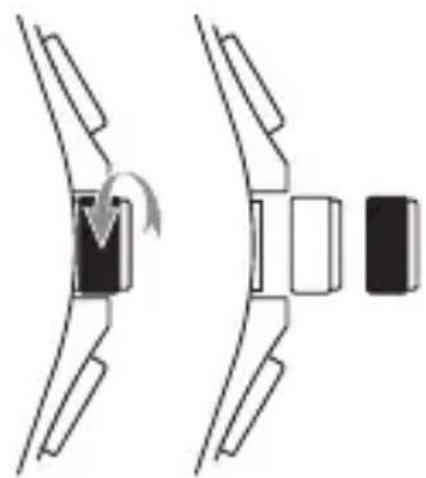
Once you have set the date or time or adjusted the chronograph second hand, push the crown back to its normal position and screw the crown clockwise back to the case.
CEO PILOT

To set the time or adjust the date of the Limited Edition Swiss Made CEO Pilot models, please follow the instructions for the CEO Canteen Swiss Made 3 hands models.
HOW TO CARE FOR YOUR WATCH
The TW Steel CEO Goliath (3 ATM), Pilot (5 ATM) and Tonneau (5 ATM) models are splash-waterproof. The CEO Canteen and Tech models are waterproof up to 10 ATM.
All watches come with a small cleaning cloth. Please use this cloth when cleaning your watch, to avoid scratches.
WARRANTY
All TW Steel CEO watches have a 2 year international warranty against all manufacturing faults.
This warranty is valid under the following conditions:
- The watch must have been purchased from an authorised dealer or official agent.
- The guarantee card must have been filled in completely, including:
- reference number of the watch;
- date of purchase;
- official stamp of the dealer and signature of salesperson.
- You must present the warranty card together with your receipt and the watch to the authorised dealer or official agent.
- The warranty does not cover normal wear and tear and/or damage caused by repairs by unauthorised persons.




- BIG IN OVERSIZED WATCHES
- TW STEEL - CEO
- CEO CANTEEN
- THE CHRONOGRAPH MODELS
- USE OF THE CROWN
- ADJUSTING THE TIME
- ADJUSTING THE DATE
- USING THE CHRONOGRAPH
- THE 3-HAND MODELS
- ADJUSTING THE DAY
- CAUTION: IF THE CROWN IS NOT PRESSED IN PROPERLY, THE WATCH IS NO LONGER WATERPROOF AND THE MOVEMENT CAN BE SERIOUSLY DAMAGED
- CEO TONNEAU
- THE SWISS MADE MODELS FEATURING A SWISS CHRONOGRAPH MOVEMENT
- SETTING THE TIME
- SETTING THE DATE
- HOW TO USE THE INTERVAL-TIMING FUNCTION
- CEO GOLIATH
- CEO TECH
- CEO PILOT
- HOW TO CARE FOR YOUR WATCH
- WARRANTY
Brand : TW Steel
Model : CE2004 CEO Tonneau
Category : Wristwatch