
CE1019 CEO Canteen - Wristwatch TW Steel - Free user manual and instructions
Find the device manual for free CE1019 CEO Canteen TW Steel in PDF.


| Brand | TW Steel |
| Model | CE1019 CEO Canteen |
| Category | Watch |
| Type | Chronograph watch |
| Case material | Stainless steel |
| Water resistance | 10 ATM (100 meters) |
| Movement type | Quartz |
| Main functions | Chronograph (1/20th second), date, day of the week (English/Spanish) |
| Chronograph capacity | 59 minutes 59 seconds |
| Crown | Screw-down with protective cap |
| Time setting | Crown in position 2, turn to set the hands |
| Date setting | Crown in position 1, turn counterclockwise |
| Chronograph buttons | A (start/stop), B (reset) |
| Maintenance | Clean with provided soft cloth, avoid scratches |
| Warranty | 2 years international against manufacturing defects |
| Included accessories | Cleaning cloth |
| Safety | Tighten crown after adjustment to maintain water resistance |
| Note | Do not use the watch if the crown is not properly screwed |
Frequently Asked Questions - CE1019 CEO Canteen TW Steel
User questions about CE1019 CEO Canteen TW Steel
0 question about this device. Answer the ones you know or ask your own.
Ask a new question about this device
Download the instructions for your Wristwatch in PDF format for free! Find your manual CE1019 CEO Canteen - TW Steel and take your electronic device back in hand. On this page are published all the documents necessary for the use of your device. CE1019 CEO Canteen by TW Steel.
USER MANUAL CE1019 CEO Canteen TW Steel
BIG IN OVERSIZED WATCHES

Deutsch 5
English 15
Español 25
Français 35
Italiano 45
Nederlands 55
Türkçe 65
Ελληνικά 75
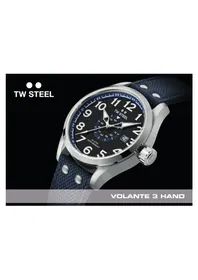
TW STEEL - CEO
TW Steel is a watch brand harmoniously combining both design and innovation. ‘The Watch in Steel’ leads the oversized market with style and quality guaranteed.
The ‘Collection ExtraOrdinary’ (CEO) is for the consumer who appreciates refined, expensive-looking styling with exceptional quality.
All watches are made from high-grade steel. Some come in AA grade PVD rose gold plating or PVD black coating, the best grade available. The CEO Goliath chronograph models come with a sophisticated movement that can measure time accurately to 1/1 of a second, while all CEO Canteen and Tonneau chronograph models are fitted with a sophisticated movement that can measure time accurately to 1/20th of a second.
The 3-hand CEO Canteen models all have a movement with day/date function in Spanish and English.
TW Steel values the most important relationship of all – the one with the consumer. To express this, we hereby give you all the information that you need to enjoy your TW Steel CEO watch to the fullest.
CEO CANTEON
THE CHRONOGRAPHMODES
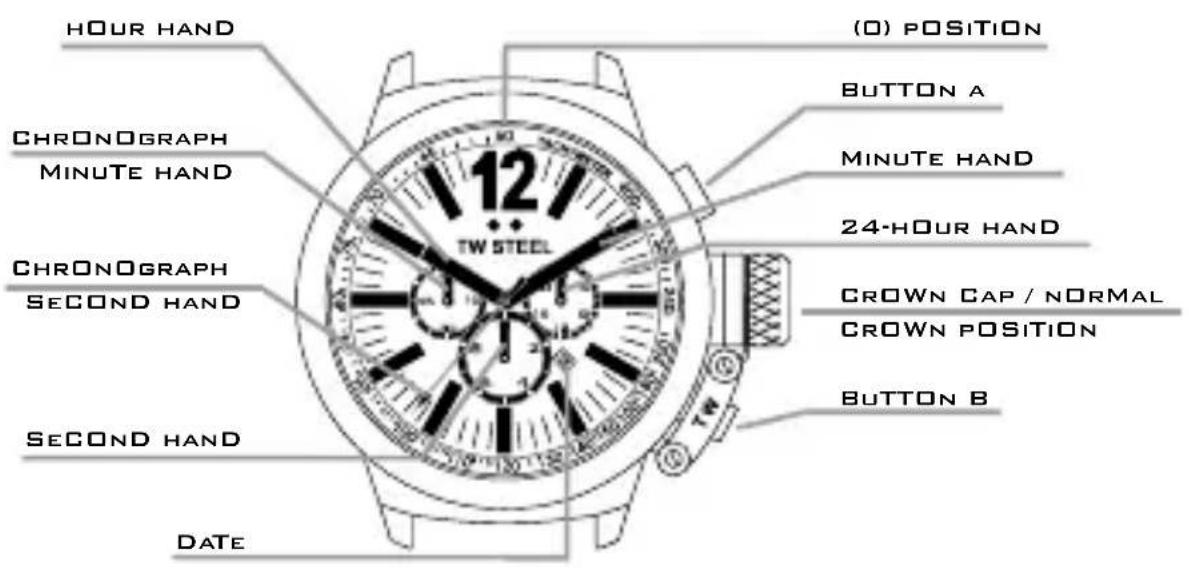
USE OF THE CROWN
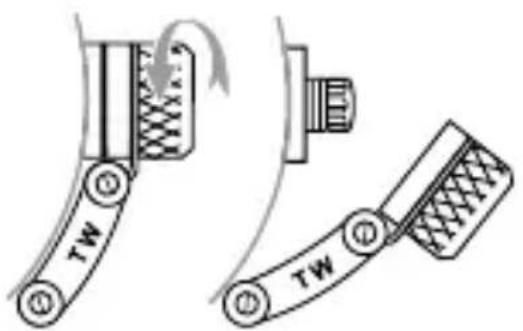
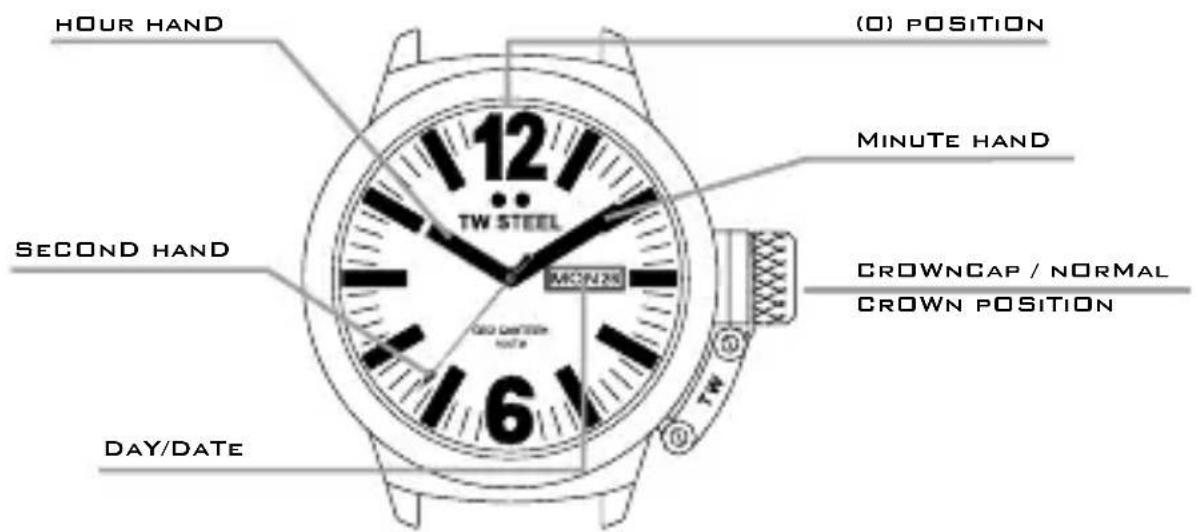
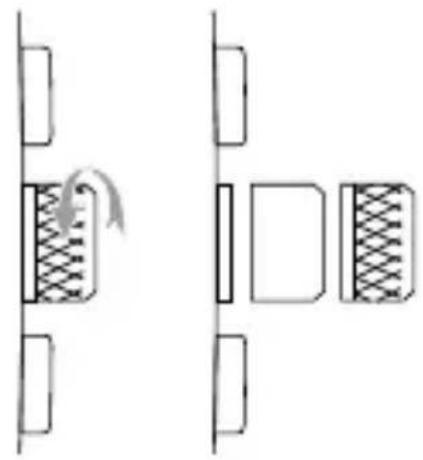
To adjust the time or set the date, unscrew the crown cap by turning it anti-clockwise. Once you have unscrewed it, you will see the (small) crown. Follow the instructions below to adjust the time and date. After adjusting them, screw the crown cap back by turning it clockwise.
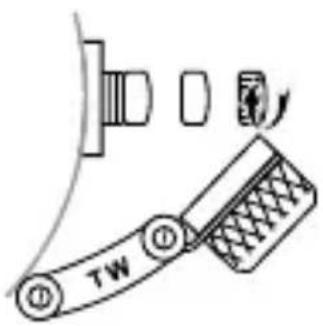
ADJUSTING THE TIME
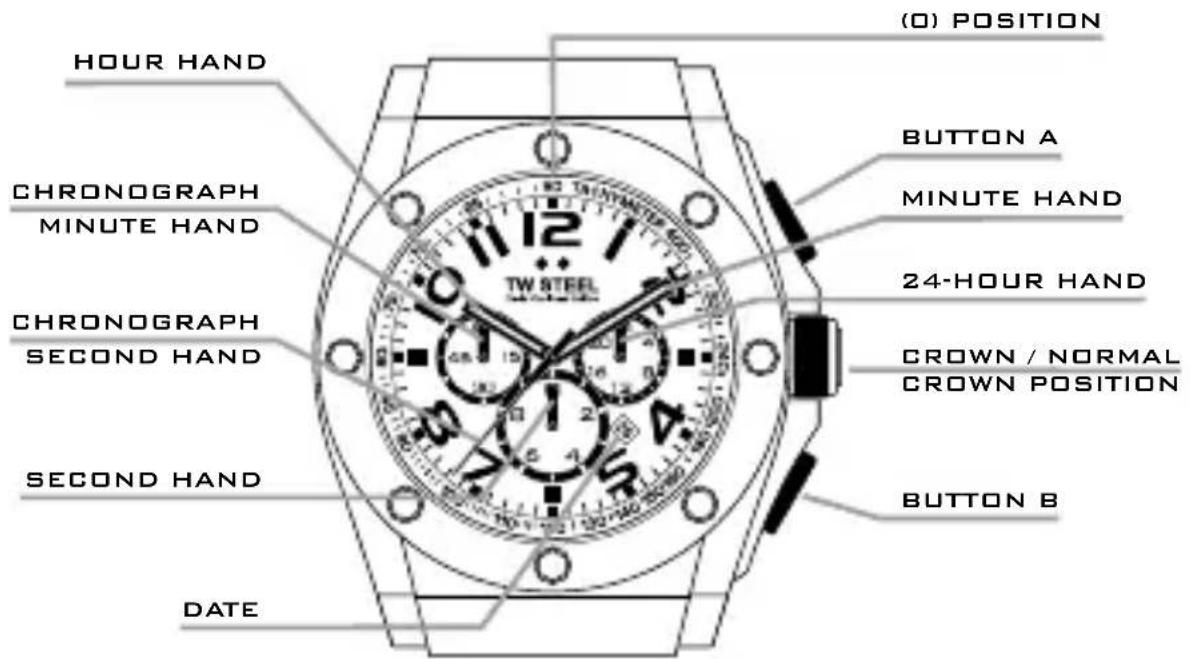
Pull the crown out to the 2nd position so that the second hand stops at the (0) position. Turn the crown to set the hour and minute hands.
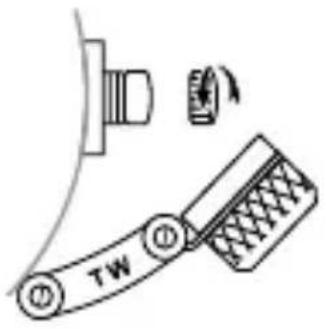
ADJUSTING THE DATE
Pull the crown out to the 1st position. Turn the crown anti-clockwise to set the date. After the date has been set, push the crown back to its normal position.
USING THE CHRONOGRAPH
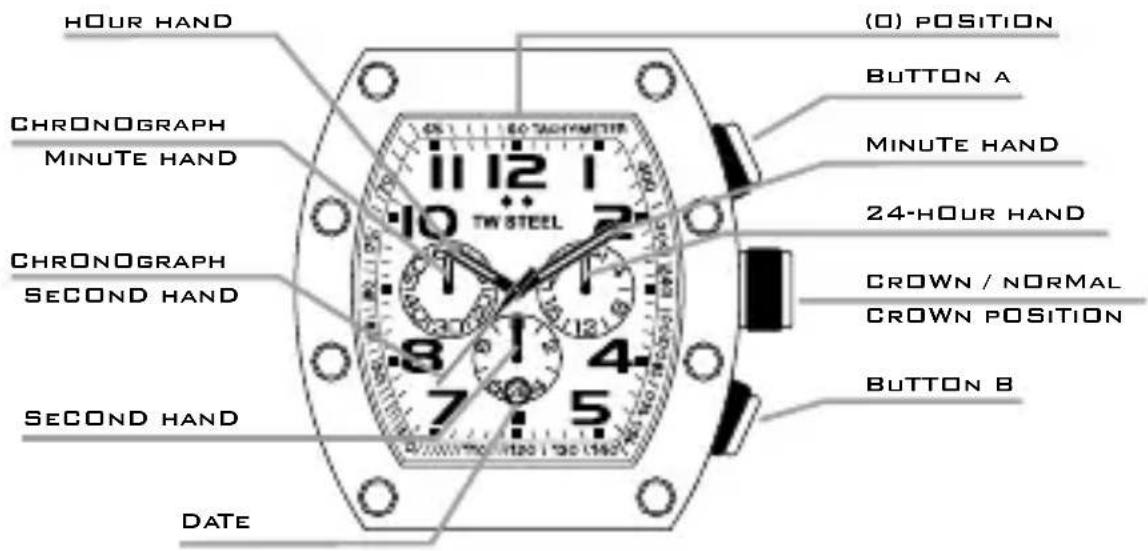
The chronograph is able to measure and display the time accurately to 1/20th of a second, up to a maximum of 59 minutes and 59 seconds. The retrograde chronograph 1/20 second hand keeps running continuously for 30 seconds after starting and then stops at the (0) position. Press button B to change the watch to the chronograph mode. The second hand stops at the (0) position and changes to the chronograph 1/20 second hand.
The chronograph can be started and stopped at any time by pressing button A.
Pressing button B resets the chronograph. All hands will then return to their (0) position. The chronograph second hand can be restarted by pressing button B once again.
If the chronograph second hand and the chronograph 1/20 second hand do not return to the (0) position after the chronograph has been reset or after the battery has been replaced, you should do the following. Pull the crown out to the 2nd position. Press button A to set the chronograph second hand to the (0) position.
Press button B to set the chronograph 1/20 second hand to the (0) position. The chronograph second hands can be advanced rapidly by continuously pressing button A or B. Once the hands have returned to the (0) position, return the crown to its normal position and screw the crown cap clockwise back to the case.
CAUTION: IF THE CROWN IS NOT PRESSED IN PROPERLY, THE WATCH IS NO LONGER WATERPROOF AND THE MOVEMENT CAN BE SERIOUSLY DAMAGED!
THE 3-HAND MODELS
USE OF THE CROWN
To adjust the time or set the date, unscrew the crown cap by turning it anti-clockwise. Once you have unscrewed it, you will see the (small) crown. Follow the instructions
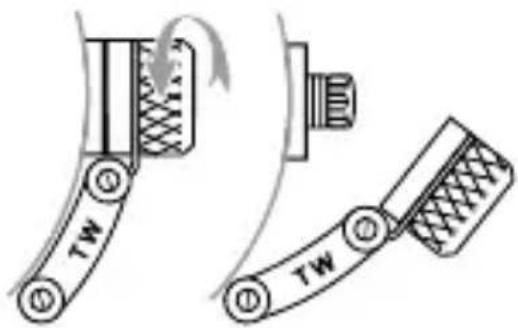
below to adjust the time and date. After adjusting them, screw the crown cap back by turning it clockwise.
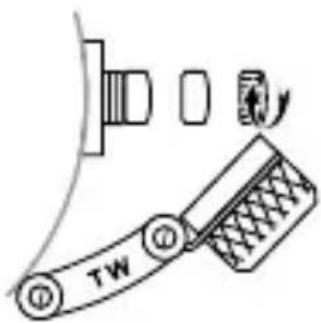
ADJUSTING THE TIME
Pull the crown out to the 2nd position.
Turn the crown to set the hour and minute hands.
ADJUSTING THE DATE
Pull the crown out to the 1st position. Turn the crown anti-clockwise to set the date.
ADJUSTING THE DAY
Pull the crown out to the 1st position. Turn the crown clockwise to adjust the day. The days can be displayed in English or Spanish.
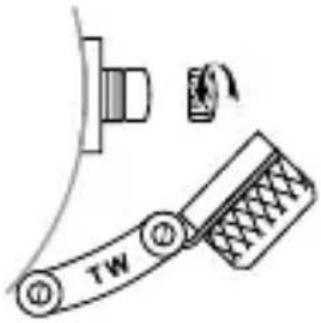
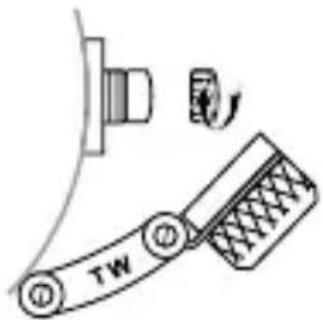
Once the date and/or day has been set, push the crown back to its normal position and screw the crown cap clockwise back to the case.
CAUTION: IF THE CROWN IS NOT PRESSED IN PROPERLY, THE WATCH IS NO LONGER WATERPROOF AND THE MOVEMENT CAN BE SERIOUSLY DAMAGED!
CEO TONNEAU
THE CHRONOGRAPH MODES
USE OF THE CROWN
To adjust the time or set the date, unscrew the crown by turning it anti-clockwise. Then follow the instructions for adjusting the date and time and using the chronograph on the CEO Canteen Style chronograph models.
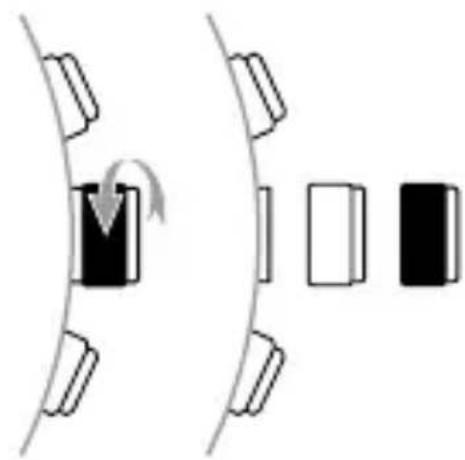
Once you have set the date or time or adjusted the chronograph second hand, push the crown back to its normal position and screw the crown clockwise back to the case.
CEO GOLIATH
THE CHRONOGRAPH MODELS
USE OF THE CROWN
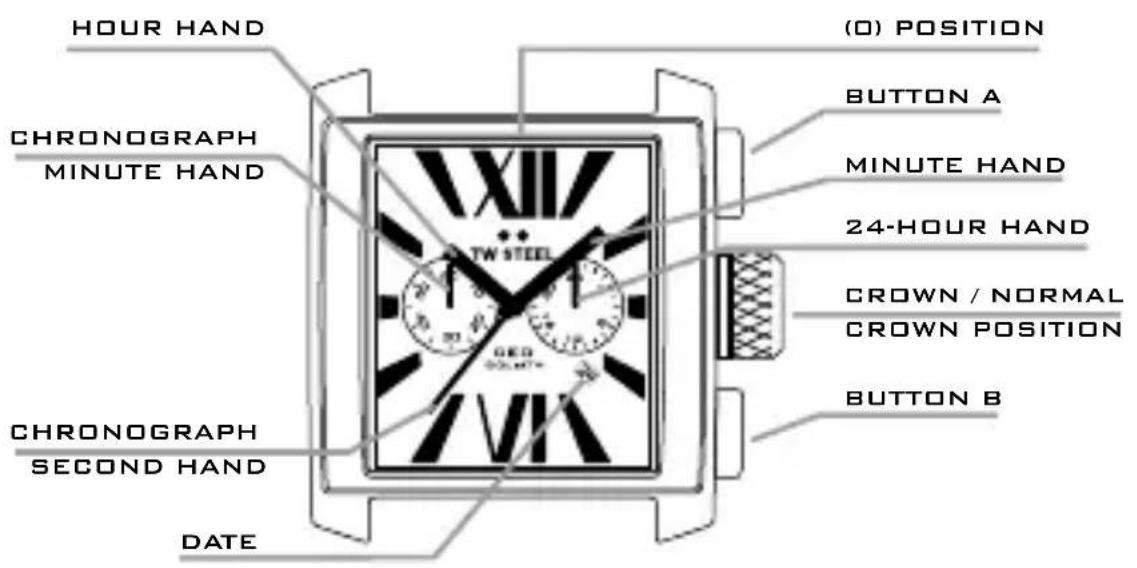
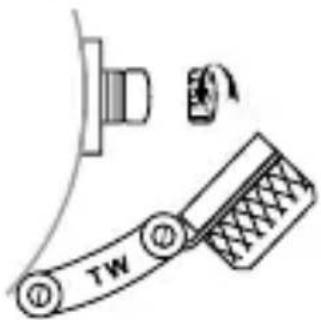
To adjust the time or set the date, pull out the crown to the 1st or 2nd position. Then follow the instructions for adjusting the date and time on the CEO Canteen Style chronograph models.
After the date or time has been set, push the crown back to its normal position.
USING THE CHRONOGRAPH
The chronograph is able to measure and display the time accurately to 1/1 of a second, up to a maximum of 59 minutes and 59 seconds.
The chronograph can be started and stopped at any time by pressing button A. Pressing button B resets the chronograph. All hands will then return to their (0) position. The chronograph second hand can be restarted by pressing button B once again.
If the chronograph second hand does not return to the (0) position after the chronograph has been reset or after the battery has been replaced, you should do the following. Pull the crown out to the 2nd position. Press button A to set the chronograph second hand to the (0) position. Push button A continuously until the second hand returns to the (0) position. The chronograph second hand can be advanced rapidly by continuously pressing button A. Once the hand returns to the (0) position, push the crown back to its normal position.
CAUTION: IF THE CROWN IS NOT PRESSED IN PROPERLY, THE WATCH IS NO LONGER WATERPROOF AND THE MOVEMENT CAN BE SERIOUSLY DAMAGED!
THE 3-HAND MODELS
USE OF THE CROWN
To adjust the time or set the date, pull out the crown to the 1st or 2nd position. Then follow the instructions for the CEO Canteen Style 3-hand models.
(Please note: this model does not display the day).
CEO TECH
THE CHRONOGRAPH MODELS
USE OF THE CROWN
To adjust the time or set the date, unscrew the crown by turning it anti-clockwise. Then follow the instructions for adjusting the date and time and using the chronograph on the CEO Canteen Style chronograph models.
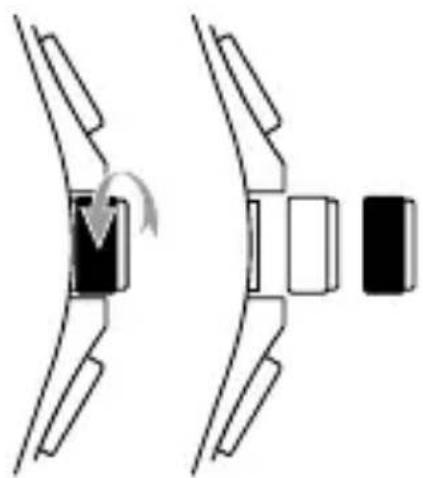
Once you have set the date or time or adjusted the chronograph second hand, push the crown back to its normal position and screw the crown cap clockwise back to the case.
WATCH CARE
The water resistance of the TW Steel CEO models is as follows: CEO Canteen style: 10 ATM, CEO Tonneau: 5 ATM, CEO Goliath: 3 ATM and CEO Tech: 10 ATM.
All watches come with a small cleaning cloth. Please use this cloth when cleaning your watch, to avoid scratches.
WARRANTY
All TW Steel CEO watches have a 2 year international warranty against all manufacturing faults.
This warranty is valid under the following conditions:
- The watch must have been purchased from an authorised dealer or official agent.
- The guarantee card must have been filled in completely, including:
- reference number of the watch;
- date of purchase;
- official stamp of the dealer and signature of salesperson.
- You must present the warranty card together with your receipt and the watch to the authorised dealer or official agent.
- The warranty does not cover normal wear and tear and/or damage caused by repairs by unauthorised persons.
TW STEEL - CEO
AJUSTE DE LA FECHA
UTILISATION DU CHRONOGRAPHE
RÉGLAGE DE L'HEURE
RÉGLAGE DU JOUR DE LA SEMAINE
UTILISATION DU CHRONOGRAPHE
UTILIZZARE IL CRONOGRAFO
CEO Canteen style 10 atmosfere, CEO Tonneau 5 atmosfere, CEO Goliath 3 atmosfere e CEO Tech 10 atmosfere.
DE TIJD INSTELLEN
DE DATUM INSTELLEN
SAATI AYARLAMA
KRONOGRAFI KULLANMA
TW Steel CEO modelleri aşağıdaki su geçirmeme özelliğine sahiptir: CEO Canteen modeli 10 ATM, CEO Tonneau 5 ATM, CEO Goliath 3 ATM ve CEO Tech 10 ATM.
Ρύθμιση της ημέρας



- TW STEEL - CEO
- CEO CANTEON
- THE CHRONOGRAPHMODES
- USE OF THE CROWN
- ADJUSTING THE TIME
- ADJUSTING THE DATE
- USING THE CHRONOGRAPH
- CAUTION: IF THE CROWN IS NOT PRESSED IN PROPERLY, THE WATCH IS NO LONGER WATERPROOF AND THE MOVEMENT CAN BE SERIOUSLY DAMAGED
- ADJUSTING THE DAY
- CEO TONNEAU
- THE CHRONOGRAPH MODES
- CEO GOLIATH
- THE CHRONOGRAPH MODELS
- THE 3-HAND MODELS
- CEO TECH
- WATCH CARE
- WARRANTY
- AJUSTE DE LA FECHA
- UTILISATION DU CHRONOGRAPHE
- RÉGLAGE DE L'HEURE
- RÉGLAGE DU JOUR DE LA SEMAINE
- UTILIZZARE IL CRONOGRAFO
- DE TIJD INSTELLEN
- DE DATUM INSTELLEN
- SAATI AYARLAMA
- KRONOGRAFI KULLANMA
- ΡΎΘΜΙΣΗ ΤΗΣ ΗΜΈΡΑΣ
Brand : TW Steel
Model : CE1019 CEO Canteen
Category : Wristwatch