DXT-1569UB - Receiver PIONEER - Free user manual and instructions
Find the device manual for free DXT-1569UB PIONEER in PDF.


User questions about DXT-1569UB PIONEER
0 question about this device. Answer the ones you know or ask your own.
Ask a new question about this device
Download the instructions for your Receiver in PDF format for free! Find your manual DXT-1569UB - PIONEER and take your electronic device back in hand. On this page are published all the documents necessary for the use of your device. DXT-1569UB by PIONEER.
USER MANUAL DXT-1569UB PIONEER
ThankyouforpurchasingthisPIONEER product
To ensure proper use, please read through this manual before using this product. It is especially important that you read and observe WARNING and CAUTION in this manual. Please keep them manual in a safe and accessible place for future reference.
Aboutthisunit
CAUTION:
USEOFCONTROLORADJUSTMENTOR PERFORMANCEOFPROCEDURES OTHERTHANTHOSESPECIFIEDHEREIN MAYRESULTINHAZARDOUSRADIATION EXPOSURE.
CAUTION:
THEUSEOFOPTICALINSTRUMENTS WITHTHISPRODUCTWILLINCREASE EYEHAZARD.

CAUTION
- Donotallowthisunittocome ntoccontact withlicuids.Electricalshockcoulresult. Also,darnagetothisunit,smoke,anoverheatingccoulresultfromcontactwith liquids.
• Always keep the volume low enough to hear outsidesounds.
• Avo d'exposureto moisture. - If the battery is connected to discharged, any preset memory will be erased.

CAUTION
1 Donottouchthespeakerflexiolewire(1). 2 Donotch angethedirectionothespeakerterminalassembly(2). 3 Makesureleadandspeakerterminalsdonotcontactmetal.
When making connections, referalsotothin structionmanualofthecarstereoused.

16cm2-wayspeakers

6" × 9" 3-way speakers
CAUTION
Thisproductisaclass1 ascrproductclassifiedundertheSafetyoflaserproducts.IEC 60825-1:2007.
CLASS 1 LASER PRODUCT
Note
Functionsettingoperat onsarecompletedeven ifthemenuiscanceledbeforereoperations areconfirmed.
Aboutthismanual
In the following instructions, USB memories and USB audiop ayersaracollectively referred loss "USB storage device".
Beforeyoustart
Incaseoftrouble
Should this sun/faillcooperate properly, please contact your dealer or nearest authorized PIONEERServ.coStation.
Operatingthisunit
Headunit

text_image
Labeled diagram of a device rear panel with numbered components for identification| PartPart | ||
| 1▲(object)8 | Equal(equalizer) | |
| 2SRC/OFF@BAND | ||
| 3 | MULTI-CONTROL(M.C.) | (neck)/DIMMER(dimmer) |
| 4 | Q(list)1▶ | |
| 5DISP/DISPOFF@1/ | ^ lo6/ | |
| 6D scloadingslot§ | Aux input jack(3.5mm stereo jack) | |
| 7USBpor. | 9Detach button | |

CAUTION
- Useanoptonal PioneerUSBcable(CD-U50E)toconnect theUSBstorage devices anydeviceconnected directlytotheunit will protrudeoutfrom theunit,which coulbe dangerous.
- Donotuse unauthorizedproducts.
Remotecontrol
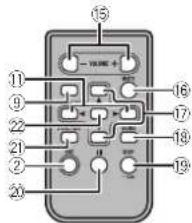
text_image
15 YANE + 16 17 18 19 20 21 22| Part | Operation |
| 16VOLUME | Presstoinoreasordoc case volume. |
| 16MUTE | Pressstomute.Pressaga into unmute. |
| 17▲/▼ | Pressstorecallpreelstations.Presstose actthenext/previousfolder. |
| 18AUDIO | Presslose ectanaudiofunction. |
| 19DISP/SCRL | Presslose ectifferentdisplays.Pressandholdtotumdimmeronorof. |
| 20II | Prossstopauscorrumoplay back. |
| 21 FUNC-TION | Pressstose ccffunctions. |
| 22 LIST/ENTER | Presslodisplaythediscible.tracktitic.folder,orfilel stdpondingontresource.Presstodisplayhelistdependingontresource.Whilaintheoperatingmenu.pressiocontrolfunctions. |
Operatingthisunit
Displayindication

| Indicator | State | |
| 1 | P (list) | The last function is being operated |
| 2 | Subinformation section | Subinformation is displayed. |
| 3 | TA(traffic announcements). | TA(unct prison). |
| 4 | TP(traffic program identification) | ATPstationistuncolin. |
| 5 | S.Rtrv (soundretriever) | Thesoundretriever function ison. |
| 6LOC | Localseocturingison. | |
| 7 | (repeat) | Trackorfolderrepeatison. |
| 8 | XX (random) | Randomplayison. |
Indicator State
| 9 | Main information section | ·Tunerbarsandfrequency·RDS programservicename,PTInformationandotherlitorainformation·CDplayerandUSBlog-agoDeviceclapsodplaybacktimeandtxtinformation |
| 10 | > | Appearswhenalowertieroffolderomenuexsts. |
Setupmenu
Whenyoutum theignitionswitchtoON afterinstallation.setupmenu appearonthe display. Youcan setupthe menuoptionsbelow.
1 After installation of this unit, turn the ignitionswitchto ON.
SETUPappears.
2 TurnM.C.to switchto YES.
■ If you can operate for 30 seconds, the setup
menuwillnotoedisplaved
■ If you prefer not to set up at this time, turn M.C. to switch to NO. Press to select.
If you select NO, you cannot setup in these setup menu.
3 PressM.C.toselect.
4 Performthefollowing procedurestoset themenu.
To proceed to the next menu option, you need to confirm your selection.
Operatingthisunit
CLOCKSET(settingtheclock)
1 TurnM.C.loadusthour.
2PressM.C.toselectminute.
3LuroMC toadu stminute
1) Power MC beneficial production
4 PressM.C.tocommitteselection;
FMSTEP(FMturingsstep)
Normally the FM tuning step employed by seek tuning is 50kHz. When AF or IAison, the tuning stop automatically changesto 100kHz. It maybe preferable to set the tuning steps 50kHz when AFison
- Thotuningstopromainsat50kHzduringmanualluning,
TlTurnM.C.toselecttheFVtuningstep.
50(50kHz)—100(100kHz)
2|PressM.C.loconfirmltheselection.
MWSTEP(MVtuningstep)
The MWtuningsepcarbeswitched between 9kHz and 10kHz. When using the luners nNorth, Contra or South America, resatthatuningstop from 8kHz (531kHz to 602kHz) a low eito
10kHz(530kHz to 1640kHz allowable).
TlumM.C.teselectthelyWtuningstep.
9(9kHz)—10(10kHz)
2PressM.C.toconfirmtheselection,
QUITappears.
5Tofinishyoursettings,turnM.C.toselect
YES.
■If you prefer to change your setting again, tum
M.C. losvitch to NO, Press to select.
6PressM.C.toselect.
Notes
- You can setup themenuption from the systemmenu. Fordetails about these listings, refer to Systemmenu on page 8.
- You can cancel setup menu by pressing
SRC/OFF

Basicoperations
Important
- Handlegentlywhenremovingorattaching thefrontpanel.
- Avoid subjecting the front panel to excessive shock.
- Keep the front panel out of direct sunlight and high temperatures.
• To avoid damaging the device or vehicle interior, remove any cables and devices attached to the front panel before detaching it.
Operatingthisunit
Removing the front panel to protect your unit from the left
1 Pressthedelachbutton:loreleaselthefront cancel.
2 Push the front panel upward (and then pull upward) (By: J.
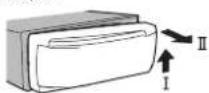
3 Alwayskeptnedetachedfrontpanelinaprotectiondevicesuchasaprotectioncase.
Re-attach not front panel
IT Slidothetrontpaneltotheloft.
Makesuretoinserttheabsonthe eftsideof
theheaduni into thesalsonthe frontpanel.
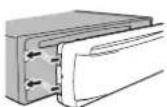
[2] 'resstherights docthetron:paneluntil is firmly sealed.
If you cannot all attach the front panel to the head until successfully makes sure that you are placing the front panel onto the head unit correctly. Forcing the front panel into account result in damage to the front panel or has unit.
Turringthe.uniton
1 PressSRC/OFFtoturntheuniton.
Turringtheunisof
T Pressandhole SRC/OFF until the unit turns off.
Selectingasource
1 Press SRC/OFF ocyclebetween:
TUNER (Lumen)—CD (CD player)—USB (USB)
—AUX(AUX)
Adjust nathevolume
Forsafety reasons, park your vehicle when removing the front panel.
Note
Whenthisunit'solue/white'leadisconnectedto thevehicle'sauto-antennarelaycontrolterminal.thevehicle'santennaextendswhenthis unit'ssourceisturnedon. Toretract:theantenna turnthesourceoff.
Useandcareoftheremote control
Usingtheremotecontrol
T) Pointtheremetacrontrolinthed directionofthe frontpaneltooperate.
When using for the first time, pull out the film protruding from the tray.
Replacing battery
① Slidel the trayout on the back of the remote control.
2 Insert the battery with the pus(+) and minus (-) po esaligned properly.
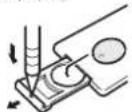
Operatingthisunit

WARNING
- Keep the battery out of the each of children. Should the battery besallowed, consult a doctor immediately.
- Batteries(batterypackorbatteriesinstalled) must not be exposed to excessive heats such as sunshine, fireorthelike.

CAUTION
• UsecoreCR2025(3V) lithium battery.
- Remove the battery if there mole control is not used for a month longer.
- Thorcisadangcrotexlosionthebatteryis incorrectlyreplaced. Replaceonlywiththe same corequivalenttype.
• Donothandlethebatterywithmetallictools
- Donotstorethebatterywithmetal objects.
- If the battery leaks, wipe the remote control completely clean and install an new battery.
- When disposing of used batteries, comply with governmental regulations on environmental public institutions' rules that apply in your country/area.

Important
- Donotstoretheremotecontrolinhighttemperaturescordirectsunlight.
• Theremote control may not function properly indirect sunlight. - Donotlettheremotecontro fallontothe floor whereit maybecomejammedunder thebrakeoracceleratorpedal.
Frequentlyusedmenu operations
| ReturningtothapreviousdisplayReturningtothepreviouslist(thefolderonelevelhigher)TPress ➔ DIMMER |
| ReturningtotheordnarydisplayCancelingthemainmenuTPressBAND. |
| ReturningtotheordnarydisplayfromhelistTPressBAND. |
Tuner
Basicoperations
| Selectingband |
| 1PressBAND unlithedesredband(FM1, FM2, FM3 for 'M', MW or SW1, SW2 for short-wave)isdisplayed. |
| Switchingpresetstations |
| TPress<▶. |
| • SelectPCH(presetchannel)underSEEKto usethisfunction.Fordetailsaboutthesetings,refertoSEEK(left/rightkeysetting)on thenextpage. |
Operatingthisunit
| Manualtuning(stepbystep) |
| 1Press←or→.SelectMAN(manual tuning),underSEEKlouschisfunction, Fordtails sacourthosetings, refer to SEEK(left/right keysetting)onthenextpage. |
| Seeking1Pressandroid←or→, and thenre ease.You can cancel seektuning by a rafly pressing←or→.While pressingancholding←or→, you can skipstations.Seektuning starts bassconas,yourel ease←or→. |
Note
Thisunit's AF(alternativefrequenciessearch) function can be turned on ancoff. AF should be offnormaltuningoperation(referto AF(alternativefrequenciessearch)onthenextpage).
Storingandrecallingstations foreachband
Usingpreset tuning buttons
1Whenyoufindastationthatyouwant tostoreinmemory,pressoneofthepreset tuningbuttons(1/ ^ to6/)andholduntil thepresetnumberstopsflashing.
2Pressoneofthepresettuningbuttons (1/^ to6/)toselectthedesiredstation.
Switchingthedisplay
| Selecting:desiredtextinformation |
| Press DISP/DISP OFF to cycle between the following:• FREQUENCY(programservicenamefrequency)• BRDCSTINFO(programservicename/FTY information)• CLOCK(sourcenameandclock) |
Notes
• If the program servicename cannot be acquired in FREQUENCY, the broadcast frequency is displayed instead. If the program servicename is detected, the program servicename will be displayed.
- BRDCSTINFOtextinformationwillchange automatically.
- Depending on the band, text information can be changed.
- Textinformationitem sthatcanbechanged dependencethearea.
UsingPTYfunctions
You cantureinloastation using PTY(program type)information.
| SearchingforanRDSstationbyPTY information You can searchforgenerahypesofbroadcasting programs such asthoselistedinthefollowing section.Refertothenex.page. | |
| 1Press (list). | |
| 2TurnM.C.toselectaprogramtype. |
NEWS/INFO POPULAR CLASSICS OTHERS
3 PressM.C.tobeginthesearch.
The unitsearchesforstationbroadcasting that typeofprogram.Whenestation sound, tsprogramservicanamesidisplayed.
• Tocance thesearch, press M.C. again.
• The program of somestations may differ from that indicated by that transmitted PTY.
• Inostationisbroadcastingthetypeof
programmyousearchedfor,NOTFOUND is
displayedforabouttwosecondisandthen
thetunereturnstetheoriginal station.
Section
Operatingthisunit
PTYlist
NEWS/INFO(newsandinformation)
NEWS(News), AFFAIRS(Currentafairs) INFO (Information), SPORT(Sports), WEATHER(Weather), FINANCE(Finance)
POPULAR(popular)
POPMUS(Popularmus c),ROCKMUS(Rock music),EASYMUS(Easylistening),OTHMUS(Othermusic),JAZZ(Jazz),COUNTRY(Country music),NATMUS(Nationalmusic),OLDIES(Oclesmus c),FOLKMUS(Folkmusic)
CLASSICS(classics)
L.CLASS(Light-class cal),CLASSIC(Classical)
OTHERS(others)
EDUCATE(Education). DRAMA(Drama). CULTURE (Culture). SCIENCE (Science). VARIED (Varied). CHILDREN(Children's) SOCIAL(Social affairs). RELIGION(Religion), PHONEIN(Phone in), TOURING (Travel), LEISURE (Leisure). DOCUMENT(Documentaries).
Functionsettings
1PressM.C.todisplaythemainmenu.
2TurnM.C.tochangethemenuoption andpresstoselectFUNCTION.
3TurnM.C.toselectthefunction. Once selected, the following functions can be adjusted.
- If MW, SW1 or SW2 is selected. only BSM, LOCALandSEEKareavailable.
BSM(beststationsmemory)
BSM(bestistationsmemory)automatical ystores thesisstrongestat or sintheordaroftheirsig ralsrength.
- PressM.C.tolumBSMon. Tocance, pressM.C.again.
REGION(regional)
When A is used, there is a function in the selection of station to those broadcasting regions on a programs.
1 PressM.C.totumneregionalfunctiononor 0 ^2 .
1 PressM.C.choselectnecesiresetting. FM: OFF LV1 LV2 LV3 LV4 MW/shortwave:OFF LV1 LV2 The highest level setting a low-reception of on the strongest stations while lower levels is allow thereception of weaker stations.
TA(trafficannouncementstandby)
1 PressM.C. column traffic announcement standbyonoroff.
AF(alternative frequenciessearch)
1 PressM.C.totumA Fonoroff.
NEWS (newserogram interruption)
ITPressM.C.totumncNEWSfunctiononor off.
Operatingthisunit
SEEK(ler/rightkeysett.ng)
Youcanassignafunctiontotheleftandnightkeys oftheunit.
Select:MAN(manualtuning)totuneupordown manually to selectPCH(presetchannel)toswitch between presetchanne s.
1 Press M.C. to select MAN or PCH.
CD/CD-R/CD-RWandUSB storagedevices
Basicoperations
Playing:CD/CD-R/CD-RW
Inserthociscintothedisloadings of with the abelsideup.
EjectingaCD/CD-R/CD-RW
1Press
PlayingsongsoraUSBstoragedevice □OpentheUSBportcover.
2 Plug nthUSBstoragedovicousingaUSB cable.
Playback performance automatically
Stopping playbackoffilesonaUSBstoragedevice
① You may disconnect the USB storage device at anytime.
Treun stops playback.
Selectingatolder
Press1/ ∧ or2/V
Selectingatrack
1 Press◄or►
Fastforward ngorreversing
TPressandhole◄or►
- When playing compressed audio, there is no sound during fast forward or reverse.
Returningtooctoficer
1 PressandholcBAND
SwitchingbetweencompressedaucboardCD-DA 1 PressBAND.
Switchingbetween playbackmemorydevices Youcanswitchbetween playbackmemorydevices onUSBstoragedeviceswithmorethanoneMass StorageDevice-compatiblememorydevice.
1 |PressBAND
- You can switch between up to 32 different memory devices.
Note
DisconnectUSBsloragedevcesfromtheunit whennotinuse.
Switchingthedisplay
Selecting the desired text information
① Press DISP/DISP OFF to cycle between the fol-
lowing
CD-DA
•ELAPSEDTIME(tracknumberandplay-backtime)
•CLOCK(sourcenameandclock)
•SPEANA(spectrumanalyzer)
CD-TEXT
- TRACKINFO(tracktitle/trackartist/disc title)
- ELAPSEDTIME(tracknumberandplaybacktime)
•CLOCK(sourcenameandclock)
•SPEANA(spectrum analyzer)
MP3/WMA/WAV
• TRACKINFO (track title/artist name/album title)
- FILEINFO(^filename/foldername)
- ELAPSEDTIME(tracknumberandplaybacktime)
- CLOCK(sourcenameandclock)
- SPEANA(spectrumanalyzer)
Notes
- TRACKINFO and FILEINFO text information will change automatically.
Operatingthisunit
- Depending on the version of Tunes used to write MP3 fileload, scormediafile types, incompatible text stored within a audio file may be displayed incorrectly.
- TextinformationItemsthatcanbechanged dependence:thermedia.
Selectingandplayingfiles/ tracksfromthenamelist
1Presstoswitchtothefile/trackname listmode.
2UseM.C.toselectthedesiredfilename (orfoldername).
| Selectingaflicortfolder |
| TurnM.C. |
| Playing |
| Whenatilico-trackisselected.prossM.C. |
| Viewingal stoftnefilesforfoldersintheselectedfolder |
| Whenatoldorsse acted.prossM.C. |
| Playingasonginneselectedfolder |
| Whenafoldersse acted.pressandholdM.C. |
Operationsusingspecialbuttons
Selectingarepeatplayrange
Press6/ tccyclebetweenthetof ow ng:
CD/CD-R/CD-RW
- ALL-Repeatalltracks
•ONE-Repeatthecurrenttrack
•FLD Repeattnecurrentfolder
USBstoragedevice
- ALL-Repeatalities
•ONE Repeat the current file
•FLD Repeattrecurrentfolder
Playing tracks in random motor
1 Press5/ xx lcturrrandomplayonoroff. Tracksinaselectedrepeatrangeareplayedin randomorder.
- To changesongs during random play, press to switch to then next track. Pressing restarts playback of the current track from the beginning of this song.
Pausingplayback
① Press 4/PAUSE to pause or resume.
Enhancing compressed audio and restoring rich sound (sound retriever)
Press3/S.Rtrvtcyclebetween:
1—2—OFF(off)
1iseffectivefor low compressionrates,and2
iseffective at high compression rates
Functionsettings
1PressM.C.todisplaythemainmenu.
2TurnM.C.tochangethemenuoption
andpresstoselectFUNCTION.
Once selected the function below can be adjusted.
Operatingthisunit
S.RTRV(sound/retriever)
Automatically enhances compressed audio and restorosrichsound.
1 Press M.C. to select the desired red setting. Fordetai s, refer to Enhancing compressed audio and restoring rich sound (sound reliever) on this page.
Audioadjustments
1PressM.C.todisplaythemainmenu.
2TurnM.C.tochangethemenuoption andpresstoselectAUDIO.
3TurnM.C.toselecttheaudiofunction.
Once selected the following gaudic functions can be adjusted.
• FADER snotavailableblownSUB.W/SUB.W isselected in SP-P/OMODE. Fordetails, refer to SP-P/OMODE(rearcul/poland/precul setting)page9
- SUB.W. SUB.W CTRL and HPF SETTING are inclavalladewhenREAR/REARisselectedin SP-P/OMODE Fordetails.roforto SP-P/OMODE(rearoutputandpreoutset- (ing)onpage9
- SUB.WCTRLandHPFSETTING are not available when SUB.W is selected in OFF. For details, refer to SUB.W (subwooferon/off setting) on this page.
FADER(faderadjustment)
1) PressM.C. to display the setting mode. 2) IumM.C. to adjust front/rears speaker balance.
BALANCE(ba anceadjustment)
1 PressM.C. tod splaythesetting mode. 2 TumM.C. to adjust the left/right speaker balance.
EQSETTING(equalizerrecall)
1 Press M.C. to disa aynesetting mode.
2 TurnM.C.toselecttheequalizer.
POWERFUL NATURAL VOCAL CUS-
TOM1—CUSTOM2—FLAT—SUPERBASS
Theequal zerbandannequalizerlevelcanbe
customizedwhenCUSTOM1orCUSTOM2is selected.
IfselectingCUSTOM1orCUSTOM2,complete
the procedures outlined below. Ifse acting other options, press M.C. Iorelum to the previous display.
• CUSTOM1 can be set separately to reach
source.
- CUSTOM2isasharedsettingusedincom-
monforallsources.
3 PressM.C.todislaythesettingmode.
4 Press M.C. cycle between the following Equalizer band—Equalizer level
5 lurnM.C.toselectthedesireosetting
Equalizer band: 80HZ—250HZ—800HZ—
2.5KHZ—8KHZ
Equalizerlevel:+6to-6
- You can also switch the equalizer by pressing EQM repeatedly.
LOUDNESS(ouness)
Ioudresscompensatesfordefic enciesirthelow- frequencyandhigh-frequencyrangesatlowvol- ume.
1 Press M.C. lose select the desired setting. OFF (off)—LOW (low)—MID (mid)—HI (high)
SUB.W(subwooferon/offsetting)
This unit is equipped with asubwooferoutput which can be determined or off.
1 Press M.C. loselect the desired setting. NOR (normal phase)—REV (reverse phase)— OFF (subwooferoff)
SUB.WCTRL(subwoofer adjustment)
Section
Operatingthisunit
Only frequencies lower than those in these selected range are pulled from the subwoofer.
1PressM.C.1cdisplaythesettingnode.
2) Press M.C. to cycle between the following: Cut-off frequency—Output level—Slope level Rates that can be adjusted on will flash.
3IumM.C.toselectthedesiredsetting Cut-off frequency: 50HZ—63HZ—80HZ 100HZ—125HZ—160HZ—200HZ
Outputlevel:-24to+6 Slopelevel:-6—-12
BASSBOOST(cassboost)
1 PressM.C. to display the setting mode. 2 Turn M.C. to select desired level. 0to+6 sc is played astholevolis increased or decreased.
HPFSETTING (big massfilter adjustment)
When you donotwantlowsoundsfromthe sub-wooferoutputfrequencyrangetopayfromthe frontorreaspeakers turn the IPF(highpass filter). Only frequencleshigherthanthoseinthe selecterangeareoutputfromthefrontorreaspeakers.
1) Press M.C. lod display the setting mode. 2) Press M.C. to cycle between the following: Cut-off frequency—Slope level 3) Turn M.C. to salact the desired setting. Cut-off frequency: OFF—50HZ—63HZ—80HZ —100HZ—125HZ—160HZ—200HZ Slope level: 6—12
SLA(source leve adjustment)
SLA(Sourceleveladjustment) is you adjust the volume level of each source to prevent radical changes in volume when switch ng between sources.
- Sett ngsarebasedontheMvolumelevel, whichrema nsunchanged.
- The IV/Vivolumelvelcanalsobeadjusted withtnisfunction.
- WhenselectingFMasthesource,youcannot switchtoSLA.
1 PressM.C. to display the setting mode.
2 Turn M.C. to adjust the source volume. Adjustment range: +4:0-4
Systemmenu
1PressM.C.todisplaythemainmenu.
2TurnM.C.tochangethemenuoption andpresstoselectSYSTEM.
3TurnM.C.toselectthesystemmenu function.
Once selected, the following system menu functions can be adjusted.
CLOCKSET(settingclock)
- Press M.C. today this setting mode.
- Press M.C. close this segment of the clock display you wish to set. Hour—Minute
- Turn M.C. today this clock.
12H/24H(cimenotation)
1PressM.C.toselectthenesiresetting. 12H(12-hourclock)—24H(24-hourclock)
AUTOPI(autoPIseek)
Operatingthisunit
The unitcan automaticallysearchforadifferent staticwithnesarreprogramming,evenduring prese!recall. TPressM.C.totumAutoPlsockonoroff.
AUX(auxiliaryinput)
Activatethissettigwnerusinganauxiliaryco-viceconnectectothisunit. 1 PressM.C.longAUXandoroff.
Switchingthedimmersetting
You can adjust the brightness of illumination.
1PressM.C.todisplaythemainmenu.
2TurnM.C.todisplayILLUMlandpressto select.
3PressM.C.toselectthedesiredsetting. OFF(off)—ON(on) • Youcanalsochangethedimmersetting by press and holding ▷DIMMER
Initialmenu
1PressandholdSRC/OFFuntiltheunit turnsoff.
2PressandholdM.C. until themainmenu appearsinthedisplay.
3TurnM.C.tochangethemenuoption andpresstoselectINITIAL.
4TurnM.C.toselecttheinitialmenufunction. Once selected, the following initial menu functions can be adjusted.
FMSTEP(HMtuningstep)
Normally, the FM tuning step employed by seek tuning is 50 kHz. When AF or TAison, that tuning step automatically changes to 100 kHz, it maybe preferable lose; the tuning step to 50 kHz when AF is on
- Thetuningstepremainsac50kHz during manualtung. 1PressM.C.toselectthePMtuningstep. 50(50kHz)—100(100kHz)
MWSTEP(MW uringsleep)
TheM/Wtuningstepcan beswitched between 9kHzzto10kHz/Whenus ngthetuner nNorth, Central or South America, reserthatuningstep from 8kHz(531k) zto 1602k-hallowable to 10kHz(530kHzto1640kHzallowable).
1Press M.C. to select the M/Wtuning step: 9(9kHz)—10(10kHz)
Operatingthisunit
SP-P/OMODE(rearoutput and precoutsetting)
TherearspeakerleadsoutputandtheRCAoutput of this is uritcan beusedtoconnectafull-range speakers/subwoofer. Selectasuitableoption for your connection.
1 PressM.C. to display new setting mode. 2 TurnM.C. to select new settings.
You can select anyone of the actions in the following list:
- REAR/SUB.W—Selectwhenthereisafull rangespeakerconnectedtotherearspeake leadsoutputandthareisasubwoofer connectedtotheRCAoutput.
•SUB.W/SUB.W-Selectwhenthereisa subwooferconnecteddirectlytotherear speakerloadsoutputwithoutanyaux liary ampanthereisasubwooferconnected totheRCAoutput.
- REAR/REAR—Select when there is a full ranges speaker connected to the area speaker leads output and the RCA output. If there is a full ranges speaker connected to the area speaker leads output and the RCA output, snolused, your may see either
REAR/SUB.WorREAR/REAR.
Systemmenu
1PressandholdSRC/OFFuntiltheunit turnsoff.
2PressandholdM.C. until themainmenu appearsinthedisplay.
3TurnM.C.tochangethemenuoption andpresstoselectSYSTEM.
4TurnM.C.toselectthesystemmenu function.
Once selected, the following system menu functions can be adjusted. Fordetails refer to System menu on the previous page.
UsinganAUXsource
1 InsertthestereominiplugintotheAUX inputjack.
2PressSRC/OFFtoselectAUXasthe source.
Note
AUX cannot be selected unless the auxiliary setting is turned on. Form or details, refer to AUX (auxiliary input) or the previous page.
Switchingthedisplay
Selecting thedes redtexinformation (1) Press DISP/DISP OFF to cycle between the following: - Source name - Source name and clock
Turningthedisplayofforon
●PressandholdDISP/DISPOFFuntilthe displayturnsonoroff.
Ifanunwanteddisplayappears
Turnoff the unwanted display using the procedures listed below.
1PressM.C.todisplaythemainmenu.
2TurnM.C.tochangethemenuoption andpresstoselectSYSTEM.
3TurnM.C.todisplayDEMOOFFandpress toselect.
4TurnM.C.toswitchtoYES.
5PressM.C.toselect.
Installation
Connections

WARNING
- Usespeakersovers0W(outputvalue)and between4Ωlo8Ω(impedancevalue).Do noluse' Ωlo3Ωspeakersforthisunit.
• The blackcaploisground. When installing this unitarpoweramp(solidseparately), makesureloconnect the groundwire first. Ensurch that the ground now reis properly connected diometal parisoft hecar's body. The groundwire of the poweramp and the one of this unitaranyothrdevicem must be connected to the cars separately with different screws. If the screw for the groundwire is on sortfalls out, it could result in fire generation of smokearm function.
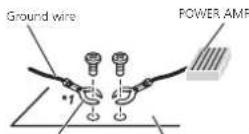
Other devices Metal parts of car's body (Another electronic device in the car)
*1 Non supplied for this unit

Important
- When installing this unit in vehicle without an ACC (accessory) position on the ignition switch, failure to connect thered cable to the terminal that detects operation of the ignition key may result in battery drain.

ACC position

No ADC position
Section
• Lusethisuntwithal 2-vo tbatteryandnegativegroundingonly.Failurelodosomayresultinafreomalfunction.
- Topreventashort-circuit,overheatingormal-function,besuretofollowthedrections below.
—Disconnectthenagativeterminialofthebatterbeforeinstallation.
—Securethewiringwithicableclampsoradnesivetape.Wrapadhesivetapearounddwiring thatcomesintocontactwithmetaloartsto protectthrewiring.
—Placeall cablesaway from moving parts, such as shift lever and seatrails.
—Placeall cablesawayfromhotplaces, such asneartheheateroutlet.
—Donotconnecttheyelowcan etothebattery bypassingitthroughtheholetocheengine compartment.
—Coverany disconnected cable connectors with insulating tape.
—Dondshortenarycables.
—Nevercut the insulation of the powerable of this unit nordertos are the power with other devices. The current capacity of the cable is limited.
—Useful softening proscribed —Never wiret renegativespeakercabledirectly loground.
—Neverbandtogethernegat vocablesofmulti plespeakers.
- When this unilison, controls gnals are sent through oblu, contable. Connect this cable to the system remote control of an external power ramp or vehicle's sauto-antenna play control terminal (max 300mA 12VDC). Ith vehicle is sequ to pod with a glassantenna, connect the antenna boost powers up by terminal.
- Neverconnecttoblue/whitocabletothe powerterminalofanexternalpoweramp. Also,neverconnecttitothepowerterminal oftheautoantenna.Deingsomayresult in batterydrainoramalfunction.
Installation
Thisunit
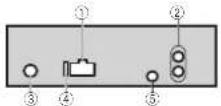
①Powercordinput
②Rearoutputsubwooferoutput
①Antennainout
④Fuse(10A)
⑤Wiredremoteinput
Hard-wiredremotecontroladaptercanobe
connected(solo separately).
Powercord
Performtheseconnectionswhennolconnectingarearspeakerleadtoasubwoofer.
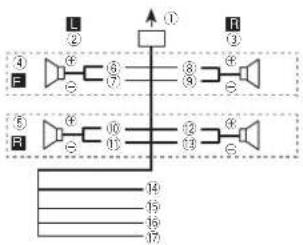
text_image
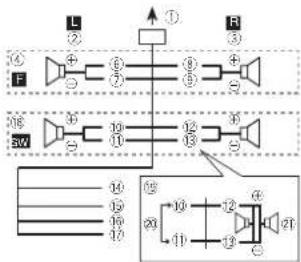
L ② ① R ③ ④ ⑤ ⑥ ⑦ ⑧ ⑨ ⑩ ⑪ ⑫ ⑬ ⑭ ⑮ ⑯ ⑰ ⑱ ⑲ ⑳ ㉑ ㉒ ㉓ ㉔ ㉕ ㉖ ㉗ ㉘ ㉙ ㉚ ㉛ ㉜ ㉝ ㉞ ㉟ ㉳ ㉟ ㉟ ㉟ ㉟ ㉟ ㉟ ㉟ ㉟ ㉟ ㉟ ㉟ ㉟ ㉟ ㉟ ㉟ ㉟ ㉟ ㉟ ㉟ ㉟ ㉟ ㉟ ㉟ ㉟ ㉟ ㉟ ㉟ ㉟ ㉟ ㉟ ㉟ ㉟ ㉟ ㉟Perform these connections when using asub-woofer without the optional amplifier.
flowchart
graph TD
    subgraph Top_Lamp
        L["①"] --> F["Speaker"]
        F --> 1["②"]
        1 --> L
        L --> 2["③"]
        2 --> R["Speaker"]
        R --> 3["④"]
        3 --> L
    end
    subgraph Bottom_Lamp
        SW["⑤"] --> 4["Speaker"]
        SW --> 5["⑥"]
        5 --> 6["⑦"]
        6 --> 7["⑧"]
        7 --> 8["⑨"]
        8 --> 9["⑩"]
        9 --> SW
    end
    L -->|①| R
    SW -->|②| L
    SW -->|③| R
    SW -->|④| L
    SW -->|⑤| R
    SW -->|⑥| L
    SW -->|⑦| R
    SW -->|⑧| L
    SW -->|⑨| R
    SW -->|⑩| L
    SW -->|⑪| R
    SW -->|⑫| L
    SW -->|⑬| R
    SW -->|⑭| L
    SW -->|⑮| R
    SW -->|⑯| L
    SW -->|⑰| R
    SW -->|⑱| L
    SW -->|㉑| R
    SW -->|㉒| L
    SW -->|㉓| R
    SW -->|㉔| L
    SW -->|㉕| R
①Topowercordinput
②Left
③Right
④ Frontspeaker
⑤Rearspeaker
⑥White
⑦White/black
⑧Gray
⑨Gray/black
⑩Green
⑪Green/black
12Violet
⑬/violet/black
⑭Black(chassisground)
Connect loaclean, paint-free metal allocation.
15Yellow
Connectiotheconstant12/supplyterm
nal.
⑯Rec
Connect to terminal controlled by ignition
switch(12VDC).
⑰Blue/white
Connectosystemcontrolterminalofthe
poweramporauto-anlennarelaycontroller
minal(max.300mA12VDC)
⑪ Subwoofer(4Ω)
Installation
When using asubwooferof70W(2Ω), be sureloconnectthesubwooferotheviol and violet/blackleadsofthisunit.Donot connectanythingtothegreenandgreen/ blackleads.
②Notused.
②Subwoofer(4Ω) × 2
Notes
- Witha2speakersystem, donotconnectanythingtothespeakerleadsthatarenotconnectedtospeakers.
- Changethe initial menu of this unit. Referto SP-P/OMODE(rearoutputandprecuitselling) on the previous page.
Thesubwooferoutputofthisun tismonau-
rel.
Poweramp(soldseparately)
Performtheseconnectionswhenusingtheoptionalamplifier.
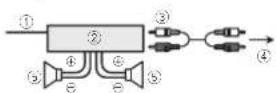
①Systemremotecontrol
ConnecttoBlue/whitecable.
②Poweramp(sClose separately)
③ConnectwithRCAcables(soldseparately)
④ToRearoutputsubwooferoutput
⑤Rearspeaker/subwoofer
Installation
Important
- Checkall connections and systems before final installation.
-
Donotuseunauthorizedpartsasthismay cause malfunctions.
-
Consultyourdealerifinstallationrequires drillingofholescrothermodificationslothe vehicle.
- Donot install this unit where:
- it may interfere with operation of the vehicle.
- it may cause injury to a passenger as a result of a sudden stop.
- These semiconductor laser will be damaged if to overheats. Install this unit away from hot places such as near the heater outlet.
- Optimum performance obtained when the unitis installed at an angle of less than 60°.

- When installing, to ensure proper health dispersion when using this unit, makes sure you leave camp space behind the carpan and wrap any loose cables so they are not blocking the events.

DINfront/rearmount
This unit can be properly installed using either front-mount rear-mounted installation. Use commercially available parts when installing.
Installation
DINFront-mount
1Insertthemountingsleeveintothedashboard.
For installation in shallowspaces, usethesup- piedmountingsleeve.If.hereisenoughspace, usethemountingsleevethatcamewiththev- hicle.
2Securethemountingsleevebyusinga screwdrivertobendthemetaltabs(90°)into place.
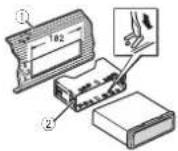
①Dashboard
②Mountingsleeve
3Installtheunitasillustrated.
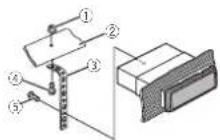
①Nut
②Firewall or metals support
③Metalstrap
④Screw
⑤ Screw(M4×8)
■ Makes sure that the unit is installed securely in place. An unstable installation may cause skipping or thermal functions.
DINRear-mount
1 Determinetheappropriateposition wheretheholesonthebracketandtheside oftheunitmatch.

2Tightentwoscrewsoneachside.

①Trusscrew(5mm×8mm)
②Mountingbracket
③Dashboardorconsole
Removingtheunit
1Removethetrimring.
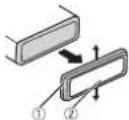
①Trimming
②Notchedtab
•Releasing the front panel allows eas enac
cesstothetirring.
- When readlaching their mring, point the
sidewiththenotcheetabdown.
2Insertthesuppliedextractionkeysinto bothsidesoftheunituntiltheyclickinto place.
Installation
3Pulltheunitoutofthedashboard.

Removingandre-attachingthe frontpanel
You can remove the front parallel to protect your unit from theft.
Pressthedetachbuttonandpushtnetront
oanelupwardandpullitowardyou.
Fordetails,refertoRemovingthefrontpanello
protect your unit from the field and re-attaching the front panel on page 1.
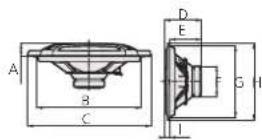
Speakerinstallation
16cm2-wayspeakers

text_image
A A B C D F F G HFront
A45°
Bφ4.3mmholes(3/16in.Dia.)
Cφ142mm(5-5/8in.Dia.)
D123mm(4-7/8in.)
E113mm(4-1/2in.)
F100mm(3-7/8in.)
G123mm(4-7/8in.)
H100mm(3-7/8in.)
113mm(4-1/2in.)
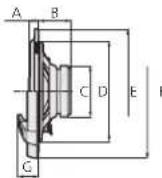
Side
A:3mm(1/2in.)
B41mm(1-5/8in.)
Cφ65mm(2-5/8in.Dia.)
Dφ128mm(5in.Da.)
Eφ158mm(6-1/4in.Dia.)
170mm(63/4in.Dia.)
G27mm(1in.)
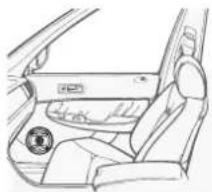
1 Determinethelocationofthespeakeras illustrated.
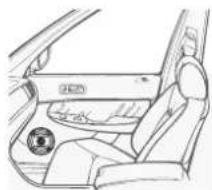
natural_image
Line drawing of a car interior showing the dashboard and seat area (no text or symbols)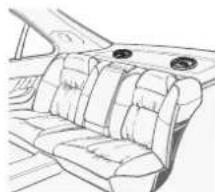
natural_image
Line drawing of a car interior showing seat compartments and dashboard (no text or symbols)Installation
2Makeholesasillustrated.(Ifneeded,removethedoorupholstery.)


(1)φ4.3mm(3/16in.Dia.)
(2)φ128mm(5in.Dia.)
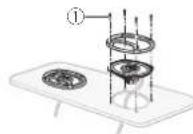
3Installthespeakersasillustrated.
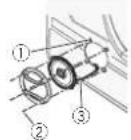
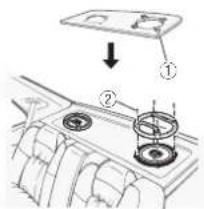
text_image
Diagram showing car interior components with labeled parts and directional arrow indicating movement or change.①Speednut
②Tapping screws(4mm×25mm)
③Cable(grayorwhite)
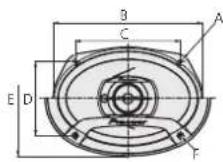
6" × 9" 3-way speakers
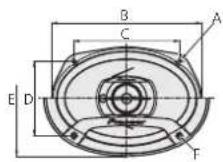
Front
A5.6mm×8.7mmholes(3/16in.×5/16in.)
B237mm(9-3/8in.)
C166.6mm(5-1/2in.)
D:17.5mm(4-5/8in.)
F182mm(7-1/4in.)
4.8mmholes(3/16in Dia.)
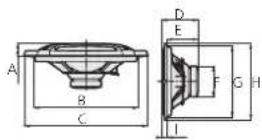
Side
A28.3mm(1-1/8n.)
B222mm(8-5/8in.)
C262mm(10-3/8in.)
D77.6mm(3in.)
E66.3mm(2-5/8in.)
Fφ65mm(2.5/8in.Dia.)
G153mm(6in.)
H163mm(6-3/8in.)
11mm(3/8in.)
Installation
1 Determinethelocationofthespeakeras illustrated.

natural_image
Line drawing of a car interior with seat covers and decorative fans (no text or symbols)2Installthespeakersasillustrated.
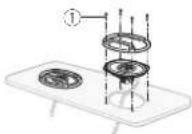
①Tapping-screws(4mm×30mm)
Additionalinformation
Troubleshooting
SymptomCauseAction
| Thedisplay automatically returnstotho ordinarydis- play. | Youdricnolper-formanyopera-torwithin about30sec-onds. | Perfornoperation again. |
| The macroat playrange changesun- expectedly. | Dependingongon therepeatplay range,thase- lectodrange maychange whenanother folderortracks beingselected orduringfast forwarding/re-versing. | Selecttherepeat playrangeagain. |
| Asubfolder s notplayed back. | Subfolderscan-notoc-played whenFLD(fold-ersepaal)isse-lected. | Selectanotherhee-boatplayrango. |
| NOXXXXappearswhena displays changed(NO TITLE,forex- ample). | Thereisnoem-beddedtextin-formation. | Switchthedisplay orplayanother track/file. |
| Theunitis malfunction-ing. There sinter- ference. | Youareusinga device,suchas acellular phone that transmils elec-tricwavesnear theunt. | Moveelectrical dev costhatmay becausetheri-terforonceaway from theunt. |
Errormessages
When you contact your dealer or your nearest PioneerServiceCenter, be sure to not the error message.
Common
MessageCauseAction
| AMPERROR.Un fit/sloop- eratoorspeaker connections incorrect:pro- tectiveircuitis activated. | Checkthespeak- reconnect or. If their message/fails Iodisappearever afterthconginis switchedoff/on, contactyourdeal- oreranauthor- izedPioneer ServiceStation forassistance. |
CDplayer
MessageCauseAction
| ERROR-07,11,12,17,30 | The disc sciry. Cleanth disc. | |
| The disc s scratched. | Replace the disc. | |
| ERROR-07,10,11,12,15,17,30,A0 | There is an elec-trical orme-chanical error. | I run the ignition switch Off and back ON or switch to load for entsource, then back to the CD player. |
| ERROR-15 The inserted discisb alk. | Replace the disc. | |
| ERROR-23 Unsuppored CD format. | Replace the disc. | |
Additionalinformation
MessageCauseAction
| FORMAT | Sometimes | Wa tuntilne |
| READ | thereisadelaybetweenthestartofplaybackandwhenyoustartonearanysound. | messaged sappearsandyouhearsound. |
| NOAUDIO their sorted | Rep acethedisc. |
| discdoesnot | |
| containany | |
| playablefiles. |
| SKIPPEDTheinserted discontains DRMprotected files. | Rep acethedisc. |
| PROTECTAllthefileson | Replacethedisc: |
| theinserted | |
| discarcem- | |
| bedcedwith | |
| DRM. |
USBstoragedevice
MessageCauseAction
| FORMATREAD | Sometimesthorisedolaybetweenthestarofplaybackandwhenyoustarttonoaranysound. | Wa bunlithnemssagedisappearsandyouhearsound. |
| NOAUDIOTheraarenc songs. | Transfertheaucko filestotheUSB storagedevce andconnect. |
| Theconnected USBstoraged devicehasecurityenaded. | FollowtheUSB storageddevcein-structionstodis aclethesecurity. |
MessageCauseAction
| SKIPPEDTheconnected USBstorage-devicecontains flesembected withWindows MediaTM DRM9/10. | Playanaudiofile notembedded withWindows MediaDRM9/10. |
| PROTECTalthctfilcsin | Transforaudio |
| theUSBstorage deviceareem-bodcdwth WindowsMedia DRMS/10. | filosnotem-beddedwith WindowsMedia DRMS/10tothe USBstoragedevicandconnect. |
| N/AUSBTheUSBdeviceconnectedtoisnotsupportedbythisunit. | ConnectaUSBMassStorageClasscompliant device.Disconnectyourdevceandreplace twithacompableUSBstoragedevice. |
| CHECKUSBTheUSBconnector,USB cablehasashort circuited. | Checkthatthe USBconnector,USB cableisnot caughtinsone-lingoram-aged. |
| Theconnected USBstorage-deviceconsumes more than maximum allowable current. | Disconnectthe USBstorage-deviceandonct uselt.Turntha gnitionswifcnto OTT,thenaACC orONanthen correctly compliantUSB storagedevices. |
Appendix
Appendix
Additionalinformation
MessageCauseAction
| ERROR-19:Communicationfailed | Performanceofthefollowingoperations.-Turnthe griffionswitchOFFandbackON.-DisconnecttheUSBstorageservice.-Changelcadifferentsource.Then,returntotheUSBsource. |
| ERROR-23:USBstoragadicvicowasanortformaltedwithFAT12,FAT16orFAT32. | USBstoragadicvicowshou cibormateown-InFAT12,FAT16orFAT32. |
| STOPtherearerosongsinthecurrentist. | Selectalistthatcontainssorgs. |
Handlingguidelines
Discsandplayer
Useonlydiscsthatfeatureeitherofthefollowing twologos.


Use12-cmdiscs. Dor otu se8-cmdl scoran adapterfor8-cmdiscs.
Use only conventional flu lycircular discs. Don't use shaped discs.
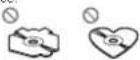
Donot insert anything other than a CD into the CD loading slot.
Donotusecracked,chipped,warped,other- w-sedamageddiscosastheymaydamagetneplayer.
UnfinalizedCD-R/RWdiscscannotbe played back.
Donottouchtherecordedis.rfaceofthediscs.
Storedisintheircaseswhennotiruse
Donotattachlabels, write on or apply chemicals to the surface of the scs.
TocleanaCD;wipetnedisowithasoftclotnourwardfromthecenter.
Condensation may temporarily impair the player's performance. Lelitresllforaboutorehourload-justloawarmertemperature. Also, wipeany dampdiscsoftwithasoftcloth.
Playbackold scasmaynothepossiblebecauseof discencharacteristics disformat, recordedapplication, playbackenvironment, storageconditions, andsoon.
Roadshocksmayinterruptdiscplayback.
Read the precautions for discs before using them.
Additionalinformation
When using disc sthat can be printed or labelsurfaces, check the instructions and the warnings of the discs. Depending on the discs inserting and ejecting may not possible. Using such discs may result in damage to this equipment.
Donotattachcommerciallyaval ablelabel ser othe materialistothediscs.
- The discsmaywarpmaking the discurplayable.
• The labels may come off during playback and preventejection of the discs which may result in damage to the equipment.
USBstoragedevice
Address any questions you have about your USB storage device to the manufacturer of the device.
ConnectionsviaUSBhubarenotsupported
DonotconnectanythingotherthanaUSBstoragedevice.
FirmlysecuretheUSBstoragedovicowhondriving.DonelletheUSBstoragedevicefal orlothe floor,whorleitmaybocemojammodunderthe brakcoracceleratorpedal.
Depending on the USB storage device, the following problems may occur.
• Operationsmayvary.
- The storage device may not be recognized. - Files may not be played back properly.
• The device may generate noise in the radio.
DualDiscs
Dua Discsaretwo-sideddiscsthathavearecordab eCDforaudicononosideanderecordable DVDforvideontheother.
SincetheCDs ceofDua Discsis notphys cally compat blew ththageneral CDstandard, it may not be possible to play the CDsidew th this unit.
FrequentloadingendingofaDualDiscmay resultinscratchesonthecisc.Seriousscratches canleadtoplaybackproblemsonthisunit.In somecases,aDualDiscmaybecomestuckinthe disloadngslotandwillnoteject.Topreventthis, werecommendyourefranfromusingDuaDisc withthisunit.
Pleasereferentheinformationfromthediscmanufacturerfomoredetailedinformationabout: DualDiscs.
Compressedaudio compatibility(disc,USB)
WMA
Fileextension:wma
Bitrate:48kbpssto320kbps(CBR),48kbpssto 384kbps(VBR)
Samplingfrequency:32kHz,44.1kHz,48kHz
Windows/MediaAudioProfessional, Lossless, Voice/DRMStream/Streamwith video: Not compatible
MP3
Fileextension:mo3
3Inrate:6kbpsto370kbps(CBR)VBR
Sampling frequency: 8kHz to 48kHz (32kHz, 44.1kHz, 48kHz (forempinas s))
CompatibleID3tagversion1.0.1.1.2.2.3.2.4 (ID3tagVersion2.xisgivenpriorityoverVersion 1.x.)
M3uplaylist:Notcompatible
MP3i(MPSinteractive).mp3PRO:Notcompatible
Additionalinformation
WAV
Fileextension:way
Quantizationbits:8and16(LPCM),4(MS ADPCM)
Sampling frequency: 16kHz to 48kHz (PCM), 22.05kHz to 44.1kHz (MSADPCM)
Supplementalinformation
Onlythefirst32characterscanneddisplayedasa flename(includingthefileextension)orafolder name.
This unit may not operate correctly depending on the application used to encode WMA files.
Theramaybeaslightdelayattnestartofplayback ofaudiofileseembeddedwithimagedataoraudio fi esstoredonaUSBstoragedevicethathasnumercusfoldernerarchies.
Disc
Playablefolder hierarchy: uobeighttiers (Apractical hierarchy is less than two).
Playablefolders upto39
Playablefiles:uto999
Filesystem:ISO9660Level1and2,Romeo,Joliet
Multi-sessiono ayback: Compatible
Packetwrittenatransfer:Notcompatible
Regardlesssoft helengthofblanksectionsbetweenthesongsfromtheoriginalrecording,compressedaudiodiscsplaywithashorlpause betweensongs.
USBstoragedevice
Playablefolderhlerarchysuptoelghtlers(Apracticalhlerarchyslessthantwetlers.)
Plavable folders: up to 500
Playable!les:upto15000
Playbackscopyright-protectedfiles:Notcompatible
Part: onedUSBstoragedevice; Onlythefirstoar- ll oncanbeplayed.
Theromaybcaslightdelaywhenstartingsplay backofaudiofilesoraUSBstoragedevicewith numerousso derhierarchies.
CAUTION
- Pioneercannctguaranteecompatibilitywith allUS-Bmassstoragedevicesandassumes nonresponsibilityforanyosscfdataon mediacylayers,smartphones,orotherdevi-ceswhileusingthisproduct.
- DonolleavediscsoraUSBstoragedevice inanyplacothatisubjecttchighttemperatures.
Sequenceofaudiofiles
The user cannot assign to numbers and specify playback sequences with this unit.
Additionalinformation
Exampleofahierarchy
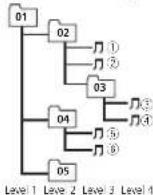
Folder Compressed audio file 01to05:Folder number (1to@Playback sequence
Disc
Folderselect or sequence or other operation may differ depending on the encoding or writing software.
USBstoragedevice
PlaybacksequenceisthesameasrecordedsequenceintheUSBstoragedevice. Tospecifytheplaybacksequence,thefollowing methodisrecommended.
1) Createafilenamethatincludesnumbers thatspecifytheplaybacksequence(e.g. 001xxx.mp3and099yyy.mp3).
2 Putthosetfiles into folder. 3 SavethefoldercontainingfilesontheUSB storage device.
However, depending on the system environment, you may not be able to specify the playback sequence.
For USB portable audioplayers, thesequence is different and depends on the player.
Copyrightandtrademark
iTunes
Apple and Tunes are trademarks of Apple Inc., registered in the U.S. and other countries.
MP3
Susplyoftnisproductionlyconveysalicensefor private, non-commercial use and does not conveyalicense on imply any rightouseth productinanycommercial (i.e. revenue generating) realt me broadcasting (ternestral satellite, cab and/oranyothermedia), broadcasting/ streaming via internet intranetsano/orother networks orinothe electronic content distribution systems such as audioaudioon-demand applications. An independent license for such uses is required. Fordetails, please sit http://www.mp3licensing.com.
WMA
Windows Mediaiser the registered trademark or trademark of Microsoft Corporation Inc. United States and/or other countries. This product includes technology owned by Microsoft Corporation and cannot be used distributed without a license from Microsoft Licensing, Inc.
Appendix
Additionalinformation
Additionalinformation
Specifications
General
Ratedpowersource .....14.4VDC (al owab voltage range: 12.0Vto14.4VDC)
Groundingsystem..... Negativetype
Maximum consumer consumption
Dimensions(W×H×D):
DIN
Continuous power output 22W×450 Hz to 15000 Hz 5%T ID 4Ω load both char-
ne driven)
Lead impedance .... 4Ω (4Ω to 8Ω allowable)
- result max/mt moc/Lp level
oudnesscontour.....+10dB(100Hz),+6.5dB (10kHz)(volume:-30dB)
Equalizer(5-BandGraphic-Equalizer) Frequency.....80/Hz/250/Hz/800/Hz/ 2.5kHz/9kHz
Equalization range... +12dB(2dB step)
Subcofer(mono):
Frequency.....50Hz/62Hz/80Hz/100Hz/125Hz/160Hz/200Hz
Slope 6 dB/oct -12 dB/cc
Gan +6dBto-24dB
Phase.....Normal/Reverse
CDplayer
System....Compactdiscaudicsystem
Usabediacs....Compactdiac
Signal-to-noisea.0.....943(1kHz)(IEC-Arnetwork)
Num permichannels.....2(stereo)
MP3decodingformat.....VPEG-1&2AudioLayer5 WMAdecodingformat.....Ver.7,7.1,8,9,10,11,12(2cn
a in by
(Windows/MediaPlayer) WAV Signal ural......LinearPCM&VSADPCM (Non compressed)
USB
USBstendemspecification
US32.0fullspeed
Maximumcurrentsupply
……A
USBClass....MSC(MassStorageClass)
Filesystem....FAT12,FAT16,FAT32
M-ocoding forma.....VPEG 1&2AudioLayers
WMAdecod nolommal....Ver.7,7,1,8,9,10,11,12(2ch
a und o)
(Windows/Media Player)
WAVSignalFormat.....LinearPCM&VSADPCM
(Non-compressed)
FMtuner
Frequencyrange: 87.5MHz to 106.0MHz
Usable sensitivity .....9d5f(0.8μV/75Ω, mono,S/N
30dB
Signal-to-noisealic.....72dB(IEC Anc.work)
MWtuner
Frequencyrange.....531kHz to 602kHz (9kHz)
530kl zto1640kl lz(10kl) z
Usablesensitivity.....25μV(S/N 20dB)
Signal-to-noise ratio.....67dB (IFC-A network)
SWtuner
Frequencyrange.....2300kHz,0773kHz
12300kHzdo2496kHz
2940kl 21042154112
4540kF+551754Hz
5820kHz 6456kHz
7100kHzb77364Hz
9600kl zto21975417
(9500kH才:10135kH
11500kHzlo12215kHz.
13570kHzlo13870kHz
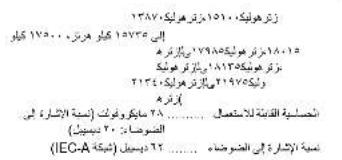
15100kl izto15735kl iz,
17500kHz to 17985kHz.
10015kHz to 18135kHz.
21340kHzlo21975kHz
Usablesensitivity.....28μV(S/N 20dB)
Signal to noise ratio .....52dB (IEC Anetwork)
16cm2-wayspeakers
Reproduction system..... Coax altwuyay
Wooler....0158mm(6-1/4in.D.a.)
Water-resistant
Inaction-moldedpolypropylenecone
Highcompliance.relledodge
Heat-resistant voice coil
Magnet:130g(4.4oz)
Tweeter....φ30πm(1-3/16in.Dia.)
Lome
Nominalimpedance....4Ω
Sensitivity....88dB(±1.5dB)
Frequency response ..... 31 Hz to 16 kHz (-20 dB)
Maxim arr musicpower...200W
Nominalpower.....25W
Erilematerial....Heat-proctresin
Weight(perspeakerinc udingaccesso-vparts)
0.45kg(16oz)
6" × 9" 3-way speakers
Reproductionsystem.....Coaxalthreeway
Wooler 165mm×257mm
(5-3/8in.×9-3/8in.)
Injection-moldedpolypropylerecone
Highcompliance.rulledcuge
Heat-resistant voice coil
Magnet:150g(5.3oz)
M drange....φ52mm(2in Dia.)
Viganet:12g(0.5oz)
Tweeter....o11m(m3/Sir.Dia.)
Nominal impedance.....40
Sensitivity.....88dB(+1.5dB)
Frequency response ..... 28 Hz to 32 kHz (-20 dB)
Maximum music power...230W
Nominalpower.....30W
Cell material.....I last procresin
Weight (per speaker including access to parts)
0.63kg(1b6oz)
Note
Specificationsandthedesignaresubecto
modificationswithoutnotice.

natural_image
Two horizontal rounded rectangular shapes with rounded ends, no text or symbols present.
English
17En
Antesdecomenzar
text_image
Labeled diagram of a device interior with numbered components for identification| Parte | Parte | ||
| 1 | ▲(expulsar) | 8 | EQU (ccualizador) |
| 2 | SRC/OFF | 9 | BAND |
| 3 | MULTI-CONTROL(M.C.) | 10 | →(partecostenor)/DIMMER(reductorceluz) |
| 4 | Q (ista) | 11 | ◀▶ |
| 5 | DISP/DISP OFF | 12 | 1/∧a6/ ↻ |
| 6 | Ranuradocargadediscos | 13 | ConocordocontradaAUX(co rectonestéreoue 3.5mm) |
| 7 | Puerto USB | 14 | Botón de soltar |

PRECAUCIÓN
text_image
Diagram of a 20-pin electronic component with numbered pins and internal connectionsNEWS/INFO—POPULAR—CLASSICS—OTHERS
ListaPTY
NEWS/INFO(notic)aseinformación
MWondacorta OFF—LV1—LV2
text_image
A A B C D E F G HDelantero
A45°
BφOrificiosde4.3mm
Cφ142mm
D123mm
E13mm
F100mm
G'23mm
H:00mm
1113mm
Instalación

Lado
A 1 3 m m
B 4 1 m m
Cφ65mm
Dφ128mm
Lφ158mm
Γφ170mm
G 2 3 m m
natural_image
Interior view of a car showing the dashboard and seat area (no text or symbols visible)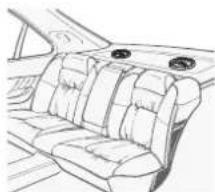
natural_image
Line drawing of a car interior showing seat compartments and dashboard (no text or symbols)text_image
Diagram showing car interior components with labeled parts and directional arrow indicating flow or movement①Tuercarápura
natural_image
Line drawing of a car interior showing seat compartments and dashboard (no text or symbols)MP3i(MP3interactive),mp3PRO:nocompatible
WAV
Extensionsearch way
(Windows Media Player)
Formatodesena WAV.....PCMlines&MSADPCM (Nocomprimido)
USB
Ver. 7, 1, 8, 9, 10, 11, 12
Audio2canules
(3) procows media Player
Formatodesena W/W....PCMLires&MSADPCM
(Nocomprimido)
SintonizadordeFM
Intervala odefrecuenc as ..de87,5MHz:108.0MHz
Sensibilidae utilizable ..... 9 dB (0,8 μV/75 Ω, mono, serial/roider30dB)
text_image
Labeled diagram of a device rear panel with numbered components for identification| Parte | Parte | ||
| 1 | ▲(Ejctar) | 8 | ELIM (actualizador) |
| 2 | SRC/OFF | 9 | BAND |
| 3 | MULTI-CONTROL(M.C.) | 10 | →(Vo tar)/DIM-MER(Redutorde luz) |
| 4 | Q (Lista) | 11 | ◀▶ |
| 5 | DISP/DISP OFF | 12 | 1/∧ e6/ ≈ |
| 6 | Slotdocarrega menodedisco | 13 | Conectordocon tradaAUX(co rectoresténeo 3,5 mm) |
| 7 | PortaUSB | 14 | BotãoDesencal-xar |

CUIDADO
text_image
Diagram of a 20-pin electronic component with numbered pins and internal connectionsFMSTEP(PassodesintoniaFM)
Normalmente, opassodesintoniaFMempregaco pelasintoniaporbuscaéde50kHz. QuandoAF
ou Aactivativo, opassodesintoniamudaráautomaticamentepara100kHz, Pxdeserpreferivel ajustaropassodesintoniaa50kHzquandoAFestiverativo.
• Opassodesinloniapermaneceab0kHzdu-ranleas-nonarr manual.
NEWS/INFO—POPULAR—CLASSICS—OTHERS
ListadePTY
MW/shortwave:OFF—LV1—LV2
•FLD—Repoteapastaatual
SUB.W/SUB.Wforselectionadoem
SP-P/OMODE. Paraobterdeta hes, consulte
SP-P/OMODE(Ajustedasaidal(caseiraepre-saida)napróximapágina.
NOR (Ease normal)—REV (Ease inverse)—OFF
FMSTEP(PassodesintoniaFM)
natural_image
Line drawing of a car interior showing the dashboard, seats, and seatbelt (no text or symbols)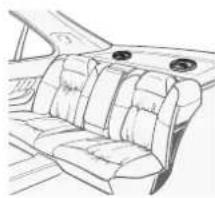
natural_image
Line drawing of a car interior showing seat compartments and dashboard (no text or symbols)text_image
Diagram showing car interior components with labeled parts and directional arrow indicating direction①Porcanevelocidade
②Parafusosatarrachantes(4mm×25mm)
③Cabo(cinzaoubranco)
natural_image
Line drawing of a car interior showing seat compartments and decorative circular elements (no text or symbols)2Instaleosalto-falantes,conformeilustrado.
① Parafusosatarrachantes(4m m × 30mm)
USB2.0develecidad total
Fornecimentomáx.decorrente
......1A
ClassUSB MSCI(MassStorageClass)
Sisternedeaninos.....FAT12.FAT16.FAT32
(Windows/MediaPlayer)
Formarcclesina/WAV....PCMLinear&MSADPCV
(Nãocorr pactado)
SintonizadordeFM
text_image
Labeled diagram of a device interior with numbered components for identification部位部位
| 1▲(出)8 | EQM(等化器) | ||
| 2SRC/OFF9BAND | |||
| 3 | MULTI-CONTROL(M.C.) | 10 | (返回)/DIMMER(顯示帶亮度調整) |
| 4 | 9(清單) | 11 | </► |
| 5 | DISP/DISP OFF | 12 | 1/∧至6/↔ |
| 6 | 弹片槽 | 13 | 40×输入插孔(3.5mm立牌塞插孔) |
| 7 | DSS焊 | 14 | 拆卸按钮 |

注意
TM: OFF-LV1-LV2-LV3-LV4
KN/短波:OFF LV1 LV2
flowchart
graph TD
    subgraph Left_Circuit
        L["①"] --> A["Speaker ②"]
        A --> B["Inductor ③"]
        B --> C["Switch ④"]
        C --> D["Ground"]
        E["⑤"] --> F["Speaker ⑥"]
        F --> G["Inductor ⑦"]
        G --> H["Switch ⑧"]
        H --> I["Ground"]
        J["⑥"] --> K["Speaker ⑨"]
        K --> L["Inductor ⑩"]
        L --> M["Switch ⑪"]
        M --> N["Ground"]
    end
    subgraph Right_Circuit
        R["①"] --> S["Speaker ③"]
        S --> T["Inductor ⑤"]
        T --> U["Switch ⑥"]
        U --> V["Ground"]
        W["⑤"] --> X["Speaker ④"]
        X --> Y["Inductor ⑭"]
        Y --> Z["Switch ⑮"]
        Z --> AA["Ground"]
        AB["⑥"] --> AC["Speaker ⑦"]
        AC --> AD["Inductor ⑧"]
        AD --> AE["Switch ⑨"]
        AF["④"] --> AG["Ground"]
        AH["⑤"] --> AI["Ground"]
        AJ["⑥"] --> AK["Ground"]
text_image
A A B C D E F G H I前置
A45°
Bφ4.3mm孔洞
Cφ142mm
D123mm
E113mm
E100mm
G123mm
H100mm
113mm
安装

侧面
A 1 3 m m
B 4 1 m m
Cφ65mm
Dφ128m
Fib 158mm
Erb 170mm
2.07
G 2 m m
1 依照图示决定扬聲器的位置。
natural_image
Interior view of a car showing the dashboard, seat, and dashboard (no text or symbols visible)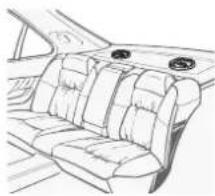
natural_image
Line drawing of a car interior showing seat compartments and dashboard (no text or symbols)text_image
Diagram showing car interior components with labeled parts and directional arrow indicating assembly or inspection①聚同燃相
安装
② 白攻螺栓(4mm×25mm)
③ 连接線(灰色或白色)
6"×9"3向揚聲器
前置
45.6mm×8.7mm孔洞
B237mm
C166.5mm
D117.5000
E182mm
F64.8mm孔洞
侧面
A28.3mm
B222mm
C262mm
D77.5mm
EC6.3mm
Fo65mm
G153mm
H163mm
I 1 1 m
1 依照圖示決定揚聲器的位置。

natural_image
Line drawing of a car interior showing three seats with two circular objects on the roof (no text or symbols)natural_image
Two horizontal oval shapes with rounded ends, one black and one white, on a plain background (no text or symbols)甲文
632htw


natural_image
Two horizontal rounded rectangles side by side, no text or symbols present
معلومات إضافية
تَالْحُطٍ

(Windows Media Player)
(Windows Media Player)
Linear PCM & MS ADPCM WAV S A P
V
FM
نظام لترستات
Microsoft Licensing Inc's
Microsoft Licensing, Inc.
natural_image
Line drawing of a car backrest with two circular vent indicators (no text or symbols)text_image
Diagram showing car intake system with labeled components and directional arrow
natural_image
Line drawing of a car interior showing the dashboard, seat, and dashboard (no text or symbols)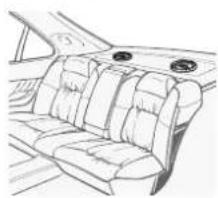
natural_image
Line drawing of a car backrest with seat compartments and dashboard (no text or symbols)①
Ar


يكتلا
مکوella
text_image
A A B C D E F G H4
45^ A
B
上1570C
137 D
E
مَلْم١٠٠ F
G
H
مَمْ
تركيب DIN الخلفي
(ض tight正面) CLOCK SET
HPF SETTING, SUB.W CTRL, SUB.W
HPF SETTING, SUB.W CTRL
The image is too blurry to recognize any text content.
(手指 Assistance) CLOCK SET
text_image
Labeled diagram of a device interior with numbered components for identificationnatural_image
Two horizontal rounded rectangles side by side, no text or symbols present
اطلاعات بیشر
اطلاعات بيشتر
(Windows Media Player)
(Windows Media Player)
× 17A × 0. × 0. × 0. × 0. × 0. × 0. × 0. × 0. × 0. × 0. × 0. × 0. × 0. × 0. × 0. × 0. × 0. × 0. × 0. × 0. × 0. × 0. × 0. × 0. × 0. × 0
1+5
The Ground Truth image displays a single, solid horizontal line. According to Rule 2 (UNDERSCORE & LINE RULES), this is a stylistic or background line, not a placeholder underscore. Therefore, the OCR result must ignore it and output nothing or only meaningful text. The provided OCR content is "____", which consists of four underscores. This is an incorrect interpretation of the line as a placeholder, violating the rule that stylistic lines must be ignored. The OCR has hallucinated placeholder underscores where none should exist in the GT. Hence, the OCR result is inconsistent with the Ground Truth.
صدا
٢ × ١٠, ١٠
S_n = n - 1
17.4.2. 何以如
7.4.16(1-2)
2017年1月1日
1.2.3.4.5.6.7.8.9.10.11.12.13.14.15.16.17.18.19.20.21.22.23.24.25.26.27.28.29.30.31.32.33.34.35.36.37.38.39.40.41.42.43.44.45.46.47.48.49.50.51.52.53.54.55.56.57.58.59.60.61.62.63.64.65.66.67.68.69.70.71.72.73.74.75.76.77.78.79.80.81.82.83.84.85.86.87.88.89.90.91.92.93.94.95.96.97.98.99.100
natural_image
Line drawing of a car interior showing the dashboard, steering wheel, and seat (no text or symbols)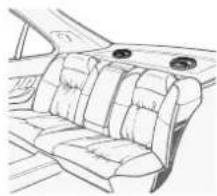
natural_image
Line drawing of a car interior showing seat compartments and dashboard (no text or symbols)text_image
A A B C D E F G Hjko
°45 A
m = 311
(1) _0 (2) _0 (3)
حدا کردن دستگاه
| SUB.W. HPF SETTING & SUB.W CTRL | |
| IFP, W: HPF SETTING & SUB.W CTRL | |
| IFP, W: HPF SETTING & SUB.W CTRL | |
| IFP, W: HPF SETTING & SUB.W CTRL |
m = 311
2.0
•
[Non-Text]
[Non-Text]
•
(No text)
[Non-Text]
.
1
i
text_image
Labeled diagram of a device interior with numbered components for identification| ### | ### | |
| (equalizer) EQ### | 8 | (###) ▲ |
| BAND | 9 | OFF/SRC |
| (###) DIMMER ### | 10 | MULTI-CONTROL (M.C.) |
| ### | 11 | (###) 9 |
| 26N/1 | 12 | DISP OFF/DISP |
| ### | 13 | ### |
| ### | 14 | USB ### |

Visit us on the World Wide Web at
http://pioneer.jp/group/index-e.html
Pioneer Gulf.FZE
http://www.pioneer-uae.com
Pioneer Electronics Australia. Pty.Ltd
http://www.pioneer.com.au/
Pioneer Electronics Asiacentre.Pte
Pioneer (HK) Ltd.
Pioneer High Fidelity Taiwan Co., Ltd.
http://www.pioneer.com.sg
http://www.pioneerhongkong.com.hk
http://www.pioneer-twn.com.tw
Pioneer International Latin America S.A.
http://www.pioneer-latin.com
PIONEERCORPORATION
1-1.Shin-ogura.Saiwai-ku.Kawasaki-shi.
Kanagawa212-0031.JAPAN
PIONEERELECTRONICS(USA)INC.
P.O.Box1540,LongBeach,California90801-1540,U.S.A.
TEL:(800)421-1404
PIONEERELECTRONICSOFCANADA, INC.
340FerrierStreet,Unit2,Markham,OntarioL3R2Z5,Canada
TEL:1-877-283-5901
TEL:905-479-4411
PIONEEREUROPENV
Haven1087, Keetberglaan1, B-9120Melsele, Belgium/Belgique
TEL:(0)3/570.05.11
PIONEERELECTRONICSASIACENTREPTE.LTD.
253AlexandraRoad,#04-01,Singapore159936
TEL:65-6472-7555
PIONEERELECTRONICSAUSTRALIAPTY.LTD.
5ArcoLane,Heatherton.Victoria,3202Australia
TEL:(03)9586-6300
PIONEERELECTRONICSDEMEXICO,S.A.deC.V.
Blvd.ManuelAvilaCamacho13810piso
Col.LomasdeChapultepec,Mexico,D.F.11000
TEL:55-9178-4270
先锋股份有限公司
台北市內湖區瑞光
电话:886-02-2657-3588
电话:055(0)2 267 0556
先锋電子(香港)有限公司
香港九龍長沙灣道909號5樓
電話:852-2848-6488
©2012PIONEERCORPORATION.
Allrightsreserved.
PrintedinMalaysia