DEH-P4050UB - Receiver PIONEER - Free user manual and instructions
Find the device manual for free DEH-P4050UB PIONEER in PDF.


User questions about DEH-P4050UB PIONEER
0 question about this device. Answer the ones you know or ask your own.
Ask a new question about this device
Download the instructions for your Receiver in PDF format for free! Find your manual DEH-P4050UB - PIONEER and take your electronic device back in hand. On this page are published all the documents necessary for the use of your device. DEH-P4050UB by PIONEER.
USER MANUAL DEH-P4050UB PIONEER
Pleasereadthroughtheseoperatinginstructionsssoyouwillknowhowtooperate yourmodelproperly.Afteryouhavefinishedreadingtheinstructions,keepthismanualinasafeplaceforfuturereference.
01 BeforeYouStart
Aboutthisunit5
Visitourwebsite6
Protectingyourunitfromtheft6
-Removingthefrontpanel6
-Attachingthefrontpanel6
Aboutthedemomode7
Useandcareoftheremotecontrol7
-Installingthebattery7
-Usingtheremotecontrol7
02 Operatingthisunit
What'sWhat8
-Headunit8
-Remotecontrol9
-Displayindication9
BasicOperations10
-PowerON/OFF10
-Selectingasource10
-Adjustingthevolume11
Tuner11
-BasicOperations11
-Storingandrecallingbroadcast frequencies11
-Introductionofadvanced operations12
-Storingthestrongestbroadcast frequencies12
-Tuninginstrongsignals12
Built-inCDPlayer13
-BasicOperations13
-Displayingtextinformationondisc13
-Selectingtracksfromthetracktitle list14
-Selectingfilesfromthefilename list14
-Introductionofadvanced operations15
-Selectingarepeatplayrange15
-Playingtracksinrandomorder15
-Scanningfoldersandtracks15
-Pausing playback15
-UsingSoundRetriever16
-Usingdisctitlefunctions16
PlayingsongsonUSBportableaudioplayer/
USBmemory17
-BasicOperations17
-Displayingtextinformationofanaudio file17
-Selectingfilesfromthefilename list17
-Introductionofadvanced operations17
PlayingsongsoniPod19
-BasicOperations19
-Browsingforasong19
-Displayingtextinformationon iPod19
-Introductionofadvanced operations20
-Playingsongsinarandomorder (shuffle)20
-Playingallsongsinarandomorder (shuffleall)21
-Selectingsongsfromalbumlistof currentlyplayingartist21
-Operatingthisunit'siPodfunction fromyouriPod21
-Changingaudiobookspeed21
03 AudioAdjustments
Introductionofaudioadjustments22
Usingbalanceadjustment22
Usingtheequalizer22
-Recallingequalizercurves22
-Adjustingequalizercurves23
-Fine-adjustingequalizercurve23
Adjustingloudness24
Usingsubwooferoutput24
-Adjustingsubwoofersettings24
Usingthehighpassfilter25
Boostingthebass25
Adjustingsourcelevels25
04 InitialSettings
Adjustinginitialsettings26
Settingtheclock26
SettingtheFMtuningstep26
SettingtheAMtuningstep26
Switchingthewarningtone27
Switchingtheauxiliarysetting27
Switchingthedimmersetting27
Settingtherearoutputandsubwoofer controller27
Switchingthefeaturedemo28
SwitchingtheEverScroll28
ActivatingtheBTAUDIOsource28
EnteringPINcodeforBluetoothwireless connection28
DisplayingsystemversionofBluetooth adapterforrepair29
05 OtherFunctions
UsingtheAUXsource30
-AboutAUX1andAUX230
-AUX1source:30
-AUX2source:30
-SelectingAUXasthesource30
-SettingtheAUXtitle30
Turningtheclockdisplayonoroff30
Usingtheexternalunit31
-Selectingtheexternalunitasthe source31
-Basicoperation31
-Usingthefunctionsallocatedto1to6 keys31
-Advancedoperations31
06 Availableaccessories
PlayingsongsoniPod32
-Basicoperation32
-Displayingtextinformationon iPod32
-Browsingforasong32
-Functionandoperation32
-Playingsongsinarandomorder (shuffle)33
BluetoothAudio33
-BasicOperations33
-Functionandoperation33
-ConnectingaBluetoothaudio player34
-PlayingsongsonBluetoothaudio player34
-Stoppingplayback34
-DisconnectingaBluetoothaudio player34
-DisplayingBD(BluetoothDevice) address35
BluetoothTelephone35
-BasicOperations35
-Settingupforhands-freephoning35
-Makingaphonecall36
-Takingaphonecall36
-Introductionofadvanced operations36
-Connectingacellularphone37
-Disconnectingacellularphone38
-Registeringaconnectedcellular phone38
-Deletingaregisteredphone38
-Connectingtoaregisteredcellular phone38
-UsingthePhoneBook39
-UsingtheCallHistory40
-Makingacallbyenteringphone number40
Contents
-Clearingmemory40
-Settingautomaticrejecting41
-Settingautomaticanswering41
-Switchingtheringtone41
-Echocancelingandnoise reduction41
Multi-CDPlayer41
-BasicOperations41
-UsingCDTEXTfunctions41
-Introductionofadvanced operations41
-Usingcompressionandbass emphasis42
-UsingITSplaylists43
-Usingdisctitlefunctions44
TVtuner44
-BasicOperations44
-Storingandrecallingbroadcast stations45
-Storingthestrongestbroadcast stationssequentially45
● AdditionalInformation
Errormessages46
Handlingguidelineofdiscsandplayer47
DualDiscs48
Compressedaudiocompatibility48
USBaudioplayer/USBmemory48
-USBaudioplayer/USBmemory compatibility48
-USBaudioplayer/USBmemory49
-Compressedaudiocompatibility50
iPod50
-AbouthandlingtheiPod50
-AboutiPodsettings50
Compressedaudiofilesonthedisc51
-Exampleofahierarchy51
Specifications52
Aboutthisunit

CAUTION
- Donotallowthisunittocomeintocontact withliquids.Electricalshockcouldresult. Also,damagetothisunit,smoke,andoverheatingcouldresultfromcontactwithliquids.
- Keep this manual handy as a reference for operating procedures and precautions.
•Alwayskeepthevolumelowenoughsothat youcanhearsoundsfromoutsidethevehicle. - Protect this unit from moisture.
- If the battery is disconnected, discharged, the preset memory will be erased and must be reprogrammed.
AboutWMA

TheWindowsMedia™logoprintedonthebox indicatesthatthisunitcanplaybackWMA data.
WindowsMediaandtheWindowslogoaretrademarksorregisteredtrademarksofMicrosoft CorporationintheUnitedStatesand/orother countries.
- Thisunitmaynotoperatecorrectlydependingontheapplicationusedtoencode WMAfiles.
AboutMP3
Supplyofthisproductonlyconveysalicense forprivate,non-commercialuseanddoesnot conveyalicensenorimplyanyrighttouse thisproductinanycommercial(i.e.revenue-generating)realtimebroadcasting(terrestrial, satellite,cableand/oranyothermedia),broadcasting/streamingviainternet,intranetsand/orothernetworksorinotherelectroniccon-
tentdistributionsystems,suchaspay-audioor audio-on-demandapplications.Anindependentlicenseforsuchuseisrequired.Fordetails,pleasevisit http://www.mp3licensing.com.
AboutAAC
ThisunitplaysbackAACfilesencodedby iTunes®.
iTunesisaregisteredtrademarkofAppleInc.
Portableaudioplayercompatibility
- Inquireatthemanufactureraboutyour USBportableaudioplayer/USBmemory. Thisunitcorrespondstothefollowing.
—USBMSC(MassStorageClass) compliant portableaudioplayerandmemory
—WMA, MP3, AACand WAVfile playback Fordetails about the compatibility, referto USBaudioplayer/USBmemorycompatibility on page 48.
iPod® compatibility
This unit can control and listent songs on an iPod.
- ThisunitcancontrolthefollowingiPod models.
—iPodnano
—iPodfifthgenerationorlater
Formaximumperformance, were recommend that you usethelatestversion of the iPodsoftware.
- WhenusinganiPod,iPodDockConnector toUSBCableisrequired.
- PioneerCD-IU50interfacecableisalso available.Fordetails,consultyourdealer.
- Thisunitcancontrolpreviousgenerations iPodmodelswithaPioneeriPodadapter (e.g.CD-IB100II).Inthiscase,mostfunctionsareessentiallythesameasaniPod connectedtoUSBinterfaceofthisunit. However,functionsrelatedtoAudiobooks andPodcastscannotbeused. Fordetailsconcerningoperationwiththe iPodadapter,refertoPlayingsongsoniPod onpage32.
- iPodisaregisteredtrademarkofAppleInc.

CAUTION
- Pioneeracceptsnoresponsibilityfordatalost ontheUSBportableaudioplayer/USBmemoryevenifthatdataislostwhileusingthis unit.
- Pioneeracceptsnoresponsibilityfordatalost ontheiPodevenifthatdataislostwhile usingthisunit.
Visitourwebsite
Visitusatthefollowingsite: http://pioneer.jp/group/index-e.html
• Weofferthelatestinformationabout PioneerCorporationonourwebsite.

Protectingyourunitfrom theft
Thefrontpanelcanbedetachedtodetertheft.
- If the front panel is not detached from the head unit within five seconds, fast turning off the ignition, awarning tones sounds.
- Youcanturnoffthewarningtone.See Switchingthewarningtoneonpage27.

Important
- Handlegentlywhenremovingorattaching thefrontpanel.
- Avoid subjecting the front panel to excessive shock.
- Keepthefrontpaneloutofdirectsunlightand hightemperatures.
Removingthefrontpanel
1PressDETACHtoreleasethefront panel.
2Grabthefrontpanelandremove.
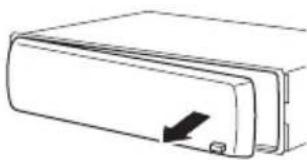
natural_image
Simple line drawing of a rectangular device with a black arrow pointing to its side (no text or symbols)3Putthefrontpanelintotheprovided protectivecaseforsafekeeping.
Attachingthefrontpanel
1Slidethefrontpaneltotheleftuntil clicks.
Frontpanelandtheheadunitarejointedon theleftside.Makesurethatthefrontpanel hasbeenjointedtotheheadunit.
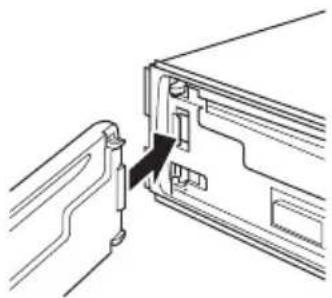
natural_image
Line drawing of a device's internal structure showing a connector inserted into a folder (no text or symbols)2Presstherightsideofthefrontpanel untilitisfirmlyseated.
■ If you can't attach the front panel to the head units successfully, try again. Front panel maybe damaged if you attach the front panel forcedly.
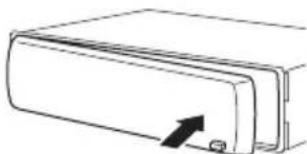
natural_image
Simple line drawing of a rectangular device with an arrow pointing to its side (no text or symbols)
Aboutthedemomode
Thisunitfeaturesthefeatureddemomode.

Important
Theredlead(ACC)ofthisunitshouldbeconnectedtoaterminalcoupledwithignitionswitch on/offoperations.Ifthisisnotdone,thevehicle batterymaybedrained.
Featuredemomode
Thefeaturedemoautomaticallystartswhen powertothisunitisturnedoffwhiletheignitionswitchissettoACCorON.PressDISP duringfeaturedemooperationtocancelthe featuredemomode.PressDISPagaintostart. Rememberthatifthefeaturedemocontinues operatingwhenthecarengineisturnedoff, it maydrainbatterypower.
Useandcareoftheremote control
Installingthebattery
Slidethetrayonthebackoftheremotecontroloutandinsertthebatterywiththeplus(+) andminus(-)polesalignedproperly.
- When using for the first time, pull out the film protruding from the tray.
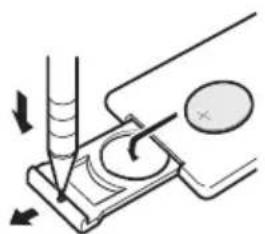
natural_image
Diagram of a laboratory procedure showing a pipette inserted into a test tube with a magnified view of the test tube (no text or labels present)
WARNING
Keepthebatteryoutofthereachofchildren. Shouldthebatterybeswallowed,consultadoc- torimmediately.

CAUTION
• UseoneCR2025(3V) lithium battery.
- Removethebatteryiftheremotecontrolisnot usedforamonthorlonger.
- Thereisadangerofexplosionifthebatteryis incorrectlyreplaced.Replaceonlywiththe sameorequivalenttype.
- Donothandlethebatterywithmetallictools.
- Donotstorethebatterywithmetallicobjects.
- If the battery leaks, wipetheremote control completely clean and install anew battery.
- Whendisposingofusedbatteries,comply withgovernmentalregulationsorenvironmentalpublicinstitutions’rulesthatapplyinyour country/area.
Usingtheremotecontrol
Pointtheremotecontrolinthedirectionofthe frontpaneltooperate.
• Theremotecontrol may not function properly indirect sunlight.

Important
- Donotstoretheremotecontrolinhighttemperaturesordirectsunlight.
- Donotlettheremotecontrolfallontothe floor,whereitmaybecomejammedunderthe brakeoracceleratorpedal.

text_image
Diagram of a device rear panel with numbered labels pointing to key components such as LED, USB, and control buttons.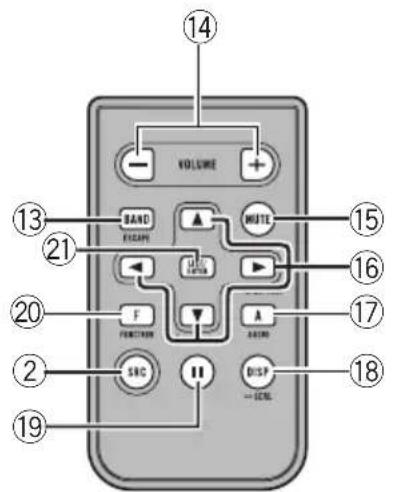
text_image
VOLUME BAND F/SCAN MUTE 13 21 LED FUNCTION A SBC DISP -CTRL 14 15 16 17 18 20 2 19What's What
Headunit
①LISTbutton
Presstodisplaythedisctitlelist,tracktitle list,folderlist,filelistorpresetchannellist dependingonthesource.
②SOURCE/OFFbutton
Thisunitisturnedonbyselectingasource. Presstocyclethroughalltheavailable sources.
③DISP/BACK/SCRLbutton
Presstoselectdifferentdisplays. Pressandholdtoscrollthetextinformation. Presstoreturntothepreviousdisplaywhen operatingthemenu. Pressandholdtoreturntothemainmenu whenoperatingthemenu.
④ MULTI-CONTROL
Movetoperformmanualseektuning, fast forward, reverseandtracksearchcontrols. Alsousedforcontrollingfunctions. Turntoincreaseordecreasethevolume.
⑤S.Rtrvbutton
PresstoturnSoundRetrieverfunctiononor off.
⑥EJECTbutton
Presstoejectadisc.
⑦CLOCKbutton
Presstochangetotheclockdisplay.
⑧SW/BASSbutton
Presstoswitchtosubwoofersettingmenu. Whenoperatingsubwoofermenu, pressto switchsetting. Pressandholdtoswitchtobassboost menu. Whenoperatingbassbooster, this button cannot beoperated.
⑨AUXinputjack(3.5mmstereojack)
Usetoconnectanauxiliarydevice.
⑩DETACHbutton
Presstoremovethefrontpanelfromthe headunit.
⑪RPT/LOCALbutton
Presstoswitchtherepeatplayrangewhile usingCD,USBoriPod. Presstoturnlocalfunctiononoroffwhile usingtunerasthesource.
⑫RDM/iPodbutton
Presstoturnrandomfunctiononoroff whileusingCDorUSB.
Operatingthisunit

text_image
S.Rtrv 2 4 6 7 8 9 10 11 12 13 14 15 16WhileusingiPod, pressthisbuttontoshufflealltracks.
PressandholdtoturniPodremotefunction onoroffwhileusinganiPodconnected USBconnectorofthisunit.
IfusingtheiPodwithaninterfaceadapter (CD-IB100II), presstoswitchtheshuffle function.
⑬BANDbutton
PresstoselectamongthreeFMbandsand oneAMband.
Presstoreturntotheordinarydisplaywhen operatingmenu.
Remotecontrol
Operationisthesameaswhenusingthebuttonsontheheadunit.
⑭VOLUMEbuttons
Presstoincreaseordecreasethevolume.
⑮MUTEbutton
Presstoturnoffthesound.Toturnonthe sound,pressagain.
⑯ ▲/▼/◄/► buttons
Presstoperformmanualseektuning, fast forward, reverseandtracksearchcontrols. Alsousedforcontrollingfunctions.
⑰AUDIObutton
Presstoselectanaudiofunction.
⑱DISPbutton
Presstoselectdifferentdisplays. Pressandholdtoscrollthetextinformation.
⑲11button
Presstoturnpauseonoroff.
⑳FUNCTIONbutton
Presstoselectfunctions.
②LIST/ENTERbutton
Presstodisplaythedisctitlelist,tracktitle list,folderlist,filelistorpresetchannellist dependingonthesource.
While in the operating menu, pressto control functions.
Displayindication
① Maindisplaysection
Displaysband,frequency,elapsed playback timeandothersettings.
- Tuner Bandandfrequencyaredisplayed.
- Bulit-inCDplayer,USB,iPod Elapsed playbacktimeandliteralinformationaredisplayed.
②S.Rtrvindicator
AppearswhenSoundRetrieverfunctionis on.
③ ◀indicator
Appearswhenanuppertieroffolderor menuexists.
④ (folder)indicator
Appearswhenoperatinglistfunction.
⑤▶indicator
Appearswhenalowertieroffolderormenu exists.
⑥ [+] (artist)indicator
Appearswhenthedisc(track)artistnameis displayedonthemaindisplaysection.
Appearswhenartistsearchrefinementon iPodbrowsingfunctionisoperated.
⑦ [●] (disc)indicator
Appearswhenthedisc(album:nameisdisplayonthemaindisplaysection.
Operatingthisunit
Appearswhenalbumsearchrefinementon iPodbrowsingfunctionisoperated.
⑧ [♪](song)indicator
Appearswhenthetrack(song)nameisdisplayonthemaindisplaysection. Appearswhensongsearchrefinementon iPodbrowsingfunctionisoperated.
Appearswhensubwooferison.
10LOCindicator
Appearswhenlocalseektuningison.
⑪○(stereo)indicator
Appearswhentheselectedfrequencyis beingbroadcastinstereo.
⑫ × (shuffle)indicator
Appearswhenshufflefunctionisonwhile iPodsourceisbeingselected.
⑬F-REPEATindicator
Appearswhenfolderrepeatison. Whenrepeatfunctionison, only REPEAT is displayed.
14F-RANDOMindicator
Appearswhenfolderrandomison. Whenrandomfunctionison, only RANDOM is displayed.
⑮ (loudness)indicator
Appearswhenloudnessison.
16 (iPodconnection)indicator
AppearswhentheiPodconnectionisrecognizedwhileUSBsourceisbeingselected.
BasicOperations
PowerON/OFF
Turningtheuniton
●PressSOURCEtoturntheuniton.
Turningtheunitoff
●PressOFFandholduntiltheunitturns off.
Selectingasource
Youcanselectasourceyouwanttolistento. Toswitchtothebuilt-inCDplayer,loadadisc intheunit(refertopage13).
- PressSOURCErepeatedlytoswitchbetweenthefollowingsources.
TUNER (tuner)—TELEVISION (television)—COMPACTDISC(built-inCDplayer)—MULTI CD (multi-CD player)—IPOD (iPod)—USB (USB)—EXTERNAL (external unit 1)—EXTERNAL (external unit 2)—AUX1 (AUX1)—AUX2 (AUX2)—BT AUDIO (BTaudio)—TELEPHONE(BTtelephone)

Notes
- Inthefollowingcases,thesoundsourcewill notchange.
—When noun it corresponding to these-lected source is connected.
—Whenthereisnodiscormagazineinthe player.
—WhentheiPodisnotconnectedtothis unit.
—WhenAUX(auxiliaryinput)issettooff (refertopage27).
—WhentheBTAUDIOsourceissettooff (refertoActivatingtheBTAUDIOsource onpage28).
- AUX1issettoonbydefault.TurnofftheAUX1 whennotinuse(refertoSwitchingtheauxiliarysettingonpage27).
Operatingthisunit
- Chargingtheportableaudioplayerusing car'sDCpowersourcewhileconnectingitto AUXinputmaygeneratenoise.Inthiscase, stopcharging.
- ExternalunitreferstoaPioneerproduct(such asonesavailableinthefuture)that,although incompatibleasasource,enablescontrolof basicfunctionswiththisunit.Twoexternal unitscanbecontrolledwiththisunit.When twoexternalunitsareconnected,theexternal unitisautomaticallyallocatedtoexternalunit 1orexternalunit2bythisunit.
- Whenthisunit'sblue/whiteleadisconnected tothevehicle'sauto-antennarelaycontrol terminal,thevehicle'santennaextendshwhen thisunit'ssourceisturnedon.Toretractthe antenna,turnthesourceoff.
Adjustingthevolume
●UseVOLUMEtoadjustthesound level.
Tuner
BasicOperations

Important
If you are using this unit in North, Central or South America, reset the AM tuning step (see Setting the AM tuning step on page 26).
- Selectaband
PressBAND.
■ Band can be selected from among FM1, FM2, FM3orAM.
● Manualtuning(stepbystep)
Push MULTI-CONTROL leftor right.
- Seektuning
Pushandhold MULTI-CONTROL leftor right for about one second and release.
■Youcancancelseektuningbypushing MULTI-CONTROLleftorright.
■ If you push and hold MULTI-CONTROL left for right, you can skip stations. Seek tuning starts as soon as you release MULTI-CONTROL.
Storingandrecallingbroadcast frequencies
Youcaneasilystoreuptosixbroadcastfrequenciesforlaterrecall.
- Sixstationsforeachbandcanbestoredin memory.
1PressLIST.
Presetscreenisdisplayed.
2UseMULTI-CONTROLtostorethese- lectedfrequencyinmemory.
Turntochangethepresetnumber.Pressand holdtostore.
■Youcanalsostorethefrequencyinmemory bypushingandholdingMULTI-CONTROLright.
3UseMULTI-CONTROLtoselectthedesiredstation.
Turntochangethestation.Presstoselect.
Operatingthisunit
■Youcanalsochangethestationbypushing MULTI-CONTROLupordown.
■Toreturntotheordinarydisplay,pressBAND orLIST.
■Ifyoudonotoperatethelistwithinabout30 seconds,thedisplayautomaticallyreturnstothe ordinarydisplay.
Introductionofadvanced operations
1PressMULTI-CONTROLtodisplaythe mainmenu.
2UseMULTI-CONTROLtoselect FUNCTION.
Turntochangethemenuoption.Presstose-lect.
3TurnMULTI-CONTROLtoselectthe function.
BSM (best stations memory)—LOCAL (local seektuning)

Notes
- Youcanalsoselectthefunctionbypassing FUNCTIONontheremotecontrol.
• To return to the previous display, press BACK.
• Toreturntothemainmenu, pressandhold BACK.
• To return to the ordinary display, press BAND.
Storingthestrongestbroadcast frequencies
BSM(beststationsmemory)letsyouautomaticallystorethesixstrongestbroadcastfrequencies.
1UseMULTI-CONTROLtoselectBSMin thefunctionmenu.
2PressMULTI-CONTROLtoturnBSMon.
Thesixstrongestbroadcastfrequenciesare storedintheorderoftheirsignalstrength.
■Tocancel, press MULTI-CONTROLagain.
Tuninginstrongsignals
Localseektuningletseyoutuneinonlythose radiostationswithsufficientlystrongsignals forgoodreception.
- PressLOCALrepeatedlytoselectthe desiredsetting.
FM: OFF—LEVEL 1—LEVEL 2—LEVEL 3—LEVEL4
AM:OFF—LEVEL1—LEVEL2
TheLEVEL4settingallowsreceptionofonly thestrongeststations,whilelowersettingslet youreceiveprogressivelyweakerstations.

Note
Youcanalsoperformthisoperationinthemenu thatappearsbyusingMULTI-CONTROL.
Built-inCDPlayer
BasicOperations
Thebuilt-inCDplayercanplaybackaudioCD (CD-DA)andcompressedaudio(WMA/MP3/AAC/WAV)recordedonCD-ROM.(Referto page51forfilesthatcanbeplayedback.) Readtheprecautionsfordiscsandplayeron page47.
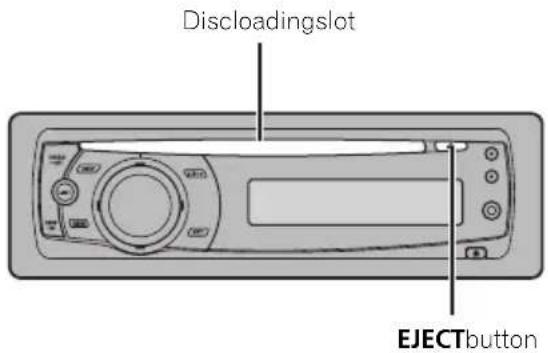
- Insertadiscintothediscloudingslot.
Playbackwillautomaticallystart.
text_image
Discloadingslot EJECTbutton- Whenloadingadisc, facethelabelsideof adiscup.
●Ejectadisc
PressEJECT.
- Selectafolder
Push MULTI-CONTROLupordown.
■Youcannotselectafolderthatdoesnothave acompressedaudiofilerecordedinit.
- Selectatrack
Push MULTI-CONTROL leftorright.
●Fastforwardorreverse
PushandholdMULTI-CONTROLleftorright foraboutonesecondandrelease.
■Whenplayingcompressedaudio,thereisno soundonfastforwardorreverse.
●Returntorootfolder
PressandholdBAND.
■Iffolder01(ROOT)containsnofiles, playback commenceswithfolder02.
●Switchbetweencompressedaudioand CD-DA
PressBAND.
■Thisoperationisavailableonlywhenplaying CD-EXTRAorMIXED-MODECDs.
■If you have switched between uncompressed audio and CD-DA, playback starts at the first track on the disc.

Notes
- Thebuilt-inCDplayercanplaybackaudioCD andcompressedaudiorecordedonaCD-ROM.(Refertopage51forfilesthatcanbe playedback.)
- Read the precautions for discs and player on page 47.
- Afteradischasbeeninserted, pressSOURCE toselectthebuilt-inCDplayer.
- Thereissometimesadelaybetweenstarting updiscplaybackandthesoundbeingissued. Whenbeingread,FORMATREADisdisplayed.
- IfanerrormessagesuchasERROR-11isdisplayed,refertoErrormessagesonpage46.
- WhenaCDTEXTdiscisinserted,thediscand tracktitlesautomaticallybegintoscrollinthe display.WhenEverScrollissettoONatthe initialsetting,thediscandtracktitlesscroll continuously.FormotedetailsaboutEver Scroll,refertoSwitchingtheEverScrollon page28.
- Playbackiscarriedoutinorderoffilenumber. Foldersareskippediftheycontainnofiles.(If folder01(ROOT)containsnofiles, playback commenceswithfolder02.)
Displayingtextinformationon disc
- PressDISPtoselectthedesiredtextinformation.
FortitleenteredCD
Playtime—disctitle
ForCDTEXTdiscs
Playtime—disctitle—discartistname—track title—trackartistname
ForWMA/MP3/AACdiscs
Playtime—foldername—filename—track title—artist name—album title—comment—bitrate
ForWAVdiscs
Playtime—foldername—filename—samplingfrequency

Notes
- Youcanscrolltotheleftofthetitlebypassing andholdingDISP.
• AudioCDthatcontainscertaininformation suchastextand/ornumberisCDTEXT. - If specific information is not recorded on a disc, title or name is not displayed.
- DependingontheversionofiTunes ^ usedto writeMP3filesontoadisc,commentinformationmaynotbecorrectlydisplayed. —iTunesisaregisteredtrademarkofApple Inc.
- Depending on the version of Windows Media Player used to encode WMA files, album names and other text information may not be correctly displayed.
- WhenplayingbackVBR(variablebitrate)-recordedWMAfiles,theaveragebitratevalueis displayed.
- WhenplayingbackVBR(variablebitrate)-recordedMP3files, VBRisdisplayedinsteadof bitratevalue.
- Thesamplingfrequencyshowninthedisplay maybeabbreviated.
- When EverScrollissettoONattheinitialsetting.textinformationscrollscontinuouslyin thedisplay.RefertoSwitchingtheEverScroll onpage28.
Selectingtracksfromthetrack titlelist
Tracktitlelistletsyouseethelistoftracktitles onaCDTEXTdiscandselectoneofthemto playback.
1PressLISTtoswitchtothetracktitlelist mode.
2UseMULTI-CONTROLtoselectthedesiredtracktitle.
Turntochangethetracktitle.Presstoplay.
■Youcanalsochangethetracktitlebypushing MULTI-CONTROLupordown.
■Youcanalsoplaythetrackbypushing MULTI-CONTROLright.
■Toreturntotheordinarydisplay,pressBAND orLIST.
■Ifyoudonotoperatethelistwithinabout30 seconds.thedisplayautomaticallyreturnstothe ordinarydisplay.
Selectingfilesfromthefile namelist
Filenamelistletsyouseethelistoffilenames (orfoldernames) and select one of them to playback.
1PressLISTtoswitchtothefilenamelist mode.
Namesoffilesandfoldersappearinthedisplay.
2UseMULTI-CONTROLtoselectthedesiredfilename(orfoldername).
Turntochangethenameoffileorfolder.
—whenafileisselected,presstoplay.
—whenafolderisselected, presstoseealist offiles (orfolders) intheseleted folder.
—whenafolderisselected, pressandholdto playasongintheselectedfolder.
■Youcanalsoplaythefilebypushing MULTI-CONTROLright.
■Youcanalsoplayasongintheselectedfolder bypushingandholdingMULTI-CONTROLright.
■Toreturntothepreviouslist(thefolderone levelhigher),pressBACK.Youcanalsoperform thisoperationbypushingMULTI-CONTROLleft.
■Toreturntothetoptieroflist,pressandhold BACK.
■Toreturntotheordinarydisplay,pressBAND orLIST.
■Ifyoudonotoperatethelistwithinabout30 seconds,thedisplayautomaticallyreturnstothe ordinarydisplay.
Introduction of advanced operations
1PressMULTI-CONTROLtodisplaythe mainmenu.
2UseMULTI-CONTROLtoselect FUNCTION.
Turntochangethemenuoption.Presstose-lect.
3TurnMULTI-CONTROLtoselectthe function.
REPEAT(repeatplay)—RANDOM(random play)—SCAN (scan play)—PAUSE (pause)—SOUNDRETRIEVER(advancedsoundretriever)—TITLEINPUT(discitleinput)

Notes
- Youcanalsoselectthefunctionbypassing FUNCTIONnontheremotecontrol.
• To return to the previous display, press BACK. - Toreturntothemainmenu, pressandhold BACK.
- Toreturntotheordinarydisplay,pressBAND.
- If you donot operate function except for TITLEINPUT within about 30 seconds, the display automatically return to the ordinary display.
- WhenplayingacompressedaudiodiscorCD TEXTdisc,youcannotswitchtodisctitleinput display.
Selectingarepeatplayrange
- PressRPTrepeatedlytoselectthedesiredsetting.
•DISC—Repeatalltracks
- TRACK-Repeatthecurrenttrack
• FOLDER—Repeat the current folder
■ If you select another folder during repeat play, therepeat play range changestodiscrepeat.
■Performingtracksearchorfastforward/reverseduringTRACK(trackrepeat)changesthe repeatplayrangetodisc/folder.
■WhenFOLDER(folderrepeat)isselected,itis notpossibletoplaybackasubfolderofthat folder.

Note
Youcanalsoperformthisoperationinthemenu thatappearsbyusingMULTI-CONTROL.
Playingtracksinrandomorder
Tracksinaselectedrepeatrangeareplayedin randomorder.
●PressRDMtoturnrandomplayon.
Tracksplayinarandomorder.
■Toturnrandomplayoff, pressRDMagain.

Note
Youcanalsoturnthisfunctiononoroffinthe menuthatappearsbyusingMULTI-CONTROL.
Scanningfoldersandtracks
Scanplaysearchesthesongwithinthese-lectedrepeatrange.
1UseMULTI-CONTROLtoselectSCANin thefunctionmenu.
2PressMULTI-CONTROLtoturnscanplay on.
The first 10 second so each track is played.
3Whenyoufindthedesiredtrackpress MULTI-CONTROLtoturnscanplayoff.
■Ifthedisplayhasautomaticallyreturned to the playbackdisplay, select SCAN again by using MULTI-CONTROL.
■Afterscanningofadisc(folder)isfinished, normal playbackofthetracksbegins.
Pausing playback
- PressII(pause)ontheremotecontrol toturnpauseon.
Playbackofthecurrenttrackpauses.
■Toturnpauseoff, press || (pause)again.

Note
Youcanalsoturnthisfunctiononoroffinthe menuthatappearsbyusingMULTI-CONTROL.
UsingSoundRetriever
SoundRetrieverfunctionautomaticallyenhancescompressedaudioandrestoresrich sound.
- PressS.Rtrvrepeatedlytoselectthedesiredsetting.
S.RTRVOFF(off)—S.RTRV1—S.RTRV2
■S.RTRV2ismoreeffectivethanS.RTRV1.

Note
Youcanalsoperformthisoperationinthemenu thatappearsbyusingMULTI-CONTROL.
Usingdisctitlefunctions
YoucaninputCDtitlesanddisplaythetitle. ThenexttimeyouinsertaCDforwhichyou haveenteredatitle, thetitleofthatCDisdisplayed.
Enteringdisctitles
Usethedisctitleinputfeaturetostoreupto 48CDtitlesintheunit.Eachtitlecanbeupto 10characterslong.
1PlaytheCDthatyouwanttoentera titlefor.
2UseMULTI-CONTROLtoselect TITLEINPUTinthefunctionmenu.
3PressMULTI-CONTROLtodisplaythe titleinputmode.
4TurnMULTI-CONTROLtoselectaletter ofthealphabet.
■Youcanalsoperformthesameoperationsby pushingMULTI-CONTROLupordown.
5PressMULTI-CONTROLtomovethecur-sortothenextcharacterposition.
6Afterenteringthetitle,pressandhold MULTI-CONTROLtostoreitinmemory.

Notes
- Titlesremaininmemory,evenafterthediscis removedfromtheunit,andarerecalledwhen thediscisreinserted.
• Afterdatafor48discsarestoredinthememory, dataforanewdiscoverwritestheoldest one. - If you connect amulti-CD player, you can input disctitles for up to 100 discs.
- Whenamulti-CDplayerthatdoesnotsupport disctitlefunctionsisconnected,youcannot enterdisctitlesinthisunit.
PlayingsongsonUSBportable audioplayer/USBmemory
Fordetailsaboutthesupporteddevice,referto Portableaudioplayercompatibilityonpage5.
BasicOperations
- Selectafolder
Push MULTI-CONTROLupordown.
●Fastforwardorreverse
Pushandhold MULTI-CONTROL leftor right for about one second and release.
- Selectatrack
Push MULTI-CONTROL leftorright.
●Returntorootfolder
PressandholdBAND.

Notes
- Optimumperformanceofthisunitmaynotbe obtaineddependingontheconnectedUSB portableaudioplayer/USBmemory.
- Iffolder01(ROOT)containsnofiles, playback commenceswithfolder02.
- When the USB portable audioplayer having battery charging function is connected to this unit and the ignition switch is set to ACC or ON, the battery is charged.
- YoucandisconnecttheUSBportableaudio player/USBmemoryanytimeyouwanttofinishlisteningtoit.
- IfUSBportableaudioplayer/USBmemoryis connectedtothisunit,thesourceischanged toUSBautomatically.Ifyoudonotusean USBdevice,disconnectitfromthisunit.DependingontheconnectedUSBdevice,turningontheignitionswitchwhileUSBdeviceis connectedtothisunitmaychangethesource automatically.
Displayingtextinformationof anaudiofile
- PressDISPtoselectthedesiredtextinformation.
ForWMA/MP3/AACdiscs
Playtime—foldername—filename—track title—artist name—album title—comment—bitrate
ForWAVdiscs
Playtime—foldername—filename—samplingfrequency
■ If the characters recorded on the audio file are not compatible with the head unit, those characters are not displayed.
■Ifspecificinformationisnotrecordedonan audiofile, titleornameisnotdisplayed.
■Thetextinformationofsomeaudiofilesmay notbecorrectlydisplayed.

Notes
- Youcanscrollthetextinformationtotheleft bypassingandholdingDISP.
- When EverScrollissettoONattheinitialsetting,textinformationscrollscontinuouslyin thedisplay.RefertoSwitchingtheEverScroll onpage28.
Selectingfilesfromthefile namelist
Theoperationisthesameasthatofthebuilt-inCDplayer.(RefertoSelectingfilesfromthefilenamelistonpage14.)
Introduction of advanced operations
1PressMULTI-CONTROLtodisplaythe mainmenu.
2UseMULTI-CONTROLtoselect FUNCTION.
Turntochangethemenuoption.Presstose-lect.
3TurnMULTI-CONTROLtoselectthe function.
REPEAT(repeatplay)—RANDOM(random play)—SCAN (scan play)—PAUSE (pause)—SOUNDRETRIEVER(advancedsoundretriever)
Functionandoperation
REPEAT, RANDOM, SCAN, PAUSE and SOUNDRETRIEVER operations are basically the same as that of the built-in CD player.
FunctionnameOperation
| REPEAT | RefertoSelectingarepeatplay rangeonpage15.However,therepeatplay rangesyoucanselectaredif- ferentfromthatofthebuilt-in CDplayer.Therepeatplay rangesoftheUSBportable audioplayer/USBmemoryare:•TRACK-Repeatjustthe currentfile•FOLDER-Repeatthecur- rentfolder•ALL-Repeatallfiles |
| RANDOM | RefertoPlayingtracksinran- domorderonpage15. |
| SCAN | RefertoScanningfoldersand tracksonpage15. |
| PAUSE | RefertoPausingplaybackon page15. |
| SOUNDRETRIEVER | RefertoUsingSoundRetriever onpage16. |

Notes
- Youcanalsoselectthefunctionbypassing FUNCTIONontheremotecontrol.
• To return to the previous display, press BACK.
• Toreturntothemainmenu, pressandhold BACK.
• To return to the ordinary display, press BAND. -
If you select another folder during repeat play, therepeat play range changesto ALL.
-
If you perform track search forward/reversed during TRACK, therepeat play range changesto FOLDER.
- WhenFOLDERisselected, it is not possible to playback as subfolder of that folder.
• Afterfileorfolderscanningisfinished, normal playbackofthefilesbeginsagain.
PlayingsongsoniPod
FordetailsaboutthesupportediPod, referto iPod® compatibilityonpage5.
BasicOperations
●Fastforwardorreverse
PushandholdMULTI-CONTROLleftorright foraboutonesecondandrelease.
- Selectatrack(chapter)
Push MULTI-CONTROL leftor right.

Notes
- WhenusinganiPod,iPodDockConnectorto USB Cable is required.
- ReadtheprecautionsforiPodonpage50.
- WhileiPodisconnectedtothisunit, PIONEER (or √ (checkmark)) is displayed on the iPod.
- IfanerrormessagesuchasERROR-19isdisplayed,refertoErrormessagesonpage46.
- WhentheignitionswitchissettoACCorON, theiPod'sbatteryischargedwhiletheiPodis connectedtothisunit.
- While the iPodisconnected to this unit, the iPod cannot be turned on or off.
- Beforeconnectingthedockconnectorofthis unittotheiPod, disconnecttheheadphones fromtheiPod.
• TheiPodisturnedoffabouttwominutesafter theignitionswitchissettoOFF.
Browsingforasong
OperationstocontrolaniPodwiththisunitis designedtobeasclosetotheiPodaspossible tomakeoperationandsongsearcheasy.
- Dependingonthenumberoffilesinthe iPod,theremaybedelaywhendisplayinga list.
- If the characters recorded on the Pod are not compatible with this unit, those characters are not displayed.
1PressLISTtoswitchtothetopmenuof thelistsearch.
2UseMULTI-CONTROLtoselectacate-gory.
Turntochangethecategory;presstoselect.
PLAYLISTS (playlists)—ARTISTS (artists)—ALBUMS (albums)—SONGS (songs)—
PODCASTS (podcasts)—GENRES (genres)—
COMPOSERS(composers)—AUDIOBOOKS (audiobooks)
Listfortheselectedcategoryisdisplayed.
■Youcanstart playback throughout these selected category bypassing and holding
MULTI-CONTROL. You can also perform this operation by pushing and holding
MULTI-CONTROLright.
■Youcanalsochangethecategorybypushing MULTI-CONTROLupordown.
■Youcanalsoselectthecategorybypushing MULTI-CONTROLright.
■Toreturntothepreviouslist,push MULTI-CONTROLleft.
3Repeatstep2tofindasongyouwant tolistento.
■Toreturntothepreviouscategory(onelevel higher),pressBACK.Youcanalsoperformthis operationbypushingMULTI-CONTROLleft.
■Toreturntothetoptierofcategories, press andholdBACK.
■Toreturntotheordinarydisplay,pressBAND orLIST.
■ If you donotoperatethelist within about 30 seconds, the display automatically return to the ordinary display.
Displayingtextinformationon iPod
- PressDISPtoselectthedesiredtextinformation.
Playtime—songtitle—artistname—album title
■ If the characters recorded on the Podarenot compatible with this unit, those characters are not displayed.

Notes
- Youcanscrollthetextinformationtotheleft bypassingandholdingDISP.
- When EverScrollissettoONattheinitialsetting.textinformationscrollscontinuouslyin thedisplay.RefertoSwitchingtheEverScroll onpage28.
Introductionofadvanced operations
1PressMULTI-CONTROLtodisplaythe mainmenu.
2UseMULTI-CONTROLtoselect FUNCTION.
Turntochangethemenuoption.Presstose-lect.
3TurnMULTI-CONTROLtoselectthe function.
REPEAT (repeat play)—SHUFFLE (shuffle)—SHUFFLEALL(shuffleall)—LINKSEARCH
(linksearch)—REMOTE(iPodremote)—PAUSE(pause)—AUDIOBOOKSSPEED(audiobookspeed)—SOUNDRETRIEVER(advancedsoundretriever)
Functionandoperation
PAUSE and SOUNDRETRIEVER operations are basically the same as that of the built-in CDplayer.
FunctionnameOperation
| REPEAT | RefertoSelectingarepeatplay rangeonpage15.However,therepeatplay rangesyoucanselectaredif-ferentfromthatofthebuilt-in CDplayer.Therepeatplay rangesoftheiPodare:ONE-Repeatthecurrent songALL-Repeatallsongsin theselectedlist |
| PAUSE | RefertoPausingplaybackon page15. |
| SOUNDRETRIEVER | RefertoUsingSoundRetriever onpage16. |

Notes
- Youcanalsoselectthefunctionbypassing FUNCTIONontheremotecontrol.
- Toreturntothepreviousdisplay.pressBACK.
- Toreturntothemainmenu, pressandhold BACK.
• Toreturntotheordinarydisplay, pressBAND. - If you donot operate functions within about 30 seconds, the display automatically returns to the ordinary display.
- REMOTE(iPodremote)functionisavailable onlyforiPodnano(secondgeneration).
- When REMOTEison, only REMOTE and SOUNDRETRIEVER can be operated.
Playingsongsinarandom order(shuffle)
1UseMULTI-CONTROLtoselectSHUFFLE inthefunctionmenu.
2PressMULTI-CONTROLtodisplaythe settingmode.
3UseMULTI-CONTROLtoselectthedesiredsetting.
Turntochangethesetting.
- SONGS-Playback songs in these selected list in random order.
Operatingthisunit
• ALBUMS—Playback songs fromaran-
domlyselected albumin order.
- OFF-Cancelrandomplay.
Playingallsongsinarandom order(shuffleall)
- PressiPodtoturnshuffleallon.
AllsongsontheiPodplayrandomly.
■Toturnshufflealloff, setSHUFFLEinthe
FUNCTIONmenutooff.

Note
Youcanalsoturnthisfunctiononinthemenu thatappearsbyusing MULTI-CONTROL.
Selectingsongsfromalbumlist ofcurrentlyplayingartist
Albumlistofthecurrentlyselectedartistis displayed.Youcanselectanalbumorsong fromtheartistname.
- Dependingonthenumberoffilesinthe iPod,theremaybedelaywhendisplayinga list.
1PressandholdLISTtoturnlinksearch on.
Searchesalbumsoftheartistanddisplaysthe list.
2UseMULTI-CONTROLtoselectanalbum orsongfromthelist.
Formoredetailsabouttheselectingoperation, refertostep2ofBrowsingforasongonpage 19.

Note
Youcanalsoturnthisfunctiononinthemenu thatappearsbyusingMULTI-CONTROL.
Operatingthisunit'siPod functionfromyouriPod
ThisfunctionisavailableonlyforiPodnano (secondgeneration).
Thisunit'siPodfunctioncanbeoperatedfrom youriPod.Soundcanbeheardfromcar's speaker,andoperationcanbeconductedfrom youriPod.
- While this function is in use, even if the ignition key is turned off, iPod is not turned off. Toturnoff power, operates theiPod.
1PressiPodandholdtoturniPodremote on.
■Toturnthisfunctionoff, pressandholdiPod again.
■Whileusingthisfunction, playtimeandtitles arenotdisplayedonthisunit.
■Evenifthisfunctionisperformed,trackup/downcanbeoperatedfromthisunit.
■Whileusingthisfunction, browsefunction cannotbeoperatedfromthisunit.
2OperatetheconnectediPodtoselecta songandplay.

Note
Youcanalsoturnthisfunctiononoroffinthe menuthatappearsbyusingMULTI-CONTROL.
Changingaudiobookspeed
While listening to an audiobook on a pod, play-backs speed can be changed.
1UseMULTI-CONTROLtoselect AUDIOBOOKSSPEEDinthefunctionmenu.
2PressMULTI-CONTROLtodisplaythe settingmode.
3UseMULTI-CONTROLtoselectthedesiredsetting.
Turntochangethesetting.
- FASTER-Playbackfasterthannormal speed
•NORMAL-Playbackinnormalspeed - SLOWER-Playbackslowerthannormal speed
Introductionofaudio adjustments
1PressMULTI-CONTROLtodisplaythe mainmenu.
2UseMULTI-CONTROLtoselectAUDIO. Turntochangethemenuoption.Presstose- lect.
3TurnMULTI-CONTROLtoselectthe audiofunction.
TurnMULTI-CONTROLtoswitchbetweenthe audiofunctionsinthefollowingorder.
FADER/BALANCE(balanceadjustment)—PRESETEQUALIZER(graphicequalizerrecall)—EQSETTING1(graphicequalizeradjustment)—EQSETTING2(graphicequalizerfine adjustment)—LOUDNESS(loudness)—SWSETTING1(subwooferon/offsetting)—SWSETTING2(subwoofersetting)—HIGHPASSFILTER(highpassfilter)—BASSBOOST(bassboost)—SRCLVADJUST(sourceleveladjustment)
4PressMULTI-CONTROLtodisplaythe settingmodeofeachfunction.
5Adjusttheeachfunction.

Notes
- Youcanalsoselecttheaudiofunctionby pressingAUDIOontheremotecontrol.
• To return to the previous display, press BACK. - Toreturntothemainmenu, pressandhold BACK.
• Toreturntotheordinarydisplay, pressBAND. - YoucanselecttheSWSETTING2onlywhen subwooferoutputisturnedonin SWSETTING1.
- WhenselectingFMasthesource,youcannot switchtoSRCLVADJUST.
- If you donot operate functions within about 30 seconds, the display automatically returns to the ordinary display.
Usingbalanceadjustment
Youcanchangethefader/balancesettingso thatitcanprovidetheideallisteningenvironmentallooccupiedseats.
1UseMULTI-CONTROLtoselect FADER/BALANCE.
2PressMULTI-CONTROLtodisplaythe settingmode.
3PressMULTI-CONTROLtoselectthesegmentyouwishtoset.
PressMULTI-CONTROL repeatedly to switch between fader and balance.
4TurnMULTI-CONTROLtoadjustspeaker balance.
Front/rearspeakerbalancecanbeadjusted betweenFADF15andFADR15. Left/rightspeakerbalancecanbeadjusted betweenBALL15andBALR15.
■Youcanalsoperformthesameoperationsby pushingMULTI-CONTROLupordown.
■FAD0isthepropersettingwhenonlytwo speakersareused.
■WhentherearoutputsettingisSUBW,adjustingthefront/rearspeakerbalanceisnoteffective.RefertoSettingtherearoutputandsubwoofercontrolleronpage27.
Usingtheequalizer
Theequalizerletyouadjusttheequalization to match the car's interior acoustic characteristics as desired.
Recallingequalizercurves
Therearesixstoreequalizercurveswhich youcaneasilyrecallatanytime. Hereisalist of the equalizercurves.
DisplayEqualizercurve
POWERFUL Powerful
NATURAL Natural
AudioAdjustments
VOCAL Vocal
CUSTOMCustom
FLATFlat
SUPERBASS Superbass
- CUSTOMisanadjustedequalizercurve thatyoucreate.Ifyoumakeadjustmentsto anequalizercurve,theequalizercurvesettingismemorizedinCUSTOM.
- WhenFLATisselected,nosupplementor correctionismadetothesound.This is useful to check the effect of the equalizer curves by switching alternatively between FLAT and a set equalizer curve.
1UseMULTI-CONTROLtoselect PRESETEQUALIZER.
2PressMULTI-CONTROLtodisplaythe settingmode.
3TurnMULTI-CONTROLtoselectthe equalizer.
■Youcanalsoperformthesameoperationsby pushingMULTI-CONTROLupordown.
Adjustingequalizercurves
Thefactorysuppliedequalizercurves, with the exception of FLAT, can be adjusted to a fine degree (nuance control).
1UseMULTI-CONTROLtoselect EQSETTING1.
2PressMULTI-CONTROLtodisplaythe settingmode.
3PressMULTI-CONTROLtoselectthesegmentyouwishtoset.
Press MULTI-CONTROL repeatedly to switch these segment in the following order:
L (low)—M (mid)—H (high)
4TurnMULTI-CONTROLtoadjustthe leveloftheequalizationband.
+6 to -6 is displayed as the level is increased or decreased.
■Youcanalsoperformthesameoperationsby pushingMULTI-CONTROLupordown.
■Youcanthenselectanotherbandandadjust thelevel.
■Theequalizercurvewithallfrequenciessetto 0 cannotbeadjusted.

Note
AseparateCUSTOMcurvecanbecreatedfor eachsource.(Thebuilt-inCDplayerandthe multi-CDplayeraresettothesameequalizeradjustmentsettingautomatically.)Ifyoumakeadjustments,theequalizercurvesettingsare memorizedinCUSTOM.
Fine-adjustingequalizercurve
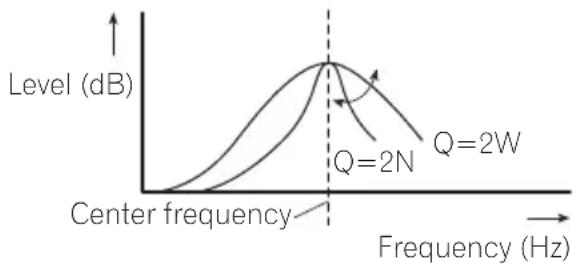
You can adjust the center frequency and the Q factor (curve characteristics) of each currently selected curve band (LOW/MID/HI).
line
| Frequency (Hz) | Q=2N Level (dB) | Q=2W Level (dB) | | -------------- | --------------- | --------------- | | 0 | 0 | 0 | | 2 | ~1.5 | ~1.8 | | 4 | ~3.0 | ~3.5 | | 6 | ~4.5 | ~5.0 | | 8 | ~5.5 | ~6.0 | | 10 | ~6.0 | ~7.0 | | 12 | ~5.5 | ~6.5 | | 14 | ~4.5 | ~5.5 | | 16 | ~3.0 | ~4.0 | | 18 | ~1.5 | ~2.5 | | 20 | 0 | 0 |1UseMULTI-CONTROLtoselect EQSETTING2.
2PressMULTI-CONTROLtodisplaythe settingmode.
3PressMULTI-CONTROLtoselectthesegmentyouwishtoset.
Press MULTI-CONTROL repeatedly to switch these segment in the following order:
Band—Frequency—Qfactor
4TurnMULTI-CONTROLtoadjustthese- lectedsegement.
Band
LOW (low)—MID (mid)—HI (high)
Frequency
Low: 40HZ—80HZ—100HZ—160HZ
Mid: 200HZ—500HZ—1KHZ—2KHZ
High: 3KHZ—8KHZ—10KHZ—12KHZ
Qfactor
2N—1N—1W—2W
■Youcanalsoperformthesameoperationsby pushingMULTI-CONTROLupordown.

Note
AseparateCUSTOMcurvecanbecreatedfor eachsource.(Thebuilt-inCDplayerandthe multi-CDplayeraresettothesameequalizeradjustmentsettingautomatically.)Ifyoumakeadjustments,theequalizercurvesettingsare memorizedinCUSTOM.
Adjustingloudness
Loudnesscompensatesfordeficienciesinthe low-andhigh-soundrangesatlowvolume.
1UseMULTI-CONTROLtoselect LOUDNESS.
2PressMULTI-CONTROLtodisplaythe settingmode.
3UseMULTI-CONTROLtoselectthedesiredsetting.
Turntochangethesetting.
LOW (low)—MID (mid)—HIGH (high)—OFF (off)
■Youcanalsoperformthesameoperationsby pushingMULTI-CONTROLupordown.
Usingsubwooferoutput
Thisunitisequippedwithasubwooferoutput whichcanbeturnedonoroff.
Also, phasecanbeselectedbetweennormal andreverse.
1PressSWtodisplaythesubwoofersettingmode.
PressSW repeatedlytoswitchbetweenthe subwoofersettingmodesinthefollowing order.
SWSETTING1(subwooferon/offsetting)settingmode—SWSETTING2(subwoofersetting)settingmode
2SelectSWSETTING1settingmode.
3TurnMULTI-CONTROLtoselectthedesiredsetting.
NORMAL(normalphase)—REV(reverse phase)—OFF(subwooferoff)
■Youcanalsoperformthesameoperationsby pushingMULTI-CONTROLupordown.

Note
Youcanalsoswitchtothissettingmodeinthe menuthatappearsbyusingMULTI-CONTROL.
Adjustingsubwoofersettings
Whenthesubwooferoutputison,youcanadjustthecut-offfrequencyandtheoutputlevelofthesubwoofer.
- Whenthesubwooferoutputison, you can selectSWSETTING2.
1PressSWtodisplaythesubwoofersettingmode.
PressSWrepeatedlytoswitchbetweenthe subwoofersettingmodesinthefollowing order.
SWSETTING1(subwooferon/offsetting)settingmode—SWSETTING2(subwoofersetting)settingmode
2SelectSWSETTING2settingmode.
3PressMULTI-CONTROLtoselectthesegmentyouwishtoset.
PressMULTI-CONTROLrepeatedlytoswitch thesesegmentinthefollowingorder:
Cutofffrequency—Level
4TurnMULTI-CONTROLtoadjustthese- lectedsegement.
Cutofffrequency
50HZ—63HZ—80HZ—100HZ—125HZ Level
+6 to -24 is displayed as the level is increased or decreased.
■Youcanalsoperformthesameoperationsby pushingMULTI-CONTROLupordown.

Note
Youcanalsoswitchtothissettingmodeinthe menuthatappearsbyusing
MULTI-CONTROL.
Usingthehighpassfilter
When you donotwantlowsounds from the subwoofer output frequency rangetoplay from the frontorrearspeakers, turn on the HPF (highpassfilter). Only frequencies higher than those in these selected range are output from the frontorrearspeakers.
1UseMULTI-CONTROLtoselect HIGHPASSFILTER.
2PressMULTI-CONTROLtodisplaythe settingmode.
3UseMULTI-CONTROLtoselectthedesiredsetting.
Turntochangethesetting.
OFF—50HZ—63HZ—80HZ—100HZ—125HZ
■Youcanalsoperformthesameoperationsby pushingMULTI-CONTROLupordown.
Boostingthebass
Bassboostfunctionbooststhebasslevelof sound.
1PressandholdBASStodisplay BASSBOOSTsettingmode.
2TurnMULTI-CONTROLtoadjustthe level.
0to+6isdisplayedasthelevelisincreasedor decreased.
■Youcanalsoperformthesameoperationsby pushingMULTI-CONTROLupordown.

Note
Youcanalsoswitchtothissettingmodeinthe menuthatappearsbyusing
MULTI-CONTROL.
Adjustingsourcelevels
SLA(sourceleveladjustment)letsyouadjust thevolumelevelofeachsourcetopreventradicalchangesinvolumewhenswitchingbetweensources.
- SettingsarebasedontheFMvolumelevel, whichremainsunchanged.
1 Compare the FM volume level with the level of the source you wish to adjust.
2UseMULTI-CONTROLtoselect SRCLVADJUST.
3PressMULTI-CONTROLtodisplaythe settingmode.
4TurnMULTI-CONTROLtoadjustthe sourcevolume.
+4to-4isdisplayedasthesourcevolumeis increasedordecreased.
■Youcanalsoperformthesameoperationsby pushingMULTI-CONTROLupordown.

Notes
• The AM volume level can also be adjusted with source level adjustments.
- Thebuilt-inCDplayerandthemulti-CDplayer aresettothesamesourceleveladjustment volumeautomatically.
- Externalunit1andexternalunit2aresetto thesamesourceleveladjustmentvolume automatically.
Adjustinginitialsettings
1PressSOURCEandholduntiltheunit turnsoff.
2PressMULTI-CONTROLandholduntil CLOCKSETappearsinthedisplay.
3TurnMULTI-CONTROLtoselectoneof theinitialsettings.
CLOCKSET(clock)—FMSTEP(FMtuning step)—AMSTEP(AMtuningstep)—
WARNINGTONE(warningtone)—AUX1(auxiliaryinput1)—AUX2(auxiliaryinput2)—
DIMMER(dimmer)—SWCONTROL(rearout-putandsubwoofercontroller)—DEMOMODE (featureddemo)—EVERSCROLL(everscroll)—BTAUDIO(Bluetoothaudio)—
PINCODEINPUT(pincodeinput)— BTVERINFO(Bluetoothversioninformation)
■Youcanalsoperformthesameoperationsby pushingMULTI-CONTROLupordown.
■Youcanalsoselectthefunctionbypassing FUNCTIONontheremotecontrol.
■Tocancelinitialsettings,pressBAND.
■ BTAUDIO, PINCODEINPUT and BTVERINFO can be selected only when Blue-toothadapter (e.g., CD-BTB100) is connected to this unit.
Settingtheclock
Usetheseinstructionstosettheclock.
1UseMULTI-CONTROLtoselect CLOCKSET.
2PressMULTI-CONTROLtodisplaythe settingmode.
■PressBACKtoreturntothepreviousdisplay.
3PressMULTI-CONTROLtoselectthesegmentoftheclockdisplayyouwishtoset.
EachtimeyoupressMULTI-CONTROL, one segmentoftheclockdisplayisselected. Hour—Minute
Asyouselectsegmentsoftheclockdisplay, theselectedsegmentblinks.
4TurnMULTI-CONTROLtoputaclock right.
■Youcanalsoperformthesameoperationsby pushingMULTI-CONTROLupordown.
SettingtheFMtuningstep
TheFMtuningstepemployedbyseektuning canbeswitchedbetween100kHz,thepreset step,and50kHz.
- Ifseektuningisperformedin50kHzsteps, stationsmaybetunedinimprecisely.Tune inthestationswithmanualtuningoruse seektuningagain.
1UseMULTI-CONTROLtoselectFMSTEP.
2PressMULTI-CONTROLtodisplaythe settingmode.
3TurnMULTI-CONTROLtoselecttheFM tuningstep.
Turning MULTI-CONTROL will switch the FM tuning step between 50kHz and 100kHz. The selected FM tuning step will appear in the display.
■Youcanalsoperformthesameoperationsby pushingMULTI-CONTROLupordown.

Note
Thetuningstepremainsat50kHzduringmanual tuning.
SettingtheAMtuningstep
TheAMtuningstepcanbeswitchedbetween 9kHz, thepresetstep, and 10kHz. When usingthetunerinNorth, CentralorSouth America, resetthetuningstepfrom9kHz(531 kHz to 1602kHz allowable) to 10kHz (530kHz to 1640kHz allowable).
1UseMULTI-CONTROLtoselect AMSTEP.
2PressMULTI-CONTROLtodisplaythe settingmode.
3TurnMULTI-CONTROLtoselecttheAM tuningstep.
Turning MULTI-CONTROL will switch the AM tuning step between 9 kHz and 10 kHz. These-lected AM tuning step will appear in the display.
■Youcanalsoperformthesameoperationsby pushingMULTI-CONTROLupordown.
Switchingthewarningtone
If the front panel is not detached from the head unit within four second soft turning off the ignition, awarning tones sounds. You can turn off the warning tone.
1UseMULTI-CONTROLtoselect WARNINGTONE.
2PressMULTI-CONTROLtoturnwarning toneon.
■Toturnwarningtoneoff, press MULTI-CONTROLagain.
Switchingtheauxiliarysetting
Auxiliarydevicesconnectedtothisunitcanbe activatedindividually.SeteachAUXsourceto ONwhenusing.Formoreinformationabout connectingorusingauxiliarydevices,referto UsingtheAUXsourceonpage30.
1UseMULTI-CONTROLtoselectAUX1/AUX2.
2PressMULTI-CONTROLtoturnAUX1/AUX2on.
■ToturnAUXoff,pressMULTI-CONTROL again.
Switchingthedimmersetting
Topreventthedisplayfrombeingtoobrightat night,thedisplayisautomaticallydimmed whenthecar'sheadlightsareturnedon.You canturnthedimmeronoroff.
1UseMULTI-CONTROLtoselectDIMMER.
2PressMULTI-CONTROLtoturndimmer on.
■Toturndimmeroff,pressMULTI-CONTROL again.
Settingtherearoutputand subwoofercontroller
Thisunit'srearoutput(rearspeakerleadsoutput)canbeusedforfull-rangespeaker(FULL) orsubwoofer(SUBW)connection.Ifyou switchtherearoutputsettingtoSUBW,you canconnectarearspeakerleaddirectlytoa subwooferwithoutusinganauxiliaryamp. Initially,theunitissetforrearfull-rangespeakerconnection(FULL).
1UseMULTI-CONTROLtoselect SWCONTROL.
2PressMULTI-CONTROLtodisplaythe settingmode.
■PressBACKtoreturntothepreviousdisplay.
3UseMULTI-CONTROLtoselectthedesiredsetting.
Turntochangethesetting.
SUBW(subwoofer)—FULL(full-rangespeaker)
■Whennosubwooferisconnectedtotherear output,selectFULL.
■Whenasubwooferisconnectedtotherear output,setforsubwooferSUBW.

Notes
- Evenifyouchangethissetting, thereisno outputunlessyouturnthesubwooferoutput on(refertoUsingsubwooferoutputonpage 24).
- If you chan get his setting, subwoofer output in the audiomenure turn to the factory settings.
Switchingthefeaturedemo
Thefeatureddemoautomaticallystartswhen powertothisunitisturnedoffwhiletheignitionswitchissettoACCorON.
1UseMULTI-CONTROLtoselect DEMOMODE.
2PressMULTI-CONTROLtoturnthefea- turedemoon.
■Toturnthefeatureddemooff, press
MULTI-CONTROLagain.

Notes
- Remember that if the featured demo continues operating when the care engine is turned off, it may drain battery power.
- Youcanalsoturnonorofffeaturedemoby pressingDISPwhilethisunitisturnedoff. For moredetails, see Aboutthedemomodeon page7.
SwitchingtheEverScroll
When Ever ScrollissettoON, recorded textinformationscrollscontinuouslyinthedisplay. SettoOFFifyouprefertheinformationto scrolljustonce.
1UseMULTI-CONTROLtoselect EVERSCROLL.
2PressMULTI-CONTROLtoturntheEver Scrollon.
■ToturntheEverScrolloff, press
MULTI-CONTROLagain.
ActivatingtheBTAUDIOsource
YouneedtoactivatetheBTAUDIOsourcein ordertouseaBluetoothaudioplayer.
- Youcanonlyoperatethisfunctionwhen Bluetoothadapter(e.g.CD-BTB100)isconnectedtothisunit.
1UseMULTI-CONTROLtoselect BTAUDIO.
2PressMULTI-CONTROLtoturnthe BTAUDIOsourceon.
■ToturntheBTAUDIOsourceoff,press MULTI-CONTROLagain.
EnteringPINcodefor Bluetoothwirelessconnection
Toconnectyourcellularphonetothisunitvia Bluetoothwirelesstechnology,youneedto enterPINcodeonyourphonetoverifythe connection.Thedefaultcodeis0000,butyou canchangethisinthisfunction.
- Youcanonlyoperatethisfunctionwhen Bluetoothadapter(e.g.CD-BTB100)isconnectedtothisunit.
- WithsomeBluetoothaudioplayers, you may berequired to enter the Bluetooth audioplayerPINcode in advance to this unit for a connection.
1UseMULTI-CONTROLtoselect PINCODEINPUT.
2PressMULTI-CONTROLtodisplaythe settingmode.
■PressBACKtoreturntothepreviousdisplay.
InitialSettings
3TurnMULTI-CONTROLtoselectanumber.
■Youcanalsoperformthesameoperationsby pushingMULTI-CONTROLupordown.
4PressMULTI-CONTROLtomovethecur-sortothenextposition.
■Youcanalsoperformthesameoperationsby pushingMULTI-CONTROLright.
5AfterinputtingPINcode(upto4digits),pressandholdMULTI-CONTROL.
PINcodecanbestoredinmemory.
Displayingsystemversionof Bluetoothadapterforrepair
Should this unit connecting Bluetooth adapter fail to operate properly and you consult your dealer for repair, you maybe asked to indicate the system version and Bluetooth module version of the adapter. You can display the versions and confirm them.
- Youcanonlyoperatethisfunctionwhen Bluetoothadapter(e.g.CD-BTB100)isconnectedtothisunit.
1UseMULTI-CONTROLtoselect BTVERINFO.
2PressMULTI-CONTROLtodisplaythe settingmode.
■PressBACKtoreturntothepreviousdisplay.
3UseMULTI-CONTROLtoselectthedesiredsetting.
Turntochangethesetting.
Systemversion—Bluetoothmoduleversion
■Youcanalsoperformthesameoperationsby pushingMULTI-CONTROLupordown.
UsingtheAUXsource
UptotwoauxiliarydevicessuchasVCRor portabledevices(soldseparately)canbeconnectedtothisunit.Whenconnected,auxiliary devicesareautomaticallyreadasAUXsources andassignedtoAUX1orAUX2. TherelationshipbetweenAUX1andAUX2sourcesisexplainedbelow.
AboutAUX1andAUX2
Therearetwomethodstoconnectauxiliarydevicestothisunit.
AUX1source:
When connecting auxiliary equipment using a stereominiplugcable
- Insertthestereominiplugintothe inputjackonthisunit.
Formoredetails, refertoWhat's Whatonpage 8.
Thisauxiliarydeviceisautomaticallysetto AUX1.
AUX2source:
When connecting auxiliary equipment using an IP-BUS-RCA Interconnector(soldseparately)
●UseanIP-BUS-RCAInterconnectorsuch astheCD-RB20/CD-RB10(soldseparetely) toconnectthisunittoauxiliaryequipment featuringRCAoutput.
Formoredetails, refertothelP-BUS-RCAInterconnectorowner'smanual.
Thisauxiliarydeviceisautomaticallysetto AUX2.
■Youcanonlymakethistypeofconnectionif theauxiliarydevicehasRCAoutputs.
SelectingAUXasthesource
●PressSOURCEtoselectAUXasthe source.
■Iftheauxiliarysettingisnotturnedon,AUX cannotbeselected.Formoredetails,seeSwitchingtheauxiliarysettingonpage27.
SettingtheAUXtitle
ThetitledisplayedfortheAUX1orAUX2 sourcecanbechanged.
1AfteryouhaveselectedAUXasthe source,useMULTI-CONTROLandselect FUNCTIONtodisplayTITLEINPUT.
2Enteratitleinthesamewayasthe built-inCDplayer.
Fordetailsconcerningoperation,refertoEnteringdisctitlesonpage16.
Turningtheclockdisplay onoroff
Youcanturntheclockdisplayonoroff.
• Evenwhenthesourcesareoff, theclock displayappearsonthedisplay.
- PressCLOCKtoturntheclockdisplay onoroff.
Each press of CLOCK turn the clock display on or off.
■Theclockdisplaydisappearstemporarily whenyouperformmotheroperations,buttheclock displayappearsagainafter25seconds.
Usingtheexternalunit
ExternalunitreferstoaPioneerproduct(such asonesavailableinthefuture)that,although incompatibleasasource,enablescontrolof basicfunctionswiththisunit.Twoexternal unitscanbecontrolledwiththisunit.When twoexternalunitsareconnected,theexternal unitisautomaticallyallocatedtoexternalunit 1orexternalunit2bythisunit. Basicoperationsoftheexternalunitareexplainedbelow.Allocatedfunctionsaredifferentdependingontheconnectedexternalunit. Fordetailsconcerningfunctions,refertoexternalunit'sowner'smanual.
Selectingtheexternalunitas thesource
- PressSOURCEtoselectEXTERNALas thesource.
Basicoperation
Functionsallocatedtothefollowingoperationsaredifferentdependingontheconnectedexternalunit.Fordetailsconcerning functions,refertotheconnectedexternal unit'sowner'smanual.
- PressBAND.
●PressandholdBAND.
●PushMULTI-CONTROLleftorright.
●PushandholdMULTI-CONTROLLeftor rightforaboutonesecondandrelease.
●PushMULTI-CONTROLupordown.
Using the functions allocated to 1 to 6 keys
1PressLIST.
2UseMULTI-CONTROLtoselect1KEYto6KEY.
Turntochange1KEYto6KEYandpress.
Advancedoperations
1PressMULTI-CONTROLtodisplaythe mainmenu.
2UseMULTI-CONTROLtoselect FUNCTION.
Turntochangethemenuoption.Presstose-lect.
3TurnMULTI-CONTROLtoselectthe function.
FUNC1 (function 1)—FUNC2 (function 2)— FUNC3 (function 3)—FUNC4 (function 4)—
AUTO/MANUAL(auto/manual)
- YoucanalsoturnFUNC1onoroffbypassingS.Rtrv.
- YoucanalsoturnFUNC2onoroffbypassingRDM/iPod.
- YoucanalsoturnFUNC3onoroffbypassingRPT/LOCAL.

Notes
- Youcanalsoselectthefunctionbypassing FUNCTIONnontheremotecontrol.
- Toreturntothepreviousdisplay,pressBACK.
- Toreturntothemainmenu,pressandhold BACK.
- Toreturntotheordinarydisplay, press BAND.
PlayingsongsoniPod Basicoperation
Youcanusethisunittocontrolaninterface adapterforiPod, whichissoldseparately.
●Fastforwardorreverse
PushandholdMULTI-CONTROLleftorright foraboutonesecondandrelease.
- Selectatrack
PushMULTI-CONTROLleftorright.

Notes
- ReadtheprecautionsforiPodonpage50.
- WhileiPodisconnectedtothisunit, PIONEER (or √ (checkmark)) is displayed on theiPod.
- IfanerrormessagesuchasERROR-11isdisplayed,refertoErrormessagesonpage46.
- WhentheignitionswitchissettoACCorON, theiPod'sbatteryischargedwhiletheiPodis connectedtothisunit.
- While the iPodisconnectedtothisunit, the iPodcannotbeturnedonoroff.
- Beforeconnectingthedockconnectorofthis unittotheiPod, disconnecttheheadphones fromtheiPod.
•TheiPodisturnedoffabouttwominutesafter theignitionswitchissettoOFF.
Displayingtextinformationon iPod
TheoperationisthesameasthatoftheiPod connectedtoUSBinterfaceofthisunit.(Refer toDisplayingtextinformationoniPodonpage 19.)
Browsingforasong
TheoperationisthesameasthatoftheiPod connectedtoUSBinterfaceofthisunit.(Refer toBrowsingforasongonpage19.) However, theselectablecategoriesareslightly different.Selectablecategoriesare
PLAYLISTS (playlists)—ARTISTS (artists)—ALBUMS (albums)—SONGS (songs)—GENRES(genres)

Note
Ifapaylistisselected,first,thisunitshowsthe playlistofyouriPod'sname.Thisplaysallthe songsinyouriPod.
Functionandoperation
1PressMULTI-CONTROLtodisplaythe mainmenu.
2UseMULTI-CONTROLtoselect FUNCTION.
Turntochangethemenuoption.Presstose-lect.
3TurnMULTI-CONTROLtoselectthe function.
REPEAT (repeat play)—SHUFFLE (shuffle)—PAUSE(pause)
Functionandoperation
REPEATisthesameasthatofiPodconnected toUSBinterfaceofthisunit.
PAUSEisthesameasthatofthebuilt-inCD player.
| FunctionnameOperation | |
| REPEAT | RefertoFunctionandoperationonpage20. |
| PAUSE | RefertoPausingplaybackonpage15. |

Notes
- Youcanalsoselectthefunctionbypassing FUNCTIONontheremotecontrol.
• To return to the previous display, press BACK.
• Toreturntothemainmenu, pressandhold BACK.
• To return to the ordinary display, press BAND.
Availableaccessories
- If you donot operate functions within about 30 seconds, the display automatically returns to the ordinary display.
Playingsongsinarandom order(shuffle)
- PressRDMrepeatedlytoselectthedesiredsetting.
- SONGS-Playback songs in these selected list in random order.
- ALBUMS-Playback songs from randomly selected albumin order.
- OFF-Cancelrandomplay.
■Toturnshuffleoff, pressRDMagain.

Note
Youcanalsoperformthisoperationinthemenu thatappearsbyusingMULTI-CONTROL.
BluetoothAudio
BasicOperations
If you connect a Bluetooth adapter (e.g. CD-BTB100) to this unit, you can control Bluetooth audioplayers via Bluetooth wireless technology.

Important
- Depending on the Bluetooth audioplayer connected to this unit, the operations available with this unit are limited to the following two levels:
—Lowerlevel: Only playing back songson your audioplayer is possible.
—Higherlevel: Playingback, pausing, selectingsongs, etc., are possible (all the operations illustrated in this manual).
- SincethereareanumberofBluetoothaudio playersavailableonthemarket,operations withyourBluetoothaudioplayerusingthis unitvaryingreatrange.RefertotheinstructionmanualthatcamewithyourBluetooth audioplayeraswellasthismanualwhileoperatingyourplayeronthisunit.
• Informationaboutsongs(e.g.theelapsed playingtime,songtitle,songindex,etc.)cannotbedisplayedonthisunit.
- WhileyouarelisteningtosongsonyourBluetoothaudioplayer,refrainfromoperatingon yourcellularphoneasmuchaspossible.If youtryoperatingyourcellularphone,thesignalfromyourcellularphonemaycausenoise onthesongplayback.
- When you are talking on cellular phone connected to this unit via Bluetooth wireless technology, song playback from your Bluetooth audioplayer connected to this unit is muted.
- Evenifwhileyouarelisteningtoasongon yourBluetoothaudioplayerandyouswitchto anothersource, playbackofsongcontinues.
●Fastforwardorreverse
Pushandhold MULTI-CONTROL leftor right for about one second and release.
- Selectatrack
Push MULTI-CONTROL leftor right.

Notes
- Fordetailsconcerningoperation, refertothe Bluetoothadapter'soperationmanual. This sectionprovidesbriefinformationonBluetoothaudioplayeroperationswiththisunit, whichslightlydiffersorisabbreviatedfrom thatdescribedintheBluetoothadapter'soperationmanual.
- EventhoughyouraudioplayerdoesnotcontainaBluetoothmodule,youcanstillcontrolitfromthisunitviaBluetoothwirelesstechnology.Tocontrolyouraudioplayerusingthisunit,connectaproductfeaturingBluetoothwirelesstechnology(availableonthemarket)toyouraudioplayerandconnecttheBluetoothadapter(e.g.CD-BTB100)tothisunit.
Functionandoperation
1PressMULTI-CONTROLtodisplaythe mainmenu.
2UseMULTI-CONTROLtoselect FUNCTION.
Turntochangethemenuoption.Presstose-lect.
3TurnMULTI-CONTROLtoselectthe function.
CONNECTIONOPEN(connectionopen)—DISCONNECTAUDIO(disconnectaudio)—PLAY (Play)—STOP (Stop)—PAUSE (pause)—DEVICEINFO(deviceinformation)
PAUSEisthesameasthatofthebuilt-inCD player.(RefertoPausingplaybackonpage15.)
■Youcanalsoperformthesameoperationsby pushingMULTI-CONTROLupordown.

Notes
- Youcanalsoselectthefunctionbypassing FUNCTIONontheremotecontrol.
• Toreturntothepreviousdisplay, pressBACK.
• Toreturntothemainmenu, pressandhold BACK.
• To return to the ordinary display, press BAND. - IfaBluetoothaudioplayerisnotconnectedto thisunityet, CONNECTIONOPEN and DEVICEINFO appearinthefunctionmenu andotherfunctionsarenotavailable.
- IfaBluetoothaudioplayerisconnectedvia higherlevel, CONNECTIONOPEN does not appear in the function menu and the other functions are available.
- IfaBluetoothaudioplayerisconnectedvia lowerlevel,onlyDISCONNECTAUDIOand DEVICEINFOappearinthefunctionmenu.
- If you donot operate function so other than CONNECTIONOPEN and DISCONNECTAUDIO within about 30 seconds, the display is automatically returned to the ordinary display.
ConnectingaBluetoothaudio player
1UseMULTI-CONTROLtoselect CONNECTIONOPENinthefunctionmenu.
2PressMULTI-CONTROLtoopentheconnection.
ALWAYSWAITING is displayed. This unit is now on stand by for connection from Bluetooth audioplayer.
If your Bluetooth audioplayerissetready for Bluetoothwireless connection, connection to this unit is automatically established.

Note
Beforeyoucanuseaudioplayersyoumayneed toenterthePINcodeintothisunit.Ifyourplayer requiresaPINcodetoestablishaconconnection, lookforthecodeontheplayerorinitsaccompanyingdocumentation.RefertoEnteringPINcode forBluetoothwirelessconnectiononpage28.
PlayingsongsonBluetooth audioplayer
1UseMULTI-CONTROLtoselectPLAYin thefunctionmenu.
2PressMULTI-CONTROLtostartplay-back.
Stopping playback
1UseMULTI-CONTROLtoselectSTOPin thefunctionmenu.
2PressMULTI-CONTROLtostoptheplayback.
DisconnectingaBluetooth audioplayer
1UseMULTI-CONTROLtoselect DISCONNECTAUDIOinthefunctionmenu.
2PressMULTI-CONTROLtodisconnect theBluetoothaudioplayer.
DISCONNECTED is displayed. The Bluetooth audioplayer is now connected from this unit.
DisplayingBD(Bluetooth Device)address
1UseMULTI-CONTROLtoselect DEVICEINFOinthefunctionmenu.
2PressMULTI-CONTROLtodisplaythe settingmode.
3UseMULTI-CONTROLtoselectthedesiredsetting.
Turntochangethesetting.
DEVICENAME(Devicename)—BDADDRESS
(BD(BluetoothDevice)address)
BluetoothTelephone
BasicOperations
If you use a Bluetooth adapter (e.g. CD-BTB100), you can connect cellular phone features of Bluetooth wireless technology to this unit for hands-free, wireless calls, even while driving.

Important
- Sincethisunitisonstandbytoconnectwith yourcellularphoneviaBluetoothwireless technology, using this unit without running the engine can result in battery drainage.
- Advancedoperationsthatrequireyourattentionsuchasdialingnumbersonthemonitor, usingphonebook,etc.,areprohibitedwhile youaredriving.Whenyouneedtousethese advancedoperations,stopyourvehicleina safeplace.

Notes
• Equalizercurveforthephonesourceisfixed.
- Whenselectingthephonesource,youcan onlyoperateFADER/BALANCE(balanceadjustment)intheaudiomenu.
Settingupforhands-freephoning
Beforeyoucanusethehands-freephoning functionyoumustsetuptheunitforusewith yourcellularphone. Thisentailsestablishinga Bluetoothwirelessconnectionbetween this unitandyourphone, registeringyourphone withthisunit,andadjustingthevolumelevel.
1Connection
Fordetailedinstructionsonconnectingyour phonetothisunitviaBluetoothwirelestechnology,refertoConnectingacellularphoneon page37.
- Yourphones should now be temporarily connected. However, to make best use of the technology, were recommend you register the phoneto this unit.
2Registration
Toregistryourtemporarilyconnectedphone, refertoRegisteringaconnectedcellularphone onpage38.
3Volumeadjustment
Adjusttheearpiecevolumeonyourcellular phoneforcomfort.Whenadjusted,thevolume levelismemorizedinthisunitasthedefault setting.
- Caller'svoicevolumeandringvolumemay varydependingonthetypeofcellularphone.
■Ifthedifferencebetweenteringvolumeand caller'svoicevolumeisbig,overallvolumelevel maybecomeunstable.
■ Before disconnecting the cellular phone from this unit, makes sure to adjust the volumeto a proper level. If the volume is muted (zerolevel) on your cellular phone, the volume level of your cellular phoneremains muted even after the cellular phone is disconnected.
Makingaphonecall
Voicerecognition
1PressBANDandholduntilVOICEDIAL appearsinthedisplay.
VOICEDIALappearsinthedisplay.When VOICEDIALONisdisplayed,voicerecognitionfunctionisnowready.
■Ifyourcellularphonedoesnotfeaturevoice recognitionfunction,NOVOICEDIALappearsin thedisplayandopearationisnotavailable.
2 Pronouncethenameofyourcontact.
Takingaphonecall
Answeringorrejectinganincomingcall
●Answeringanincomingcall
Whenacallcomesin, press MULTI-CONTROL.
■YoucanalsoperformthisoperationbypushingMULTI-CONTROLup.
●Endacall
PushMULTI-CONTROLdown.
●Rejectinganincomingcall
Whenacallcomesin.pushMULTI-CONTROL down.

Notes
- Ifprivatemodeisselectedonthecellular phone,hands-freephoningmaynotbeperformed.
- Theestimatedcalltimeappearsinthedisplay (thismaydifferslightlyfromtheactualcall time).
Operatingacallwaiting
●Answeringacallwaiting
Whenacallcomesin, press MULTI-CONTROL.
■YoucanalsoperformthisoperationbypushingMULTI-CONTROLup.
●Endallcalls
Push MULTI-CONTROLdown.
●Switchbetweencallersonhold PressMULTI-CONTROL.
■YoucanalsoperformthisoperationbypassingMULTI-CONTROLup.
- Rejectingacallwaiting
PushMULTI-CONTROLdown.

Notes
- PushingMULTI-CONTROLdownendsall callsincludingcallswaitingtonline.
• Toendthecall, bothyouandyourcallerneed tohangupthephone.
Introductionofadvanced operations
1PressMULTI-CONTROLtodisplaythe mainmenu.
2UseMULTI-CONTROLtoselect FUNCTION.
Turntochangethemenuoption.Presstose-lect.
3TurnMULTI-CONTROLtoselectthe function.
SEARCHPHONE(searchandconnect)—
CONNECTIONOPEN(connectionopen)—
DISCONNECTPHONE(disconnectphone)—
CONNECTPHONE(connectphone)—
SETPHONE(registeringphone)—
DELETEPHONE(deletephone)—
PHBOOKTRANSFER(phonebooktransfer)—
CLEARMEMORY(clearmemory)—
NUMBERDIAL(callbyenteringnumber)—
REFUSECALLS(automaticrejectsetting)—
AUTOANSWER(automaticanswersetting)—RINGTONE(ringtoneselect)—
AUTOCONNECT(automaticconnectionsetting)—ECHOCANCEL(echocancel)—
DEVICEINFO(deviceinformation)
Ifnotconnectedyet
The following functions cannot be operated.
• DISCONNECTPHONE(disconnectphone)
- SETPHONE(registeringphone)
- CLEARMEMORY(clearmemory)
• NUMBERDIAL(callbyenteringnumber)
Ifconnectedbutnotregisteredyet
The following functions cannot be operated.
- SEARCHPHONE(searchandconnect)
• CONNECTIONOPEN(connectionopen)
• CONNECTPHONE(connectphone) - CLEARMEMORY(clearmemory)
Ifalreadyconnectedandregistered
The following functions cannot be operated.
- SEARCHPHONE(searchandconnect)
• CONNECTIONOPEN(connectionopen)
• CONNECTPHONE(connectphone) - SETPHONE(registeringphone)

Notes
- Youcanalsoselectthefunctionbypassing FUNCTIONontheremotecontrol.
- Toreturntothepreviousdisplay,pressBACK.
- Toreturntothemainmenu, pressandhold BACK.
- Toreturntotheplaybackdisplay, pressBAND.
- DEVICEINFOisthesameasthatoftheBluetoothaudio.(RefertoDisplayingBD(Bluetooth Device)addressonpage35.)
- Ifacellularphoneisconnectedtothisunitvia BluetoothwirelesstechnologywithHSP (HeadSetProfile),CLEARMEMORYand NUMBERDIALcannotbeselected.
- If you donot operate function so other than SEARCHPHONE, CONNECTIONOPEN, CONNECTPHONE, PHBOOKTRANSFER, DISCONNECTPHONE, NUMBERDIAL and CLEAR MEMORY within about 30 seconds, the display automatically return to the ordinary display.
Connectingacellularphone
Searchingforavailablecellularphones
1UseMULTI-CONTROLtoselect
SEARCHPHONEinthefunctionmenu.
2PressMULTI-CONTROLtosearchfor availablecellularphones.
Whilesearching, SEARCHINGflashes.When availablecellularphonesfeaturingBluetooth wirelesstechnologyarefound,devicenameor
NAMENOTFOUND(ifnamescannotbeobtained)isdisplayed.
■ If this unit fail to find any available cellular phones, NOT FOUND is displayed.
3TurnMULTI-CONTROLtoselectadevice nameyouwanttoconnect.
■Youcanalsoperformthesameoperationsby pushingMULTI-CONTROLupordown.
4PressMULTI-CONTROLtoconnectthe selectedcellularphone.
Whileconnecting, CONNECTINGflashes. To completetheconnection, checkthedevice name(PIONEERBTUNIT) and enterthelink codeonyourcellularphone. If the connection is established, CONNECTED is displayed.
■ Thelinkcodeissetto0000asdefault.You canchangethiscodeintheinitialsetting.Refer toEnteringPINcodeforBluetoothwirelessconnectiononpage28.
Usingacellularphonetoinitiatea connection
1UseMULTI-CONTROLtoselect CONNECTIONOPENinthefunctionmenu.
2PressMULTI-CONTROLtoopentheconnection.
ALWAYSWAITINGflashesandtheunitis nowonstandbyforconnectionfromacellular phone.
3Usecellularphonetoconnecttothis unit.
■ Thelinkcodeissetto0000asdefault.You canchangethiscodeintheinitialsetting.Refer toEnteringPINcodeforBluetoothwirelessconnectiononpage28.
Disconnectingacellularphone
1UseMULTI-CONTROLtoselect DISCONNECTPHONEinthefunctionmenu.
Devicenameoftheconnectedphoneappears inthedisplay.
2PressMULTI-CONTROLtodisconnecta cellularphonefromthisunit.
Afterdisconnectioniscompleted, DISCONNECTED is displayed.
Registeringaconnected cellularphone
1UseMULTI-CONTROLtoselect SETPHONEinthefunctionmenu.
2PressMULTI-CONTROLtodisplaythe settingmode.
3TurnMULTI-CONTROLtoselectaregistrationassignment.
P1 (user phone 1)—P2 (user phone 2)—P3 (user phone 3)—G1 (guest phone 1)—G2 (guestphone2)
■Youcanalsoperformthesameoperationsby pushingMULTI-CONTROLupordown.
■ Asyouselecteachassignment,youcansee whetherornotaphoneisalreadyregistered.If theassignmentisempty,NODATAisdisplayed. Iftheassignmentisalreadytaken,thedevice nameappears.Toreplaceanassignmentwitha newphone,firstdeletethecurrentassignment. Formoredetailedinstructions,seeDeletingare-gisteredphoneonthispage.
4PressMULTI-CONTROLtoregisterthe currentlyconnectedphone.
When registration is completed, REGCOMPLETED is displayed.
■Iftheregistrationfails,REGERRORisdisplayed.Inthiscase,returntostep1andtry again.
Deletingaregisteredphone
1UseMULTI-CONTROLtoselect DELETEPHONEinthefunctionmenu.
2PressMULTI-CONTROLtodisplaythe settingmode.
3TurnMULTI-CONTROLtoselectaregistrationassignment.
P1 (user phone 1)—P2 (user phone 2)—P3 (user phone 3)—G1 (guest phone 1)—G2 (guestphone2)
- Youcanalsoperformthesameoperationsby pushingMULTI-CONTROLupordown. - Iftheassignmentisempty, NODATAisdisplayandoperationisnotpossible.
4PressMULTI-CONTROLtoshowtheconfirmationdisplay.
5TurnMULTI-CONTROLtoselect DELETEOK?:YES.
Thephonebeingdeletedisnowonstandby. ■Tocancel,selectDELETEOK?:NO.
6PressMULTI-CONTROLtodeletethe phone.
After the phone is deleted, DELETED is displayed.
Connectingtoaregistered cellularphone
Connectingtoaregisteredphone manually
1UseMULTI-CONTROLtoselect CONNECTPHONEinthefunctionmenu.
2PressMULTI-CONTROLtodisplaythe settingmode.
3TurnMULTI-CONTROLtoselectaregistrationassignment.
P1 (user phone 1)—P2 (user phone 2)—P3 (user phone 3)—G1 (guest phone 1)—G2 (guestphone2)
Availableaccessories
■Youcanalsoperformthesameoperationsby pushingMULTI-CONTROLupordown.
■ If the assignment is empty, NODATA is displayed and operation is not possible.
4PressMULTI-CONTROLtoconnectthe selectedcellularphone.
Whileconnecting, CONNECTING is displayed. After the connection is completed, CONNECTED is displayed.
Connectingtoaregisteredphone automatically
1UseMULTI-CONTROLtoselect AUTOCONNECTinthefunctionmenu.
2PressMULTI-CONTROLtoturnautomaticconnection.
If your cellular phone is ready for Bluetooth wireless connection, connection to this unit is automatically established.
■Toturnautomaticconnectionoff,press MULTI-CONTROLagain.
UsingthePhoneBook
TransferringentriestothePhoneBook
ThePhoneBookcanholdatotalof500entries.300fromUser1,150fromUser2,and50fromUser3.
1UseMULTI-CONTROLtoselect PHBOOKTRANSFERinthefunctionmenu.
2PressMULTI-CONTROLtoshowtheconfirmationdisplay.
TRANSFER:YESappearsinthedisplay.
3PressMULTI-CONTROLtoenterinthe phonebooktransferstandbymode.
4Usecellularphonetoperformphone booktransfer.
Performphonebooktransferusingthecellularphone. Fordetailedinstructions, referto theinstructionmanualthatcamewithyour cellularphone.
■Thedisplayindicateshowmanyentrieshave beentransferredandthetotalnumbertobe transferred.
5DATATRANSFERREDisdisplayed and phonebooktransferiscompleted.
CallinganumberinthePhoneBook

Important
Besuretoparkyourvehicleandapplytheparkingbrakewhenperformingthisoperation.
Afterfindingthenumberyouwanttocallin thePhoneBook,youcanselecttheentryand makethecall.
1PressLISTtodisplaythePhoneBook.
2PressMULTI-CONTROLtodisplay ABCSEARCH.
3TurnMULTI-CONTROLtoselectthefirst letterofthenameyouarelookingfor.
4PressMULTI-CONTROLtodisplayan entry.
ThedisplayshowsthefirstPhoneBookentry starting with that letter (e.g. "Ben", "Brian" and "Burt" when "B" is selected).
5TurnMULTI-CONTROLtoselectanentry youwanttocall.
6PressMULTI-CONTROLtodisplaya phonenumber.
7TurnMULTI-CONTROLtoselectaphone numberyouwanttocall.
■ Ifonephonenumberisenteredinanentry, thisoperationisnotavailable.
■ If you want to go back and select another entry, press BACK.
8PressMULTI-CONTROLtomakeacall.
- PressandholdMULTI-CONTROLtoswitchto phonebookdeletedisplay.Fordetails,referto Clearingmemoryonthenextpage.
UsingtheCallHistory

Important
Besuretoparkyourvehicleandapplytheparkingbrakewhenperformingthisoperation.
The12mostrecentcallsmade(dialled),receivedandmissed,arestoredintheCallHistory.YoucanbrowsetheCallHistoryandcallnumbersfromit.
1PressLISTtodisplaythelist.
2TurnMULTI-CONTROLtoselectalist.
Phonebook—MISSEDCALLS(missedcall)—DIALEDCALLS(dialedcall)—RECEIVEDCALLS(receivedcall)
■ FormoredetailsaboutthePhoneBooklist, refertoUsingthePhoneBookontheprevious page.
■ Ifnophonenumbersarestoredinthese- lectedlist, NODATA is displayed.
3PressMULTI-CONTROLtodisplayare-gisterednamelist.
4TurnMULTI-CONTROLtoselectaphone number.
■ If thenumberisalreadyinthePhoneBook, thenameisdisplayed.
■Youcanalsochangethephonenumberby pushingMULTI-CONTROLupordown.
5PressMULTI-CONTROLtomakeacall.
■Foraninternationalcall,pressandhold MULTI-CONTROLtoadd+tothephonenumber.
Makingacallbyentering phonenumber

Important
Besuretoparkyourvehicleandapplytheparkingbrakewhenperformingthisoperation.
1UseMULTI-CONTROLtoselect NUMBERDIALinthefunctionmenu.
2PressMULTI-CONTROLtodisplaythe numberinputscreen.
3TurnMULTI-CONTROLtoselectanumber.
■Youcanalsoperformthesameoperationsby pushingMULTI-CONTROLupordown.
4PressMULTI-CONTROLtomovethecur-sortothenextposition.
■Upto24digitscanbeentered.
5Whenyoucompletedenteringthe number,pressandholdMULTI-CONTROLto makeacall.
Callconfirmationappears.
■Ifa24-digitphonenumberisentered, press MULTI-CONTROL. And then press and hold MULTI-CONTROL to make a call.
Clearingmemory
1UseMULTI-CONTROLtoselect CLEARMEMORYinthefunctionmenu.
2PressMULTI-CONTROLtodisplaythe settingmode.
3TurnMULTI-CONTROLtoselectanitem. PHONEBOOK(phonebook)—MISSED
(missedcallhistory)—DIALED(dialledcall history)—RECEIVED(receivedcallhistory)—ALL(deleteallmemory)
■IfyouwanttoclearthePhoneBookand dialled/received/missedcallhistorylist,select ALL.
■Ifguestphoneisconnectedtothisunitvia Bluetoothwirelesstechnology,PHONEBOOK cannotbeselected.
4PressMULTI-CONTROLtodetermine theitemthatyouwanttodelete.
5TurnMULTI-CONTROLtoselect CLEARMEMORY:YES.
Clearingmemoryisnowonstandby.
■Tocancel,selectCLEARMEMORY:NO.
Availableaccessories
6PressMULTI-CONTROLtoclearthe memory.
Whileclearing, CLEARING is displayed. After the data on these selected item is cleared, CLEARED is displayed.
Settingautomaticrejecting
1UseMULTI-CONTROLtoselect REFUSECALLSinthefunctionmenu.
2PressMULTI-CONTROLtoturnautomaticcallrejectionon.
■Toturnautomaticcallrejectionoff,press MULTI-CONTROLagain.
Settingautomaticanswering
1UseMULTI-CONTROLtoselect AUTOANSWERinthefunctionmenu.
2PressMULTI-CONTROLtoturnautomaticansweringon.
■Toturnautomaticansweringfunctionoff, pressMULTI-CONTROLagain.
Switchingtheringtone
1UseMULTI-CONTROLtoselect RINGTONEinthefunctionmenu.
2PressMULTI-CONTROLtoturnthering toneon.
■Toturntheringtoneoff, press MULTI-CONTROLagain.
Echocancelingandnoisereduction
1UseMULTI-CONTROLtoselect ECHOCANCELinthefunctionmenu.
2PressMULTI-CONTROLtoturnechocancelingon.
■Toturnechocancelingoff, press MULTI-CONTROLagain.
Multi-CDPlayer
BasicOperations
Youcanusethisunittocontrolamulti-CD player, which is sold separately.
- Onlyfunctionsdescribedinthismanualare supportedby50-discmulti-CDplayers.
- Thisunitisnotdesignedtooperatedisctitle listfunctionswitha50-discmulti-CDplayer. Forinformationaboutthedisctitlelistfunctions,refertoSelectingdiscsfromthedisc titlelistonpage44.
- Selectadisc
Push MULTI-CONTROLupordown.
●Fastforwardorreverse
Pushandhold MULTI-CONTROL leftor right for about one second and release.
- Selectatrack
Push MULTI-CONTROL leftor right.

Notes
- When multi-CD player completes preparatory operations, READY is displayed.
- IfanerrormessagesuchasERROR-11isdisplayed, refertothemulti-CDplayerowner's manual.
- If there are an odiscsinthemulti-CD player magazine, NODISC is displayed.
UsingCDTEXTfunctions
YoucanusethesefunctionsonlywithaCD TEXTcompatiblemulti-CDplayer. Theoperationisthesameasthatofthebuilt-inCDplayer. RefertoDisplayingtextinformationondiscon page13.
Introductionofadvanced operations
YoucanonlyuseCOMP/DBE(compression andDBE)withamulti-CDplayerthatsupports them.
Availableaccessories
1PressMULTI-CONTROLtodisplaythe mainmenu.
2UseMULTI-CONTROLtoselect FUNCTION.
Turntochangethemenuoption.Presstose-lect.
3TurnMULTI-CONTROLtoselectthe function.
REPEAT(repeatplay)—RANDOM(random play)—SCAN (scan play)—PAUSE (pause)—COMP/DBE(compressionandDBE)—
ITSPLAY(ITSplay)—ITSMEMORY(ITSprogramming)—TITLEINPUT(disctitleinput)
■Ifyoudonotoperatefunctionsotherthan ITSMEMORYandTITLEINPUTwithinabout30 seconds,thedisplayautomaticallyreturnstothe ordinarydisplay.
■WhenplayingaCDTEXTdisconaCDTEXT compatiblemulti-CDplayer,youcannotswitchto
TITLEINPUT. Thedisctitleisalreadyrecorded on theCDTEXTdisc.
Functionandoperation
REPEAT, RANDOM, SCAN, PAUSE, COMP/DBE and TITLEINPUT operations are basically the same as that of the built-in CD player.
FunctionnameOperation
| REPEAT | RefertoSelectingarepeatplay rangeonpage15.However,therepeatplayranges youcanselectaredifferentfrom thatofthebuilt-inCDplayer.The repeatplayrangesofthemulti-CD playerare:•MCD-Repeatalldiscsinthe multi-CDplayer•TRACK-Repeatjustthecurrenttrack•DISC-Repeatthecurrentdisc |
| RANDOM | RefertoPlayingtracksinrandom orderonpage15. |
| SCAN | RefertoScanningfoldersand tracksonpage15. |
| PAUSE | RefertoPausingplaybackonpage 15. |
| TITLEINPUT | RefertoEnteringdisctitleson page16. |

Notes
- Youcanalsoselectthefunctionbypassing FUNCTIONontheremotecontrol.
• Toreturntothepreviousdisplay, pressBACK. - Toreturntothemainmenu, pressandhold BACK.
• Toreturntothe playbackdisplay, pressBAND. - Ifyouselectotherdiscsduringrepeatplay, therepeatplayrangechangestoMCD.
- If you perform track search or fast forward/reversed during TRACK, therepeat play range changesto DISC.
• Aftertrackordiscscanningisfinished, normal playbackofthetracksbeginsagain.
Usingcompressionandbass emphasis
Youcanonlyusethesefunctionswithamulti-CDplayerthatsupportsthem.
COMP(compression)andDBE(dynamicbass emphasis)functionsletsyouadjustthesound playbackqualityofthemulti-CDplayer.
1UseMULTI-CONTROLtoselect COMP/DBEinthefunctionmenu.
■Ifthemulti-CDplayerdoesnotsupport COMP/DBE, NOCOMPisdisplayedwhenyouattempttoselectit.
2TurnMULTI-CONTROLtoselectthedesiredsetting.
OFF—COMP 1—COMP 2—OFF—DBE 1—DBE2
UsingITSplaylists
ITS(instanttrackselection)letsyoumakea playlistoffavoritetracksfromthemulti-CD playermagazine. After you have added your favoritetrackstotheplaylist, you canturnon ITS playandplayjustthose selections. You can use IT Stoenterand playback upto 99 tracks per disc from upto 100 discs (with the disc titles). (With multi-CD players sold before the CDX-P1250 and CDX-P650, upto 24 track scan bestored in the playlist.)
CreatingaplaylistwithITSprogramming
1PlayaCDthatyouwanttoprogram.
Push MULTI-CONTROLupordowntoselect theCD.
2UseMULTI-CONTROLtoselect ITSMEMORYinthefunctionmenu.
3PressMULTI-CONTROLtodisplaythe settingmode.
4PressMULTI-CONTROLtoselectTRK.
5TurnMULTI-CONTROLtoselectthedesiredtrack.
6PressMULTI-CONTROLtoselect MEMORY.
MEMORYCOMPLETE is displayed and the currently playing selection is added to your playlist.
■IfDELETEisdisplayed,turnMULTI-CONTROL todisplayMEMORY.

Note
Afterdatafor100discsisstoredinmemory, data foranewdiscwilloverwritetheoldestone.
PlaybackfromyourITSplaylist
ITSplayletsyoulistentothetracksthatyou haveenteredintoyourITSplaylist.Whenyou turnonITSplay,tracksfromyourITSplaylist inthemulti-CDplayerbegintoplay.
1Selecttherepeatrange.
2UseMULTI-CONTROLtoselectITSPLAY inthefunctionmenu.
3PressMULTI-CONTROLtoturnITSplay on.
ITSPLAY:ONappearsinthedisplay.Playback beginsofthosetracksfromyourplaylistwithin thepreviouslyselectedMCDorDISCranges.
■IfnotracksinthecurrentrangeareprogrammedforITSplay,thenEMPTYisdisplayed.
■ToturnITSplayoff, pressMULTI-CONTROL again.
ErasingatrackfromyourITSplaylist
YoucandeleteatrackfromyourITSplaylistif ITSplayison.
IfITSplayisalreadyon, skiptostep2. If ITS playisnotalreadyon, use MULTI-CONTROL.
1PlaytheCDwiththetrackyouwantto deletefromyourITSplaylist,andturnITS playon.
RefertoPlaybackfromyourITSplaylistonthis page.
2UseMULTI-CONTROLtoselect ITSMEMORYinthefunctionmenu.
3PressMULTI-CONTROLtodisplaythe settingmode.
4PressMULTI-CONTROLtoselectTRK.
5TurnMULTI-CONTROLtoselectthedesiredtrack.
6PressMULTI-CONTROLtoselect DELETE.
The currently playing selection is erased from your ITS playlist and playback of then next track begins.
■ IfMEMORYisdisplayed,turn
MULTI-CONTROLtodisplayDELETE.
■Iftherearenotracksfromyourplaylistinthe currentrange,EMPTYisdisplayedandnormal playbackresumes.
ErasingaCDfromyourITSplaylist
YoucandeletealltracksofaCDfromyourITS playlistifITSplayisoff.
1PlaytheCDthatyouwanttodelete.
2UseMULTI-CONTROLtoselect ITSMEMORYinthefunctionmenu.
3PressMULTI-CONTROLtodisplaythe settingmode.
4PressMULTI-CONTROLtoselect DELETE.
AlltracksonthecurrentlyplayingCDaredeletedfromyourplaylist
MEMORYDELETEDisdisplayed.
■IfMEMORYisdisplayed,turn
MULTI-CONTROLtodisplayDELETE.
Usingdisctitlefunctions
YoucaninputCDtitlesanddisplaythetitles. Then, youcaneasilysearchforandplayade-sireddisc.
Enteringdisctitles
Usethedisctitleinputfeaturetostoreupto 100CDtitles(withITSplaylist)intothemulti-CDplayer.Eachtitlecanbeupto10characterslong.
Fordetailsconcerningoperation,refertoEnteringdisctitlesonpage16.
- Titlesremaininthememoryevenafterthe discisremovedfromthemagazine,and arerecalledwhenthediscisreinserted.
• Afterdatafor100discsisstoredinmemory, dataforanewdiscwilloverwritethe oldestone.
Displayingdisctitles
Youcandisplaythetextinformationofany discthathasthedisctitleentered.
Theoperationisthesameasthatofthebuilt-inCDplayer.
RefertoDisplayingtextinformationondiscon page13.
Selectingdiscsfromthedisctitlelist
Disctitlelistletsyouseethelistofdisctitles enteredinthemulti-CDplayerandselectone ofthemtoplayback.
1PressLISTtoswitchtothedisctitlelist modeduringtheplaybackdisplay.
2UseMULTI-CONTROLtoselectthedesireddisctitle.
Turntochangethedisctitle.Presstoplay.
■Youcanalsochangethedisctitlebypushing MULTI-CONTROLupordown.
■Youcanalsoplaythediscbypushing
MULTI-CONTROLright.
■WhenplayingCDTEXTdisc,press
MULTI-CONTROLtoseealistofthetracksinthe selecteddisc.PressBACKorpush
MULTI-CONTROL lefttoreturntothedisclist.
■Toreturntotheordinarydisplay,pressBAND orLIST.
■Ifyoudonotoperatethelistwithinabout30 seconds,thedisplayautomaticallyreturnstothe ordinarydisplay.
■Ifnotitleisenteredforadisc,NODISCTITLE isdisplayed.
■NODISCisdisplayednexttothediscnumber whenthereisnodiscinthemagazine.
TVtuner
BasicOperations
YoucanusethisunittocontrolaTVtuner, whichissoldseparately.
Fordetailsconcerningoperation, refertothe TVtuner'soperationmanual. ThissectionprovidesinformationonTVoperationswiththis unit, whichdiffersfromthatdescribedinthe TVtuner'soperationmanual.
- Selectaband
PressBAND.
- Selectachannel(stepbystep)
Push MULTI-CONTROL leftor right.
- Seektuning
Pushandhold MULTI-CONTROL leftor right for about one second and release.

Notes
• BandcanbeselectedfromTV1orTV2.
- Youcancancelseektuningbypushing MULTI-CONTROLleftorright.
- If you push and hold MULTI-CONTROL left for right, you can skip stations. Seek tuning starts as soon as you release MULTI-CONTROL.
Storingandrecallingbroadcast stations
Youcaneasilystoreupto12broadcaststationsforlaterrecall.
- 12stationsforeachbandcanbestoredin memory.
1PressLIST.
Presetscreenisdisplayed.
2UseMULTI-CONTROLtostorethese- lectedstationinmemory.
Turntochangethepresetnumber.Pressand holdtostore.
■Youcanalsostorethestationinmemoryby pushingandholdingMULTI-CONTROLright.
3UseMULTI-CONTROLtoselectthedesiredstation.
Turntochangethestation.Presstoselect.
■Youcanalsochangethestationbypushing MULTI-CONTROLupordown.
■If you donot operatethelist within about 30 seconds, the display automatically return to the ordinary display.
Storingthestrongestbroadcast stationssequentially
1PressMULTI-CONTROLtodisplaythe mainmenu.
2UseMULTI-CONTROLandselect FUNCTIONtodisplayBSSM.
■Youcanalsoselectthefunctionbypassing FUNCTIONnontheremotecontrol.
3PressMULTI-CONTROLtoturnBSSM on.
SEARCHbeginstoflash. While SEARCH is flashing, the 12 strongest broadcast stations are stored in order from the lowest channel up. When finished, the preset channel lists appears.
■Tocancelthestorageprocess,press MULTI-CONTROLagain.
4UseMULTI-CONTROLtoselectthedesiredstation.
Turntochangethestation.Presstoselect.
■Youcanalsochangetestationbypushing MULTI-CONTROLupordown.
■Toreturntothechanneldisplay,pressBAND.
■Ifyoudonotoperatethelistwithinabout30 seconds,thedisplayautomaticallyreturnstothe ordinarydisplay.
AdditionalInformation
Errormessages
Whenyoucontactyourdealeroryournearest PioneerServiceCenter,besuretohavethe errormessagerecorded.
Built-inCDPlayer
| MessageCauseAction | ||
| ERROR-11,12, 17,30 | DirtydiscCleandisc. | |
| ERROR-11,12, 17,30 | ScratcheddiscReplacedisc. | |
| ERROR-10,11, 12,15,17,30, A0 | Electricalormechanical | Switchtheignition key,orswitchtoa differentsource, thenbacktothe CDplayer. |
| ERROR-15Theinserteddisc doesnotcontain anydata | Replacedisc. | |
| ERROR-22,23TheCDformat cannotbeplayed back | Replacedisc. | |
| NOAUDIOTheinserteddisc doesnotcontain anyfilesthatcan beplayedback | Replacedisc. | |
| TRKSKIPPEDTheinserteddisc containsWMA filesthatareprotectedbyDRM | Replacedisc. | |
| PROTECT | Allthefileson theinserteddisc aresecuredby DRM | Replacedisc. |
USBaudioplayer/USBmemory
| MessageCauseAction | |
| NOAUDIOnosongsTransfertheaudio | |
| filestotheUSB portableaudio player/USBmemoryandconnect. | |
| USBmemory withsecurityenabledisconnected | FollowtheUSB memoryinstructionstodisablethe security. |
| TRKSKIPPED | Theconnected USBportable audioplayer/USBmemory containsWMA filesthatareprotectedby WindowsMedia DRM9/10 | Playanaudiofile notprotectedby WindowsMedia DRM9/10. |
| PROTECT | Allthefileson theconnected USBportable audioplayer/USBmemoryare protectedby WindowsMedia DRM9/10 | Transferaudiofiles notprotectedby WindowsMedia DRM9/10tothe USBportable audioplayer/USB memoryandconnect. |
| N/AUSB | TheUSBdevice connectedtois notsupportedby thisunit. | ConnectaUSB portableaudio playerorUSB memorythatis USBMassStorage Classcompliant. |
| CHECKUSB | TheUSBconnectororUSBcable isshort-circuited. | Confirmthatthe USBconnectoror USBcableisnot caughtinsome-thingordamaged. |
| Theconnected USBportable audioplayer/USBmemory consumesmore than500mA (maximumallow-ablecurrent). | Disconnectthe USBportable audioplayer/USB memoryanddo notuseit.Turnthe ignitionswitchto OFF;thentoACC orONandthen connectthecom-pliantUSBportableaudioplayer/USBmemory. |
iPod
| MessageCauseAction | ||
| ERROR-19Communication failure | Disconnectthe cablefromiPod.OnceiPodmain menuisdisplayed, connectthecable again. ResettheiPod. | |
| iPodfailureDisconnectthe cablefromiPod.OnceiPodmain menuisdisplayed, connectthecable again. ResettheiPod. | ||
| N/AUSBOldversionof iPod | UpdatetheiPod version. | |
| iPodfailureResettheiPod. | ||
| ERROR-16Oldversionof iPod | UpdatetheiPod version. | |
| iPodfailureDisconnectthe cablefromiPod.OnceiPodmain menuisdisplayed, connectthecable again. ResettheiPod. | ||
| ERROR-A1 CHECKUSB | iPodisnot chargedbutoperatescorrectly | Checkiftheconnectioncablefor iPodshortedout (e.g.,notcaughtin metalobjects). Afterchecking, switchtheignition keyordisconnect theiPodandconnectagain. |
| NOSONGSNosongsTransferthesongs toiPod. | ||
| STOPNosongsinthe currentlist | Selectalistthat containsthe songs. | |

Handlingguidelineofdiscs andplayer
- Useonlydiscsfeaturingeitheroffollowing twologos.


- Useonlyconventional,fullycirculardiscs. Donotuseshapeddiscs.

- Use12-cmor8-cmCD.Donotusean adapterwhenplaying8-cmCDs.
- DonotinsertanythingotherthanaCDinto theCDloadingslot.
- Donotusecracked, chipped, warped, or otherwisedamaged discsastheymaydamagetheplayer.
- UnfinalizedCD-R/CD-RWdiscplaybackis notpossible.
- Donottouchtherecordedsurfaceofthe discs.
- Storediscsintheircaseswhennotinuse.
- Avoidleavingdiscsinexcessivelyhotenvir- onmentsincludingunderdirectsunlight.
- Donotattachlabels, writeonorapplychemicalstothesurfaceofthediscs.
- TocleanaCD, wipethediscwithasoft clothoutwardfromthecenter.
- Condensationmaytemporarilyimpairthe player's performance. Leave it to adjust to thewarmertemperatureforaboutone hour.Also,wipeanydumpdiscswithasoft cloth.
- Playbackofdiscsmaynotbepossiblebe- causeofdisc characteristics, discformat, recorded application, playbackenvironment, storage conditions, and soon.
- Textinformationmaynotbecorrectlydis-playeddependingontherecordedenvironment.
AdditionalInformation
• Roadshocksmayinterruptdiscplayback.
- Read the precautions for discs before using them.
DualDiscs
- DualDiscsaretwo-sideddiscsthathavea recordableCDforaudioononesideanda recordableDVDforvideoontheother.
- SincetheCDsideofDualDiscsisnotphysicallycompatiblewiththegeneralCD standard, itmaynotbepossibletoplaythe CDsidewiththisunit.
- FrequentloadingandejectingofaDual Discmayresultinscratchesonthedisc. Serioussscratchescanleadtoplaybackproblemsonthisunit.Insomecases,aDual Discmaybecomestuckinthediscloading slotandwillnoteject.Topreventthis,we recommendyourefrainfromusingDual Discwiththisunit.
- Pleaserefertotheinformationfromthe discmanufacturerformoredetailedinformationaboutDualDiscs.
Compressedaudio compatibility
WMA
- Compatible format: WMAencoded by WindowsMediaPlayer
- Bitrate:48kbpsto320kbps(CBR),48kbps to384kbps(VBR)
- Samplingfrequency:32kHz,44.1kHz,48 kHz
- WindowsMediaAudio9Professional, Lossless, Voice: No
MP3
- Compatible format: MPEG-1,2,2.5 Audio Layer3
- Bitrate:8kbpsto320kbps(CBR),VBR
-
Samplingfrequency:8kHzto48kHz(32, 44.1,48kHzforeemphasis)
-
CompatibleID3tagversion:1.0,1.1,2.2, 2.3,2.4(ID3tagVersion2.xisgivenpriority thanVersion1.x.)
• M3uplaylist: No - MP3i(MP3interactive),mp3PRO:No
AAC
- Compatible format: AACencoded by iTunes®
•Samplingfrequency:11.025kHzto48kHz
•Transmissionrate:16kbpsto320kbps - AACfileboughtontheiTunesMusicStore (.m4pfileextension):No
- AppleLossless:No
WAV
- Compatible format: Linear PCM (LPCM), MSADPCM
- Quantizationbits:8and16(LPCM),4(MS ADPCM)
- Samplingfrequency:16kHzto48kHz (LPCM).22.05kHzto44.1kHz(MSAD-PCM)
USBaudioplayer/USBmemory USBaudioplayer/USBmemory compatibility
• USBversion:2.0,1.1 and 1.0
• USBdatatransferrate:fullspeed
- USBClass:MSC(MassStorageClass)device
- Protocol:bulk
• Minimumamountofmemory:250MB
• Maximumamountofmemory:250GB
- Filesystem:FAT32andFAT16
• Supplycurrent:500mA

Notes
- PartitionedUSBmemoryisnotcompatible withthisunit.
AdditionalInformation
- DependingonthekindofUSBportableaudio player/USBmemoryyouuse,thisunitmay notrecognizetheUSBaudioplayer/USB memoryoraudiofilesmaynotbeplayedback properly.
- ThisunitcanplaybackfilesintheUSBportableaudioplayer/USBmemorythatisUSB MassStorageClass.However,copyrightprotectedfilesthatarestoredinabove-mentioned USBdevicescannotbeplayedback.(Ifthe iPodisconnectedtothisunit,file playback conditiondependsontheiPodspecifications.)
- You cannot connect a USB portable audio player/USB memory to this unit via a USB hub.
USBaudioplayer/USBmemory
- DonotleavetheUSBportableaudio player/USBmemoryindirectsunlightfor extendedamountsoftime.ExtendedexposuretodirectsunlightcanresultinUSB portableaudioplayer/USBmemorymalfunctionduetotheresultinghighttemperature.
- DonotleavetheUSBportableaudio player/USBmemoryinhightemperature.
- FirmlysecuretheUSBportableaudio player/USBmemorywhendriving.Donot lettheUSBportableaudioplayer/USB memoryfallontothefloor,whereitmaybe-comejammedunderthebrakeoracceleratorpedal.
- Theremaybeaslightdelaywhenstarting playbackofaudiofilesencodedwithimage data.
- Depending on the USB devices connected to this unit, it may generate noise in the radio.
- Only32charactersfromthebeginningcan bedisplayedasafilename(includingthe extension)orafoldernamewhenUSBportableaudioplayer/USBmemoryisselected asasource.
- Thetextinformationofsomeaudiofiles maynotbecorrectlydisplayed.
-
Fileextensionsmustbeusedproperly.
-
Upto15000filesonaUSBportableaudio player/USBmemorycanbeplayedback.
- Upto500foldersonaUSBportableaudio player/USBmemorycanbeplayedback.
- UptoeighttiersdirectoryonaUSBportableaudioplayer/USBmemorycanbe playedback.
- Theremaybeaslightdelaywhenstarting playbackofaudiofilesonaUSBportable audioplayer/USBmemorywithnumerous folderhierarchies.
- Donotconnectanythingotherthanthe USBportableaudioplayer/USBmemory.
- Operationsmayvarydependingonthe kindofUSBaudioplayerandaUSBmemory.
ThesequenceofaudiofilesonUSB memory
ForUSBportableaudioplayers, thesequence is different from that of USB memory and depends on the player.
Exampleofahierarchy
:Folder
Compressedaudiofile

flowchart
graph TD
    A["01"] --> B["02"]
    B --> C["①"]
    B --> D["②"]
    B --> E["03"]
    E --> F["③"]
    E --> G["④"]
    H["04"] --> I["⑤"]
    H --> J["⑥"]
    K["05"] --> L["⑦"]
Level 1 L level 2 L level 3 L level 4
- 01to05representassignedfoldernumbers.①to⑥representtheplaybacksequence.Theusercannotassignfolder numbersandspecifytheplaybacksequencewiththisunit.
AdditionalInformation
- Playbacksequenceoftheaudiofileisthe sameasrecordedsequenceintheUSBdevice.
- Tospecifythe playbacksequence, the following method is recommended.
1Createthefilenameincludingnumbers thatspecifythe playbacksequence(e.g., 001xxx.mp3and099yyy.mp3).
2Putthosefilesintoafolder.
3Recordthefoldercontainingfilesintothe USBdevice.
However, depending on the system environment, you cannot specify the file playback sequence.
Compressedaudiocompatibility
WMA
- Compatible format: WMAencoded by WindowsMediaPlayer
- Bitrate:48kbpsto320kbps(CBR),48kbps to384kbps(VBR)
- Samplingfrequency:32kHz,44.1kHz,48 kHz
- WindowsMediaAudio9Professional, Lossless, Voice: No
MP3
- Compatible format: MPEG-1,2,2.5 Audio Layer3
- Bitrate:8kbpsto320kbps(CBR),VBR
- Samplingfrequency:8kHzto48kHz(32, 44.1,48kHzforeemphasis)
- CompatibleID3tagversion:1.0,1.1,2.2, 2.3,2.4(ID3tagVersion2,xisgivenpriority thanVersion1.x.)
• M3uplaylist: No
• MP3i(MP3interactive), mp3PRO: No
AAC
- Compatible format: AACencoded by iTunes®
•Samplingfrequency:11.025kHzto48kHz
•Transmissionrate:16kbpsto320kbps - AACfileboughtontheiTunesMusicStore (.m4pfileextension):No
- AppleLossless:No
WAV
- Compatible format: Linear PCM (LPCM), MSADPCM
- Quantizationbits:8and16(LPCM),4(MS ADPCM)
- Samplingfrequency:16kHzto48kHz (LPCM),22.05kHzto44.1kHz(MSAD-PCM)
iPod
AbouthandlingtheiPod
- DonotleavetheiPodindirectsunlightfor extendedamountsoftime.ExtendedexposuretodirectsunlightcanresultiniPod malfunctionduetotheresultinghighttemperature.
- DonotleavetheiPodinahighttemperature.
- Connectdirectlythedockconnectorcable totheiPodsothatthisunitworksproperly.
- FirmlysecuretheiPodwhendriving.Do notlettheiPodfallontothefloor,whereit maybecomejammedunderthebrakeor acceleratorpedal.
• Fordetails, refertotheiPod'smanuals.
AboutiPodsettings
- You cannot operate theiPodEqualizeron Pioneerproducts. Were recommend that you set theiPodEqualizertooff, before connecting to this unit.
- You cannot set Repeat to off theiPod when using this unit. Even if you set Repeat to off theiPod, Repeats automatically changed to all when connecting theiPod to this unit.
AdditionalInformation
Compressedaudiofileson thedisc
- DependingontheversionofWindows MediaPlayerusedtoencodeWMAfiles, albumnamesandothertextinformation maynotbecorrectlydisplayed.
- Theremaybeaslightdelaywhenstarting playbackofWMA/AACfilesencodedwith imagedata.
- ISO9660Level1and2compliant.Romeo andJolietfilesystemsarebothcompatible withthisplayer.
- Multi-session playback is possible.
- Compressedaudiofilesarenotcompatible withpacketwritedatatransfer.
- Only64charactersfromthebeginningcan bedisplayedasafilename(includingthe extensionsuchas.wma,.mp3,.m4aor.wav)orafoldername.
- Folderselectionsequenceorotheroperationmaybealtereddependingontheencodingorwritingsoftware.
- Regardless of the length of blank section between the song so for original recording, compressed audiodiscs play with short pause between songs.
- Fileextensionssuchas.wma,.mp3,.m4a or.wavmustbeusedproperly.
Exampleofahierarchy
:Folder
Compressedaudiofile

flowchart
graph TD
    01 --> 02
    02 --> 1
    02 --> 2
    02 --> 3
    03 --> 4
    04 --> 5
    04 --> 6
    05 --> 6
    1 --> 3
    2 --> 3
    3 --> 4
    4 --> 5
    5 --> 6
Level 1 L level 2 L level 3 L level 4
- Thisunitassignsfoldernumbers.Theuser cannotassignfoldernumbers.
- Folderhierarchyisalloweduptoeighttiers. However, apracticalhierarchyoffolderis lessthantwotiers.
- Upto99foldersonadisccanbeplayed back.
AdditionalInformation
Specifications
General
Ratedpowersource.....14.4VDC
Groundingsystem......Negativetype
Max.currentconsumption
10.0A
Dimensions(W×H×D):
DIN
Chassis....178×50×162mm
Nose....188×58×14mm
D
Chassis....178×50×162mm
Nose....170×46×14mm
Weight....1.3kg
Audio
Maximumpoweroutput.....50W×4
50W×2/4Ω+70W×1/2
Ω(forsubwoofer)
Continuouspoweroutput...22W×4(50Hzto15000
Hz,5%THD,4Ωload,both
channelsdriven)
Load impedance .... 4 Ω to 8 Ω × 4
4 to 8 × 2 + 2 × 1
Preoutmaxoutputlevel.....4V
Equalizer(3-BandParametricEqualizer):
Low
Frequency.....40/80/100/160Hz
QFactor....0.35/0.59/0.95/1.15(+6dB
whenboosted)
Gain....±12dB
Mid
Frequency.....200/500/1k/2kHz
QFactor....0.35/0.59/0.95/1.15(+6dB
whenboosted)
Gain....±12dB
High
Frequency......3.15k/8k/10k/12.5kHz
QFactor....0.35/0.59/0.95/1.15(+6dB
whenboosted)
Gain....±12dB
HPF:
Frequency.....50/63/80/100/125Hz
Slope....-12dB/oct
Subwoofer(mono):
Frequency.....50/63/80/100/125Hz
Slope....-18dB/oct
Gain....+6dBto-24dB
Phase......Normal/Reverse
Bassboost:
Gain....+12dBto0dB
CDplayer
System .... Compact disc audio system
Usablediscs....Compactdisc
Signal-to-noiseratio....94dB(1kHz)(IEC-Anet-
work)
Numberofchannels......2(stereo)
MP3decodingformat......MPEG-1&2AudioLayer3
WMAdecodingformat......Ver.7,7.1,8,9,10,11(2ch
audio)
(WindowsMediaPlayer)
AACdecodingformat......MPEG-4AAC(iTunes ^® en-
codedonly)(.m4a)
(Ver.7.2andearlier)
WAVsignalformat....LinearPCM&MSADPCM
USB
Specification.....USB2.0fullspeed
Supplycurrent....500mA
Maximumamountofmemory
250GB
Filesystem.....FAT16,FAT32
MP3decodingformat......MPEG-1&2AudioLayer3
WMAdecodingformat......Ver.7,7.1,8,9,10,11(2ch
audio)
(WindowsMediaPlayer)
AACdecodingformat......MPEG-4AAC(iTunes ^® en-
codedonly)(.m4a)
(Ver.7.2andearlier)
WAVsignalformat....LinearPCM&MSADPCM
FMtuner
Frequencyrange.....87.5MHzto108.0MHz
Usable sensitivity .... 8 dBf (0.7 μV/75 Ω, mono,
S/N:30dB)
Signal-to-noiseratio....75dB(IEC-Anetwork)
AMtuner
Frequencyrange....531kHzto1602kHz(9kHz)
530kHzto1640kHz(10
kHz)
Usablesensitivity.....18μV(S/N:20dB)
Signal-to-noiseratio......65dB(IEC-Anetwork)
Infraredremotecontrol
Wavelength....940nm±50nm
Output.....typ:12mw/srperInfrared
LED

Note
Specificationsandthedesignaresubjecttomod-
ificationswithoutnoticeduetoimprovements.

natural_image
Simple line drawing of a rectangular device with a curved top and a black arrow pointing to the side (no text or symbols)3Coloquelacarátulaenlafundaprotectoraprovistaparaguardarlademanerasegura.
natural_image
Diagram of a device's internal structure showing a connector inserted into a folder (no text or symbols present)natural_image
Simple line drawing of a rectangular device with an arrow pointing to its side (no text or symbols)

natural_image
Diagram of a pipette dispensing liquid into a sample holder with an arrow indicating force (no text or symbols present)Acercadelmododemo
text_image
Diagram of a device rear panel with numbered labels pointing to key components such as buttons, dials, and indicators.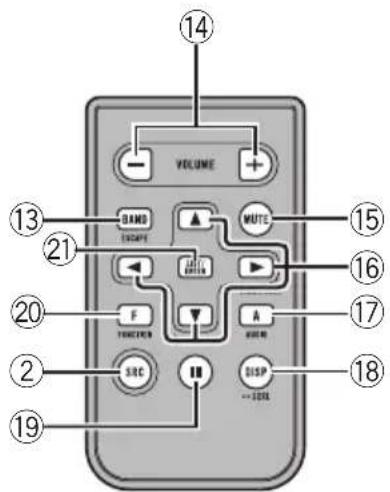
text_image
VOLUME DAND Escape AUTO F FUNCTION A SRC DISP =30Hz 14 15 16 17 18 19 20 21 13Quéescadacosa
Unidadprincipal
①BotónLIST
FM: OFF—LEVEL 1—LEVEL 2—LEVEL 3—LEVEL4
AM:OFF—LEVEL1—LEVEL2
CDplayerincorporado122
natural_image
Simple line drawing of a rectangular device with a black arrow pointing to its side (no text or symbols)natural_image
Technical line drawing of a mechanical assembly with a bracket and connector (no text or symbols)natural_image
Simple line drawing of a rectangular device with an arrow pointing to its side (no text or symbols)
natural_image
Diagram of a laboratory procedure showing a pipette and a magnified view of a sample (no text or symbols present)
ADVERTÊNCIA
Mantenhaabateriaforadoalcancedecrianças. Casoelasejaingerida, consulteummédicoimediatamente.

CUIDADO
text_image
Diagram of a device rear panel with numbered labels pointing to key components such as buttons, dials, and indicators.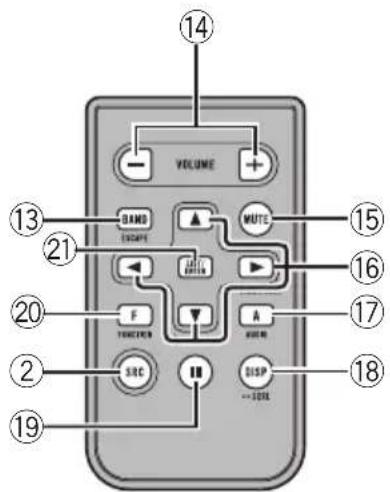
text_image
VOLUME 14 13 BAND ECAPE MUTO 21 F FUNCTION A WORM 15 16 17 20 SRC DISP -300K 18 19Introduçãoaosbotões
Unidadeprincipal
①BotãoLIST
Pressioneparavisualizaralistadetítulosde disco, listadetítulosdefaixa, listadepas-tas, listadearquivosoulistadecanaispro-gramadosdependendodafonte.
②BotãoSOURCE/OFF
FM: OFF—LEVEL 1—LEVEL 2—LEVEL 3—LEVEL4
AM:OFF—LEVEL1—LEVEL2
CLOCKSET(Hora)—FMSTEP(PassodesintoniaFM)—AMSTEP(PassodesintoniaAM)—
Chassi....178×50×162mm
Face....170×46×14mm
Peso....1,3kg
Áudio
Visit us on the World Wide Web at
http://pioneer.jp/group/index-e.html
Pioneer Gulf.FZE
http://www.pioneer-uae.com
Pioneer Electronics Australia. Pty.Ltd
http://www.pioneeraus.com.au
Pioneer Electronics Asiacentre.Pte
http://www.pioneer.com.sg
Pioneer (HK) Ltd.
http://www.pioneerhongkong.com.hk
Pioneer High Fidelity Taiwan Co., Ltd.
http://www.pioneer-twn.com.tw
Pioneer International Latin America S.A.
http://www.pioneer-latin.com
PIONEERCORPORATION
4-1,MEGURO1-CHOME,MEGURO-KU
PIONEERELECTRONICSAUSTRALIAPTY.LTD.
178-184BoundaryRoad, Braeside, Victoria3195, Australia
TEL:(03)9586-6300
PIONEERELECTRONICSOFCANADA, INC.
300AllstateParkway, Markham, OntarioL3R0P2, Canada
TEL:1-877-283-5901
TEL:905-479-4411
PIONEERELECTRONICSDEMEXICO,S.A.deC.V.
Blvd.ManuelAvilaCamacho13810piso
Col.LomasdeChapultepec,Mexico,D.F.11000
TEL:55-9178-4270
先鋒股份有限公司
總公司:台北市中山北路二段44號13樓
電話:(02)2521-3588
先鋒電子(香港)有限公司
香港九龍尖沙咀海港城世界商業中心
9樓901-6室
電話:(0852)2848-6488
PublishedbyPioneerCorporation.
Copyright©2007byPioneerCorporation.
Allrightsreserved.