DEH-5150UB - Receiver PIONEER - Free user manual and instructions
Find the device manual for free DEH-5150UB PIONEER in PDF.


User questions about DEH-5150UB PIONEER
0 question about this device. Answer the ones you know or ask your own.
Ask a new question about this device
Download the instructions for your Receiver in PDF format for free! Find your manual DEH-5150UB - PIONEER and take your electronic device back in hand. On this page are published all the documents necessary for the use of your device. DEH-5150UB by PIONEER.
USER MANUAL DEH-5150UB PIONEER
ThankyouforpurchasingthisPIONEERproduct.
Pleasereadthroughthismanualbeforeusingtheproductforthefirsttime,toensureproperuse.Afterreading,pleasekeepthemanualinasafeandaccessibleplace forfuturereference.
01 BeforeYouStart
Aboutthisunit5
Features5
Visitourwebsite5
Protectingyourunitfromtheft5
-Removingthefrontpanel6
-Attachingthefrontpanel6
Aboutthedemomode6
Useandcareoftheremotecontrol6
-Installingthebattery6
-Usingtheremotecontrol7
02 Operatingthisunit
What'swhat8
-Headunit8
-Remotecontrol9
BasicOperations10
-PowerON/OFF10
-Selectingasource10
-Adjustingthevolume10
Tuner11
-BasicOperations11
-Storingandrecallingbroadcast frequencies11
-Introductiontoadvanced operations11
-Storingthestrongestbroadcast frequencies12
-Tuninginstrongsignals12
Built-inCDPlayer12
-BasicOperations12
-Displayingtextinformationondisc13
-Selectingtracksfromthetracktitle list14
-Selectingfilesfromthefilename list14
-Introductiontoadvanced operations14
-Selectingarepeatplayrange15
-Playingtracksinrandomorder15
-Scanningfoldersandtracks15
-Pausing playback15
-Usingadvancedsoundretriever15
-Usingdisctitlefunctions15
PlayingsongsinaUSBstoragedevice17
-BasicOperations17
-Displayingtextinformationofanaudio file17
-Selectingfilesfromthefilename list18
-Introductiontoadvanced operations18
PlayingsongsoniPod19
-BasicOperations19
-Browsingforasong19
-Displayingtextinformationon iPod20
-Introductiontoadvanced operations20
-Playingsongsinarandomorder (shuffle)21
-Playingallsongsinarandomorder (shuffleall)21
-Playingsongsrelatedtothecurrently playingsong21
-Operatingthisunit'siPodfunction fromyouriPod22
-Changingaudiobookspeed22
03 AudioAdjustments
Introductionofaudioadjustments23
Usingbalanceadjustment23
Usingtheequalizer23
-Recallingequalizercurves23
-Adjustingequalizercurves24
-Adjusting7-bandgraphicequalizer24
Adjustingloudness25
Usingsubwooferoutput25
-Adjustingsubwoofersettings25
Boostingthebass26
Usingthehighpassfilter26
Adjustingsourcelevels26
04 InitialSettings
Adjustinginitialsettings27
Selectingthedisplaylanguage27
Settingthedate27
Settingtheclock27
SettingtheFMtuningstep28
SettingtheAMtuningstep28
Switchingthewarningtone28
Switchingtheauxiliarysetting28
Switchingthedimmersetting29
Adjustingthebrightness29
Settingtherearoutputandsubwoofer controller29
Switchingthesoundmuting/attenuation30
Switchingthefeaturedemo30
Switchingthereversemode30
Switchingtheeverscroll30
ActivatingtheBTAudiosource30
EnteringPINcodeforBluetoothwireless connection31
Displayingsystemversionforrepair31
05 OtherFunctions
UsingtheAUXsource32
-AboutAUX1andAUX232
-AUX1source:32
-AUX2source:32
-SelectingAUXasthesource32
-SettingtheAUXtitle32
Usingtheexternalunit32
-Selectingtheexternalunitasthe source32
-Basicoperation32
-Usingthefunctionsallocatedto1to6 keys33
-Advancedoperations33
Turningtheclockdisplayonoroff33
Switchingthedisplayindicationandbutton illumination33
Usingdifferententertainmentdisplays33
06 Availableaccessories
PlayingsongsoniPod35
-Basicoperation35
-Displayingtextinformationon iPod35
-Browsingforasong35
-Introductiontoadvanced operations35
-Playingsongsinarandomorder (shuffle)36
BluetoothAudio36
-BasicOperations36
-Functionandoperation37
-ConnectingaBluetoothaudio player37
-PlayingsongsonaBluetoothaudio player38
-Stopping playback38
-DisconnectingaBluetoothaudio player38
-DisplayingBD(BluetoothDevice) address38
BluetoothTelephone38
-BasicOperations38
-Settingupforhands-freephoning39
-Makingaphonecall39
-Takingaphonecall40
-Functionandoperation40
-Connectingacellularphone41
-Disconnectingacellularphone41
-Registeringaconnectedcellular phone42
-Deletingaregisteredphone42
-Connectingtoaregisteredcellular phone42
-Usingthephonebook43
-Usingthecallhistory45
-Makingacallbyenteringphone number45
-Clearingmemory46
-Settingautomaticrejecting46
-Settingautomaticanswering46
-Switchingtheringtone46
-Echocancelingandnoise reduction46
Multi-CDPlayer47
-BasicOperations47
-UsingCDTEXTfunctions47
-Introductiontoadvanced operations47
-Usingcompressionandbass emphasis48
-UsingITSplaylists48
-Usingdisctitlefunctions50
DVDPlayer51
-BasicOperations51
-Introductiontoadvanced operations51
TVtuner52
-BasicOperations52
-Storingandrecallingbroadcast stations53
-Storingthestrongestbroadcast stationssequentially53
AdditionalInformation
Errormessages54
Handlingguidelineofdiscsandplayer55
DualDiscs56
HandlingguidelineofUSBstoragedevice andthisunit56
Compressedaudiocompatibility(disc, USB)56
-Supplementalinformationof compressedaudio(disc,USB)57
Compressedaudiofilesonthedisc57
CompressedaudiofilesintheUSBstorage device57
Exampleofahierarchyand playback sequences57
-Thesequenceofaudiofilesonthe disc57
-ThesequenceofaudiofilesontheUSB storagedevice57
iPod58
-iPodcompatibility58
-AbouthandlingtheiPod58
-AboutiPodsettings58
Copyrightandtrademarknotice59
Specifications60
Aboutthisunit

CAUTION
- Donotallowthisunittocomeintocontact withliquids. Electricalshockcouldresult. Also, damagetothisunit, smoke, andoverheatingcouldresult from contact with liquids.
- "CLASS1LASERPRODUCT" Thisproductcontainsalaserdiodeofhigher classthan1.Toensurecontinuedsafety,do notremoveanycoversorattempttogainaccesstotheinsideoftheproduct.Referallservicingtoqualifiedpersonnel.
- Keep this manual handy as a reference for operating procedures and precautions.
• Alwayskeepthevolumelowenoughsothat youcanhearsoundsfromoutsidethevehicle. - Protect this unit from moisture.
- If the battery is disconnected, discharged, the preset memory will be erased and must be reprogrammed.
Features
Thisunitiscompatiblewithawidevarietyof fileformatsandmedia/storagedevices.
Fileformatcompatibility
•WMA
• MP3
• AAC
• WAV
Fordetailsaboutcompatibility,refertoAddi- tionalInformationonpage54.
Media/storagedevicecompatibility
- CD/CD-R/CD-RW
- USBportableaudioplayer/USBmemory Makeinquiriestothemanufacturerabout yourUSBportableaudioplayer/USBmemory. Fordetailsaboutcompatibility,refertoAdditionallInformationonpage54.
iPodcompatibility
Thisunitcancontrolandlistentosongsonan iPod.
Inthismanual,iPodandiPhonewillbereferredtoasiPod.
FordetailsaboutthesupportediPod,referto iPodcompatibilityonpage58.

CAUTION
- Pioneeracceptsnoresponsibilityfordatalost ontheUSBmemory/USBportableaudio playerevenifthatdataislostwhileusingthis unit.
- Pioneeracceptsnoresponsibilityfordatalost ontheiPodevenifthatdataislostwhile usingthisunit.
Visitourwebsite
Visitusatthefollowingsite: http://pioneer.jp/group/index-e.html
- Weofferthelatestinformationabout PioneerCorporationonourwebsite.
Protectingyourunitfrom theft
Thefrontpanelcanbedetachedtodetertheft.
- If the front panel is not detached from the head unit within five seconds, fast turning off the ignition, awarning tones sounds.
- Youcanturnoffthewarningtone.Referto Switchingthewarningtoneonpage28.

Important
- Handlegentlywhenremovingorattaching thefrontpanel.
- Avoid subjecting the front panel to excessive shock.
- Keepthefrontpaneloutofdirectsunlightand hightemperatures.
- Before detaching, besuretoremovetheAUX/USBcableandUSBdevicefromthefront panel. If they are not removed, this unit, any connected devices or the vehicle interior may be damaged.
Removingthefrontpanel
1Press(detach)toreleasethefront panel.
2Grabthefrontpanelandremove.

natural_image
Simple line drawing of a rectangular device with a black arrow pointing to its side (no text or symbols)3Putthefrontpanelintotheprovided protectivecaseforsafekeeping.
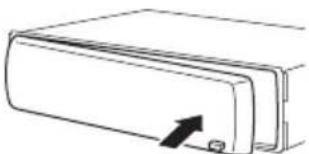
Attachingthefrontpanel
1Slidethefrontpaneltotheleftuntil clicks.
Frontpanelandtheheadunitarejointedon theleftside.Makesurethatthefrontpanel hasbeenjointedtotheheadunit.

natural_image
Pure technical line drawing of a mechanical component with no text or symbols2Presstherightsideofthefrontpanel untilitisfirmlyseated.
- If you can't attach the front panel to the head unitsuccessfully, try again. Frontpanel maybe damaged if you attach the front panel forced by
natural_image
Simple line drawing of a rectangular device with an arrow pointing to its side (no text or symbols)
Aboutthedemomode
Thisunitfeaturestwodemonstrationmodes. Oneisthereversemode, theotheristhefea-turedemomode.

Important
Theredlead(ACC)ofthisunitshouldbeconnectedtoaterminalcoupledwithignitionswitch on/offoperations.Ifthisisnotdone,thevehicle batterymaybedrained.
Reversemode
If you donot perform an operation within about 30 seconds, screen indications start to reverse, and then continue reversing every 10 seconds. Pressing button BAND/ESC when powerto this unit is turned off while the ignition switch cissetto ACC or ON cancel there-verse mode. Press button BAND/ESC againto start there reverse mode.
Featuredemomode
Thefeaturedemoautomaticallystartswhen powertothisunitisturnedoffwhiletheignitionswitchissettoACCorON.PressDISP duringfeaturedemooperationtocancel the featuredemomode.PressDISPagaintostart. Rememberthatifthefeaturedemocontinues operatingwhenthecarengineisturnedoff, it maydrainbatterypower.
Useandcareoftheremote control
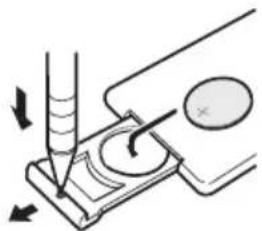
Installingthebattery
Slidethetrayonthebackoftheremotecontroloutandinsertthebatterywiththeplus(+) andminus(-)polesalignedproperly.
natural_image
Diagram of a pipette dispensing liquid into a container with an arrow indicating force (no text or symbols present)
WARNING
- Keepthebatteryoutofthereachofchildren. Shouldthebatterybeswallowed,consulta doctorimmediately.
BeforeYouStart
- Batteries(batterypackorbatteriesinstalled) shall not be exposed to excessive heats such as sunshine, fireorthelike.

CAUTION
• UseoneCR2025(3V) lithium battery.
- Removethebatteryiftheremotecontrolisnot usedforamonthorlonger.
- Thereisadangerofexplosionifthebatteryis incorrectlyreplaced.Replaceonlywiththe sameorequivalenttype.
- Donothandlethebatterywithmetallictools.
- Donotstorethebatterywithmetallicobjects.
- If the battery leaks, wipetheremote control completely clean and install anew battery.
- Whendisposingofusedbatteries,comply withgovernmentalregulationsorenvironmentalpublicinstitutions'rulesthatapplyinyour country/area.
Usingtheremotecontrol
Pointtheremotecontrolinthedirectionofthe frontpaneltooperate.
- Theremotecontrolmaynotfunctionproperlyindirectsunlight.

Important
- Donotstoretheremotecontrolinhighttemperaturesordirectsunlight.
- Donotlettheremotecontrolfallontothe floor,whereitmaybecomejammedunderthe brakeoracceleratorpedal.
What'swhat Headunit

text_image
①②③⑤ ④ ⑥ ⑦⑧⑨ ⑮⑭⑮⑰⑪⑫⑬⑯⑰①SRC/OFFbutton
Thisunitisturnedonbyselectingasource. Presstocyclethroughalltheavailable sources.
② /LISTbutton
Presstodisplaythedisctitlelist,tracktitle list,folderlist,filelistorpresetchannellist dependingonthesource.
Pressandholdtoswitchtolinkplaymode whileusinganiPod.
Fordetails, refertoPlayingsongsrelatedto thecurrentlyplayingsongonpage21.
③S.Rtrvbutton
Presstoswitchadvancedsoundretriever settings.
Fordetails, referto Usingadvancedsound retrieveronpage15.
④ MULTI-CONTROL
Movetoperformmanualseektuning, fast forward, reverse and track search controls.
Alsousedforcontrollingfunctions.
Turntoincreaseordecreasethevolume.
⑤SW/BASSbutton
Presstoswitchtosubwoofersettingmenu. Whenoperatingsubwoofermenu, pressto switchmenu.
Pressandholdtoswitchobassboost menu.
⑥Discloadingslot
InsertaCD/CD-R/CD-RWtoplay.
⑦▲(eject)button
PresstoejectaCD/CD-R/CD-RW.
⑧CLOCK/DISPOFFbutton
Presstochangetotheclockdisplay.
Pressandholdtoturnthedisplayindication andbuttonilluminationofforon.
⑨USBport
UsetoconnectaUSBstoragedeviceand aniPod.
- Whenconnecting, openuptheUSBconnectorlid.
- UseaUSBcabletoconnecttheUSBstoragedevicetotheUSBport.Sincethe USBstoragedeviceisprojectedforward fromtheunit,itisdangeroustoconnect directly.
PioneerCD-U50EUSBcableisalsoavailable.Fordetails.consultyourdealer.
⑩ (detach)button
Presstoremovethefrontpanelfromthe headunit.
⑪AUXinputjack(3.5mmstereojack)
Usetoconnectanauxiliarydevice.
⑫ ⇌ (repeat)/LOCbutton
Presstoswitchtherepeatplayrangewhile usingCD,USBoriPod.
Presstoswitchlocalsettingswhileusing tunerasthesource.
⑬ (random)/iPodbutton
Presstoturnrandomfunctiononoroff whileusingCDorUSB.
WhileusinganiPod, presstoshuffleall tracks.
Pressandholdtoswitchthecontrolmode whileusinganiPod.
Fordetails, refertoOperatingthisunit'siPod function from youriPodonpage22.
IfusingtheiPodwithaninterfaceadapter (CD-IB100Ⅲ),presstoswitchtheshuffle function.
⑭DISP/SCRLbutton
Presstoselectdifferentdisplays.
Operatingthisunit
Pressandholdtoscrollthroughthetextinformation.
⑮BAND/ESCbutton
PresstoselectamongthreeFMbandsand oneAMband.
Presstoreturntotheordinarydisplaywhen operatingthemenu.
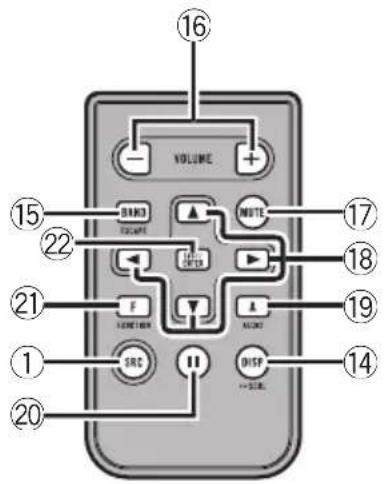
Remotecontrol
Operationisthesameaswhenusingthebuttonsontheheadunit.
text_image
VOLUME 16 15 22 17 NOTE 18 21 F 19 A 14 SRS DISP -- SRL 20⑯VOLUMEbuttons
Presstoincreaseordecreasethevolume.
⑰MUTEbutton
Presstoturnoffthesound.Toturnonthe sound,pressagain.
⑱ ▲/▼/◄/► buttons
Presstoperformmanualseektuning, fast forward, reverse and track search controls. Alsoused for controlling functions.
⑲AUDIObutton
Presstoselectanaudiofunction.
⑳11button
Presstoturnpauseonoroff.
②1FUNCTIONbutton
Presstoselectfunctions.
⑳LIST/ENTERbutton
Presstodisplaythedisctitlelist,tracktitle list,folderlist,filelistorpresetchannellist dependingonthesource.
Whileintheoperatingmenu,presstocontrolfunctions.
BasicOperations
PowerON/OFF
Turningtheuniton
●PressSRC/OFFtoturntheuniton.
Turningtheunitoff
- PressSRC/OFFandholduntiltheunit turnsoff.
Selectingasource
Youcanselectasourceyouwanttolistento.
- PressSRC/OFFrepeatedlytoswitchbetweenthefollowingsources.
Tuner (tuner)—TV (television)—DVD (DVD player/multi-DVDplayer)—CD(built-inCD player)—Multi CD (multi-CD player)—iPod (iPodconnectedwiththeinterfaceadapter)—USB(USBstoragedevice)/iPod(iPodconnectedusingUSBInput)—EXT(externalunit 1)—EXT (external unit 2)—AUX1 (AUX1)—AUX2 (AUX2)—BT Audio (BT audio)—TEL (BT telephone)

Notes
- In the following cases, the soundsource will not change.
—When noun it corresponding to these-lected source is connected.
—Whenthereisnodiscormagazineinthe player.
—WhentheiPodisnotconnectedtothis unitwiththeinterfaceadapter.
—WhenAUX(auxiliaryinput)issettooff (refertopage28).
—WhentheBTAudiosourceissettooff (refertoActivatingtheBTAudiosourceon page30).
- WhenanUSBstoragedeviceoriPodisnot connectedtotheUSBportofthisunit, NODEVICEisdisplayed.
- AUX1issettoonbydefault.TurnofftheAUX1 whennotinuse(refertoSwitchingtheauxiliarysettingonpage28).
- Chargingtheportableaudioplayerusing car'sDCpowersourcewhileconnectingitto AUXinputmaygeneratenoise.Inthiscase, stopcharging.
- ExternalunitreferstoaPioneerproduct(such asonesavailableinthefuture)that,although incompatibleasasource,enablescontrolof basicfunctionswiththisunit.Twoexternal unitscanbecontrolledwiththisunit.When twoexternalunitsareconnected,theexternal unitisautomaticallyallocatedtoexternalunit 1orexternalunit2bythisunit.
- Whenthisunit'sblue/whiteleadisconnected tothevehicle'sauto-antennarelaycontrol terminal,thevehicle'santennaextendshwhen thisunit'ssourceisturnedon.Toretractthe antenna,turnthesourceoff.
Adjustingthevolume
●TurnMULTI-CONTROLtoadjustthe soundlevel.
Tuner
BasicOperations
If you are using this unit in North, Central or South America, reset the AM tuning step (referto Setting the AM tuning step on page 28).
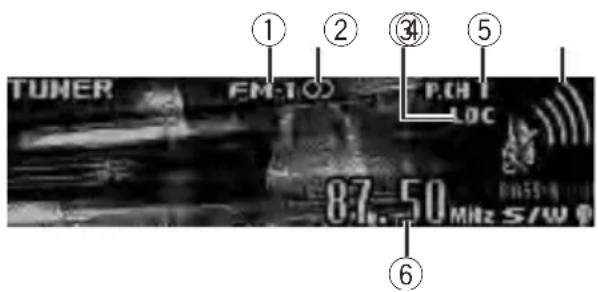
text_image
TUNER FM-TOC P.CH LOC 87.50 MHz S/W ① ② ③ ⑤ ⑥①Bandindicator
②○(stereo)indicator
Appearswhentheselectedfrequencyisbeing broadcastinstereo.
③LOCindicator
Appearswhenlocalseektuningison.
④Presetnumberindicator
⑤Signallevelindicator
Showstheradiowavestrength.
⑥Frequencyindicator
- Selectaband
PressBAND/ESC.
■ Band can be selected from among FM1, FM2, FM3orAM.
● Manualtuning(stepbystep)
Push MULTI-CONTROL leftor right.
- Seektuning
PushandholdMULTI-CONTROLleftorright, and then release.
■Youcancancelseektuningbypushing MULTI-CONTROLleftorright.
■WhilepushingandholdingMULTI-CONTROL leftorright,youcanskipstations.Seektuning startsassoonasyoureleaseMULTI-CONTROL.
Storingandrecallingbroadcast frequencies
Youcaneasilystoreuptosixbroadcastfrequenciesforlaterrecall.
- Sixstationsforeachbandcanbestoredin memory.
1Press /LIST.
Presetscreenisdisplayed.
2UseMULTI-CONTROLtostorethese- lectedfrequencyinmemory.
Turntochangethepresetnumber.Pressand holdtostore.
3UseMULTI-CONTROLtoselectthedesiredstation.
Turntochangethestation.Presstoselect.
■Youcanalsochangetestationbypushing MULTI-CONTROLupordown.
■Toreturntotheordinarydisplay,press
BAND/ESCor 📋/LIST.
■If you donotoperatethelist within about 30 seconds, the display automatically return to the ordinary display.
■Youcanalsorecallradiostationfrequencies assignedtopresettuningnumbersbypushing MULTI-CONTROLupordownduringthefrequencydisplay.
Introductiontoadvanced operations
1PressMULTI-CONTROLtodisplaythe mainmenu.
2UseMULTI-CONTROLtoselect FUNCTION.
Turntochangethemenuoption.Presstose-lect.
Thefunctionmenuisdisplayed.
3TurnMULTI-CONTROLtoselectthe function.
BSM(beststationsmemory)—Local(local seektuning)

Notes
• Toreturntotheordinarydisplay, press BAND/ESC.
- If you donot operate functions within about 30 seconds, the display automatically returns to the ordinary display.
Storingthestrongestbroadcast frequencies
BSM(beststationsmemory)letsyouautomaticallystorethesixstrongestbroadcastfrequencies.
1UseMULTI-CONTROLtoselectBSMin thefunctionmenu.
RefertoIntroductiontoadvancedoperations onthepreviouspage.
2PressMULTI-CONTROLtoturnBSMon.
Thesixstrongestbroadcastfrequenciesare storedintheorderoftheirsignalstrength.
■Tocancel, press MULTI-CONTROLagain.
Tuninginstrongsignals
Localseektuningletseyoutuneinonlythose radiostationswithsufficientlystrongsignals forgoodreception.
- Press ⇌/LOCrepeatedlytoselectthe desiredsetting.
FM: OFF—Level 1—Level 2—Level 3—Level4
AM:Level1—Level2
TheLevel4settingallowsreceptionofonly thestrongeststations,whilelowersettingslet youreceiveprogressivelyweakerstations.

Note
Youcanalsoperformthisoperationinthemenu thatappearsbyusingMULTI-CONTROL.
Built-inCDPlayer BasicOperations

text_image
CD WMA FDD TRK 01'28 kbps 01'17" S/W ① ② ③ ④ ⑤①WMA/MP3/AAC/WAVindicator
Showsthetypeofaudiofilecurrentlyplaying
whenthecompressedaudioisplaying.
②Foldernumberindicator
Showsthefoldernumbercurrentlyplaying
whenthecompressedaudioisplaying.
③Tracknumberindicator
④Playtimeindicator
⑤Bitrate/samplingfrequencyindicator
Showsthebitrateorsamplingfrequencyof
thecurrenttrack(file)whenthecompressed
audioisplaying.
- WhenplayingbackVBR(variablebit rate)-recordedWMAfiles,theaverage bitratevalueisdisplayed.
- WhenplayingbackVBR(variablebit rate)-recordedMP3files, VBRisdisplayinsteadofbitratevalue.
- InsertingaCD/CD-R/CD-RWintothe discloadingslot
Playbackwillautomaticallystart.
■WhenloadingaCD/CD-R/CD-RW,face thelabelsideofadiscup.
●EjectingaCD/CD-R/CD-RW
Press▲(eject).
- Selectafolder
Push MULTI-CONTROLupordown.
■Youcannotselectafolderthatdoesnothave acompressedaudiofilerecordedinit.
- Selectatrack
Push MULTI-CONTROL leftor right.
Operatingthisunit
●Fastforwardorreverse
Pushandhold MULTI-CONTROL leftorright.
■Whenplayingcompressedaudio,thereisno soundonfastforwardorreverse.
●Returntorootfolder
PressandholdBAND/ESC.
■Iffolder01(ROOT)containsnofiles, playback commenceswithfolder02.
●Switchbetweencompressedaudioand CD-DA
PressBAND/ESC.
■Thisoperationisavailableonlywhenplaying CD-EXTRAorMIXED-MODECDs.
■ If you have switched between uncompressed audio and CD-DA, playback starts at the first track on the disc.

Notes
- Thebuilt-inCDplayercanplaybackaudioCD andcompressedaudiorecordedonaCD-ROM.(Pleaseseethefollowingsectionfor filesthatcanbeplayedback.Refertopage 57.)
- Readtheprecautionsfortheplayeranddiscsinthefollowingsection.Refertopage55.
- Adischasalreadybeeninserted, pressSRC/OFFtoselectthebuilt-inCDplayer.
- Thereissometimesadelaybetweenstarting updiscplaybackandthesoundbeingissued. Whenbeingread,FORMATREADisdisplayed.
- Ifanerrormessageisdisplayed, refertoError messagesonpage54.
- Playbackiscarriedoutinorderoffilenumber. Foldersareskippediftheycontainnofiles.(If folder01(ROOT)containsnofiles, playback commenceswithfolder02.)
Displayingtextinformationon disc
- PressDISP/SCRLtoselectthedesired textinformation.
- FortitleenteredCD
Playtime— Ⓧ:disctitleandplaytime
- ForCDTEXTdiscs
Playtime— ☐:discartistnameand:
tracktitle— ☐:discartistnameand:
disctitle— ☐:disctitleand:tracktitle
— ☐:trackartistnameand:tracktitle
— ☐:tracktitleandplaytime—:track
title, ☐:trackartistnameand:disctitle
• ForWMA/MP3/AAC
Playtime— :foldernameand:file name— :artistnameand:tracktitle — :artistnameand:albumtitle—: albumtitleand :tracktitle—:track titleandplaytime— :commentandplay time— :tracktitle,:artistnameand :albumtitle
- ForWAV
Playtime— foldernameand:file name

Notes
- Youcanscrolltotheleftofthetitlebypassing andholdingDISP/SCRL.
•AudioCDthatcontainscertaininformation suchastextand/ornumberisCDTEXT. - If specific information is not recorded on a disc, title or name is not displayed.
- DependingontheversionofiTunesusedto writeMP3filesontoadisc,commentinformationmaynotbecorrectlydisplayed.
- DependingontheversionofWindows Media™PlayerusedtoencodeWMAfiles, albumnamesandothertextinformationmay notbecorrectlydisplayed.
- WhenplayingbackVBR(variablebitrate)-recordedWMAfiles,theaveragebitratevalueis displayed.
- WhenplayingbackVBR(variablebitrate)-recordedMP3files, VBRisdisplayedinsteadof bitratevalue.
- Thesamplingfrequencyshowninthedisplay maybeabbreviated.
- When EverScrollissettoONattheinitialsetting.textinformationscrollscontinuouslyin thedisplay.RefertoSwitchingtheeverscroll onpage30.
Selectingtracksfromthetrack titlelist
Tracktitlelistletsyouseethelistoftracktitles onaCDTEXTdiscandselectoneofthemto playback.
1Press ⚫/LISTtoswitchtothetracktitle listmode.
2UseMULTI-CONTROLtoselectthedesiredtracktitle.
Turntochangethetracktitle.Presstoplay.
■Youcanalsochangethetracktitlebypushing MULTI-CONTROLupordown.
■Youcanscrolltotheleftofthetitlebypassing andholdingDISP/SCRL.Tostopscrolling,press DISP/SCRL.
■Toreturntotheordinarydisplay,press
BAND/ESCor 📋/LIST.
■Ifyoudonotoperatethelistwithinabout30 seconds,thedisplayautomaticallyreturnstothe ordinarydisplay.
Selectingfilesfromthefile namelist
Filenamelistletsyouseethelistoffilenames (orfoldernames) and selectoneofthemto playback.
1Press ⚫/LISTtoswitchtothefilename listmode.
Namesoffilesandfoldersappearinthedisplay.
2UseMULTI-CONTROLtoselectthedesiredfilename(orfoldername).
Turntochangethenameoffileorfolder.
—whenafileisselected, presstoplay.
—whenafolderisselected, presstoseealist offiles (orfolders) in theselected folder.
—whenafolderisselected, pressandholdto playasongintheselectedfolder.
■Youcanalsoplaythefilebypushing
MULTI-CONTROLright.
■Youcanalsoplayasongintheselectedfolder bypushingandholdingMULTI-CONTROLright.
■Toreturntothepreviouslist(thefolderone levelhigher),pushMULTI-CONTROLleft.
■Numberofthefolders/filesinthecurrentlyselectedfolderwillbeindicatedontherightsideofthedisplay.
■Youcanscrolltotheleftofthetitlebypassing andholdingDISP/SCRL.Tostopscrolling,press DISP/SCRL.
■Toreturntotheordinarydisplay,press
BAND/ESCor Ⓑ/LIST.
■Ifyoudonotoperatethelistwithinabout30 seconds,thedisplayautomaticallyreturnstothe ordinarydisplay.
Introductiontoadvanced operations
1PressMULTI-CONTROLtodisplaythe mainmenu.
2UseMULTI-CONTROLtoselect FUNCTION.
Turntochangethemenuoption.Presstose-lect.
3TurnMULTI-CONTROLtoselectthe function.
Playmode(repeatplay)—Randommode (randomplay)—Scanmode(scanplay)—Pause(pause)—SoundRetriever(advanced soundretriever)—TitleInput"A"(disctitle input)

Notes
• Toreturntotheordinarydisplay, press BAND/ESC.
- If you donot operate function except for TitleInput "A" within about 30 seconds, the display automatically return to the ordinary display.
- WhenplayingacompressedaudiodiscorCD TEXTdisc,youcannotswitchtodisctitleinput display.
Selectingarepeatplayrange
- Press/LOCrepeatedlytoselectthe desiredsetting.
- Discrepeat-Repeatalltracks
- Trackrepeat—Repeat the current track
- Folderrepeat—Repeatthecurrentfolder
■ If you select another folder during repeat play, therepeat play range changestodiscrepeat.
■Performingtracksearchorfastforward/reverseduringTrackrepeat(trackrepeat)changestherepeatplayrangetodisc/folder.
- WhenFolderrepeat(folderrepeat)isselected, it is not possible to playback as subfolder of that folder.

Note
Youcanalsoperformthisoperationinthemenu thatappearsbyusingMULTI-CONTROL.
Playingtracksinrandomorder
Tracksinaselectedrepeatrangeareplayedin randomorder.
●Press 📧/ iPodoturnrandomplayon.
Tracksplayinarandomorder.
■Toturnrandomplayoff, press/iPodagain.

Note
Youcanalsoturnthisfunctiononoroffinthe menuthatappearsbyusingMULTI-CONTROL.
Scanningfoldersandtracks
Scanplaysearchesthesongwithinthese- lectedrepeatrange.
1UseMULTI-CONTROLtoselect Scanmodeinthefunctionmenu.
RefertoIntroductiontoadvancedoperations onthepreviouspage.
2PressMULTI-CONTROLtoturnscanplay on.
The first 10 second so feach track is played.
3Whenyoufindthedesiredtrackpress MULTI-CONTROLtoturnscanplayoff.
■ Ifthedisplayhasautomaticallyreturned to the playbackdisplay, select Scanmode again by using MULTI-CONTROL.
■Afterscanningofadisc(folder)isfinished, normal playbackofthetracksbegins.
Pausing playback
1UseMULTI-CONTROLtoselectPausein thefunctionmenu.
RefertoIntroductiontoadvancedoperations onthepreviouspage.
2PressMULTI-CONTROLtoturnpause on.
Playbackofthecurrenttrackpauses.
■Toturnpauseoff, press MULTI-CONTROL again.
Usingadvancedsoundretriever
Advanced soundretrieverfunction automatically enhances compressed audio and restores rich sound.
- PressS.Rtrvrepeatedlytoselectthedesiredsetting.
OFF(off)—1—2
■2ismoreeffectivethan1.

Note
Youcanalsoperformthisoperationinthemenu thatappearsbyusingMULTI-CONTROL.
Usingdistitlefunctions
YoucaninputCDtitlesandddisplaythetitle. ThenexttimeyouinsertaCDforwhichyou haveenteredatitle, thetitleofthatCDdisdisplayed.
Operatingthisunit
Enteringdisctitles
Usethedisctitleinputfeaturetostoreupto 48CDtitlesintheunit.Eachtitlecanbeupto 10characterslong.
1PlaytheCDthatyouwanttoentera titlefor.
2UseMULTI-CONTROLtoselect TitleInput"A"inthefunctionmenu.
RefertoIntroductiontoadvancedoperations onpage14.
3PressDISP/SCRLtoselectthedesired charactertype.
PressDISP/SCRLrepeatedlytoswitchbetween the followingcharactertypes:
Alphabet(uppercase), numbersandsymbols—Alphabet(lowercase)—Europeanletters, such as those with accents (e.g. á, à, ä, ç)—Numbersandsymbols
4PushMULTI-CONTROLupordownto selectaletterofthealphabet.
5PushMULTI-CONTROLleftorrightto movethecursortothepreviousornext characterposition.
6Movethecursortothelastpositionby pushingMULTI-CONTROLrightafterenteringthetitle.
When you push MULTI-CONTROL rightone more time, the entered title is stored in memory.
7PressBAND/ESCtoreturntotheplay-backdisplay.

Notes
- Titlesremaininmemory,evenafterthediscis removedfromtheunit,andarerecalledwhen thediscisreinserted.
• Afterdatafor48discsarestoredinthememory, dataforanewdiscoverwritestheoldest one. - Ifyouconnectamulti-CDplayer,youcan inputdisctitlesforupto100discs.
- Whenamulti-CDplayerthatdoesnotsupport disctitlefunctionsisconnected,youcannot enterdisctitlesinthisunit.
Operatingthisunit
PlayingsongsinaUSB storagedevice
Youcanplaycompressedaudiofilesstoredin aUSBstoragedevice.
- Fordetailsaboutcompatibility,refertoAdditionallInformationonpage54.
BasicOperations

text_image
USB WMA FLDO FTRK01 0128 kbps 03'-17" S/W ① ② ③ ④ ⑤①WMA/MP3/AAC/WAVindicator
Showsthetypeoffilecurrentlyplaying.
②Foldernumberindicator
③Tracknumberindicator
④Playtimeindicator
⑤Bitrate/samplingfrequencyindicator
- WhenplayingbackVBR(variablebit rate)-recordedWMAfiles,theaverage bitratevalueisdisplayed.
- WhenplayingbackVBR(variablebit rate)-recordedMP3files, VBRisdisplayinsteadofbitratevalue.
● PluggingaUSBstoragedevice and playing
1PlugaUSBstoragedeviceintotheUSB port. Regarding the position of USB port, refer to Headuniton page 8.
2PressSRC/OFFtoselectUSBasasource, Playbackwillstart.
■ UseaUSBcabletoconnecttheUSBstorage device to the USBport. SincetheUSBstoragedevice is projected forward from the unit, it is dangerous to connect directly.
- Selectafolder
Push MULTI-CONTROLupordown.
●Fastforwardorreverse
Pushandhold MULTI-CONTROL leftor right.
- Selectatrack
Push MULTI-CONTROL leftor right.
●Returntorootfolder
PressandholdBAND/ESC.
●UnpluggingaUSBstoragedevice
PullouttheUSBstoragedevice.
YoucandisconnecttheUSBstoragedevice anytimeyouwanttofinishlisteningtoit.

Notes
- Read the precautions for USB storage devices and this unit in the following section. Referto Additional Information.
- If an error message is displayed, refer to Error messagesonpage54.
- lffolder01(ROOT)containsnofiles, playback commenceswithfolder02.
- When the USB portable audioplayer having battery charging function is connected to this unit and the ignition switch is set to ACC or ON, the battery is charged.
Displayingtextinformationof anaudiofile
Theoperationisthesameasthatofthebuilt-inCDplayer.
RefertoDisplayingtextinformationondiscon page13.

Notes
- If the characters recorded on the audio file are not compatible with the head unit, those characters are not displayed.
- Thetextinformationofsomeaudiofilesmay notbecorrectlydisplayed.
Selectingfilesfromthefile namelist
Theoperationisthesameasthatofthebuilt-inCDplayer.
RefertoSelectingfilesfromthefilenamelist onpage14.
Introductiontoadvanced operations
1PressMULTI-CONTROLtodisplaythe mainmenu.
2UseMULTI-CONTROLtoselect FUNCTION.
Turntochangethemenuoption.Presstose-lect.
3TurnMULTI-CONTROLtoselectthe function.
Playmode(repeatplay)—Randommode
(randomplay)—Scanmode(scanplay)—
Pause(pause)—SoundRetriever(advanced soundretriever)
Functionandoperation
Play mode, Random mode, Scan mode,
Pause and SoundRetrieveroperations are basically the same as that of the built-in CD player.
FunctionnameOperation
| Playmode | RefertoSelectingarepeatplay rangeonpage15.However,therepeatplayranges youcanselectaredifferentfrom thatofthebuilt-inCDplayer.The repeatplayrangesoftheUSB storagedeviceare:Trackrepeat-Repeatjust thecurrentfileFolderrepeat-Repeatthe currentfolderAllrepeat-Repeatallfiles |
| Randommode | RefertoPlayingtracksinrandom orderonpage15. |
| Scanmode | RefertoScanningfoldersand tracksonpage15. |
| Pause | RefertoPausingplaybackonpage 15. |
| SoundRetriever | RefertoUsingadvancedsoundre-trieveronpage15. |

Notes
• Toreturntotheordinarydisplay, press BAND/ESC.
- If you select another folder during repeat play, therepeat play range changesto Allrepeat.
- If you perform track search forward/ reversed during Track repeat, therepeat play rangechangesto Folder repeat.
- WhenFolderrepeatisselected, it is not possible to playback as subfolder of that folder.
• Afterfileorfolderscanningisfinished, normal playbackofthefilesbeginsagain.
- If you donot operate functions within about 30 seconds, the display automatically returns to the ordinary display.
Operatingthisunit
PlayingsongsoniPod
Youcancontrolandlistentosongsonan iPod.
- FordetailsaboutthesupportediPod, refer toiPodcompatibilityonpage58.
- WhenusinganiPod,iPodDockConnector toUSBCableisrequired.
BasicOperations
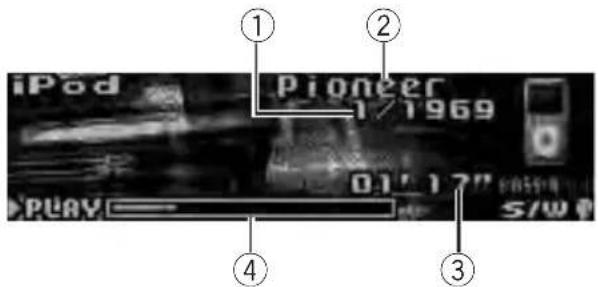
text_image
① iPod Pioneer 1/1969 0.1" 12" PLAY S/W①Songnumberindicator
②iPodname
③Playtimeindicator
④Songtime(progressbar)
- ConnectinganiPod
1PluganiPodintotheUSBportusingthe iPodDockConnectortoUSBCable. RegardingthepositionofUSBport, refer to Headunitonpage8.
2PressSRC/OFFtoselectiPodasasource. Playbackwillstart.
●Fastforwardorreverse
Pushandhold MULTI-CONTROL leftor right.
- Selectatrack(chapter)
Push MULTI-CONTROL leftorright.
●DisconnectinganiPod
PullouttheiPodDockConnectortoUSB Cable.

Notes
- ReadtheprecautionsforiPodinthefollowing section.Refertopage58.
-
Ifanerrormessageisdisplayed, refertoError messagesonpage54.
-
WhentheignitionswitchissettoACCorON, theiPod'sbatteryischargedwhiletheiPodis connectedtothisunit.
- While the iPodis connected to this unit, the iPod cannot be turned on or off. However when the control mode is set to iPod, you can turn the iPod on or off.
- Beforeconnectingthedockconnectorofthis unittotheiPod, disconnecttheheadphones fromtheiPod.
•TheiPodisturnedoffabouttwominutesafter theignitionswitchissettoOFF.
Browsingforasong
OperationstocontrolaniPodwiththisunitis designedtobeasclosetotheiPodaspossible tomakeoperationandsongsearcheasy.
- Dependingonthenumberoffilesinthe iPod,theremaybeadelaywhendisplaying alist.
- If the characters recorded on the Pod are not compatible with this unit, those characters are not displayed.
Searchingsbycategory
1Press/LISToswitchtothetopmenu ofthelistsearch.
2UseMULTI-CONTROLtoselectacate-gory.
Turntochangethecategory.Presstoselect. Playlists (playlists)—Artists (artists)— Albums (albums)—Songs (songs)—Podca (podcasts)—Genres (genres)—Composers (composers)—Audiobooks(audiobooks) Listfortheselectedcategoryisdisplayed.
■Youcanstartplaybackthroughoutthese- lectedcategorybypassingandholding MULTI-CONTROL.Youcanalsoperformthisop- erationbypushingandholding MULTI-CONTROLright.
■Youcanalsochangethecategorybypushing MULTI-CONTROLupordown.
■Youcanalsoselectthecategorybypushing MULTI-CONTROLright.
Operatingthisunit
3Repeatstep2tofindasongyouwant tolistento.
■Toreturntothepreviouscategory,push MULTI-CONTROLleft.
■Toreturntothetoptierofcategories, push andhold MULTI-CONTROL left.
■Youcanscrolltotheleftofthetitlebypassing andholdingDISP/SCRL.Tostopscrolling,press DISP/SCRL.
■Toreturntotheordinarydisplay,press BAND/ESC.
■Ifyoudonotoperatethelistwithinabout30 seconds,thedisplayautomaticallyreturnstothe ordinarydisplay.
Searchingbyalphabetinthelist
1Press/LISToswitchtothetopmenu ofthelistsearch.
2UseMULTI-CONTROLtoselectacate-gory.
Turntochangethecategory.Presstoselect.
3Whenalistfortheselectedcategoryis displayed, press ⚫/LISTtoswitchtoalphabetsearchmode.
4TurnMULTI-CONTROLtoselectaletter ofthealphabet.
5PressMULTI-CONTROLtodisplaythealphabeticallist.
Thelistisdisplayedstartingfromtheselected letterofthealphabet.
■Ifalphabetsearchisaborted,NOTFOUNDis displayed.
Displayingtextinformationon iPod
- PressDISP/SCRLtoselectthedesired textinformation.
Playtime— 📄:artistnameand:songtitle — 📄:artistnameand:albumname—: albumnameand 🌐:songtitle—:songtitle andplaytime— 🌐:songtitle,;artistname and Ⓧ:albumname
■ If the characters recorded on the Podarenot compatible with this unit, those characters are not displayed.

Notes
- Youcanscrollthetextinformationtotheleft bypressingandholdingDISP/SCRL.
- When Ever ScrollissettoONattheinitialsetting.textinformationscrollscontinuouslyin thedisplay.RefertoSwitchingtheeverscroll onpage30.
Introductiontoadvanced operations
1PressMULTI-CONTROLtodisplaythe mainmenu.
2UseMULTI-CONTROLtoselect FUNCTION.
Turntochangethemenuoption.Presstose-lect.
3TurnMULTI-CONTROLtoselectthe function.
Playmode(repeatplay)—Shufflemode (shuffle)—Shuffle all (shuffle all)—Link play (linkplay)—Controlmode(controlmode)—Pause(pause)—Audiobooks(audiobook speed)—SoundRetriever(advancedsound retriever)
Functionandoperation
Playmode, Pause and Sound Retriever operations are basically the same as that of the built-in CD player.
| FunctionnameOperation | |
| Playmode | RefertoSelectingarepeatplay rangeonpage15.However,therepeatplayranges youcanselectaredifferentfrom thatofthebuilt-inCDplayer.The repeatplayrangesoftheiPod are:•RepeatOne–Repeatthecur-rentsong•RepeatAll–Repeatallsongs intheselectedlist |
| Pause | RefertoPausingplaybackonpage 15. |
| SoundRetriever | RefertoUsingadvancedsoundre-trieveronpage15. |

Notes
- Toreturntotheordinarydisplay, press BAND/ESC.
- If you donot operate functions within about 30 seconds, the display automatically returns to the ordinary display.
- When Control mode is set to iPod, only Controlmode, Pause and SoundRetriever can be operated.
Playingsongsinarandom order(shuffle)
1UseMULTI-CONTROLtoselect Shufflemodeinthefunctionmenu.
RefertoIntroductiontoadvancedoperations onthepreviouspage.
2PressMULTI-CONTROLtoselectyourfavoritesetting.
- ShuffleSongs—Playback songs in these selected list in random order.
- ShuffleAlbums—Playback songs from a randomly selected albumin order.
- ShuffleOFF-Cancelrandomplay.
Playingallsongsinarandom order(shuffleall)
- Press/iPodtoturnshuffleallon.
AllsongsontheiPodplayrandomly.
■Toturnshufflealloff, setShufflemodeinthe FUNCTIONmenutooff.

Note
Youcanalsoturnthisfunctiononinthemenu thatappearsbyusingMULTI-CONTROL.
Playingsongsrelatedtothe currentlyplayingsong
Songsrelatedtothecurrentlyplayingsong areplayed.Youcanplaysongsofthefollowing lists.
—Albumlistofcurrentlyplayingartist
—Songlistofcurrentlyplayingalbum
—Albumlistofcurrentlyplayinggenre
- Dependingonthenumberoffilesinthe iPod,theremaybeadelaywhendisplaying alist.
1Pressandhold linkplaymode.
LISTtoswitchtothe
Linkplayisdisplayed.
2UseMULTI-CONTROLtoselectthedesiredmode.
Push MULTI-CONTROL leftor right to change themode; presstoselect.
- Artist–Playsthealbumofcurrentlyplayingartist.
- Album–Playsthesongofcurrentlyplaying album.
- Genre—Playsthealbumofcurrentlyplayinggenre.
Searchingflasheswhilesearchingthelistand thentheplaybackoftheliststarts.
■ Iftherelatedalbums/songsarenotfound, NotFoundisdisplayed.

Note
Youcanalsoturnthisfunctiononinthemenu thatappearsbyusingMULTI-CONTROL.
Operatingthisunit'siPod functionfromyouriPod
ThisfunctioncannotbeoperatedwiththefollowingiPodmodels.
—iPodnanofirstgeneration
—iPodfifthgeneration
Thisunit'siPodfunctioncanbeoperatedfrom youriPod.Soundcanbeheardfromthecar's speakers,andoperationcanbeconducted fromyouriPod.
- While this function is in use, even if the ignition key is turned off, the iPod will not be turned off. Toturnoff power, operates the iPod.
1Press ✗/iPodandholdtoswitchthe controlmode.
Eachpressingandholding XX/iPodswitches thecontrolmodeasfollows:
- iPod – This unit's iPod function can be operated from the connected iPod.
- AUDIO – This unit's iPod function can be operated from this unit.
2WhenyouselectiPod,operatetheconnectediPodtoselectasongandplay.
■SwitchingthecontrolmodetoiPodpauses song playback.OperatetheiPodtostartplay-back.
■ Even if the control mode is set to iPod, following functions are available from this unit.
• Volume
- Fastforward/reverse
- Trackup/down
- Pausing
- Switchingthetextinformation

Notes
- Youcanalsoswitchthecontrolmodeinthe menuthatappearsbyusing MULTI-CONTROL.
- When the control mode is set to iPod, operations are limited as follows:
—FunctionsotherthanControlmode(controlmode), Pause(pause)and SoundRetriever(advancedsoundretriever)cannotbeselected.
—Browsefunctioncannotbeoperatedfrom thisunit. - Turningthisfunctiononpausessongplay-back.OperatetheiPodtostart playback.
Changingaudiobookspeed
While listening to an audiobook on iPod, play-backspeed can be changed.
1UseMULTI-CONTROLtoselect Audiobooksinthefunctionmenu.
RefertoIntroductiontoadvancedoperations onpage20.
2PressMULTI-CONTROLtoselectyourfavoritesetting.
PressMULTI-CONTROL repeatedly until the desired setting appears in the display.
- Faster-Playbackfasterthannormalspeed
• Normal-Playbackinnormalspeed - Slower-Playbackslowerthannormal speed
Introductionofaudio adjustments

text_image
Fader F/R ①①Audiodisplay
Showstheaudioadjustmentstatus.
1PressMULTI-CONTROLtodisplaythe mainmenu.
2UseMULTI-CONTROLtoselectAUDIO.
Turntochangethemenuoption.Presstose-lect.
Theaudiomenuisdisplayed.
3TurnMULTI-CONTROLtoselectthe audiofunction.
Turn MULTI-CONTROL to switch between the audio functions in the following order.
Fader(balanceadjustment)—Powerful(graphicequalizeradjustment)—50Hz(7-band graphicequalizeradjustment)—Loudness (loudness)—SubWoofer1(subwooferon/off setting)—SubWoofer2(subwoofersetting)—
Bass (bass boost)—HPF (high pass filter)—SLA(sourceleveladjustment)
■YoucanselecttheSubWoofer2onlywhen subwooferoutputisturnedoninSubWoofer1.
■ WhenselectingFMasthesource, you cannot switchtoSLA.
■Toreturntothedisplayofeachsource,press BAND/ESC.
■ If you donot operate function except for 50Hz within about 30 seconds, the display is automatically returned to the ordinary display.
Usingbalanceadjustment
Youcanchangethefader/balancesettingso thatitcanprovidetheideallisteningenvironmentinallooccupiedseats.
1UseMULTI-CONTROLtoselectFaderin theaudiofunctionmenu.
RefertoIntroductionofaudioadjustmentson thispage.
■ If the balancesetting has been previously adjusted, Balance will be displayed.
2PushMULTI-CONTROLupordownto adjustfront/rearspeakerbalance.
EachtimeMULTI-CONTROL is pushed up or down, the front/rearspeaker balance moves toward the front or rear.
Front15toRear15isdisplayedasthefront/rearspeakerbalancemovesfromfronttorear.
■F/ROisthepropersettingwhenonlytwo speakersareused.
- When the rear output setting is Rear SP:S/W, you cannot adjust front/rearspeaker balance.
RefertoSettingtherearoutputandsubwoofer controlleronpage29.
3PushMULTI-CONTROLleftorrightto adjustleft/rightspeakerbalance.
EachtimeMULTI-CONTROL is pushed left for right, the left/right speaker balance is moved forward to the left or right.
Left15toRight15isdisplayedastheleft/rightspeakerbalancemovesfromleftto right.
Usingtheequalizer
Theequalizerletsyouadjusttheequalization to match the car's interior acoustic characteristics as desired.
Recallingequalizercurves
Therearesevenstoredequalizercurveswhich youcaneasilyrecallatanytime.Hereisalist oftheequalizercurves.
DisplayEqualizercurve
| Powerful | Powerful |
| Natural | Natural |
| Vocal | Vocal |
| Custom1 | Custom1 |
Custom2Custom2
FlatFlat
SuperBassSuperbass
- Custom1andCustom2areadjustedequalizercurvesthatyoucreate.Adjustments canbemadewitha7-bandgraphicequalizer.
- When Flatisselected, nosupplementor correctionismadetothesound. This is useful to check the effect of the equalizer curves by switching alternatively between Flat and a set equalizer curve.
1UseMULTI-CONTROLtoselectthegraphicequalizeradjustment.
RefertoIntroductionofaudioadjustmentson thepreviouspage.
Powerfulappearsinthedisplay. Iftheequalizercurvehasbeenpreviouslyselected, thecurveofthatpreviouslyselected willbedisplayedinsteadof Powerful.
2PushMULTI-CONTROLleftorrightto selectanequalizercurve.
EachtimeMULTI-CONTROL is pushed left for right, equalizer curves are selected in the following order:
Powerful—Natural—Vocal—Custom1—Custom2—Flat—SuperBass
Adjustingequalizercurves
Thefactorysuppliedequalizercurves, with the exception of Flat, can be adjusted to a finedegree (nuance control).
1Recalltheequalizercurveyouwantto adjust.
RefertoRecallingequalizercurvesonthepreviouspage.
2PushMULTI-CONTROLupordownto adjusttheequalizercurve.
Eachtime MULTI-CONTROL is pushed up or down, the equalizer curve increases or decreases respectively.
+6 to -4 (or -6) is displayed as the equalizer curveisincreasedordecreased.
■The actual range of the adjustments are different depending on which equalizer curve is selected.
■Theequalizercurvewithallfrequenciessetto 0 cannotbeadjusted.
Adjusting7-bandgraphicequalizer
ForCustom1 and Custom2 equalizer curves, you can adjust the level of each band.
- AseparateCustom1curvecanbecreated foreachsource.(Thebuilt-inCDplayerand themulti-CDplayeraresettothesame equalizeradjustmentsettingautomatically.)Ifyoumakeadjustmentswhena curveotherthanCustom2isselected,the equalizercurvesettingswillbememorized inCustom1.
- ACustom2curvecanbecreatedcommon toallsources.Ifyoumakeadjustments whentheCustom2curveisselected,the Custom2curvewillbeupdated.
1Recalltheequalizercurveyouwantto adjust.
RefertoRecallingequalizercurvesonthepreviouspage.
2UseMULTI-CONTROLtoselect7-band graphicequalizeradjustment.
Frequencyandthelevel(e.g.,50Hz+4)appearsinthedisplay.
3PushMULTI-CONTROLleftorrightto selecttheequalizerbandtoadjust.
EachtimeMULTI-CONTROL is pushed left for right, equalizer bands are selected in the following order:
50Hz—125Hz—315Hz—800Hz—2kHz—5kHz—12.5kHz
4PushMULTI-CONTROLupordownto adjusttheleveloftheequalizerband.
Eachtime MULTI-CONTROL is pushed up down, the level of the equalization band increases or decreases.
AudioAdjustments
+6 to -6 is displayed as the level is increased or decreased.
■Youcanthenselectanotherbandandadjust thelevel.
5PressBAND/ESCtocancelthe7-band graphicequalizeradjustment.
Adjustingloudness
Loudnesscompensatesfordeficienciesinthe low-andhigh-soundrangesatlowvolume.
1UseMULTI-CONTROLtoselect Loudnessintheaudiofunctionmenu.
RefertoIntroductionofaudioadjustmentson page23.
2PressMULTI-CONTROLtoturnloudness on.
Loudnesslevel(e.g.,Mid)appearsinthedisplay.
■Toturnloudnessoff, press MULTI-CONTROL again.
3PushMULTI-CONTROLleftorrightto selectadesiredlevel.
EachtimeMULTI-CONTROL is pushed left for right, levelisselected in the following order:
Low (low)—Mid (mid)—High (high)
Usingsubwooferoutput
Thisunitisequippedwithasubwooferoutput whichcanbeturnedonoroff.
1PressSW/BASStodisplaythesubwoo-fersettingmode.
PressSW/BASSrepeatedlytoswitchbetween thesubwoofersettingmodesinthefollowing order.
SubWoofer1(subwooferon/offsetting)settingmode—SubWoofer2(subwoofersetting)settingmode
2SelectSubWoofer1settingmode.
3PressMULTI-CONTROLtoturnsubwooferoutputon.
Normalappearsinthedisplay.Subwooferoutputisnowon.
■Toturnsubwooferoutputoff, press MULTI-CONTROLagain.
4PushMULTI-CONTROLleftorrightto select the phase of subwoofer output.
Push MULTI-CONTROL left to select reverse phase and Reverse appears in the display. Push MULTI-CONTROL right to select normal phase and Normal appears in the display.

Note
Youcanalsoswitchtothissettingmodeinthe menuthatappearsbyusingMULTI-CONTROL.
Adjustingsubwoofersettings
Whenthesubwooferoutputison,youcanadjustthecut-offfrequencyandtheoutputlevelofthesubwoofer.
Only frequencies lower than those in these selected range are outputted from the subwoofer.
- Whenthesubwooferoutputison, you can select SubWoofer2.
1PressSW/BASStodisplaythesubwoo-fersettingmode.
PressSW/BASSrepeatedlytoswitchbetween thesubwoofersettingmodesinthefollowing order.
SubWoofer1(subwooferon/offsetting)settingmode—SubWoofer2(subwoofersetting)settingmode
2SelectSubWoofer2settingmode.
3PushMULTI-CONTROLleftorrightto selectcut-offfrequency.
EachtimeMULTI-CONTROL is pushed left for right, cut-off frequencies are selected in the following order:
50Hz—63Hz—80Hz—100Hz—125Hz
4PushMULTI-CONTROLupordownto adjusttheoutputlevelofthesubwoofer.
EachtimeMULTI-CONTROL is pushed up or down, subwoofer level increases or decreases. +6 to -24 is displayed at the level is increased or decreased.

Note
Youcanalsoswitchtothissettingmodeinthe menuthatappearsbyusing
MULTI-CONTROL.
Boostingthebass
Bassboostfunctionbooststhebasslevelof sound.
1PressandholdSW/BASStodisplayBass settingmode.
2PushMULTI-CONTROLupordownto selectadesiredlevel.
0to+6isdisplayedasthelevelisincreasedor decreased.

Note
Youcanalsoswitchtothissettingmodeinthe menuthatappearsbyusing
MULTI-CONTROL.
Usingthehighpassfilter
When you donotwantlowsounds from the subwoofer output frequency rangetoplay from the frontorrearspeakers, turn on the HPF (high pass filter). Only frequencies higher than those in these selected range are output from the frontorrearspeakers.
1UseMULTI-CONTROLtoselectHPF.
RefertoIntroductionofaudioadjustmentson page23.
2PressMULTI-CONTROLtoturnhigh passfilteron.
80Hzappearsinthedisplay.Highpassfilteris nowon.
■Ifthehighpassfilterhasbeenpreviouslyadjusted, thefrequencyofthatpreviouslyselected willbedisplayedinsteadof80Hz.
■Toturnhighpassfilteroff, press
MULTI-CONTROLagain.
3PushMULTI-CONTROLleftorrightto selectcut-offfrequency.
EachtimeMULTI-CONTROL is pushed left for right, cut-off frequencies are selected in the following order:
50Hz—63Hz—80Hz—100Hz—125Hz
Adjustingsourcelevels
Sourceleveladjustment(SLA) lets you adjust the volume level of each source to prevent radical changes in volumewhenswitching between sources.
- SettingsarebasedontheFMvolumelevel, whichremainsunchanged.
1 Compare the FM volume level with the level of the source you wish to adjust.
2UseMULTI-CONTROLtoselectSLAin theaudiofunctionmenu.
RefertoIntroductionofaudioadjustmentson page23.
3PushMULTI-CONTROLupordownto adjustthesourcevolume.
EachtimeMULTI-CONTROLispushedupor down,sourcevolumeincreasesordecreases.
SLA+4toSLA-4isdisplayedasthesource volumeisincreasedordecreased.

Notes
• The AM volume level can also be adjusted with source level adjustments.
- Thebuilt-inCDplayerandthemulti-CDplayer aresettothesamesourceleveladjustment volumeautomatically.
- Externalunit1andexternalunit2aresetto thesamesourceleveladjustmentvolume automatically.
Adjustinginitialsettings
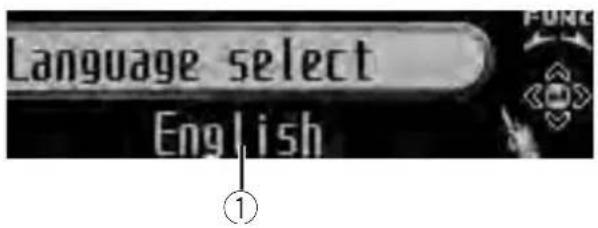
text_image
Language select EnglishUsingtheinitialsettings,youcancustomize varioussystemsettingstoachieveoptimalperformancefromthisunit.
①Functiondisplay
• Showsthefunctionstatus.
1PressSRCandholduntiltheunitturns off.
2PressMULTI-CONTROLandholduntil theinitialsettingmenuappearsinthedisplay.
3TurnMULTI-CONTROLtoselectoneof theinitialsettings.
Turn MULTI-CONTROL to switch between the functions in the following order.
Languageselect(languageselection)—
Calendar (calendar)—Clock (clock)—FM step (FMtuningstep)—AMstep(AMtuningstep)
—Warning tone (warning tone)—AUX1 (auxiliaryinput1)—AUX2(auxiliaryinput2)—
Dimmer(dimmer)—Brightness(brightness)
—S/Wcontrol(rearoutputandsubwoofer controller)—Mute(soundmuting/attenuation)—Demonstration(featuredemo)—
Reversemode(reversemode)—Ever-scroll (everscroll)—BTAUDIO(Bluetoothaudio)—Pincodeinput(pincodeinput)—
BTVersioninfo.(Bluetoothversioninformation)
Usethefollowinginstructionstooperateeach particularsetting.
■ BTAUDIO, Pincodeinput and
BTVersioninfo.canbeselectedonlywhenBluetoothadapter(e.g.,CD-BTB100)isconnectedto thisunit.
■Tocancelinitialsettings,pressBAND/ESC.

Selectingthedisplaylanguage
Foryourconvenience, this unitequips multiple languagedisplay. You can select the language best suited to your first language.
1UseMULTI-CONTROLtoselect Languageseselectintheinitialsettingmenu.
RefertoAdjustinginitialsettingsonthispage.
2PressMULTI-CONTROLtoselectthelanguage.
Each press of MULTI-CONTROL selects languages in the following order:
Pushing MULTI-CONTROL leftor right will select one segment of the calendar display:
Day—Month—Year
Asyouselectsegmentsofthecalendardisplaythesegmentselectedwillblink.
3PushMULTI-CONTROLupordownto setthedate.
Pushing MULTI-CONTROLupwillincrease theselectedday,monthoryear.Pushing
MULTI-CONTROLdownwilldecreasethese- lectedday,monthoryear.
Settingtheclock
Usetheseinstructionstosettheclock.
1UseMULTI-CONTROLtoselectClockin theinitialsettingmenu.
RefertoAdjustinginitialsettingsonthepreviouspage.
2PushMULTI-CONTROLleftorrightto selectthesegmentoftheclockdisplayyou wishtoset.
Pushing MULTI-CONTROL leftor rightwill selectonesegmentoftheclockdisplay: Hour—Minute
Asyouselectsegmentsoftheclockdisplay, theselectedsegmentblinks.
3PushMULTI-CONTROLupordownto putaclockright.

Note
You can match the clock to times signal by pressing MULTI-CONTROL.
- If00to29, theminutesareroundeddown. (e.g., 10:18 becomes 10:00.)
- If 30 to 59, the minutes are rounded up. (e.g., 10:36 becomes 11:00.)
SettingtheFMtuningstep
TheFMtuningstepemployedbyseektuning canbeswitchedbetween100kHz, thepreset step, and 50kHz.
- Ifseektuningisperformedin50kHzsteps, stationsmaybetunedinimprecisely.Tune inthestationswithmanualtuningoruse seektuningagain.
1UseMULTI-CONTROLtoselectFMstep intheinitialsettingmenu.
RefertoAdjustinginitialsettingsonthepreviouspage.
2PressMULTI-CONTROLtoselecttheFM tuningstep.
PressingMULTI-CONTROL repeatedly will switch the FM tuning step between 50kHz and 100kHz. These selected FM tuning step will appear in the display.
SettingtheAMtuningstep
TheAMtuningstepcanbeswitchedbetween 9kHz, thepresetstep, and 10kHz. When usingthetunerinNorth, CentralorSouth America, resetthetuningstepfrom9kHz(531 kHz to 1602kHz allowable) to 10kHz (530kHz to 1640kHz allowable).
1UseMULTI-CONTROLtoselectAMstep intheinitialsettingmenu.
RefertoAdjustinginitialsettingsonthepreviouspage.
2PressMULTI-CONTROLtoselecttheAM tuningstep.
PressingMULTI-CONTROLrepeatedlywill switchtheAMtuningstepbetween9kHz and 10kHz. TheselectedAMtuningstepwillappearinthedisplay.
Switchingthewarningtone
If the front panel is not detached from the head unit within four second soft turning off the ignition, awarning tones sounds. You can turn off the warning tone.
1UseMULTI-CONTROLtoselect Warningtoneintheinitialsettingmenu.
RefertoAdjustinginitialsettingsonthepreviouspage.
2PressMULTI-CONTROLtoturnwarning toneon.
■Toturnwarningtoneoff,press MULTI-CONTROLagain.
Switchingtheauxiliarysetting
Auxiliarydevicesconnectedtothisunitcanbe activatedindividually.SeteachAUXsourceto ONwhenusing.Formoreinformationabout connectingorusingauxiliarydevices,referto UsingtheAUXsourceonpage32.
1UseMULTI-CONTROLtoselectAUX1/AUX2intheinitialsettingmenu.
RefertoAdjustinginitialsettingspage27.
2PressMULTI-CONTROLtoturnAUX1/AUX2on.
■ToturnAUXoff,pressMULTI-CONTROL again.
Switchingthedimmersetting
Topreventthedisplayfrombeingtoobrightat night,thedisplayisautomaticallydimmed whenthecar'sheadlightsareturnedon.You canturnthedimmeronoroff.
1UseMULTI-CONTROLtoselectDimmer intheinitialsettingmenu.
RefertoAdjustinginitialsettingspage27.
2PressMULTI-CONTROLtoturndimmer on.
■Toturndimmeroff, press MULTI-CONTROL again.
Adjustingthebrightness
Youcanadjustthedisplaybrightness.
1UseMULTI-CONTROLtoselect Brightnessintheinitialsettingmenu.
RefertoAdjustinginitialsettingspage27.
2PushMULTI-CONTROLleftorrightto adjustthebrightnesslevel.
0to15isdisplayedasthelevelisincreasedor decreased.
■Whendimmerisfunctioning,thebrightness levelcanbeadjusted0to10.
Settingtherearoutputand subwoofercontroller
Thisunit'srearoutput(rearspeakerleadsoutputandRCArearoutput)canbeusedforfull-rangespeaker(RearSP:F.Range)orsubwoo-
fer(RearSP:S/W)connection.Ifyouswitch therearoutputsettingtoRearSP:S/W,you canconnectarearspeakerleaddirectlytoa subwooferwithoutusinganauxiliaryamp. Initially,theunitissetforrearfull-rangespeakerconnection(RearSP:F.Range).
1UseMULTI-CONTROLtoselect S/Wcontrolintheinitialsettingmenu.
RefertoAdjustinginitialsettingspage27.
2PressMULTI-CONTROLtoswitchthe rearoutputsetting.
Pressing MULTI-CONTROL will switch between RearSP: F.Range(full-rangespeaker) and RearSP: S/W(subwoofer) and that status will be displayed.
■ Whennosubwooferisconnectedtotherear output, selectRearSP:F.Range(full-rangespeaker).
■Whenasubwooferisconnectedtotherear output,selectRearSP:S/W(subwoofer).

Notes
- Evenifyouchangethissetting,thereisno outputunlessyouturnthesubwooferoutput on(refertoUsingsubwooferoutputonpage 25).
- If you change this setting, subwoofer output in the audiomenu will return to the factory settings.
- BothrearspeakerleadoutputsandRCArear outputareswitchedsimultaneouslyinthis setting.
Switchingthesound muting/attenuation
Soundfromthissystemismutedorattenuatedautomaticallywhenthesignalfromthe equipmentwithmutefunctionisreceived.
- Thesoundismutedorattenuated, MUTE or ATTaredisplayedandnoaudioadjustmentispossible.
- Soundfromthissystemreturnstonormal whenthemutingorattenuationiscanceled.
1UseMULTI-CONTROLtoselectMutein theinitialsettingmenu.
RefertoAdjustinginitialsettingspage27.
2PressMULTI-CONTROLtoswitchthetel-ephonemuting/attenuation.
PressingMULTI-CONTROLwillswitchbetweenTELATT(attenuation)andTELmute(muting)andthatstatuswillbedisplayed.

Switchingthefeaturedemo
The feature demo automatically starts when powerto this unit is turned off while the ignition switch it set to ACC or ON.
1UseMULTI-CONTROLtoselect Demonstrationintheinitialsettingmenu.
RefertoAdjustinginitialsettingspage27.
2PressMULTI-CONTROLtoturnthefea- turedemoon.
■Toturnthefeaturedemooff, press
MULTI-CONTROLagain.

Notes
- Remember that if the featured demo continues operating when the care engine is turned off, it may drain battery power.
- Youcanalsoturnonorofffeatureddemoby pressingDISPwhilethisunitisturnedoff. For moredetails,refertoAboutthedemomodeon page6.
Switchingthereversemode
If you donot perform an operation for about 30 seconds, screen indications start to reverse, and continue reversing every 10 seconds.
1UseMULTI-CONTROLtoselect Reversemodeintheinitialsettingmenu.
RefertoAdjustinginitialsettingspage27.
2PressMULTI-CONTROLtoturnthere- versemodeon.
■Toturnthereversemodeoff, press
MULTI-CONTROLagain.

Note
YoucanalsoturnonoroffreversemodebypressingBAND/ESCwhilethisunitisturnedoff. For moredetails, refertoReversemodeonpage6.

Switchingtheeverscroll
Wheneverscrollissettoon, CDtextinformationscrollscontinuouslyinthedisplay.Setto offifyouprefertheinformationtoscrolljust once.
1UseMULTI-CONTROLtoselect Ever-scrollintheinitialsettingmenu.
RefertoAdjustinginitialsettingspage27.
2PressMULTI-CONTROLtoturntheever scrollon.
■ToturntheEverScrolloff, press
MULTI-CONTROLagain.
ActivatingtheBTAudiosource
YouneedtoactivatetheBTAudiosourcein ordertouseaBluetoothaudioplayer.
- Youcanonlyoperatethisfunctionwhen Bluetoothadapter(e.g.CD-BTB100)isconnectedtothisunit.
1UseMULTI-CONTROLtoselect BTAUDIOintheinitialsettingmenu.
RefertoAdjustinginitialsettingspage27.
2PressMULTI-CONTROLtoturnthe BTAudiosourceon.
■ToturntheBTAudiosourceoff,press MULTI-CONTROLagain.
EnteringPINcodefor Bluetoothwirelessconnection
Toconnectyourcellularphonetothisunitvia Bluetoothwirelesstechnology,youneedto enterPINcodeonyourphonetoverifythe connection.Thedefaultcodeis0000,butyou canchangethisinthisfunction.
- WithsomeBluetoothaudioplayers, you may berequired to enter the Bluetooth audioplayerPINcode in advance to this unit for a connection.
- Youcanonlyoperatethisfunctionwhen Bluetoothadapter(e.g.CD-BTB100)isconnectedtothisunit.
1UseMULTI-CONTROLtoselect Pincodeinputintheinitialsettingmenu.
RefertoAdjustinginitialsettingspage27.
2PushMULTI-CONTROLupordownto selectanumber.
3PushMULTI-CONTROLleftorrightto movethecursorortothepreviousornextposition.
4AfterinputtingPINcode(upto16digits),pressMULTI-CONTROL.
PINcodecanbestoredinmemory. WhenyoupressMULTI-CONTROLagainon thesamedisplay,thePINcodeyouenteredis storedinthisunit.
- PushingMULTI-CONTROLrightintheconfirmationdisplayreturnsyoutothePINcodeinput display, andyoucanchangethePINcode.
Displayingsystemversion forrepair
Should this unit fail to operate properly and you consult your dealer for repair, you maybe asked to indicate the system version of this unit and of Bluetooth module. You can display the versions and confirm them.
- Youcanonlyoperatethisfunctionwhen Bluetoothadapter(e.g.CD-BTB100)isconnectedtothisunit.
1UseMULTI-CONTROLtoselect BTVersioninfo.intheinitialsettingmenu.
RefertoAdjustinginitialsettingspage27. Thesystem(microprocessor)versionofthis unitisdisplayed.
2PushMULTI-CONTROLlefttoswitchto theversionoftheBluetoothmoduleofthis unit.
■PushingMULTI-CONTROLrightreturnstothe systemversionofthisunit.
UsingtheAUXsource
UptotwoauxiliarydevicessuchasVCRor portabledevices(soldseparately)canbeconnectedtothisunit.Whenconnected,auxiliary devicesareautomaticallyreadasAUXsources andassignedtoAUX1orAUX2.ThererelationshipbetweenAUX1andAUX2sourcesisexplainedbelow.
AboutAUX1andAUX2
Therearetwomethodstoconnectauxiliarydevicestothisunit.
AUX1source:
When connecting auxiliary device using a stereo miniplugcable
- Insertthestereominiplugintothe inputjackonthisunit.
Formoredetails, referto Headunitonpage8. This auxiliary device is automatically set to AUX1.
AUX2source:
When connecting auxiliary device using an IP-BUS-RCA Interconnector(sold separately)
- UseanIP-BUS-RCAInterconnectorsuch astheCD-RB20/CD-RB10(soldseparately) toconnectthisunittoauxiliarydevicefeaturingRCAoutput.
Formoredetails, refertotheIP-BUS-RCAInterconnectorowner's manual. Thisauxiliary device is automatically set to AUX2.
■Youcanonlymakethistypeofconnectionif theauxiliarydevicehasRCAoutputs.
SelectingAUXasthesource
- PressSRCtoselectAUXasthesource.
■Iftheauxiliarysettingisnotturnedon,AUX cannotbeselected.Formoredetails,referto Switchingtheauxiliarysettingonpage28.
SettingtheAUXtitle
ThetitledisplayedfortheAUX1orAUX2 sourcecanbechanged.
1 After you have selected AUX as the source, use MULTI-CONTROL and select FUNCTION to display Title Input "A".
2Enteratitleinthesamewayasthe built-inCDplayer.
Fordetailsconcerningoperation,refertoEnteringdisctitlesonpage16.
Usingtheexternalunit
ExternalunitreferstoaPioneerproduct(such asonesavailableinthefuture)that,although incompatibleasasource,enablescontrolof basicfunctionswiththisunit.Twoexternal unitscanbecontrolledwiththisunit.When twoexternalunitsareconnected,theexternal unitisautomaticallyallocatedtoexternalunit 1orexternalunit2bythisunit. Basicoperationsoftheexternalunitareexplainedbelow.Allocatedfunctionsaredifferentdependingontheconnectedexternalunit. Fordetailsconcerningfunctions,refertoexternalunit'sowner'smanual.
Selectingtheexternalunitas thesource
- PressSRC/OFFtoselectEXTERNALas thesource.
Basicoperation
Functionsallocatedtothefollowingoperationsaredifferentdependingontheconnectedexternalunit.Fordetailsconcerning functions,refertotheconnectedexternal unit'sowner'smanual.
●PressBAND/ESC.
●PressandholdBAND/ESC.
OtherFunctions
●PushMULTI-CONTROLleftorright.
- PushandholdMULTI-CONTROLLeftor right.
●PushMULTI-CONTROLupordown.
Using the functions allocated to 1 to 6 keys
1Press/LIS
2UseMULTI-CONTROLtoselectKey1to Key6.
TurntochangeKey1toKey6andpress.
Advancedoperations
1PressMULTI-CONTROLtodisplaythe mainmenu.
2UseMULTI-CONTROLtoselect FUNCTION.
Turntochangethemenuoption.Presstose-lect.
3TurnMULTI-CONTROLtoselectthe function.
Function1(function1)—Function2(function 2)—Function3 (function 3)—Function4 (function4)—Auto/Manual(auto/manual)

Note
Toreturntotheordinarydisplay, press
BAND/ESC.
Turningtheclockdisplay onoroff
Youcanturntheclockdisplayonoroff.
- Evenwhenthesourcesareoff, theclock displayappearsonthedisplay.
- PressCLOCK/DISPOFFtoturntheclock displayonoroff.
Each press of CLOCK/DISPOFF turn the clock display on or off.
■Theclockdisplaydisappearstemporarily whenyouperformotheroperations,buttheclock displayappearsagainafter25seconds.

Note
In the following conditions, the clock display cannot be turned on or off.
—While displaying threelinetextinformation

Switchingthedisplay indicationandbutton illumination
Displayindicationandbuttonilluminationcan beswitchedonoroff.
●PressandholdCLOCK/DISPOFF.
PressingandholdingCLOCK/DISPOFF switchesthedisplayindicationandbuttonilluminationonoroff.
■Whilethedisplayindicationisturnedoff, CLOCK/DISPOFFbuttonlightsup.
■Evenifthdisplayindicationisturnedoff,operationcanbeconducted.Ifoperationisconductedwhilethedisplayindicationisoff,displaywilllightupforafewsecondsandthenturnoff again.
Usingdifferent entertainmentdisplays
Youcanenjoyentertainmentdisplayswhilelisteningtoeachsoundsource.
1PressMULTI-CONTROLtodisplaythe mainmenu.
2UseMULTI-CONTROLtoselect ENTERTAINMENT.
Turntochangethemenuoption.Presstose-lect.
3UseMULTI-CONTROLtochangethedis- play.
Turntochangethemenuoption.Presstose-lect.
BGV(backgroundvisual)—BGP-1(backgroundpicture1)—BGP-2(backgroundpicture2)—BGP-3(backgroundpicture3)—
BGP-4(backgroundpicture4)—SIMPLE-1(simpledisplay1)—SIMPLE-2(simpledisplay2)—LEVELMETER(levelmeter)—
VISUALIZER-1(visualizer1)—VISUALIZER-2(visualizer2)—SPECTRUMANALYZER-1(spectrumanalyzer1)—
SPECTRUMANALYZER-2(spectrumanalyzer 2)—MOVIE-1 (movie 1)—MOVIE-2 (movie 2)
■Toreturntotheplaybackdisplay,press
BAND/ESC.
PlayingsongsoniPod Basicoperation
Youcanusethisunittocontrolaninterface adapterforiPod(e.g.CD-IB100II), whichissold separately.

text_image
iPod 1/1969 0.1' 17" PUBY S/W①Songnumberindicator
②Playtimeindicator
③Songtime(progressbar)
●Fastforwardorreverse
PushandholdMULTI-CONTROLleftorright.
- Selectatrack
Push MULTI-CONTROL leftor right.

Notes
- ReadtheprecautionsforiPodinthefollowing section.Refertopage58.
- Ifanerrormessageisdisplayed, refertoError messagesonpage54.
- WhentheignitionswitchissettoACCorON, theiPod'sbatteryischargedwhiletheiPodis connectedtothisunit.
- While theiPodisconnectedtothisunit, the iPodcannotbeturnedonoroff.
- Beforeconnectingthedockconnectorofthis unittotheiPod, disconnecttheheadphones fromtheiPod.
• TheiPodisturnedoffabouttwominutesafter theignitionswitchissettoOFF.
Displayingtextinformationon iPod
- PressDISP/SCRLtoselectthedesired textinformation.
Playtime— 🎥 :artistnameand:songtitle — 🎥 :artistnameand:albumname—: albumnameand 🎥 :songtitle—: songtitle and playtime
■ If the characters recorded on the Podarenot compatible with this unit, those characters are not displayed.

Notes
- Youcanscrollthetextinformationtotheleft bypassingandholdingDISP/SCRL.
- When EverScrollissettoONattheinitialsetting,textinformationscrollscontinuouslyin thedisplay.RefertoSwitchingtheeverscroll onpage30.
Browsingforasong
TheoperationisthesameasthatoftheiPod connectedtoUSBinterfaceofthisunit.(Refer toBrowsingforasongonpage19.) However,theselectablecategoriesareslightly different.Selectablecategoriesare Playlists (playlists)—Artists (artists)—Albums (albums)—Songs (songs)—Genres (genres)
Introductiontoadvanced operations
1PressMULTI-CONTROLtodisplaythe mainmenu.
2UseMULTI-CONTROLtoselect FUNCTION.
Turntochangethemenuoption.Presstose-lect.
3TurnMULTI-CONTROLtoselectthe function.
Playmode(repeatplay)—Shufflemode(shuffle)—Pause(pause)
Functionandoperation
PlaymodeandPauseoperationsarebasically thesameasthatofthebuilt-inCDplayer.
FunctionnameOperation
| Playmode | RefertoSelectingarepeatplay rangeonpage15.However,therepeatplayranges youcanselectaredifferentfrom thatofthebuilt-inCDplayer.The repeatplayrangesoftheiPodare:•RepeatOne–Repeatthecur- rentsong•RepeatAll–Repeatallsongs intheselectedlist |
| Pause | RefertoPausingplaybackonpage 15. |

Notes
• Toreturntotheordinarydisplay, press BAND/ESC.
- If you donot operate functions within about 30 seconds, the display automatically returns to the ordinary display.
Playingsongsinarandom order(shuffle)
- Press/iPodrepeatedlytoselectthe desiredsetting.
- ShuffleSongs—Playback songs in these selected list in random order.
- ShuffleAlbums—Playbacksongsfroma randomlyselectedalbuminorder.
- ShuffleOFF-Cancelrandomplay.

Note
Youcanalsoturnthisfunctiononinthemenu thatappearsbyusingMULTI-CONTROL.
BluetoothAudio
If you connect a Bluetooth adapter (e.g. CD-BTB100) to this unit, you can control Bluetooth audioplayers via Bluetooth wireless technology.
- Insomecountries, CD-BTB100isnotsold onthemarket.
BasicOperations

text_image
ST Audio Pioneer ① BASS S/W①Devicename
Showsthedevicenameoftheconnected Bluetoothaudioplayer(orBluetoothadapter).

Important
- Depending on the Bluetooth audioplayer connected to this unit, the operations available with this unit are limited to the following two levels: — A2DP profile (Advanced Audio Distribution Profile): Only playing back songs on your audioplayer is possible. — AVRCP profile (Audio/Video Remote Control Profile): Playing back, pausing, selectings songs, etc., are possible.
- SincethereareanumberofBluetoothaudio playersavailableonthemarket,operations withyourBluetoothaudioplayerusingthis unitvaryextensively.Refertotheinstruction manualthatcamewithyourBluetoothaudio playeraswellasthismanualwhileoperating yourplayeronthisunit.
• Informationaboutsongs(e.g.theelapsed playingtime,songtitle,songindex,etc.)can-notbedisplayedonthisunit. - WhileyouarelisteningtosongsonyourBluetoothaudioplayer,refrainfromusingonyourcellularphoneasmuchaspossible.Ifyouuseyourcellularphone,thesignalfromyourcellularphonemaycausenoiseonthesongplayback.
- WhenyouaretalkingonacellularphoneconnectedtothisunitviaBluetoothwirelestechnology,songplaybackfromyourBluetooth audioplayerconnectedtothisunitismuted.
Availableaccessories
- Evenifyouarelisteningtoasongonyour Bluetoothaudioplayerandyouswitchtoan-othersource,songplaybackcontinues.
●Fastforwardorreverse
Pushandhold MULTI-CONTROL leftor right.
- Selectatrack
Push MULTI-CONTROL leftorright.

Notes
- Fordetailsconcerningoperation, refertothe Bluetoothadapter'soperationmanual. This section provides brief information on Bluetooth audioplayer operations with this unit, which slightly differs or is abbreviated from that described in the Bluetooth adapter's operation manual.
- EventhoughyouraudioplayerdoesnotcontainaBluetoothmodule,youcanstillcontrolitfromthisunitviaBluetoothwirelestechnology.Tocontrolyouraudioplayerusingthisunit,connectaproductfeaturingBluetoothwirelestechnology(availableonthemarket)toyouraudioplayerandconnecttheBluetoothadapter(e.g.CD-BTB100)tothisunit.
Functionandoperation
1PressMULTI-CONTROLtodisplaythe mainmenu.
2UseMULTI-CONTROLtoselect FUNCTION.
Turntochangethemenuoption.Presstose-lect.
3TurnMULTI-CONTROLtoselectthe function.
Connectionopen(connectionopen)— Disconnectaudio(disconnectaudio)—Play (Play)—Stop (Stop)—Pause (pause)— Deviceinfo.(deviceinformation)
■Pauseisthesameasthatofthebuilt-inCD player.(RefertoPausingplaybackonpage15.)

Notes
- Toreturntotheordinarydisplay, press BAND/ESC.
- IfaBluetoothaudioplayerisnotconnectedto thisunityet, Connectionopen and Deviceinfo.appearinthefunctionmenuand otherfunctionsarenotavailable.
- IfaBluetoothaudioplayerisconnectedvia AVRCP(Audio/VideoRemoteControlProfile), Connectionopendoesnotappearinthe functionmenuandtheotherfunctionsare available.
- IfaBluetoothaudioplayerisconnectedvia A2DP(AdvancedAudioDistributionProfile), onlyDisconnectaudioandDeviceinfo.appearinthefunctionmenu.
- If you donot operate function so other than Connection open and Disconnect audio within about 30 seconds, the display is automatically returned to the ordinary display.
ConnectingaBluetoothaudio player
1UseMULTI-CONTROLtoselect Connectionopeninthefunctionmenu.
RefertoFunctionandoperationonthispage.
2PressMULTI-CONTROLtoopentheconnection.
Alwayswaiting is displayed. This unit is now on standby for connection from Bluetooth audioplayer. If your Bluetooth audioplayer is ready for Bluetooth wireless connection, connection to this unit is automatically established.

Note
Beforeyoucanuseaudioplayersyoumayneed toenterthePINcodeintothisunit.Ifyourplayer requiresaPINcodetoestablishaconconnection, lookforthecodeontheplayerorinitsaccompanyingdocumentation.RefertoEnteringPINcode forBluetoothwirelessconnectiononpage31.
PlayingsongsonaBluetooth audioplayer
1UseMULTI-CONTROLtoselectPlayin thefunctionmenu.
RefertoFunctionandoperationontheprevious page.
2PressMULTI-CONTROLtostartplay-back.
Stopping playback
1UseMULTI-CONTROLtoselectStopin thefunctionmenu.
RefertoFunctionandoperationontheprevious page.
2PressMULTI-CONTROLtostoptheplayback.
DisconnectingaBluetooth audioplayer
1UseMULTI-CONTROLtoselect Disconnectaudiointhefunctionmenu.
RefertoFunctionandoperationontheprevious page.
2PressMULTI-CONTROLtodisconnect theBluetoothaudioplayer.
Disconnected is displayed. The Bluetooth audioplayer is now disconnected from this unit.
DisplayingBD(Bluetooth Device)address
1UseMULTI-CONTROLtoselect Deviceinfo.inthefunctionmenu.
RefertoFunctionandoperationontheprevious page.
2PushMULTI-CONTROLlefttoswitchto theBDaddress.
12-digithexadecimalstringisdisplayed.
- PushingMULTI-CONTROLrightreturnstothe devicename.
BluetoothTelephone
If you use a Bluetooth adapter (e.g. CD-BTB100), you can connect cellular phone features using Bluetooth wireless technology to this unit for hands-free, wireless calls, even while driving.
- Insomecountries, CD-BTB100 is not sold on the market.
BasicOperations

text_image
TEL PIONEER 12:00 PH 01 JAN 2009 ① ③ ② ④ S A U T O P H O N E T ⑤① Devicename
Showsthedevicenameofthecellularphone.
② Signallevelindicator
Showsthesignalstrengthofcellularphone.
• The level shown on the indicatormay differ from the actual signal level.
③ Usernumberindicator
Showstheregistrationnumberofthecellular phone.
④ Batterystrengthindicator
Showsthebatterystrengthofcellularphone.
• The level shown on the indicatormay differ from the actual battery strength.
- If the battery strength is not available, nothing is displayed in the battery strength indicator area.
⑤ Incomingcallnoticeindication Showswhenanincomingcallhasbeenreceivedandnotcheckedyet.
- Incomingcallnoticeisnotdisplayedfor callsmadewhenyourcellularphoneis disconnectedfromthisunit.
⑥ Automaticanswering/Automaticrejectingindicator
ShowsAUTOwhentheautomaticanswering functionison(formoredetails, refertoSetting automaticansweringonpage46).
Availableaccessories
ShowsREJECTwhentheautomaticrejecting functionison(formoredetails, refertoSetting automaticrejectingonpage46).
⑦Clockdisplay
Showsthetime(ifconnectedwithaphone).
⑧Calendardisplay
Showstheday, monthandyear(ifconnected withaphone).

Important
- Sincethisunitisonstandbytoconnectwith yourcellularphoneviaBluetoothwireless technology,usingthisunitwithoutrunning theenginecanresultinbatterydrainage.
- Advancedoperationsthatrequireyourattentionsuchasdialingnumbersonthemonitor, usingphonebook,etc.,areprohibitedwhile youaredriving.Whenyouneedtousethese advancedoperations,stopyourvehicleina safeplace.

Notes
- Theequalizercurveforthephonesourceis fixed.
- Whenselectingthephonesource,youcan onlyoperateFader(balanceadjustment)in theaudiomenu.
Settingupforhands-freephoning
Beforeyoucanusethehands-freephoning functionyoumustsetuptheunitforusewith yourcellularphone. Thisentailsestablishinga Bluetoothwirelessconnectionbetween this unitandyourphone, registeringyourphone withthisunit,andadjustingthevolumelevel.
1Connection
Fordetailedinstructionsonconnectingyour phonetothisunitviaBluetoothwirelestechnology,refertoConnectingacellularphoneon page41.
- Yourphoneshouldnowbetemporarilyconnected. However, to makebestuseofthetechnology, were recommend you register the phoneto this unit.
2Registration
Toregistryourtemporarilyconnectedphone, refertoRegisteringaconnectedcellularphone onpage42.
3Volumeadjustment
Adjusttheearpiecevolumeonyourcellular phoneforcomfort.Whenadjusted,thevolume levelisrecordedinthisunitasthedefaultsetting.
- Caller'svoicevolumeandringvolumemay varydependingonthetypeofcellularphone.
■ If the difference between the ranging volume and caller's voice volume is big, overall volume level may become unstable.
■ Before disconnecting the cellular phone from this unit, makes sure to adjust the volumeto a proper level. If the volume is muted (zerolevel) on your cellular phone, the volume level of your cellular phoneremains muted even after the cellular phone is disconnected.
Makingaphonecall
Voicerecognition
1PressBAND/ESCandholduntil Voicedialappearsinthedisplay.
Voicedialappearsinthedisplay.When VoicedialONisdisplayed,voicerecognition functionisnowready.
■Ifyourcellularphonedoesnotfeaturevoice recognitionfunction, Novoicedialappearsin thedisplayandoperationisnotpossible.
2 Pronouncethenameofyourcontact.
Takingaphonecall
Answeringorrejectinganincomingcall
●Answeringanincomingcall
Whenacallcomesin, press MULTI-CONTROL.
■YoucanalsoperformthisoperationbypushingMULTI-CONTROLup.
●Endacall
PushMULTI-CONTROLdown.
●Rejectinganincomingcall
Whenacallcomesin.pushMULTI-CONTROL down.

Notes
- Ifprivatemodeisselectedonthecellular phone,hands-freephoningmaynotbeperformed.
- Theestimatedcalltimeappearsinthedisplay (thismaydifferslightlyfromtheactualcall time).
Operatingacallwaiting
●Answeringacallwaiting
Whenacallcomesin, press
MULTI-CONTROL.
■YoucanalsoperformthisoperationbypassingMULTI-CONTROLup.
●Endallcalls
PushMULTI-CONTROLdown.
●Switchbetweencallersonhold
PressMULTI-CONTROL.
■YoucanalsoperformthisoperationbypushingMULTI-CONTROLup.
- Rejectingcallwaiting
PushMULTI-CONTROLdown.

Notes
- PushingMULTI-CONTROLdownendsall callsincludingcallswaitingtonline.
• Toendthecall, bothyouandyourcallerneed tohangupthephone.
Functionandoperation
1PressMULTI-CONTROLtodisplaythe mainmenu.
2UseMULTI-CONTROLtoselect FUNCTION.
Turntochangethemenuoption.Presstose-lect.
3TurnMULTI-CONTROLtoselectthe function.
Search&Connect(searchandconnect)—
Connectionopen(connectionopen)—
Disconnectphone(disconnectphone)—
Connectphone(connectphone)—Setphone (registeringphone)—Deletephone(delete phone)—PH.B.Transfer(phonebooktransfer)
—PH.B.Nameview(phonebooknameview) —Clearmemory(clearmemory)—
Numberdial(callbyenteringnumber)—Refusecalls(automaticrejectsetting)—
Autoanswer(automaticanswersetting)—
Ringtone(ringtoneselect)—Autoconnect (automaticconnectionsetting)—Echocancel (echocancel)—Deviceinfo.(deviceinformation)
Ifnotconnectedyet
The following functions cannot be operated.
- Disconnectphone(disconnectphone)
- Setphone(registeringphone)
- Clearmemory(clearmemory)
• PH.B.Nameview(phonebooknameview)
• Numberdial(callbyenteringnumber)
Ifconnectedbutnotregisteredyet
The following functions cannot be operated.
- Search&Connect(searchandconnect)
- Connectionopen(connectionopen)
- Connectphone(connectphone)
• PH.B.Nameview(phonebooknameview) - Clearmemory(clearmemory)
Ifalreadyconnectedandregistered
The following functions cannot be operated.
- Search&Connect(searchandconnect)
- Connectionopen(connectionopen)
- Connectphone(connectphone)
- Setphone(registeringphone)

Notes
• Toreturntothe playback display, press BAND/ESC.
• Deviceinfo.isthesameasthatoftheBluetoothaudio.(RefertoDisplayingBD(Bluetooth Device)addressonpage38.)
• PH.B.Nameview(phonebooknameview) cannotbeselectedforcellularphoneregisteredguestphone.
- Ifcellularphoneisconnectedtothisunitvia BluetoothwirelesstechnologywithHSP (HeadSetProfile),PH.B.Nameview, Clearmemory, Numberdial and Refusecalls cannotbeselected.
- If you donot operate functions other than Search & Connect, Connection open, Connect phone, PH.B. Transfer, Disconnect phone, Numberdial and Clearmemory within about 30 seconds, the display automatically return to the ordinary display.
Connectingacellularphone Searchingforavailablecellularphones
1UseMULTI-CONTROLtoselect Search&Connectinthefunctionmenu.
RefertoFunctionandoperationontheprevious page.
2PressMULTI-CONTROLtosearchfor availablecellularphones.
Whilesearching, Searchingflashes.When availablecellularphonesfeaturingBluetooth wirelessstechnologyarefound,devicenameor Namenotfound(ifnamescannotbeobtained)isdisplayed.
■ If this unit fail to find any available cellular phones, Not found is displayed.
3PushMULTI-CONTROLupordownto selectadevicenameyouwanttoconnect.
4PressMULTI-CONTROLtoconnectthe selectedcellularphone.
Whileconnecting, Connectingflashes.To completetheconnection,checkthedevice
name(PioneerBTUnit)andenterthelink codeonyourcellularphone.Iftheconnection isestablished,Connectedisdisplayed.
■PINcodeissetto0000asthedefault.You canchangethiscodeintheinitialsetting.Refer toEnteringPINcodeforBluetoothwirelessconnectiononpage31.
Usingacellularphonetoinitiatea connection
1UseMULTI-CONTROLtoselect Connectionopeninthefunctionmenu.
RefertoFunctionandoperationontheprevious page.
2PressMULTI-CONTROLtoopentheconnection.
Alwayswaitingflashesandtheunitisnow onstandbyforconnectionfromacellular phone.
3Usecellularphonetoconnecttothis unit.
■PINcodeissetto0000asthedefault.You canchangethiscodeintheinitialsetting.Refer toEnteringPINcodeforBluetoothwirelessconnectiononpage31.
Disconnectingacellularphone
1UseMULTI-CONTROLtoselect Disconnectphoneinthefunctionmenu.
RefertoFunctionandoperationontheprevious page.
Devicenameoftheconnectedphoneappears inthedisplay.
2PressMULTI-CONTROLtodisconnecta cellularphonefromthisunit.
Afterdisconnectioniscompleted, Disconnectedisdisplayed.
Registeringaconnected cellularphone
1UseMULTI-CONTROLtoselect
Setphoneinthefunctionmenu.
RefertoFunctionandoperationonpage40.
2PushMULTI-CONTROLupordownto selectapairingassignment.
P1 (user phone 1)—P2 (user phone 2)—P3 (user phone 3)—G1 (guest phone 1)—G2 (guestphone2)
■ Asyouselecteachassignment,youcansee whetherornotaphoneisalreadyregistered.If theassignmentisempty,Nodataisdisplayed.If theassignmentisalreadytaken,thedevicename appears.Toreplaceanassignmentwithanew phone,firstdeletethecurrentassignment.For moredetailedinstructions,seeDeletingaregisteredphoneonthispage.
3PressMULTI-CONTROLtoregisterthe currentlyconnectedphone.
When registration is completed,
Reg.Completedisdisplayed.
■Iftheregistrationfails,Reg.ERRORisdisplayed.Inthiscase,returntostep1andtry again.
Deletingaregisteredphone
1UseMULTI-CONTROLtoselect Deletephoneinthefunctionmenu.
RefertoFunctionandoperationonpage40.
2PushMULTI-CONTROLupordownto selectapairingassignment.
P1 (user phone 1)—P2 (user phone 2)—P3 (user phone 3)—G1 (guest phone 1)—G2 (guestphone2)
■ If the assignment is empty, Nodata is displayed and operation is not possible.
3PushMULTI-CONTROLrighttoselect DeleteYES.
DeleteYESisdisplayed.Deletingphoneis nowonstandby.
4PressMULTI-CONTROLtodeletethe phone.
After the phone is deleted, Deleted is displayed.
Connectingtoaregistered cellularphone
Connectingtoaregisteredphone manually
1UseMULTI-CONTROLtoselect
Connectphoneinthefunctionmenu.
RefertoFunctionandoperationonpage40.
2PushMULTI-CONTROLupordownto selectapairingassignment.
P1 (user phone 1)—P2 (user phone 2)—P3 (user phone 3)—G1 (guest phone 1)—G2 (guestphone2)
■ If the assignment is empty, Nodata is displayed and operation is not possible.
3PressMULTI-CONTROLtoconnectthe selectedcellularphone.
Whileconnecting, Connecting is displayed. After the connection is completed, Connected is displayed.
Connectingtoaregisteredphone automatically
1UseMULTI-CONTROLtoselect
Autoconnectinthefunctionmenu.
RefertoFunctionandoperationonpage40.
2PressMULTI-CONTROLtoturnautomaticconnection.
If your cellular phone is ready for Bluetooth wireless connection, connection to this unit is automatically established.
■Toturnautomaticconnectionoff, press
MULTI-CONTROLagain.
Using the phonebook
Transferringentriestothephonebook
ThePhoneBookcanholdatotalof500entries.300fromUser1,150fromUser2,and50fromUser3.
1UseMULTI-CONTROLtoselect
PH.B.Transferinthefunctionmenu.
RefertoFunctionandoperationonpage40.
2PressMULTI-CONTROLtoenterthe phonebooktransferstandbymode.
TransferYESappearsinthedisplay.
3PressMULTI-CONTROLtoshowtheconfirmationdisplay.
Transfer-/-appearsinthedisplay.
4Usethecellularphonetoperform phonebooktransfer.
Performphonebooktransferusingthecellularphone. Fordetailedinstructions, referto theinstructionmanualthatcamewithyour cellularphone.
■ Thedisplayindicateshowmanyentrieshave beentransferredandthetotalnumbertobe transferred.
5Datatransferredisdisplayed and phonebooktransferiscompleted.
Changing the phonebook display order
1UseMULTI-CONTROLtoselect PH.B.Nameviewinthefunctionmenu.
RefertoFunctionandoperationonpage40. InvertnamesYESappearsinthedisplay.
2PressMULTI-CONTROLtochangethe namevieworder.
Inverted is displayed and then a name view order is changed.
PressingMULTI-CONTROL repeatedly changesthenamevieworderbetweenfirst andlastname.
Callinganumberinthephonebook

Important
Besuretoparkyourvehicleandapplytheparkingbrakewhenperformingthisoperation.
Afterfindingthenumberyouwanttocallin thephonebook,youcanselecttheentryand makethecall.
1PressLISTtodisplaythephonebook.
2PushMULTI-CONTROLleftorrightto selectthefirstletterofthenameyouare lookingfor.
3PressMULTI-CONTROLtodisplayentries.
ThedisplayshowsthefirstthreePhoneBook entriesstartingwiththatletter(e.g. "Ben", "Brian" and "Burt" when "B" is selected).
4PushMULTI-CONTROLupordownto selectaPhoneBookentryyouwanttocall.
■Youcanscrollliteralinformationbypassing andholdingDISP/SCRL.Tostopscrolling,press DISP/SCRL.
5PushMULTI-CONTROLrighttodisplay thedetailedlistoftheselectedentry.
Thephonenumber,nameandgenre(ifassigned)ofentriesaredisplayedinthedetailed list.
■Youcanscrollliteralinformationbypassing andholdingDISP/SCRL.Tostopscrolling,press DISP/SCRL.
■Ifseveralphonenumbersareincludedinan entry,selectonebyturningMULTI-CONTROL.
■ If you want to go back and select another entry, push MULTI-CONTROL left.
6PressMULTI-CONTROLtomakeacall.
7Toendthecall, pushMULTI-CONTROL down.
EditingthenameofaPhoneBookentry

Important
Besuretoparkyourvehicleandapplytheparkingbrakewhenperformingthisoperation.
YoucaneditthenamesofPhoneBookentries. Eachnamecanbeupto16characterslong.
1Displaythedetailedlistofyourdesired PhoneBookentry.
PleaseseeSteps1to5ofthefollowingsection forhowtodothis.RefertoCallinganumberin thephonebookonthepreviouspage.
2PressandholdMULTI-CONTROLtodisplaythenameinputscreen. Editnameisdisplayed.
3PressDISP/SCRLtoselectthedesired charactertype.
EachpressofDISP/SCRLswitchesthecharactertypesinthefollowingorder: Alphabet(uppercase),numbersandsymbols—alphabet(lowercase)—numbersandsymbols—Europeancharacters,suchasthose with accents (e.g., á, à, ä, ç) or Russian characters
- PressingandholdingDISP/SCRLenablesyoutoswitchcharactersetbetweenISO8859-1(Europeancharacters)andISO8859-5(Russiancharacters)alternately.
■EuropeancharactersandRussiancharacters can'tbemixed.
4PushMULTI-CONTROLupordownto selectaletter.
■Todeleteacharacterandleaveaspace,select "_" (underbar).
5PushMULTI-CONTROLleftorrightto movethecursorortothepreviousornext characterposition.
6PressMULTI-CONTROLtostorethenew name.
Editingphonenumbers

Important
Besuretoparkyourvehicleandapplytheparkingbrakewhenperformingthisoperation.
YoucaneditthenumbersofPhoneBookentries.Eachphonenumbercanbeupto24digitslong.
1Displaythedetailedlistofyourdesired PhoneBookentry.
PleaseseeSteps1to5ofthefollowingsection forhowtodothis. RefertoCallinganumberin thephonebookonthepreviouspage.
2PressandholdMULTI-CONTROLtodisplaythenameinputscreen.
Editnameisdisplayed.
3TurnMULTI-CONTROLtoswitchtothe numberinputscreen.
Editname(nameinputscreen)— Editnumber(numberinputscreen)— Clearmemory(clearmemoryscreen)
4PushMULTI-CONTROLleftorrightto movethecursorortothenumberyouwant tochange.
5PushMULTI-CONTROLupordownto changenumbers.
Repeat the seven steps until you have finished changing.
6PressMULTI-CONTROLtostorethenew number.
Clearingaphonebookentry

Important
Besuretoparkyourvehicleandapplytheparkingbrakewhenperformingthisoperation.
1Displaythedetailedlistofyourdesired PhoneBookentry.
PleaseseeSteps1to5ofthefollowingsection forhowtodothis.RefertoCallinganumberin thephonebookonpage43.
2PressandholdMULTI-CONTROLtodisplaythenameinputscreen.
Editnameisdisplayed.
3TurnMULTI-CONTROLtoswitchtothe clearmemoryscreen.
Editname(nameinputscreen)—
Editnumber(numberinputscreen)—
Clearmemory(clearmemoryscreen)
4PushMULTI-CONTROLrighttoshowa confirmationdisplay.
ClearmemoryYESisdisplayed.
■ If you donot want to clear them memory that you have selected, push MULTI-CONTROL left.
Thedisplayrevertstonormal.
5PressMULTI-CONTROLtodeletethe PhoneBookentry.
Clearedisdisplayed.
ThePhoneBookentryisdeleted. Thedisplay returnstoPhoneBookentrylist.
Usingthecallhistory

Important
Besuretoparkyourvehicleandapplytheparkingbrakewhenperformingthisoperation.
The12mostrecentcallsmade(dialled),receivedandmissed,arestoredinthecallhistory.Youcanbrowsethecallhistoryandcallnumbersfromit.
1PressLISTtodisplaythelist.
PressLIST repeatedlyytoswitchbetween the followinglists:
Phone book—Missed call—Dialled call—Receivedcall
■FormoredetailsaboutthePhoneBooklist, refer to Using the phonebook on page 43.
■ Ifnophonenumbersarestoredinthese- lectedlist, Nodata is displayed.
2TurnMULTI-CONTROLtoselectaphone number.
Turning MULTI-CONTROL to changethe phonenumbers stored in the list.
■Ifthephonenumberisalreadyinthephone book, thecorrespondingnameisdisplayed.
■Youcanalsochangethephonenumberby pushing MULTI-CONTROLupordown.
3PushMULTI-CONTROLrighttodisplay thedetailedlist.
Nameandphonenumberaredisplayedinthe detailedlist.
■ IfthenumberisalreadyinthePhoneBook thenthenameisalsodisplayed.
■TurningMULTI-CONTROLswitchestothepreviousornextphonenumberdisplayedinthedetailedlist.
■ If you don not operate anything within about 30 seconds, the list display is canceled automatically.
4PressMULTI-CONTROLtomakeacall.
■Foraninternationalcall,pressandhold
MULTI-CONTROLtoadd+tothephonenumber.
5Toendthecall, pushMULTI-CONTROL down.
Makingacallbyentering phonenumber

Important
Besuretoparkyourvehicleandapplytheparkingbrakewhenperformingthisoperation.
1UseMULTI-CONTROLtoselect Numberdialinthefunctionmen
RefertoFunctionandoperationonpage40.
2PushMULTI-CONTROLupordownto selectanumber.
3PushMULTI-CONTROLleftorrightto movethecursortothepreviousornextposition.
■Upto24digitscanbeentered.
4Whenyoufinishenteringthenumber, pressMULTI-CONTROL.
Callconfirmationappears.
5PressMULTI-CONTROLagaintomakea call.
6Toendthecall, pushMULTI-CONTROL down.
Clearingmemory
1UseMULTI-CONTROLtoselect Clearmemoryinthefunctionmenu.
RefertoFunctionandoperationonpage40.
2PushMULTI-CONTROLupordownto selectanitem.
EachtimeMULTI-CONTROL is pushed upon down, the items areswitched in the following order:
Phonebook(phonebook)—Missedcalls (missedcallhistory)—Dialedcalls(dialled callhistory)—Receivedcalls(receivedcallhistory)—Dialpreset(presetphonenumbers)—Allclear(deleteallmemory)
■IfyouwanttoclearallthePhoneBook, dialled/received/missedcallhistorylistandpresetphonenumber,selectAllclear.
■Ifguestphoneisconnectedtothisunitvia Bluetoothwirelestechnology,Phonebookcannotbeselected.
3PushMULTI-CONTROLrighttodeterminetheitemthatyouwanttodelete fromthisunit.
ClearmemoryYESisdisplayed.Clearing memoryisnowonstandby.
■ If you donot want to clear them memory that you have selected, push MULTI-CONTROL left. Thedisplay revertstonormal.
4PressMULTI-CONTROLtoclearthe memory.
Cleared is displayed and data on these selected item is cleared from this unit's memory.
Settingautomaticrejecting
1UseMULTI-CONTROLtoselect Refusecallsinthefunctionmenu.
RefertoFunctionandoperationonpage40.
2PressMULTI-CONTROLtoturnautomaticcallrejectionon.
■Toturnautomaticcallrejectionoff,press MULTI-CONTROLagain.
Settingautomaticanswering
1UseMULTI-CONTROLtoselect Autoanswerinthefunctionmenu.
RefertoFunctionandoperationonpage40.
2PressMULTI-CONTROLtoturnautomaticansweringon.
■Toturnautomaticansweringfunctionoff, pressMULTI-CONTROLagain.
Switchingtheringtone
1UseMULTI-CONTROLtoselect Ringtoneinthefunctionmenu.
RefertoFunctionandoperationonpage40.
2PressMULTI-CONTROLtoturnthering toneon.
■Toturntheringtoneoff, press MULTI-CONTROLagain.
Echocancelingandnoisereduction
1UseMULTI-CONTROLtoselect Echocancelinthefunctionmenu.
RefertoFunctionandoperationonpage40.
Availableaccessories
2PressMULTI-CONTROLtoturnechocancelingon.
■Toturnechocancelingoff, press MULTI-CONTROLagain.
Multi-CDPlayer
BasicOperations
Youcanusethisunittocontrolamulti-CD player, whichissoldseparately.
- Onlyfunctionsdescribedinthissectioncan beoperated.
- Onlyfunctionsdescribedinthismanualare supportedby50-discmulti-CDplayers.
- Thisunitisnotdesignedtooperatedisctitle listfunctionswitha50-discmulti-CDplayer. Forinformationaboutthedisctitlelistfunctions,refertoSelectingdiscsfromthedisc titlelistonlinepage50.
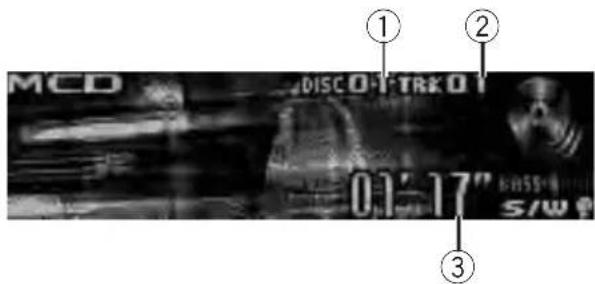
text_image
MCD DISCOFTREKOT 01:17" S/SW①Discnumberindicator
②Tracknumberindicator
③Playtimeindicator
- Selectadisc
Push MULTI-CONTROLupordown.
●Fastforwardorreverse
Pushandhold MULTI-CONTROL leftorright.
- Selectatrack
Push MULTI-CONTROL leftorright.

Notes
- When multi-CD player completes preparatory operations, READY is displayed.
- IfanerrormessagesuchasERROR-11isdis-played, refertothemulti-CDplayerowner's manual.
- If there are an odiscsinthemulti-CD player magazine, NODISC is displayed.
UsingCDTEXTfunctions
YoucanusethesefunctionsonlywithaCD TEXTcompatiblemulti-CDplayer.
Theoperationisthesameasthatofthebuilt-inCDplayer.
RefertoDisplayingtextinformationondiscon page13.
Introductiontoadvanced operations
YoucanonlyuseCompression(compression andDBE)withamulti-CDplayerthatsupports them.
1PressMULTI-CONTROLtodisplaythe mainmenu.
2UseMULTI-CONTROLtoselect FUNCTION.
Turntochangethemenuoption.Presstose-lect.
3TurnMULTI-CONTROLtoselectthe function.
Playmode(repeatplay)—Randommode (randomplay)—Scanmode(scanplay)—
Pause(pause)—Compression(compression and DBE)—ITSplaymode(ITSplay)—
ITSmemo(ITSprogramming)—TitleInput"A"(disctitleinput)
■Ifyoudonotoperatefunctionsotherthan ITSmemoandTitleInput"A"withinabout30 seconds,thedisplayautomaticallyreturnstothe ordinarydisplay.
■WhenplayingaCDTEXTdisconaCDTEXT compatiblemulti-CDplayer,youcannotswitchto
TitleInput"A".Thedisctitleisalreadyrecorded ontheCDTEXTdisc.
Functionandoperation
Play mode, Random mode, Scan mode,
PauseandTitleInput"A"operationsarebasicallythesameasthatofthebuilt-inCDplayer.
FunctionnameOperation
| Playmode | RefertoSelectingarepeatplay rangeonpage15.However,therepeatplayranges youcanselectaredifferentfrom thatofthebuilt-inCDplayer.The repeatplayrangesofthemulti-CD playerare:•M-CDrepeat-Repeatall discsinthemulti-CDplayer•Trackrepeat-Repeatjustthe currenttrack•Discrepeat-Repeatthecurrentdisc |
| Randommode | RefertoPlayingtracksinrandom orderonpage15. |
| Scanmode | RefertoScanningfoldersand tracksonpage15. |
| Pause | RefertoPausingplaybackonpage 15. |
| TitleInput"A" | RefertoEnteringdisctitleson page16. |

Notes
- Toreturntothe playback display, press BAND/ESC.
- If you select other discsduring repeat play, therepeat play range changesto M-CDrepeat.
- If you perform track search forward/reversed during Track repeat, therepeat play range change to Discrepeat.
- Aftertrackordiscscanningisfinished,normalplaybackofthetracksbeginsagain.
Usingcompressionandbass emphasis
Youcanonlyusethesefunctionswithamulti-CDplayerthatsupportsthem.
COMP(compression)andDBE(dynamicbass emphasis)functionsletsyouadjustthesound playbackqualityofthemulti-CDplayer.
1UseMULTI-CONTROLtoselect Compressioninthefunctionmenu.
Referto/Introductiontoadvancedoperations onthepreviouspage.
■ If themulti-CD playerdoes not support
COMP/DBE, NOCOMP is displayed when you attempt to select it.
2PressMULTI-CONTROLtoselectyourfavoritesetting.
COMPOFF—COMP1—COMP2—
COMPOFF—DBE1—DBE2
UsingITSplaylists
ITS(instanttrackselection)letsyoumakea playlistoffavoritetracksfromthemulti-CD playermagazine.Afteryouhaveaddedyourfavoritetrackstotheplaylist,youcanturnonITS playandplayjustthoseselections. YoucanuselTStoenterandplaybackupto 99tracksperdiscfromupto100discs(with thedisctitles).(Withmulti-CDplayerssoldbe- foretheCDX-P1250andCDX-P650,upto24 trackscanbestoredintheplaylist.)
CreatingaplaylistwithITSprogramming
1PlayaCDthatyouwanttoprogram.
Push MULTI-CONTROLupordowntoselect theCD.
2UseMULTI-CONTROLtoselect ITSmemointhefunctionmenu.
RefertoIntroductiontoadvancedoperations onthepreviouspage.
3Selectthedesiredtrackbypushing MULTI-CONTROLleftorright.
4PushMULTI-CONTROLuptostorethe currentlyplayingtrackintheplaylist.
Memorycomplete is displayed and the currently playing selection is added to your playlist.
5PressBAND/ESCtoreturntotheplay-backdisplay.

Note
Afterdatafor100discsisstoredinmemory, data foranewdiscwilloverwritetheoldestone.
PlaybackfromyourITSplaylist
ITSplayletsyoulistentothetracksthatyou haveenteredintoyourITSplaylist.Whenyou turnonITSplay,tracksfromyourITSplaylist inthemulti-CDplayerbegintoplay.
1Selecttherepeatrange.
RefertoPlayingtracksinrandomorderon page15.
2UseMULTI-CONTROLtoselect ITSplaymodeinthefunctionmenu.
RefertoIntroductiontoadvancedoperations onpage47.
3PressMULTI-CONTROLtoturnITSplay on.
ITSplayappearsinthedisplay.Playbackbeginsofthosetracksfromyourplaylistwithin thepreviouslyselectedM-CDrepeater Discrepeatranges.
■IfnotracksinthecurrentrangeareprogrammedforITSplay,thenITSemptyisdisplayed.
■ToturnITSplayoff,pressMULTI-CONTROL again.
ErasingatrackfromyourITSplaylist
YoucandeleteatrackfromyourITSplaylistif ITSplayison.
IfITSplayisalreadyon, skiptostep2. If ITS playisoff, use MULTI-CONTROL.
1PlaytheCDwiththetrackyouwantto deletefromyourITSplaylist,andturnITS playon.
RefertoPlaybackfromyourITSplaylistonthis page.
2UseMULTI-CONTROLtoselect ITSmemointhefunctionmenu.
RefertoIntroductiontoadvancedoperations onpage47.
3Selectthedesiredtrackbypushing MULTI-CONTROLleftorright.
4PushMULTI-CONTROLdowntoerase thetrackfromyourITSplaylist.
The currently playing selection is erased from your ITS playlist and playback of then next track begins.
■ If there are not tracks from your playlist in the current range, ITSempty is displayed and normal playback resumes.
5PressBAND/ESCtoreturntotheplay-backdisplay.
ErasingaCDfromyourITSplaylist
YoucandeletealltracksofaCDfromyourITS playlistifITSplayisoff.
1PlaytheCDthatyouwanttodelete.
Push MULTI-CONTROLupordowntoselect theCD.
2UseMULTI-CONTROLtoselect ITSmemointhefunctionmenu.
RefertoIntroductiontoadvancedoperations onpage47.
3PushMULTI-CONTROLdowntoerase alltracksonthecurrentlyplayingCDfrom yourITSplaylist.
AlltracksonthecurrentlyplayingCDaredeletedfromyourplaylistandMemorydeleted isdisplayed.
4PressBAND/ESCtoreturntotheplay-backdisplay.
Usingdistitlefunctions
YoucaninputCDtitlesanddisplaythetitles. Then, youcaneasilysearchforandplayade-sireddisc.
Enteringdisctitles
Usethedisctitleinputfeaturetostoreupto 100CDtitles(withITSplaylist)intothemulti-CDplayer.Eachtitlecanbeupto10characterslong.
Fordetailsconcerningoperation,refertoEnteringdisctitlesonpage16.
- Titlesremaininthememoryevenafterthe discisremovedfromthemagazine,and arerecalledwhenthediscisreinserted.
• Afterdatafor100discsisstoredinmemory, dataforanewdiscwilloverwritetheoldestone.
Displayingdisctitles
- PressDISP/SCRLtoselectthedesired textinformation.
- FortitleenteredCD
Playtime— Ⓧ:disctitleandplaytime
- ForCDTEXTdiscs

text_image
Playtime— ⚫:discartistnameand: tracktitle— ⚫:discartistnameand: disctitle— ⚫:disctitleand:tracktitle — ⚫:trackartistnameand:tracktitle — ⚫:tracktitleandplaytimeSelectingdiscsfromthedisctitlelist
Disctitlelistletsyouseethelistofdisctitles enteredinthemulti-CDplayerandselectone ofthemtoplayback.
1PressLISTtoswitchtothedisctitlelist modeduringthe playbackdisplay.
2UseMULTI-CONTROLtoselectthedesireddisctitle.
Turntochangethedisctitle.Presstoplay.
■Youcanalsochangethedisctitlebypushing MULTI-CONTROLupordown.
■WhenplayingCDTEXTdisc,push
MULTI-CONTROL righttoseealistofthetracks intheselecteddisc.Push MULTI-CONTROL left toreturntothedisclist.
■Ifnotitleisenteredforadisc,NOTITLEisdisplayed.
■NODISCisdisplayednexttothediscnumber whenthereisnodiscinthemagazine.
■Youcanscrolltotheleftofthetitlebypassing andholdingDISP/SCRL.Tostopscrolling,press DISP/SCRL.
■Ifyoudonotoperatethelistwithinabout30 seconds,thedisplayautomaticallyreturnstothe ordinarydisplay.
DVDPlayer
BasicOperations
YoucanusethisunittocontrolaDVDplayeror multi-DVDplayer,whichissoldseparately. Fordetailsconcerningoperation,refertothe DVDplayer'sormulti-DVDplayer'soperation manual.Thissectionprovidesinformationon DVDoperationswiththisunitwhichdiffers fromthatdescribedintheDVDplayer'sor multi-DVDplayer'soperationmanual.

text_image
① ② ③ ④ DVD 01'17" DVD BASS-W S/W① DVD-V/VCD/CD/MP3/WMA indicator
Showsthetypeofdisccurrentlyplaying.
②Discnumberindicator
Showsthenumberofthedisccurrentlyplayingwhenusingamulti-DVDplayer.
③Title/Foldernumberindicator
Showsthetitle(whenplayingDVDvideo)or
folder(whenplayingcompressedaudio)of
theselectioncurrentlyplaying.
④Chapter/tracknumberindicator
Showsthechapter(whenplayingDVDvideo)
ortrack(whenplayingVideoCD,CDorcompressedaudio)currentlyplaying.
⑤Playtimeindicator
- Selectachapter/track
Push MULTI-CONTROL leftor right.
●Fastforwardorreverse
Pushandhold MULTI-CONTROL leftor right.
■Whenplayingcompressedaudio,thereisno soundonfastforwardorreverse.
● Toskipbackorforwardtoanother chapter/track, pushMULTI-CONTROLleftor right.
- Selectadisc
PushMULTI-CONTROLupordown.
■Youcanoperatethisfunctiononlywhena multi-DVDplayerisconnectedtothisunit.
- Selectafolder
Push MULTI-CONTROLupordown.
■Youcanoperatethisfunctiononlywhena DVDplayercompatiblewithcompressedaudio playbackisconnectedtothisunit.
■Youcannotselectafolderthatdoesnothave acompressedaudiofilerecordedinit.
Introductiontoadvanced operations
1PressMULTI-CONTROLtodisplaythe mainmenu.
2UseMULTI-CONTROLtoselect FUNCTION.
Turntochangethemenuoption.Presstose-lect.
3TurnMULTI-CONTROLtoselectthe function.
DuringDVDvideoorVideoCDplayback
Playmode(repeatplay)—Pause(pause) DuringCD playback
Playmode(repeatplay)—Randommode(randomplay)—Scanmode(scanplay)—
Pause (pause)—ITS play mode (ITS play)—ITS memo (ITS input)—TitleInput "A" (disc titleinput)
Duringcompressedaudioplayback
Playmode(repeatplay)—Randommode(randomplay)—Scanmode(scanplay)—Pause(pause)
■Toreturntothe playbackdisplay, press BAND/ESC.
■Ifyoudonotoperatefunctionsexceptfor ITSmemoandTitleInput"A"withinabout30 seconds,thedisplayisautomaticallyreturnedto theordinarydisplay.
Functionandoperation
Play mode, Random mode, Scan mode, PauseandTitleInput"A"operationsarebasicallythesameasthatofthebuilt-inCDplayer. Also, ITSplaymodeandITSmemooperationsarebasicallythesameasthatthemulti-CDplayer.
FunctionnameOperation
| Playmode | RefertoSelectingarepeatplay rangeonpage15.Buttherepeatplayrangethatyou canselectisvarydependingon thetypeofdiscorsystem.There-peatplayrangesoftheDVD player/multi-DVDplayerareas below:DuringPBCplaybackofVideo CDs,thisfunctioncannotbeoper-ated.•Discrepeat-Repeatthecur-rentdisc•Folderrepeat-Repeatthe currentfolder•Titlerepeat-Repeatjustthe currenttitle•Chapterrepeat-Repeatjust thecurrentchapter•Trackrepeat-Repeatthecur-renttrack |
| Randommode | RefertoPlayingtracksinrandom orderonpage15. |
| Scanmode | RefertoScanningfoldersand tracksonpage15. |
| Pause | RefertoPausingplaybackonpage 15. |
| ITSplaymode | RefertoUsingITSplaylistson page48. |
| ITSmemo | RefertoUsingITSplaylistson page48. |
| TitleInput"A" | RefertoEnteringdisctitleson page16. |

Notes
- If you select other discsduring repeat play, therepeat play range changesto Discrepeat.
- WhenplayingbackVideoCDorCD, ifyouperformtracksearchorfastforward/reversedur-
ingTrackrepeat,therepeatplayrange changestoDiscrepeat.
- Whenplayingbackcompressedaudio, if you selectanotherfolder during repeat play, the repeat play range changesto Discrepeat.
- Whenplayingbackcompressedaudio, if you performtracksearchorfastforward/reverse duringTrackrepeat, therepeatplayrange changestoFolderrepeat.
- Multi-DVDplayerthathasITSfunctionsand disctitlefunctionscanalsobeconnectedto thisunit.Inthiscase,ITSplaymode, ITSmemoanddisctitleinputcanbecontrolled.
- TheITSfunctionofaDVDplayerdiffers slightlyfromITSplaybackwithamulti-CD player.Withmulti-DVDplayer,ITSplaybackappliesonlytotheCDplaying.Fordetails,refer toUsingITSplaylistsonpage48.
TVtuner
BasicOperations
YoucanusethisunittocontrolaTVtuner, whichissoldseparately. Fordetailsconcerningoperation, refertothe TVtuner'soperationmanual. ThissectionprovidesinformationonTVoperationswiththis unit, whichdiffersfromthatdescribedinthe TVtuner'soperationmanual.
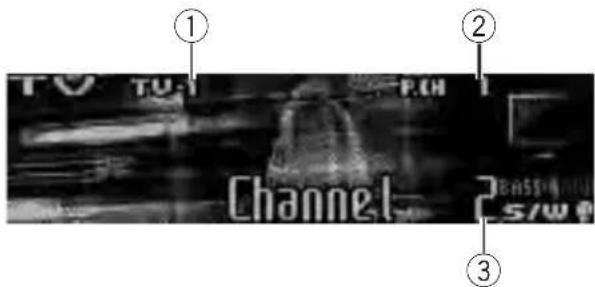
text_image
① TO TOL P.CN Channel 2 BASSELL 5/W ② ③①Bandindicator
②Presetnumberindicator
③Channelindicator
- Selectaband
PressBAND/ESC.
- Selectachannel(stepbystep)
Push MULTI-CONTROL leftorright.
- Seektuning
PushandholdMULTI-CONTROLleftorright, and then release.

Notes
• Band can be selected from TV-1 or TV-2.
- Youcancancelseektuningbypushing MULTI-CONTROLleftorright.
- WhilepushingandholdingMULTI-CONTROL leftorright,youcanskipstations.Seektuning startsassoonasyourelease MULTI-CONTROL.
Storingandrecallingbroadcast stations
Youcaneasilystoreupto12broadcaststationsforlaterrecall.
- 12stationsforeachbandcanbestoredin memory.
1PressLIST.
Presetscreenisdisplayed.
2UseMULTI-CONTROLtostorethese- lectedstationinmemory.
Turntochangethepresetnumber.Pressand holdtostore.
3UseMULTI-CONTROLtoselectthedesiredstation.
Turntochangethestation.Presstoselect.
■Youcanalsochangethestationbypushing
MULTI-CONTROLupordown.
■If you donotoperatethelist within about 30 seconds, the display automatically return to the ordinary display.
- Youcanalsorecallstationsassignedtopreset tuningnumbersbypushingMULTI-CONTROLup ordownduringthechanneldisplay.
Storingthestrongestbroadcast stationssequentially
1PressMULTI-CONTROLtodisplaythe mainmenu.
2UseMULTI-CONTROLandselect FUNCTIONtodisplayBSSM.
3PressMULTI-CONTROLtoturnBSSM on.
Searchingbeginstoflash.WhileSearchingis flashing,the12strongestbroadcaststations arestoredinorderfromthelowestchannel up.Whenfinished,thepresetchannellistappears.
■Tocancelthestorageprocess,press MULTI-CONTROLagain.
4UseMULTI-CONTROLtoselectthedesiredstation.
Turntochangethestation.Presstoselect.
■Youcanalsochangethestationbypushing
MULTI-CONTROLupordown.
■Toreturntotheordinarydisplay,press
BAND/ESC.
■ If you donot operatethelist within about 30 seconds, the display automatically return to the ordinary display.
AdditionalInformation
Errormessages
Whenyoucontactyourdealeroryournearest PioneerServiceCenter,besuretohavethe errormessagerecorded.
Built-inCDPlayer
| MessageCauseAction | ||
| ERROR-11,12, 17,30 | DirtydiscCleandisc. | |
| ScratcheddiscReplacedisc. | ||
| ERROR-10,11, 12,15,17,30, A0 | Electricalorme-chanical | Turntheignition switchOFFand backON,orswitch toadifferent source,thenback totheCDplayer. |
| ERROR-15Theinserteddisc doesnotcontain anydata | Replacedisc. | |
| ERROR-22,23TheCDformat cannotbeplayed back | Replacedisc. | |
| NOAUDIOTheinserteddisc doesnotcontain anyfilesthatcan beplayedback | Replacedisc. | |
| TRKSKIPPEDTheinserteddisc containsWMA filesthatareprotectedbyDRM | Replacedisc. | |
| PROTECTAllthefileson theinserteddisc aresecuredby DRM | Replacedisc. | |
USBstoragedevice
| MessageCauseAction | ||
| NOAUDIOnosongsTransfertheaudio | ||
| filestotheexternal storagedeviceand connect. | ||
| USBstoragede- vicewithsecurity enablediscon- nected | FollowtheUSB storagedevicein- structionstodis- ablethesecurity. | |
| NODEVICE | TheUSBstorage deviceoriPodis notconnectedto theUSBportof thisunit. | Connectacompa- tibleUSBstorage device. |
| TRKSKIPPED | Theconnected USBstoragede-vicecontains WMAfilesthat areprotectedby Windows MediaTMDRM9/10 | Playanaudiofile notprotectedby WindowsMedia DRM9/10. |
| PROTECTAllthefilesinthe USBstoragede-vicearepro-tectedby WindowsMedia DRM9/10 | Transferaudiofiles notprotectedby WindowsMedia DRM9/10tothe USBstoragede-viceandconnect. | |
| NOTCOMPATIBLE | TheUSBstorage deviceconnected toisnotsup-portedbythis unit. | ConnectaUSB storagedevicethat isUSBMassSto-rageClasscompli-ant. |
| CHECKUSB | TheUSBconnec-tororUSBcable isshort-circuited. | Confirmthatthe USBconnectoror USBcableisnot caughtinsome-thingordamaged. |
| Theconnected USBstoragede-viceconsumes morethan500 mA(maximum allowablecur-rent). | Disconnectthe USBstoragede-viceandonot useit.Turnthe ignitionswitchto OFF,thentoACC orONandthen connectthecom-pliantUSBstorage device. | |
| ERROR-19Communication failure | Performoneofthe followingopera-tions.-Turntheignition switchOFFand backON.-DisconnectorejecttheUSBsto-ragedevice.-Changetoadif-ferentsource.Then,returntothe USBsource. | |
| ERROR-23USBstoragede-viceisnotfor-mattedwith FAT16orFAT32 | USBstoragede-viceshouldbefor-mattedwithFAT16 orFAT32. | |
iPod
| MessageCauseAction | ||
| ERROR-19Communication failure | Disconnectthe cablefromiPod.OnceiPodmain menuisdisplayed, connectthecable again. ResettheiPod. | |
| iPodfailureDisconnectthe cablefromiPod.OnceiPodmain menuisdisplayed, connectthecable again. ResettheiPod. | ||
| ERROR-16,18Oldversionof iPod | UpdatetheiPod version. | |
| iPodfailureDisconnectthe cablefromiPod.OnceiPodmain menuisdisplayed, connectthecable again. ResettheiPod. | ||
| ERROR-A1 CHECKUSB | iPodisnot chargedbutoperatescorrectly | Checkiftheconnectioncablefor iPodshortedout (e.g.,notcaughtin metalobjects). Afterchecking, turntheignition switchOFFand backONordisconnecttheiPodand connectagain. |
| NOSONGSNosongsTransferthesongs toiPod. | ||
| STOPNosongsinthe currentlist | Selectalistthat containsthe songs. | |
| NODEVICETheUSBstorage deviceoriPodis notconnectedto theUSBportof thisunit. | ConnectacompatiibleiPod. | |

Handlingguidelineofdiscs andplayer
- Useonlydiscsfeaturingeitheroffollowing twologos.


- Useonlyconventional,fullycirculardiscs. Donotuseshapeddiscs.


- Use12-cmor8-cmCD.Donotusean adapterwhenplaying8-cmCDs.
- DonotinsertanythingotherthanaCDinto theCDloadingslot.
- Donotusecracked, chipped, warped, or otherwisedamaged discsastheymaydamagetheplayer.
- UnfinalizedCD-R/CD-RWdiscplaybackis notpossible.
- Donottouchtherecordedsurfaceofthe discs.
- Storediscsintheircaseswhennotinuse.
- Avoidleavingdiscsinexcessivelyhotenvir- onmentsincludingunderdirectsunlight.
- Donotattachlabels, writeonorapplychemicalstothesurfaceofthediscs.
- To clean a CD, wipe the disc with a soft clothoutwardfromthecenter.
- Condensationmaytemporarilyimpairthe player's performance. Leave it to adjust to thewarmertemperatureforaboutone hour.Also,wipeanydumpdiscswithasoft cloth.
- Playbackofdiscsmaynotbepossiblebe- causeofdisc characteristics, discformat, recorded application, playbackenvironment, storage conditions, and soon.
AdditionalInformation
- Textinformationmaynotbecorrectlydisplayeddependingontherecordedenvironment.
• Roadshocksmayinterruptdiscplayback. - Read the precautions for discs before using them.
DualDiscs
- DualDiscsaretwo-sideddiscsthathavea recordableCDforaudioononesideanda recordableDVDforvideoontheother.
- SincetheCDsideofDualDiscsisnotphysicallycompatiblewiththegeneralCD standard, it may not be possible to play the CDsidewith this unit.
- FrequentloadingandejectingofaDual Discmayresultinscratchesonthedisc. Seriousscratchescanleadtoplaybackproblemsonthisunit.Insomecases,aDual Discmaybecomestuckinthedisclaoing slotandwillnoteject.Topreventthis,we recommendyourefrainfromusingDual Discwiththisunit.
- Pleaserefertotheinformationfromthe discmanufacturerformoredetailedinformationaboutDualDiscs.
HandlingguidelineofUSB storagedeviceandthisunit
- ThisunitcanplaybackfilesintheUSBportableaudioplayer/USBmemorythatis USBMassStorageClass.
- Optimumperformanceofthisunitmaynot beobtaineddependingontheconnected USBstoragedevice.
- DonotleavetheUSBstoragedeviceinany placewithhightemperatures.
- DependingonthekindofUSBstoragedeviceyouuse,thisunitmaynotrecognize thestoragedeviceorfilemaynotbeplayed backproperly.
-
Operationsmayvarydependingonthe kindofaUSBstoragedevice.
-
You cannot connect a USB storage device to this unit via a USB hub.
- DonotpluganythingotherthantheUSB storagedeviceintotheUSBport.
- FirmlysecuretheUSBstoragedevicewhen driving.DonotlettheUSBstoragedevice fallontothefloor,whereitmaybecome jammedunderthebrakeoraccelerator pedal.
- PartitionedUSBstoragedeviceisnotcompatiblewiththisunit.
- Depending on the USB storage device connected to this unit, it may generate noise in the radio.
Compressedaudio compatibility(disc,USB)
WMA
- Compatible format: WMAencoded by WindowsMediaPlayer
- Fileextension:.wma
- Bitrate:48kbpsto320kbps(CBR),48kbps to384kbps(VBR)
•Samplingfrequency:32kHzto48kHz - WindowsMediaAudio9Professional, Lossless, Voice: No
MP3
- Fileextension:.mp3
- Bitrate:8kbpsto320kbps(CBR,VBR)
- Samplingfrequency:16kHzto48kHz(32, 44.1,48kHzforeemphasis)
- CompatibleID3tagversion:1.0,1.1,2.2, 2.3,2.4(ID3tagVersion2.xisgivenpriority thanVersion1.x.)
• M3uplaylist: No - MP3i(MP3interactive),mp3PRO:No
AAC
- Compatible format: AACencoded by iTunes
- Fileextension:.m4a
• Transmissionrate:16kbpsto320kbps (CBR)
•Samplingfrequency:11.025kHzto48kHz - AppleLossless:No
AdditionalInformation
WAV
- Compatible format: Linear PCM(LPCM), MSADPCM
- Fileextension:.wav
- Quantizationbits:8and16(LPCM),4(MS ADPCM)
- Samplingfrequency:16kHzto48kHz (LPCM),22.05kHzto44.1kHz(MS ADPCM)
Supplementalinformationof compressedaudio(disc,USB)
- Theremaybeaslightdelaywhenstarting playbackofaudiofilesencodedwithimage data.
- Fileextensionsmustbeusedproperly.
- Only32charactersfromthebeginningcan bedisplayedasafilename(includingthe extension)orafoldername.
- Thetextinformationofsomeaudiofiles maynotbecorrectlydisplayed.
Compressedaudiofileson thedisc
- ISO9660Level1and2compliant.Romeo andJolietfilesystemsarebothcompatible withthisplayer.
- Multi-session playback is possible.
- Compressedaudiofilesarenotcompatible withpacketwritedatatransfer.
- Regardlessofthelengthofblanksection betweenthesongsoforiginalrecording, compressedaudiodiscsplaywithashort pausebetweenensongs.
Compressedaudiofilesin theUSBstoragedevice
AboutUSBstoragedevicecompatibility, refer toSpecificationsonpage60.
• Copyrightprotectedfilescannotbeplayed back.
- Theremaybeaslightdelaywhenstarting playbackofaudiofilesonaUSBstorage devicewithnumerousfolderhierarchies.

Exampleofahierarchyand playbacksequences
:Folder
Compressedaudiofile

flowchart
graph TD
    A["01"] --> B["02"]
    B --> C["①"]
    B --> D["②"]
    B --> E["03"]
    E --> F["③"]
    E --> G["④"]
    H["04"] --> I["⑤"]
    H --> J["⑥"]
    K["05"] --> L["⑦"]
Level 1 L level 2 L level 3 L level 4
Thesequenceofaudiofileson thedisc
- Thisunitassignsfoldernumbers.Theuser cannotassignfoldernumbers.
- Folderselectionsequenceorotheroperationmaybealtereddependingontheencodingorwritingsoftware.
- Folderhierarchyisalloweduptoeighttiers. However, apracticalhierarchyoffolderis lessthantwotiers.
- Upto99foldersonadisccanbeplayed back.
Thesequenceofaudiofileson theUSBstoragedevice
ForUSBportableaudioplayers, thesequence is different from that of USB memory and depends on the player.
AdditionalInformation
- 01to05representassignedfoldernumbers.①to⑥representtheplaybacksequence.Theusercannotassignfolder numbersandspecifytheplaybacksequencewiththisunit.
- Playbacksequenceoftheaudiofileisthe sameasrecordedsequenceintheUSB storagedevice.
- Tospecifytheplaybacksequence, the following method is recommended. 1 Createthefilenameincludingnumbers that specify the playback sequence (e.g., 001xxx.mp3 and 099yyy.mp3). 2 Put those files into a folder. 3 Record the folder containing files into the USB storage device. However, depending on the system environment, you cannot specify the file playback sequence.
- Upto15000filesinaUSBstoragedevice canbeplayedback.
- Upto500foldersinaUSBstoragedevice canbeplayedback.
- UptoeighttiersdirectoryinaUSBstorage devicecanbeplayedback.
iPod
iPodcompatibility
- ThisunitsupportsonlythefollowingiPod models.SupportediPodsoftwareversions areshownbelow.OlderversionsofiPod softwaremaynotbesupported.
—iPodnanofirstgeneration(softwareversion1.3.1)
—iPodnanosecondgeneration(software version1.1.3)
—iPodnanothirdgeneration(software version1.1.2)
—iPodfifthgeneration(softwareversion 1.3.0)
—iPodclassic(softwareversion1.1.2)
—iPodtouch(softwareversion2.0)
—iPhone(softwareversion2.0)
—iPhone3G(softwareversion2.0)
- Depending on the generation or version of the iPod, some functions cannot be operated.
- OperationsmayvarydependingonthesoftwareversionofiPod.
- WhenusinganiPod,iPodDockConnector toUSBCableisrequired.
- PioneerCD-IU50interfacecableisalso available.Fordetails,consultyourdealer.
- Thisunitcancontrolpreviousgenerations iPodmodelswithaPioneeriPodadapter (e.g.CD-IB100II). Fordetailsconcerningoperationwiththe iPodadapter,refertoPlayingsongsoniPod onpage35.
AbouthandlingtheiPod
- DonotleavetheiPodindirectsunlightfor extendedamountsoftime.ExtendedexposuretodirectsunlightcanresultiniPod malfunctionduetotheresultinghighttemperature.
- DonotleavetheiPodinahighttemperature.
- Connectdirectlythedockconnectorcable totheiPodsothatthisunitworksproperly.
- FirmlysecuretheiPodwhendriving.Do notlettheiPodfallontothefloor,whereit maybecomejammedunderthebrakeor acceleratorpedal.
• Fordetails, refertothei Pod's manuals.
AboutiPodsettings
- You cannot operate theiPodEqualizeron Pioneerproducts. Were recommend that you set theiPodEqualizertooff, before connecting to this unit.
- YoucannotsetRepeattooffontheiPod whenusingthisunit.EvenifyousetRepeat tooffontheiPod,Repeatisautomatically changedtoAllwhenconnectingtheiPod tothisunit.
AdditionalInformation
Copyrightandtrademark notice
WMA

text_image
Plays Medium Media™WindowsMediaandtheWindowslogoaretrademarksorregisteredtrademarksofMicrosoft CorporationintheUnitedStatesand/orother countries.
Thisproductincludestechnologyownedby MicrosoftCorporationandcannotbeusedor distributedwithoutalicensefromMicrosoft Licensing,Inc.
MP3
Supplyofthisproductonlyconveysalicense forprivate,non-commercialuseanddoesnot conveyalicensenorimplyanyrighttouse thisproductinanycommercial(i.e.revenue-generating)realtimebroadcasting(terrestrial, satellite,cableand/oranyothermedia),broadcasting/streamingviinternet,intranetsand/orothernetworksorinotherelectroniccontentdistributionsystems,suchaspay-audioor audio-on-demandapplications.Anindependentlicenseforsuchuseisrequired.Fordetails,pleasevisit
http://www.mp3licensing.com.
iTunes
iTunesisattrademarkofAppleInc., registered intheU.S.andothercountries.
iPod

text_image
Made for iPodiPodisatrademarkofAppleInc., registered in the U.S. and other countries.
iPhone

text_image
Works with iPhoneiPhoneisattrademarkofAppleInc.

AdditionalInformation
Specifications
General
Powersource....14.4VDC(12.0Vto14.4V allowable)
Groundingsystem......Negativetype
Max.currentconsumption 10.0A
HPF: Frequency.....50/63/80/100/125Hz Slope.....-12dB/oct
Subwoofer(mono): Frequency.....50/63/80/100/125Hz Slope.....-18dB/oct Gain.....+6dBto-24dB Phase.....Normal/Reverse
Bassboost: Gain.....+12dBto0dB
CDplayer
System....Compactdiscaudiosystem Usablediscs....Compactdisc Signal-to-noiseratio....94dB(1kHz)(IEC-Anetwork)
Numberofchannels......2(stereo) MP3decodingformat......MPEG-1&2AudioLayer3 WMA decoding format ...... Ver. 7, 7.1, 8, 9, 10, 11 (2ch audio) (WindowsMediaPlayer)
AACdecodingformat......MPEG-4AAC(iTunesencodedonly)(.m4a) (Ver.7.7andearlier)
WAVsignalformat....LinearPCM&MSADPCM (Non-compressed)
USB
USBstandardspecification ....USB2.0fullspeed
Maximumcurrentsupply...500mA
Minimummemorycapacity 256MB
USBClass....MSC(MassStorageClass)
Filesystem.....FAT16,FAT32
MP3decodingformat......MPEG-1&2AudioLayer3
WMA decoding format ...... Ver. 7, 7.1, 8, 9, 10, 11 (2ch audio) (WindowsMediaPlayer)
AACdecodingformat......MPEG-4AAC(iTunesencodedonly)(.m4a) (Ver.7.7andearlier)
WAVsignalformat....LinearPCM&MSADPCM (Non-compressed)
FMtuner
Frequencyrange.....87.5MHzto108.0MHz
Usable sensitivity ....9 dBf (0.7 V/75 , mono, S/N:30dB)
Signal-to-noiseratio....72dB(IEC-Anetwork)
AMtuner
Frequencyrange....531kHzto1602kHz(9kHz) 530kHzto1640kHz(10 kHz)
Usablesensitivity.....25μV(S/N:20dB)
Signal-to-noiseratio......62dB(IEC-Anetwork)
Infraredremotecontrol
Wavelength....940nm±50nm
Output......typ;12mw/srperInfrared LED

Note
Specificationsandthedesignaresubjecttomodificationswithoutnoticeduetoimprovements.

GraciasporhabercompradoesteproductoPIONEER.
natural_image
Simple line drawing of a rectangular device with a black arrow pointing to its side (no text or symbols)3Coloqueelpaneldelanteroenlafunda protectoraprovistaparaguardarlodemaneasegura.
natural_image
Diagram of a device's internal structure showing a connector inserted into a folder (no text or symbols visible)natural_image
Simple line drawing of a door or cabinet with an arrow pointing to the side panel (no text or symbols)
Acercadelmododemo
natural_image
Diagram of a laboratory procedure showing a pipette and test tube with an arrow indicating direction (no text or symbols)
ADVERTENCIA
text_image
Fader F/R ①text_image
Language select Englishtext_image
BT Audio Pioneer BASS S/Wtext_image
MCD DISCOFTRK01 03'17" S/Wtext_image
① DVD DVD ② DITOTCOI 01' 17" DVD BASS-W S/W① Indicador DVD-V/VCD/CD/MP3/WMA
text_image
① TO TUT P.CH Channel 2 BASS 5/00text_image
Works with iPhoneiPhoneesunamarcacomercialdeApple Inc.
natural_image
Simple line drawing of a rectangular object with a black arrow pointing to its side (no text or symbols)natural_image
Technical line drawing of a mechanical assembly with no visible text or symbols2Pressioneoladodireitodopainelfrontalatéoseutotalencaixe.
natural_image
Simple line drawing of a rectangular device with an arrow pointing to its side (no text or symbols)
natural_image
Diagram of a laboratory procedure showing a pipette and a circular object on a base, with arrows indicating motion (no text or symbols)
ADVERTÊNCIA
—Podcasts (Podcasts)—Genres (Estilos)—
Composers(Compositores)—Audiobooks (Audiobooks)
text_image
Language select English ①text_image
BT Audio Pioneer ① BASS S/W①Nomedodispositivo Mostraonomedodispositivodoáudioplayer Bluetoothconectado(ouadaptadorBluetooth).

Importante
text_image
TEL PIONEER 12:00 PM 01 JAN 2009 ① ③ ② ④ S A U T O P H O N E I AUTO ⑤text_image
MCD DISCO-TRKOT 01:17" S/OW ① ② ③text_image
① TO TOL P.CH Channel 25/0 ② ③①Indicadordebanda
②Indicadordenúmeroprogramado
③Indicadordecanal
text_image
Plays Medium MediumVisit us on the World Wide Web at
http://pioneer.jp/group/index-e.html
Pioneer Gulf.FZE
http://www.pioneer-uae.com
Pioneer Electronics Australia. Pty.Ltd
http://www.pioneeraus.com.au
Pioneer Electronics Asiacentre.Pte
http://www.pioneer.com.sg
Pioneer (HK) Ltd.
http://www.pioneerhongkong.com.hk
Pioneer High Fidelity Taiwan Co., Ltd.
http://www.pioneer-twn.com.tw
Pioneer International Latin America S.A.
http://www.pioneer-latin.com
PIONEERCORPORATION
4-1,MEGURO1-CHOME,MEGURO-KU
TOKYO153-8654,JAPAN
PIONEERELECTRONICS(USA)INC.
P.O.Box1540, LongBeach, California90801-1540, U.S.A.
TEL:(800)421-1404
PIONEEREUROPENV
Haven1087, Keetberglaan1, B-9120Melsele, Belgium/Belgique
TEL:(0)3/570.05.11
PIONEERELECTRONICSASIACENTREPTE.LTD.
253AlexandraRoad,#04-01,Singapore159936
TEL:65-6472-7555
PIONEERELECTRONICSAUSTRALIAPTY.LTD.
178-184BoundaryRoad, Braeside, Victoria3195, Australia
TEL:(03)9586-6300
PIONEERELECTRONICSOFCANADA, INC.
300AllstateParkway, Markham, OntarioL3R0P2, Canada
TEL:1-877-283-5901
TEL:905-479-4411
PIONEERELECTRONICSDEMEXICO,S.A.deC.V.
Blvd.ManuelAvilaCamacho13810piso
Col.LomasdeChapultepec,Mexico,D.F.11000
TEL:55-9178-4270
先鋒股份有限公司
總公司:台北市中山北路二段44號13樓
電話:(02)2521-3588
先鋒電子(香港)有限公司
香港九龍尖沙嘴海港域世界商業中心
9樓901-6室
電話:(0852)2848-6488
PublishedbyPioneerCorporation.
Copyright©2008byPioneerCorporation.
Allrightsreserved.