DEH-1450UB - Receiver PIONEER - Free user manual and instructions
Find the device manual for free DEH-1450UB PIONEER in PDF.


User questions about DEH-1450UB PIONEER
0 question about this device. Answer the ones you know or ask your own.
Ask a new question about this device
Download the instructions for your Receiver in PDF format for free! Find your manual DEH-1450UB - PIONEER and take your electronic device back in hand. On this page are published all the documents necessary for the use of your device. DEH-1450UB by PIONEER.
USER MANUAL DEH-1450UB PIONEER
REPRODUCTOR DE CD CON RECEPTOR RDS
CD PLAYER COM RDS
CD RDS 接收機
ThankyouforpurchasingthisPIONEER product
To ensure proper use, pleasereach through this manual before using this product. It is especially important that you read and observe WARN-
ING sandCAUTIONsin this manual. Please keep the manual in as safe and accessible place for further reference.
Aboutthisunit
CAUTION:
USEOFCONTROLORADJUSTMENTOR PERFORMANCEOFPROCEDURES OTHERTHANTHOSESPECIFIEDHEREIN MAYRESULTINHAZARDOUSRADIATION EXPOSURE.
CAUTION:
THEUSEOFOPTICALINSTRUMENTS WITHTHISPRODUCTWILLINCREASE EYEHAZARD.

CAUTION
- Donotallowthisunittocome intocontact with liquids. Electricalshockcouldresult. Also, damagetothisunit, smoke, andoverheatingcouldresult from contact with liquids.
• Always keep the volume of eleven oughts, clear outsidesounds. - Avoidexposuretomoisture.
- If the battery is connected to discharged, any preset memory will be erased.
CAUTION
This product is a class1aserproductclassified under the Safety of laser products. IEC 60825-1:2007, and contains a ass1M ascr module. To ensure continued safety, do not remove any covers or attempt to gain access to the inside the product. Referral servicing to qualified personnel.
CLASS 1 LASER PRODUCT
CAUTION—CLASS 1M INVISIBLE LASER RADIATION WHEN OPEN, DO NOT VIEW DIRECTLY WITH OPTICAL INSTRUMENTS.
Note
Functionsettingoperat onsarecompletedeven ifthemenuiscancelledbeforetheoperations areconfirmed.
Aboutthismanual
In the following instructions, USB memories and USB audiop ayersare collectively referred to as "USB storage device".
Demomode
Important
- Failure: oconnelltheredlead(ACC) of this unit to a terminal coupled with ignition switch on/off operations may lead battery drain.
- Remember that the fealuredemocontinuesoperatingwhentocarengine sturned off, it may drain battery power.
Beforeyoustart
Thedemostartsautomatically fycodonotoperacethisunilwithinaou30secondsince the unitwaslastoperaceriftheignitionswitch this settoACCorONwhiletheunitstumecoff. To cancellthedemomocie,youneedtodisplay the unitsettingsSelectDEMO(demodisplaysetting)ancturnoffthedemodispay Fordails, referolinitialsettingsonpage7.
Incaseoftrouble
Should this unit failcooperale properly, please contact your dealer or near a rest authorized PIONEERService Station.
Operatingthisunit
Headunit

text_image
① 2 3 4 5 6 ⑨ 11 12 13 14 15 16 17PartPart
| (1) ▲(inject)(8) | ▷ (back/disray) | ||
| (2) | Q dis(9) ◀▶ | ||
| (3) | MULTI-CONTROL(M.C.) | 10BAND | |
| (4) | SRC/OFF | 10 | 1 to 6 |
| (5)D sc loading slot(2) | ○ /DISP OFF | ||
| (6)USB port | 13 | AUX input jack(3.5 mm stereojack) | |
| (7) | EQM | 14 | Delacn button |

CAUTION
- Use an optional Pioneer USB cable (CD-US0F) to connect the USB audioplayer/USB memory as any device connected directly to the unit will protrude out from the unit and may be dangerous.
- Donol useunauthorizedproducts.
Remotecontrol
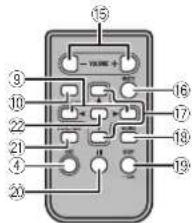
text_image
15 YANE + - 16 17 18 19 20 21 22 23 24 25 26 27 28 29 30 31 32 33 34 35 36 37 38 39 40| Part | Operation | |
| 15VOLUME | Press to increase or decrease volume. | |
| 16MUTE | Press to mute. Press again to unmute. | |
| 17▲/▼ | Press to recall presentations. Press to select thanex/provious folder. | |
| 18AUDIO | Press to select an audio function. | |
| 19DISP/SCRL | Press to select differentdisplays. Press and note to turn dimmer on oroff. | |
| 20II | Press to pause or rosumc play back. | |
| 21 | FUNC-TION | Press to select functions. |
| 22 | LIST/ENTER | Press to display the disc title, track title, folder or file list depending on the source. Press to display the list depending on the source. While in the operating menu, press to controlfunctions. |
Operatingthisunit
Displayindication

text_image
Diagram of a 16-pin connector with numbered labels pointing to each pin.Indicator State
| 1 | Main dis- play soc- tion | Tuner: band and frequencyRDS: program service name, PTY information and other literal informationBuilt-in CD player and USB: elapsed playback time and text information |
| 2 | Q (dst) | The listfunction is beingoper acted. |
| 3 | LOC | Local seek tuning is on. |
| 4 | TA (TA)TA functionis on. | |
| 5 | TP (TP) | A TP station is tuned in. |
| 6 | (repeat) | Track of folder repeats is on. |
| 7 | XX (ran- dom) | Random play ison. |
| 8 | S Rtrv (sound re- trieve) | The soundretriever functionis on. |
Setupmenu
When you turn the ignition switch to ON after installation, selup menu appear on the display. You can set up the menu options below.
1 After installation of this unit, turn the ignition switchtoON. SETUP appears.
2 Turn M.C. to switch to YES. Press M.C. to select.
- If you do not operate for 30 seconds, the set up menu will not be displayed.
■ If you prefer not to set up at this time, turn M.C.
to switch to NO. Press to select
If you select NO, you cannot set up in the set up menu.
3 Perform the following procedures to set themenu.
To proceed to the next menu option, you need to confirm your selection.
CLOCK SET (selling the clock)
| 1 | Tum M.C. to adjust hour |
| 2 | Press M.C. to select minute. |
| 3 | Tum M.C. to adjust minute. |
| 4 | Press M.C. to confirm the selection. |
FM STEP (FM tuning step)
| Normally, the FM tuning stop employed by seek tuning is 50 kHz. When AF or TA is on, the tuning step automatically changes to 100 kHz. It may be preferable to set the tuning step to 50 kHz when AF is on. |
| • The tuning step remains at 50 kHz during manual tuning. |
| 1) lum M.C. to select the FM tuning step.50 (pC kHz—100 (100 kHz). |
| 2) Press M.C. to confirm the selection. |
| MW STEP (MW tuning step) |
Operatingthisunit
The MWtuningstep can be switched between 9kHz to 10kHz. When using the Helunen nNorth, Centra or South America, reset the tuning step from 9kHz (531kHz to 602kHz) to 10kHz (530kHz to 1640kHz) allowable.
1 Turn M.C. lose select the MWtuning step. 9 (8 kHz)—10 (10 kHz)
2 Press M.C. lo confirm the selection.
DEMO(demoisplaysetting)
1) TurnM.C. to set the modisplaytoonoroff. 2) PressM.C. to confirm the selection.
QUIT appears.
4Tofinishyoursettings,turnM.C.toselect YES.Presstoselect.
■If you prefer to change your setting again, turn M.C. loswitch lo NO. Press loselect.
Notes
- You can selupthemenu options in their initial settings. Ford details about those settings, rotor to initial settings on page 7. - You can cancel selup menu by pressing SRC/OFF.
Basicoperations
Important
- Hand egentlywhenremovingorattaching thefrontpanel.
- Avoid subjecting the front panel to excessive shock.
- Keep the front panel out of direct sunlight and night temperatures.
• To avoid damaging the device or vehicle interior, remove any cables and devices attached to the front panel before detaching it.
Removing the front panel to protect your unit from the left
1 Pressthedelachbutton to release the front panel.
2 Push the front panel upward (I) and then pull it toward(II) you.

3 Always kept the data front panel line protection devices such as protection case.
Re-attachingthefrontpanel
IT Sidothetrontpanchotheleft. Makesuretoin sertthetabsontheletsideof Irheadunit niotheslo sonthefrontpanel.
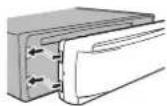
2 Prosthent rights doc the front panel until its firm yseated. If you cannot attach the front panel to the head unit successfully makes urthat you are placing the front panel to the head unit correctly. Forcing the front panel in oplacemay result in damagot the front panel had unit.
Turningtheunion
1 Press SRC/OFF to turn the unit on.
Turningtheunitoff IT Press and hold SRC/OFF until the unit turns off.
Operatingthisunit
Selectingasource
1 Press SRC/OFF to cycle between: TUNER (tuner)—CD (built-in CD player)—USB (USB)—AUX(AUX)
Adjustingthevolume 1TurM.C. to adjust the volume.

CAUTION
Forsafetyreasons, park your vehicle when removing the front panel.
Note
Whenth sunit'sblue/whiteleadisconnectedto thevehicle'sauto-antennarelaycontrolterminal,thevehicle'santennaextendswhenthis unit'ssourceistumedon.Toretracttheantenna,turnthesourceoff.
Useandcareoftheremote control
Using heremotecontrol IT Point that amote control in the direct on the front panel to operate. When using for the first time pull out the film protruding from the tray.
Replacing the battery
① Sidethe rays for the back of theremote control.
2 Insert: the battery with the plus(+) and minus (-) poles aligned properly.


WARNING
- Keep the battery you of these children. Should the battery be swallowed, consult a doctor immediately.
- Batteries(batterypackorbatteriesinstalled) must not be exposed to excessive cheats such as sunshine, fireortholike.

CAUTION
• UseoneCR2025(3V) lithium battery.
- Remove the battery if theremole controls not used for amontorlonger.
- There is a danger of explosion if the battery is incorrectly replaced. Replace only with the same core equivalent type.
- Donotnandlethebatterywithmetallictools.
- Donolslorethebatterywithmetallicobjects.
- If the battery leaks, wipe theremotocontrol completely clean and install an new battery.
- When disposing cfused batteries comply with governmental regulations on environmental public institutions' rules that apply in your country/area.

Important
- Donotstoretheremotecontrolinlighttemperaturesorirectsunlight.
- Theremotecontrol may not function properly and rect sunlight.
- Donot etheremote control fall onto the floor, where it may become jammed under the brake craccelerator pedal.
Operatingthisunit
Menuoperationsidentical forsetupmenu/function settings/audioadjustments/initialsettings/lists
| Return ngtothopreviousdisplay |
| Return ngtothepreviouslist(thefolderonelevel higher) |
| ITPress > |
| Return ngtotheordinarydisplay |
| Cancelting the initial setting menu/setup menu |
| ITPressBAND |
| Return ngtotheordinarydisplayfromthelist |
| ITPressBAND |
Tuner
Basicoperations
| Selectingband |
| Press BAND until the desired band (F1, F2, F3 for FM, MW or S1, S2 for shortwave) is cis- played. |
| Recallingpresetstations |
| Press < or ▶IF MAN (manual tuning) a selected in SEEK you can not recallpresetstations.You need to selectPCH (presatch annal) in SEEK.Fordetalls about these settings refer to SEEK(left/right key setting) on thenexpage. |
Manualtuning(stepbystep)
1 Press ◀ or ▶.
- If PCH (preset channel) is selected in SEEK, you cannot return our order manually. You need to select MAN(manualluning) in SEEK. For details about the settings, refer to SEEK (left/right key setting) on then next page.
Seeking
1 Press and hold ◀ or ▶, and then release. You can cancel seek tuning by briefly press ng ◀ or ▶. While pressing and holding ◀ or ▶, you can skip stations. Seek tuning starts as soon as you release ◀ or ▶.
Note
Thisunit'sAF(alternativefrequenciessearch) function can be turned on and off. AF should be off from normal tuning operation (referto AF(alternativefrequenciessearch) on then next page).
Storingandrecallingstations foreachband
Usingpreset tuning buttons
1 When you find astation that you want to store in memory, press one of the preset tuning buttons (1 to 6) and hold until the preset number stops flashing.
2Pressoneofthepresettuningbuttons(1 to6)toselectthedesiredstation.
SwitchingtheRDSdisplay
●Press.
Programservicename—PTYinformation—Entertainment—Frequency
■ PTYinformationandthefrequencyappearonthedisplayforeightseconds.
■ Depending on the band, text information can be changed.
Operatingthisunit
■ Textinformationitemsthatcanbochangeddependonthearea.
PTYlist
NEWS/INFO
NEWS(News), AFFAIRS(Currentaffairs), INFO (Information), SPORT (Sports). WEATHER (Weather), FINANCE(Finance)
POPULAR
POPMUS(Popularmusic) ROCKMUS(Rock music), EASYMUS(Easyl stening), OTHMUS (Othermusic) JAZZ(Jazz), COUNTRY(Country music), NATMUS(Nationalmusic), OLDIES (Oldlesmusic), FOLKMUS(Folkmusic)
CLASSICS
L.CLASS(Lightclassical),CLASSIC(Classical)
OTHERS
EDUCATE(Fucation),DRAMA(Drama).CULTURE (Culture). SCIENCE (Science), VARIED (Varied). CHILDREN (Children's), SOCIAL (Social affairs). RELIGION (Religion),PHONEIN (Phone in). TOURING (Travel), LEISURE (Leisure). DOCUMENT (Documentaries)
Functionsettings
1PressM.C.todisplaythemainmenu.
2TurnM.C.tochangethemenuoption andpresstoselectFUNCTION.
3TurnM.C.toselectthefunction.
Afterselecting, perform the following procedure to set the function.
- If MW, S1 or S2 is selected, only BSM, LOCALandSEEK savailable.
BSM(beststationsmemory)
BSM(beststationsmemory)automaticallystores thes|xstrongeststationsintheorderoftheirsignalstrength.
1 PressM.C.toturnBSMon. Tocancel, pressM.C.again.
REGION(regional)
When AF is used, theregional function limits the selection of station to those broadcasting regional programs.
1 Press M.C. to turn theregional function or off.
Localseektuning ets,youtuneintoconlythose raciostationswithsufficientlystrongsignalsfor goodreception.
1 PressM.C. to select the desired setting.
FM: OFF LV1 LV2 LV3 LV4
M/W/shortwave: OFF—LV1—LV2
The highest level setting allows reception of
only the strongest stations, while lower levels
allowthereceptionofweakerslations.
PTYSEARCH(programtypesalection)
Section
Operatingthisunit
Youcantune into eastation using PTY(program type)information.
1PressM.C.1cdisplaythesettingmode.
2|IumM.C.toselectthedesiredsetting.
NEWS/INFO POPULAR CLASSICS OTHERS
3) PressM.C. to begin the search.
Theurilsearchesforaslationbroadcasting thatltypeofprogram.Whenaslationisfound, itsprogramsorv conamoisdisplayed. ForF1YiprogramtypolDcode)informat on, referlothepreviouspage.
The program of some stations may differ from that indicated by the transmit tool. If no station is broadcasting the type of program you searched for, NOTFOUND is displayed for about two seconds another the tuner return to the original station.
TA(trafficannouncementstandby)
1 PressM.C. tclu ntrafficannouncement standbyonoroff.
AF(a temativefrequenciessearch)
1) Press M.C.tcturn AFonoroff.
NEWS(newsprogram interruption)
1) Press M.C. tcturntheNEWSfunctiononor off.
SEEK(left/rightkeysetting)
You can assign a function to the left and right keys of the unit.
SelectMAN(manua tuning)totureupordown manuallyorselectPCH(presetchannel)toswitch betweenpreselchannels.
1 Press M.C. to select MAN or PCH
CD/CD-R/CD-RWandUSB storagedevices
Basicoperations
PlayngaCD/CD-R/CD-RW
T Insert the disc into the disc loadings of with the labelside up.
EjectingaCD/CD-R/CD-RW
1 Press
PlayingsongsonaUSBstoragedevice
T OpentheUSBportcover.
[2] Plug in the USB storagedovice using a USB cable.
Asongwill beplayedautomatically.
Stopping playbackoffi esonaUSBstoragedevice
T You may disconnect the USB storage device at anytime.
Theunitstopsplayback.
Selectingafolde
1Press1/ ▲ or2/.V
Selectingatrack
1 Press◄ or ►
Fastforwardingorreversing
1 Press and hold ◀ or ▶
- When playing compressed audio, there sno sound during fast forward or reverse.
Returningtorcotfolder
TPressandholdBAND
SwitchingbetweencompressedaudioandCD-DA
1 PressBAND
Switchingbetweenplaybackmemorydevices You canswitchbetweenplaybackmemorydevices
onUSBstoragedev coswithmorethanoneMass
StorageDevice-compatiblememorydevice.
1PressBAND
- Youcanswitchbetweenupto32different memorydevices.
Operatingthisunit
Note
DisconnectUSBstoragedevicesfromtheunit whennctinuse.
Displayingtextinformation
Selectingthedesirectextinformation
1Press
- Depending on the version of Tunes used to
writeMP3filestoaciscormediaflotypes, in- compatib etextstored withinaudiofilemay beisplayedincorrectly.
- Textinformationitemsthatcanbechanged dependonthemedia.
Selectingandplayingfiles/ tracksfromthenamelist
1Presstoswitchtothefile/trackname listmode.
2UseM.C.toselectthedesiredfilename (orfoldername).
Changingthefileorfoldername
1 TurnM.C.
Playing
1 When a leor track is selected, press M.C.
Viewingalistofthef les(orfolders) nthese-
ler:lerfolder
T Whenafolderisselected, press M.C.
Playingasongintheselectedfolder
1 Whenafolderisselected,pressandholdM.C.
Advancedoperationsusing specialbuttons
1Press6/ → locyclebetweenthefollowing
CD/CD-R/CD-RW
•ALL-Repeatalltracks
•ONE-Repeatthecurrenttrack
- FLD-Repeat the current folder
USBaudioplayer/USBmemory
•ALL-Repeatallfiles
•ONE-Repeatthecurrentfile
•FLD-Repeatthecurrentfolder
Playingtracksinrandomorder
1 Press5/ ××toturrrandomplayoncroff. Tracksinaselectedrepeatrangeareplayed in randomorder.
• Tochangesongsduringrandomplay.press▶ toswitchtothenextrack.Pressing◀restarts playbackofthecurrenttrackfromthebegin- ning Golfthesong.
Pausing playback
1 Press 4/PAUSE to pause or resume.
Enhancing compressed audio and restoring rich sound (sound retriever)
1 Press 3/S.Rtrv to cycle between:
1—2—OFF(off)
1iseffectivefor low compression rates, and 2
iseffectiveforhighcompressionrates.
Functionsettings
1PressM.C.todisplaythemainmenu.
2TurnM.C.tochangethemenuoption andpresstoselectFUNCTION.
3TurnM.C.toselectthefunction.
Afterselecting, perform the following procedure to set the function.

En
Operatingthisunit
REPEAT(repeatplay)
1 Press M.C. lose select arepeat play range. For details, referto Selecting arepeat play range on the previous page.
RANDOM(randomplay)
1PressM.C.tolumrandomplayonroff.
PAUSE(pause)
1 Press M.C. lopausea resume,
S.RTRV(soundretriever)
Automatically enhances compressed audio and restores richness and.
TPressM.C.tosalctthedesiredsetting for details, refer to Enhancing compressed audio and restoring rich sound(soundre/never) on the previous page.
Audioadjustments
1PressM.C.todisplaythemainmenu.
2TurnM.C.tochangethemenuoption andpresstoselectAUDIO.
3TurnM.C.toselecttheaudiofunction. Afterselecting.performthe following procedureslosellheaudiofunction.
FAD/BAL(face/balanceadjustment)
1 Press M.C. to display nonsetting mode. 2 Press M.C. to cycle between face front/rear, antenna arc left/right. 3 Turn M.C. to address speaker balance. • When there are output and RC/OUTPUT setting are SW, you cannot adjust front/rearspeaker balance. Refero REAR-SP (reoutput setting), onthenextpage. Refero PREOUT (preoutput setting) onthenextpage.
PRESETEQ(equal zerrecal)
1PressM.C.od splaythesellngmode.
2 lumM.C.toselecttheequalizer DYNAMIC—VOCAL—NATURAL—CUSTOM —FLAT—POWERFUL
3 PressM.C.toconfirmtheselection.
- Youcanalsoswitchtheequalizerbypassing EQAI repeatedly.
TONECTRL(equalizeradjustment)
- Adjustedecualizercurvesettingsarestoreclin CUSTOM.
1PressM.C.od splaythesettingmode.
2 Press M.C. to select BASS (bass)/MID (mid)/TREBLE(trab a).
3TurnM.C.toadjustthelevel. Adjustment range: +6 to -6
LOUD(ouress)
Loudnesscompensatesfordeficiencies in:helow-frequency and high-frequency ranges at low volume.
1 PressM.C.oselectthedesiredsetting. OFF (off)—LOW(low)—HI (high)
SUB.W(subwooferon/offsetting)
The suniti sequipped with as rawoferoutput which can be turned on or off.
1 pressM.C.oselectthedesiredsetting. NOR (normal phase)—REV (reverse phase)—OFF(subwooferoff)
SUB.WCTRL(suowooferadjustment)
Operatingthisunit
The cut-off frequency and output level can be adjusted when the subwoofer output is on. Only frequencies lower than those in these selected range outputted from the subwoofer.
- When you select OFF in SUB.W, you cannot select this function. Fordetails, refer to SUB.W (subwoof/cron/offsetting) on this page.
1 PressM.C lod splaythesettingmore.
2PressM.C. locyclebetween the cut-off frequency and output level of the subwoofer. Cut offrequency(Cut offrecuency display flashes.)—Outputlevel(Output level display flashos.)
3 TimM.C. to select the desired setting. Cut-off frequency: 50HZ—63HZ—80HZ—100HZ—125HZ Output level: -24 to +6
SLA(source:leveladjustment)
SLA(Sourcolavalad,ustmont)letsyouadjustthe volumeleveloieachsourceopreventradical changesinvolumewhenswitchingbetweensources.
- SettingsarebasedontheFM/volumelevel, whichremainsunchanged.
- The MWV volumevelcana sobeadjusted with this function.
- Whense ectingFMastresource,youcannot switchtoSLA.
1 PressM.C. to display the setting mode.
- TurM.C. loadjustresource volume. Adjustment range: +4 to -4
3 PressM.C.toconfirmtheselection.
Initialsettings
1PressandholdSRC/OFFuntiltheunit turnsoff.
2PressM.C.andholduntilfunctionname appearsinthedisplay.
3TurnM.C.toselecttheinitialsetting.
Afterselecting, perform the following procedure to set the initial setting.
CLOCKSET(settingtheclock)
1 PressM.C. to display the setting mode.
2 PressM.C. to select these segments of the clock display you wish to set. Hour—Minute
3 TurnM.C.toadjusttheclock.
FMSTEP(FMtuningsleep)
Normally.theF Mituning stepemployedbyseek tuningis50kHz.When AForTAison.thetuning stepautomatically changes to 100kHz, it maybe preparable set the tuning steps to 50kHz when AFison.
- Thetuningslepremain sat50×Hzuring manualtuning.
PressM.C. to select the Hvtuning step. 50(50kHz)—100(100kHz)
MWSTEP(MWturingstep)
The MW turing step can be switched between 9kHz and 10kHz. When using the tuner in North, Central South America, resetting turing step from 9kHz (531kHz to 1602kHz lowable) to
^10 kHz(530kHz to 1640kHz allowable).
TPressM.C.toselecttheMWtuningstep. 9 (8 kHz)—10 (10 kHz)
AUTO-PI(autoPIseek)
Thoun tecanautomaticallysearchforad frent stationwiththesameprogramming,everduring prosotroca1.
PressM.C.toturnAutoPiseekonoroff.
AUX(auxiliary input)
Activate this setting when using an auxiliary device connected to this unit.
PressM.C.toturnAUXonoroff.
USBPNP(pluganoplay)
Section
Operatingthisunit
Thissetting allows you to switch your source to USB automatically.
1 PressM.C. lcturntheplugardplayfunction onoroff.
ON-When USB storage device is connected, depending on the type of device, the source is automatically switch to USB when you turn on the engine. If you disconnect your USB storage device, this unit source is turned off.
OFF-When USBstoragedeviceisconnected, thesourceisnotswitchedtoUSBautomatically. PleasechangethesourceloUSBmanually.
REAR-SP(rearoutputsetting)
Therearspeakerieacoutputcanbeusedfortull-rangespeakerorsubwooferconnection.
If you switch to SW, you can connect a earspeak-erleaddirectly to asubwoofer without using an auxiliary amo.
Initially, REAR-SPissetforrearfull-rargespeaker connection (FUL).
1) PrassM.C. to select the desired setting.
FUL—SW
- Evenifyouchangethissettng,therewill benocutputifyouselectOFFinSUB.W (RefertoSUB.W(subwooferon/offsetting) onthepreviouspage).
- If you change this setting, subwoofer output in the audiomenu will return to the factory settings.
PREOUT(precutsetting)
The RCA outputscar beused for rear speaker or subwoofer connection.
If you switch to SW, you can connect are speakers load directly to as subwoofer without using an auxiliary amp.
Initially, PREOUTtissel'orrear-full-rangespeaker connection (SW).
1 PressM.C. loselected desired setting SW—REA
• Evenifyouchangethissetting,therewill be nonoutputifyouselectOFFinSUB.W (ReferloSUB.W(subwooferon/offsetting) ontheproviouspage).
- If you change this setting, subwoofer output in the audiomenu will return to the factory settings.
DEMO(demonisplaysetting)
1 PressM.C.totunthedemodisplayonoroff.
SCROLL(scrollmodesetting)
WhaneverscrollissettoON, recorded textinformationscrolls continuously in the display. Setto OFFify you prefer their information to scroll just
once.
1 Press M.C. to turn the ever scroll on or off.
Switchingthedimmersetting
You can adjust the brightness of illumination.
●Pressandhold

UsinganAUXsource
1 InsertthestereominiplugintotheAUX inputjack.
2PressSRC/OFFtoselectAUXasthe source.
Operatingthisunit
Note
AUX cannot be selected unless the auxiliary setting is turned on. Formed details, refer to AUX (auxiliary input) on the previous page.
Turningtheclockdisplayon oroff
- Press/DISPOFFtoturntheclockdisplayonoroff.
- The clock display disappear temporarily when you perform other operations, but the clock display appears again after 25 seconds.
Turningthedisplayofforon
●Pressandhold/DISPOFFuntilthedisplayturnsoffandon.

Installation
Connections

WARNING
• Usespeakersovers0W(outputvalue) and between 4Ωlo8Ω(impedancevalue). Do nouse1Ωlo3Ωspeakersforthisunit.
• The black cab disground. When installing this unit power (sold separately), ensure connected backgroundwire first. Ensure that groundwire is properly connected to a parson the car's body. The groundwire the poweramp and the one of the unit aryohordvcomustoc connected to the course, within different screws. If these were for the round new reoosorta sout, it could result in fire generation of smox cormal function.
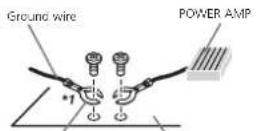
Other devices Metal parts of car's body (Another electronic device in the car).
^** Non supplied for this unit.

Important
- When installing this unit vehicle without an ACC (accessory) position on the ignition switch, failure to connect theredable to the terminal that detects operation of the ignition key may result in battery drain.

ACC position

No ACC position
• Use this unit with a 12-volt battery and negative grounding only. Failure to dosomay result in a firearm function.
- Topreventashort-circuit, overheatingormal-function, besuretofollowthedirections below.
— Disconnect the negative terminal of the battery before installation.
— Secure the wiring with cable clamps or adhesive tape. Wrap adhesive tape around wiring that comes into contact with metal parts to protect the wiring.
— Place all cables away from moving parts, such as the shift lever and seat rails.
— Place all cables away from hot places, such as near the heater outlet.
— Do not connect the yellow cable to the battery by passing it through the hole to the engine compartment.
— Cover any disconnected cable connectors with insulating tape.
— Do not shorten any cables.
— Never cut the insulation of the power cable of this unit in order to share the power with other devices. The current capacity of the cable is limited.
— Use a fuse of the rating prescribed.
— Never wire the negative speaker cable directly to ground.
— Never band together negative cables of multiple speakers.
- When this unit is on control signals a present through the play/whitcable. Connect this cable to the system are mole control of an external power and port vehicle sauto-antenna, clay or co-trial terminal (max 300mA 12VDC). If the vehicle scouippow tha glass antenna, connect to the antenna boost power supply terminal.
- Neverconnecttheblue/whitecabletoche powerterminalofanexternalpoweramp. Also,neverconnectittotnepowerterminal oftheautoantenna.Doingsomayresultin batterydrainoramalfunction.
Installation
This unit

①Powercordinout
②Rearoutputsubwooferoutput
③Antennainout
④Fuse(10A)
⑤Wiredremoteinput
Hard-wiredremotecontroladaptorcanbe connected(soloseparately).
Power cord
Perform these connections when not connecting arcarspeaker load to asubwoofer.

flowchart
graph TD
    subgraph Left_Circuit
        L["①"] --> A["②"]
        A --> B["③"]
        B --> C["④"]
        C --> D["⑤"]
        D --> E["⑥"]
        E --> F["⑦"]
        F --> G["⑧"]
        G --> H["⑨"]
        H --> I["⑩"]
        I --> J["⑪"]
        J --> K["⑫"]
        K --> L["⑬"]
        L --> M["⑭"]
        M --> N["⑮"]
        N --> O["⑯"]
        O --> P["⑰"]
        P --> Q["⑱"]
        Q --> R["⑲"]
        R --> S["⑳"]
        S --> T["㉑"]
        T --> U["㉒"]
        U --> V["㉓"]
        V --> W["㉔"]
        W --> X["㉕"]
        X --> Y["㉖"]
        Y --> Z["㉗"]
        Z --> AA["㉘"]
        AA --> AB["㉙"]
        AB --> AC["㉚"]
        AC --> AD["㉛"]
        AD --> AE["㉜"]
        AE --> AF["㉝"]
        AF --> AG["㉞"]
        AG --> AH["㉟"]
        AH --> AI["㉟c"]
        AI --> AJ["㉟d"]
        AJ --> AK["㉟e"]
        AK --> AL["㉟f"]
        AL --> AM["㉟g"]
        AM --> AN["㉟h"]
        AN --> AO["㉟i"]
        AO --> AP["㉟j"]
        AP --> AQ["㉟k"]
        AQ --> AR["㉟l"]
        AR --> AS["㉟m"]
        AS --> AT["㉟n"]
        AT --> AU["㉟o"]
        AU --> AV["㉟p"]
        AV --> AW["㉟q"]
        AW --> AX["㉟r"]
        AX --> AY["㉟t"]
        AY --> AZ["㉟u"]
        AZ --> BA["㉟v"]
        BA --> BB["㉟w"]
        BB --> BC["㉟x"]
        BC --> BD["㉟y"]
        BD --> BE["㉟z"]
Perform these connections when using asub-woofer without the optional amplifier.

text_image
L ① ② F ③ ④ ⑤ ⑥ ⑦ ⑧ ⑨ ⑩ ⑪ ⑫ ⑬ ⑭ ⑮ ⑯ ⑰ ⑱ ⑲ ⑳ ㉑ ㉒ ㉓ ㉔ ㉕ ㉖ ㉗ ㉘ ㉙ ㉚ ㉛ ㉜ ㉝ ㉞ ㉟ ㉳ ㉴ ㉵ ㉶ ㉷ ㉸ ㉹ ㉺ ㉻ ㉼ ㉽ ㉾ ㉿ ㉒ ㉓ ㉔ ㉕ ㉖ ㉗ ㉘ ㉙ ㉚ ㉛ ㉜ ㉝ ㉞ ㉟ ㉟a ㉟b ㉟c ㉟d ㉟e ㉟f ㉟g ㉟h ㉟i ㉟j ㉟k ㉟l ㉟m ㉟n ㉟o ㉟p ㉟q ㉟r ㉟s ㉟t ㉟u ㉟v ㉟w ㉟x ㉟y ㉟z ㉟a ㉟b ㉟c ㉟d ㉟e ㉟f ㉟g ㉟h ㉟i ㉟j ㉟k ㉟l ㉟m ㉟n ㉟o ㉟p ㉟q ㉟r ㉟s ㉟t ㉟u ㉟v ㉟w ㉟x ㉟t ㉟o ㉟p ㉟q ㉟r ㉟s①Topowercorcinput
②Left
③Right
④ Frontspeaker
⑤Rearspeaker
⑥White
(7)White/black
(8)Grav
⑨Grav/black
d@Green
(1)Green/black
⑫Violet
⑬Violet/black
⑭Black(chassisground)
Connectloaclean, paint-freemetallocation.
15Ye ow
Connecttotheconstant12Vsupplytermi-
nal.
16Red
Connect to terminal controlled by gnition
switch(12VDC).
⑰Blue/white
Connectosystemcontrolterminalofthe
poweramporauto-anlennare aycontroller-mina (max.300mA-12VDC).
⑱Subwoofer(4Ω)
Section
Installation
When using a subwoofer of 70 W (2 Ω), be suretoconnecthesuowoferlotthevirol and violet/blackleadsoft this unit. Donot connectanythingtothegreenandgreen/blackleads.
②Notused
②Subwoofer(4Ω)×2
Notes
- Witha2speakersystem, donotconnectanythingtothespeakerleadsthatarenotconnectedlospeakers.
- Changetneitialsettingofthisunit.Refer to REAR-SP (rear output setting) on page 8. RefertoPREOUT(prcoutsetting)onpage8. Thesubwooferoutputofthisunitismonaural.
Poweramp(soldseparately)
Performtheseconnectionswhenusingtheo- tionalamplitier.
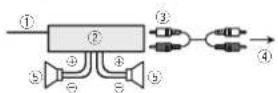
①Systemremolecontrol
Connect to Blue/white cable.
②Poweramp(so/dseparately)
③ConnectwithRCAcables(soldseparately)
④ToRearoulputorsubwooferoulput
⑤Rearspeakcrorsubwoofer
Installation
Important
- Checkall connections and systems before final installation.
- Donotuse unauthorized partsasthismay cause malfunctions.
- Checkall connections and systems before final installation.
-
Donotuse:unauthorizedpartsasthismay cause malfunctions.
-
Consultyourdea enfinstalationrequires drillingofholesorothermodificationslothe vehicle.
- Donotinstallthisunitwhere:
— tmayinterferewith operationofthevehicle.
— tmaycause injurytoapassengerasaresult ofasucudenstop.
• These semiconductor laser will be damaged if it overheats. Install this unit away from not places such as near the heater outlet. - Opt mumperformanceisootainedwhenthe uritisinstalledatanangleflessthan60°.

- Wheninstalling,loensureproperhealdispersalwhenusingthisunit,makesureyouleavocamplospacebehindthercarpanclandwrapanyloosecablessotheyarenolblock-ingthevents.
DINfront/rearmount
Th sunitcanbeproperlyinstalledusingeither front-mountorrear mountinstallation. Usecommerciallyavailablepartswheninstalling.
DINFront-mount
1 Insert themountingsleeve into the dashboard.
For installation in allowspaces, uset res up- pliedmountingsleeve. If there is enough space, usethemountingsleevethatcamewith the vehicle.
Installation
2Securethemountingsleevebyusinga screwdrivertobendthemetaltabs(90°)into place.
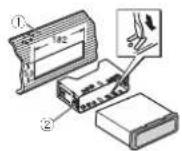
① Dashboard
②Mountngsleeve
3Installtheunitasillustrated.
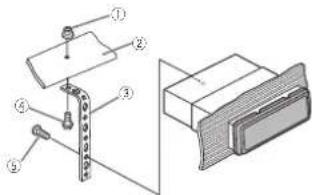
text_image
Technical diagram showing labeled mechanical components with numbered parts, likely illustrating a assembly or assembly process.①Nut
②Firewallormetalsupport
③Metalstrao
④Screw
⑤ Screw(M4×8)
■ Makes sure that the unit is insta I ad securely in place. An unsable instal ation may cause skipping or other a functions.
DINRear-mount
1 Determinetheappropriateposition wheretheholesonthebracketandtheside oftheunitmatch.
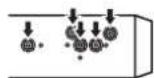
2Tightentwoscrewsoneachside.

①Trusscrew(5mm×8mm)
②Mountingoracket
① Dashboardorconsole
Removingtheunit
1Removethetrimring.

①Tirring
②Notchedtab
- Releasing front panel allow easier access to the remaining.
- When reattaching the trimming point the side with then notched tabdown.
2Insertthesuppliedextractionkeysinto bothsidesoftheunituntiltheyclickinto place.
Installation
3Pulltheunitoutofthedashboard.
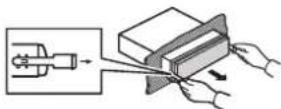
Removingandre-attachingthe frontpanel
You can remove the front panel to protect your unifromtheft. Pressthedetachbuttonandpushthefront panelupwardandpulltowardyou. Fordetails refer to removing the front panel to protect your unifromtheft and file attaching the front panel on page4.
Additionalinformation
Troubleshooting
| SymptomCauseAction | ||
| Treadiso ayl-lumination turnsonano oftetrandom. | Demoprodeis on. | Turnoffthedemo displayselling. |
| Treadiso ay automatically returnstothe ordinarydis-play. | Youdidnor-per- formanyopera- tionwithin about30sec-onds. | Performoperation again. |
| Therepeat playrange changesun- expectedly. | Dependingon therepearplay range these- leceorange maychange when another folderortrackis beingselected orduringfast forwarding/re-versing. | Selecttherepeat playrangeagain. |
| Asubfoldingis notplayed back. | Subfoldorscan notbeplayed whenFLD(fold- ompoat)isse- lectao. | Selectanothermo- peatplayrange. |
| NOXXXXa-pearswnena displayis changed(NO TITLE forex-ample). | There snowem- bededextin- formation. | Switchthadisplay orplayanother trackfile. |
SymptomCauseAction
| Theunit is malfunct on-ing.There sinter-feranca. | Youareusinga device,suchas acel ular phone,hat transmitselec-triowavesnear theunit. | Moveelectrical dev cesthatmay becausegthien-terfencanaway frommeunit. |
Errormessages
When you contact your dealer or your nearest PioneerService Center, besuretonole the error message.
Built-inCDPlayer
MessageCauseAction
| ERROR-07,11,12,17,30 | The disc is dirty. Clean the disc. | |
| The disc is scratched. | Replace the disc. | |
| ERROR-07,10,11,12,15,17,30,A0 | There is an elec-tricakorme-chanical error. | Turn the ignition switch OFF and back ON, or switch load differ-er source, then back to the CD player. |
| ERROR-15 | Th ains ated disc sblank. | Replace the disc. |
| ERROR-23 | Unsupported CD format. | Replace the disc. |
| FRMTREAD | Sometimes there is a delay between the start of playback and how you start to hear any sound. | Wait until the message's ap-pears and you no a sound. |
Appendix
Additionalinformation
MessageCauseAction
| NOAUDIOThe inserted discdoesnot contain any playbrief les. | Replacethed sc. |
| SKIPPEDThe inserted discoscontains DRMprotected filcs. | Replacethed sc. |
| PROTECTAllthefieson theinserted discancom-beddedwith DRM. | Replacethed sc. |
USBstoragedevice
MessageCauseAction
| NODEVICEWhen plug and playisoft no USBstoragedo-viceiscon- nected. | •Turntheplug andplayon.•Connectacom-patibleUSBstor-agevice. |
| FRMTREADSometimes thereisade ay between the startofelayback andwhenyou starttoherany sound. | Waluntilthe messagedisappearsandyou, hearsound. |
| NOAUDIOThereareno songs. | Transfertheaudio filestotheUSB storagedevice andconnect. |
| Theconnected USBstoragedo-vicehassecur- llyenabled. | FollowtheUSB storagedovicein structionsted si- ablelhesecurily. |
MessageCauseAction
| SKIPPEDTheconnected USB3storagedevicecontains filesembeded withWindows Media®DRM9/10. | Playanaudiofile notambedded withWindows MediaDRM9/10. |
| PROTECTAllthofilosin | Transforaudio |
| theUSBstorage | filesnotom |
| deviceareem- | beededwith |
| acddodwith | WindowsMedia |
| WindowsMocia | D-RM9/10tothe |
| DRM8/10. | USBstoragede- |
| vicaadconopact |
| N/AUSBTheUSBdevice connectedrois notsupported byth sun t. | ConnectaUSB MassStorage Clesscompliant device.Disconnect yourdevicano replacewitha compatibleUSB storagedevice. |
| CHECKUSBtheUSBconnectororUSBcap enasshortcircuited. | CheckthattheUSBconnectororUSBcableisnotcaughtinsomethingordamaged. |
| TheconnectedUSBstoragedeviceconsumesmanthan600mA(maximal owablecurrent) | D sconnecttheUSBstoragedeviceanddonotusat.TurntheignatorswitchtoOTT,thentoACCorONandthenconnectonlycompliantUSBstoragedevices. |
Additionalinformation
MessageCauseAction
| ERROR-19:Communication failure. | Performance of the following operations.-Turn the ignition switch OFF and back ON.-Disconnect the USB storage device.-Changeloaid ifere source, then return to the USB source. |
| ERROR-23:USB storage device was not for malled with FAT12, FAT16 for FAT32. | USB storage device should be formed with FAT12, FAT16 for FAT32. |
Handlingguidelines
Discsandplayer
Useonlydiscsthatfeatureeitherofthenefollowing twologos.


Use12 cmdiscs. Donotuse8 cmdiscsoran adapterior8-cmdiscs.
Useonlyconventional,fulycirculardiscs. Donot useshape discs.
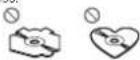
DorctinsertanythingotherthanaCDintothe CDloadingslot.
Dorctusacracked,chipped,warped,orother- wisedamageddiscsastheymaycamagethep ay- er.
Unf nalized CD-R/RWdiscscannotbeplayed back.
Doratoucatherecordedsurfaceofthediscs
Stored discosintheirceaswhen notinuse.
Donatlachlabels. w/teonorapplychemica's tothesurfaceoftheciscs.
TocleanaCD, wiethed scwitha softclothoutward from the center.
Condensation may temporarily impair the player's performance. Let stress for about one hour road adjust to a warmer temperature. Also, wise any dampeliscoff with asortcloth.
Playback of discsmaynotbepossiblebecauseof disc characteristics,disformat,recordadapplication, playbackenvironment,storageconditions, andsoon,
Road shocks may interrupt displayback.
Additionalinformation
When using discsthatcanoeprinted on label surfaces, check the instructions and the warnings of the discs. Depending on the discs, inserting and ejecting may not be possible. Using such discs may result in damage to this equipment.
Donotattachcommercial yavailable abelson othermaterialstothediscs.
- Thed scsraywarpmakingthediscounplayable.
• The labels may come off during playback and prevent ejection of the discs, which may result in damage to the equipment.
USBstoragedevice
ConnectionsviaUSBhubarenotsupported.
Donotconnect anythingotherthanaUSBstoragedevice.
FirmlysecuretheUSBstoragedevicewhendriving DonolettheJSBstoragedevicefalontotha floor,where tmaybecomejamnedunderthe brakeoracceleratorpedal.
Depending on the USB storage device, the following problem may occur.
•Operat or smayvary.
• The storage of a camay not be recognized.
• Filesmaynotbeplayocbackproperty.
• The device may generate noise in the radio.
DualDiscs
DualDiscsarelwo-sideddiscstathavearecordable eCDforalcionones ceancarecordable DVDforvideontheother.
Since the CDsideofDualD scsisnotphysically compatible with the general CD standard it may not be possible to play the CDs with the unit
Frequent loading and ejecting of Dual Disc may result in scratch resonhed disc. Serious scratches can east to playback problems on sun. In some cases, a Dual Disc may become stuck in the disloading slot and will not reject. Toprevent this, were recommend you refrain from using Dual Disc with this unit.
Pleaserefe totheinformationfrom:deciscoman-
racturerformoredetailedinformationabout
Dual Discs.
Compressedaudio compatibility(disc,USB)
WMA
Fileextension.wma
B trate/48kbpsfc320kbps(CBR), 48kbpsfc384kops(VBR)
Sampling frequency: 32kHz, 44.1kHz, 48kHz
WindowsMediaAudio Professional, Lossless. Voice/DRMStream/Streamwithvideo:Notcompatible
MP3
Fileextension:mp3
Bitrate:8kbpsto320xops(CBR),VBR
Sampling frequency 8kHz to 48kHz (32kHz, 44.1kHz, 48kHz for emphasis);
Compatio aID3tagversion:1.0.1.1.2.2.3.2.4 (ID3tagVersion2,xisgiven priorityoverVersion 1.x.)
MSuplaylist: Notcompatic
MP3i(MP3interactive),mp3PRO:Notcompatible
Additionalinformation
WAV
The extension: way
Quantization of Band16(LPCM) 4(MS ADPCM)
Sampling frequency:16kHz to 48kHz (LPCM), 22.05 kHz and 44.1 kHz (MSADPCM)
Supplementalinformation
Only the first 32 characters can be displayed as a filename (including the file extension) or to do name.
This sun tmayrctoperatecorrectlydepending on the application usectoencedeWMAfiles.
Theremaybeaslightdelayatthestartofplayback ofaudiofilesembeddedwithmagedataoaudio filesstoreconaUSBstoragedevicethathasnumerousfolderhierarchies.
Disc
\Playerholder hierarchy:uptoeightiers(Apractical hierarchy is less than two tiers). \
Plavable folders:uptc99
Playable files: upto999
FI esystem:ISO9660Level1and2,Romeo,Jollet
Multi-session playback: Compatible
Packetwritedataltransfien Notcompatible
Regardless of the length of blank sections between the songs from the original recording, compressed audiced scplay with short pause between songs.
USBstoragedevice
Playablefolder: archy:uptoeghtlers(Apractical: archyls:leasethantwoters)
Playablefolders:upto500
Playablefiles:upto15000
Playbackofcopyright-protectedfiles:Notcompatible
Partitioned USB storage device: Only their first partition can be played.
ThoramayboaslightdelaywhenstartngplaybackofaudioflesonalUSBstoragedevicewith numerousfolderhierarches.

CAUTION
- Pioneercannorguaranteecompatibilitywith all USB mass storage devices and assumes no responsibility for any loss of data on mediaplayers, smartphones or other devices while using this product.
- DonolleavediscorsaUSBstoragedevice inanypiacethatissubjecttohightemperatures.
Sequenceofaudiofiles
Treusercannolassignfoldernumbersand specify playbacksequenceswiththisunit.
Appendix
Additionalinformation
Exampleofahierarchy
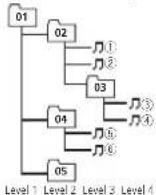
Folder
Compressed audiofile
0 to 5:Folder number
①to⑥:Playback sequence
Disc
Folperse ectionsequenceortheroperation may differ depending on the encoding or writing software.
USBstoragedevice
PlaybacksequenceisthesameasrecordedsequenceintneUSBstoragedevice.
Tospecifythe playbacksequence.thefollowing methodisrecommended.
1|Createafilenamethatincludesnumbers thatspecify:heplaybacksequence(e.g., 001xxx.mp3and099yyy.mp3).
2 Putthosefilesintoafolder. 3 SavethefoldercontainingfilesontheUSB storagedevice.
I however, depending on the system environment, you may not be able to specify the app back sequence.
For USB portable audiop layers, thesequence is different and depends on the player.
Copyrightandtrademark
iTunes
Aopieand TunesaretrademarksofApoleInc. registeredintheU.S.andothercountries.
MP3
Supply of this product only conveyal license for private, non-commercial use and does not conveyal licensen or impy any right to set this product in any commercial (i.e. revenue generating) real-time broadcast (terrestrial, satellite, cable and/or other media), broadcasting/streaming via internet, intranets and/or other networks or no other electronic content distributions systems, such as pay-audicora audio-on-demand applications. An independent licensee for such uses is required. For details, please visit http://www.mplicensing.com.
WMA
WindowsMediaiseltheraregistered, trademark or trademarkotMicrosoftCorporationinthe UnitedStalesand/ortherccountries. Thisproductincludestechnologyownedby MicrosoftCorporationandcannotfocuscolor distributedwithoutalicensefromMicrosoft Licensing,Inc.
Additionalinformation
Specifications
General
| Ratio powersorcs......14.4VDC | |
| allowalvalo/lagarangec 12.0Mto14.4VDC) | |
| Groundingsystem......Negativetype | |
| Maxim urr current consumption......16.0CA | |
| Dimensions(W×H×D) | |
| D/N | |
| Chassis......70mm×50mm×16mm | |
| Nose......188mm×58mm×16mm | |
| D | |
| Chassis......70mm×50mm×16mm | |
| Nose......1.0mm×46mm×16mm | |
| Weight......1.1g | |
Audio
Maximum power output. 50W×4
Continuouspowerourpur
22W×4,50Hz+15000Hz
6% HLD,42lac,BoncRan
Load impedance .... 4Ω (4Ω to 3Ω allowable)
Precutmaxim umourpleve
Tongolova
Bass
Frequency.....100Hz
Gain....112dB
Nio
Frequency.....1kl/2
Inble
6410....=1206
(二)本说明仅供参考。
Frequency.....10kHz
(三)
Gain....+12dB
Sulawofer(mono)
Frequency.....50Hz/63Hz/50Hz/100Hz/
125Hz
Slope.....
- 北京
Gain......
+6dBto-
“信”
CDplayer
System....Compactd saud osystem
Disabled discs....Compact disc
Signal to reiscratio.....0/dB(1kHz)(I=C-Arcwork)
Number of channels.....2(stereo)
VP3decodingformat.....MPEG\~&2AudioLayer3
WV/decoding format....Ver.7.7.1,8.9.10,11.12(2ch
30(24)
(Windows/MediaPlayer)
WAVsigna lornal....LinearPCM&MSADPCM
(Non-compressed)
USB
USB standardspecification
...USB2.0full speed
Maximum amounts supply
1A
JSBClass....MSC(MassStorageClass)
Flesystem....FAT12,FAT16,FAT32
VP3decodingformat.....MPFG-42Audio layer3
WVAccoding formal....Ver.7.7.1,8.9.10,11.12(2ch
audioj
(Windows Media Player)
WAVsigna format..... nearPCM&MSADPCM
(Non-compressed)
FMtuner
Frequencyrange.....87.5MHz to 108.0MHz
Usable sensitivity ..... 90BJ108oW75Ω mono. S/N
30dB
Signal-to-noiseratio.....72dB(DC-A network)
MWtuner
Frequencyrange....531kl (zto 1602kl (z(9kl) z)
530kHz to 1640kHz (10kHz)
Jisab esensitivity.....25μV(S/N:20d3)
Signal to noiseratio .....62dB(LC Anclworx)
SWtuner
Frequenovrange....2300kHzto7735kHz
(2300kl Izto2495kl Iz,2940
kH704215417.4540kH70
5135kHz,5820kHzto6455
kHz,7100kHz,7735kHz;
9508112.021975K 12
(9500kl Iztc 10135kl/2.
530kHz71612215kHz,13570
16520 35104H2,15100KHz
(3)1510412 11000K 203
1950K12,180.15K12018
130KHz 2 340KHz 2021915
(5)N20B
Ostie Cseri Stity, 20 pT (3) 4 200E
- QPA to nonseratio.....626B/LC Anschok
Note
Specificationsandthedesignaresubiectto
modificat onswithoutnotice.

natural_image
Two horizontal rounded rectangular shapes with rounded ends, no text or symbols present.
English
15En
Antesdecomenzar
text_image
Labeled diagram of a device interior with numbered components for identification| ParteParte | ||
| 1▲(expulsar)4 | ⊃(oerteposteno/d splay) | |
| 2 | 9 (lista)9◀▶ | |
| 3 | MULTI-CONTROL(M.C.) | 10BAND |
| 4 | SRC/OFF | 11 1 a 6 |
| 5 | Ramura decargace discos | 12 √/DISP OFF |
| 6Puerto USB | 13 | Conector deer-traca AUX(co-nector este/reode3,0 mm) |
| 7 | EOM | 14 Bolón descitar |

PRECAUCIÓN
9 (9 kHz)—10 (10 kHz)
2)PulseM.C.paraconfimarlaselocc ón.
DYNAMIC—VOCAL—NATURAL—CUSTOM —FLAT—POWERFUL
TPulseM.C.parasococ on are pasodesintomideFM.
50(50kHz)—100(100kHz)
MWSTEP(pasodesirtoriaMW)
9 (9 kHz)—10 (10 kHz)
text_image
Technical diagram showing labeled components of a mechanical assembly with numbered parts①Tuerca
②Murocorlauegcosoportedemela
③Correametálica
④Tomillo
⑤Tom IIo(M4×8)
natural_image
Two horizontal oval shapes with rounded ends, one black and one white, side by side (no text or symbols)Español
31Es
text_image
Labeled diagram of a device rear panel with numbered components for identification| Parte | Parte | ||
| 1 | ▲ (Fjoter) | 8 | ⇒ (voltar/ex bir) |
| 2 | Q (Lisia) | 9 | ◀/▶ |
| 3 | MULTI-CONTROL(M.C.) | 10 | BAND |
| 4 | SRC/OFF | 11 | 1 a 6 |
| 5 | Slotdecarrega-men/odedisco | 12 | ∅ /DISPOFF |
| 6 | PortaUSB | 13 | Conectorpoen-trade/AUX(so-rectoresténeoce3.5 mm) |
| 7 | EQA | 14 | BolãoDesencal-xar |
AVISO
text_image
① ②④⑥ ⑧⑦③⑤FMSTEP(PassodesintoniaFM)
Normalmente, opassodesintoniaFMemoregado: polesintoniaporouscacdo50kHz. Quando AF ou l'Acstivorativo, opassodesintoniamudará automaticamente para 100kHz. Podeserpreferível ajustaropassocosintoniaa50kHzquando AF estivorativo.
• Opassodesinla:riapermaneceab0x-Hzdu-ranceas:nton:amanua.
T Giro M.C. para seleccionar o passo de sintonia FM.
50(50kHz)—100(100kHz)
2 Pross one M.C. para confirmar a seleção
MWSTEP(Passodes rstoniaMW)
Opassodosinton aM/Wpodesora/kemadentre 9 kHz10 kHz, Autilizarosinton zadorna/Américado Norte, Centralcudo Sul, reajusteopasso de sintonia do 9 kHz (531 kHz a 1602 kHz permissivel) para 10 kHz (530 kHz a 1640 kHz permissivel).
MWSTEP(Passodesintention)
OpassodosintoniaMWpodoscraltornadoentre 9kHz-10kHz. A utilizarosintonizacca americado Norie, CentraloudoSul, reajusleopasso desintoniade9kHz(531kHz-1802kHz per missi-vol) para 10kHz (530kHz 1640kHz per missivol). L Pressione M.C. paraselecionaropassodes nton aMW.
9 (3 kHz)—10 (10 kHz)
Seção
text_image
Technical diagram showing labeled components of a mechanical assembly with numbered parts(1) Porca
②Firewallousupertedemeta
③Trade metal
④Parafuso
⑤Paratuso(M4×8)
Windows/Media Player
FormatodesinalWAV....PCM linearMMSADPCM
(Nã corractede)
USB
Ver. 7, 1, 5, 9, 10, 11, 12
(éudiocé2ca nais)
(Windows/MediaPlayer)
FormaludcsinalWAV....PCMLINE&MSADPCM
(Não com o setdo)
SintonizadordeFM
kHz=1.25kHz 4.540kHz
3.175kHz,5.820kHz,6.455
kHz,7.100kHz,7.335kHz
9.500kHz21 975kHz
19.500kl/la:10.135kl/2
11.580kl ba12.215kl
13.570kHz 13.870kHz
1+ 20Hz a1b 73kHz
17.50kHz 17.98kHz
13.015kHz7019.125kHz
21 340kHz 21 925kHz
Sensibilicadeutilizavel...28μV(Sira(Ruido:20dB)
Relações na suuído
62dB(redelFC-A)
Nota
Asespecificosedeiones,losuje losa
text_image
Labeled diagram of a device rear panel with numbered components for identification部位部位
| 1▲(退出)8 | ⊃(返回/显示) | |
| 2 | 9(清单) | 6◀/▶ |
| 3 | MULTI-CONTROL(M.C.) | 10BAND |
| 4 | SRC/OFF | 11 1至6 |
| 5 | 模块槽 | 12 2/DISPOFF |
| 6 | TISR端 | 13 3以上输入插孔(3.5mm立旋臂插孔) |
| 7 | 14 | 15折卸按钮 |

注意
9 (9 kHz) -10 (10 kHz)
AUTO-PI(自動PI接帯)
text_image
Technical diagram showing labeled components of a mechanical assembly with numbered partsnatural_image
Two horizontal oval shapes with rounded ends, one black and one white, on a plain background (no text or symbols)甲文
572htw


8Zhtw

natural_image
Two horizontal oval shapes with rounded ends, one black and one white, on a plain background (no text or symbols)甲文
592htw


natural_image
Two horizontal rounded rectangles side by side, no text or symbols present
م Reformات إضافية
تاقلاط

| (USB/العربية) | ||||||||
| WBMA | ||||||||
| WBMA: | ||||||||
| WBMA (CBR) | ||||||||
| WBRA | ||||||||
| WBRA (VBR) | ||||||||
| WBRA (CRB) | ||||||||
| WBRA (Lossless, Windows Media Audio Professional) | ||||||||
| WBRA (Voice/DRM Stream/Stream) |


م gloّومات إضافية
کیتلا
text_image
Technical diagram showing labeled mechanical components with numbered parts, likely illustrating a assembly or assembly process.صامولة ①
text_image
① ② ④ ⑥ ⑧⑦③⑤text_image
Labeled diagram of a device rear panel with numbered components for identificationWindows Media Audio Professional -Lossless Volume/DRM Stream/Stream
MP3
text_image
Technical diagram showing labeled mechanical components with numbered parts, likely illustrating a assembly or assembly process.①
② محفظيا بشکین لای
كزامارية
± 4
(M4×A) ⑤
The Ground Truth image displays a single, solid horizontal line. According to Rule 2 (UNDERSCORE & LINE RULES), if the GT contains lines used for stylistic emphasis or as background elements (like ruled paper), the OCR result must ignore them. The provided OCR content is "____", which consists of four underscores. This is incorrect because underscores are not equivalent to a solid line and are not permitted under the “Stylistic/Background Lines (Ignore)” rule. The OCR has hallucinated underscores where none should exist in the GT, violating the “Stylistic/Background Lines (Ignore)” rule. Therefore, the OCR result is inconsistent with the Ground Truth.
; 七
—CLASSICS—POPULAR—NEWS/INFO
OTHERS
m = 311
m = 311
text_image
① ② ④ ⑥ ⑧⑦③⑤وضث نشر
تنظيم منو
text_image
Diagram of a device rear panel with numbered labels pointing to key components| ### | ### | |
| (###) | 8 | (###)▲ |
| ▶/◀ | 9 | (###)0 |
| BAND | 10 | MULTI-CONTROL(M.C.) |
| 6 1 | 11 | SRC/OFF |
| ○/DISP OFF | 12 | ### ### ### ### ### ### ### ### ### ### ### ### ### ### ### ### ### ### ### ### ### ### ### ### ### ### ### ### ### ### ### ### ### ### ### ### ### ### ### ### ### ### ### ### ### ### ### ### ### ### ### ### ### ### ### ### ### ### ### ### ### ### ### ### ### ### ### ### ### ### ### ### ### ### ### ### ### ### ### ### ### ### ### ### ### ### ### ### ### ### ### ### ### ### ### ### ### ### ### ### ### ###### |
| A### | ||
| ### | 13 | USB ### |
| ### ### | 14 | ### |

Pioneer, /ˌʌktəʊð/ USB
Visit us on the World Wide Web at
http://pioneer.jp/group/index-e.html
Pioneer Gulf.FZE
http://www.pioneer-uae.com
Pioneer Electronics Australia. Pty.Ltd
http://www.pioneer.com.au/
Pioneer Electronics Asiacentre.Pte
Pioneer (HK) Ltd.
Pioneer High Fidelity Taiwan Co., Ltd.
http://www.pioneer.com.sg
http://www.pioneerhongkong.com.hk
http://www.pioneer-twn.com.tw
Pioneer International Latin America S.A.
http://www.pioneer-latin.com
PIONEERCORPORATION
1-1.Shin-ogura.Saiwai-ku.Kawasaki-shi,
Kanagawa212-0031,JAPAN
PIONEERELECTRONICS(USA)INC.
P.O.Box1540,LongBeach,California90801-1540,U.S.A.
TEL:(800)421-1404
PIONEEREUROPENV
Haven1087,Keetberglaan1,B-9120Melsele,Belgium/Belgique
TEL:(0)3/570.05.11
PIONEERELECTRONICSASIACENTREPTE.LTD.
253AlexandraRoad,#04-01,Singapore159936
TEL:65-6472-7555
PIONEERELECTRONICSAUSTRALIAPTY.LTD.
5ArcoLane,Heatherton,Victoria,3202Australia
TEL:(03)9586-6300
PIONEERELECTRONICSOFCANADA,INC.
340FerrierStreet,Unit2,Markham,OntarioL3R2Z5,Canada
TEL:1-877-283-5901
TEL:905-479-4411
PIONEERELECTRONICSDEMEXICO,S.A.deC.V.
Blvd.ManuelAvilaCamacho13810piso
Col.LomasdeChapultepec,Mexico,D.F.11000
TEL:55-9178-4270
先锋股份有限公司
台北市內湖區瑞光路407號8樓
电话:(02)2657-3588
① 沈 (22, 203, 15
先锋電子(香港)有限公司
香港九龍長沙灣道909號5樓
電話:(0852)2848-6488