Carat Professional - Blood pressure monitor BOSO - Free user manual and instructions
Find the device manual for free Carat Professional BOSO in PDF.


User questions about Carat Professional BOSO
0 question about this device. Answer the ones you know or ask your own.
Ask a new question about this device
Download the instructions for your Blood pressure monitor in PDF format for free! Find your manual Carat Professional - BOSO and take your electronic device back in hand. On this page are published all the documents necessary for the use of your device. Carat Professional by BOSO.
USER MANUAL Carat Professional BOSO
boso Carat professional

text_image
SYS. 136 mmHg DIA. 88 mmHg 76 PUL/min boso Carat professionalnatural_image
Electric guitar with power plug and cord (no visible text or symbols)
text_image
boso Carat professional Gobuzach anatung User Instructions Music of samples Enerphonie in minutes Manual et Uguine
Kurzanleitung

natural_image
Diagram of a battery pack with four black-and-white segments and two white + charges, shown in top-down view (no text or symbols)Bild 1
natural_image
Medical pressure monitor with attached cable and stand, no visible text or symbolsBild 2

Product features....36
Contents of package 37
Quick guide 38
Introduction 39
Blood pressure values 41
Systolic and diastolic blood pressure value 41
WHO blood pressure cut-off values 41
Starting up 43
Inserting batteries 43
Battery status....44
Changing batteries....44
General instructions for self-measurement 45
Preparing to measure your blood pressure 47
Note on cuff sizes 47
Attaching the cuff 48
Table of contents
Measuring your blood pressure....51
Interrupting a measurement....52
Measurement display 53
Recalling the last recorded measurement....55
Mains operation 56
Error messages....57
Cleaning and Desinfection....59
Warranty 59
Customer service / Disposal 60
Technical data....61
Calibration checks - Testing instructions
(for trained specialist staff only)....64

Product features


text_image
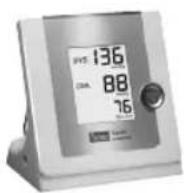
M SYS 130 mmg 84 mA 68 Mains connector boso Carat professional START button Cuff connector LCD display
Battery status display see page 44

Measurement in progress see page 52

Irregular heartbeat during measurement see page 53, 58

Stored value see page 55
Contents of package
1 boso Carat professional blood pressure monitor
4 LR 6 (AA) batteries

3 cuffs CA01, CA02, CA03

1 power supply

natural_image
Electric guitar with power plug and cord (no visible text or symbols)1 Warranty certificate

1 User instructions
text_image
bosoCarat professional Cadaudha amniangg User instructions Mode of eugel Manual of instructions Manual of OvarianQuick guide

→Insert batteries, ensure correct positioning (P. 43)
→Connect cuff to monitor (P. 47)
→Attach cuff (P. 48)
→Start (and stop) a measurement by pressing the start button (P. 51)
Measured systolic, diastolic and pulse values are displayed after the measurement is completed (P. 53)
→Retrieving values from memory (P. 55): with the instrument switched off, press the start button 3 seconds until "M" is displayed.
This quick guide does not replace the detailed information on the use and safety of the blood pressure monitor featured in the user instructions.

Please be sure therefore to read the user instructions!
Introduction
Dear Customer,
We are delighted that you have decided to purchase a boso blood pressure monitor. The boso brand is synonymous with optimum quality and precision and is also number 1 among professionals: 77% of all German doctors currently use boso blood pressure monitors. The experience gained from decades of use by professionals has also been incorporated into all the patient monitors for home measurement.
This instrument has also passed our strict quality control procedures and is your reliable partner for monitoring your blood pressure values.
⚠️ Please read these user instructions before using the instrument for the first time, as correct blood pressure readings
can only be obtained if the instrument is operated correctly.
In these user instructions, "→" means an action by the user.
To get help concerning usage or maintenance please contact your dealer or the manufacturer (contact details can be found on the back cover of this manual).
An unexpected operating condition or an incidence which has worsened the health condition or could have worsened the health condition should be reported to the manufacturer immediately.
If the instrument is to be sold, ensure that these user instructions are enclosed.

Introduction
If the monitor is used in medical practice (in accordance with the legislation governing the operation of medical devices), it should be calibrated at regular intervals (see page 64).

The boso Carat professional blood pressure monitor is suitable for patients of all ages with an upper arm circumference of be-tween 16 and 48 cm. The monitor is not suitable for neonatals.
Wireless communication devices, such as home networking devices, mobile phones, cordless phones and their base stations, walkie-talkies can affect this blood pressure monitor. Therefore, a minimum distance of 11 feet should be kept from such devices.
Blood pressure values
To determine the blood pressure, two values need to be measured:
●Systolic (upper) blood pressure:
This is produced when the heart muscle contracts and blood is forced into the blood vessels.
●Diastolic (lower) blood pressure:
This is present when the heart muscle expands and fills with blood again.
Blood pressure measurement values are expressed in mmHg (mm of mercury).
| The World Health Organization (WHO) has defined the following cut-off values for assessing blood pressure: | ||
| systolic diastolic | ||
| High blood pressure (hypertension) over 140 mmHg over 90 mmHgBorderline normal blood pressure 130 to 139 mmHg 85 to 89 mmHgNormal blood pressure 120 to 129 mmHg 80 to 84 mmHgOptimum blood pressure up to 119 mmHg up to 79 mmHg | ||

Blood pressure values

Whether medical treatment is necessary depends not only on the blood pressure, but also on the patient's risk profile. Please contact your GP if one of the values (systole, diastole) consistently exceeds the cut-off point for high blood pressure.
Self-measurement of blood pressure often produces somewhat lower values at home than at the doctor's. The German Hypertension League has therefore defined lower cut-off values for home measurements:
Home measurement: 135/85 mmHg Measurement in the doctor's surgery: 140/90 mmHg
Starting up
The device must be installed and put into operation in accordance with the instructions in this manual.
natural_image
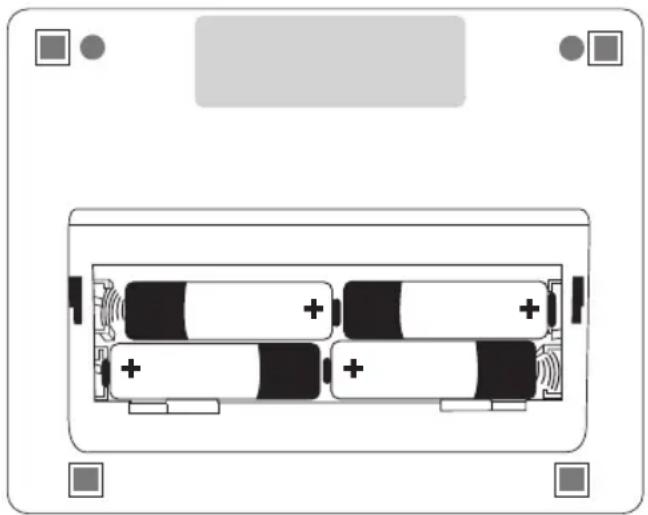
Diagram of a battery pack with four black-and-white segments and two white batteries, no text or symbols presentIllustration 1
→Use only high quality leak-proof batteries of the correct specifications (see "Technical data" P. 61).
⚠️ Never mix old and new batteries or different makes.
⚠️ If the batteries are not inserted correctly, the monitor will not work and this may cause the batteries to heat up and leak, damaging the monitor.
→Inserting the batteries
The battery compartment is located on the underside of the monitor. Insert batteries in the battery compartment as shown in illustration 1.
→Remove the batteries if the monitor is not to be used for any length of time.

Starting up
The monitor has a battery status display (see P. 34)

Battery fully charged.

Battery partially charged.

Replace battery soon.

Flashing! No further measurements possible. Replace battery.
⚠️ Care for the environment
Do not dispose of used batteries and charger units in domestic waste.
You can take these to collection sites for used batteries or special waste.
Contact your local authority for information.
⚠️ Change batteries only when the monitor is switched off!
The memory store is deleted if the batteries are removed for a prolonged period (more than 30 sec.)! The memory store is deleted immediately if the batteries are removed in measurement or store mode!
General instructions for self-measurement
- Fluctuations in blood pressure are quite normal. Even when measurements are repeated, there can be marked differences. Single or irregular measurements do not provide reliable information about the actual blood pressure. A reliable evaluation is only possible if regular measurements are taken under comparable conditions.
- ⚠️ Self-testing does not mean self-treatment. Do not on any account change the dose of medicine prescribed by your doctor of your own accord.
-
Irregular heartbeats can affect the accuracy of the monitor or result in incorrect measurements (see page 58).
-
Incorrect measurements can also occur in patients with a weak pulse (possibly in patients wearing a pacemaker, for example). The blood pressure monitor itself has no effect on the pacemaker.
- If you are pregnant, consult your doctor before using the monitor.
- Always take the measurement in a calm and relaxed state. You are recommended to check your blood pressure twice a day—in the morning on getting up and in the evening once you have relaxed after work.
- Always measure your blood pressure from the arm with the higher blood pressure values (where not required otherwise (see page 49)).

General instructions for self-measurement
To do this, measure the blood pressure first in both arms and thereafter always from the arm with the higher blood pressure.

Preparing to measure your blood pressure
Note on cuff sizes:
The monitor may only be used with the following cuff types. These should be chosen according to the upper arm circumference printed on them.
| Type Arm Order numbercircumference | |
| CA01 22 – 32 cm 143-4 | -766* |
| CA02 32 – 48 cm 143-4 | -767* |
| CA03 16 – 22 cm 141-4 | -772* |
* supplied as standard.
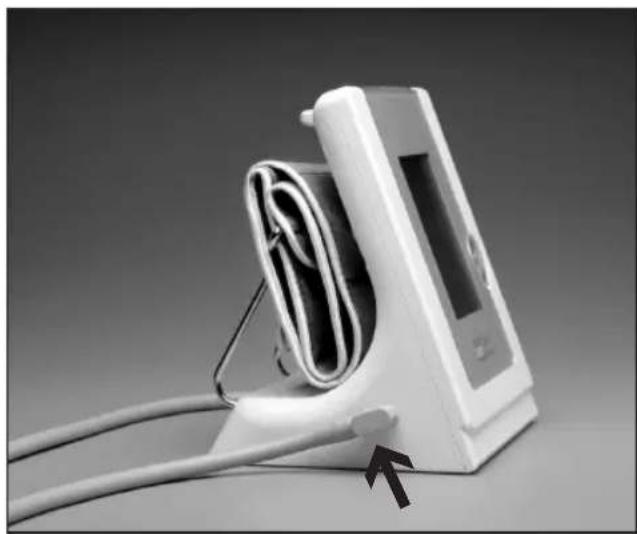
Attach the cuff to the monitor by pressing the plug (click) into the socket on the left side of the unit. (See illustration 2).
natural_image
Medical pressure monitor with attached cable and arrow indicator (no text or symbols visible)Illustration 2

Preparing to measure your blood pressure
Observe the following instructions when measuring your blood pressure:

Avoid smoking or drinking coffee for one hour before measuring your blood pressure.


Sit comfortably for the blood pressure measurement. Support your back and arms. Do not cross your legs. Place your feet flat on the floor.
Relax for 5 minutes before taking a measurement.
Do not move during the measurement.
Attaching the cuff
The measurement should be taken from the bare upper arm.
In the case of tightly fitting outer clothing, ensure that the blood supply to the arm is not cut off when the sleeve is rolled up (if necessary remove the article of clothing before taking the measurement).
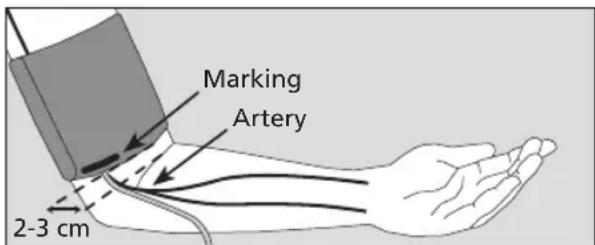
→Open out the cuff into the shape of a ring and slide it over the upper arm until the bottom edge of the cuff is about 2-3 cm above the elbow. The cuff must be positioned so that the marking is over the artery (see illustration 3).
Preparing to measure your blood pressure
text_image
Marking Artery 2-3 cmIllustration 3
⚠️ Do not attach the cuff over wounds as this can cause further injuries.
⚠ Ensure that the cuff is not attached to an arm where arteries or veins are undergoing or have undergone medical treatment (e.g. shunt).
⚠ For women who have had a breast amputated, do not attach the cuff to the arm on the amputated side of the body.
⚠️ During the measurement, medical apparatus that are being used on the same arm at the same time, may malfunction.
⚠️ The cuff must not be too tight. There should be enough space to fit roughly two fingers between arm and cuff.
⚠ The metal ring should never lie over the artery (see illustration 3) as this may produce a false reading.
→Grasp the end of the cuff that feeds though the metal ring and wrap it around the outside of your arm. Attach the Velcro fastener by applying gentle pressure.

Preparing to measure your blood pressure
→Place your arm with the cuff attached on the table, holding it relaxed and slightly bent so that the cuff is level with your heart.


text_image
too low values correct values too high values Illustration 4
Do not talk during the measurement.
⚠️ Check that the air tube is not kinked during the measurement. This could cause congestion of the blood flow and subsequent injury.
⚠ The blood pressure measurement should not prevent the flow of blood for an unnecessary length of time (> 2 minutes). If the monitor fails to function correctly, remove the cuff from the arm.
Excessive frequent measurements can cause injury by restricting blood flow.
Measuring your blood pressure
→Start the measurement with your start button
⚠️ Now hold the arm absolutely still and do not talk.
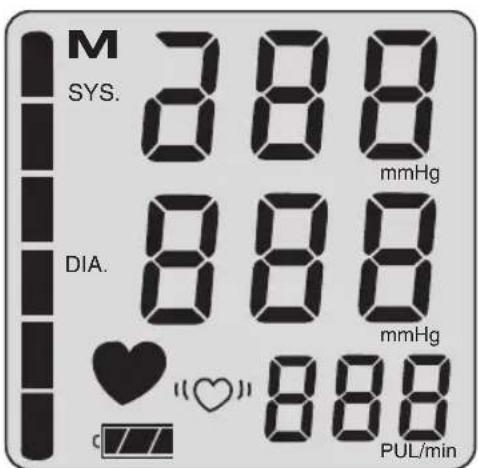
All the items on the LCD display appear briefly to indicate that the monitor is now ready for use (see illustration 5).
text_image
M SYS. 888 mmHg DIA. 888 mmHg ♥ (●) 888 PUL/minIllustration 5

Measuring your blood pressure
The pump starts to inflate the cuff.
The monitor has an intelligent automatic inflation system for gentle inflation to the correct cuff pressure.
The increasing cuff pressure is displayed.
When the required pressure is reached, the pump switches off and the air is released slowly from the cuff.
⚠️ Interrupting a measurement:
A measurement can be interrupted at any stage by pressing the start button; the cuff deflates automatically.
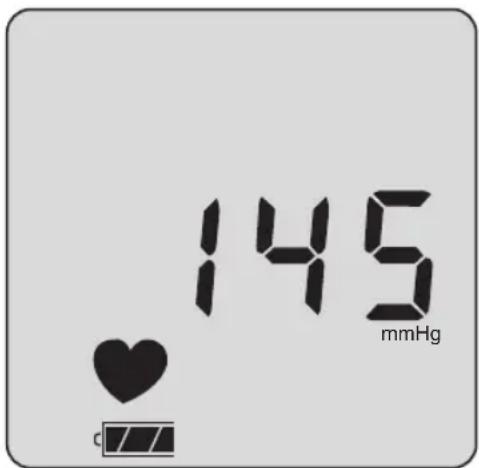
During the measurement phase the descending cuff pressure and the flashing ♥ symbol are displayed (see illustration 6).
text_image
145 mmHgIllustration 6

Measurement display
After the end of the measurement, the in-built valve opens automatically and the cuff deflates rapidly.
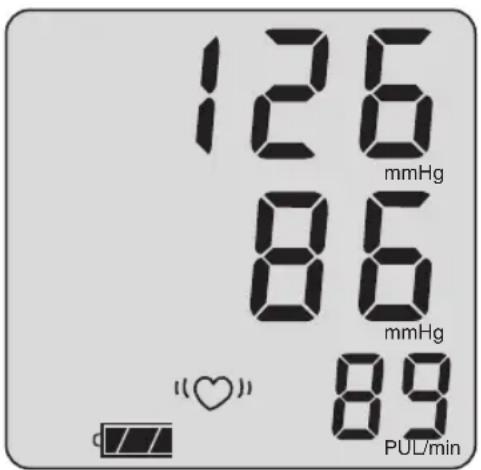
The measured blood pressure values (systole, diastole, pulse) are displayed (see illustration 7).
text_image
126 mmHg 86 mmHg (♥) 89 PUL/minIllustration 7
The measurement is stored automatically.
Invalid measurements with an "Err" message (see page 54) are not stored.
If the symbol “he” appears after the measurement, it is recommended that the measurement is repeated, holding the arm completely still. If the “he” symbol appears again even with the arm held still, this may be an indication of an irregular heartbeat. Please discuss this with your doctor at your next visit.

Measurement display
Blood pressure is a dynamic parameter and can be affected by the patient's position, e.g. sitting, standing, lying, moving, before or during the measurement, physical condition (stress, disease, etc.).

→If the measurement result is obviously wrong, repeat the measurement.
The unit switches itself off automatically after about 1 min. To repeat a measurement, press the start button again briefly.

Allow at least two minutes between measurements.
→If no further measurement is required, remove the cuff from the arm.
Recalling the last recorded measurement
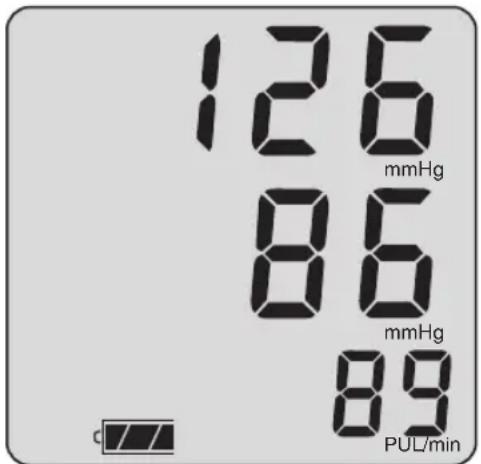
To recall the result of the last measurement, press the START-button for approx. 3 seconds, while the unit is switched off.
The result of the last measurement appears for approx. 3 seconds. Afterwards the unit switches off automatically (see illustration 8).
text_image
126 mmHg 86 mmHg 89 PUL/minIllustration 8
→To start a new measurement, simply press „START“.
The monitor switches off automatically 5 seconds after the last measurement is displayed.
Changing batteries when the monitor is switched on can result in loss of data (see page 46. Change batteries only when the monitor is switched off).

Mains operation

The mains connection socket is located at the rear of the monitor. Where required, use only the boso power supply unit (order number 410-7-153). This power supply unit produces a rectified output of the correct polarity. Other commercially available power supply units can cause damage to the electronic components, which will invalidate the warranty. There is also a risk of fire with these other power supply units.
⚠️ If there are no batteries in the unit, the memory store is cleared when it is disconnected from the mains.
⚠️ If there are fully charged batteries in the unit, the memory store is not cleared when it is disconnected from the mains.
→Disconnecting from the mains:
With the monitor switched off, disconnect the plug from the unit first of all and then disconnect the power supply unit from the wall socket
Error messages
If any problems occur during the measurement, the display will show an error message instead of a blood pressure reading.
Meaning of error messages:
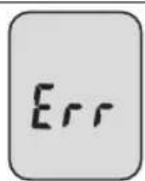
Cause of Err message: Troubleshooting:
Excessive variation in cuff pressure Hold arm still during measurement
No valid pulse readings Check position of cuff (see page 48) and repeat measurement.
Systole – diastole difference Check position of cuff (see page 48) too small: and repeat measurement
Systole – diastole ≤10 mmHg

Cause of Err CuF message:
Incorrectly inflated Cuff possibly too
Troubleshooting:
loose, attach cuff more firmly (see page 49)

Error messages

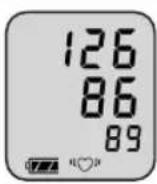
“♥” Display: Troubleshooting:
Repeat measurement recommended, holding the arm absolutely still. If the “♥” symbol appears again, even with the arm held still, this may be an indication of an irregular heartbeat. Please discuss this with your doctor at your next visit.
Cleaning and Desinfection Warranty
Cleaning Monitor:
Use a soft, dry cloth to clean your monitor.
Cleaning Cuff:
Small stains on the cuff can be removed carefully with a proprietary washing-up liquid.
Desinfection:
For disinfectant wipes (at least 5 minutes exposure time) of the device and the cuff, we recommend the disinfectant mikrozid sensitive liquid (Schülke & Mayr). To disinfect the velcro of the cuff, we recommend spray disinfection.
In particular, if the device is used on multiple users is to pay attention to regular cleaning and disinfections of the cuff.
Warranty:
For details of the warranty conditions, please consult the warranty certificate supplied.
A claim under the warranty will only be accepted if the warranty certificate, completed and stamped by the dealer, is returned with the monitor.

Customer service
Disposal

Customer service:
Warranty and repair work must be undertaken by trained and authorised personnel. Do not modify this equipment without authorization of the manufacturer.
Send the monitor, carefully packaged and with sufficient postage, to your authorised dealer or directly to:
Do not dispose of monitors and batteries in the domestic waste.
At the end of its lifespan, the monitor must be taken to a collection site for obsolete electronic items.
Please note that batteries and rechargeable batteries must be disposed of separately (local authority collection site).
Expected operational lifetime of the equipment: 10 years.
Expected operational lifetime of the cuff: 10.000 measurement cycles.
Technical data
Measurement principle: oscillometric
Measurement range: 40 to 240 mmHg, 40 to 200 pulses/min.
Cuff pressure: 0 to 320 mmHg
Memory store: 1 measurement
Display: LCD
Operating conditions: environmental temperature +10°C to +40°C Relative humidity 15 to 85%
Storage conditions: environmental temperature -10°C to +60°C Relative humidity 15 to 85%
Power supply: DC 6 V (4 x 1.5 V Mignon IEC LR 6 alkaline manganese batteries) Alternative special option: DC 6 V power supply unit, Order No. 410-7-153

Technical data
Typical battery life: 1.000 measurement cycles
(depending on inflation pressure and frequency of use).
Battery check: symbol display in LCD window

Weight: 600 g without batteries
Dimensions (WxHxD): 150 mm x 160 mm x 120 mm
Classification: Protection class II ( )

Type BF (☐)
Protection against solid IP21
objects and water:
Clinical test Accuracy complies with the requirements
(DIN 58130): of EN 1060 Part 3
Technical data
Maximum deviation of cuff ± 3 mmHg
pressure measurement:
Maximum deviation of ± 5 %
pulse rate display:
Applicable standards: EN 1060, Part 1: "Non-invasive sphygmomanometers – General requirements" and Part 3: "Supplementary requirements for electro-mechanical blood pressure measuring systems".

Calibration checks - Testing instructions
(for trained specialist staff only)
Calibration checks – every 2 years at the latest – must be performed by the following institutions or persons:

- Manufacturer
– Trade measurements authorities - Persons who fulfil the requirements of the legislation governing the operation of medical devices.
A) Function testing
Function testing of the monitor can only be carried out on a person or with a suitable simulator.
B) Testing of pressure circuit integrity and deviation of pressure display
Note:
a) When the pressure in measurement mode increases above 320 mmHg, the quick release valve is triggered and the pressure circuit opens. When the pressure in test mode increases above 320 mmHg, the measured value display flashes.
b) Remove the plug from the cuff tube for testing. Then attach the short connecting piece of the plug – previously inserted into the socket on the monitor – to the cuff tube and insert the long connecting piece of the plug into the monitor.
A pump ball must also be introduced into the pressure circuit.
Calibration checks - Testing instructions
(for trained specialist staff only)
Testing
1.) Remove batteries.
2.) Hold start button pressed down and insert batteries.
3.) Release start button.
The monitor is now ready for testing; the current pressure is displayed in the SYS, DIA and PULS fields. The start button is illuminated green.
4.) Perform test for deviation of pressure display and pressure circuit integrity (observe setting time for cuff – at least 30 seconds) in the usual manner.
5.) Switch off monitor by pressing the start button again and re-establish all original connections.
C) Safety seal
As a safeguard, the upper and lower parts of the housing can be joined with a safety seal. Alternatively, a hole drilled in the lower side of the monitor for the connecting screw for the housing can be sealed for safety.

Table des matières
natural_image
Electric guitar charger with power plug and cord (no visible text or symbols)
text_image
bosoCarat professional Getbacks resevering Use Instructions Mock d'emploi Chromate d'orgiving Manual del Brouche
natural_image
Diagram of a battery pack with four black-and-white segments and two white + charges, shown in top-down view (no text or symbols)Figure 1
natural_image
Medical pressure monitor with attached cable, no visible text or symbols
Figure 2
natural_image
Electric guitar with power plug and cord (no visible text or symbols)natural_image
Diagram of a battery pack with two black-and-white batteries and four white batteries, no text or symbols presentFig. 1
natural_image
Medical pressure monitor with attached cable and stand, no visible text or symbols
Fig. 2
natural_image
Electricity charger with power plug and cord (no visible text or symbols)natural_image
Diagram of a battery pack with four black-and-white segments and two white + charges, no text or symbols present.Figura 1
natural_image
Medical pressure monitor with attached cable and stand, no visible text or symbolsFigura 2
