HB822 - Solar bench PHILIPS - Free user manual and instructions
Find the device manual for free HB822 PHILIPS in PDF.


User questions about HB822 PHILIPS
0 question about this device. Answer the ones you know or ask your own.
Ask a new question about this device
Download the instructions for your Solar bench in PDF format for free! Find your manual HB822 - PHILIPS and take your electronic device back in hand. On this page are published all the documents necessary for the use of your device. HB822 by PHILIPS.
USER MANUAL HB822 PHILIPS
natural_image
Line drawing of a desktop lamp with adjustable arm and base (no text or symbols)
text_image
Tanning lamps Philips HPA flexpower 400-600 Type no. HB071 service no. 482269080123
natural_image
Plain beige background with no visible text, symbols, or objectsENGLISH 6
DEUTSCH 16
FRANÇAIS 26
NEDERLANDS 36
ESPAÑOL 46
ITALIANO 56
NORSK 66
SVENSKA 76
DANSK 86
Introduction

text_image
ULTRAVIOLET (UV) VISIBLE LIGHT INFRARED (IR)The sun
The sun supplies various types of energy. Visible light enables us to see, ultraviolet (UV) gives us a tan and infrared (IR) in sunrays provides the heat in which we like to bask.
The tanning appliance
With this tanning appliance you can suntan comfortably at home. The tanning lamps emit visible light, heat and ultraviolet, giving you the impression you are sunbathing in real sunlight. The special UV filter only passes the radiation that is required to get a tan.
The tanning lamps emit sufficient infrared to provide comfortable warmth.
A timer ensures that each session does not last longer than 60 minutes. Just as with natural sunlight, overexposure must be avoided (see chapter 'UV, tanning and your health').
Important
- Check if the voltage indicated on the appliance corresponds to the mains voltage in your home before you connect the appliance.
- Water and electricity are a dangerous combination! Do not use this appliance in wet surroundings (e.g. in the bathroom or near a shower or swimming pool).
- If you have just been swimming or have just taken a shower, dry yourself thoroughly before using the appliance.
- Make sure children do not play with the appliance. Remove the plug from the wall socket as a precaution.
- Let the appliance cool down after use for approx. 15 minutes before folding it back into transport position and storing it.
- Only move the appliance when it is in transport position.
- Make sure the vents in the lamp unit and in the base remain open during use. Keep your hair away from the air inlet of the lamp unit.
- The appliance has been fitted with an automatic protection against overheating. If the appliance is insufficiently cooled (e.g. because the vents are covered), the appliance will switch off automatically. Once the cause of overheating has been removed and the appliance has cooled down, the appliance will switch on automatically again.
- Do not exceed the recommended session time or the maximum number of tanning hours (see chapter 'UV tanning sessions:how often and how long?').
- Do not choose a tanning distance of less than 65 cm.
- Do not tan a particular part of your body more than once a day. Avoid excessive exposure to natural sunlight on the same day.
- Do not take a tanning session if you have a disease and/or if you use medication that increases the sensitivity of your skin. Consult your doctor in case of doubt.
-
Consult your doctor if ulcers, moles or persistent lumps develop on the skin.
-
Always wear the protective goggles provided with the appliance while tanning to protect your eyes from excessive doses of visible light, UV and IR (also see the chapter 'UV, tanning and your health').
- Remove creams, lipstick and other cosmetics well in advance of a tanning session.
- Do not use any sunscreens or suntan accelerators.
- If your skin feels taut after the tanning session, you may apply a moisturising cream.
- Never use the appliance when the UV filter is damaged, broken or missing or when the timer is defective.
- The UV filter becomes hot during the tanning session. Do not touch it.
- Colours may fade under the influence of the sun. The same effect may occur when using this appliance.
- Do not expect the appliance to yield better results than the natural sun.
UV, tanning and your health
Just as with natural sunlight, the tanning process will take some time. The first effect will only become visible after a few sessions (see chapter 'UV sessions: how often, how long?').
Overexposure to ultraviolet (natural sunlight or artificial light from your solarium) can cause sunburn.
Besides many other factors, such as overexposure to natural sunlight, incorrect and excessive use of a solarium may increase the risk of skin and eye problems. The degree to which these effects occur is determined by the nature, intensity and duration of the radiation on the one hand and the sensitivity of the person involved on the other hand.
The more the skin and the eyes are exposed to UV, the higher the risk of keratitis, conjunctivitis, damage to the retina, cataracts, premature skin ageing and the development of skin tumours will be. Some medications and cosmetics increase the sensitivity of the skin.
Therefore it is highly important:
▶ that you follow the instructions in the chapters 'Important' and 'UV tanning sessions: how often and how long?';
▶ that the tanning distance (distance between the UV filter and the body) is 65 cm.
▶ that you do not exceed the maximum number of tanning hours per year (i.e. 21 hours or 1260 minutes);
▶ that you always wear the goggles provided while tanning.
UV tanning sessions: how often and how long?
- Do not take more than one tanning session per day, over a period of five to ten days.
- Allow an interval of at least 48 hours between the first and the second session.
- After this 5- to 10-day course, we advise you to give your skin a rest for a while.
- Approximately one month after a course, your skin will have lost much of its tan. You can then start a new course.
- If you want to keep your tan, do not stop tanning after the course, but continue taking one or two tanning sessions a week.
- Whether you choose to stop tanning for a while or whether you continue tanning on a lower frequency, do remember that you must not exceed the maximum number of tanning hours.
- For this appliance the maximum is 21 tanning hours (=1260 minutes) a year.
Example
Suppose you take a 10-day tanning course, with an 8-minute session on the first day and a 20-minute session on the nine following days.
The entire course will then last (1 x 8 minutes) + (9x 20 minutes) = 188 minutes.
This means you can take 6 of these courses in a year, as 6 × 188 minutes = 1128 minutes
Of course, the maximum number of tanning hours applies to each separate part or side of the body that is tanned (e.g. the back and front of the body).
As is shown in the table, the first session of a tanning course should always last 8 minutes, irrespective of the sensitivity of the skin.
▶ If you think that the sessions are too long for you (e.g. because your skin feels taut and tender after the session), we advise you to reduce the length of the sessions by e.g. 5 minutes.
- For a beautiful all-over tan, turn your body slightly during the session so that the sides of your body are better exposed to the tanning rays.
| Duration of the UV session for each separately treated part of the body | For persons with very sensitive skin | For persons with normal sensitive skin | For persons with less sensitive skin |
| 1st session | 8 minutes | 8 minutes | 8 minutes |
| rest of at least 48 hours | |||
| 2nd session | 10 minutes | 20 - 25 minutes | 30 minutes* |
| 3rd session | 10 minutes | 20 - 25 minutes | 30 minutes* |
| 4th session | 10 minutes | 20 - 25 minutes | 30 minutes* |
| 5th session | 10 minutes | 20 - 25 minutes | 30 minutes* |
| 6th session | 10 minutes | 20 - 25 minutes | 30 minutes* |
| 7th session | 10 minutes | 20 - 25 minutes | 30 minutes* |
| 8th session | 10 minutes | 20 - 25 minutes | 30 minutes* |
| 9th session | 10 minutes | 20 - 25 minutes | 30 minutes* |
| 10th session | 10 minutes | 20 - 25 minutes | 30 minutes* |
*) or longer, depending on your skin sensitivity.
If your skin feels slightly taut after tanning, you can apply a moisturising cream.
Preparing for use
natural_image
Illustration of two people pushing a cart on a stretcher (no text or symbols)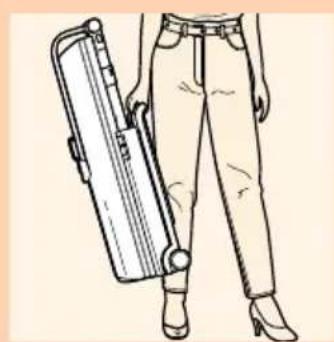
natural_image
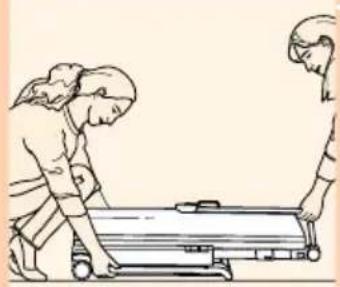
Line drawing of a person wearing a beige pants and high-heeled boots, holding a cylindrical object (no text or symbols)- The appliance can be easily moved in transport position. The appliance is easier to lift if you do so together with another person.
- If you have to lift the appliance by yourself, use the handle.
natural_image
Illustration of a hand using a tool to press down horizontal lines, with an arrow indicating the process (no text or symbols present)
natural_image
Illustration of a hand opening a large cylindrical device with an arrow indicating motion (no text or symbols present)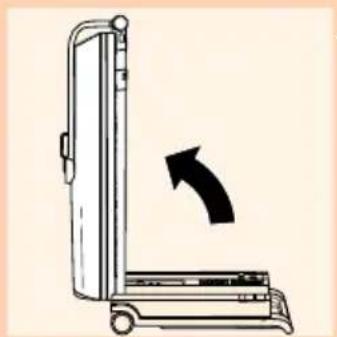
natural_image
Diagram of a vertical device with an arrow indicating clockwise rotation (no text or symbols)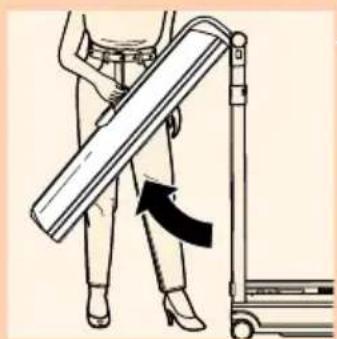
natural_image
Illustration of a person using a cart to lift a wooden plank, with a black arrow indicating force direction (no text or symbols)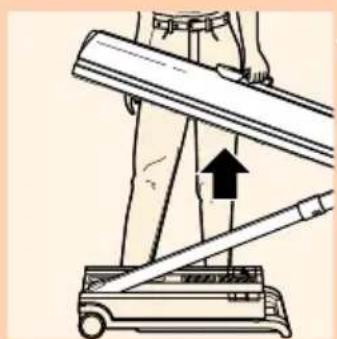
natural_image
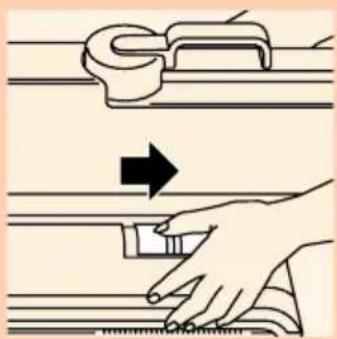
Diagram of a mechanical device with an upward arrow indicating motion or force direction (no text or symbols present)1 To open the appliance, move the slides in the direction of the arrow.
2 Pull the stand and the lamp unit up.
3 Put the tanning appliance in the position indicated.
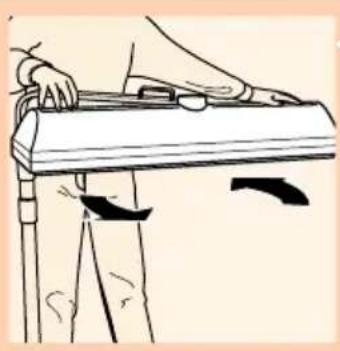
4 Pull the lamp unit up to horizontal position. Use the handle to do this.
You will hear clicks when you move the lamp unit past certain fixed positions.
- Instead of using the above step-by-step method, you can also pull the lamp unit up by its handle in one single movement.
natural_image
Line drawing of a person using a handheld device to press or install a tray (no text or symbols)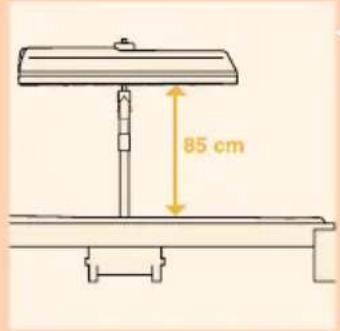
text_image
85 cm
text_image
Medical diagram showing a hand holding a medical device with labeled parts and directional arrows indicating movement or force.5 Turn the lamp unit a quarter turn.
6 Place the tanning appliance beside a bed as indicate in the figure.
The distance between the UV filter and the surface on which you are lying down (e.g. the bed), must be 85 cm.
- Loosen the height adjustment lock by sliding the collar down the stand. Pull the lamp unit up at the same time to a height of 85 cm above the bed.
Let go of the collar to lock the lamp unit into position.
- You can check the distance between the lamp unit and the bed by pulling out the measuring tape.
- The measuring tape will automatically rewind if you move the red tab sideways.
The appliance is now ready for use.
Using the appliance
1 Fully unwind the mains cord.
2 Put the plug in the wall socket.
- Consult the table in these directions for use and your own notes.
▶ Put on the protective goggles provided.
3 Set the timer to the appropriate time for the tanning session.
4 Lie down under the lamp unit.
The timer will automatically switch the tanning appliance off when the set tanning time has elapsed.
- The timer can be set to a maximum tanning time of 60 minutes. If you want to tan both sides of your body in one session, reset the timer just before the set time for tanning one side has elapsed. In this way you can avoid the waiting time of at least 3 minutes, which is necessary
natural_image
Pure diagram of three circular components with no text or symbols, no readable text or labels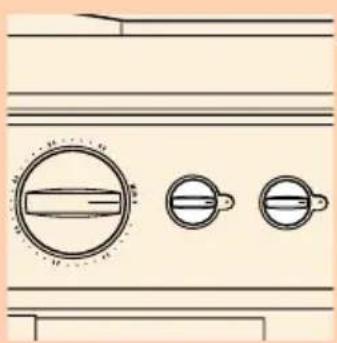
natural_image
Diagram of a rotary knob with three circular features, no text or symbols presentto let the tanning lamps cool down. It is only possible to switch the tanning lamps on again after they have cooled down.
After the tanning session
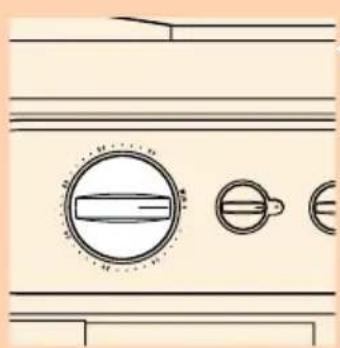
1 Keep track of the number of sessions you have had by means of the memory knobs. The appliance has two memory knobs: one for each person.
Cleaning
1 Always unplug the appliance and let it cool down before you start cleaning it.
2 Clean the outside of the appliance with a damp cloth.
Do not let any water run into the appliance.
3 Do not use any scouring agents or scouring pads.
Never use abrasive liquids like scourers, petrol or acetone to clean the appliance.
- You can clean the outside of the UV filter with a soft cloth sprinkled with some methylated spirits.
Storing
1 Let the appliance cool down for 15 minutes before you put it in transport position and store it. In the meantime, you can wind up the cord and put it in the base of the appliance.
2 Make sure the cord is stored properly and does not get stuck between the hinging parts of the appliance when you put the appliance in transport position.
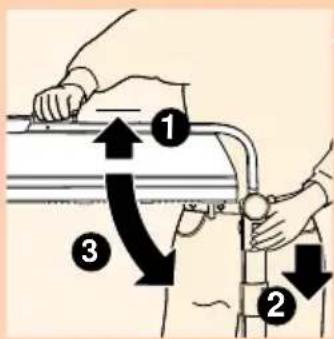
3. Loosen the height adjustment lock by sliding the collar down the stand. Push the stand down at the same time. Then let go of the collar.

text_image
Medical diagram showing a hand holding a medical device with labeled parts and directional arrows indicating movement or force.
natural_image
Line drawing of a person using a handheld device to press or install a tray (no text or symbols)4 Turn the lamp unit a quarter turn.
text_image
Diagram illustrating a mechanical or fluid system with numbered components and directional arrows indicating movement or flow.5 Lift the lamp unit a little with one hand and unlock it by pushing the two unlocking slides down with your other hand.
natural_image
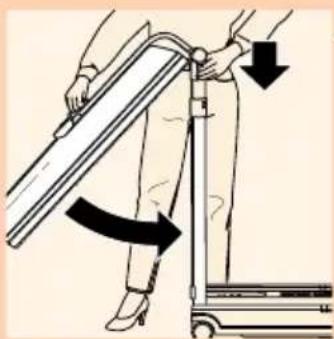
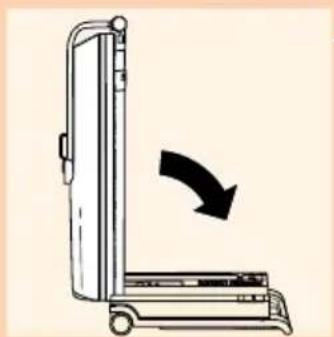
Illustration of a person using a mobility device to lift a person's leg, with arrows indicating motion direction (no text or symbols)6 Hold the two unlocking slides down with one hand and fold the lamp unit into vertical position with your other hand. Then let go of the unlocking slides.
natural_image
Diagram of a vertical device with an arrow indicating clockwise rotation (no text or symbols)7 Lower the stand and the lamp unit carefully onto the base of the appliance.

natural_image
Illustration of a hand using a tool to press down horizontal lines, with an arrow indicating left motion (no text or symbols present)8 Lock the lamp unit onto the base by pushing the slides on the base in the direction of the arrow.

natural_image
Diagram showing a car being lifted by a lamp and a switch, with no visible text or symbols
natural_image
Line drawing of a person standing near a door with a bag open, showing no text or symbols9 The tanning appliance can be stored under a bed.
10 It can also be stored in a cupboard in upright position.
Replacement
The light emitted by the tanning lamps will become less bright in time (i.e. after a few years in case of normal use). When this happens, you will notice a decrease in the tanning capacity of the appliance. You can solve this problem by setting a slightly longer tanning time or by having the tanning lamps replaced.
The UV filter protects against undesired radiation. It is therefore important to have a damaged or broken filter replaced right away.
Have the tanning lamps (Philips HPA flexpower 400-600), the UV filter and the cord replaced by an authorised Philips dealer or service centre. Only they have the knowledge and skills required for this job and the original spare parts for the appliance.
Environment
The lamps of the appliance contain substances that can be harmful to the environment. When you discard the lamps, make sure they are not thrown away with the normal household waste but are handed in at an official collection point.
Information & service
If you need service or information or if you have a problem, please visit the Philips Web site at www.philips.com or contact the Philips Customer Care Centre in your country (you will find its phone number in the worldwide guarantee leaflet). If there is no Customer Care Centre in your country, turn to your local Philips dealer or contact the Service Department of Philips Domestic Appliances and Personal Care BV.
Troubleshooting guide
The appliance may fail to work properly because it has not been installed or is not used in accordance with the instructions. In that case you are able to solve the problem yourself by following the troubleshooting tips below.
| Problem | Possible cause |
| The appliance does not start | The lamp unit has not been put in the right position (see chapter 'Preparing for use'. |
| The plug has not been (properly) inserted into the wall socket. | |
| There is a power failure. Check by means of another appliance. | |
| The lamps are still too hot to go on. Let them cool down for 3 minutes first. | |
| The appliance was not sufficiently cooled and the overheating protection switched appliance off automatically. Remove the cause of overheating (e.g. remove a towel that is blocking one or more vents).Wait for 10 minutes and switch the appliance back on. | |
| The fuse cuts off the power when you switch on the tanning appliance or during use. | Check the fuse of the circuit to which the tanning appliance is connected.The correct fuse type is a 16A standard fuse or an automatic fuse.The fuse may also blow because you have connected (too many) different appliances to the same circuit. |
| Poor tanning capacity | You are not following the tanning schedule suitable for your skin type. |
| The distance between the lamps and the surface you lie on is larger than described. | |
| When the lamps have been used for a long time, the UV emitted will decrease.This effect only becomes noticeable after several years.You can solve this problem by selecting a longer tanning time or by having the lamps replaced. |
Einleitung

text_image
ULTRAVIOLET (UV) SICHTBARES LIGHT INFRAROT (IR)Die Sonne
natural_image
Illustration of two people handling a large cylindrical object (no text or symbols visible)natural_image
Line drawing of a person wearing trousers and high heels holding a briefcase (no text or symbols)natural_image
Illustration of a hand using a tool to adjust or install a ruler, with no text or symbols present.natural_image
Illustration of a hand opening a large cylindrical device with an arrow indicating motion (no text or symbols present)natural_image
Diagram of a vertical device with an arrow indicating rotation or change (no text or symbols present)natural_image
Illustration of a person using a mobility device to lift a large rectangular object, with a black arrow indicating the motion direction (no text or symbols present)natural_image
Diagram of a mechanical device with an upward arrow indicating motion or force (no text or symbols present)natural_image
Line drawing of a person using a handheld device to press or install a tray (no text or symbols)text_image
Diagram showing two labeled positions (1 and 2) of a person holding a bicycle, with arrows indicating movement or force directions.natural_image
Pure diagram of a rotary knob with three circular buttons, no text or symbols presentnatural_image
Pure technical line drawing of a mechanical component with three circular features (no text or symbols)text_image
Diagram showing a person holding a medical device with labeled parts and directional arrows indicating movement or force.natural_image
Line drawing of a person using a handheld device to press or stand (no text or symbols)text_image
Diagram illustrating a mechanical or fluid system with numbered components and directional arrows indicating motion or flow.natural_image
Illustration of a person using a mobility device to lift a cart, with arrows indicating motion direction (no text or symbols)natural_image
Diagram of a vertical device with a curved arrow indicating rotation or change (no text or symbols present)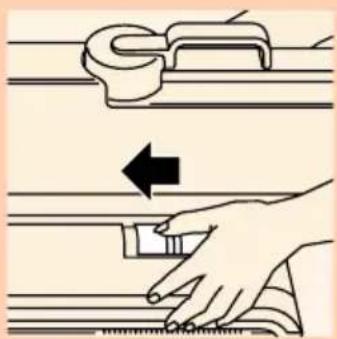
text_image
Diagram illustrating hand positioning and movement of a mechanical component, with directional arrow indicating motion direction.natural_image
Illustration of a hand opening a car under a lamp, with an arrow indicating left motion (no text or symbols)natural_image
Line drawing of a person standing near a door with a bag attached (no text or symbols)natural_image
Illustration of two people handling a large cylindrical object (no text or symbols visible)
natural_image
Line drawing of a person wearing a trousers and high heels, holding a large cylindrical object (no text or symbols)text_image
Diagram illustrating hand positioning on a tool with directional arrow indicating movement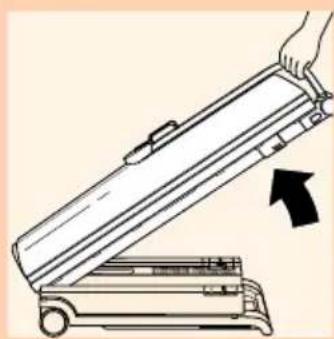
natural_image
Illustration of a hand opening a large cylindrical device with an arrow indicating motion (no text or symbols)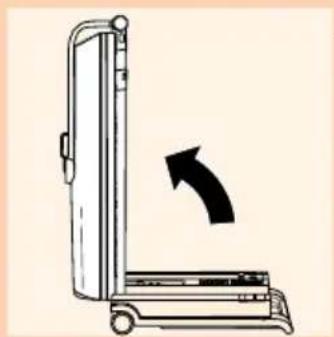
natural_image
Diagram of a vertical device with an arrow indicating rotation or movement (no text or symbols present)
natural_image
Illustration of a person using a walking lever with a black arrow indicating motion (no text or symbols)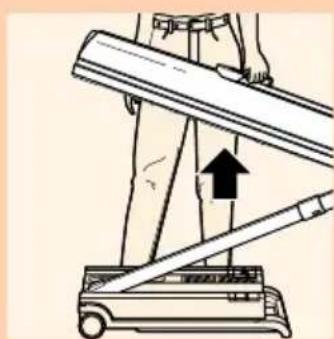
natural_image
Illustration of a person using a lever mechanism to lift a cart, with an upward arrow indicating motion (no text or symbols present)natural_image
Line drawing of a person using a walking cart, no text or symbols presenttext_image
Diagram showing two labeled positions (1 and 2) of a person holding a medical device with arrows indicating movement or force direction.natural_image
Pure diagram of a door handle with three circular components, no text or symbols present
natural_image
Pure technical line drawing of three circular components with no text or symbolstext_image
Medical diagram showing a hand holding a catheter with labeled parts and directional arrows indicating movement or force.natural_image
Line drawing of a person using a handheld device to clean or adjust equipment (no text or symbols)text_image
Diagram illustrating a mechanical or fluid system with numbered components and directional arrows indicating motion or flow.natural_image
Illustration of a person using a mobility device to lift a cart, with arrows indicating motion direction (no text or symbols)natural_image
Diagram of a vertical device with an arrow indicating clockwise rotation (no text or symbols)natural_image
Illustration of a hand using a tool to adjust or install a ruler, with no visible text or symbols.natural_image
Illustration of a car being towed by a lamp, with an arrow indicating left motion (no text or symbols)natural_image
Line drawing of a person standing near a door with a hanging device (no text or symbols)natural_image
Illustration of two people pushing a cart on a stretcher (no text or symbols)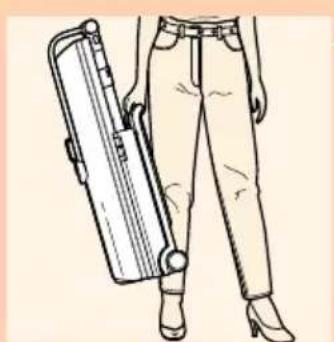
natural_image
Line drawing of a person wearing a high-heeled pants and holding a large cylindrical device (no text or symbols)natural_image
Illustration of a hand using a tool to adjust or install a mechanical component, with no visible text or symbols.natural_image
Illustration of a hand opening a large cylindrical device with an arrow indicating motion (no text or symbols)natural_image
Diagram of a vertical device with an arrow indicating rotation or movement (no text or symbols present)natural_image
Illustration of a person using a cart to lift a wooden plank, with a black arrow indicating force direction (no text or symbols)natural_image
Illustration of a person using a treadmill to lift a horizontal bar, with an upward arrow indicating motion (no text or symbols present)natural_image
Line drawing of a person using a walking cart (no text or symbols)
text_image
85 cm
text_image
Medical diagram showing a hand holding a catheter with labeled parts and directional arrows indicating movement or force.natural_image
Pure diagram of three circular components with no text or symbols, no readable text or labels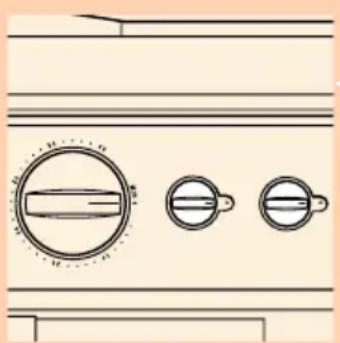
natural_image
Simple line drawing of a door handle with three circular buttons, no text or symbols presenttext_image
Diagram showing two labeled positions (1 and 2) of a person holding a medical device with arrows indicating movement or force direction.natural_image
Line drawing of a person using a handheld device to press or install a tray (no text or symbols)text_image
Diagram illustrating a mechanical or fluid system with numbered components and directional arrows indicating motion or flow.natural_image
Illustration of a person using a walking lever with directional arrows indicating motion (no text or symbols)natural_image
Diagram of a vertical mechanical device with an arrow indicating clockwise motion (no text or symbols)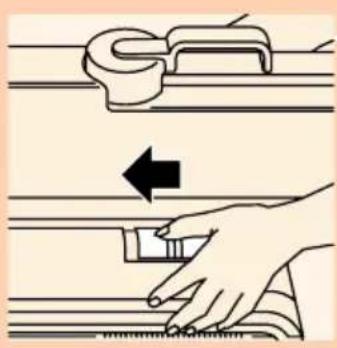
text_image
Diagram illustrating hand positioning and movement of a mechanical component, with directional arrow indicating motion direction.natural_image
Illustration of a hand holding a lamp next to a vehicle, with an arrow indicating leftward motion (no text or symbols)natural_image
Line drawing of a person standing in a doorway with a door open, showing legs and feet (no text or symbols)natural_image
Illustration of two people pushing a stretcher on a stretcher (no text or symbols)natural_image
Line drawing of a person wearing a suit jacket and pants, holding a hard hat (no text or symbols)
natural_image
Illustration of a hand using a tool to press or adjust a ruler, with no text or symbols present.
natural_image
Line drawing of a hand opening a large cylindrical device with an arrow indicating motion (no text or symbols)
natural_image
Diagram of a medical device with an arrow indicating rotation or movement (no text or symbols present)
natural_image
Illustration of a person using a walking lever with a curved arrow indicating motion (no text or symbols)natural_image
Diagram of a mechanical device with an upward arrow indicating motion or force (no text or symbols present)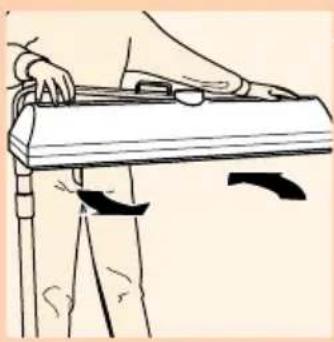
natural_image
Line drawing of a person using a handheld device to press or stand (no text or symbols)
text_image
85 cm
text_image
Medical diagram showing a hand holding a wrist with labeled parts and directional arrows indicating movement or force.natural_image
Simple line drawing of a door handle with three circular gauges (no text or symbols)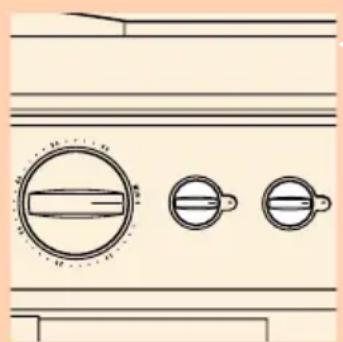
natural_image
Pure diagram of three circular components with internal lines, no text or symbols presenttext_image
Diagram showing two labeled mechanical or robotic device steps with downward arrows indicating motion directionnatural_image
Line drawing of a person using a walking cart, no text or symbols presenttext_image
Diagram illustrating hand positioning and movement of a device with numbered arrows indicating direction of movement.natural_image
Illustration of a person using a walking lever with directional arrows indicating motion (no text or symbols)natural_image
Diagram of a vertical device with an arrow indicating clockwise motion (no text or symbols)
text_image
Diagram illustrating three steps of a door lock mechanism: opening, adjusting the handle, and opening the device.natural_image
Illustration of two people pushing a cart on a stretcher (no text or symbols)
natural_image
Line drawing of a person wearing a beige pants and high-heeled boots, holding a cylindrical object (no text or symbols)natural_image
Illustration of a hand opening a mechanical device with an arrow indicating motion (no text or symbols present)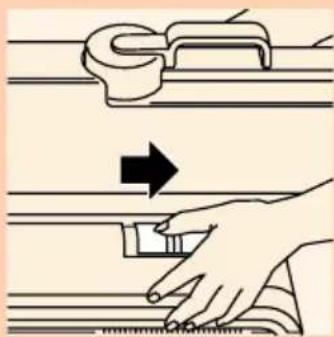
natural_image
Illustration of a hand using a tool to press down a metal component, with an arrow indicating the process (no text or symbols present)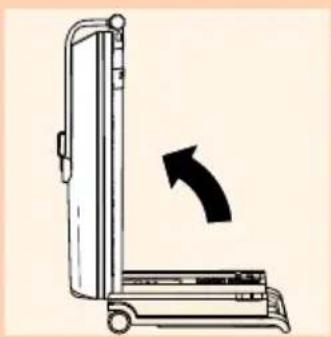
natural_image
Diagram of a vertical mechanical device with an arrow indicating rotational motion (no text or symbols)
natural_image
Illustration of a person using a mobility device to lift a long bar, with a black arrow indicating the motion direction (no text or symbols present)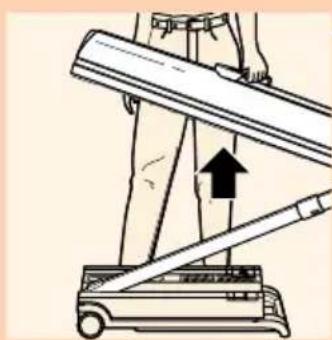
natural_image
Illustration of a person using a walking lever on a treadmill, with an upward arrow indicating motion (no text or symbols present)natural_image
Line drawing of a person using a walking cane to lift a wooden plank (no text or symbols)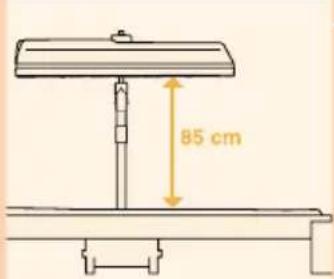
text_image
85 cm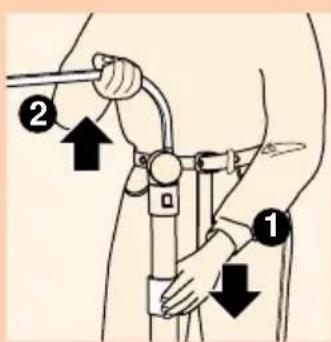
text_image
Diagram showing two labeled positions (1 and 2) of a person holding a bicycle, with arrows indicating movement or force direction.natural_image
Pure diagram of three circular components with no text or symbols, no readable labels or symbols present.
natural_image
Simple line drawing of three circular objects with a central horizontal bar, no text or symbols presenttext_image
Diagram showing two labeled positions (1 and 2) of a person holding a medical device with arrows indicating movement or force direction.natural_image
Line drawing of a person using a walking cart (no text or symbols)text_image
Diagram illustrating a mechanical or fluid system with numbered components and directional arrows indicating motion or flow.natural_image
Illustration of a person using a mobility device to lift a cart, with arrows indicating motion direction (no text or symbols)natural_image
Diagram of a vertical device with an arrow indicating clockwise rotation (no text or symbols)
natural_image
Illustration of a hand using a tool to press down a metal ruler, with no text or symbols present.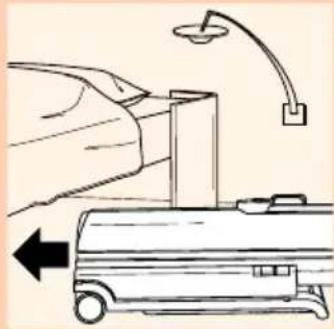
natural_image
Illustration of a car being tested under a lamp, with an arrow indicating left motion (no text or symbols)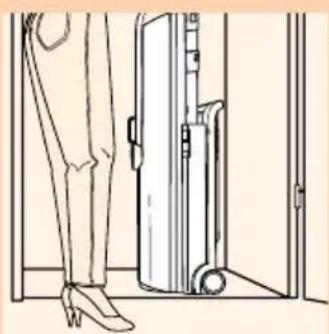
natural_image
Line drawing of a person standing near a door with a luggage bag attached (no text or symbols)natural_image
Illustration of two people pushing a cart (no text or symbols)natural_image
Line drawing of a person wearing casual pants and high heels, holding a large cylindrical object (no text or symbols)natural_image
Illustration of a hand using a tool to press down horizontal lines, with an arrow indicating the process (no text or symbols present)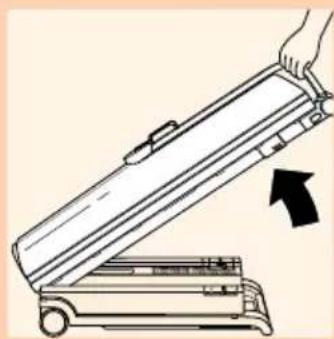
natural_image
Illustration of a hand using a device to lift a tray, with an arrow indicating motion (no text or symbols present)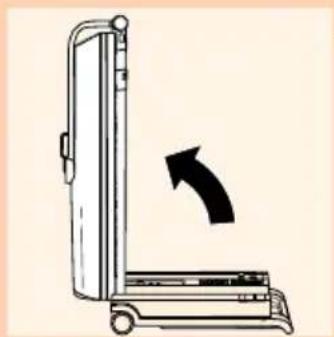
natural_image
Diagram of a vertical device with an arrow indicating rotation or movement (no text or symbols present)
natural_image
Illustration of a person using a handstand to lift a cart, with a black arrow indicating the motion direction (no text or symbols present)
natural_image
Illustration of a person using a lever mechanism to lift a cart, with an upward arrow indicating motion (no text or symbols present)natural_image
Line drawing of a person using a walking lever on a chair (no text or symbols)
text_image
85 cm
text_image
Diagram showing two labeled positions (1 and 2) of a person holding a tool, with arrows indicating movement or force direction.natural_image
Pure diagram of a device casing with three circular components and a handle, no text or symbols present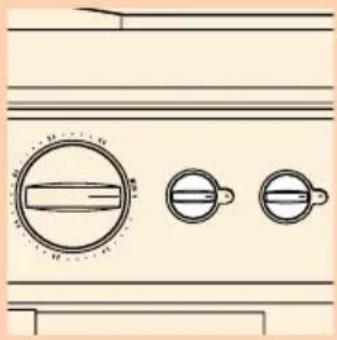
natural_image
Simple line drawing of a door handle and two circular buttons with handles, no text or symbols presentEtter solingen
text_image
Diagram showing two labeled positions (1 and 2) of a human figure with a tool, marked by arrows indicating downward motion.natural_image
Line drawing of a person using a handheld device to press or install a tray (no text or symbols)
text_image
Diagram illustrating a hand operating a mobility device with labeled directional arrows and numbered componentsnatural_image
Illustration of a person using a mobility device to lift a cart, with arrows indicating motion direction (no text or symbols)natural_image
Diagram of a vertical device with an arrow indicating clockwise motion (no text or symbols)natural_image
Illustration of a hand using a tool to press or adjust a mechanical component, with no visible text or symbols.natural_image
Illustration of a hand opening a car under a lamp, with an arrow indicating left motion (no text or symbols)natural_image
Line drawing of a person standing near a door with a roller, no text or symbols present10 It can also be stored in a cupboard in upright position.
Utskifting
natural_image
Illustration of two people pushing a cart (no text or symbols)natural_image
Line drawing of a person standing with a suitcase and high heels (no text or symbols)natural_image
Illustration of a hand using a tool to press down horizontal lines, with an arrow indicating the process (no text or symbols present)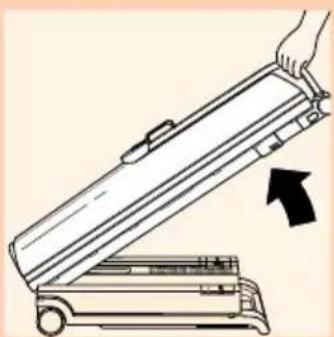
natural_image
Illustration of a hand opening a mechanical device with an arrow indicating motion (no text or symbols)natural_image
Diagram of a vertical mobile device with an arrow indicating rotation or movement (no text or symbols present)natural_image
Illustration of a person using a cart to lift a large object, with an arrow indicating motion direction (no text or symbols)natural_image
Illustration of a person using a treadmill to lift a horizontal bar, with an upward arrow indicating motion (no text or symbols present)natural_image
Line drawing of a person using a handheld device on a chair (no text or symbols)text_image
Medical diagram showing a hand holding a medical device with labeled parts and directional arrows indicating movement or force.natural_image
Pure diagram of three circular components with no text or symbols, numbers, or symbols present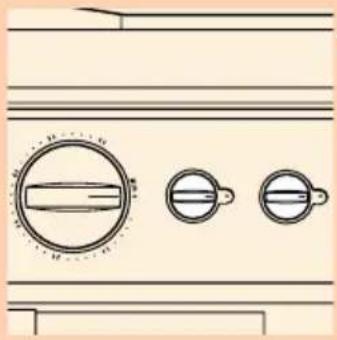
natural_image
Pure diagram of three circular components with no text or symbols, no readable text or labelstext_image
Diagram showing two labeled positions (1 and 2) of a person holding a wristbelt, with arrows indicating downward movement.natural_image
Line drawing of a person using a handheld device to press or install a tray (no text or symbols)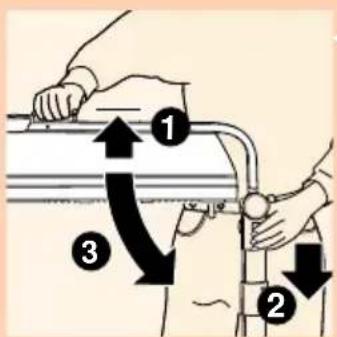
text_image
Diagram illustrating a hand operating a mobility device with labeled directional arrows and numbered componentsnatural_image
Illustration of a person using a cart with a lever, showing motion direction (no text or symbols)natural_image
Diagram of a vertical door mechanism with an arrow indicating clockwise motion (no text or symbols)text_image
Diagram illustrating hand positioning on a tool with an arrow indicating left motion, showing alignment and measurement setup.natural_image
Illustration of a hand holding a car under a lamp, with an arrow pointing left (no text or symbols)natural_image
Line drawing of a person standing near a door with a luggage bag attached (no text or symbols)natural_image
Illustration of two people pushing a stretcher on a stretcher (no text or symbols present)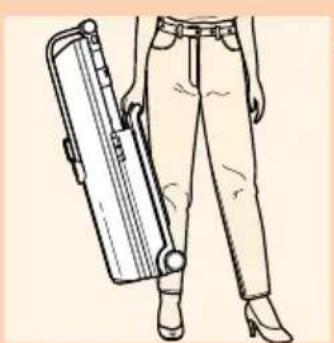
natural_image
Line drawing of a person wearing a suit jacket and pants, holding a hard hat (no text or symbols)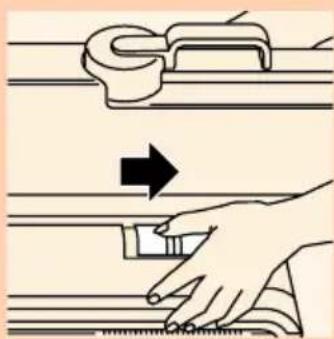
natural_image
Illustration of a hand using a tool to press or adjust a ruler, with no text or symbols present.
natural_image
Illustration of a hand opening a portable device with an arrow indicating motion (no text or symbols)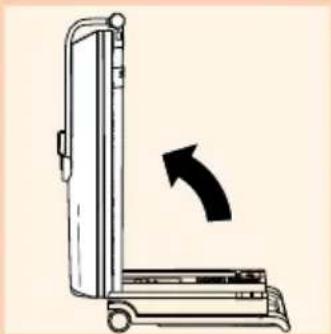
natural_image
Diagram of a vertical device with an arrow indicating rotation or movement (no text or symbols present)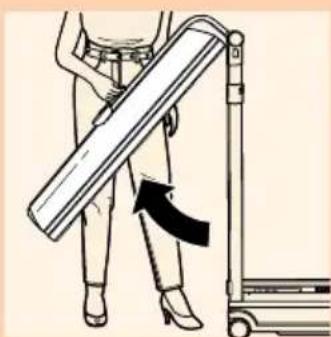
natural_image
Illustration of a person using a mobility device to lift a long pole, with a black arrow indicating the motion direction (no text or symbols present)natural_image
Diagram of a mechanical device with a lever and lever mechanism, showing no text or symbols
natural_image
Line drawing of a person using a walking cane to handle a wooden object (no text or symbols)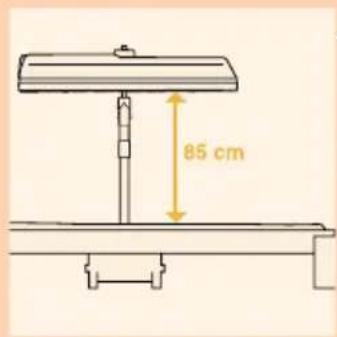
text_image
85 cm
text_image
Medical diagram showing a hand holding a wrist with labeled parts and directional arrows indicating movement or force.natural_image
Illustration of a washing machine front panel with circular gauges and handlebars (no text or symbols)text_image
Diagram showing two labeled positions (1 and 2) of a person holding a medical device with arrows indicating movement or force direction.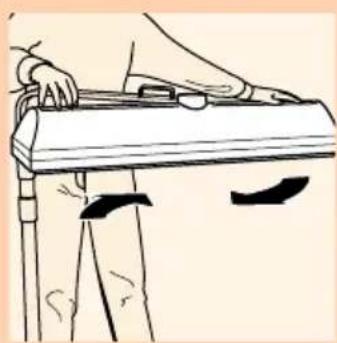
natural_image
Line drawing of a person using a tool on a chair (no text or symbols)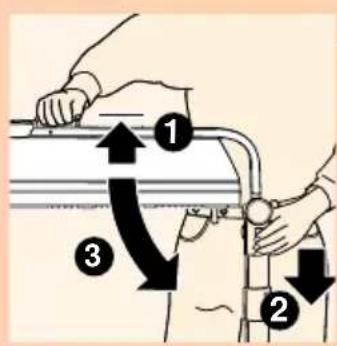
text_image
Diagram illustrating a mechanical or fluidic process with numbered steps and directional arrows indicating movement.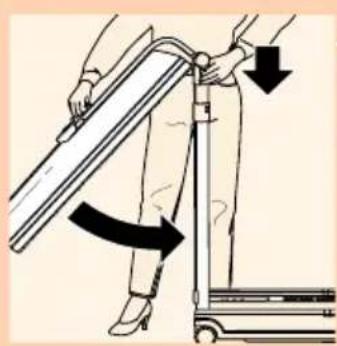
natural_image
Illustration of a person using a mobility device to lift a pole, with arrows indicating motion direction (no text or symbols)
natural_image
Diagram of a device with a right-handled arrow indicating rotation or change (no text or symbols present)text_image
Diagram illustrating three steps of a door lock mechanism: opening, adjusting the handle, and lifting a device.- lampeenheden fastlåses til basisdelen ved at skubbe skydekontakterne i basisdelen i pilens retning.
9 Solariet kan nu opbevares under en seng.