
C 1060 plus - Irrigation timer GARDENA - Free user manual and instructions
Find the device manual for free C 1060 plus GARDENA in PDF.


| Product Type | Irrigation Timer / Water Computer |
| Model | C 1060 plus |
| Brand | Gardena |
| Power Supply | 1 x 9V alkaline battery (IEC 6LR61) |
| Battery Life | Approx. 1 year |
| Operating Pressure | 0.5 - 12 bar |
| Max Water Temperature | 40 °C |
| Number of Programs | 6 (Program-controlled watering) |
| Watering Duration Range | 1 minute to 9 hours 59 minutes |
| Watering Cycles | Every 24h, 2nd, 3rd, 4th, 5th, 6th, 7th day or specific weekdays |
| Watering Modes | Program-controlled, automatic water distributor (Prog 11), soil moisture sensor-controlled (Prog 12-14) |
| Budget Function | Adjust run time from 10% to 100% in 10% steps |
| Manual Operation | Yes, with adjustable duration (0:00 to 9:59) |
| Child Lock | Set manual duration to 0:00 |
| Sensor Compatibility | GARDENA Soil Moisture Sensor, Rain Sensor, Automatic Water Distributor (Art. 1198) |
| Display | LCD with symbols for time, program, battery, sensor status |
| Connection Thread | G 1" (33.3 mm) with adapter for G 3/4" (26.5 mm) |
| Filter | Yes, cleanable |
| Anti-theft Device | Optional (Art. 1815-00.791.00) |
| Intended Use | Private domestic gardens, outdoor, automatic watering |
| Storage | Dry, frost-free place |
| Environmental Disposal | Do not dispose with household waste; recycle at municipal collection point |
Frequently Asked Questions - C 1060 plus GARDENA
User questions about C 1060 plus GARDENA
0 question about this device. Answer the ones you know or ask your own.
Ask a new question about this device
Download the instructions for your Irrigation timer in PDF format for free! Find your manual C 1060 plus - GARDENA and take your electronic device back in hand. On this page are published all the documents necessary for the use of your device. C 1060 plus by GARDENA.
USER MANUAL C 1060 plus GARDENA
GB Operating Instructions
Water Computer
F Mode d'emploi
Welcome to the Garden of GARDENA...

Translation of the original instructions from German. Please read these operating instructions carefully and observe the notes given. Use these instructions to familiarise yourself with the Water Computer and its proper use as well as the notes on safety.

For safety reasons, children and young people under 16 as well as anyone who is not familiar with these operating instructions may not use the Water Computer.
→Please keep these operating instructions in a safe place.
Contents
- Where to Use Your GARDENA Water Computer C 1060 plus 2
- Safety instructions .... 2
- Function ...... 3
- Putting Your Water Computer into Operation 5
- Programming 7
5.1 Basic programming 7 5.2 Special programs 10 5.3 Other settings 13
- Putting Your Water Computer out of Operation ..... 14
- Maintenance 14
- Troubleshooting ..... 15
- Available accessories .... 15
- Technical Data 16
- Service / Warranty 16
1. Where to Use Your GARDENA Water Computer C 1060 plus
Intended use:
The GARDENA Water Computer is intended for private use in domestic and hobby gardens, exclusively for outdoor use, to control sprinklers and watering systems.
The Water Computer can be used for automatic watering during holidays.
Please note:

The GARDENA Water Computer must not be used for industrial purposes or in conjunction with chemicals, foodstuffs, easily flammable and explosive materials.
2. Safety instructions
Battery:
To ensure the Water Computer runs safely, only a 9 V alkaline manganese battery (alkaline) type IEC 6LR61 must be used.
In order to stop the Water Computer from failing because of a weak battery if you are away for a long time, the battery must be replaced when the battery display still shows only 1 bar.
Setting up
Warning!
The Water Computer must not be used indoors.
Only use the Water Computer outdoors.
The Water Computer may only be set up vertically with the sleeve nut to the top to prevent water penetrating into the battery compartment.
The minimum water output to ensure that the Water Computer functions correctly is 20 - 30 l/h.
For example, at least 10 x 2-litre Drip Heads are required to control the Micro-Drip-System.
At high temperatures (over 60 °C at the display) the LCD display may extinguish. This does not affect the program in any way.
When the computer cools down the LCD display illuminates again.
The max. temperature for the water flow is 40°C.
Only use clear fresh water.
The minimum operating pressure is 0.5 bar, the maximum operating pressure is 12 bar.
Avoid tensile strain.
Do not pull the hose connected to the Water Computer.
Programming
Program the Water Computer with the tap turned off.
This way you can avoid getting wet when trying out the manual On/Off function (man. On/Off). You can remove the control unit from the housing to program the Water Computer.
If the controller is removed when the valve is open, the valve remains open until the controller is fitted again.
3. Function
Controls:
Display levels:
With the Water Computer, the garden can be watered fully automatically at any time of day.
Sprinklers, a sprinkler system, or a drip head watering system can be used for watering.
The Water Computer carries out watering fully automatically according to the set programs and can therefore also be used during holidays. Evaporation is lowest in the early morning or late evening.
The watering programs are easily entered using the controls.
Control
Function
① Rotary button: Changes the adjustable values. ② Menu button: Switches to the next display level. ③ OK button: Applies the values set with the rotary button. ④ Man. button: For switching the water throughput on or off manually.
The 4 display levels,
• Level 1: Normal display • Level 2: Current time and day of the week • Level 3: Enter watering programs • Level 4: Turning watering programs on and off can be selected one after the other by pressing the Menu key.
Display panel:

You can change the display level at any time, even during programming. All program data that has been changed up till now and confirmed by pressing OK will be saved.
| Display | Desscription |
| 5 Ticker Explanation of the program step / Computer status. | |
| 6 Weekdays Current weekday or programmed (Mo), (Tu), ... watering days. | |
| 7 Time Flashes when entering the current data (Time - hours, minutes, day of the week). | |
| 8 am / pm Display for 12 hour clock (e. g. in USA, Canada). | |
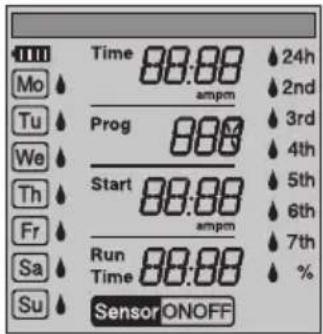
| 9 Prog Program-controlled watering (Prog 1-5) / % (percentage change in run time) (Prog 10) / Watering with automatic water distributor (Prog 11) / Soil moisture sensor-controlled watering (Prog 12-14) / Watering program on (ON) / off (OFF). | |
| 10 Start | Watering start time (flashes when in input mode). |
| 11 Run Time | Watering duration (flashes when in input mode). |
| 12 24h, 2nd, 3rd, 4th 5th, 6th, 7th | Watering cycle (with drop symbol activated). Every 24 hours; every 2/3/4/5/6/7 days. |
| 13 % (Run Time) | Budget function: Watering duration for all watering programs can be set centrally in 10% steps from 100% down to 10%. |
| 13 Sensor ON/OFF | Sensor ON (watering)/ Sensor OFF (watering is not carried out). |
| 14 Battery | Indicates 5 battery levels: 3 bars: Battery fully charged 2 bars: Battery half full 1 bar: Battery low 1 bar flashing: Battery almost flat 0 bar: Battery flat |
If no bars are displayed, the valve is no longer opened. A valve opened by the programme will also close again if the battery is flat.
The battery display is reset when the battery is changed.
| 2 Bars 1 Bar 1 Bar flashing 0 Bar | |||
| Battery half full Battery low Battery almost flat Battery flat | |||
| Valve opens. Valve opens. Valve still opens. Valve does not open. | |||
| The Water Computer The is guaranteed to will continue to work stops working for a minimum for no more than 4 weeks. | The Water Computer The W water Computer The Water Computer in no more than 4 weeks. | Computer | |
| It is advisable to The battery change the battery. | Battery must be changed soon. | The battery must be changed. | |
| → Replace battery (see 4. Putting Your Water Computer into Operation “Inserting battery”). | |||
4. Putting Your Water Computer into Operation
Insert battery:

The Water Computer must only be operated with a 9 V alkali-manganese (alkaline) battery type IEC 6LR61.
- Remove controller ⑯ from the housing of the Water Computer.
- Insert battery in the battery compartment ⑰. Observe correct polarity ⑪.
The display shows all LCD symbols for 2 seconds and then switches to language selection. (see 5. Programming).
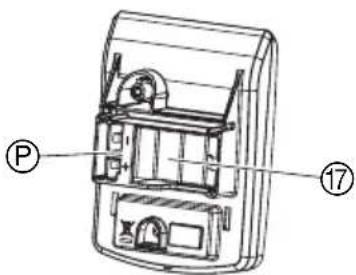
- Install controller ⑯ on the housing again.
Connect Water Computer:

The Water Computer is fitted with a sleeve nut ¹⁹ for taps with (G 1") (33.3 mm) thread. The adapter supplied ¹⁸ is used to connect the Water Computer to the tap with 26.5 mm (G ³⁄₄) threads.
- For 26.5 mm (G 3/4) threads: Screw the adapter ⑱ to the tap by hand (do not use pliers).
- Screw sleeve nut 19 of the Water Computer on to the adaptor thread by hand (do not use pliers).
- Screw tap connector ⑳ on to the Water Computer.
Connect soil moisture or rain sensor (optional):
Apart from scheduled watering there is also the option of including how damp the soil is or rainfall into the watering programme.
If the soil is damp enough, the programme will be stopped, or a programme will be prevented from starting. Manual operation via Man. On/Off is unaffected by this.
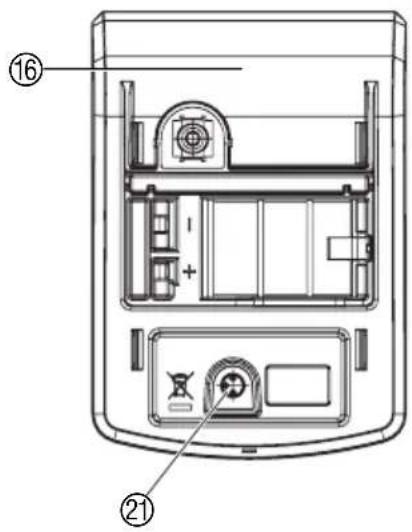
The "Soil moisture sensor-controlled watering" mode can only be selected when using a soil moisture sensor (see 5.2 Special programs).
- Remove controller ⑯ from the housing of the Water Computer.
- Place soil moisture sensor in the watered area
- or - place rain sensor (with extension cable if necessary) outside the watered area.
- Insert the sensor in the sensor connection ② of the Water Computer.
An adapter cable may be required to connect older sensors, which can be purchased from GARDENA Service, GARDENA Adapter cable Art. No. 1189-00.600.45.
Fit anti-theft device (optional):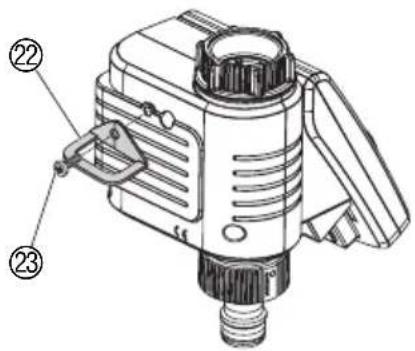
To secure your Water Computer against theft, you can obtain the GARDENA Anti-theft device Art. No. 1815-00.791.00 from GARDENA Service.
- Screw clamp ② with screw ③ firmly to the back of the Water Computer.
- Use clamp ② e.g. for fixing a chain.
It is no longer possible to remove the screw after it has been screwed in.
Compile watering plan:
Before you start entering the watering data in the computer we recommend that you write the data on one of the watering plans in the appendix to maintain more of an overview.
Example:
| Program Prog | Start time | Watering- Watering day duration | Watering cycles | ||||||||||||||
| Run Time | Mo | Tu | We | Th | Fr | Sa | So | 24h | 2nd | 3rd | 4th | 5th | 6th | 7th | |||
| 1 | 7:30 | 0:30 | X | X | X | ||||||||||||
| 2 | 19:00 | 0:20 | X | X | |||||||||||||
| 3 | 22:30 | 1:10 | X | X | X | ||||||||||||
| 4 | 4:00 | 0:15 | X | ||||||||||||||
| 5 | - | - | |||||||||||||||
| 6 | - | - | |||||||||||||||
Watering modes:
The Water Computer has 3 watering modes:
- Begin Program-controlled watering (Prog 1 - 6) using the programs entered (Watering begins depending on the watering start times)
-or-
• Watering with automatic water distributor (Prog 11)
using the GARDENA automatic water distributor (watering of up to 6 watering lines)
-or-
- Soil moisture sensor-controlled watering (Prog 12 - 14)
using a GARDENA Soil Moisture Sensor (watering begins when the soil moisture sensor registers dry).
5.1 Basic programming
The controller can be removed to programme the unit and programming can be done on the move. (see 4. Putting Your Water Computer into Operation "Inserting battery").
Setting language:
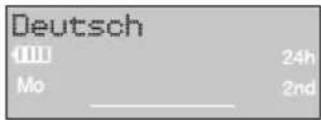
Set current time and day of week:
- Insert battery (see 4. Putting Your Water Computer into Operation).
The language English flashes.
- Set the language by turning the rotary button (E.g. English) and confirm by pressing OK.
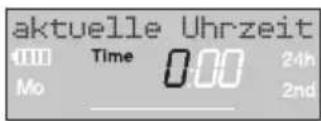
The ticker Enter current time appears.
1.
2.

3.
(not necessary if the language has been set).
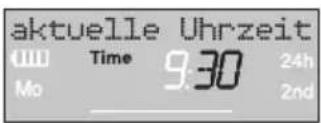
The ticker "Enter current time" appears.
Time and the hour display will flash on the screen.
- Set the time in hours with the rotary button
(example: 9 hours) and confirm with the OK-key.
Time and the minutes display flash.
- Set the time in minutes with the rotary button
(example: 300 minutes) and confirm with the OK-key.
The ticker "Select current day" appears.
Time and the day of the week display flash.
- Set the day of the week by turning the rotary button (e.g., Sa for Saturday) and confirm with OK.
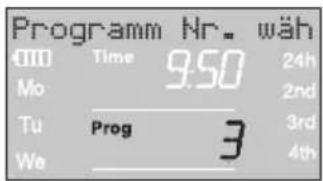
The ticker "Select program no." appears.
Prog and the program number flash on the screen.
Entering watering program:
1.

2.
3.

4.
5.
6.
Program-controlled watering (Prog 1 - 6):
Up to 6 programs can be entered using program-controlled watering (Prog 1 to 5).
- Press Menu-key twice (not necessary if the current time and day of the week has been entered). The ticker Select program no. appears. Prog and the program number flash on the screen.
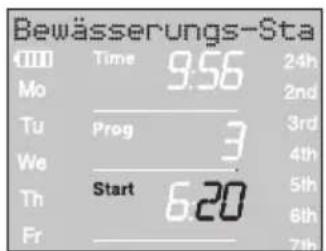
- Use the rotary button to set the program number (E.g. Prog 3) and confirm by pressing OK. The ticker Enter watering start time appears. Start and the hour display will flash on the screen.
- Set the hours for starting the watering time with the rotary button (example: 5 hours) and confirm with the OK-key. Start and the minutes section flash on the display.
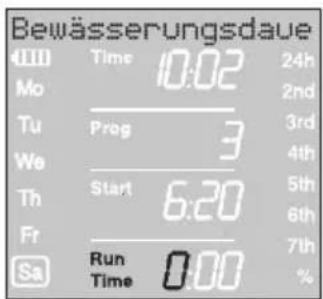
- Set the minutes for starting the watering time with the rotary button (example: 20 minutes) and confirm with the OK-key. The ticker Enter watering duration appears. Run Time and the hours for the watering time flash on the display.
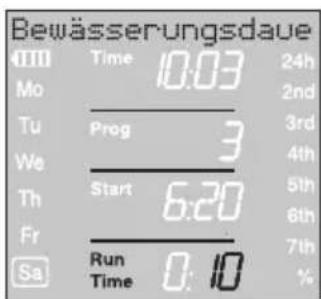
- Set the hours for the watering time with the rotary button (example: 0 hours) and confirm with the OK-key. Run Time and minutes for the watering time flash on the display.
- Set watering time minutes with the rotary button (example: 170 minutes) and confirm with the OK-key. The ticker Enter watering frequency appears. Watering cycle ♦ 24h flashes on the display.
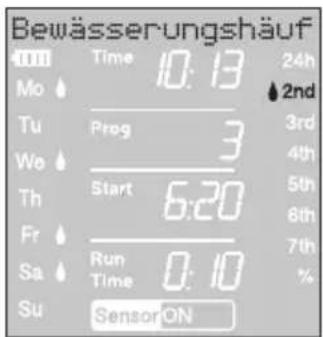
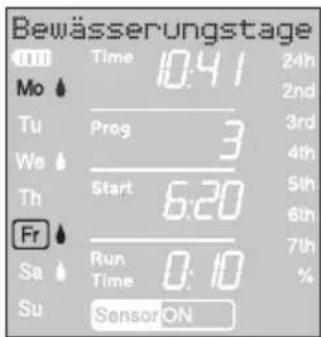

The watering frequency can be selected by:
- the (7.) watering cycle (right hand column of the display)
- or - • the (8.) watering days (left hand column of the display).
- Select watering cycle with the rotary button (E.g. 2nd) and confirm by pressing OK.
24h / 2nd / 3rd / 4th / 5th / 6th / 7th:
Watering every 24 hours / every 2. / 3. / 4. / 5. / 6. / 7. days
The week preview is displayed in the left hand column for 2 seconds.
The ticker Select program no. appears and the display jumps back to Step 2 and the next program number up flashes.
- or -
- Select each watering day with the rotary button (E.g. ⬆ Mo, ⬆ Fr Monday and Friday) and confirm by pressing OK.
The ticker Enter watering days appears.
- Press the Menu button
The ticker Select Program no. appears.
The display jumps back to Step 2 and the next program number up flashes.
If program number 8 has been created, the ticker "Watering programs ON" is displayed.
Prog 00N flashes on the display.
If not all 6 programs are to be entered, you can use the menu button to switch to the "Start watering programs" display level.
The Prog 00 must be selected so that the watering programs can start. If Prog OFF is selected, the watering programs do not run.
- Press Menu 3 times (not necessary if the program has already been created with program number 8).
- Select Prog ON with the rotary button and confirm by pressing OK.
The ticker "Program OK" is displayed for 2 seconds and then the display jumps to the normal display.
The Water Computer has now been programmed, i.e. the inbuilt valve opens and closes completely automatically and thus waters at the programmed times.
Even if Prog OFF is selected, watering can be done manually.
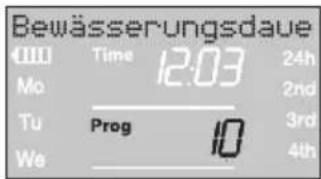
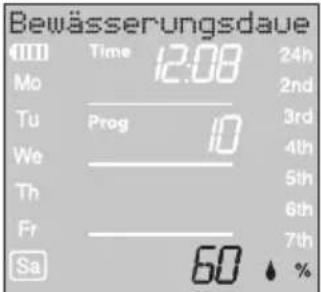
Budget function / % run time (Prog 10):
Automatic Water Distributor:

5.2 Special programs
The programmed watering durations of the 6 watering programs can be reduced centrally in 10% steps from 100% down to 10% without changing the 6 programs. For example, watering durations in Autumn must be shorter than in Summer.
- Keep the Menu button pressed for 5 seconds. (With Prog 777 "Automatic water distributor", press the Menu button twice).
Prog and the program number flash on the screen.
The ticker "Change watering time percentage" is displayed.
- Select program number 1706 by turning the knob and confirm with OK.
The % steps flash on the display.
- Turn the knob to select the required programmed watering duration percentages (e.g., 50%) and confirm with OK.
The % symbol is displayed in the normal display.
Note: When the percentage of the watering duration is changed, the display of the originally programmed watering durations in the 6 programs stays as it is.
Watering with automatic water distributor (Prog 11)
By connecting the GARDENA Automatic Water Distributor, Art. 1198, up to 6 watering lines can be controlled with the water computer. Each of the 6 watering lines can only be controlled max. once a day.
This is ideal if there is not a sufficient amount of water to operate several watering lines all at once or if individual plants require different amounts of water. Enables all watering lines to be operated one after the other.
After Prog 1 has been confirmed with OK and the watering start time for the first program has been entered (see 5. Programming), all watering start times of the following 5 programs are automatically preprogrammed. Thus only the watering durations for programs 2 - 6 can be set.
To ensure that the automatic water distributor switches over properly, there must be at least a 30 minute break between each of the 6 programs.
Preprogramming Prog 17 takes into account the minimum required 30 minute breaks between the programs and a minimum watering duration of 30 seconds (display 1 Min.). This watering duration is necessary so that the automatic water distributor switches over to the next outlet and the watering programs are allocated correctly to the corresponding watering lines.
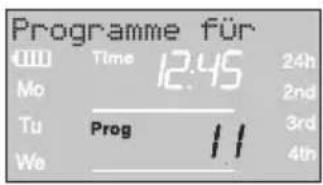

Prog OFF and Prog 178
Soil moisture sensor / rain sensor and Prog 17 18
Exit watering with automatic water distributor again:
The watering frequency entered for the first watering program applies by design to watering programs 2 - 6 too.
- Hold the Menu button down for 5 seconds. Prog and the program number flash on the screen.
- Select program no. 11 with the knob and confirm with OK. The ticker Enter watering start time appears. Start and the hour display will flash on the screen.
- Set the watering start time (E.g. 18.00) and watering duration. (E.g. 0:10) for program 1 (Prog 1) (see "Set watering program" from Step 3).
- Set the watering duration for programs 22-65
If after confirming Prog 17 the watering programs are turned off (Prog OFF) or the watering duration (run time) is set to 0, all programs starting at this time are reduced to the minimum watering duration of 30 seconds. (Display: 1 min.). Thus the watering programs are allocated correctly to the corresponding outlet of the automatic water distributor.
By opening the water flow for a short time the outlets on the automatic water distributor are switched on so that when the programs are switched on again (Prog Don) or if a watering duration is entered, the outlets to the required watering program are allocated as they were originally.
If Prog 17 is selected and the soil moisture or rain sensor registers sufficient moisture (Sensor OFF), a running watering program is stopped. The time of the following waterings are reduced to 30 seconds. (Display: 1 min.) until the soil moisture or rain sensor allows watering again. Then the originally entered watering duration is run again.
Reducing watering because the soil moisture is sufficient ensures that the automatic water distributor switches to the next outlet and thus the watering programs are allocated correctly to the relevant distributor outlet.
Hold the Menu button down for 5 seconds.
The normal display appears on the screen again.

Exit soil moisture sensor-controlled watering again:
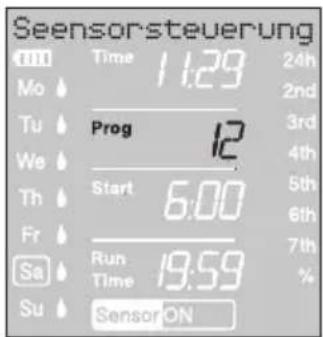
Soil moisture sensor-controlled watering (Prog 12 - 14):
The previously set programs for program-controlled watering (Prog 1 to 56) are retained but they do not run.
- Hold the Menu button down for 5 seconds. Prog and the program number flash on the screen.
- Select the required watering cycle by turning the knob (e.g. Prog 17) and confirm by pressing OK.
Prog 17: Watering throughout the day (6 a.m. - 8 p.m.) if the soil moisture sensor registers dry.
Prog 13: Watering during the night (8 p.m. - 6 a.m.) when the soil moisture sensor registers dry.
Prog 14: Watering when the soil moisture sensor registers dry.
Run Time and the watering duration minutes flash on the screen.
- Set the watering duration in minutes (0 - 59 minutes) with the rotary button (e.g. 40 minutes) and confirm by pressing OK. Watering starts in the set watering cycle as soon as the soil moisture sensor registers dry (Sensor ON).
The watering duration set in the sensor-controlled watering mode also applies to manual watering.
In the case of soil moisture sensor-controlled watering, a two-hour watering pause is triggered after every watering cycle in order for the soil moisture sensor to record the soil moisture.
Example:
Watering cycle = Prog 124 (Watering throughout the day)
Watering duration = 40 minutes.
Watering begins when the sensor registers dry (Sensor ON) during the day (between 6 a.m. and 8 p.m.) and ends up to 40 minutes later depending on the amount of moisture in the soil.
The watering duration is preset to 30 minutes at the factory.
Emergency programme:
If no sensor is inserted in sensor-controlled watering mode or if the connection cable is faulty, watering will take place every 24 hours. The watering duration depends on the run time but is limited to a maximum of 30 minutes.
→ Hold the Menu button down for 5 seconds.
The normal display appears on the screen again.
5.3 Other settings:
Read / modify watering programmes:
If a value in the programme is to be changed, this can be changed without changing the other values in the programme.
- Press the Menu key twice. Start and the hours flash on the display.
- Press the Menu button to jump to the next programme level
- or - change the programme data with the rotary button and confirm by pressing the OK button.
If the watering period is changed while a programme is running, the current watering is ended.
Manual operation:
1.
The valve can be opened or closed manually at any time. A program-controlled open valve can also be closed early without changing the program data (Watering start time, watering duration and watering frequency). The controller must be fitted.
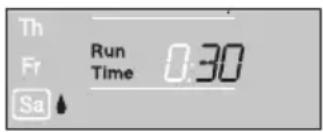
- Press Man.-key to open the valve manually (or to close an open valve). Run Time and the watering time in minutes (set to 30 minutes in the works) flash for 10 seconds on the display.
- Whilst the watering time in minutes is flashing, the watering duration can be modified with the rotary button (between 0800 and 0559) (example: 10 minutes) and confirm by pressing the OK button.
- Press Man.-key to close the valve early. The valve is closed.
The amended manual opening period is stored, i.e. each time the valve is opened manually in future the modified opening period is preset. If the manual opening period is amended to 0000 the valve is closed and also remains closed after the Man.-key is pressed (child lock).
If the valve has been opened manually and a programmed start of a watering period overlaps the manual opening period, the programmed starting time is suppressed.
Example:
The valve is opened at 9.00 a.m. manually, the opening period is 30 minutes. A program with a start time (START) between 9.00 and 9.30 a.m. will not be undertaken in this case.
Reset:
The factory settings are restored.
→ Press Man.-key and Menu-key simultaneously for 3 seconds. All the LCD symbols are displayed for 2 seconds and the display moves to the normal display.
- All the program data are set to zero. •The manual watering period is set to 0030 again. •The language, the time and the day of the week are retained.
Important information:
If no entry is made during programming for a period of more than 60 seconds, the normal display reappears. In this case, all changes made up to now will be applied.
When a sensor installed in the Water Computer registers damp (OFF), the programmed watering is not carried out. There must be a 1 minute pause between programs.
6. Putting Your Water Computer Out of Operation
Storage / Overwintering:

- Press Menu-key 3 times, select Prog OFF with the rotary button and confirm with the OK-key. The watering program is not run.
- Store your Water Computer in a dry place where it is protected from frost.
Disposal: (in accordance with RL2002/96/EC)

The product must not be added to normal household waste. It must be disposed of in line with local environmental regulations.
→Important: Make sure that the unit is disposed of via your municipal recycling collection centre. →Please return flat batteries to a GARDENA dealer or dispose of them properly at your nearest recycling centre. Only dispose of batteries when they are flat.
Disposing of flat batteries:
7. Maintenance
Clean filter:
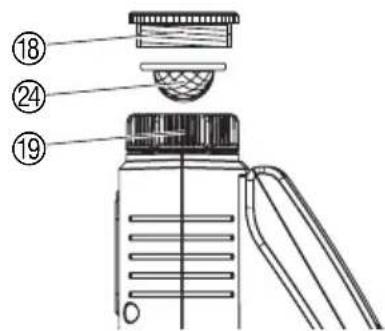
The filter ② should be checked regularly and cleaned when necessary.
- Unscrew sleeve nut ⑲ of the Water Computer by hand from the tap thread (do not use pliers).
- If necessary unscrew the adaptor ⑱.
- Remove filter ⑳ from sleeve nut ⑲ and clean.
- Fit the Water Computer again (see 4. Putting Your Water Computer into Operation "Connecting Water Computer").
- Troubleshooting
| Fault | Possible | Cause |
| No display appears | Battery inserted incorrectly. | → Check polarity markings match (+/-). |
| Flat battery. →Insert new (alkaline) battery. | ||
| Temperature on the display Display appears after is higher than 60 °C. temperature has dropped. | ||
| Manual watering is not possible using the Man. button | Battery flat (1 bar flashes). | → Insert new (alkaline) battery. |
| Manual watering period is set to 0:00. | →Set manual watering period to a figure greater than 0:00 (see 5. Programming). | |
| Tap turned off. | →Turn tap on. | |
| Watering program is not being undertaken (no watering) | Watering program has not been entered completely. | → Read off watering program and modify if necessary. |
| Programs deactivated (Prog OFF). | → Activate program (Prog ON). | |
| Program entry/modification during or just before the start pulse. | → Make program entry/ modification outside the programmed start times. | |
| Valve was opened manually →Avoid possible program previously. | ||
| Tap turned off. | →Turn tap on. | |
| Program overlap (1 st watering start time has priority). | →Enter new watering program without overlaps. | |
| Soil moisture or rain sensor registers damp (sensor OFF). | → If dry, check setting / location of soil moisture / rain sensor. | |
| Battery flat (1 bar flashing). | → Insert new (alkaline) battery. | |
| Water Computer does not close | Minimum quantity of water drawn is less than 20 l/h. | → Connect more drip heads. |
| Display: Sensor fault | Sensor not correctly connected. | → Check connection cable and sensor. |

In the event of other faults please contact GARDENA Service. Repairs should only be carried out by GARDENA service centres or dealers authorised by GARDENA.
- Available accessories
| GARDENASoil Moisture Sensor | Art. No. | |
| GARDENARain Sensor electronic | Art. No. 1189 | |
| GARDENA Anti-theft device | Art. No. 1815-00.791.00From GARDENA Service | |
| GARDENA (to connect older GARDENA Adapter cable sensors) From GARDENA Service | Art. No. 1189-00.600.45 | |
| GARDENA Cable Adapter | For simultaneous connection of rain and soil moisture sensor | Art. No. 1189-00.630.00 From GARDENA Service |
| GARDENA Automatic Water Distributor 6 watering lines | For fully controll of up to | Art. No. 1198 |
10. Technical Data
| Min./max. operating pressure: | 0.5 bar/12 bar |
| Flow medium: Clear fresh water | |
| Max. liquid temperature: | 40 °C |
| Number of program-controlled watering cycles per day: | Up to 6 |
| Watering duration per program: | 1 min. to 9 hours 59 min. |
| Battery required: | 1 × 9V alkaline manganese (alkaline) battery type IEC 6LR61 |
| Operating time of the battery: | approx. 1 year |
11. Service / Warranty
GARDENA guarantees this product for 2 years (from date of purchase). This guarantee covers all serious defects of the unit that can be proved to be material or manufacturing faults.
Under warranty we will either replace the unit or repair it free of charge if the following conditions apply:
- The unit must have been handled properly and in keeping with the requirements of the operating instructions.
- Neither the purchaser or a non-authorised third party have attempted to repair the unit.
- Faults which occur as a result of incorrectly installed or leaking batteries are not covered by the guarantee.
- Damage caused by frost is not covered by the warranty.
This manufacturer's guarantee does not affect the user's existing warranty claims against the dealer/seller.
If you have any problems with your Water Computer, please contact our Customer Service or return the defective unit together with a short description of the problem directly to one of the GARDENA Service Centres listed on the back of this leaflet.
| GB Product Liability | We expressly point out that, in accordance with product liability law, we are not liable for any damage caused by our units if it is due to improper repair or if parts exchanged are not original GARDENA parts or parts approved by us, and, if the repairs were not carried out by a GARDENA Service Centre or an authorised specialist. The same applies to spare parts and accessories. | |
| F Responsabilité | Nous vous signalons expressément que GARDENA n'est pas responsable des dommages causés par ses appareils, dans la mesure où ces dommages seraient causés suite à une réparation non conforme, dans la mesure où, lors d'un échange de pièces, les pièces d'origine GARDENA n'auraient pas été utilisées, ou si la réparation n'a pas été effectuée par le Service Après-Vente GARDENA ou l'un des Centres SAV agréés GARDENA. Ceci est également valable pour tout ajout de pièces et d'accessoires autres que ceux préconisés par GARDENA. | |
| NL Productaansprakelijkheid | Wij wijzen er nadrukkelijk op, dat wij op grond van de wet aansprakelijkheid voor producten niet aansprakelijk zijn voor schade ontstaan door onze apparaten, indien deze door onvakkundige reparatie veroorzaakt zijn, of er bij het uitwisselen van onderdelen geen gebruik gemaakt werd van onze originele GARDENA onderdelen of door ons vrijgegeven onderdelen en de reparatie niet door de GARDENA technische dienst of de bevoegde vakman uitgevoerd werd. Ditzelfde geldt voor extra-onderdelen en accessoires. | |
| S Produktansvar | Tillverkaren är inte ansvarig för skada som orsakats av produkten om skadan beror på att produkten har reparerats felaktigt eller om, vid reparation eller utbyte, andra än Original GARDENA reservdelar har använts. Samma sak gäller för kompletteringsdelar och tillbehör. | |
| DK Produktansvar | Vi gör udtrykkeligt opmærksom på at i henhold til produktansvarsloven er vi ikke ansvarlige for skader forårsaget af vores udstyr, hvis det skyldes uautoriserede reparationer eller hvis dele er skiftet ud og der ikke er anvendt originale GARDENA dele eller dele godkendt af os, eller hvis reparationerne ikke er udført af GARDENA-service eller en autoriseret fagmand. Det samme gælder for ekstra udstyr og tilbehør. | |
| RUS Ответственность за продукцию за продукцию | Мы однозначно заявляем, что согласно Закону об ответственности мы не несем ответственности за нанесенный нашим устройством ущерб, если он обусловлен неквалифицированным ремонтом или заменой деталей на запасные детали неоригинального происхождения GARDENA или неразрешенные нами детали или, если ремонт был произведен не службой сервиса GARDENA или неуполномоченным нами квалифицированным специалистом. Аналогичное относится также к дополнительным деталям и принадлежностям. | |
| GB EU Certificate of ConformityThe undersigned GARDENA International GmbH, Hans-Lorenser-Str. 40,D-89079 Ulm, hereby certifies that, when leaving our factory, the units indicatedbelow are in accordance with the harmonised EU guidelines, EU standardsof safety and product specific standards. This certificate becomes void if theunits are modified without our approval. | Description of the unit: Water ComputerDésignation du matériel : Programmateur d'arrosageOmschrijving van het apparaat: BesproeiingscomputerProduktbeskrivning: BevattningscomputerBeskrivelse af enhederne: VandingscomputerНазвание устройства: Компьютер | |
| F Certificat de conformité aux directives européennesLe constructeur, soussigné : GARDENA Manufacturing GmbH, Hans-Lorenser-Str. 40, D-89079 Ulm, déclare qu'à la sortie de ses usines le matériel neufdésigné ci-dessous était conforme aux prescriptions des directives europé-ennes énoncées ci-après et conforme aux règles de sécurité et autres règlesqui lui sont applicables dans le cadre de l'Union européenne. Toute modifica-tion portée sur ce produit sans l'accord express de GARDENA supprime lavalidité de ce certificat. | Type: Art. No.:Type : Référence :Typ: C 1060 plus Art. nr.: 1864Typ: Art. nr.:Type: Varenr. :Тип: Арт. No: | |
| NL EU-overeenstemmingsverklaringOndergetekende GARDENA Manufacturing GmbH, Hans-Lorenser-Str. 40,D-89079 Ulm, bevestigt, dat het volgende genoemde apparaat in de door onsin de handel gebrachte uitvoering voldoet aan de eis van, en in overeenstem-ming is met de EU-richtlijnen, de EU-veiligheidsstandaard en de voor het pro-duct specifieke standaard. Bij een niet met ons afgestemde verandering aanhet apparaat verliest deze verklaring haar geldigheid. | EU directives:Directiveseuropéennes : 2004/108/ECEU-richtlijnen:EU direktiv: 93/68/ECEU Retningslinier:Директивы EC: | |
| S EU TillverkarintygUndertecknad firma GARDENA International GmbH, Hans-Lorenser-Str. 40,D-89079 Ulm, intygar härmed att nedan nämnda produkter överensstämmermed EU:s direktiv, EU:s säkerhetsstandard och produktspecifikation. Dettaintyg upphör att gälla om produkten ändras utan vårt tillstånd. | Year of CE marking:Date d'apposition du marquage CE :Installatiejaar van de CE-aanduiding:CE-Märkningsår : 2007CE-Mærkningsår :Год разрешения маркировкизначком CE: | |
| DK EU Overensstemmelse certificatUndertegnede GARDENA International GmbH, Hans-Lorenser-Str. 40,D-89079 Ulm bekræfter hermed, at enheder listet herunder, ved afsendelsefra fabrikken, er i overensstemmelse med harmoniserede EU retningslinier,EU sikkerhedsstandarder og produktspecifikationsstandarder. Dette certifikattræder ud af kraft hvis enhederne er ændret uden vor godkendelse. | Ulm, 01.08.2007Fait à Ulm, le 01.08.2007Ulm, 01-08-2007Ulm, 2007.08.01.Ulm, 01.08.2007Ульм, 01.08.2007 | Authorised representativeReprésentant légalGemachtigdeBehörig FirmatecknareTeknisk direktørУполномоченныйпредставитель Peter LameliVice President Peter LameliVice President |
| RUS Свидетельство о соответствии ECМы, нижеподписавшиеся GARDENA Manufacturing GmbH, Hans-Lorenser-Str.40, D-89079 Ulm, настоящим подтверждаем, что нижеуказанное устройство,отгруженное с нашего предприятия, имеет исполнение, соответствующейтребованиям согласованных директив EC, стандартам по техникебезопасности EC и производственным стандартам. При несогласованномс нами изменении устройства настоящее свидетельство теряет силу. | ||
Nylex Consumer Products
50-70 Stanley Drive
Somerton, Victoria, 3062
Phone: (+61) 1800 658 276
spare.parts@nylex.com.au
GARDENA Belgium NV/SA
Brampton, Ontario L6T 4X3
Phone: (+1) 905 792 93 30
info@gardenacanada.com
Chile
Antonio Martinic y Cia Ltda.
Cassillas 272
Centro de Cassillas
Santiago de Chile
Phone: (+56) 2 20 10 708
garfar_cl@yahoo.com
Costa Rica
Compania Exim
Euroiberoamericana S.A.
Los Colegios, Moravia,
Aycliffe Industrial Park
Newton Aycliffe
County Durham
DL5 6ÜP
info.gardena@husqvarna.co.uk
Greece
Agrokip
Psomadopoulos S.A.
Ifaistou 33A
Industrial Area Koropi
194 00 Athens Greece
V.A.T. EL093474846
Phone: (+30) 210 66 20 225
service@agrokip.gr
Hungary
GARDEÑA
Magyarország Kft.
Késmárk utca 22
1158 Budapest
Phone: (+36) 80 20 40 33
gardena@gardena.hu
Iceland
Ó. Johnson & Kaaber
Tunguhalsi 1
110 Reykjavik
ooj@ojk.is
Ireland
Michael McLoughlin & Sons
Hardware Limited
Long Mile Road
Dublin 12
Italy
Phone: (+39) 02.93.94.79.1
info@gardenaitalia.it
Japan
KAKUICHI Co. Ltd.
Sumitomo Realty &
Development Kojimachi
BLDG., 8F
5-1 Nibanncyo, Chiyoda-ku
Tokyo 102-0084
Phone: (+81) 33 264 4721
m_ishihara@kaku-ichi.co.jp
Luxembourg
Magasins Jules Neuberg
NYLEX New Zealand Limited
Building 2, 118 Savill Drive
Mangere, Auckland
Phone: (+64) 0800 22 00 88
spare.parts@nylex.com.au
Norway
GARDENA Norden AB
Sales Office Norway
Kleverveien 6
1540 Vestby
info@gardena.no
Poland
GARDENA Polska Sp. z o.o.
Szymanów 9 d
05-532 Baniocha
Phone: (+48) 22 727 56 90
gardena@gardena.pl
Portugal
GARDENA Portugal Lda.
02-08 Tat Ann Building
Singapore 577185
Phone: (+65) 6253 2277
hyray@singnet.com.sg
Slovak Republic
GARDENA Slovensko, s.r.o.
Panónska cesta 17
851 04 Bratislava
Phone: (+421) 263 453 722
info@gardena.sk
Slovenia
GARDENA d.o.o.
Brodišče 15
1236 Trzin
Phone: (+386) 1 580 93 32
servis@gardena.si
South Africa
GARDENA
South Africa (Pty.) Ltd.
P.O. Box 11534
Vorna Valley 1686
Phone: (+27) 11 315 02 23
sales@gardena.co.za
Spain
GARDENA IBÉRICA S.L.U.
C/ Basauri, n° 6
La Florida
28023 Madrid
Phone: (+34) 91 708 05 00
Kyivo Svyatoshyn Region
08130, Ukraine
Phone: (+380) 44 459 57 03
upyr@altsest.kiev.ua
USA
Melnor Inc.
3085 Shawnee Drive
Winchester, VA 22604
Phone: (+1) 540 722-9080
service_us@melnor.com
1864-28.960.01/0108
© GARDENA
Manufacturing GmbH
D-89070 Ulm
http://www.gardena.com


- GB OPERATING INSTRUCTIONS
- F MODE D'EMPLOI
- CONTENTS
- WHERE TO USE YOUR GARDENA WATER COMPUTER C 1060 PLUS
- INTENDED USE
- PLEASE NOTE
- SAFETY INSTRUCTIONS
- BATTERY
- SETTING UP
- WARNING
- PROGRAMMING
- FUNCTION
- CONTROL
- DISPLAY PANEL
- PUTTING YOUR WATER COMPUTER INTO OPERATION
- INSERT BATTERY
- CONNECT WATER COMPUTER
- CONNECT SOIL MOISTURE OR RAIN SENSOR (OPTIONAL)
- COMPILE WATERING PLAN
- WATERING MODES
- THE WATER COMPUTER HAS 3 WATERING MODES
- BASIC PROGRAMMING
- SETTING LANGUAGE
- SET CURRENT TIME AND DAY OF WEEK
- ENTERING WATERING PROGRAM
- PROGRAM-CONTROLLED WATERING (PROG 1 - 6)
- THE WATERING FREQUENCY CAN BE SELECTED BY
- H / 2ND / 3RD / 4TH / 5TH / 6TH / 7TH
- AUTOMATIC WATER DISTRIBUTOR
- SPECIAL PROGRAMS
- WATERING WITH AUTOMATIC WATER DISTRIBUTOR (PROG 11)
- SOIL MOISTURE SENSOR-CONTROLLED WATERING (PROG 12 - 14)
- EXAMPLE
- EMERGENCY PROGRAMME
- OTHER SETTINGS
- MANUAL OPERATION
- RESET
- IMPORTANT INFORMATION
- PUTTING YOUR WATER COMPUTER OUT OF OPERATION
- STORAGE / OVERWINTERING
- DISPOSAL: (IN ACCORDANCE WITH RL2002/96/EC)
- DISPOSING OF FLAT BATTERIES
- MAINTENANCE
- CLEAN FILTER
- TECHNICAL DATA
- SERVICE / WARRANTY
- CHILE
- COSTA RICA
- GREECE
- HUNGARY
- ICELAND
- IRELAND
- ITALY
- JAPAN
- LUXEMBOURG
- NORWAY
- POLAND
- PORTUGAL
- TAT ANN BUILDING
- SLOVAK REPUBLIC
- SLOVENIA
- SOUTH AFRICA
- SPAIN
- USA
Brand : GARDENA
Model : C 1060 plus
Category : Irrigation timer