VGA extender - Distributor Newstar - Free user manual and instructions
Find the device manual for free VGA extender Newstar in PDF.


User questions about VGA extender Newstar
0 question about this device. Answer the ones you know or ask your own.
Ask a new question about this device
Download the instructions for your Distributor in PDF format for free! Find your manual VGA extender - Newstar and take your electronic device back in hand. On this page are published all the documents necessary for the use of your device. VGA extender by Newstar.
USER MANUAL VGA extender Newstar
[with/without audio]
![Newstar VGA extender - [with/without audio] - 1](/content/2026/06/1237538/images/fca03d414b7da9c67cbc3cb04eba76e7d310cf8f695e7a60c24f667c30868b3a.jpg)
text_image
VGA EXTENDER DC-9V CDS OUT POWER ACTIVE VGA EXTENDER DC-9V CDS OUT POWER ACTIVE VGA EXTENDER DC-9V CDS OUT POWER ACTIVE VGA EXTENDER DC-9V CDS OUT POWER ACTIVE![Newstar VGA extender - [with/without audio] - 2](/content/2026/06/1237538/images/ca99143172af7be8735906459ae73eab451f02d677c3ea3fbd1d6eb651bb57df.jpg)
text_image
VGA+Audio EXTENDER DC-SV POWER ACTIVE DC-SV POWER ACTIVE DC-SV NEW COMPLEXING EXTENDER DC-SV POWER ACTIVETable of Content
■ Introduction ...... 1
■ Product Description
VGA CAT5 Extender Pair 2
VGA + Audio CAT5 Extender Pair .... 3
■ CAT5 Cable 4
■ Installation
VGA CAT5 Extender Pair 6
VGA + Audio CAT5 Extender Pair .... 7
■ Operation
LED 8
Equalizer selector 8
■ Appendices
Specifications 9
Troubleshooting 10
Please read this manual thoroughly and follow the Installation procedures to prevent any damage to the KVM switch or any connecting device.
Introduction
The “VGA CAT5 Extender” pair enables you to transmit VGA signals up to 150M (500 ft.) away with resolution up to 1024 x 768. Featuring common mode noise suppression circuit for superb VGA quality via inexpensive unshielded twisted pair CAT5 cables. The Local unit duplicates the input signal for local use and transmits the VGA signal to a Remote unit. Upon receiving the VGA signal via a CAT5 connector, the Remote unit broadcasts the signal to two VGA outputs. A convenient Gain (equalization) control selector on the Remote unit is designed for optimum signal clarity according to the length of the CAT5 cable.
The “VGA + Audio CAT5 Extender” has all the functions of the “VGA CAT5 Extender” with an added feature for audio signal.
Both pairs are ideal for public broadcasting, exhibits, retail stores, courtrooms, stock tickers, bus station and many more applications.
Product Description
VGA CAT5 Extender Pair
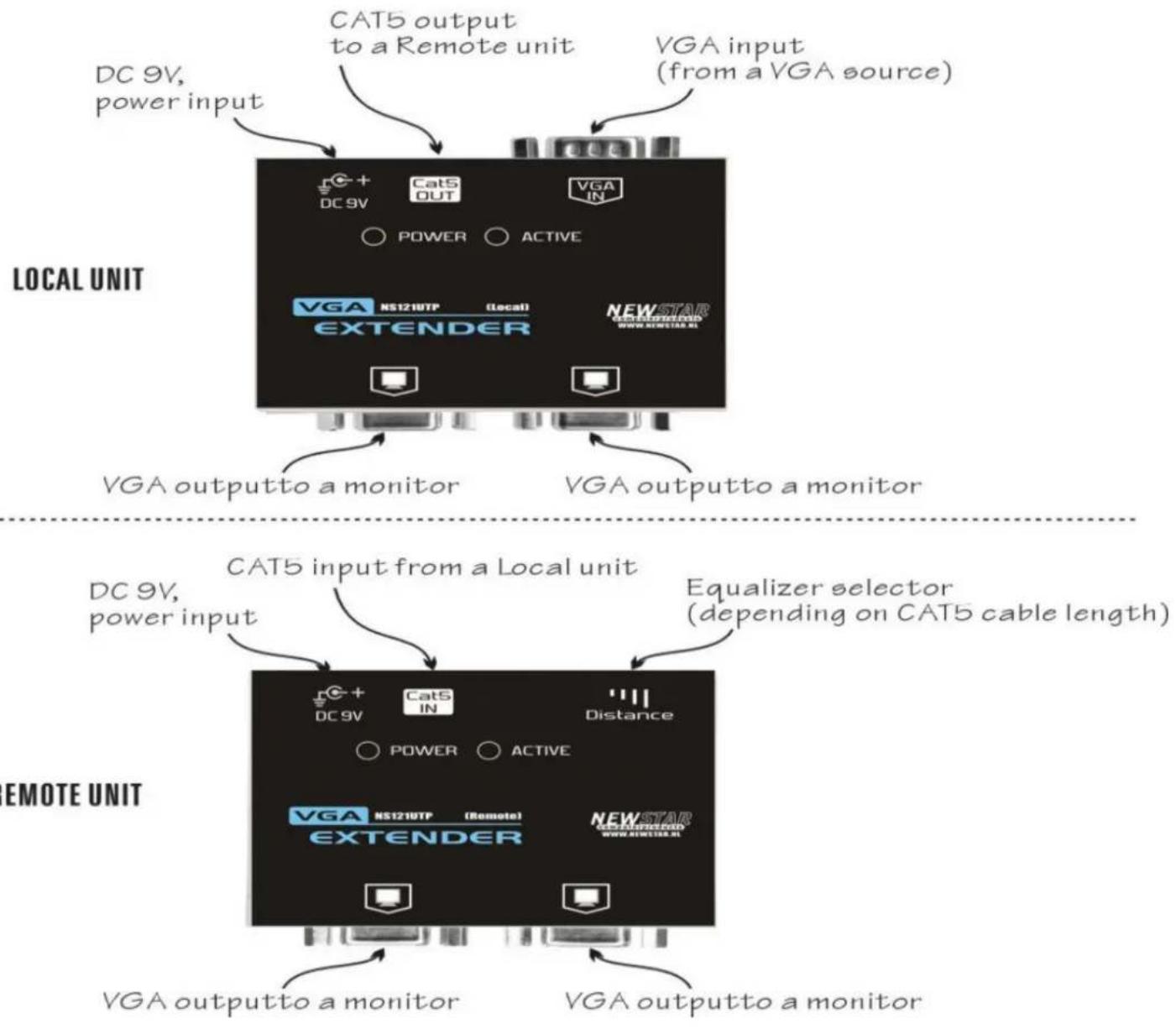
flowchart
graph TD
    A["LOCAL UNIT"] --> B["DC 9V, power input"]
    A --> C["VGA output to a Remote unit"]
    A --> D["VGA input (from a VGA source)"]
    E["EMOTE UNIT"] --> F["DC 9V, power input"]
    E --> G["CAT5 input from a Local unit"]
    E --> H["Equalizer selector (depending on CAT5 cable length)"]
    I["VGA output to a monitor"] --> J["DC 9V"]
    I --> K["Cat5 IN"]
    I --> L["Distance"]
    M["VGA OUTTO a monitor"] --> N["DC 9V"]
    M --> O["Cat5 OUT"]
    M --> P["VGA IN"]
    Q["VGA OUTTO a monitor"] --> R["DC 9V"]
    Q --> S["Cat5 OUT"]
    Q --> T["VGA IN"]
VGA + Audio CAT5 Extender Pair
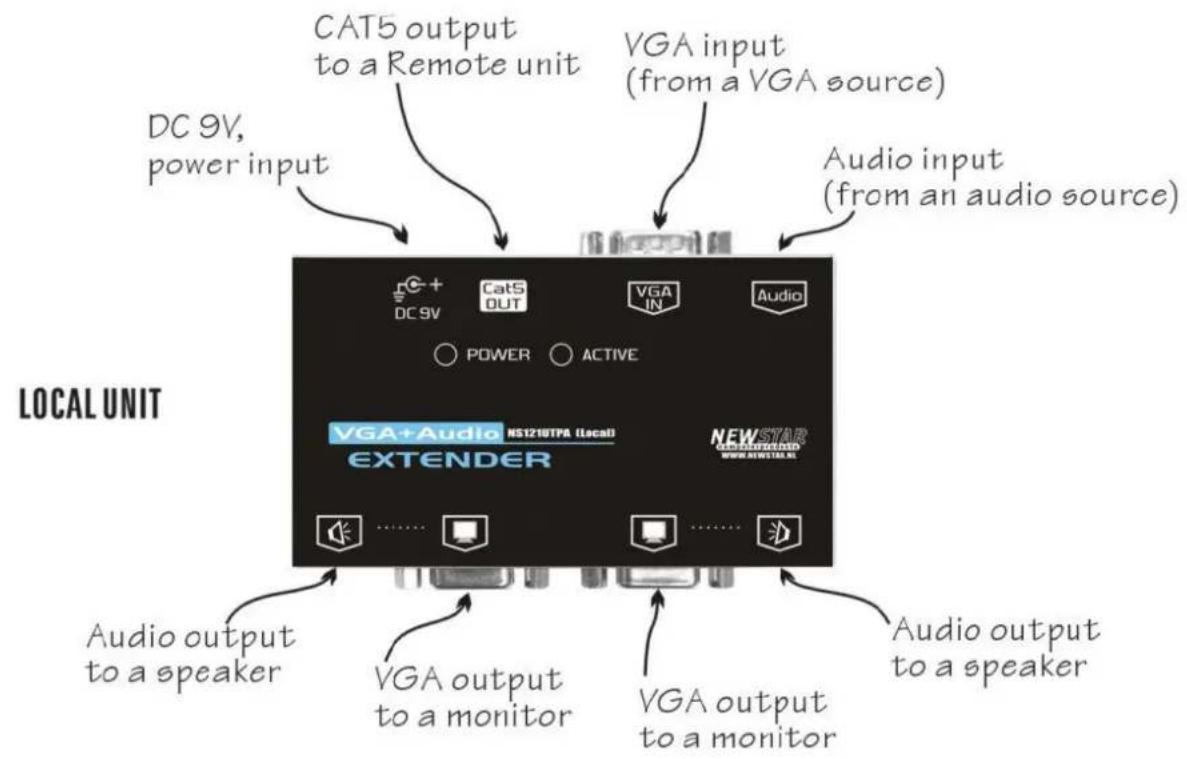
flowchart
graph TD
    A["CAT5 output to a Remote unit"] --> B["DC 9V, power input"]
    C["VGA input (from a VGA source)"] --> D["Audio input (from an audio source)"]
    E["Local Unit"] --> F["EAU + Audio NS121UTPA (Local) EXTENDER"]
    G["Audio output to a speaker"] --> H["VG A output to a monitor"]
    I["Audio output to a speaker"] --> J["VGA output to a monitor"]
    K["VG A output to a monitor"] --> L["NEWSTAR WWW.NWSTAR.NL"]

flowchart
graph TD
    A["Remote Unit"] --> B["DC 9V, power input"]
    A --> C["CAT5 input from a Local unit"]
    A --> D["Equalizer selector (depending on CAT5 cable length)"]
    A --> E["Video Output to a speaker"]
    A --> F["Video Output to a monitor"]
    A --> G["Video Output to a monitor"]
    A --> H["Audio output to a speaker"]
    A --> I["Video Output to a speaker"]
    A --> J["Video Output to a monitor"]
    A --> K["Video Output to a monitor"]
    A --> L["Video Output to a monitor"]
    A --> M["Video Output to a monitor"]
    A --> N["Video Output to a monitor"]
    A --> O["Video Output to a monitor"]
    A --> P["Video Output to a monitor"]
    A --> Q["Video Output to a monitor"]
    A --> R["Video Output to a monitor"]
    A --> S["Video Output to a monitor"]
    A --> T["Video Output to a monitor"]
    A --> U["Video Output to a monitor"]
    A --> V["Video Output to a monitor"]
    A --> W["Video Output to a monitor"]
    A --> X["Video Output to a monitor"]
    A --> Y["Video Output to a monitor"]
    A --> Z["Video Output to a monitor"]
CAT5 Cable
The Extender Pair requires a piece of UTP (Unshielded Twisted Pair) CAT5 cables no longer than 150 meters (490 feet).

natural_image
Two gray Ethernet cable connectors with visible port labels (no text or symbols)The cable must be wired according to the EIA/TIA 568B industry standard as shown below.
| Pin | Wire Color | Pair | Function |
| 1 | White/Orange 2 T | ||
| 2 | Orange 2 R | ||
| 3 | White/Green 3 T | ||
| 4 | Blue 1 R | ||
| 5 | White/Blue 1 T | ||
| 6 | Green 3 R | ||
| 7 | White/Brown | 4 T | |
| 8 | Brown | 4 R |
Note:
CAT5, CAT5e or CAT6 cables are applicable to the extender pair.

text_image
HOME CABLES ERGONOMIC SOLUTIONS LCD TV ARM LCD MONITOR ARM KVM/VIDEO SWITCHES USB PRODUCTS SERVER RACKS www.newstar.nl Telephone + 31 (0) 23 547 88 88 NEWSTAR computerproducts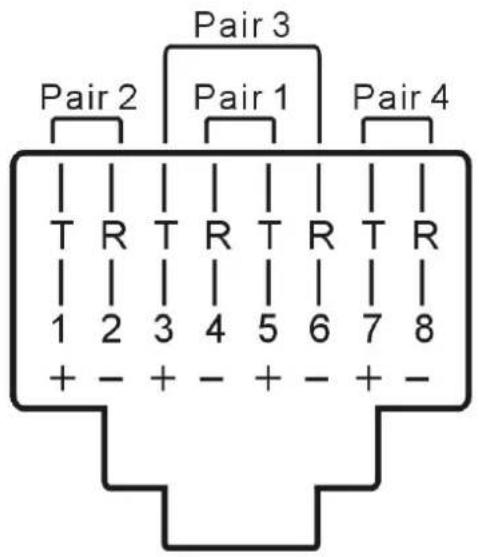
text_image
Pair 3 Pair 2 Pair 1 Pair 4 T R T R T R T R 1 2 3 4 5 6 7 8 + - + - + - + -The above diagram shows the RJ45 connector of a CAT5 cable with its metal contacts facing up.
Installation
VGA CAT5 Extender Pair
The figure indicates the complete connection. Note: Not all devices shown below are required for the pair to operate. CAT5 cable, VGA source and power supplies are required.
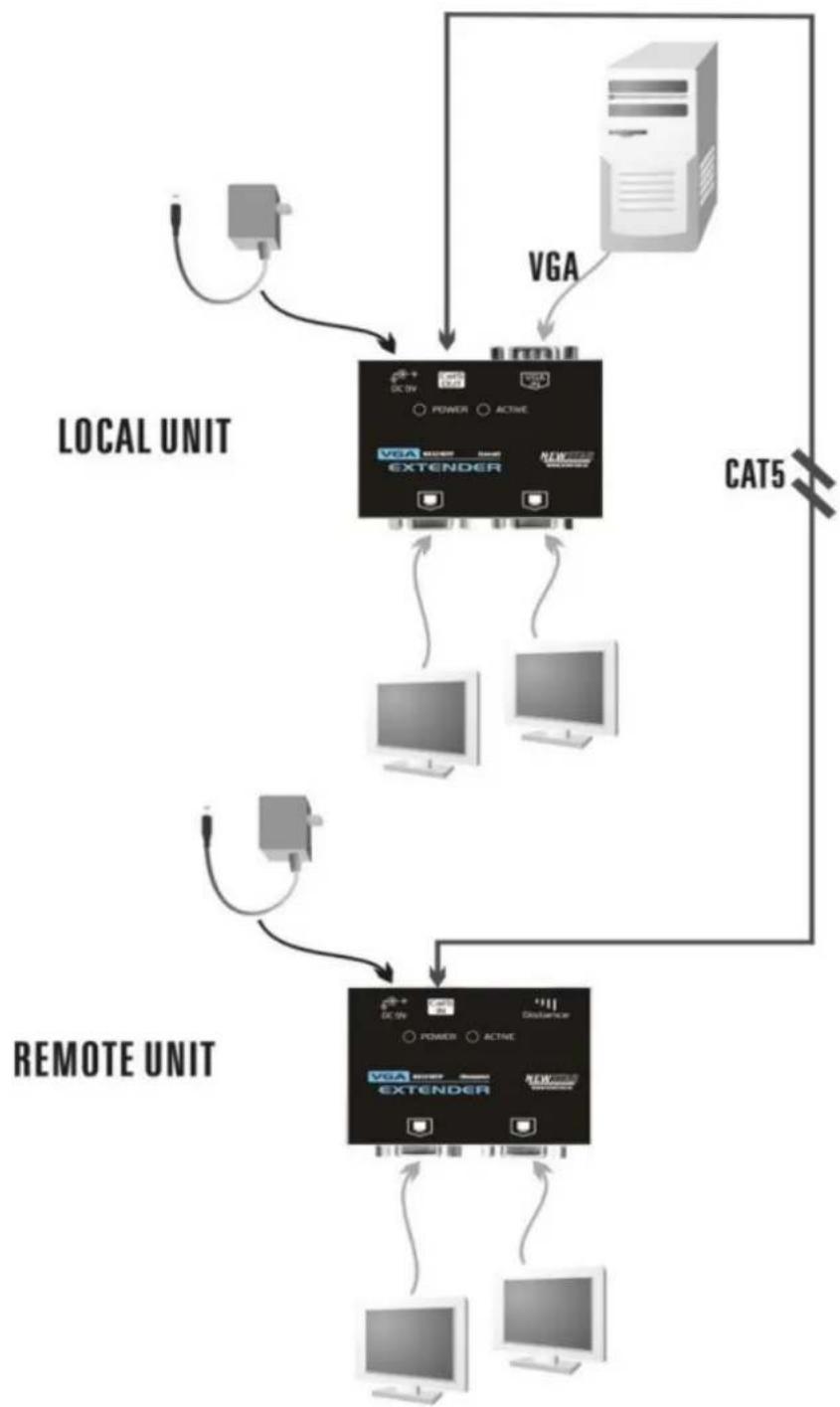
flowchart
graph TD
    A["Local Unit"] -->|VGA| B["External Unit"]
    B -->|CAT5| C["Remote Unit"]
    C -->|VGA| D["External Unit"]
    D -->|CAT5| E["External Unit"]
    style A fill:#f9f,stroke:#333
    style B fill:#ccf,stroke:#333
    style C fill:#cfc,stroke:#333
    style D fill:#fcc,stroke:#333
    style E fill:#ffc,stroke:#333
VGA + Audio CAT5 Extender Pair
Note: The pair can be used for either audio or VGA signal or both.
The "VGA + Audio CAT5 Extender" accepts one stereo signal (the left and the right channels) input on an audio jack (similar to a computer). This stereo signal is broadcasted to the two local audio outputs and is "mixed" together to form a mono signal before transmitting to a Remote unit via CAT5
cable. Therefore, the left channel and the right channel audio signals at a Remote unit are the same.
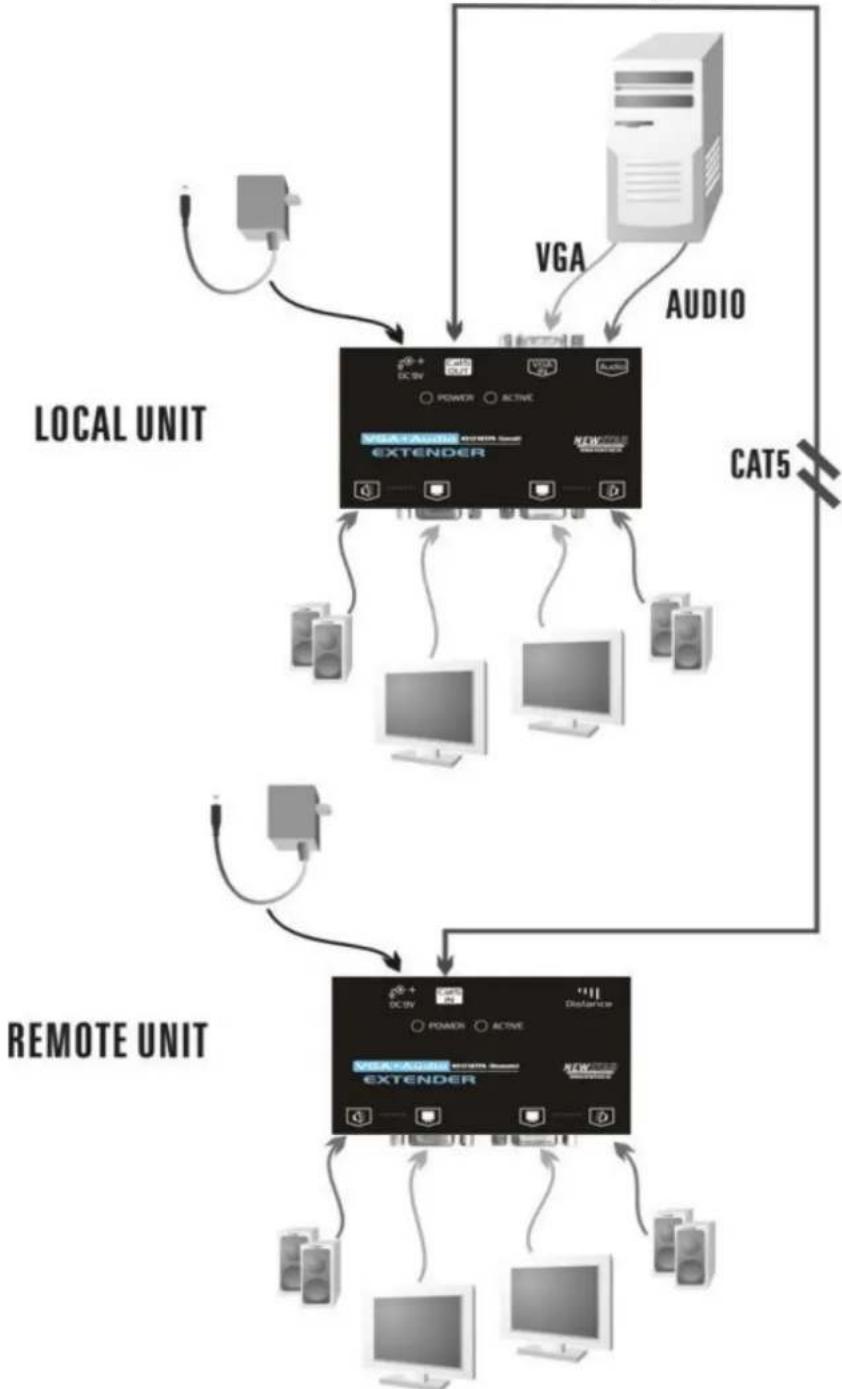
After all connections
are secured, you may plug in the power adapters into the power jacks of the Local and the Remote CAT5 Extender units and plug the power adapters into AC outlets.
Operation
LED
There are two LEDs on the Local unit. The POWER LED must illuminate indicating the unit is properly powered. The ACTIVE LED illuminates when there is VGA input signals.
Likewise, the POWER LED of the Remote unit illuminates indicating the unit is properly powered. Its ACTIVE LED illuminates when VGA signals are properly decoded for the two local HDB15 VGA ports. The ACTIVE LED never turns on, if the "VGA + Audio CAT5 Extender" is used to transmit audio signals only.
Equalizer selector
You may adjust the Equalizer selector on the Remote unit to get optimum video signal for various cable lengths. There are four segments of various lengths on the selector indicating different length of cables. The following table can be used as a reference for selecting the Equalizer.
| CAT5 cable length | Equalizer position | |
| meter | feet | |
| 0 ~ 40 | 0 ~ 131 | --- |
| 40 ~ 80 | 131 ~ 262 | ---- |
| 80 ~ 120 | 262 ~ 394 | ---- |
| 120 ~ 160 | 394 ~ 525 | ---- |
Appendices
Specifications
| VGA CAT5 Extender | NS121UTP | |
| NS121UTP (local) | NS121UTP (remote) | |
| Purpose | Local unit for VGA source | Remote unit for VGA extension |
| RJ-45, CAT5 connector | Extension output for VGA | Extension input for VGA |
| Cable between units | CAT5, CAT5e and CAT6 | |
| Max. distance | 150 meters* | |
| VGA input port | HDB15 (female) x 1 | N/A |
| VGA output port | HDB15 (female) x 2 | |
| Equalizer selector | N/A 4-position slide switch | |
| Status indicator | Power (green) x 1, Active (yellow) x 1 | |
| Operating voltage | 9V DC, 600mA | |
| VGA + AudioCAT5 Extender | NS121UTPA | |
| NS121UTPA (local) | NS121UTPA (remote) | |
| Purpose | Local unit for VGA + Audio source | Remote unit for VGA + Audio extension |
| RJ-45, CAT5 connector | Extension output for VGA + Audio | Extension input for VGA + Audio |
| Cable between units | CAT5, CAT5e and CAT6 | |
| Max. distance | 150 meters* | |
| VGA input port | HDB15 (female) x 1 | N/A |
| Audio input port | Stereo jack (female) x 1 | N/A |
| VGA output port | HDB15 (female) x 2 | |
| Audio output port | Stereo jack (female) x 2 | Mono jack (female) x 2 |
| Equalizer selector | N/A | 4-position slide switch |
| Status indicator | Power (green) x 1, Active (yellow) x 1 | |
| Operating voltage | 9V DC, 600mA | |
* resolution 1600 x 1200
Troubleshooting
| Symptom | Solution |
| No VGA signals at the Remote unit. | . Both units must be powered. ACTIVE LED on the Local unit and the Remote unit must illuminate indicating the signal is correct. |
| VGA signal is garbled Make sure the | wires are correctly wired inside the cable according to EIA568A or EIA568B standard. |
| ACTIVE LED at the Remote unit is always off. | . The ACTIVE LED of the Local unit must be on. Check the wirings of the CAT5 cable. . Make sure the POWER LED of the Remote unit is on. |
| VGA quality changes with the change of CAT5 cables. | Use the Equalizer selector to adjust the VGA signal for various cable lengths and characteristics. |
| No audio signal at the Remote unit | Make sure the volume is high enough. |
| Audio signal at the Remote unit becomes mono. | The Local unit mixes the left/right audio signals before transmitting to the Remote unit via CAT5 cable. |
Limited Warranty
IN NO EVENT SHALL THE DIRECT VENDOR'S LIABILITY FOR DIRECT OR INDIRECT, SPECIAL, INCIDENTAL OR CONSEQUENTIAL DAMAGES, LOSS OF PROFIT, LOSS OF BUSINESS, OR FINANCIAL LOSS WHICH MAY BE CAUSED BY THE USE OF THE PRODUCT EXCEEDS THE PRICE PAID FOR THE PRODUCT.,
The direct vendor makes no warranty or representation, expressed or implied with respect to the contents or use of this documentation, and especially disclaims its quality, performance, merchantability, or fitness for any particular purpose.
The direct vendor also reserves the right to revise or update the product or documentation without obligation to notify any user of such revisions or updates. For further information, please contact your direct vendor.
All the brand names and registered trademarks are the property of their respective owners.