STR-DE405 - Receiver SONY - Free user manual and instructions
Find the device manual for free STR-DE405 SONY in PDF.


User questions about STR-DE405 SONY
0 question about this device. Answer the ones you know or ask your own.
Ask a new question about this device
Download the instructions for your Receiver in PDF format for free! Find your manual STR-DE405 - SONY and take your electronic device back in hand. On this page are published all the documents necessary for the use of your device. STR-DE405 by SONY.
USER MANUAL STR-DE405 SONY
Selecting a Component
To listen to or watch a connected component, first select the function on the receiver or with the remote. Before you begin, make sure you have:
- Connected all components securely and correctly as indicated on pages 4 to 8.
- Turned MASTER VOLUME to the leftmost position (0) to avoid damaging your speakers.
text_image
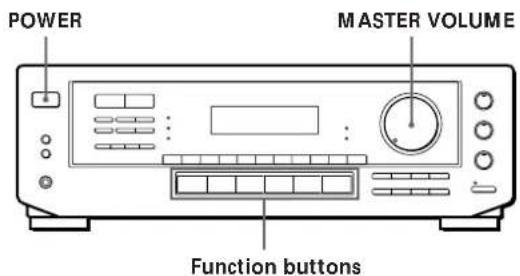
POWER MASTER VOLUME Function buttons1 Press POWER to turn on the receiver.
2 Press a function button to select the component you want to use:
| To listen to or watch | Press |
| Records | PHONO |
| Radio programmes | TUNER |
| Compact discs (CD) | CD |
| Audio tapes or MiniDiscs (MD) | TAPE/MD |
| TV programmes or Laser discs | TV/LD |
| Video tapes | VIDEO |
3 Turn on the component, for example, a CD player, and then start playing.
To tune in radio stations on this receiver, see "Receiving Broadcasts" on page 11.
4 Turn MASTER VOLUME to adjust the volume. To adjust the volume of the TV's speakers, use the volume control on the TV.
| To | Do this |
| Mute the sound | Press MUTING on the remote. Press again to restore the sound |
| Reinforce the bass | Press BASS BOOST to turn on the BASS BOOST indicator. |
| Adjust the balance | Turn the BALANCE control left or right. |
| Adjust the tone quality | Adjust the BASS and TREBLE controls. |

When you listen with headphones
Connect the headphones to the PHONES jack and set the SPEAKERS buttons to OFF.
Watching/listening to video programmes
When you watch/listening to TV or video programmes, we recommend you play audio portion through the receiver instead of your TV's speaker. This lets you take advantage of the receiver's surround sound effects, like Dolby Pro Logic Surround and lets you use the receiver's remote to control the audio. Turn off the speakers on your TV before you start so you can enjoy the surround sound from your receiver.
To watch/listening to TV programmes, turn on the TV, TV tuner and the receiver and press TV/LD on the receiver.
To watch videos or laser discs, do the following:
1 Press a function button to select the component (for example, VIDEO).
2 Turn on the TV and set the TV's video input to match your video component.
3 Turn on the component (VCR or LD player), and start playback.
Using the remote

The remote lets you operate the receiver and the Sony components that are connected to it.
text_image
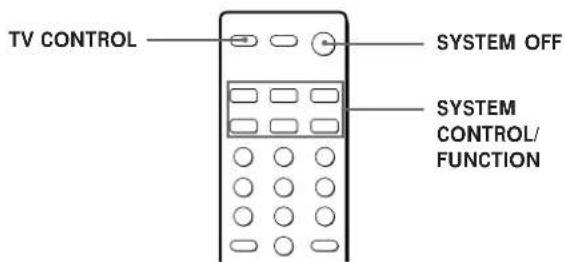
TV CONTROL SYSTEM OFF SYSTEM CONTROL/ FUNCTION(continued)
1 Press one of the SYSTEM CONTROL/FUNCTION buttons to select the component you want to use. The SYSTEM CONTROL/FUNCTION buttons on the remote are factory-set as follows:
| To listen to | Press |
| Records | PHONO |
| Radio programmes | TUNER |
| Compact discs (CD) | CD |
| Audio tapes or MiniDiscs (MD) | TAPE/MD |
| TV programmes | TV |
| VHS Video tapes (VTR-3 mode) | VIDEO |
If you want to change the factory setting of a button, see page 11.
The receiver and the selected component turn on.
If the component does not turn on
Press the power switch on the component.
2 Start playing.
Refer to "Remote Button Descriptions" on page 25 for details.
To turn off the components
Press SYSTEM OFF. You can turn off the video and audio components connected to the SWITCHED AC OUTLET at the same time.

If you use a Sony TV
When you press TV to watch a TV programme, the TV turns on and switches to the TV input. The TV also turns on when you press VIDEO and switches to the appropriate video input.
If the TV does not switch to the appropriate input automatically, press TV/VIDEO.

When you watch TV without using the receiver (only for Sony TVs)
Press TV CONTROL to set the remote to operate only the TV. When you press this button, the TV turns on and switches to the TV input. If the TV does not switch to the TV input automatically, press TV/VIDEO.
Note
Some Sony TVs can not be controlled by this remote.
Operating one component while using another (Background Operation)

You can temporality operate other components while listening to or watching a programme.
text_image
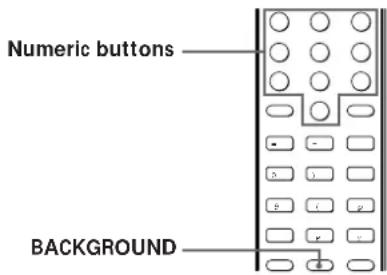
Numeric buttons BACKGROUND1 Hold down BACKGROUND.
2 Press both the corresponding numeric button of the component you're going to use (see the table below) and one of the following buttons at the same time; VISUAL POWER, TV/VIDEO, CH PRESET +/-, ANT TV/VTR, D.SKIP, (9, p, 0 /), = / +, P, r.
Example: To start recording on a tape deck while listening to a CD While holding down BACKGROUND, press 4 (or 5) and press r at the same time.
The numeric buttons are assigned to select the functions as follows:
| Numeric button | Operates |
| 1 | CD player |
| 2 | DAT deck |
| 3 | MD deck |
| 4 | Tape deck A |
| 5 | Tape deck B |
| 6 | LD player |
| 7 | VCR (remote control mode VTR 1*) |
| 8 | VCR (remote control mode VTR 2*) |
| 9 | VCR (remote control mode VTR 3*) |
| 0 | TV |
* Sony VCRs are operated with a VTR 1, 2 or 3 setting. These correspond to Beta, 8mm and VHS respectively.
Changing the factory setting of a function button

If the factory settings of the FUNCTION buttons (page 10) don't match your system components, you can change them. For example, if you have two CD players and you don't have a tape deck or an MD deck, you can assign the TAPE/MD button to your second CD player.
Note that the settings of the TUNER and PHONO buttons cannot be changed.
text_image
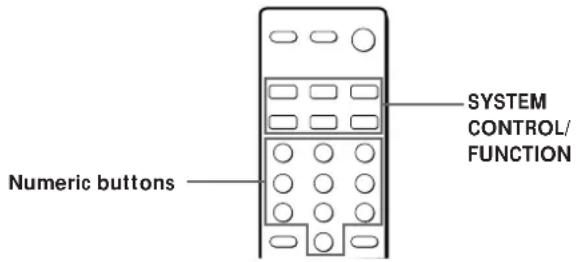
Numeric buttons SYSTEM CONTROL/ FUNCTION1 Hold down the SYSTEM CONTROL/FUNCTION button whose function you want to change (TAPE/MD, for example).
2 Press the corresponding numeric button of the component you want to assign to the SYSTEM CONTROL/FUNCTION button (1 - CD player, for example).
For the numeric buttons, see the table in "Operating one component while using another" on page 10.
Now you can use the TAPE/MD button to control a second CD player.
To reset the setting to the factory setting
Repeat the above procedure.
Receiving Broadcasts
This receiver lets you enter a station's frequency directly by using the numeric buttons (direct tuning). If you don't know the frequency of the station you want, see "Receiving broadcasts by scanning stations (automatic tuning)" on page 12.
Before you begin, make sure you have:
- Connected an FM/AM aerial to the receiver as indicated on page 5.
- Selected the appropriate speaker system. (See "Selecting the speaker system" on page 7.)
MASTER VOLUMEPOWER Numeric buttons
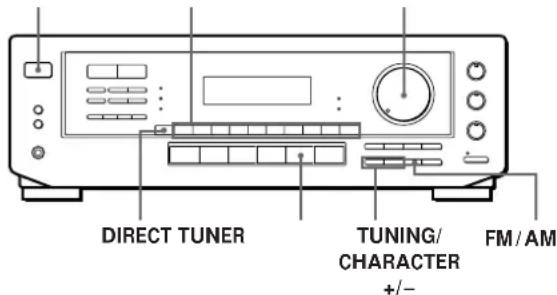
text_image
DIRECT TUNER TUNING/ CHARACTER +/-1 Press POWER to turn on the receiver.
2 Press TUNER.
The last received station is tuned in.
3 Press FM/AM to select FM or AM stations.
4 Press DIRECT.
5 Press the numeric buttons to enter the frequency.
Example 1: FM 102.50 MHz
Example 2: AM 1350 kHz
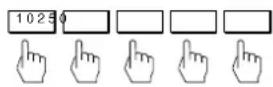
(You don't have to enter the last "0.")
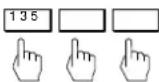
6 When you tune in AM stations, adjust the direction of the AM loop aerial for optimum reception.
To receive other stations
Repeat Steps 3 to 5.

If the STEREO indicator remains off
Press FM MODE when an FM stereo broadcast is received.
(continued)

If an FM stereo programme is distorted
The STEREO indicator flashes. Press FM MODE to change to monaural (MONO). You will not have the stereo effect but the distortion will be reduced. To return to stereo mode, press this button again.

If you cannot tune in a station and the entered numbers are flashing
Make sure you've entered the right frequency. If not, press DIRECT and re-enter the frequency you want. If the entered numbers still flash, the frequency is not used in your area.

To watch FM simulcast TV programmes
Make sure that you tune in the simulcast programme both on the TV (or the VCR) and on the receiver.

If you enter a frequency not covered by the tuning interval
The entered value is automatically rounded up or down to the closest covered value.
Tuning intervals for direct tuning are:
FM: 50 kHz intervals (87.5 - 108.0 MHz)
10 kHz intervals (65.0 - 74.0 MHz)
AM: 9 kHz intervals
Receiving broadcasts by scanning stations (automatic tuning)
If you don't know the frequency of the radio station you want, you can have the receiver scan all the receivable stations to locate the one you want.
1 Press TUNER.
The last received station is tuned in.
2 Press FM/AM to select FM or AM.
3 Press TUNING/CHARACTER + or -.
Press the + button for a higher station number; press the – button for a lower one. When you tune past either end of the band, the receiver automatically jumps to the opposite end. Every time a station is received, the receiver stops scanning. To continue scanning, press the button again.
Presetting Radio Stations
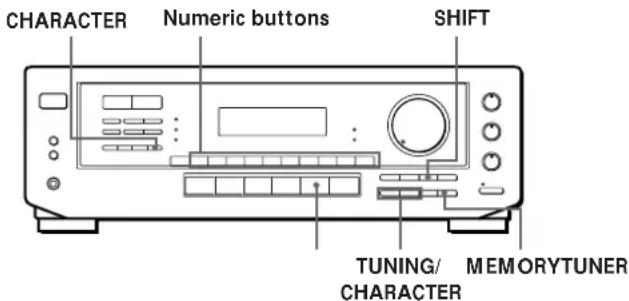
You'll most likely want to preset the receiver with the radio stations you listen to often so that you don't have to tune in the station every time. The receiver can store a total of 30 FM or AM stations. You can store the stations on preset numbers combining 3 characters (A, B, C) and numbers (0 - 9). For example, you can store a station as preset number A1, B6 or C9, etc.
text_image
CHARACTER Numeric buttons SHIFT TUNING/ MEMORYTUNER CHARACTER1 Press TUNER.
The last received station is tuned in.
2 Tune in the station you want.
If you are not familiar with how to tune in a station, see "Receiving Broadcasts" on the previous page.
3 Press MEMORY.
"MEMORY" appears for a few seconds. Do steps 4 and 5 before "MEMORY" goes out.
4 Press SHIFT to select a character (A, B or C).
Each time you press SHIFT, the letter "A," "B" or "C" appears in the display.
If "MEMORY" disappears, start again from step 3.
5 While MEMORY is displayed, press the number you want to use (0 to 9).
6 Repeat Steps 2 to 5 to preset other stations.
To change a preset station
Preset a new station on the number you want to change.
Note
If the mains lead is disconnected for about one week, the preset stations will be cleared from the receiver's memory, and you will have to preset the stations again.
Tuning preset stations (preset tuning)
You can tune directly to a preset station by entering its preset number. If you don't know which stations are preset on which numbers, you can tune by scanning the preset stations.
1 Press TUNER.
The last received station is tuned in.
2 Press SHIFT to select a character (A, B or C), then press the number.
For example, select A and then press 7 to tune in the station preset as A7.

You can tune by scanning the preset stations
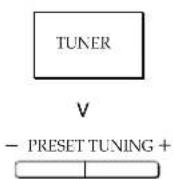
First press TUNER and then press PRESET TUNING + or – to select the station you want. Each time you press the buttons, the preset numbers change as follows:

text_image
n A1 ~ A2 ~ ... ~ A0 ~ B1 ~ B2 ~ ... ~ B0 N n C0 ~ ... ~ C2 ~ C1NNaming preset stations
You can store names, up to 8 characters long, for your preset stations (except for FM RDS stations). Once you name a preset station, the name appears in the display instead of the frequency when you tune to that preset. The characters you can use include letters, numbers and symbols.
1 Tune to the preset station you want to name
2 Press CHARACTER.
The cursor blinks in the display.
3 Use TUNING/CHARACTER + or - to select the character you desire.
4 Press CHARACTER to move the cursor into position for the next character.
5 Repeat steps 3 and 4 to enter up to 8 characters.
6 Wait a few seconds and the receiver automatically stores the name at the previously selected preset.
If you make a mistake
Press CHARACTER repeatedly so that the character you want to change blinks in the display, then use TUNING/CHARACTER + or - to select the desired character.
Using the Radio Data System (RDS)
What you can do with the Radio Data System
Radio Data System (RDS) is a broadcasting service that allows radio stations to send additional information along with the regular radio programme signal. This receiver offers you three convenient RDS features: Displaying the RDS information; Monitoring of traffic, news, or information programmes; and Locating a station by programme type. RDS is available only on FM stations.*
Note
RDS may not work properly if the station you are tuned to is not transmitting the RDS signal properly or if the signal strength is weak.
* Not all FM stations provide RDS service, nor do they provide the same types of services. If you are not familiar with the RDS system, check with your local radio stations for details on RDS services in your area.
Receiving RDS broadcasts
Simply select a station from the FM band.
When you tune in a station that provides RDS services, the station name appears in the display.
Displaying the RDS Information
Press DISPLAY. Each time you press DISPLAY, the display advances one step through the following information.
| Information displayed | You can: |
| Station Name* | Locate each station by name (e.g., WDR) instead of frequency. |
| Frequency* | Locate each station by frequency |
| Programme Type | Locate a specific type of programme being broadcast. (See page 15 for the types of programmes you can select.) |
| Radio Text | Display the text messages sent by the RDS station. |
| Clock (24-hour system) | Display the current time |
* This information also appears for non-RDS FM stations.
Notes
- If there is an emergency announcement by governmental authorities, ALARM flashes in the display.
- When the message consists of 9 characters or more, the message scrolls across the display.
- The following messages appear if a station is not providing a particular RDS service:
"NO PTY" (the selected programme type is not available)
"NO TEXT" (text data is not available)
"NO TIME" (clock time data is not available)
Monitoring traffic, news, or information programmes (EON)
Enhanced Other Networks (EON) allows the tuner to automatically switch to a station broadcasting traffic, news, or other information. After the programme ends, the tuner switches back to the station you were listening to (or the function you were using).
1 Tune to an FM station.
2 Press EON to select the programme you want to monitor.
Each time you press EON, the indicators light as follows:
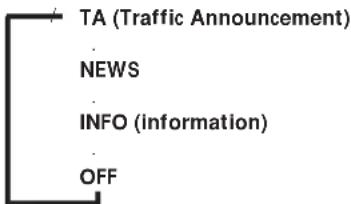
flowchart
graph TD
    A["TA (Traffic Announcement)"] --> B["NEWS"]
    B --> C["INFO (information)"]
    C --> D["OFF"]
The receiver enters EON standby mode.
"NO TA", "NO NEWS", or "NO INFO", appears if you press EON before tuning to an RDS station.
When a station starts broadcasting the programme you selected, the receiver switches to the station, a message (e.g., "NOW TA") appears and the respective indicator (e.g., "TA") flashes. After the programme ends, the receiver switches back to the station you were listening to (or the function you were using).
To stop monitoring the programme
Press EON once.
Turn off the EON feature when you want to record a programme without interruptions, especially when you want to do timer recording.
Notes
- To use this function, be sure to store the RDS stations beforehand.
- When the selected station has a weak signal, "WEAK SIG" appears and then, the receiver returns to the previous station or programme source.
Locating a station by programme type (PTY)
You can locate a station you want by selecting a programme type. The receiver tunes in the type of programmes currently being broadcast from the RDS stations stored in the receiver's preset memory.
1 Press PTY repeatedly until the programme type you want appears in the display. See the following table for the programme types you can select.
2 Press PRESET TUNING + or – while the programme type appears in the display. The tuner starts searching the preset RDS stations for the programme ("Search" and the programme type are displayed alternately). When the receiver finds the programme you are looking for, it stops searching. The preset number of the preset station currently broadcasting the selected programme type flashes, and the receiver receives the station.
Note
"NO PTY" appears when the programme type that you've selected is not being broadcast and the receiver returns to the original station.
You can select the following programme types:
| Programme type | What you hear |
| NONE | Any programmes not defined below |
| NEWS | News programmes |
| AFFAIRS | Topical programmes that expand on current news |
| INFO | Programmes about consumer affairs, medical advice, and weather |
| SPORT | Sports programmes |
| EDUCATE | Educational programmes, such as a “how-to” programme and advice |
| DRAMA | Radio plays and serials |
| CULTURE | Programmes about national or regional culture, such as religion, language, and societal concerns |
| SCIENCE | Programmes about the natural sciences |
| VARIED | Programmes containing celebrity interviews, panel games, and comedy |
| POP M | Popular music programmes |
| ROCK M | Rock music programmes |
| M.O.R.M | Easy Listening (middle of the road music) |
| LIGHT M | Classical music, such as instrumental, vocal, and choral |
| CLASSICS | Performances of major orchestras, chamber music, opera, etc. |
| OTHER M | Music that does not fit into any of the above categories, such as jazz and rhythm and blues |
| ALARM | Emergency announcements |
Note
If there is an emergency announcement by governmental authorities, ALARM flashes in the display.
Recording
This receiver makes it easy to record to and from the components connected to the receiver. You don't have to connect playback and recording components directly: once you select a programme source on the receiver, you can record and edit as you normally would using the controls on each component. Before you begin, make sure you've connected all components properly.
Function buttons
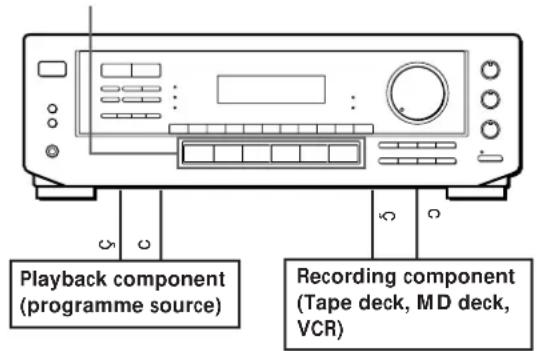
text_image
Playback component (programme source) Recording component (Tape deck, MD deck, VCR)ç: Audio signal flow
c: Video signal flow
Recording on an audio tape or MiniDisc
You can record on a cassette tape or MiniDisc using the receiver. See the instruction manual of your tape deck or MD deck if you need help.
1 Press one of the function buttons to select the programme source.
2 Set the component to be ready for playing.
For example, insert a CD into the CD player.
3 Insert a blank tape or disc into the recording deck and adjust the recording level, if necessary.
4 Start recording on the recording deck and then start playing the component.
(continued)
Recording on a video tape
You can record from a TV or a LD player using the receiver. You can also add audio from a variety of audio sources when editing a video tape. See your VCR or LD player's instruction manual if you need help.
1 Press TV/LD to select the programme source.
2 Set the component to be ready for playing. For example, insert the laser disc you want to record from into the LD player.
3 Insert a blank video tape into the VCR for recording.
4 Start recording on the VCR and then start playing the laser disc you want to record.

You can replace audio while copying a laser disc
At the point you want to start adding different sound, press another function button (for example, CD) and start playback. The sound from the selected component will be recorded over the original audio.
To resume recording the sound of the laser disc, press the TV/LD function button.
Choosing a Surround Mode
You can take advantage of surround sound simply by selecting one of the three pre-programmed surround modes according to the type of music you wish to play.
natural_image
Front view line drawing of a portable electronic device with control panel and buttons (no text or symbols)DELAY TIME/EFFECT
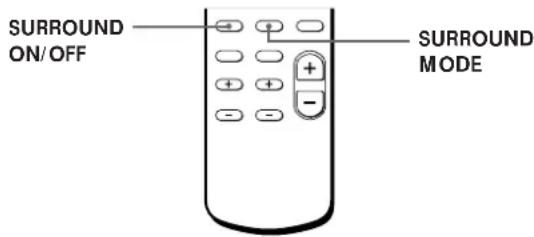
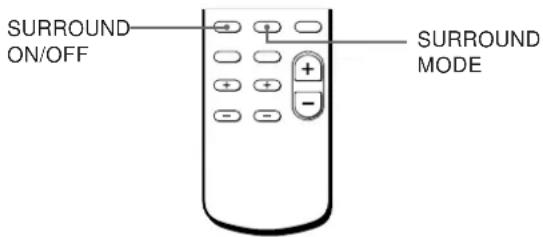
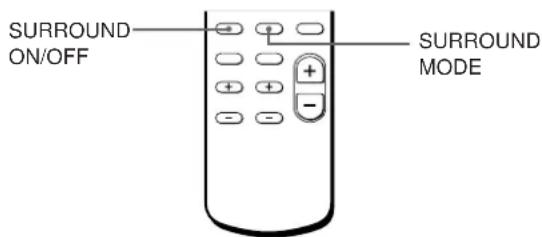
1 Press SURROUND ON/OFF to turn on the surround sound.
One of the SUR (surround) MODE indicators lights up in the display.
2 Press SURROUND MODE repeatedly until the indicator for the surround mode you want lights up.
Select the appropriate surround mode as follows:
| Select | To |
| PRO LOGIC* | Decode programmes processed with Dolby Surround and create the atmosphere of a movie theatre. |
| THEATER | Add the acoustic reflections of a theatre to decoded Dolby Surround signals. |
| HALL | Reproduce the acoustics of a rectangular concert hall. Ideal for soft, acoustic sounds. |
* "DOLBY" appears in the display.

When you use the remote
Each time you press SURROUND MODE, surround mode changes as follows:

* "DOLBY" appears in the display.
To turn off surround sound
You can find Dolby Surround-encoded software by looking at the packaging
However, some videos and laser discs may use Dolby Surround sound even if it's not indicated on the package.
Note
Make sure to select speaker A with the SPEAKERS A button, otherwise, you can't obtain the surround effect.
Adjusting the Effect Level (for THEATER and HALL only)
You can make the surround sound more prominent by increasing the EFFECT level. This control lets you adjust the “presence” of the surround effect in six steps (1-6).
1 Start playing a programme source.
2 Press DELAY TIME/EFFECT to select the level you prefer. The effect level ("EFFECT 1" ... "EFFECT 6") appears on the display.
Note
Changing the effect level may not produce major variations in the surround effect when used with certain playback sources.
Getting the Most Out of Dolby Pro Logic Surround Sound
To obtain the best possible Dolby Pro Logic Surround sound, first select the centre mode according to the speaker system you have. Then, adjust each speaker volume and delay time.
Note that you must have at least one additional pair of speakers and/or one centre speaker to do the following adjustments.
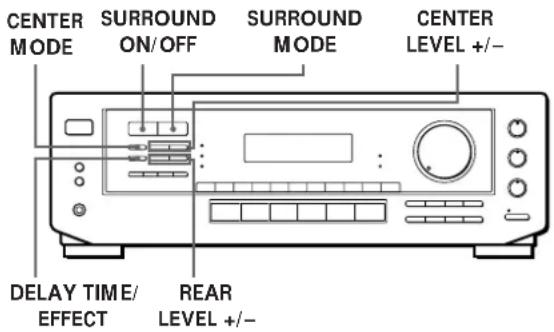
text_image
CENTER MODE SURROUND ON/OFF SURROUND MODE CENTER LEVEL +/- DELAY TIME/ EFFECT REAR LEVEL +/-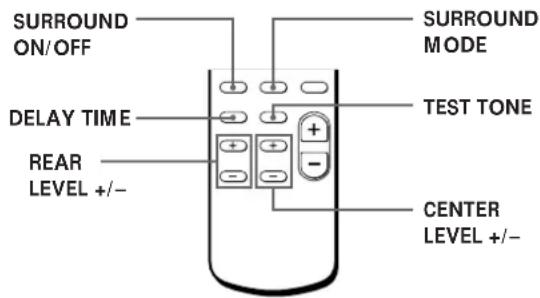
Selecting the centre mode
The receiver offers you four centre modes: PHANTOM, 3 CH LOGIC, NORMAL, and WIDE. Each mode is designed for a different speaker configuration. Select the mode that best suits your speaker's system configuration.
1 Press SURROUND ON/OFF to turn on surround sound.
2 Press SURROUND MODE repeatedly to select the Dolby surround sound field (PRO LOGIC or THEATER mode).
3 Press CENTER MODE repeatedly until the centre mode you want appears in the display. Select the centre mode as follows:
| If you have | Select | So that |
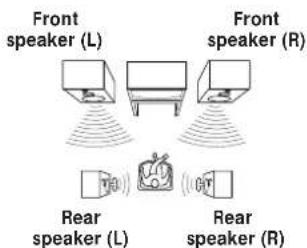
| Front and rear speakers, no centre speaker | PHANTOM | The sound of the centre channel is output from the front speakers. |
| Front and centre speakers, no rear speaker | 3 CH LOGIC (3 Channel Logic) | The sound of the rear channel is output from the front speakers. |
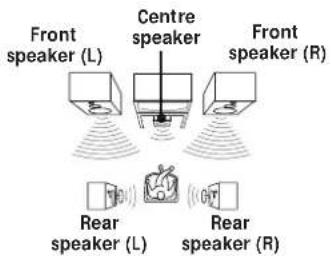
| Front and rear speakers, and a small centre speaker | NORMAL | The bass sound of the centre channel is output from the front speakers (because a small speaker cannot produce enough bass). |
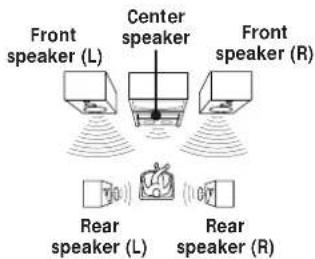
| Front and rear speakers, and a large centre speaker | WIDE | For “complete” Dolby Pro Logic Surround sound. |
Adjusting the speaker volume

The test tone feature lets you set the volume of your speakers to the same level. (If all of your speakers have equal performance, you don't have to adjust the speaker volume.)
Using the controls on the remote lets you adjust the volume level from your listening position.
1 Press TEST TONE on the remote.
You will hear the test tone from each speaker sequentially.
2 Adjust the volume level so that the test tone from each speaker is at the same level from your listening position.
- To adjust the level of centre speaker, press CENTER LEVEL + or - on the remote.
- To adjust the level of rear speakers, press REAR LEVEL + or – on the remote.
3 Press TEST TONE on the remote to turn off the test tone.

You can adjust all speakers at one time
Adjust MASTER VOL on the remote or MASTER VOLUME on the receiver.

You can also adjust the volume level with the controls on the receiver
After pressing TEST TONE on the remote, press REAR LEVEL + or - and CENTER LEVEL + or - to adjust the level of the rear and centre speakers respectively.

You can increase the output level of the rear speakers
The adjustment range of the rear speakers is preset from -15 to +10, but you can shift the range up 5 levels (-10 to +15). Hold down CENTER MODE on the receiver while turning on the power until "GAIN UP" appears on the display.
The values for the rear level remain fixed at -15 to +10 in the display, but you will be able to hear the difference in the actual output level.
To reset the rear level adjustment range, repeat this procedure to display "NORMAL".
Adjusting the delay time
You can make the surround sound more effective by delaying the output from the rear speakers (delay time). You can select from three delay times, S (15 mS), M (20 mS), and L (30 mS). For example, if you've placed the rear speakers in a large room or apart from your listening position, set the delay time shorter.
1 Start playing a programme source encoded with Dolby Surround sound.
2 Press DELAY TIME on the remote or DELAY TIME/EFFECT on the receiver repeatedly to choose the delay time parameter. The current delay time appears in the display, such as "DELAY S," "DELAY M" or "DELAY L."
Note
Select the PRO LOGIC mode when you adjust the delay time using DELAY TIME/EFFECT on the receiver.
Troubleshooting
If you experience any of the following difficulties while using the receiver, use this troubleshooting guide to help you remedy the problem. Should any problem persist, consult your nearest Sony dealer.
There's no sound or only a very low-level sound is heard.
/ Check that the speakers and components are connected securely.
/ Make sure you select the correct component on the receiver.
/ Make sure you set the SPEAKERS selector correctly.
/ Press MUTING on the remote if "MUTING" is displayed.
/ The protective device on the receiver has been activated because of a short circuit. ("PROTECT" flashes.) Turn off the receiver, eliminate the short-circuit problem and turn on the power again.
The left and right sounds are unbalanced or reversed.
/ Check that the speakers and components are connected correctly and securely.
/ Adjust the BALANCE control.
Severe hum or noise is heard.
/ Check that the speakers and components are connected securely.
/ Check that the connecting cords are away from a transformer or motor, and at least 3 meters away from a TV set or fluorescent light.
/ Place your TV away from the audio components.
/ Make sure you connect a ground wire to the aerial ground terminal.
/ The plugs and jacks are dirty. Wipe them with a cloth slightly moistened with alcohol.
RDS isn't working.
/ Make sure you're tuning an FM station.
/ Select a stronger FM station.
The appropriate display or information does not appear.
/ Contact the radio station and find out whether or not they actually provide the service in question. If so, the service may be temporarily out of service.
The station, or programme source, was interrupted by another station / the tuner automatically starts searching stations.
/ The EON function is working. Turn off EON when you don't want the current programme interrupted.
The station name does not appear in the display.
/ Press DISPLAY until the station name appears.
Radio stations cannot be tuned in.
/ Check that the aerials are connected securely. Adjust the aerials and connect an outdoor aerial if necessary.
/ The signal strength of the stations is too weak (when you tune in with automatic tuning). Use direct tuning.
/ No stations have been preset or the preset stations have been cleared (when you tune in with scanning preset stations). Preset the stations (see page 12).
No sound or only a very low-level sound is heard from the rear speakers.
/ Select the appropriate centre mode (see page 18).
/ Adjust the speaker volume appropriately (see page 19).
/ Make sure you turn on the sound field surround mode function.
No sound is heard from the centre speaker.
/ Select the appropriate centre mode (see page 18).
/ Adjust the speaker volume appropriately (see page 19).
Surround effect cannot be obtained.
/ Make sure you turn on the sound field function.
/ Make sure that the front speakers are connected to the SPEAKERS A terminal.
/ Make sure that SPEAKERS A and B buttons are depressed when two sets of front speakers are used.
No picture or an unclear picture is seen on the TV screen.
/ Select the appropriate function on the receiver.
/ Place your TV away from the audio components.
Recording cannot be made.
/ Check that the components are connected correctly.
The remote does not function.
/ Point the remote at the remote sensor g on the receiver.
/ Remove the obstacles in the path of the remote and the receiver.
/ Replace both batteries in the remote with new ones if they are weak.
/ Make sure you select the correct function on the remote.
/ Pressing TV CONTROL sets the remote to operate the TV only. In this case, press one of the SYSTEM CONTROL/FUNCTION buttons before operating the receiver (etc.).
Specifications
Amplifier section
Power output
| Stereo mode | (DIN 1 kHz, 4 ohms) |
| 75 W + 75 W | |
| Surround mode | (DIN 1 kHz, 4 ohms) |
| Front: | |
| 50 W/ch | |
| Centre: | |
| 50 W | |
| (only in the PRO LOGIC mode) | |
| Rear: | |
| 50 W |
| Frequency response | PHONO: RIAA equalization curve ±0.5 dB CD, TAPE/MD, VIDEO: 10 Hz - 50 kHz ±1 dB |
Inputs
| Sensitivity | Impedance | S/N(weighting network, input level) | |
| PHONO (MM) | 2.5 mV | 50 kilohms | 74 dB72 dB*(A, 2.5 mV) |
| CD | 200 mV | 50 kilohms | 82 dB82 dB*(A, 150 mV) |
| TAPE/MD, TV/LD,VIDEO | 150 mV | ||
| * '78 IHF |
| Outputs | TAPE/MD REC OUT: Voltage 150 mV, Impedance 10 kilohmsVIDEO AUDIO OUT: Voltage 150 mV, Impedance 10 kilohmsPHONES: Accepts low and high impedance headphones |
| Muting | Full mute |
| BASS BOOST | +10 dB at 70 Hz |
| TONE | ±8 dB at 100 Hz and 10 kHz |
FM tuner section
| Tuning range | 65.0 - 74.0 MHz87.5 - 108.0 MHz |
| Aerial terminals | 75 ohms, unbalanced |
| Sensitivity | Mono: 18.3 dBf, 2.2 μV/75 ohmsStereo: 38.3 dBf, 22.5 μV/75 ohms |
| Usable sensitivity | 11.2 dBf, 1 μV/75 ohms (IHF) |
| S/N | Mono: 76 dBStereo: 70 dB |
| Harmonic distortion at 1 kHz | Mono: 0.3 %Stereo: 0.5 % |
| Separation | 45 dB at 1 kHz |
| Frequency response | 30 Hz - 15 kHz _-2^+0.5 dB |
| Selectivity | 60 dB at 400 kHz |
AM tuner section
| Tuning range | 531 - 1,611 kHz |
| Aerial | Loop aerial |
| Usable sensitivity | 50 dB/m (at 999 kHz) |
| S/N | 54 dB (at 50 mV/m) |
| Harmonic distortion | 0.5 % (50 mV/m, 400 Hz) |
| Selectivity | 35 dB |
Video section
| Inputs | VIDEO, TV/LD:1 Vp-p 75 ohms |
| Outputs | VIDEO:1 Vp-p 75 ohmsMONITOR:1 Vp-p 75 ohms |
General
| System | Tuner section: PLL quartz-locked digital synthesizer systemPreamplifier section: Low-noise NF type equalizerPower amplifier section: Pure-complimentary SEPP |
| Power requirements | 220-230 V AC, 50/60 Hz |
| Power consumption | 160 W |
| AC outlets | Switched 100 W |
| Dimensions | 430 x 145 x 300 mm |
| Mass (Approx.) | 6.3 kg |
| Supplied accessories | FM wire aerial (1) |
| AM loop aerial (1) | |
| Remote controller (remote) (1) | |
| Size AA (R6) batteries (2) |
| Design and specifications are subject to change without notice. |
Glossary
Centre mode
Setting of speakers to enhance Dolby Pro Logic Surround mode. To obtain the best possible surround sound, select one of the following four centre modes according to your speaker system.
• NORMAL mode
Select NORMAL mode if you have front and rear speakers and a small centre speaker. Since a small speaker cannot produce enough bass, the bass sound of the centre channel is output from the front speakers.
text_image
Front speaker (L) Centre speaker Front speaker (R) Rear speaker (L) Rear speaker (R)- WIDE mode
Select WIDE mode if you have front and rear speakers and a large centre speaker. With the WIDE mode, you can take full advantage of Dolby Surround sound.
text_image
Front speaker (L) Center speaker Front speaker (R) Rear speaker (L) Rear speaker (R)- PHANTOM mode
Select PHANTOM mode if you have front and rear speakers but no centre speaker. The sound of the centre channel is output from the front speakers.
text_image
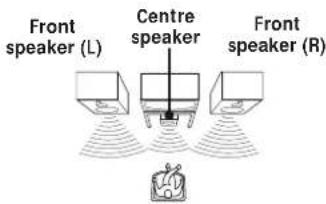
Front speaker (L) Front speaker (R) Rear speaker (L) Rear speaker (R)- 3 CH LOGIC mode
Select 3 CH LOGIC mode if you have front and centre speakers but no rear speaker. The sound of the rear channel is output from the front speakers to let you experience some of the surround sound without using rear speakers.
text_image
Front speaker (L) Centre speaker Front speaker (R)Delay time
Time lag between the surround sound output from front speakers and rear speakers. By adjusting the delay time of the rear speakers, you can obtain the feeling of presence. Make the delay time longer when you have placed the rear speakers in a small room or close to your listening position, and make it shorter when you have placed them in a large room or apart from your listening position.
Direct tuning
Tuning method to let you directly enter a station's frequency using the numeric buttons. Use this method if you know the frequency of the station you want.
Dolby Pro Logic Surround
Decoding system of Dolby Surround sound standardized in TV programmes and movies. Compared with the former Dolby Surround system, Dolby Pro Logic Surround improves sound image by using four separate channels: off-screen audio effects, on-screen dialog, left-to-right panning, and music. These channels manipulate the sound to be heard and enhance the action as it happens on the screen. To take advantage of Dolby Pro Logic, you should have at least one pair of rear speakers and/or one centre speaker. You also need to select the appropriate centre mode to enjoy a full effect.
Dolby Surround
Encoding and decoding system of Dolby Surround sound for consumer use. Dolby Surround decodes the extra channels on the Dolby Surround-encoded sound tracks of movie videos and TV programmes and produces sound effects and echoes that make the action seem to envelop you.
The receiver offers Dolby Surround as one of the pre-programmed sound fields. If you have rear or centre speaker(s), we recommend that you customize the Dolby Surround sound field by selecting the appropriate centre mode to take advantage of Dolby Pro Logic Surround sound.
Preset station
A radio broadcasting station that is stored in memory of the receiver. Once you "preset" stations, you no longer have to tune in the stations. Each preset station is assigned its own preset number, which lets you tune them in quickly.
Surround sound
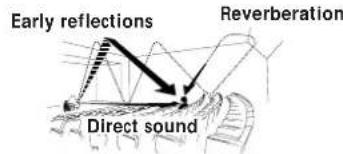
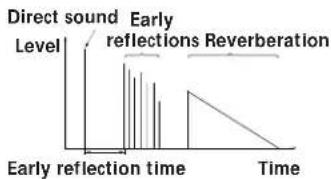
Sound that consists of three elements: direct sound, early reflected sound (early reflections) and reverberative sound (reverberation). The acoustics where you hear the sound affect the way these three sound elements are heard. These sound elements are combined in such a way that you can actually feel the size and the type of a concert hall.
- Types of sound
text_image
Early reflections Reverberation Direct sound• Transition of sound from rear speakers
line
| Early reflection time | Time | | --------------------- | ---- | | 0 | 0 | | 1 | 1 | | 2 | 2 | | 3 | 3 | | 4 | 4 | | 5 | 5 | | 6 | 6 | | 7 | 7 | | 8 | 8 | | 9 | 9 | | 10 | 10 | | 11 | 11 | | 12 | 12 | | 13 | 13 | | 14 | 14 | | 15 | 15 | | 16 | 16 | | 17 | 17 | | 18 | 18 | | 19 | 19 | | 20 | 20 | | 21 | 21 | | 22 | 22 | | 23 | 23 | | 24 | 24 | | 25 | 25 | | 26 | 26 | | 27 | 27 | | 28 | 28 | | 29 | 29 | | 30 | 30 | | 31 | 31 | | 32 | 32 | | 33 | 33 | | 34 | 34 | | 35 | 35 | | 36 | 36 | | 37 | 37 | | 38 | 38 | | 39 | 39 | | 40 | 40 | | 41 | 41 | | 42 | 42 | | 43 | 43 | | 44 | 44 | | 45 | 45 | | 46 | 46 | | 47 | 47 | | 48 | 48 | | 49 | 49 | | 50 | 50 | | 51 | 51 | | 52 | 52 | | 53 | 53 | | 54 | 54 | | 55 | 55 | | 56 | 56 | | 57 | 57 | | 58 | 58 | | 59 | 59 | | 60 | 60 | | Note: The 'Time' column is not explicitly labeled in the code, so it is inferred from the visual data labels. The 'Time' values are estimated based on the label 'Time'. There is no additional data series or legend present.Test tone
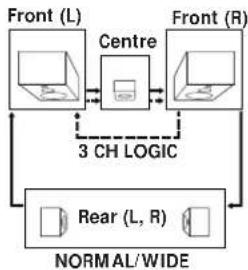
Signal given out by the receiver for adjusting the speaker volume. The test tone will come out as follows:
- In a system with a centre speaker (NORMAL/WIDE/3 CH LOGIC modes) The test tone is output from the front L (left), centre, front R (right), and rear speakers in succession.
flowchart
graph TD
    A["Front (L)"] --> B["Central"]
    C["Front (R)"] --> B
    B --> D["3 CH LOGIC"]
    D --> E["Rear (L, R)"]
    E --> F["NORMAL/WIDE"]
    F --> G["Output"]
• In a system without a centre speaker (PHANTOM mode)
The test tone is output from the front and the rear speakers alternately.
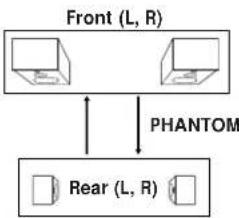
flowchart
graph TD
    A["Front (L, R)"] <--> B["Rear (L, R)"]
    C["PHANTOM"] --> A
A, B
Adjusting
delay time 19
speaker volume 19
tone 9
volume 9
Aerial hookups 5
Audio component hookups 5, 6
Automatic tuning 12
Background operation 10
C
Centre mode 18,22
NORMAL mode 18,22
PHANTOM mode 18, 22
3 CH LOGIC mode 18, 22
WIDE mode 18,22
Character 13
Connecting. See Hookups
D
Delay time 19,22
Direct tuning 11, 22
Display 13
Dolby Pro Logic
Surround 22
getting the most out of 18
Dolby Surround sound 17, 22
centre mode 18,22
Dubbing. See Recording
E, F, G
Editing. See Recording
EON 14
H, I, J, K, L, M
Hookups
aerials 5
audio components 5,6
mains lead 8
overview 4
speakers 6,7
video component 7
N, O
Naming preset stations 13
NORMAL mode 18, 22
P
PHANTOM mode 18, 22
Preset station 22
Presetting
radio stations 12
Preset tuning 13
Programme source
selecting 9,10
PTY 14
Q
Quick reference guide 26
R
Random Music Sensor 25
RDS 13
Rear panel 5,6,7,8,24
Receiving broadcasts
directly 11
using preset stations 13
Recording
on a tape 15
on a video tape 16
Remote buttons 9, 10, 25
background operation 10
S
Scanning
preset stations 13
radio stations 12
Selecting a programme source
9
using the remote 9,10
Speakers
connection 6,7
placement 6
selecting speaker system 7
Storing radio stations. See
Presetting
Surround sound 17, 22
T
Test tone 19,22
3 CH LOGIC mode 18, 22
Troubleshooting 20
Tuning. See Receiving
broadcasts
U
Unpacking 4
V
Video component hookups 7
W, X, Y, Z
Watching/listening to video programmes 9
WIDE mode 18,22
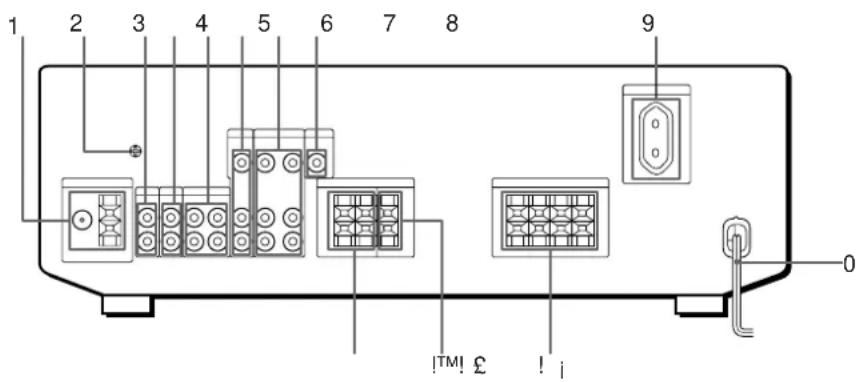
text_image
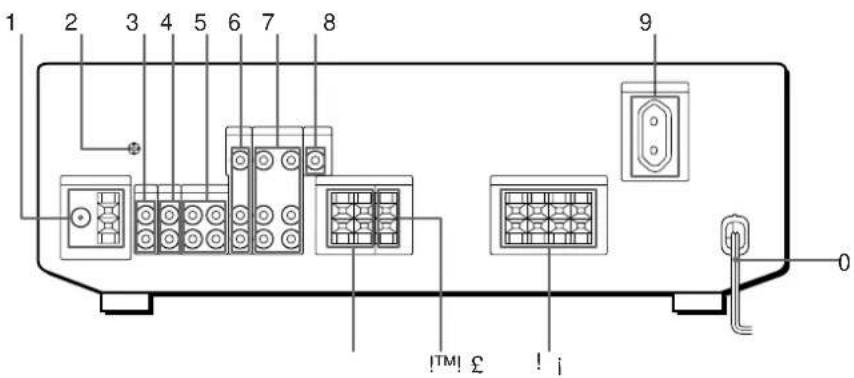
1 2 3 4 5 6 7 8 9 0 TM! £ ! i1 ANTENNA (AM/FM)
2 y ground terminal
3 PHONO
4 CD
5 TAPE/MD
6 TV/LD
7 VIDEO
8 MONITOR
9 SWITCHED AC OUTLET
0 Mains lead
For buttons not described on previous pages and buttons with names different from the buttons on the main unit.
| Remote Button | Operates | Function |
| 0-9 | Receiver | Selects preset numbers. |
| CD player/MD deck | Selects track numbers.0 selects track 10. | |
| TV/VCR | Selects channel numbers. | |
| >10 | CD player/Tape deck/MD deck | Selects track numbers over 10. |
| CH/PRESET+/- | Receiver | Scans and selects preset stations. |
| TV/VCR | Selects preset channels. | |
| D. SKIP | CD player | Skips discs (CD player with multi-disc changer only.) |
| 0 / ) | CD player | Searches tracks (forward or backward). |
| Tape deck/MD deck/VCR | Fastforwards or rewinds. | |
| = / + | CD player/MD deck | Skips tracks. |
| P | CD player/Tape deck/MD deck/VCR | Pauses play or record.(Also starts recording with components in record standby.) |
| ( | CD player/Tape deck/MD deck/VCR | Starts play. |
| p | CD player/Tape deck/MD deck/VCR | Stops play. |
| 9 | Tape deck | Starts play on the reverse side. |
| r | Tape deck | Sets tape decks to the record standby mode. |
| r + ( | Tape deck/MD deck/VCR | Starts recording when pressed with (or 9 on tape deck). |
| RMS DIRECTION | Tape deck | Selects tape direction (for tape decks with the RMS* function.) |
| RMS CLEAR | Tape deck | Clears RMS* programme (for tape decks with the RMS function.) |
| Remote Button | Operates | Function |
| RMS/START | Tape deck | Programmes tracks (tape deck with the RMS* function only). |
| ENTER | TV/VCR | Changes channels when used with 0-9. |
| TV/VIDEO | TV/VCR | Selects input signal: TV input or video input. |
| VISUAL POWER | TV/VCR | Turns on or off the power. |
| TV CONTROL | TV | Turns on the TV, switches the input to “TV,” and sets the remote to operate the TV. |
| -/- - | TV | Selects the channel entry mode, either one or two digit. |
| SUB CH +/- | TV | Selects preset channels for the small picture.** |
| POSITION | TV | Changes the position of the small picture.** |
| SWAP | TV | Swaps the small and the large picture.** |
| P IN P | TV | Activates the picture-in-picture function.** |
| JUMP | TV | Jumps back and forth between the previous and current channels. |
| MASTER VOL +/- | TV | Normally, adjusts the master volume of the receiver.If TV CONTROL was pressed, it adjusts the volume on the TV. |
| MUTING | TV | Normally, mutes the sound from the receiver.If TV CONTROL was pressed, the sound on the TV itself is muted. |
| ANT TV/VTR | VCR | Selects output signal from the aerial terminal: TV signal or VCR programme. |
* RMS: Random Music Sensor
** Only for Sony TVs with the picture-in-picture function
Note
Some Sony equipment can not be controlled by this remote as shown in the table above.
Receiving Broadcasts (direct tuning)
Example: Receiving FM 102.50 MHz
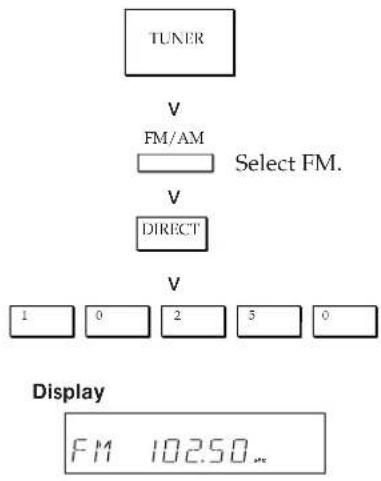
flowchart
graph TD
    A["TUNER"] --> B["V FM/AM"]
    B --> C["Select FM."]
    C --> D["V DIRECT"]
    D --> E["V 1 0 2 5 0"]
    E --> F["Display FM 102.50..."]
Presetting Radio Stations
Example: Presetting a station as A7

flowchart
graph TD
    A["TUNER"] -->|V| B["Tune in the station you want."]
    B -->|V| C["MEMORY"]
    C --> D["SHIFT"]
    D --> E["Select A."]
    E --> F["7"]
Selecting a Component
Example 1: Playing a CD
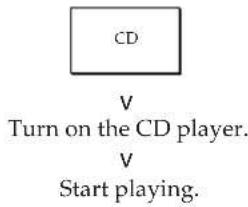
flowchart
graph TD
    A["CD"] -->|V| B["Turn on the CD player."]
    B -->|V| C["Start playing."]
Example 2: Watching a video tape
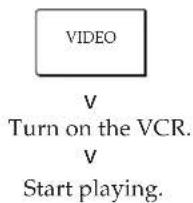
flowchart
graph TD
    A["VIDEO"] -->|V| B["Turn on the VCR."]
    B -->|V| C["Start playing."]
Scanning Radio Stations (automatic tuning)
Example: Scanning FM stations
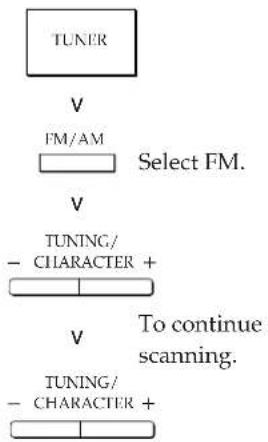
flowchart
graph TD
    A["TUNER"] --> B["FM/AM"]
    B --> C["Select FM."]
    C --> D["TUNING/ CHARACTER +"]
    D --> E["To continue scanning."]
    E --> F["TUNING/ CHARACTER +"]
Receiving Preset Stations
Example: Receiving the station number A7
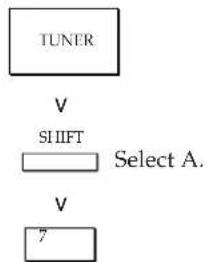
flowchart
graph TD
    A["TUNER"] -->|V| B["SHIFT"]
    B --> C["Select A."]
    D["V"] --> E["7"]
Using Pre-programmed Sound Fields
Example: Watching the laser disc of a Dolby Surround-encoded movie
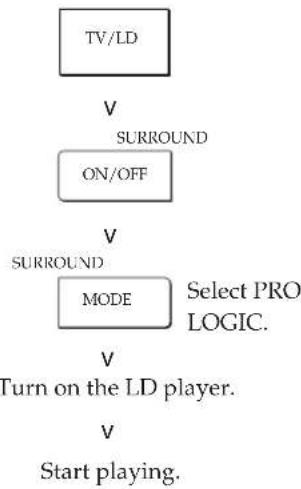
flowchart
graph TD
    A["TV/LD"] -->|V| B["SURROUND"]
    B --> C["ON/OFF"]
    C -->|V| D["SURROUND"]
    D --> E["MODE"]
    E -->|Select PRO LOGIC.| F["Turn on the LD player."]
    F -->|V| G["Start playing."]
Scanning Preset Stations
OSTRZE∅ENIE
natural_image
Diagram of a battery holder with arrows indicating direction (no text or symbols)
text_image
y CD PHONO TAPE/MD (c.d.n.)Czynno ci wstípne
text_image
CD IN L R OUTPUT LINE L RGramofon
Odbiornik Gramofon
flowchart
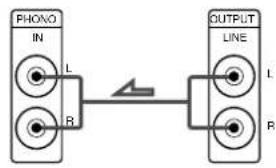
graph LR
    A["PHONG IN"] -->|L| B["OUTPUT LINE"]
    C["R"] -->|R| B
    B -->|L| D["Output Line"]
    B -->|R| E["Output Line"]
flowchart
graph TD
    A["Device 1"] -->|45| C["User Interface"]
    B["Device 2"] -->|45| C["User Interface"]
    D["Device 3"] -->|45| C["User Interface"]
text_image
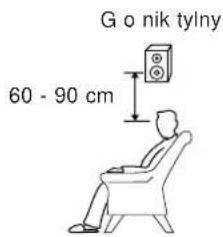
G o nik tylny 60 - 90 cmnatural_image
Front view of a portable electronic device with control panel and buttons (no visible text or labels)natural_image
Front view line drawing of a portable electronic device with ports, buttons, and a central display (no text or symbols)DELAY TIME/EFFECT
Przyciski pilota 10, 11, 12, 18, 19, 20, 22 sterowanie t em 11
PTY 15, 16
R
RDS 9, 14, 15
Znak (Character) 13, 14
text_image
1 2 3 4 5 6 7 8 9 0 !TM! £ ! i1 ANTENNA (AM/FM)
2 y ±cze uziemienia
3 PHONO
4 CD
5 TAPE/MD
6 TV/LD
7VIDEO
8 MONITOR
9 SWITCHED AC OUTLET
0 przewÚd zasilania
!; FRONT SPEAKERS (A/B)
!™ SURROUND SPEAKER (CENTER)
!£ SURROUND SPEAKERS (REAR)
natural_image
Diagram of a battery holder with two cylindrical components and directional arrows indicating movement (no text or symbols)
äÓ„% Á‡ÏÂÌËÚ, ·‡Ú‡ ÂÈÍË
Ç ÍÓ ì†Î,î° ûÔÎÓ,Êfl ñ •-ÓÚ° •-Ú± ÂÈÎÉ +•ÓÚ‡,Ú ,ÚÂ-ÂÎÊÂ Ô ÉÏ ÍÓ 6 ÎÂÒfl^Â,. á†ÎÂÎÊÜ, •-Ú± ÂÈÎÉ ï ÍÓ,°Â, ÍÓ,%± ‰.ÊÖÙ‡Î-ÊÓÎ!° È ÔUÎ,Ú ûÔ †,ÎÂÎÊfl ·ÓÎ,- Í ÍÓÊÂÚ ÛÔ ‡,ÎÎÚ, ‡‰.ÊÓÔ ÉÂÎÎÉÎÓï.
è EÏÂ\~‡ìËfl
• çÂÎ, Áfl ÓÒÚ‡, ÎflÚ, %oËÒÚ‡î^ËÓÌt*È ÔÛÎ, Ú ÙÔ ‡, ÎÂIËfl, ÎÀÒÛ Ó, ÂÔ ‡†, °ÒÓÍÓÈ ÚÂÏÔ ‡ÚÙ ÓÈ ÉÏÈ, î‡ÊIÓÒÙ.
• çÂÎ, Áfl Ô ÊÏÂÎflÚ, ìÓ, Ù, ·+Ú± ÂÈÍÙ O ÓÚ +·ÓÚ‡ÌlÓÈ.
• ♂AÏ,Àfî ÔO‰,Ä,‡Ú, %‡Ú\~Éi ‰.ÉÒÚ†î`ÉÓìlÓ,Ó ÙÔ ‡,ÎÂIËfl ÎÀÔÓÔ À‰.ÒÚ,Àlì°Î ÓÓÎÎA-ÎÏ ŒÂÍÙ^ÂIËflÎ ÉÎË ÉÂÍÙ^ÂIËflÎ ÓÔ,ÂÚÊUÂÎ,Î'I Ó Œ-Ó Ó,. Ç Ô ÓÛË,IÓÎ ÓÎÛ\~*à ÎÓÊÂÚ ,ÓÂIËÎÎUÚ, IÂËÔÔ ‡,ÎÓÔÛ,.
• è É %ÎÊÚÂÎ, ÎÓÈ ÓÒÚ†ÎÓ, ÎA %ÉOÙ†î'ÉÓIÏÓ, Ó ÔÛÎ, Ú‡ ÛÔ ‡, ÎÀÎËÎ ÒÎÎÚ, • ñ‡ ÂÊÎË , Ó ĕÁ-ÂÊ+ÎÊà ÎÂÉÔÔ ‡, ÎÓÒÚÂÈ ÔÛÎ, Ú‡, °'Â', †Ã'i Ù ÚÂ-ÎÓÈ ÕÎË ÍÓ ÓÂËÂ-£‡ äÂÂÎ.
é·°ËÂ ò,Â%°ÂÎËfl Ó ÒÓÂ%°ËÎÂÎËfli
ä ‡‰ËÓÔ ÊÄÏÎÉÍÙ ÑÓÉIÓ ÔÓ‰.ÎÎ \~‡Ú. ÎËÊÂÜ͆Ã+ÎÌ°Â ‡Ú‰.ÉÓ-/,ˉ.ÂÓÍÓÍÔÓÎÀÎÚ°, \~ÚÓ ‰.†ÂÚ,ÒAÏÓÊÍÓÒÚ, ÙÔ ‡ÎÎÚ,\~'ÚÊÏËÏ ÍÓÏÔÓÎÀÎÚ†ÏÈ Ó ‡‰.ÉÓÔ ÊÄÏÎÉ·. èÓ‰.ÎÎ,\~'ÉÚ, ÎÂÓ·ÍÓ‰.ÉI°Â ÍÓÏÔÓÎÀÎÚ°, ÔÓ f!‰.ÎÂ, ÚÍ+Á+ÎÏÓÏ Î† òÓÓÚ,ÂÚÓÚ,Û,\~£I ßÚ +ÎÈ^+í. ë †òÔÓÎÓÊÀÏËÂÏ „ÎÂÀ‰.‰Îfl ÓÓ‰.ÎÎ,\~ÀÎÈfl ͱʉ.‘ IÓÏÔÓÎÀÎÚÓ, ÓÁI+ÍÓÏÉÙ,Òfl,ÒÓ‰.†Á‰.ÂΓê+ÒÔÓÎÓÊÀÏË ÒÓ‰.ÊIÊÚÂÎÂÈ Í+Á+‰.ÎÂÈ Ô+ÎÂÏÊ” Í+ÒÚ .28.
flowchart
graph TD
    A["Input"] --> B["Audio Processor"]
    B --> C1["è% ÍÎ - ÀIËÄ, É% ÀOÍÓÏÀIÚÓ, (èÚ . 7)"]
    B --> C2["íÇ ÍIÉÚÓ"]
    B --> C3["íÇ Ú, IÄ"]
    B --> C4["èÏÄ %ÎÎ ì‡ÀÄ i- %ËOÍÓ,"]
    B --> C5["ÇË% ÀO·_IÉÚÓUÓI"]
    B --> D1["è% ÍÎ - ÀIËÄ, ‡IÜÄÎ* (èÚ . 5)"]
    B --> D2["Ää/óa ‡IÜÄ·"]
    B --> D3["èA Â%IËE, ÓÎÓ_O,Ó ÉUÄÎ, (Ô ‡,È)"]
    B --> D4["à%IËE, ÓÎÓ_O,Ó ÉUÄÎ, (Ô ‡,È)"]
    B --> D5["èÏÄ %ÎÎ ÍOÎÖ†IÚÎ- %ËOÍÓ,"]
    B --> D6["ñÂIÚ ‡Î ,i-Ê, ÓÎÓ_O,Ó ÉUÄÎ"]
    B --> D7["à%IËE, ÓÎÓ_O,Ó ÉUÄÎ, (Ô ‡,È)"]
è Â%.Ô ĒÒÚÛÔÎÂIËÂÏÍ ≠.ÓÚÂ
• è ‰, °ÔÓÎÎÀÎËÂÏ Í‡ÎËi-ÎË-Ó ÓÓÂ%.ËÎÂÎËÈ, °ÎÎ, \~ËÚ, ÊÊ܇ÎËÂ, ÓÂI ÍÓÎÔÓÎÂÎÚÓ,.
• çÂÎ, Áfl ÔÓ%oÎÎ \~ËÚ „Îț, Î°È ÔËÚ‡, \~ËÈ -ÎÙ Í ÔÂÚË, ÔÓ͇ ÎA ·Û‰.ÜÚ Á‡,  -Âΰ, ÔÀ ÔÓÂ%o.ËÎÀÏEfl.
• ëÓÂ%ÕÊÎÂÎËfl, °ÔÓÎÎËÚ, ì‡%ÕÂÊÎÓ, Ó ÊÁ·ÂʱÎË -ÛÎÓ, Ê ,,Û%ÕÂÎËfl.
• è È ÔÓÂ%õIÀIËË ñÚ%ÕÓ-/Ë%ÃÓ͇-ÂÎÂÈ Ó- ñÜÊÚ, İËχIËÂ ì‡ ÓÓ,·ÒÓ,‡IËÄ Ėı -ÚÂÍ Ó, Ô „ÎÂÁ%o‡IË ÔÓ Ėı +Ò^,ÂÚÍÂ: ÇÒÚ‡,ÊÚ, ÊÂÎÚ°È, ·ÂÎ°È É Í ‡ÒÎ°È -ÚÂÍ ° , ÊÂÎÚÓ („É%oÂÓ), ·ÂÎÓ (ÎÂ,Ó±Ù%o.ÉÓ-) EχÒÓÂ(Ô‡,Ó±Ù%o.ÉÓ-) „ÎÂÁ%o‡ÒÓÓÚ,ÂÚOÙ,ÂÎÎÓ.
èÓ%。ÍÎ, \~ÂIË ‡¡ÚÂÌ!°
é-ÊÂ Ô,Â%ÂÌËfl
Ç “ÚÓÉ, †‡, Á Ú͇ Á+Í ÓÓ fí‰ÓÍ ÓÓ‰ÍÍ, \~ÂIËfl Aä E óà †ÍÚÀÎ Í †‰.ËÓÔ ÉÀÎÎÉÎÙ. è É IÂÓ-Ó‰.ËIÓÓÜÉ Ô ÉÄÎ +°‰.ËÓÔ Á‰+° Ô É‰.À,ÓÂ,ÓÁ±,Ä -ÉU, "ÚËÖÓ‰.ÊÀÎÈfl,†Á‡ÚAÏÖËOUÛOËÜ,Í+ÓÚÂ, Ú͇A+ÎÎÓÉ Í † ÔÓÔΉ.Ü, -ÉI òÚ ‡ÎË+#.ɛ‡ÒÓÓÎÓÉÀÎË ÎÎÀÎÏ ÒÏÓÚ ÂÚ, ͇ ÙËÊÂUÍ+Á+ÎÎÓÏ ÉÒÛÎÎÂ.
text_image
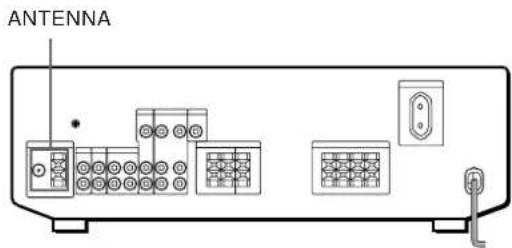
ANTENNAä‡í‡fl ‡IÚÂÌì‡ ìÛÊì‡?
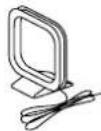
• óá Ô Ó,ÓÍÓ-ì±fl ≠¡ÚÂÌì‡ (ÔÓÒÚ‡,ÎflÂϱfl,ÎÂÒÚ ò ‡‰.ËÓÔ ÊÂÏÎÉÍÓÏ) (1 -Ú.)
- Äà ‡ÏÓ-χfl ‡IÚÂÌl‡ (ÔÓOÙ‡,ÎfÎÂχfl,ÎÂÒÚÂ Ô ‡%.ËÓÔËÂÏlËÍÓÏ) (1 -Ú.)

èÓ%ÍÎ\~ÂIËÂÍ ‡%ËÓÔ ÊÂÏÏËÍÙ
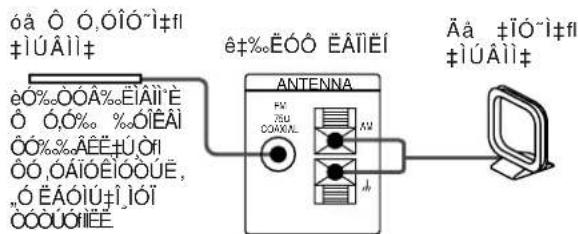
text_image
ôâ Ô ó.ÔÎÓ~î+í #ÍÚÂìì‡ êô%ÕÔ ÊÂIÏÉI Ê+%ÉÓÔ ÊÂIÏÉI ANTENNA 75µ COAXNL Aù Ãã ±ÍÓ~î+í #ÍÚÂìì‡
ÖÖÎË óå Ó Â%+Ê Ó ÊÎË·,ÚÓfl Ó·-Ó èÓ%òÓÂ%.ÉÎËÚ, 75-ÔÎ•È ÎÓ‡ÎÕˇΕ]•È ·-ÂÎ, (ΠÒÓÒÚ‡,ÎÎÎÎ•È ,ÎÀÔÚÂ Ó +‰.ÉÓÔ ÉÂÎÎÉÎÓÏ) í óå · ÚÊÎÓÈ ‡ÎÚÂÎÎÂ, +‰.Û„ÊÎ - ΄ÎÂÁ%Ü °FM 75W COAXIAL.(óå, 75 eÎ, ÎÓ‡ÎÕˇÎ,ì.), ÜÓÙ‡ÎÓ,ÎÂÎÎÓÎÜ Î‡ ڰΕÎÓÈ Ó†ÎÂÎÈ +‰.ÉÓÔ ÉÂÎÎÉ·.
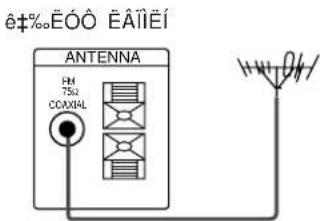
text_image
e±‰E00 EAIIEÍ ANTENNA FM 75Ω COXIAL 14V O/H
ÖÖÎË Åå Ö Â%+°-Ê Ó ÉÎÉ·.ÚÒfl Ó··Ó éÓ%òÓÂ%ÉÎÈÜ,ÔÓ,Ó%òÉÄÓÎfr'ÉÀÈ,%ÎÉÎÓÉ20-50 ÙÚUÓ, (6 - 15 î) (ÎÅ ÓÓÓÚ‡,ÎîÎÂÎ'È,ÎÀÓÛ ò †%ÉÓÔ ÉÂÎÎÉÎÓÏ) ÍÓ ÎÎÂÎÏÄ Åå ‡ÎÛÂÎI", %ÓÓÔÎÎÂÎÈÄ ÍòÎÓ'ÊÀ ± ñÓ'-ÎÓÈ ‡ÎÛÂÎÎÄ. è ÓÛÎÎÙÚ, Ô ó,Ó%± Ù ÚÎÉ"Ü ,,Ó ÉÄÓÎÙ‡,ÎÓÏ ÔÓÎÓÉÂÎÈë.
èÓ%òÓÂ%òÉìÂìÈ Á‡ÁÂÎÎfl, ˜Â,,ÓÔÓ,Ó%÷
ÇÓ ÊÁ-ÂÊ+IÊÃ, „Ú%ÃÎÊfl ÔÓ%ÓÓÂ%ÕÊ. Á+ÁÃÎÎfl, “ÊÊ ÔÓ,Ó%。(ÎÀ ÔÓÔÚ±,ÎîÎÂÏ”É,ÎÄÒÚA Ô +%ÕÊÔ Ô ÉÃÎÎÊÍÓÏ) Í Á+ÁÃÎÎfl, “ÂÊ ÎÎÃÎΠy. è Ê ÔÓ%ÎÎ\~ÂÎÊË Í ñÛÊIÓÈ +ÎÙÂÎì” Ó-ÎÂ+ÚÂÎ,IÓ Í‡%Ó, °ÔÓÎÎÊÚ, Á+ÁÃÎÎÂÎÊ %òÎfl Á+“ÉÚ” ÓÚ ÍÓÎÎÊË.
ê‡%.ÉÓÔ ÉÀÎÎÉÍ
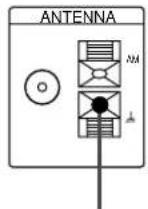
ä ÁÂÏÎÂ
óÚÓ ò%°Â·Ú, %°‡Î,-Â?
è ÊÏÂÓ·IÓ%õËÏÓÙÉÔÓ%Î\~ÄÎÉfl%Ú„ÈÎÓÏÔÎÀÎÜÓ, ÔÈOUÛÔÉÙ, ÍÔÎÂ%Ú\~ÂȄ·,Â, ±ÔÊÔ'ÊÎÀÎÀÎÉÉ ‡%ÖÉÔÔ'ÊÀÎÎÉ· ÚÔÎ,ÍÓ%ÎflÔÎÛ\~ÎÉfl%ÓÉÔÔÓ,, ‡ÎÏ-΄·,“èÓ%ÎÎ\~ÄÎÉ„ÕÎÎÓ„Ó,ÓÊÛÂÎ,IÓÈÔÛÂϔ·ÔÛ.6Ê7.
èÓ%。ÍÎ \~ÂIËÂ ‡Û%。ËÓÍÓÏÔÓÌÂIÚÓ,
é-ËÂ Ô,Â%ÂÎËfl
á%Ô, ÚÍtÁtI ÔÓ f%ÓÍ ÔÓ%Î, \~ÂIÉf ‡Ú%ÊÕÍÓÏÔÓÎÀIÚÓ, †%ÉÓÓ ÊÂIÉÎU. èË Ô ÉÎÀÎÀIÈË ±%ÉÓÓ ÊÂIÉΆ, Ít'ÂÓÚ, ÚOÊÎÉUÂÎÎ ,°ÔÎÎÉÚ, IÊÊÂÜÍtA‡Îl' ÔÓÂ%ÉÎÂÎÉÎ. çÊÊÂtÉÒÛÎÍA ÔÓÍtA‡IÓ tòÓÓÍÓÉÂÎÊÂ,,ÎÂÁ%. %Îfl ÓÓ%Î, \~ÂIÉÎ IÓÏÔÓÎÀIÚÓ,.
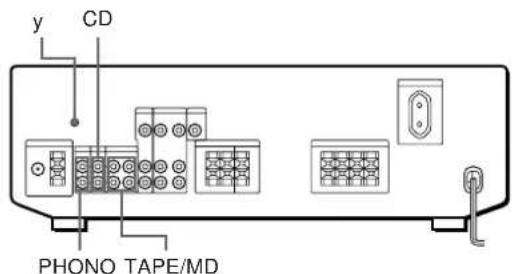
text_image
y CD PHONO TAPE/MD(è Ó%ÓÎÊÂIËÂ)
ä‡íE -ìÙ ° ìÛÊI°?
ÄÜ%ÖÖ-ÏÜ° (ÏÂ ÔÓÒÚ‡,ÎflÂÏ°Â ,ÏÂÒÚÂ Ô
% ËÓÔ ÊÂÎÎËÍÓÏ) (èÓ 1 -Ú. %îfl ÔÎÂÂ ± %îfl
ÍÓÏÔ±íÚI°1 %.ËÕÍÓ, EÏË Ô ÓË,, †±ÚÂÎfl, ÔÓ 2 -Ú. %ôîfl
%.ÂÍË %.Îfl ͇ÒÒÂÚϹ ÎÂIÚ EÏË ÊÈÏË%.ËOÍÓ,
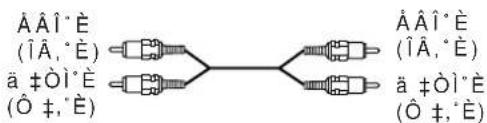
text_image
ÄÄÎ*Ë (ÎÂ,°Ë) ä ‡ÒÎ*Ë (Ô ‡,°Ë) ÄÄÎ*Ë (ÎÂ,°Ë) ä ‡ÒÎ*Ë (Ô ‡,°Ë)ëiÂï‡ òÓÂ%.ËÌÂÌËÈ
ëÚ ÂÎÍÓÈ ç ÔÓͱÁ°,±ÂÚÒfì ì‡Ô ±,ÎÂIË ÔÂÂ%.±"ËÖË,,·ÎÓ,.
èΠ%Îfl ÍÓÏÔ‡ÍÚ̹ %°ËÕÍÓ,
êî %îfl ꇉËÓÔ ÊÂÏIËÍ ÍÓÏÔ±ÍÚ̹ ‰.ËÓÍÓ,
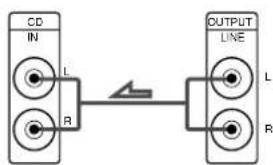
text_image
CD IN L R OUTPUT LINE L Rè ÓË,, °,‡ÚÂÎ.
text_image
PHONO IN L R OUTPUT LINE L R• OÖÎE Ô ÓË,, †ÚÂÎ, EÏÂÂÚ Á‡ÁÂÎÎfl, °ËÈ ÔÓÓ%.
èÓ%òÓÂ%òÉIÈÚ, Á‡ÁÀÎIfl. ̈ÈÈ Ô Ó,Ó%o Í Á‡ÁÀÎIfl. ̈AÈ ÎÎÀÎΠy ‡%òÉÓÔ ÉÂÎÏÉ͇,Ó É·ÂʇIÈÂ,Û%òÂÎÈfl.
ÑA͇ %°Ifí ͇ÒÀÚ͹ ÍÀIÚ EÏË ÍËIË%ëÖÍÓ,
ʱ%ÕÕÕÕÕÕÕÕÕÕÕÕÕÕÕÕÕÕÕÕÕÕÕÕÕÕÕÕÕÕÕÕÕÕÕÕÕÕÕÕÕÕÕÕÕÕÕÕÕÕÕÕÕÕÕÕÕÕÕÕÕÕÕÕÕÕÕÕÕÕÕÕÕÕÕÕÕÕÕÕÕÕÕÕÕÕÕÕÕÕÕÕÕÕÕÕÕÕÕÕÃO
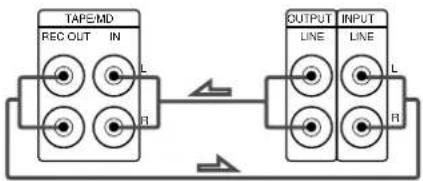
flowchart
graph LR
    A["TAPE/MD"] -->|L| B["OUTPUT"]
    A -->|R| B
    B -->|L| C["INPUT"]
    B -->|R| C
    A -->|FI| B
óÚÓ ò%°Â·Ú, %°‡Î, -Â?
è ëOÚÚÔÊÚ, í ÓÍÂ%û. \~ÂÈ, ·,  %îfl ÔÓ%oÎî. \~ÂIËfl, ÔÏlÓ, Ó, Ô ÉUÂÎÂÈ.
èÓ%。ÍÎ \~ÂIËÂ „ÓÍÍÓ„Ó,Ó ÑÚÂÎ ,IÓÈ ÒËÒÚÂÏ°
é·ËÂ ò,Â%°.ÂÌËfl
á%ÔÔÔÔÔÔÔÔÔÔÔÔÔÔÔÔÔÔÔÔÔÔÔÔÔÔÔÔÔÔÔÔÔÔÔÔÔÔÔÔÔÔÔÔÔÔÔÔÔÔÔÔÔÔÔÔÔÔÔÔÔÔÔÔÔÔÔÔÔÔÔÔÔÔÔÔÔÔÔÔÔÔÔÔÔÔÔÔÔÔÔÔÔÔÔÔÔÔÔÔô
„ÓÍÍÓ„Ó,Ó ÉÚAÏ IÓÈ òÉÒÚAÏ° Í ‡%.ÉÓÔ ÉÀÎÎÉÍU.
è Â%ìË (ÎÂ,°È Ê Ô ‡,°È) „ÓÏÍÓ,,Ó,Ó ÉÚÂÎË
Ó·fÍÁ±ÚÂÎ¡Ó ìÛÊÌ°, ÚÓ, ÂÏfl, ͇í ^ÂIÚ ±Î.I°È E
Á‡%òIË „ÓÍÍÓ„Ó,Ó ÉÚAÎË fl,Îfl,ÚÒfl ÓÔ^ËÓÎÏ°ÏË.
ÑÓÓÓÏËÚAÏ.IÓÁ O ÉÏÀÎÀÏËÄ ^ÂIÚ ñÎ.IÓ„Ó E
Á ± % .I , Ó II O, Ó, Ó E U A I A E O · A O O A E, ± A U
ÔÓ,°-ÂIËÂ "ÙUÂÍÚ± Á,ÛÍÓ,Ó,,Ó ÓÍ ÚÊÂIËfl.
ê‡ÒÔÓÎÓÊÂIË ÎÎÂÎÎ òÏÓÚ ÂÚ, ì‡
IËÊÂÔ Ê.Â%ÂÎÎÓÏ EÒÛÎÎÂ.
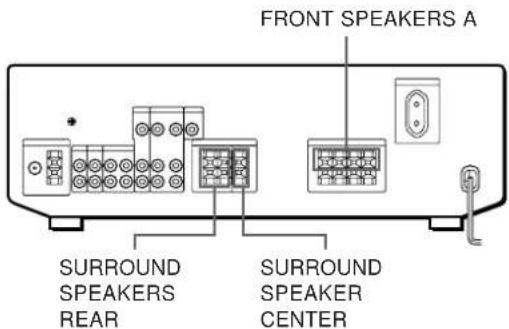
natural_image
Front view line drawing of a portable electronic device with control panel and buttons (no text or symbols)DELAY TIME/EFFECT
ÑˇՇÁÓÌ 65,0 - 74,0 âÉ^
ì‡OÚ ÓÈÍË 87,5 - 108,0 âÉ^
C',Ó%° 75 éï,
‡IÚÂIì' ìÂO-‡Î‡IÒË Ó,‡ÎÌ'Â
óÛ,ÒÚ,ËÚÂÎ]ÓÒÚ, æÓÎÓÙÓÎ.: 18,3 %.Âf,
2,2 μC/75 éï
ëÚÂÂÓÙÓÌ.:38,3‰Âf,
22,5 μC/75 éï
ê‡Î,·fl 11,2%Âf,1 μC/
^7 Û,ÒÚ,ËÚÂÎ,IÓÒÚ, 75 éÏ (IHF)
éÚIÓ-ÂIËÂ âÓIÓÙÓÌ.: 76 %.Å
ÒË„I‡Î/¬ÛÏ ëÚÂÂÓÙÓÌ.:70%°Â