dLAN 200 AVplus - Powerline Adapter DEVOLO - Free user manual and instructions
Find the device manual for free dLAN 200 AVplus DEVOLO in PDF.


User questions about dLAN 200 AVplus DEVOLO
0 question about this device. Answer the ones you know or ask your own.
Ask a new question about this device
Download the instructions for your Powerline Adapter in PDF format for free! Find your manual dLAN 200 AVplus - DEVOLO and take your electronic device back in hand. On this page are published all the documents necessary for the use of your device. dLAN 200 AVplus by DEVOLO.
USER MANUAL dLAN 200 AVplus DEVOLO
natural_image
White wireless router device with ports and ventilation slots (no visible text or symbols)devolo dLAN ^® 200 AVplus
© 2011 devolo AG Aachen (Germany)
While the information in this manual has been compiled with great care, it may not be deemed an assurance of product characteristics. devolo shall be liable only to the degree specified in the terms of sale and delivery.
The reproduction and distribution of the documentation and software supplied with this product and the use of its contents is subject to written authorization from devolo. We reserve the right to make any alterations that arise as the result of technical development.
Trademarks
HomePlug ^® is a registered trademark of HomePlug Powerline Alliance.
Linux ^® is a registered trademark of Linus Torvalds.
Ubuntu® is a registered trademark of Canonical Ltd.
Mac ^® and Mac OS X ^® are registered trademarks of Apple Computer, Inc.
Windows ^® and Microsoft ^® are registered trademarks of Microsoft, Corp.
devolo, dLAN ^® , Vianect ^® and the devolo logo are registered trademarks of devolo AG.
All other names mentioned may be trademarks or registered trademarks of their respective owners. Subject to change without notice. No liability for technical errors or omissions.
devolo AG
Charlottenburger Allee 60
52068 Aachen
Germany
www.devolo.de
Aachen, March 2011
Contents
1 Preface 5
1.1 Thank you! 5
1.1.1 About this manual 5
2 Introduction 7
2.1 What exactly is dLAN? 8
2.2 devolo—Up to speed on green IT 8
2.3 The dLAN 200 AVplus at a glance 9
2.4 Sample applications 10
3 Initial use 13
3.1 Package contents 14
3.2 System requirements 14
3.3 Functions 16
3.4 Connecting the dLAN 200 AVplus 17
3.5 Software installation 17
3.5.1 Software for Windows 17
3.5.2 Software for Mac (OS X) 18
3.5.3 Software for Linux (Ubuntu) 18
4 dLAN network 19
4.1 Security in the dLAN 19
4.2 dLAN Cockpit 19
4.2.1 Encrypting a network with dLAN Cockpit 22
4.3 dLAN AV network encryption at the touch of a button 23
5 Appendix 27
5.1 Bandwidth optimisation 27
5.2 Important safety instructions 29
5.3 Disposal of old devices 31
5.4 Warranty conditions 31
Contents
1 Preface
1.1 Thank you!
The dLAN 200 AVplus allows you to set up your own home network with almost no effort. Because the clever dLAN technology transmits the data over the household electrical wiring, you do not have to lay any new cables. You do not even have to do without an electrical socket, as the dLAN 200 AVplus provides a power supply to which you can connect your terminal devices or multiple sockets as usual. The integrated mains filter significantly improves data transmission in the home network.
The fast transfer rate of up to 200 Mbps makes every bandwidth-intensive Internet application a real multimedia treat. The integrated "Quality of Service" function measures the bandwidth requirement, optimises the data flow and ensures excellent quality—particularly for voice and video data.
To protect your data, simply press a button on the dLAN 200 AVplus to activate the convenient and secure 128-bit AES (Advanced Encryption Standard) encryption. In addition, the patented power saving mode, which comes standard, automatically uses up to 80% less power.
1.1.1 About this manual
After a brief introduction to "dLAN" and "Green IT" basics in Chapter 2, Chapter 3 will cover successfully setting up your dLAN 200 AVplus. Chapter 4 explains how to configure your dLAN AV network. Tips for bandwidth optimisation, information about product safety and environmental compatibility of the device and our warranty conditions can be found in Chapter 5 and conclude the manual.
Description of the symbols
Here we briefly describe the meaning of the symbols used in this manual.

Very important note. Failure to observe this note may result in damage.

Important note that should be observed.

Additional information, background material and configuration tips for your device.
If you have any further ideas or suggestions related to our products, we would be delighted to hear from you at support@devolo.com!
devolo on the Internet
For detailed information on our products, visit www.devolo.com. The Service centre area not only contains product descriptions and documentation, but also updates of devolo software and your device's firmware.
2 Introduction
dLAN is an intelligent, secure technology that lets you set up a home network easily, quickly and economically via your household electrical wiring, without the need for complex and expensive dedicated cabling.
The available performance and effort required for the installation also compares favourably to traditional methods—dLAN technology now attains speeds you would expect from other LAN technologies, and installing it is a breeze!
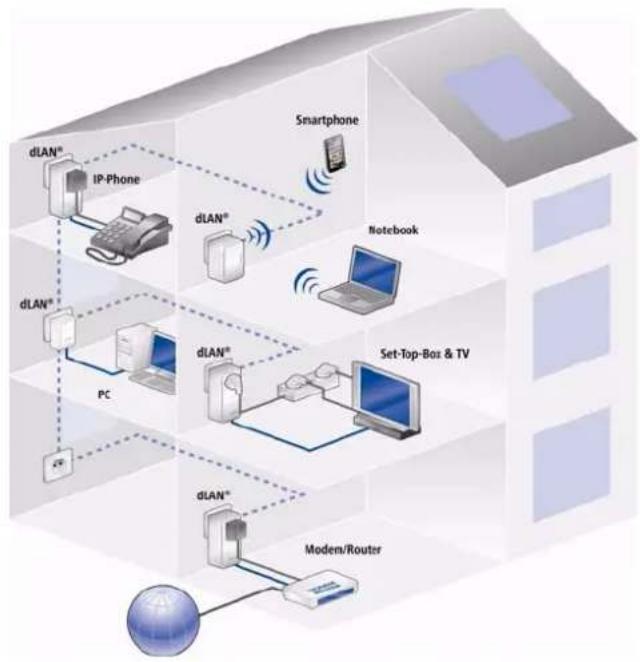
flowchart
graph TD
    A["IP-Phone"] -->|dLAN®| B["Smartphone"]
    C["dLAN®"] -->|dLAN®| D["笔记本"]
    E["PC"] -->|dLAN®| F["Set-Top-Box & TV"]
    G["dLAN®"] -->|dLAN®| H["Modem/Router"]
    I["Global Globe"] --> J["Internet"]
    style A fill:#f9f,stroke:#333
    style C fill:#f9f,stroke:#333
    style E fill:#f9f,stroke:#333
    style F fill:#f9f,stroke:#333
    style G fill:#f9f,stroke:#333
    style I fill:#ccf,stroke:#333
    style J fill:#ccf,stroke:#333
2.1 What exactly is dLAN?
dLAN (direct Local Area Network) uses the household power grid to transfer data between computers equipped with suitable adapters and other network components. As a result, any power outlet can be used as a network access point. The data is modulated prior to transfer and sent as a signal via household power lines. State-of-the-art technology ensures that the power and data networks do not interfere with one another. Networking via dLAN is fast and secure. The data is encrypted using a key to prevent easy interception by third parties.
2.2 devolo—Up to speed on green IT
The topic everyone is talking about is green IT. devolo has an easy solution: the power saving mode, which comes standard with the home network adapters, sets the company apart from many competitors in the IT industry. And that has been the case even before global warming and the scarcity of resources have become concerns on everyone's mind.
Developers at devolo, have for a long time kept a close eye on how much power dLAN adapters may consume. After all, a devolo network via electrical sockets should
not only be convenient, but also require as little energy as possible—particularly during times when it is not being used.
That devolo can satisfy the demand for energy efficiency is evidenced by the patented power saving mode in the devices. It automatically lowers energy consumption by more than 80 percent when the computers in the dLAN network or connected equipment are switched off.
The power saving mode in the adapters is not only a tribute to environmental protection but also a real service to the customer. Most people tend to forget to regularly press the standby button on the hardware. The patented technology in devolo adapters allows you to save energy without having to do anything. And if less energy is consumed, your electric meter will turn more slowly. In other words, every minute the adapter is in power saving mode, you will save money.

A dLAN adapter connected to a computer can only go into power saving mode if the network card of the switched-off computer is also inactive. If you are using a network card that remains active even when the computer is switched off, we recommend connecting the computer to an on/off switch using a multiple socket so that both the computer and the integrated network card are de-energised.
2.3 The dLAN 200 AVplus at a glance
●The dLAN 200 AVplus quickly and easily establishes a network connection over the household electrical wiring.
● Simple plug-and-play connection between the routers, computers and other network-compatible devices!
● The integrated electrical socket enables additional terminal devices or multiple sockets to be connected to the adapter just as a normal wall socket—no power supply is lost.
●The integrated mains filter significantly improves data transmission in the home network.
●The "Quality of Service" function and transfer rates of up to 200 Mbps are enough for bandwidth-hungry applications. Automatic data prioritisation ensures interference-free reproduction of voice and video data.
● Easy data encryption at the touch of a button or via dLAN Cockpit.
●The patented power saving mode automatically uses up to 80% less power.
● Compatible with all devolo dLAN AV adapters.
- Long data range of 300 m between the adapters and reliable network speed for setting up a home network.
2.4 Sample applications
Internet individual installation solution (fig 1)

flowchart
graph TD
    A["Internet"] --> B["Switch"]
    B --> C["Switch"]
    C --> D["Computer"]
    D --> E["Switch"]
    E --> F["Switch"]
    F --> G["Switch"]
    G --> H["Switch"]
    style A fill:#4CAF50,stroke:#388E3C
    style B fill:#90EE90,stroke:#388E3C
    style C fill:#90EE90,stroke:#388E3C
    style D fill:#4CAF50,stroke:#388E3C
    style E fill:#90EE90,stroke:#388E3C
    style F fill:#4CAF50,stroke:#388E3C
    style G fill:#90EE90,stroke:#388E3C
    style H fill:#4CAF50,stroke:#388E3C
Networking between two computers (fig 2)

flowchart
graph TD
    A["Device 1"] -->|Blue Line| B["Switch"]
    C["Device 2"] -->|Blue Line| D["Switch"]
    B --> E["Computer 1"]
    D --> F["Computer 2"]
    B -.-> G["Power Outlet"]
    D -.-> H["Power Outlet"]
Internet multiple installation solution (fig 3)

flowchart
graph TD
    A["Internet"] --> B["Switch"]
    B --> C["PC"]
    C --> D["Switch"]
    D --> E["PC"]
    E --> F["Switch"]
    F --> G["PC"]
    G --> H["Switch"]
    H --> I["PC"]
    I --> J["Switch"]
    J --> K["PC"]
    K --> L["Switch"]
    L --> M["PC"]
    M --> N["Switch"]
    N --> O["PC"]
    O --> P["Switch"]
    P --> Q["PC"]
    Q --> R["Switch"]
    R --> S["PC"]
    S --> T["Switch"]
    T --> U["PC"]
    U --> V["Switch"]
    V --> W["PC"]
    W --> X["Switch"]
    X --> Y["PC"]
    Y --> Z["Switch"]
    Z --> AA["PC"]
    AA --> AB["Switch"]
    AB --> AC["PC"]
    AC --> AD["Switch"]
    AD --> AE["PC"]
    AE --> AF["Switch"]
    AF --> AG["PC"]
    AG --> AH["Switch"]
    AH --> AI["PC"]
    AI --> AJ["Switch"]
    AJ --> AK["PC"]
    AK --> AL["Switch"]
devolo dLAN 200 AVplus
12 Introduction
devolo dLAN 200 AVplus
3 Initial use
This chapter covers everything you need to know to set up your dLAN 200 AVplus. It will explain connecting
the dLAN 200 AVplus and its functions. We will also briefly introduce the included devolo software and guide you through its installation.

natural_image
White portable network adapter device with ports and ventilation slots (no visible text or symbols)3.1 Package contents
Please ensure that the delivery is complete before beginning with the installation of your dLAN 200 AVplus:
Single Kit:
○dLAN 200 AVplus
○Network cable
○Hard copy of installation guide
○CD containing software and online documentation
or
Starter Kit:
○Two dLAN 200 AVplus
○Two network cables
○Hard copy of installation guide
○CD containing software and online documentation
or
Network Kit:
○Three dLAN 200 AVplus
○Three network cables
○Hard copy of installation guide
○CD containing software and online documentation
devolo AG reserves the right to change the package contents without prior notice.
3.2 System requirements
● Operating systems: Windows XP (32 bit), Windows Vista Home Premium (32 bit/64 bit), Windows 7 Home Premium (32 bit/64 bit), Linux (Ubuntu), Mac (OS X) and any other operating system with network support
Network connection

Please note that your computer or other device must feature a network adapter with a network port.

Please note that dLAN devices such as the devolo dLAN duo (14 Mbps) and devolo dLAN Highspeed Ethernet II (85 Mbps) can be used on the same household electrical wiring as dLAN AV devices (500 Mbps) without interference, but they will not be able to communicate directly with one another. Hence, to set up a dLAN AV network, you need two dLAN AV devices (200 Mbps/500 Mbps). More valuable information about dLAN or dLAN AV is available in the Service Centre section of our website at www.devolo.com.
(200
Mbps/

3.3 Functions
The dLAN 200 AVplus features 3 control LEDs as well as a network port and an encryption button:
Power
green: Lit steady when dLAN 200 AVplus is ready for operation; flashes when it is in standby mode.
dLAN
green: The network connection is suitable for HD video streaming; flashes when data is being transmitted.
orange: The network connection is suitable for SD video streaming and online gaming; flashes when data is being transmitted.
red: The network connection is suitable for simple data transfer and Internet access; flashes when data is being transmitted.
Ethernet
green: A connection to the Ethernet network exists; flashes when data is being transmitted.
Network connection
This is the connection point on the dLAN 200 AVplus for connecting it to a computer or another network device with the network cable (included).
Encryption button
Data encryption at the touch of a button; For more information on the functions of the encryption button, please see the chapter 4.3 dLAN AV network encryption at the touch of a button.
Integrated electrical socket
If you connect additional network devices using a multiple socket, plug this multiple socket into the electrical socket of the dLAN 200 AVplus. The integrated mains filter eliminates any noise of connected devices and significantly improves data transmission in the home network.

Please note that all dLAN AV devices to be connected to your network are also connected to your household electrical wiring. A dLAN AV device switches to Standby mode after a short while if no active network device such as a computer is connected to the network port. In Standby mode, the dLAN AV device cannot be accessed via the power supply grid. As soon as the network device (e.g. computer) connected to the network interface is switched on again, your dLAN AV device can also be reached again via the electrical wiring.
3.4 Connecting the dLAN 200 AVplus
This section describes how to connect your dLAN 200 AVplus to a computer or other network device.
①Use the included network cable to connect the dLAN 200 AVplus to the network port of your running computer or other network device.
②Plug the dLAN 200 AVplus into a free electrical outlet.

Additional network devices that are connected via a multiple socket are connected to the mains power supply by plugging the multiple socket into the integrated electrical socket of the dLAN 200 AVplus.
③Once you have connected at least two dLAN 200 AVplus adapters as described above, your dLAN 200 AVplus network has been set up. To secure your dLAN AV network, continue with the configuration as described in chapter 4 dLAN network.
3.5 Software installation
3.5.1 Software for Windows
Use the installation wizard to install the devolo software for using the adapter with the Windows operating system:
● devolo dLAN Cockpit finds all reachable dLAN adapters in your dLAN AV network, displays information about these devices and encrypts your dLAN AV network individually.
To install the software, insert the included CD-ROM in the CD drive of your computer.

If autoplay is installed on your computer, the installation will start automatically. Otherwise, open the folder with the Windows Explorer by right-clicking on Start (or the Windows logo) and selecting Explorer from the context menu. Double-click to start the installation wizard manually.
During the installation process, you will be given the choice of installing all software components (Standard installation) or selecting individual ones (Custom installation).

To take full advantage of the functions of your device, we recommend installing all of the applications.
You will be asked for permission to transfer anonymous performance data related to your dLAN 200 AVplus to devolo. The data sent to devolo pertains only to the performance values of your dLAN 200 AVplus devices. The data is anonymized and will be used exclusively for statistical purposes. By providing it, you can help us improve our products. You can find the installed software applications in the Start Programs devolo program group.
3.5.2 Software for Mac (OS X)
The software ↩ mac folder contains the dLAN configuration software.
3.5.3 Software for Linux (Ubuntu)
The software ♦ linux folder contains the dLAN configuration software.
4 d LAN network
4.1 Security in the dLAN
Before you can use the dLAN 200 AVplus in your dLAN network, first you have to connect it to other dLAN AV devices as a home network. Two specific pieces of information are especially important for this:
- Shared use of a dLAN password results in a delimited dLAN network.
- Shared use of the dLAN password serves as access control to the dLAN network as well as the encryption, and thereby the interception protection, of the transmitted data.
The dLAN password can be specified automatically via the encryption button or manually using the dLAN Cockpit program. Please note the following basic principle when choosing your encryption method:
In dLAN AV networks, data encryption is as simple as touching a button, since all corresponding dLAN AV devices are equipped with an encryption button.
- For dLAN AV networks that include devices with and without encryption buttons, data encryption must be set up using the dLAN Cockpit.
4.2 dLAN Cockpit
devolo dLAN Cockpit is a monitoring and encryption program that detects all reachable dLAN AV devices in your home network and combines them in a secure network. Due to its logical graphic design, the dLAN Cockpit is easy and intuitive to operate. After installing the devolo software, it can be found in the Start ➕ Programs ➕ devolo program group.
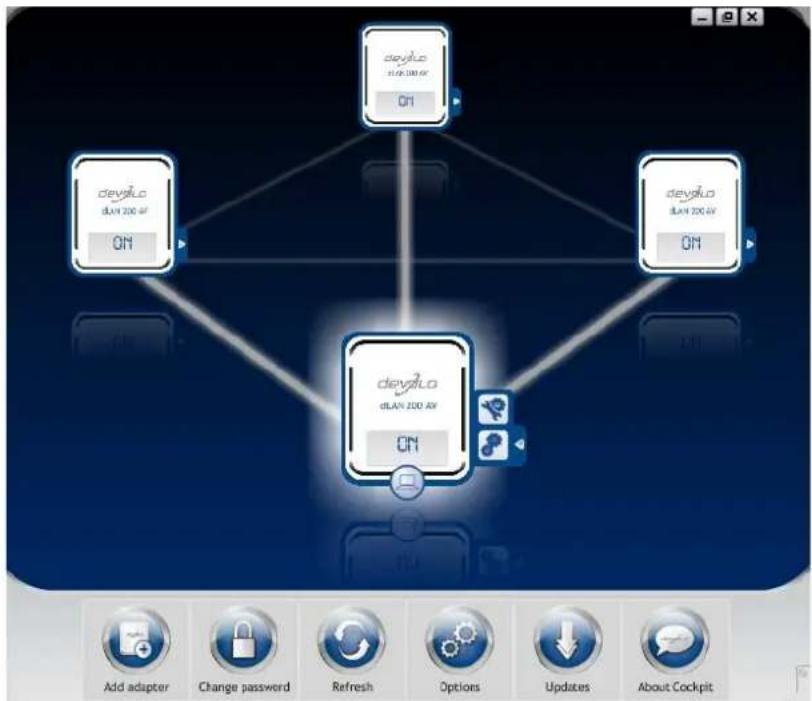
flowchart
graph TD
    A["devOps dLAN 200 AV"] -->|ON| B["DevOps dLAN 200 AV"]
    A -->|ON| C["devOps dLAN 200 AV"]
    A -->|ON| D["devOps dLAN 200 AV"]
    B --> E["Add adapter"]
    B --> F["Change password"]
    B --> G["Refresh"]
    B --> H["Options"]
    B --> I["Updates"]
    B --> J["About Cockpit"]
After starting the dLAN Cockpit, all reachable dLAN devices in your home network will appear. This may take a moment.

All adapters found in the network appear with as adapter icon with a corresponding product name. The adapter in the middle of the dLAN network identified with the symbol shown here symbolises your locally connected device. If you have multiple dLAN devices connected locally, you can jump back and forth between them. Clicking an adapter icon with the mouse enables the corresponding dLAN AV device and highlights it.
The coloured connecting lines of the adapters illustrate the current transmission quality:
● Green: the network connection is suitable for HD video streaming.
- Orange: the network connection is suitable for SD video streaming and online gaming.
- Red: the network connection is suitable for simple data transfer and Internet access.
If data transmission from one device to another is actually taking place, the data rate is displayed on the respectively highlighted adapter.
Settings and functions
You can configure settings for the respectively highlighted device or for the network
- via the buttons at the bottom edge of the screen
- or via tabs arranged at the side of each adapter.
You can always use the Refresh button to display the current status of devices that have been found (if this hasn't happened automatically).
By means of the Options button or the corresponding tabs of the respective adapter, you can learn device information such as the firmware version used and the individual MAC address.
Options are given like assigning an additional name, resetting the respective device to the factory default settings or removing a device from the existing dLAN network.

The above-mentioned setting options vary depending on the function and features of your device.
You can also specify whether information on the performance of your dLAN adapters will be transferred to devolo.

The data sent to devolo pertains only to the performance values of your dLAN devices. The data is anonymised and will be used exclusively for statistical purposes. By providing it, you can help us improve our products.
The Troubleshooting Guide includes installation instructions and information about how to connect your devices optimally with one another.
4.2.1 Encrypting a network with dLAN Cockpit
If you use dLAN AV devices without an encryption button, data can be encrypted only via dLAN Cockpit.

Before the networking procedure, note the security IDs of all dLAN AV adapters. This unique identifier of each dLAN device is located on the label on the housing. It consists of 4 x 4 letters separated by dashes (e.g. ANJR-KMOR-KSHT-QRUV). Ensure that all dLAN adapters are connected to the power grid and computers or other network components as appropriate.
Scan for local adapter
After dLAN Cockpit is started, it searches for the dLAN adapter connected directly to your computer first.
Adding an adapter
Add all the dLAN devices you want to your dLAN network by selecting the Add adapter button. You will need the 16-character security IDs of the adapters from the label on the housing. Enter it now in the Security ID field and confirm with OK. If a security ID is correct and the device can be reached in the dLAN network, it will be added to your network of configured adapters and also displayed in the program.
Entering a network password
After you have added all the dLAN devices you want to your dLAN network, select the Change password button to assign a shared network password that will apply for all registered adapters in your personal home network.
You can choose between your own password, a random password and the default password. To define your own password with a length of at least eight characters, enter this into the Network password (min. 8 characters) text field. Alternatively, you can have a randomly selected, highly secure password assigned using the Generate secure password button. Use the Factory default password button to reset the dLAN adapter to the default password. Normally, the display of the password is hidden for security reasons. If you enable the option Show characters, the current password is displayed in legible form in the text field.

The factory default password is HomePlugAV. Assigning a specific password to a single adapter will exclude it from the remaining dLAN network.
If dLAN Cockpit is called up again later after a successful initial installation, for example to integrate a new adapter into a network, the application remembers the devices that were entered earlier. Enter the new device as described in the Adding an adapter section. The current network password is assigned automatically to the newly added device.
4.3 dLAN AV network encryption at the touch of a button
To encrypt a dLAN AV network, in which all associated devices are equipped with an encryption button, simply press the encryption button that is located on the device. Pressing this button will encrypt your dLAN AV network with a randomly generated password.

natural_image
Close-up of a white kitchen appliance handle with a button and lid (no visible text or symbols)
Adapters cannot be configured while in Standby mode.
The following section contains exact instructions on the basis of possible network scenarios:
Encrypting a new dLAN AV network consisting of two dLAN 200 AVplus adapters (fig 4)
Once both dLAN 200 AVplus adapters have been successfully connected, press each encryption button for 1 second within two minutes of one another.
That's it! Your dLAN AV network is now protected against unauthorized access.

text_image
1 fig 4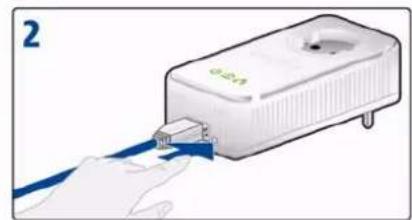
natural_image
Illustration of a hand inserting a small component into a device labeled '0.2A', with no visible text or symbols beyond the label.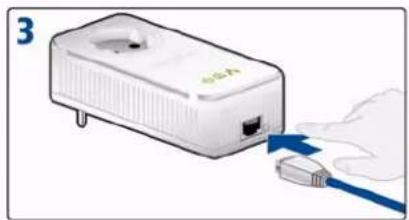
natural_image
Illustration of a white electronic device with a blue cable emitting a light, labeled with number 3 (no text or symbols on the device itself)Expanding an existing dLAN AV network with a new dLAN 200 AVplus (fig 5)
If you have already secured your existing dLAN 200 AVplus network using the encryption button, use the same method to integrate other adapters. Once you have successfully connected the new dLAN 200 AVplus, first press the encryption button of one of your network's existing adapters (1 second),
then press the encryption button of your new dLAN 200 AVplus (1 second) within two minutes.
That's it! The new dLAN 200 AVplus is now integrated in your network. To integrate additional dLAN 200 AVplus adapters in your network, repeat the above steps.

flowchart
graph TD
    A["Internet"] --> B["Desktop"]
    B --> C["Server Rack"]
    C --> D["Laptop"]
    D --> E["Switch"]
    E --> F["Computer"]
    style A fill:#f9f,stroke:#333
    style B fill:#ccf,stroke:#333
    style C fill:#cfc,stroke:#333
    style D fill:#fcc,stroke:#333
    style E fill:#cff,stroke:#333
    style F fill:#ffc,stroke:#333
Excluding a dLAN 200 AVplus from your network (fig 6)
To exclude a dLAN 200 AVplus adapter from an existing network, press its encryption button for at least ten seconds. The device will be assigned a new randomly generated password and will thus no longer be able to access the network. To integrate the adapter in
a different dLAN 200 AVplus network, follow the steps described above, depending on whether you are setting up a new network or adding the adapter to an existing one.

flowchart
graph TD
    A["Internet"] --> B["Device 1"]
    B --> C["Device 2"]
    C --> D["Switch"]
    D --> E["Router"]
    E --> F["Computer"]
    F --> G["Switch"]
    G --> H["Computer"]
5 Appendix

For the permitted voltage range for operating the device and the power consumption, refer to the label on the rear side of the device.

For the CE declaration for this product, refer to the accompanying product CD under CE. Additional technical information is available at www.devolo.com.
5.1 Bandwidth optimisation
To significantly improve the transmission capacity of the network, we recommend that you comply with the following "connection rules":
● Plug the device directly into a wall socket. Avoid multiple sockets. (fig 7)
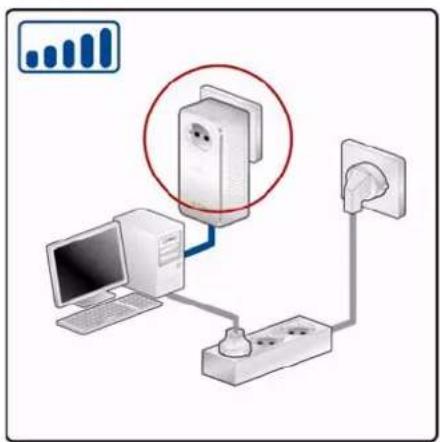
text_image
Diagram showing a wall-mounted device connected to a computer and power outlet, with a bar chart icon above indicating data or usage.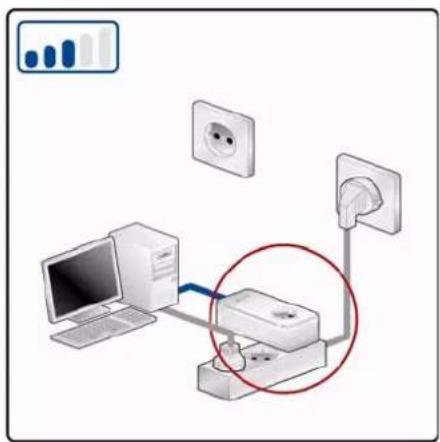
text_image
Diagram showing connections between a computer, power outlets, and a device with a red circle highlighting a component.fig 7
- You should connect all additional network devices that are connected to a multiple socket to the mains power supply via the electrical socket integrated into the dLAN 200 AVplus. To take full advantage of the filter function of the
dLAN 200 AVplus and to improve data transmission in the network, always plug the multiple socket into the electrical socket of the dLAN 200 AVplus. (fig 8)

text_image
Diagram showing a power line connection between a computer, switch, and wall-mounted device with a red circle highlighting a component.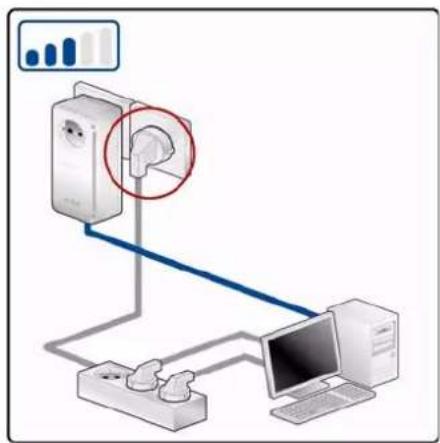
text_image
Diagram showing a device connected to a computer via a blue cable, with a small bar chart above indicating data or output.fig 8
- If you need to power more devices, use a remote wall socket. (fig 9)
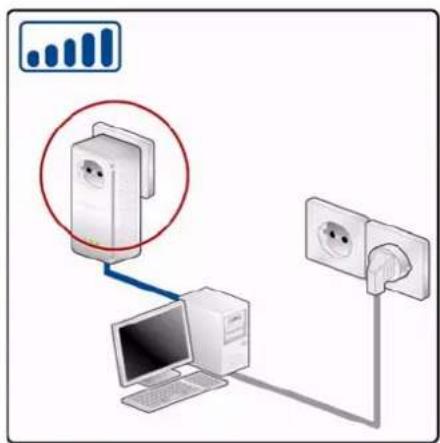
text_image
Diagram showing a power switch connected to a computer and an electrical outlet, with a bar chart icon above.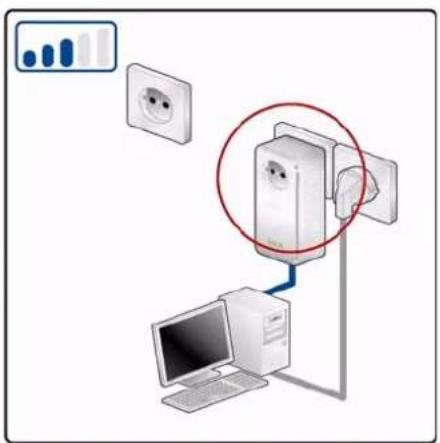
text_image
Diagram showing a wall-mounted device connected to a computer, with a magnified inset illustrating its components.fig 9
5.2 Important safety instructions
All safety and operating instructions should be read and understood before using the device, and should be kept for future reference.
● Never open the device. There are no user-service-able parts inside the device.

Do not try to service this product yourself! Contact qualified technicians each and every time your device needs maintenance. There is a risk of electric shock!
- Use the device in a dry location only.
● Always use the included network cable to connect the device.
30 Appendix
- Do not insert any objects into the openings of the device.
● To disconnect the device from the power supply grid, pull the power plug. - Do not keep the device in direct sunlight.
- Slots and openings on the case serve as ventilation. Never block or cover them.
● Never set up the device near a heater or radiator.
●The device should be located only where sufficient ventilation can be ensured. - Disconnect the device from the power supply grid before cleaning. Use a moist towel to clean the device. Never use water, paint thinner, benzene, alcohol or other strong cleaning agents when cleaning the device, as these could damage the case.
● Never use the device with a power supply that does not meet the specifications provided on the rating plate. If you do not know what type of power supply you have at home, contact your dealer or energy supplier. - In the event of damage, disconnect the device from the power supply grid and contact customer service. This applies, for example, if
○the power cable or plug is damaged.
○liquid has been spilled on the device or objects have fallen into the device.
○the device has been exposed to rain or water.
○the device does not work, even though the operating instructions have been followed properly.
○the device's case is damaged.

5.3 Disposal of old devices
The icon with crossed-out wastebasket on the device means that this adapter is an electrical or electronic device that falls within the scope of application of the German Electrical and Electronic Equipment Act. Since 24 March 2006, these types of devices may no longer be disposed of with household waste. Rather, in Germany, they can be given to a municipal collection point free of charge. Contact your municipal government to find out the address and hours of the nearest collection point.
5.4 Warranty conditions
The devolo AG warranty is given to purchasers of devolo products in addition to the warranty conditions provided by law and in accordance with the following conditions:
1 Warranty coverage
a) The warranty covers the equipment delivered and all its parts. Parts will, at devolo's sole discretion, be replaced or repaired free of charge if, despite proven proper handling and adherence to the operating instructions, these parts became defective due to fabrication and/or material defects. Alternatively, devolo reserves the right to replace the defective product with a comparable product with the same specifications and features. Operating manuals and possibly supplied software are excluded from the warranty.
b) Material and service charges shall be covered by devolo, but not shipping and handling costs involved in transport from the buyer to the service station and/or to devolo.
c) Replaced parts become property of devolo.
d) devolo is authorized to carry out technical changes (e.g. firmware updates) beyond repair and replacement of defective parts in order to bring the equipment up to the current technical state. This does not result in any additional charge for the customer. A legal claim to this service does not exist.
2 W a r r a n t
The warranty period for this devolo product is three years. This period begins at the day of delivery from the devolo dealer. Warranty services carried out by devolo do not result in an extension of the warranty period nor do they initiate a new warranty period. The warranty period for installed replacement parts ends with the warranty period of the device as a whole.
3 W a r r a n t 5 y 0 p p r e o r c a e t d i
a) If defects appear during the warranty period, the warranty claims must be made immediately, at the latest within a period of 7 days.
b) In the case of any externally visible damage arising from transport (e.g. damage to the housing), the person carrying out the transportation and the sender should be informed immediately. On discovery of damage which is not externally visible, the transport company and the sender are to be immediately informed in writing, at the latest within 3 days of delivery.
c) Transport to and from the location where the warranty claim is accepted and/or the repaired device is exchanged, is purchaser's own risk and cost.
d) Warranty claims are only valid if a copy of the original purchase receipt is returned with the device. devolo reserves the right to require the submission of the original purchase receipt.
4 Suspension of the warranty
All warranty claims will be deemed invalid
a) if the label with the serial number has been removed from the device,
b) if the device is damaged or destroyed as a result of acts of nature or by environmental influences (moisture, electric shock, dust, etc.),
c) if the device was stored or operated under conditions not in compliance with the technical specifications,
d) if the damage occurred due to incorrect handling, especially to non-observance of the system description and the operating instructions,
e) if the device was opened, repaired or modified by persons not contracted by devolo,
f) if the device shows any kind of mechanical damage, or
g) if the warranty claim has not been reported in accordance with 3a) or 3b).
If it becomes apparent that the reported malfunction of the device has been caused by unsuitable hardware, software, installation or operation, devolo reserves the right to charge the purchaser for the resulting testing costs.
6 Additional regulations
The above conditions define the complete scope of devolo's legal liability.
a) The warranty gives no entitlement to additional claims, such as any refund in full or in part. Compensation claims, regardless
the of the legal basis, are excluded. This does not apply if e.g. injury to persons or damage to private property are specifically covered by the product liability law, or in cases of intentional act or culpable negligence.
b) Claims for compensation of lost profits, indirect or consequential detriments, are excluded.
c) devolo is not liable for lost data or retrieval of lost data in cases of slight and ordinary negligence.
d) In the case that the intentional or culpable negligence of devolo employees has caused a loss of data, devolo will be liable for those costs typical to the recovery of data where periodic security data back-ups have been made.
e) The warranty is valid only for the first purchaser and is not transferable.
f) The court of jurisdiction is located in Aachen, Germany in the case that the purchaser is a merchant. If the purchaser does not have a court of jurisdiction in the Federal Republic of Germany or if he moves his domicile out of Germany after conclusion of the contract, devolo's court of jurisdiction applies. This is also applicable if the purchaser's domicile is not known at the time of institution of proceedings.
g) The law of the Federal Republic of Germany is applicable. The UN commercial law does not apply to dealings between devolo and the purchaser.
Index
Numerics
3 control LEDs 16
B
Bandwidth optimisation 27
C
CE declaration 27
D
Disposal of old devices 31
dLAN AV network 19, 23
E
Encryption button 16, 23
F
Factory default password 22
G
Generate secure password 22
Green IT 8
|
Important safety instructions 27
Integrated electrical socket 16
Integrating the new adapter into the network 23
L
Linux 18
M
Mac (OS X) 18
N
Network connection 16
Network password 22
P
Package contents 14
Power saving mode 8
S
Security ID 22
Software installation 17
W
Warranty 31
Windows 17
Index