
Home Control 9591 - Thermostat DEVOLO - Free user manual and instructions
Find the device manual for free Home Control 9591 DEVOLO in PDF.


| Product Type | Smart Thermostat |
| Brand | Devolo |
| Model | Home Control 9591 |
| Dimensions (H x W x D) | 100 x 100 x 30 mm |
| Weight | 150 g |
| Power Supply | 2x AA batteries (1.5 V) |
| Battery Life | Up to 2 years |
| Temperature Range | 5°C to 30°C |
| Control Interface | Rotary dial, touchscreen |
| Connectivity | Devolo Home Control wireless protocol |
| Compatibility | Devolo Home Control Hub required |
| Main Functions | Temperature control, weekly scheduling, vacation mode, child lock, open window detection |
| App Control | Via Devolo Home Control app (iOS/Android) |
| Maintenance & Cleaning | Clean with a dry, soft cloth; avoid liquids. Replace batteries when low. |
| Safety | Low voltage operation, overheat protection, child lock function |
| Spare Parts & Repairability | Batteries (AA, replaceable). No user-serviceable parts; contact Devolo support for repairs. |
| Mounting | Wall-mounted with included screws and wall plugs |
| Operating Temperature | 0°C to 40°C |
Frequently Asked Questions - Home Control 9591 DEVOLO
User questions about Home Control 9591 DEVOLO
0 question about this device. Answer the ones you know or ask your own.
Ask a new question about this device
Download the instructions for your Thermostat in PDF format for free! Find your manual Home Control 9591 - DEVOLO and take your electronic device back in hand. On this page are published all the documents necessary for the use of your device. Home Control 9591 by DEVOLO.
USER MANUAL Home Control 9591 DEVOLO
first steps
2
Thank you for placing your trust in this devolo product.
Carefully read all instructions before setting up the device and store the instructions for later reference.
Icons

Very important note. Failure to observe this note may result in damage.

Important note that should be observed.
Background information and configuration tips for your device.
Intended use
Use the Home Control Radiator Thermostat as described in these instructions and in the Home Control online help to prevent damage and injuries.

Except for insertion and occasional replacement of the batteries, the Home Control Radiator Thermostat is completely maintenance-free. Otherwise, the device contains no user-serviceable parts!
CE conformity

When used as intended, the product conforms to the basic requirements of the directives 2014/53/EU, 2014/35/EU and the other relevant provisions of the Radio and Telecommunications Terminal Equipment Act (FTEG) and is designed for use in the EU, Switzerland and Norway. A printout of the CE declaration is included.
devolo Home Control
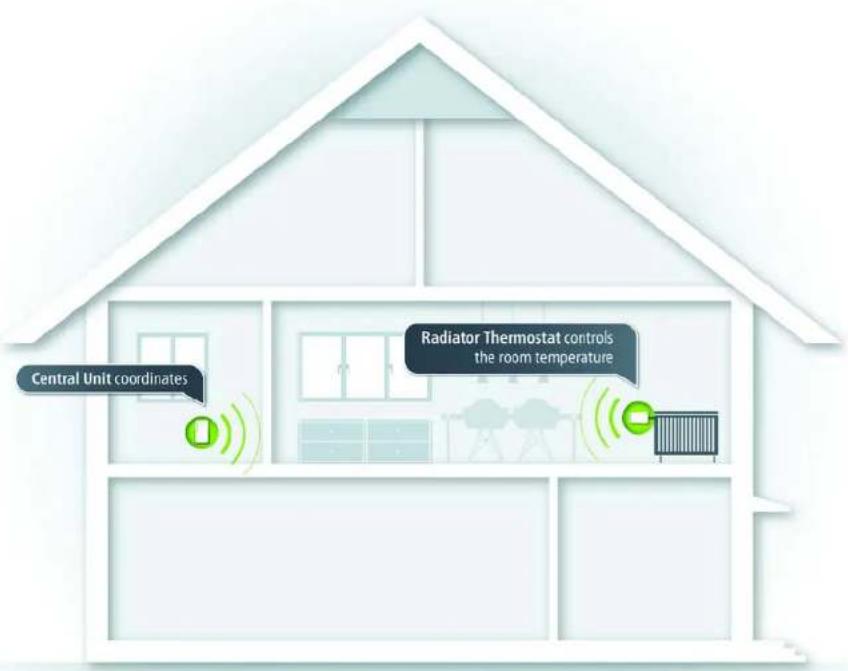
Home Control (also known as home automation) refers to the specific control of electrically operated indoor household devices. The Home Control system by devolo uses the Z-Wave™ wireless standard.
A Home Control system requires a Z-Wave™-compatible control unit such as the Home Control Central Unit from devolo. Use its Home Control portal to coordinate the Home Control Radiator Thermostat and all other Home Control devices. You can access the Home Control Central Unit through the my devolo app and at www.mydevolo.com in a browser.
For more information about setting up the Home Control Central Unit, please refer to the installation guide and/or Home Control online help.
Accessing the Home Control Central Unit via the my devolo app (for smartphone/tablet)
Open the my devolo app ↩ Home Control and select your Home Control Central Unit.
Accessing the Home Control Central Unit via web browser (PC/laptop)
At www.mydevolo.com Home Control select your Home Control Central Unit.
For more information on the control and configuration of all devolo Home Control devices, as well as application examples, please refer to the Home Control online help.
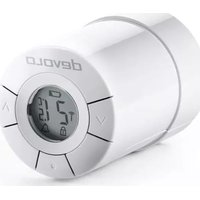
The Home Control Radiator Thermostat
The radiator is controlled electronically, e.g. via the Home Control Central Unit (see section devolo Home Control on page 3 or manually via the function button and the navigation buttons on the thermostat. In the latter case, the Home Control Radiator Thermostat sends a change notification to the control unit, e.g. the Home Control Central Unit. In addition to the target temperature, the display shows the status of the respective battery, the wireless connection, an alarm and any keypad lock that may be in effect.

For more detailed descriptions of the Home Control Radiator Thermostat functions, refer to the Home Control online help.
Removing the existing thermostat
To ensure that the radiator valve is accessible for the installation of the Home Control Radiator Thermostat, remove the old thermostat or (for a new radiator) the protective cap.
Depending on the type, thermostats are removed differently; some are simply unscrewed, while others have to be detached using a standard tool. For more information, refer to the respective manufacturer's documentation.
Inserting the batteries

Always keep batteries away from open flame and high temperatures. Avoid direct sunlight and heat radiation!
Always remove all batteries from battery-operated devices that are only in storage and are not in use. Old batteries can leak and damage the device!
Do not use rechargeable batteries!
When inserting the batteries, ensure that the polarity is correct. Using the batteries incorrectly can damage the device!
The Home Control Radiator Thermostat uses commercially available AA alkaline batteries. For information on replacing the battery, please refer to the Home Control online help.
① Take off the battery compartment cover and insert the included batteries in the correct position (see marking in the battery compartment) into the Home Control Radiator Thermostat.

② When you have inserted the batteries correctly, the following symbol m flashes on the display of the Home Control Radiator Thermostat.
③ Reattach the battery compartment cover. You can now continue with the installation on the radiator.
Installing the Home Control Radiator Thermostat

Only use the Home Control Radiator Thermostat indoors.
The Home Control Radiator Thermostat is compatible with most commercially available radiator valves. For this purpose, two adapter rings are included with the Home Control Radiator Thermostat:
8
The narrow adapter ring is compatible with the M30 x 1.5 screw threads from the following manufacturers: Comap/SAR, Heimeier, Honeywell-Braukmann, Idmar, Jaga, Junkers, MNG, Orkli, Oventrop, Pegler, R.B.M., Rossweiner, Schlösser, Siemens, Simplex, Tieme, Valv Sanayii, Watts.
The wide adapter ring is compatible with all Danfoss RA valves.
④ Plug or screw the correct adapter for your radiator onto the valve: Tighten the wide adapter ring using the included Allen key; tighten the narrow adapter ring hand-tight.

Wide

Narrow
⑤ Now, screw the Home Control Radiator Thermostat to the adapter ring installed on the radiator and tighten it hand-tight by rotating clockwise, applying gentle pressure.
⑥ To fasten the Home Control Radiator Thermostat completely, press the centre function button for 3 seconds ☐. The device pulls tight on its own and is thus completely installed.

Registering the Home Control Radiator Thermostat on the control unit (e.g. Home Control Central Unit)
⑦ After you have successfully installed the Home Control Radiator Thermostat, continue with its electronic registration on the control unit.
⑧ When you plug in the Home Control Central Unit from devolo, follow the description in the section devolo Home Control on page 3 to call up your Home Control Central Unit and select Devices Add device devolo Home Control Radiator Thermostat. Follow the rest of the instructions there to log into your Home Control Central Unit. From now on, you can take electronic control conveniently using the Home Control portal of the Home Control Central Unit.
For more information on time control and configuration, as well as application examples, please refer to the Home Control online help.
Service and warranty
Warranty: 3 years
If your devolo device is found to be defective during initial installation or within the warranty period, please contact the vendor who sold you the product. The vendor will take care of the repair or warranty claim for you. The complete warranty conditions can be found at www.devolo.com/warranty.
| Great Britain 0203 024 18 | 38 (national rate) support@devolo.co.uk | |
| Sweden 0077 1400 480 (national rate) support@devolo.se | ||
| Finland 972 519 125 (national rate) support@devolo.fi | ||
| Norway 81 500 174 (national rate) support@devolo.com | ||
| Denmark 070 136 001 (national rate) support@devolo.dk | ||
| Other countries +49 241 70 | 525 18 (international rate) support@devolo.com | |
Disposal
Neither the Home Control Radiator Thermostat nor the batteries may be disposed of with the household waste. Instead, you can return these at no charge at your municipal collection point or at the retailer (e.g. supermarket, specialist shop).

devolo
devolo AG
Charlottenburger Allee 60
52068 Aachen – Germany
www.devolo.com


- THANK YOU FOR PLACING YOUR TRUST IN THIS DEVOLO PRODUCT
- INTENDED USE
- CE CONFORMITY
- DEVOLO HOME CONTROL
- THE HOME CONTROL RADIATOR THERMOSTAT
- REMOVING THE EXISTING THERMOSTAT
- INSERTING THE BATTERIES
- ONLY USE THE HOME CONTROL RADIATOR THERMOSTAT INDOORS
- SERVICE AND WARRANTY
- WARRANTY: 3 YEARS
- DISPOSAL
- DEVOLO
Brand : DEVOLO
Model : Home Control 9591
Category : Thermostat