PM 52 - Sports Watch BEURER - Free user manual and instructions
Find the device manual for free PM 52 BEURER in PDF.


User questions about PM 52 BEURER
0 question about this device. Answer the ones you know or ask your own.
Ask a new question about this device
Download the instructions for your Sports Watch in PDF format for free! Find your manual PM 52 - BEURER and take your electronic device back in hand. On this page are published all the documents necessary for the use of your device. PM 52 by BEURER.
USER MANUAL PM 52 BEURER
Operating Instructions
Gebrauchsanleitung

top up yourlife
TABLE OF CONTENTS
Scope of delivery ....3
Important Notes ....4
General Information for Training 6
Functions of the HR monitor....8
Transmission of signal and methods of Devices Measurement.....9
Getting started....9
Putting on the heart rate monitor 9
Activating the HR watch from transport mode....9
Activating the heart rate monitor from power saving mode......10
Putting on the chest strap ....10
General operation of the HR monitor....11
Buttons on the HR watch 11
Display....12
Menus....13
Basic settings....15
Overview....15
Enter personal data....15
Set training zone....17
Set units....18
Watch settings 19
Overview....19
Set time of day and date....19
Set alarm clock....21
Recording of training 22
Overview....22
Stop run times ....23
Record laps 24
Stop and store recording.... 25
Delete all recordings.... 26
Analyzing memory messages.... 27
Results.... 28
Overview 28
Display training data.... 28
Lap results 30
Overview 30
Display lap results 30
Fitness test 31
Overview.... 31
Conduct fitness test.... 32
Display fitness values.... 33
EasyFit software.... 35
Technical specifications and batteries 36
List of abbreviations.... 39
Index 41
SCOPE OF DELIVERY
| Heart rate monitor with wrist band |  |
| Chest strap | |
| Bike mount |  |
| Storage box |  |
In addition:
- Operating instructions and separate short instructions
IMPORTANT NOTES
Please carefully read through these operating instructions, keep it for future reference and also make it available to others.

Training
This product is not a therapeutic device. It is a training instrument, which was developed for the measurement and representation of the human heart rate.
- With high-risk sports, please note that the use of the heart rate monitor can represent an additional source of injury.
If in doubt or for illnesses, please consult your doctor concerning the values of your upper and lower target heart rate as well as the duration and frequency of training. In such a way, you can achieve optimal results when training.
■ WARNING: People suffering from heart and circulatory illnesses or those with pacemakers should only use this heart rate monitor after having consulted their doctor.

Application
■ The device is only intended for private use.
This device may only be used for the purpose it was designed for and in the manner outlined in this operating instructions. Any form of improper use can be dangerous. The manufacturer is not liable for damages that are caused by improper or incorrect use.
The heart rate monitor is waterproof. (see chapter "Technical Specifications")
- Electromagnetic disturbances may occur. (see chapter "Technical Specifications")

Cleaning and care
From time to time, carefully clean your chest strap, elastic chest strap and heart rate monitor with a soap and water solution. Then rinse off all components with clean water. Carefully dry them with a soft towel. You can wash the elastic chest strap in the washing machine at 30° without fabric softener. The chest strap is not made for the dryer! When using a textile chest strap, please take note of the information in the directions for use of the textile chest strap.
■ Store the chest strap in a clean and dry place. Dirt impairs the elasticity and functioning of the transmitter. Sweat and moisture can keep the electrodes wet and consequently activate the transmitter, which shortens battery life.

Repair, Accessories and Disposal
■ Prior to use, it should be ensured that the device and accessories are free of damage. If in doubt, do not use the device and consult your sales representative or the customer service address provided.
■ Repairs may only be conducted by customer service or authorized dealers. Please do not in any case attempt to repair the device!
■ Use the device only in combination with the accessories provided with it.
- Avoid contact with sunscreen or the like since these can cause damage to the imprint or plastic components.
- Do not expose the device to direct sunlight.
Please dispose of the device in accordance with Waste Electric and Electronic Equipment 2002/96/EC - WEEE. For inquiries, please contact the municipal authority responsible for disposal in your area.
GENERAL INFORMATION FOR TRAINING
This heart rate monitor serves to measure the human pulse. By means of various settings, you can support your individual training program and monitor your pulse. You should monitor your pulse during exercise because you should prevent your heart from excessive strain on the one hand and on the other in order to achieve the optimal training results. The table provides you with some information on the selection of your training zone. The maximum heart rate reduces with advancing age. Information on the training heart rate must therefore always be in relation to the maximum heart rate. The following rule of thumb helps to identify the maximum heart rate:
220 - age = maximum heart rate
The following example applies to a 40-year-old person: 220-40 = 180
| Heart/health programme | Fat burning zone | Fitness programme | Endurance training programme | Anaerobic training | |
| Max. heart rate range | 50 - 60% | 60 - 70% | 70 - 80% 80 - 90% | 90 - 100% | |
| Effect | Strengthens the heart and the circulatory system | The body burns the highest percentage of calories from fat. Strengthens the heart and the circulatory system, enhances fitness | Improves the respiratory and circulatory system. Ideal to promote the basic endurance | Improves speed maintenance and increases basic speed | Overloads specific muscles. High injury risk for athletes at amateur level, risk related to the heart in case of disease |
| Suitable for | Ideal for beginners | Weight control and loss | Athletes at amateur level | Ambitious athletes at amateur level, professional athletes | Only professional athletes |
| Training | Regenerative training | Fitness training Endurance training | Fitness training addressing specific zones | ||
See the chapter "Basic Settings", section "Setting your training zone" on how to individually set your training zone. See the chapter "Fitness Test" on how the heart rate monitor sets your individual limits of the suggested training zone through the fitness test.
Analysis of the Training
You can transfer your training data to a PC via the PC interface of your HR monitor (3 pins on the back of your monitor) and evaluate it there. The required accessories consisting of a CD with the PC software EasyFit and a communication cable are available at specialist shops under order number 671.10.
The PC software EasyFit controls the transfer of the data from your HR monitor and offers a wide range of analysis options. In addition, EasyFit provides useful calendar and administrative functions, which also support optimal training over longer periods of time. Using the software, you can also control and monitor your weight management.
FUNCTIONS OF THE HR MONITOR
HR functions
■ Exact ECG heart rate measurement
■ Transmission: analogue
■ Individual training zone adjustable
■ Acoustic and visual alarm
■ Average heart rate (average)
■ Maximum training heart rate
■ Calorie consumption in Kcal (basis jogging)
■ Fat burning in g/oz
Settings
Gender
Weight
■ Unit of weight kg/lb
Height
Unit of height cm/inch
Age
■ Maximum heart rate
Time functions
■ Time of day
■ Calendar (up to 2099) and weekday
Date
- Alarm / alarm clock
■ Stop watch
■ 50 laps for each training, recall of all of them or each one. Display of lap time and average heart rate
Fitness test
■ Fitness index with interpretation
■ Maximum oxygen-breath volume (VO _2 max)
■ Basal metabolic rate (BMR)
■ Active metabolic rate (AMR)
■ Calculated maximum heart rate
■ Suggested training zones
TRANSMISSION OF SIGNAL AND METHODS OF DEVICES MEASUREMENT
Receiving range of the heart rate monitor
Your heart rate monitor picks up the heart rate signals sent by the chest strap transmitter within a range of 70 centimeters.
Sensors on the chest strap
The entire chest strap consists of two components: the actual chest strap and an elastic tension belt. On the inside of the chest strap contacting the body, there are two rectangular, corrugated sensors. Both sensors determine your heart rate ECG exactly and transmit this to the heart rate monitor. When using a textile chest strap, please take note of the information in the directions for use of the textile chest strap.
The chest strap is compatible with other analogue devices, such as e.g. ergometers.
GETTING STARTED
Putting on the heart rate monitor
You can wear your heart rate monitor like a wrist watch. In order to fix the heart rate monitor on bike handle bars, attach the bike mount included to the handle bars. Tighten the heart rate monitor around the mount such that it is not able to slip while riding.
Activating the HR watch from transport mode
During transport the monitor is blank. You can remove the transport mode by pressing the button MENU and then START/STOP.
Activating the heart rate monitor from power saving mode
You can activate your heart rate monitor by pressing any button. If the heart rate monitor has not received any signal for approx. five minutes, it switches to the power saving mode. At that point, only the current time and the date will be displayed. Press any button in order to reactivate the watch.
Putting on the chest strap
- Put the chest strap around the upper part of your body and fasten the two ends. Adjust the length of the belt such that the belt is snug, but neither too loose nor too tight. Position the belt around the chest such that the logo is facing outwards and in the correct position directly over the breast bone. For men, the chest belt should be located directly below the pectoral muscles, for women, directly below the breast.

natural_image
Simple line drawing of a human torso and lower abdomen (no text or symbols)Since optimal contact between the skin and the heart rate sensors can not be created immediately, it may take some time until the heart rate is measured and displayed. If necessary, alter the position of the transmitter in order to achieve optimal contact. Most of the time, sufficient contact is achieved through the accumulation of sweat beneath the chest strap. You can, however, also wet the contact points on the inside of the chest strap. For this, lift the chest strap up from the skin slightly and wet the two sensors with saliva, water or ECG gel (available at the chemistry). The contact between the skin and chest strap may not be interrupted also with greater movements of the thorax such as during deep breathing. Significant chest chair can interfere with and even prevent contact.
- Put on the chest strap a few minutes before starting in order to warm it up to body temperature and establish optimal contact.
GENERAL OPERATION OF THE HR MONITOR
Buttons on the HR watch

text_image
beurer 138. 1945.57 Fr 12.04. 2 3 41 START/STOP
2 OPTION/SET
3 MENU
4
Starts and stops functions and adjusts values. Press and holding accelerates the entry.
Switches between the functions within one menu and confirms settings.
Switches between the different menus.
Pressing quickly illuminates the display for five seconds.
Pressing and holding activates/deactivates the acoustic alarm when exiting the training zone.
Display

text_image
beuer 1 138 19:45:57 3 Fr 12.04. 41 Top line
2 Middle line
3 Bottom line
4 Symbols
Alarm clock is activated.
Heart rate is being received.
▲ Training zone has been exceeded.
▼ Training zone has been underrun.
Acoustic alarm for exit from the training zone is activated. The sound when pressing the buttons is activated.
An explanation of the display abbreviations can be found in the list of abbreviates at the end of the operating instructions.
Menus
You can switch menus with the MENU Button.

flowchart
graph TD
    A["Time"] --> B["Training"]
    B --> C["Result"]
    C --> D["LAP Result"]
    D --> E["Setting"]
    E --> F["FitTest"]
    F --> A
    style A fill:#f9f,stroke:#333
    style B fill:#ccf,stroke:#333
    style C fill:#cfc,stroke:#333
    style D fill:#fcc,stroke:#333
    style E fill:#cff,stroke:#333
    style F fill:#ffc,stroke:#333
Power saving mode
If your heart rate monitor has not received any signal for approx. five minutes, it switches to the power saving mode. In that case, only the current time and the date will be shown. Press any button to reactivate the HR monitor.

text_image
12:00 Fri 12:04Main display
When changing menus, the name of the menu is first shown, then your HR monitor will automatically switch to the main display of the active menu.
From there, you have to first choose a submenu or you can directly access functions.

flowchart
graph TD
    A["Menu"] -->|automatically| B["Main display"]
Overview of the menus
| Menu | Meaning | Description: see chapter... |
| Time | Time "Watch Settings" | |
| Training | Training | "Recording of Training" |
| Result | Result "Results" | |
| Lap Result | Lap result | "Lap results" |
| Setting | Settings | "Basic settings" |
| FitTest | Fitness test | "Fitness test" |
BASIC SETTINGS
Overview
In the menu Setting you can:
- Enter your personal data (user). Based on this data, your HR monitor determines your calorie consumption and your fat burning during training!
- Set your training zone (limits). See chapter "General Information on Training" for explanations on how to set the training zones. Your HR monitor issues an acoustic and visual alarm during your training when the training zone is exited.
■ Change the units of measurement (units) for height and weight.
Once you are in the menu Setting, your HR monitor automatically switches to the main display. This displays User.

Setting

User
Enter personal data
MENU
Switch to the menu Setting.

User
| START/STOP | Gender is displayed. START/STOP Select M, if you are male. START/STOP Select F, if you are female. |  Gender Gender |
| OPTION/SET | AGE is displayed. START/STOP Set your age (10-99). |  AGE AGE |
| OPTION/SET | MaxHR is displayed. The HR monitor automatically calculates the maximum heart rate according to the formula: 220 - age = MaxHR Please note that the HR monitor also determines the MaxHR after every fitness test and sets it as a suggested value. START/STOP You can overwrite the value calculated (65-239). |  MaxHR MaxHR |
| OPTION/SET | Weight is displayed. START/STOP Please select your weight (20-226 kg or 44-499 lbs). |  Weight Weight |
| OPTION/SET | Height is displayed. START/STOP Set your height (80-227 cm or 2'6"-7'6" feet). | 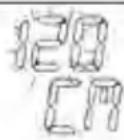 Height Height |
| OPTION/SET | Return to the display User. |
Set training zone
You can set your individual upper and lower heart rate limit as described below.
Please note that both limits are automatically set as a training zone suggestion after every fitness test and that the old data are consequently overwritten. For this, the lower limit of the suggested training zone totals 65%, the upper limit 85% of the maximum heart rate.
| MENU | Switch to the menu Setting. | 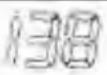  |
| OPTION/SET | Limits is displayed. | |
| START/STOP | Lo limit is displayed. START/STOP Set the lower limit for your training zone (40-238). | 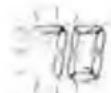 Lo limit Lo limit |
| OPTION/SET | Hi limit is displayed. START/STOP Set the upper limit (41-239). | 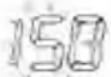 Hi limit Hi limit |
| OPTION/SET | Return to the display Limits. |
Set units
| MENU | Switch to the menu Setting. |   |
| OPTION/SET | Limits is displayed. | |
| OPTION/SET | Units is displayed. | |
| START/STOP | kg/lb is displayed. The weight unit blinks.START/STOP Switch between the units. |  k3/lb k3/lb |
| OPTION/SET | cm/inch is displayed. The unit of measurement for height blinks.START/STOP Switch the units. |  cm/inch cm/inch |
| OPTION/SET | Return to the display Units. |
WATCH SETTINGS
Overview
| In the Time menu you can:■ Set the time and the date.■ Set the alarm clock. |  |
| When you are in the Time menu the heart rate monitor automatically activates the main display. In this mode both the weekday and the current date are displayed. On the display: Fri 12.04 (Friday 12th April). |  |
Set time of day and date
| MENU | Switch to the menu Time. |  |
| START/STOP5 sec | Set Time is shown briefly. Hour is displayed. The hour setting blinks. START/STOP Set the hour (0-24). |  |
| OPTION/SET | Minute is displayed. The hour setting blinks. START/STOP Set the minute (0-59). |  |
| OPTION/SET | Year is displayed. The year setting blinks. /STOP Set the year. The calendar goes up to 2099. |  |
| OPTION/SET | Month is displayed. The monthly setting blinks. /STOP Set the month (1-12). |  |
| OPTION/SET | Day is displayed. The day setting blinks. /STOP Set the day (1-31). |  |
| OPTION/SET | Back to the main display. |
Set alarm clock
You can turn off the alarm clock by pressing any button. On the following day, we will be woken up at the same time.
| MENU | Switch to the menu Time. |  |
| OPTION/SET | Alarm is displayed. | |
| START/STOP5 sec | Set Time is shown briefly.On Alarm is displayed.START/STOP Turns the alarm clock off (Off) and on (On). |  |
| OPTION/SET | Hour is displayed. The hour setting blinks.START/STOP Set the hour. |  |
| OPTION/SET | Minute is displayed. The hour setting blinks.START/STOP Set the minute. |  |
| OPTION/SET | Back to the main display. |
In the menu Training you can:
- Stop your run times and thereby record your training session.
■ Record individual laps.
■ Stop and save your recording. - Delete all recordings.
■ Analyze memory messages.
Once you are in the menu Training, your HR monitor automatically switches to the main display. This displays the already recorded training time on the middle line (after Save/Delete: 00:00:00) and on the line below Start.

text_image
138 00,000.00 Training
text_image
138 0000.00 StartThings to know about the recordings
As soon as you have started the recording, your HR monitor starts recording your training data. Your HR monitor continually records your training data until you save or delete this. This also applies when you first start training on the following day. The running time also allows you to stop your training session at any time.
- Your HR watch has a memory. The recording time is up to 24 hours and depends on the number of laps. A maximum of 50 laps is possible for each training. Your HR watch informs you if the memory is almost full. At this point, at the latest, we recommend transmitting the recordings to your PC and thus emptying the memory on the HR watch. Alternatively you can delete all recordings manually. Read the
section “Delete all recordings” in this chapter to find out how to delete the recordings.
- You can let your training data be displayed. The last recording saved, can be recalled in the menu Result. In the menu Lap Result you can see the laps for this recording.
As soon as you have transferred the recordings into the EasyFit software, you can view and analyze them there. The memory will be deleted every time you have successfully transferred the data to the PC. You can find explanations regarding the transfer of data to the PC in the chapter “EasyFit Software”.
Stop run times
| MENU | Switch to the menu Training. If you have already stopped a run time, the recorded training time is displayed on the middle line. |  |
| START/STOP | Start the recording. Run is displayed. Even if you change to another menu during the recording, the time continues to run in the background. |  |
| START/STOP | Stop the recording. Stop is displayed. You can interrupt and resume your recordings at any time by pressing the button START/STOP. |  |
Record laps
While the recording of your entire training is in progress, you can record individual laps. The time continues to run as the laps are recorded.
| You are in the menu Training and your training is currently being recorded. Run is displayed. |  | |
| OPTION/SET | Time a new lap. The display shows the time and number of the last lap timed for five seconds, for example Lap 1. |  |
| The display automatically switches back to Run and shows the number of the current lap, for example Run 2. |  | |
| OPTION/SET | Record additional training laps as needed. You can record up to a total of 50 laps for each training. |  |
Stop and store recording
Please note that after finishing and saving, you can no longer have the data displayed in the Result and Lap Result menus.
| You are in the menu Training. You have just recorded a training.Stop is displayed. |  | |
| START/STOP5 sec | Save the recording.Hold Save is displayed. |  |
| The display automatically switches back to the main display.The data is now ready to be transmitted to the PC. |  | |
Delete all recordings
Your HR watch informs you automatically when the memory is almost full. Before you then delete the memory, we recommend analyzing the training recording or transmit to the PC! The memory on the HR watch will be deleted automatically every time you successfully transfer data to the PC. Alternatively you can delete the memory manually as described here.
The automatic or manual deletion causes all training recordings including your laps to be deleted.
| You can | delete the data before or after the training:■ You are in the menu Training. Start is displayed.■ You are in the menu Training. You have just recorded a training. Stop is displayed. | |
| OPTION/SET5 sec | Delete all recordings.MEM Delete is displayed. |  |
| The monitor automatically switches to the main display. |  | |
Analyzing memory messages
In the menu Training your HR watch automatically informs you if the memory is almost full or if almost all the laps are occupied.
| Message | Meaning |
 | When switching to the menu Training the HR watch signals MEM LOW, if less than 10% of the memory or less than 10 laps are free. |
 | During training, the HR watch signals every 5 seconds MEM x% Free, if less than 10% of the memory is free.On the display: MEM 8% Free (still 8% free). |
 | During training the HR watch signals every 5 seconds LAP Rest x, if there are less than 10 (of a total of 100) laps .On the display: LAP Rest 7 (still 7 laps free). |
If the memory is full, you cannot start a new training session. Read in the previous section “Delete all recordings” to find out how to delete the memory manually.
The memory is also deleted every time the data is transferred to the PC. You can find the relevant explanations in the chapter “EasyFit Software”.
RESULTS
Overview
| In the menu Result you can display your training data of the last recording stopped: mean and maximum heart rate, times within and outside of the training zone as well as calorie consumption and fat burning. |  |
 | |
| Once you are in the menu Result, your HR monitor automatically switches to the main display.This displays bPM AVG. |  |
 | |
 |
Display training data
| MENU | Switch to the menu Result. | |
| BPM AVG (average training heart rate) is displayed. |    | |
| OPTION/SET | HRmax (maximum training heart rate) is displayed. |    |
| OPTION/SET | In [min] (time within the training zone) is displayed. |  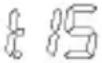  |
| OPTION/SET | Lo [min] (time below the training zone) is displayed. | 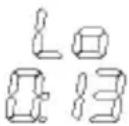 [min] [min] |
| OPTION/SET | Hi [min] (time above the training zone) is displayed. |  [min] [min] |
| OPTION/SET | [kcal] (the total calorie consumption during the recording of the training session) is displayed. The calculation is conducted based on moderately fast jogging. The basis for the display of the calorie consumption and the fat burning are:■ Personal data (basic settings)■ the time and heart rate measured during the training session. | 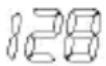 [Kcal] [Kcal] |
| OPTION/SET | Fat[g] (Fat burning during the entire training recording) is displayed. |  |
| OPTION/SET | Back to the main display. |
LAP RESULTS
Overview
| In the menu LAP Result you can have the time and average heart rate as well as the last stopped training recording and the individual laps displayed. |  |
| Once you are in the menu LAP Result, your HR monitor automatically switches to the main display. The top line shows the average heart rate, the middle line the training time last recorded. |  |
Display lap results
| MENU | Switch to the menu LAP result. | |
| OPTION/SET | AVG 1: Results in lap 1 are displayed: The top line shows the average heart rate, the middle line displays the lap time. |  |
| OPTION/SET | Pressing again switches to the individual result display for the following lap. Maximum 50 laps for each training. |  |
| OPTION/SET | Back to the main display. |
FITNESS TEST
Overview
In the menu FitTest you can:
■ Test your personal fitness in a 1600m run (1 mile).
■ Have your fitness evaluated: Fitness index (1-5), maximum oxygen-breath volume ( VO_2 max), basal metabolic rate (BMR) and active metabolic rate (AMR).
- Have your individual upper and lower limit calculated automatically as a recommended training zone and overwritten the two limits in the menu Setting. Also see the chapter "Setting training zone".
■ Have your maximum heart rate (MaxHR) automatically calculated and have it overwritten in the menu Setting.
The fitness test is not just designed for active athletes, but also for those with a lower fitness level from all age groups.
After one second, the main display appears. The top line displays your fitness index:
■ 0 = No test has been conducted yet
1 = Poor
2 = Fair
3 = Average


| ■ 4 = Good■ 5 = EliteOn the middle line, the date of your last fitness test is displayed. If you have not yet completed a fitness test, then the preset date is displayed. |
Conduct fitness test
The units displayed "m" or "mile" result from the basic settings. In the chapter "Basic Settings", section "Setting units", you can read how to change these units.
| MENU | Switch to the menu FitTest. |  |
| START/STOP | The scrolling display appears Press START to begin. Put on the chest strap. Your pulse will now be shown on the display and you have five minutes to warm up. Your HR monitor signals the end of the 5-minute warmup phase with a beep. In the event you would like to shorten the warmup phase, you can press the button START/STOP to switch to the next screen.Briskly walk exactly 1600m (1 mile). For this, choose a level route of exactly 1600m. Ideally, you will cover a distance of four stadium laps (4 times 400m = 1600m).The scrolling display Press STOP after 1600 m reminds you to press the button START/STOP after 1600m. |   |
| The scrolling display Test Finished appears and the time required is displayed. |  | |
| START/STOP | Back to the main display. It displays your fitness index (1-5) with evaluation and the current date. |
Display fitness values
The display of the fitness values only makes sense, if you have completed at least one fitness test. The fitness values displayed refer to the last test.
| MENU | Change to the menu FitTest. The fitness index (1-5) and the date of your last fitness text is shown. If no fitness test has been completed yet, a 0 is displayed. |  |
| OPTION/SET | VO2max is displayed. The maximum oxygen-breath volume is displayed in millilitres within one minute per kg of body weight. It is the basis for the evaluation of your fitness test. |  |
| OPTION/SET | BMR (Basal Metabolic Rate) is displayed. The basal metabolic rate is calculated based on the values of age, gender, body size and weight. The BMR specifies the calories needed to maintain your vital functions - in the absence of movement. |  |
| OPTION/SET | AMR (Active Metabolic Rate) is displayed. The active metabolic rate is calculated based on the basic metabolic rate and an "activity premium", which is dependant on the fitness level. |  |
| OPTION/SET | Back to the main display. |
EASYFIT SOFTWARE
You can analyse your training data optimally with the Accessory Set 671.10, consisting of a CD with the PC software EasyFit and a communication cable, which can be bought optionally. In addition to that, you will find many other functions for weight management and for workout planning.
- Calendar functions
■ Transfer of the training recordings
■ Weekly workout planning for achieving the desired weight
■ Various analyses and graphics for observing the training progress
Installation of the software
To install the software, please pay attention to the printed instruction or to the file "Install_Readme" on the enclosed CD.
Please follow the instructions carefully.
System requirements
Please refer to our homepage www.beurer.de for the current version of the PC software package EasyFit as well as for the system requirements.
TECHNICAL SPECIFICATIONS AND BATTERIES
HR monitor
Waterproof to 30 m (suitable for swimming)

The impermeability of the monitor to moisture cannot be guaranteed if you jump into water (high pressure load) and also if the buttons are pressed in the rain.
Chest strap
Waterproof (suitable for swimming)
Transmission frequency
5.3 KHz
Battery HR monitor
3V lithium battery, type CR2032 (Recommendation: SONY batteries).
The service life is approx 15 months if the monitor with pulse display is used for 1 hour daily. In addition, activated functions such as e.g. acoustic alarm could reduce the service life of the battery to up to 13 months.

The included batteries are only for test mode and could be consumed within one year.
Battery chest strap
3V lithium battery, type CR2032
Service life: approx 28 months
Replacing the batteries
The battery of the HR monitor may only be replaced by a specialized dealer (any lock-maker's shop) and at the service address provided.
You can replace the battery in the chest strap on your own. The battery compartment is located on the inner side. Use a coin or the battery to be used to open the compartment. The positive pole of the battery inserted must face upwards. Carefully close the battery compartment again.
Used batteries do not belong in the household garbage. Dispose of these through your electronics dealer or your local collecting point for recoverables. You are legally required to do this. We will find this symbol on batteries containing toxic chemicals: Pb = battery contains lead, Cd = battery contains cadmium, Hg = battery contains mercury.

text_image
Pb Cd HgDistortion and interference
In the HR monitor, a receiver for signals from the chest strap transmitter is integrated. During use, it may arise that the HR monitor receives signals other than those transmitted by the chest strap.
How can I recognize interference?
Interference can be recognized in that the values displayed are unrealistic. If your normal heart rate amounts to 130 bpm and it is suddenly shown to be 200, then a short-term disturbance is present. Once you have removed yourself from the vicinity of the source causing the disturbance, the values will automatically resume being accurate. Please note that distorted values can mildly influence the training result displays and overall values.
What kind of causes for interference are there?
In some situations, short-range electromagnetic interference can occur. In order to avoid these, keep well away from these sources.
- Nearby power lines
■ Walking through security gates in airports.
■ Nearby overhead lines (tram)
■ Nearby traffic lights, television sets, car motors, bike computers
■ Nearby exercise equipment
■ Nearby mobile phones
Interference from other devices for measuring heart rates
The HR monitor as a receiver can react to interfering stray signals such as other heart rate monitors within a vicinity of one metre. This can result in incorrect measurements particularly when training in groups. If you e.g. jog next to one another, it can be beneficial to wear the HR monitor on the other wrist or to increase the distance to one's training partner.
LIST OF ABBREVIATIONS
Abbreviations on the display in alphabetical order:
| Abbreviation | English |
| AGE Age | |
| Alarm Alarm | |
| AMR | Calories needed for the activity |
| AVG | Average heart rate during training |
| AVG Run | Average heart rate during training |
| BMR Basal Metabolism | |
| BPM Heart beats per minute | |
| bPM AVG | Average heart rate during training, beats per minute |
| bPM Hrmax | Maximal heart rate during training, beats per minute |
| cm/inch Centimeter/Inch | |
| Day Day | |
| FitTest Fitness Test | |
| f female | |
| Fat[g] Fat in gram | |
| Fri Friday | |
| Gender | Gender |
| Height | Height |
| Hi | Time above the training zone |
| Hi limit | Highest training limit |
| Hold Save | Save the recording |
| Hour Hour | |
| HR | Heart Rate |
| HRmax | Max. heart rate during training |
| In | Time within the training zone |
| [Kcal] | Calorie consumption in Kcal |
| kg | Kilogram |
| kg/lb | Kilogram/pound |
| lap | Lap |
| Limits Training limits | |
| Lo | Time below the training zone |
| Lo limit | Lowest training limit |
| m male | |
| MaxHR Maximum Heart Rate (formula: 220 - age) | |
| MEM | Memory |
| MEM Delete Memory Delete | |
| Minute Minute | |
| [min] Minute | |
| Mon Monday | |
| Month Month | |
| Result Result | |
| Run Run time is measured | |
| Sat Saturday | |
| Setting Settings (Menu) | |
| SEt Setting | |
| Start Start | |
| Stop Stop | |
| Sun | Sunday |
| Time | Time (Menu) |
| Thu | Thursday |
| Training | Training (Menu) |
| Tue | Tuesday |
| Units | Units |
| User User | |
| VO2max | Maximal Amount of Oxygen |
| Wed Wednesday | |
| Weight Weight | |
| Year Year | |
INDEX
A
Accessories 5
Alarm Clock 12
Application 4
B
Basic settings 15
Buttons 11
C
Care 5
Cleaning 5
Conduct fitness test 32
D
Delete all recordings 26
Display 12
Display fitness values 33
Display lap results 30
Display training data 28
Disposal 5
Distortion and interference 38
F
Fitness index 31
Fitness test 31
FitTest (Menu) 14
G
Getting started 9
L
Lap Result (Menu) 14
Lap results 30
List of abbreviations 39
M
Main display 14
Memory messages analyzing 27
Menus 13
Methods of Device Measurement 9
N
Notes 4
P
Pacemakers 4
Power saving mode 13
R
Record laps 24
Recording 22
Recording of training 22
Recordings delete 26
Repair 5
Replacing the batteries 37
Result (Menu) 14
Results 28
S
Scope of delivery 3
Set alarm clock 21
Set date 19
Set time of day and date 19
Set training zone 17
Set units 18
Setting (Menu) 14
Software EasyFit 7, 23, 35
Stop run times 23
Stopwatch 23
Symbol 12
T
Technical specifications 36
Time (Menu) 14
Training 6
Training (Menu) 14
Transmission of Signal from the
Devices 9
W
Watch settings 19
INHALTSVERZEICHNIS
Lieferumfang 45
natural_image
Simple line drawing of a human torso and arm (no text or symbols)text_image
12:08. Fri 12.04Hauptanzeige
text_image
138 0000.00 Training