
DR-MH30S - DVD/HDD Recorder JVC - Free user manual and instructions
Find the device manual for free DR-MH30S JVC in PDF.


| Product type | DVD/HDD Recorder |
| Brand | JVC |
| Model | DR-MH30S |
| Dimensions (W x H x D) | 435 mm x 70 mm x 345.5 mm |
| Weight | 6.1 kg |
| Power supply | AC 220 V – 240 V, 50 Hz/60 Hz |
| Power consumption (operation) | 37 W |
| Power consumption (standby) | 19.3 W |
| Hard disk capacity | 160 GB (DR-MH30S) |
| Compatible disc formats (recording) | DVD-RAM, DVD-RW (VR mode/Video mode), DVD-R |
| Compatible disc formats (playback only) | DVD VIDEO, Audio CD, Video CD/SVCD, MP3, JPEG, CD-R/RW |
| Recording modes | XP, SP, LP, EP, FR (variable) |
| Maximum recording time on hard disk (DR-MH30S) | XP: approx. 36 h, SP: approx. 72 h, LP: approx. 143 h, EP: approx. 214 h, FR480: approx. 300 h |
| Front connectors | S-video/Video/Audio (L/R) input, DV (i.Link) input, Disc tray |
| Rear connectors | Antenna IN/OUT, Component video output, S-video output, Audio output (L/R), Digital audio output (coaxial/optical), Scart L-1 IN/OUT, Scart L-2 IN/DECODER, SAT CONTROL socket |
| Main functions | DVD/HDD recording and playback, SHOWVIEW system, Timer recording, High-speed copying, Direct memory playback, Library navigation, Editing, Parental lock, Progressive scan |
| Safety | Class 1 laser, Automatic shutdown in case of failure, Ventilation, Condensation |
| Maintenance and cleaning | Clean discs with a soft cloth from the center outward. Do not use solvents. Disconnect the device before cleaning. |
| Operating temperature | 5°C to 40°C |
| Supplied accessories | RF cable, 21-pin Scart cable, Satellite controller, IR remote control, R6 batteries x 2 |
Frequently Asked Questions - DR-MH30S JVC
User questions about DR-MH30S JVC
0 question about this device. Answer the ones you know or ask your own.
Ask a new question about this device
Download the instructions for your DVD/HDD Recorder in PDF format for free! Find your manual DR-MH30S - JVC and take your electronic device back in hand. On this page are published all the documents necessary for the use of your device. DR-MH30S by JVC.
USER MANUAL DR-MH30S JVC
natural_image
Line drawing of a JVC electronic device chassis (no text or symbols on body)

VIDEO
RAM/RW



SHOWVIEW®
DELUXE
i
MANUEL D'UTILISATION
PRODUIT LASER DE CLASSE 1
REPRODUCTION DES ÉTIQUETTES
ÉTIQUETTE D'AVERTISSEMENT A L'INTÉRIEUR DE L'APPAREIL
CAUTION VISIBLE AND INVISIBLE LASER RADIATION WHEN OPEN. AVOID EXPOSURE TO BEAM. DO NOT STARE INTO BEAM OR VIEW DIRECTLY WITH OPTICAL INSTRUMENTS.
ADVARSEL SYN LIG OG USYN LIG LASERSTRÅLING VED ÅBNING. UNDGÅ UDSAETTELSE FOR STRÅLING SE IKKE IND I STRÅLEN - HELLER IKKE MED OPTISKE INSTRUMENTER.
ADVARSEL SYNLIG OG USYNLIG LASERSTRÅLING NÅR DEKSEL ÅPNES. UNDGÅ EKSPONERING FOR STRÅLEN STIRR IKKE INN I STRÅLEN ELLER SE DIREKTE MED OPTISKE INSTRUMENTER.
VARO! AVATTAESSA OLET ALTTIINA NÄKYVÄÄ JA NÄKYMÄTÖN LASERSÄTEILYLLE. ÄLÄ TUIJOTA SÄTEESEEN ÄLÄKÄ KATSO SITÄ OPTISEN LAITTEEN LÄPI.
VARNING SYN LIG OCH OSYN LIG LASERSTRÅLNING NÄR DENNA DEL ÄR ÖPPNAD. STRÅLEN ÄR FAR LIG STIRRA EJ IN I STRÅLEN OCH BETRAKTA EJ STRÅLEN MED OPTISKA INSTRUMENT.
natural_image
Cartoon illustration of a character running away from a fire with a smokestack and sun (no text or symbols)natural_image
Cartoon illustration of a person using a device with a magnet above their head, reacting with fear (no text or symbols)natural_image
Cartoon illustration of a smiling eraser with arms and legs, no text or symbols presentnatural_image
Cartoon illustration of a sad, anthropomorphic object being washed with ice and a small rectangular object nearby (no text or symbols)natural_image
Cartoon illustration of a car with a surprised expression, no text or symbols presentnatural_image
Cartoon illustration of a firecracker with a firecracker inside, showing a character reacting to the firecracker (no text or symbols present)natural_image
Cartoon illustration of a person running away from a CD with smoke and a megaphone nearby (no text or symbols)natural_image
Cartoon illustration of a computer monitor with a ball above it and a mouse, next to a remote (no text or symbols)natural_image
Cartoon illustration of a person running away from a computer with a cloud and smoke, no text or symbols presentnatural_image
Cartoon illustration of a box with a cup and smoke, emitting vapor, next to a small device (no text or symbols)natural_image
Cartoon illustration of a smiling book character inside an open box, with no text or symbols present.En cas de transport
natural_image
Cartoon illustration of a person running away from a vehicle with smoke, no text or symbols presentnatural_image
Cartoon illustration of a smiling fish on a plate with steam rising (no text or symbols)natural_image
Cartoon illustration of a smiling book character holding a stack of books (no text or symbols present)natural_image
Diagram of a device rear panel with indicator lights and ports (no text or symbols)
natural_image
Two-step illustration showing hands operating a mechanical device with a knob (no text or symbols)natural_image
Line drawing of a hand inserting a pencil into a device (no text or symbols)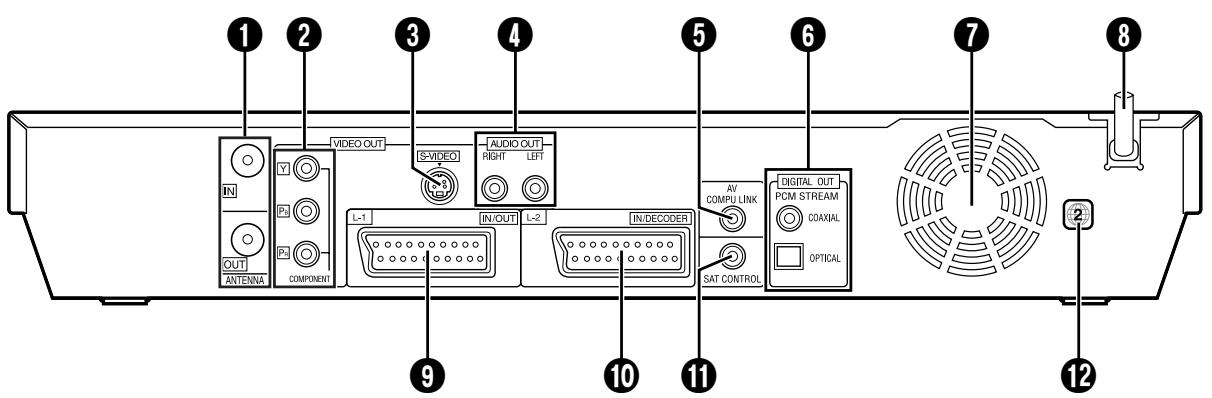
Recadrage/Letter-box
![INITIAL SET UP > GUIDE PROG SET GUIDE 3 CANAL DVD FR3 RETOUR SET UP ENTER SELECTIONZ AVEC PUS APPROVEZ SUR [ENTER] SORTS SEL PRESS [SET UP] TO EXIT](/content/2019/11/123615/images/caa982e2b22caf163dc19aa0ede91b60ef0b115fd5f2e59bd68ea56839a22773.jpg)
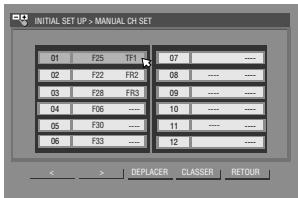
Réglage du tuner

COPIE INTERDITE LECTURE IMPOSSIBLE
Y : 1,0 Vc-c, 75 ohms
Y : 1,0 Vc-c, 75 ohms
CB/CR, PB/PR : 0,7 Vc-c, 75 ohms