
PACT 10HP - Portable air conditioner DELONGHI - Free user manual and instructions
Find the device manual for free PACT 10HP DELONGHI in PDF.


| Product type | Portable air conditioner |
| Brand | DELONGHI |
| Model | PACT 10HP |
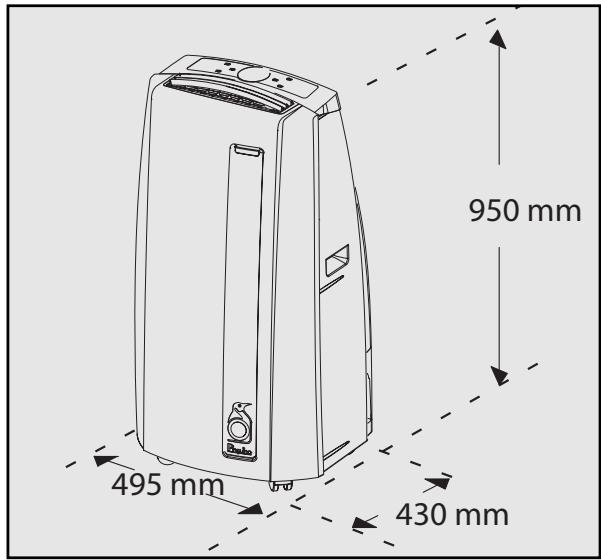
| Dimensions (L x H x D) | 495 x 950 x 430 mm |
| Weight | 34 kg |
| Refrigerant | R410A (GWP=1975) |
| Power supply | Mains, see rating plate |
| Operating modes | Cooling, Dehumidification, Ventilation, Heating (heat pump), Smart |
| Additional functions | On/off timer, Sleep, Swing, Ionizer (depending on model) |
| Filters | Ionic silver filter + 3M® electrostatic filter |
| Water management | Condensate water tank with manual or continuous drainage |
| Air exhaust hose | Adjustable length, diameter 134 mm for fixed installation |
| Remote control | Yes, with AAA batteries (2x 1.5V) |
| Fan speeds | 4 (Auto, High, Medium, Low) |
| Operating temperature range | Cooling: 21-35°C; Heating: 10-27°C |
| Maintenance | Weekly cleaning of ionic silver filter; Seasonal replacement of 3M® filter |
| Safety | Frost protection, automatic tank full stop, automatic diagnostics |
| Warranty | According to supplied document |
Frequently Asked Questions - PACT 10HP DELONGHI
User questions about PACT 10HP DELONGHI
0 question about this device. Answer the ones you know or ask your own.
Ask a new question about this device
Download the instructions for your Portable air conditioner in PDF format for free! Find your manual PACT 10HP - DELONGHI and take your electronic device back in hand. On this page are published all the documents necessary for the use of your device. PACT 10HP by DELONGHI.
USER MANUAL PACT 10HP DELONGHI
- Use this appliance only as described in this instruction manual. As with all electrical equipment, whilst the instructions aim to cover as many eventualities as possible, caution and common sense should be applied when operating and installing this appliance.
- This appliance is designed for home air conditioning and must not be used for other purposes
- It is dangerous to modify or alter the characteristics of the appliance in any way.
- The appliance must be installed in conformity with national legislation regulating electrical equipment and installations.
- If the appliance requires repair, contact a Service Centre authorised by the manufacturer only. Repairs carried out by unauthorised personnel may be dangerous.
- This appliance must be used exclusively by adults.
- Never allow the appliance to be used by people (including children) with psychological, physical or sensory impairments or with insufficient experience and knowledge, unless closely supervised and instructed by someone responsible for their safety. Young children should be supervised to ensure that they do not play with the appliance.
- The appliance must be connected to an efficient earth system. Have your electrical circuit checked by a qualified electrician.
- Do not use extension cables.
- Before cleaning or maintenance, always unplug the appliance from the mains socket.
- Never unplug the appliance by pulling on the power cable.
- Do not install the appliance in rooms containing gas, oil or sulphur. Do not install near sources of heat
- Keep the appliance at least 50 cm away from flammable substances (alcohol etc) or pressurised containers (eg aerosol cans).
- Do not rest heavy or hot objects on top of the appliance.
Clean the air filter at least once a week. - Avoid using heating appliances near the air conditioner.
- Always transport the appliance upright or resting on one side. Before moving the appliance, empty the internal circuit completely of water. After moving the appliance, wait at least 1 hour before starting it.
- When putting the appliance away, do not cover with plastic bags.
- The materials used for packaging can be recycled. You are therefore recommended to dispose of them in special differentiated waste collection containers.
- At the end of its working life, consign the appliance to a specialist collection centre.
- If the power cable is damaged, it must be replaced by the manufacturer or an authorised technical service centre in order to avoid all risk.
- R410A refrigerant gas conforms to EC regulations on the environment. Avoid perforating the refrigerant circuit of the appliance.
- ENVIRONMENTAL INFORMATION: This unit contains fluorinated greenhouse gases covered by the Kyoto Protocol. Maintenance and disposal must be carried out by qualified personnel only (R410A, GWP=1975).
Important information for correct disposal of the product in accordance with EC Directive 2002/96/EC.
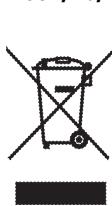
At the end of its working life, the product must not be disposed of as urban waste. It must be taken to a special local authority differentiated waste collection centre or to a dealer providing this service. Disposing of a household appliance separately avoids possible negative consequences for the environment and health deriving from inappropriate disposal and enables the constituent materials to be recovered to obtain significant savings in energy and resources. As a reminder of the need to dispose of household appliances separately, the product is marked with a crossed-out wheeled dustbin.
ELECTRICAL CONNECTIONS
Before plugging the appliance into the mains socket, check that:
- the mains power supply corresponds to the value indicated on the rating plate on the back of the appliance;
- the power socket and electrical circuit are adequate for the appliance.
- the mains socket matches the plug. If this is not the case, have the plug replaced;
- the mains socket is adequately earthed. Failure to follow these important safety instructions absolves the manufacturer of all liability.
During the summer, you feel comfortable at a temperature of between 24 and 27° C with a relative humidity of about 50% .
An air conditioner removes excess moisture and heat from the room where it is located. Compared with installed models, portable air conditioners have the advantage that they can be moved from one room to another in the home or be transported from one building to another.
Hot air from the room is passed through a heat exchanger cooled by refrigerant gas. Excess heat and moisture are removed before the air is re-emitted into the room.
In single unit models, a small part of this air is used to cool the refrigerant gas and then, when hot and damp, is discharged outside.
In the spring and autumn, the appliance can also be used to heat.
The efficient heat pump system provides a high heating capacity with low energy consumption.
All Pinguino models can also be used in fan-only mode.
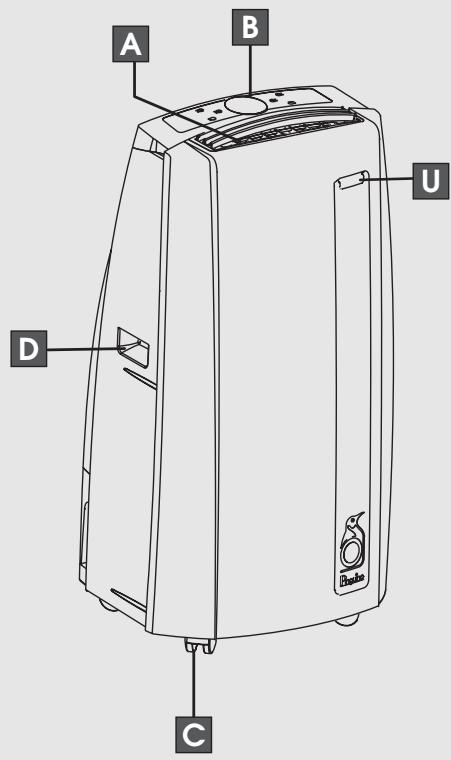
DESCRIPTION
A air outlet grille
B control panel
C castors
D handles
E air intake grille with filters
F air exhaust hose housing
G intake grille
H continuous condensate drain connection
condensate tank
J power cable
K flange cap
air exhaust hose
M window outlet
N suckers
O castor locks
P continuous drain hose with coupling
Q remote control
R 3M® air purifying filter
silver ion filter
T adjustable bar
U remote control receiver
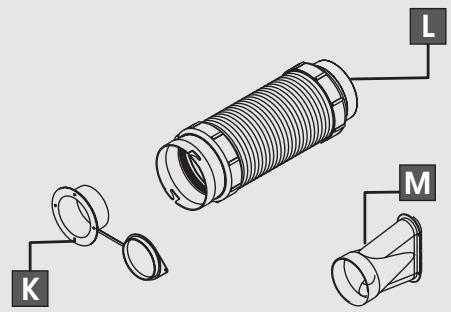
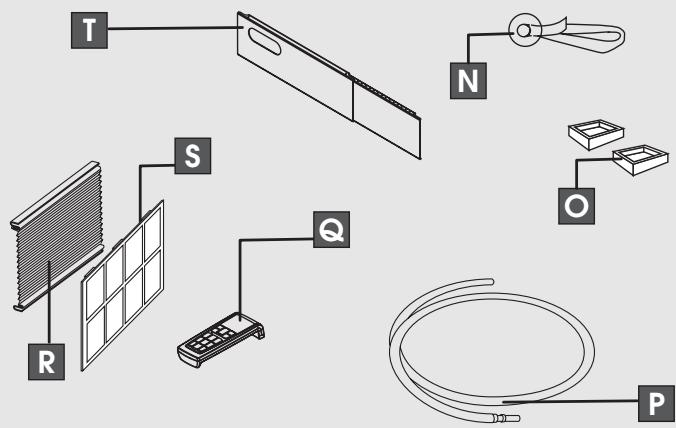
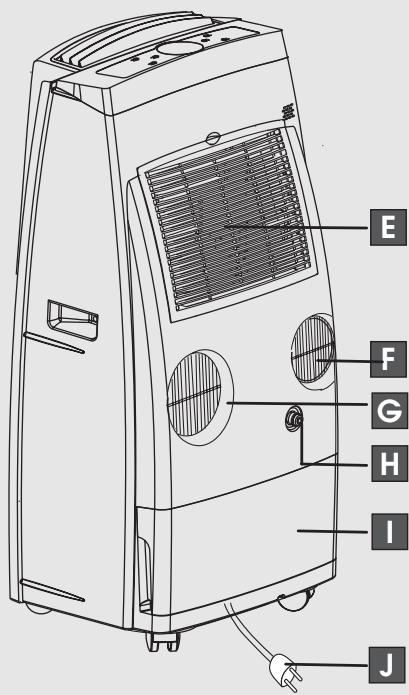
The instructions below will enable you to prepare your air conditioner for operation as efficiently as possible.
Before use, make sure the air intake and outlet grilles are unobstructed.
AIR-CONDITIONING WITHOUT INSTALLATION
Just a few simple steps and your comfort is ensured with your appliance:
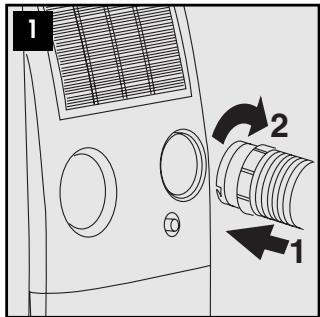
- Fit the air exhaust hose in the housing at the back of the appliance (fig. 1).
- Fit the window outlet to the end of the hose.
- Place the air conditioner near a window or French window.
- Adjust the length of the hose to reach the window.
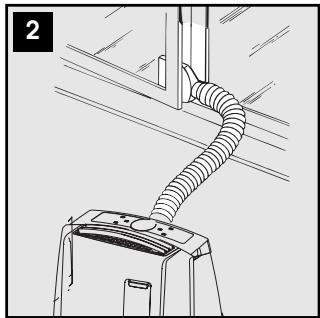
Make sure the air exhaust hose is unobstructed. - Open the window or French window slightly and position the outlet (fig. 2).
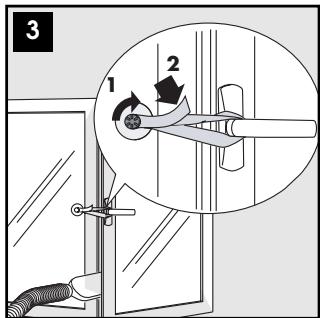
- If you have a double window, use the sucker provided to hold the two parts of the window together (fig. 3).
You can also use the "adjustable bar" (T) accessory.
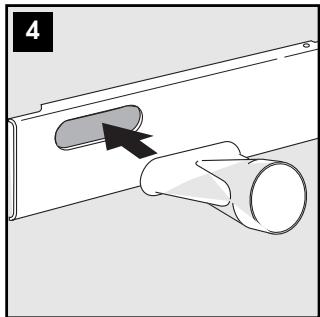
- Fit the window outlet in the housing in the bar (fig. 4)
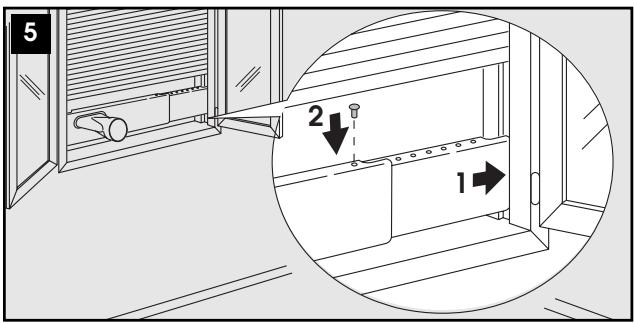
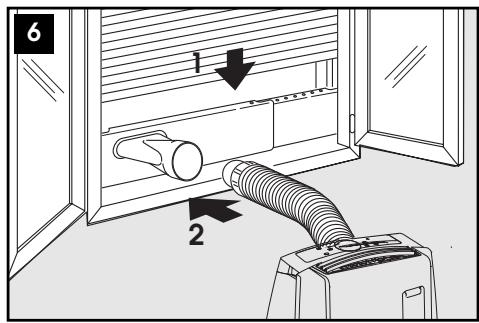
- Position the bar on the window sill and adjust until it fits in the guides of the blind (the length can be blocked with the plastic pin provided), then lower the blind (fig. 5).
- Fit the air exhaust hose to the end of the window outlet (see fig. 6).
- Place the air conditioner near a window or French window and connect the end of the hose.
Keep the air hose as short and free of curves as possible to avoid bottlenecks.
AIR-CONDITIONING WITH INSTALLATION
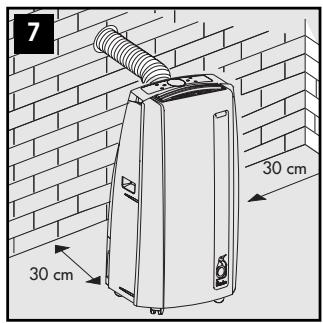
If required, your appliance can also be installed semi-permanently (Fig. 7).
Proceed as follows:
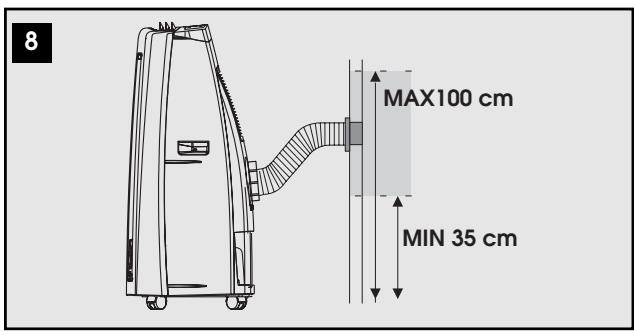
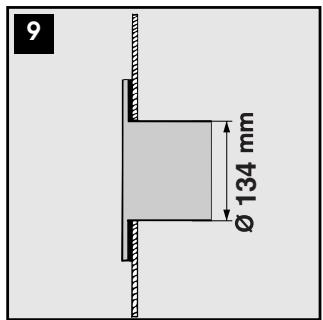
- Drill a 134 mm dia. hole respecting the heights shown in fig. 8.
in the window pane
- Fit the flange accessory provided in the hole following the indications in figs. 9, 10 and 11.
- Fit the hose in the housing at the back of the appliance (fig. 1).
- Fit the end of the hose to the flange as shown in fig. 8. When the hose is not fitted, the hole can be closed with the flange cap.
Keep the air hose as short and free of curves as possible to avoid bottlenecks.
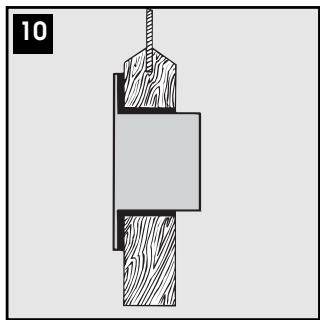
in the wooden kickboard of a French window
- When installing the air conditioner semi-permanently, you should leave a door slightly open (as little as 1 cm ) to guarantee correct ventilation.
- When using the appliance to heat a room with a high level of humidity, condensate may appear on the outside of the air exhaust hose. To avoid this, you can cover the hose with insulation.
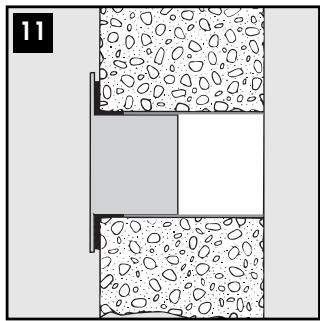
in the wall: you are recommended to insulate the section of wall using suitable insulation.
DESCRIPTION OF CONTROL PANEL
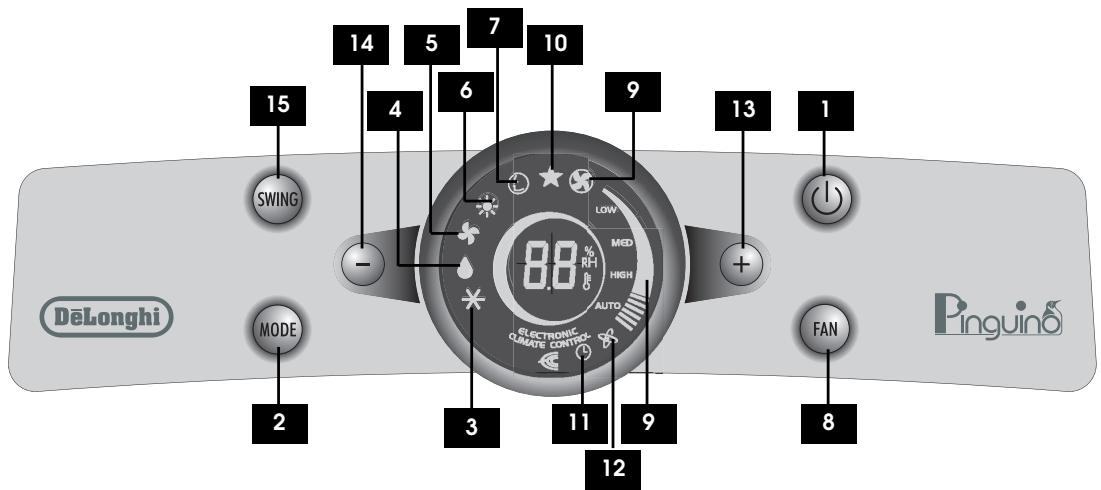
1 ON/Standby button (on/off)
2 MODE button (selects the modes): Air conditioning, dehumidifying, air purifying/fan, heating, Smart.)
3 Air conditioning symbol
4 Dehumidifying symbol
5 Air purifying/fan symbol
6 Heating symbol
7 Smart symbol
8 Fan speed button: Low - Med - High - Auto.
9 Speed indicator
10 SLEEP symbol
11 "Timer" symbol
12 "Ioniser" symbol (certain models only)
13 Increase button (+)
17 Decrease button (-)
15 SWING button (movement of the grille flaps)
The control panel enables you to manage all the main functions of the appliance, but to fully exploit its potential, you must use the remote control unit.
TURING THE APPLIANCE ON
Plug into the mains socket.
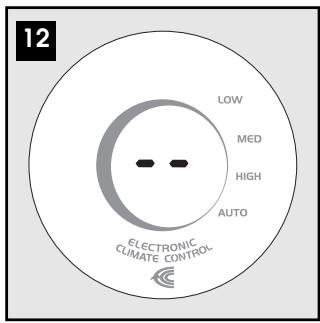
Two lines appear on the display indicating that the appliance is in standby (fig. 12).
- Press the button until the appliance comes on. The last function active when it was turned off will appear. When turned on for the first time, the appliance will be in "air conditioning" mode. Subsequently it will be in the same mode as when turned off.
Never turn the air conditioner off by unplugging from the mains. Always press the button, then wait for a few minutes before unplugging. This allows the appliance to perform a cycle of checks to verify operation.

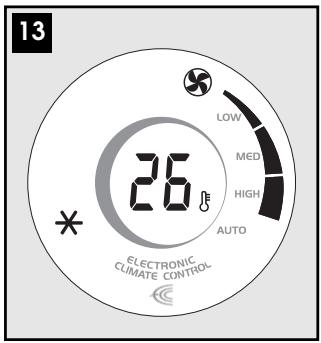
AIR CONDITIONING MODE (FIG. 13)
Ideal for hot muggy weather when you need to cool and dehumidify the room.
To set this mode correctly:
- Press the MODE button a number of times until the air-conditioning symbol (3) appears.
- Select the target temperature by pressing the + or - button until the corresponding value is displayed.
- Select the required fan speed by pressing the FAN button. Four speeds are available:
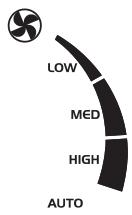
High speed: to achieve the target temperature as rapidly as possible
Medium speed: reduces noise levels but still maintains a good level of comfort
Low speed: for silent operation
Auto speed: the appliance automatically selects the most suitable fan speed in relation to the temperature set on the digital display.
The most suitable temperature for the room during the summer varies from 24 to 27°C . You are recommended, however, not to set a temperature much below the outdoor temperature.

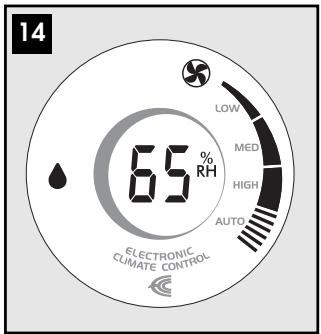
DEHUMIDIFYING MODE (FIG. 14)
Ideal to reduce room humidity (spring and autumn, damp rooms, rainy periods, etc).
Place the appliance in the room without fitting the air exhaust hose (L).
To set this mode correctly:
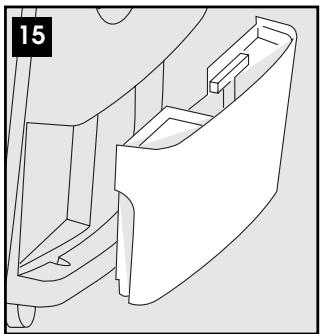
- Press the MODE button a number of times until the dehumidifying symbol (4) appears, then press the + or - button until the required humidity level is displayed. At the same time, the Auto fan light comes on as the appliance automatically selects the most appropriate speed. Water is removed from the air and collected in the tank at the back of the air conditioner. When the tank is full, the appliance shuts down and FL (full tank) appears on the display. The tank must be extracted and emptied (fig. 15). When the tank has been emptied, the appliance starts up again.
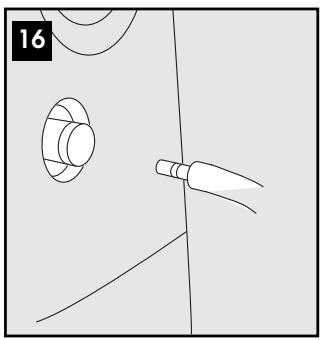
The accessory continuous drain hose enables the condensate produced to be eliminated without requiring the tank to be emptied periodically. Fit the hose with the rapid coupling as shown in fig. 16.
NB: In order for the continuous drain function to operate correctly, make sure the accessory is fully connected to the coupling. To release, press the coupling flange.

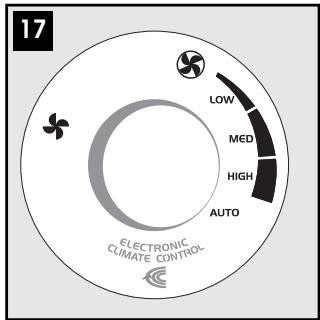
AIR PURIFYING/FAN MODE (FIG. 17)
When using the appliance in this mode, the air exhaust hose does not need to be attached.
To set this mode correctly:
- Press the MODE button a number of times until the fan symbol appears.
- Select the required fan speed by pressing the FAN button. Three speeds are available:
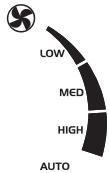
High speed: for maximum fan power
Medium speed: reduces noise levels but still maintains a good level of comfort
Low speed: for silent operation
In this mode, AUTO speed cannot be selected.

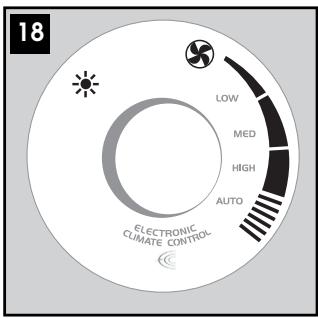
HEATING MODE (FIG. 18)
To set this function correctly:
- Press the MODE button a number of times until the heating symbol (6) appears.
- Select the required temperature by pressing the + or - button until the corresponding value is displayed.
- In heating mode, the fan speed is selected automatically by the appliance.
Water is removed from the air and collected in the tank at the back of the air conditioner.
When the tank is full, the appliance shuts down and " F " (full tank) appears on the display. The tank must be extracted and emptied (fig. 15).
When the tank has been emptied, the appliance starts up again. The continuous drain hose accessory enables the condensate produced to be eliminated without requiring the tank to be emptied periodically.
To use the continuous drain function, fit the hose with the rapid coupling as shown in fig. 16.

SMART MODE (FIG. 19)
To select this mode, press the MODE button a number of times until the SMART symbol (7) appears.
In this mode, the appliance decides automatically whether to operate in air conditioning, fan or heating mode, the most suitable temperature for optimum well-being and the fan speed.

SWING BUTTON (15)
Moves the grille flaps to distribute the cool air uniformly in the room.
- When the SWING button is pressed once, the flaps begin moving alternately forwards and backwards. Press the SWING button again to stop the flaps in their current position. Pressing the button again will restart the flaps moving forwards and backwards.
- When the appliance is turned off, the flaps will close irrespective of their position.
When operating in very cold rooms, the appliance defrosts automatically, momentarily interrupting normal operation. "L" appears on the display. During this operation, it is normal for the noise made by the appliance to change.
In this mode, the fan may operate for short periods, even though the set temperature has already been reached.
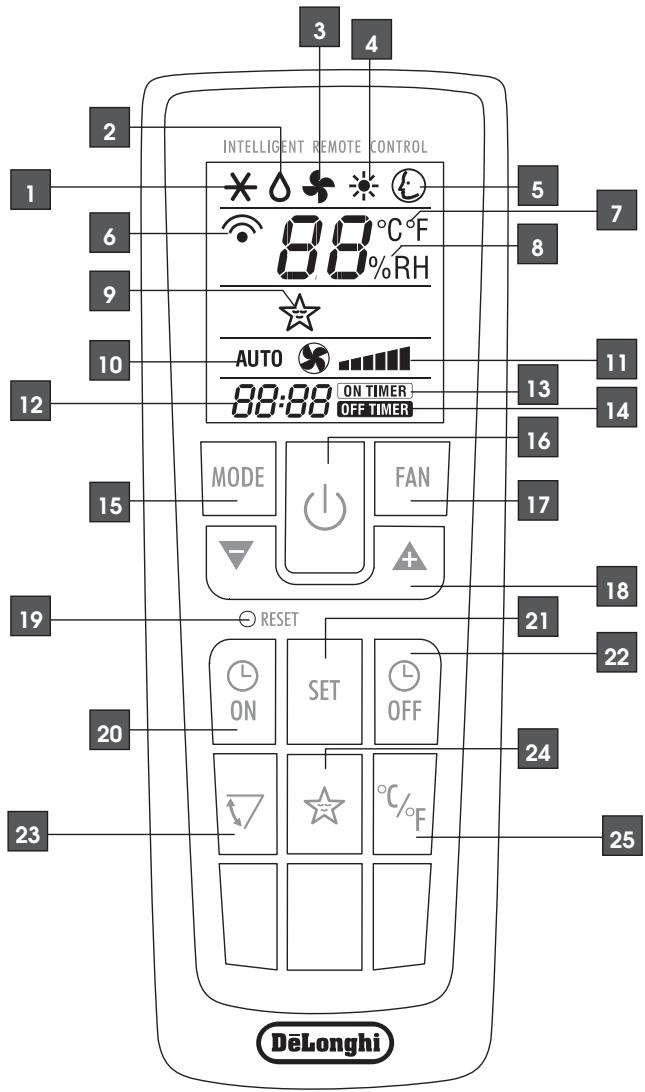
1 Air conditioning symbol
2 Dehumidifying symbol
3 Fan symbol
4 Heating symbol
5 SMART symbol
6 Signal transmission
7 Selected temperature scale indicator
8 Relative humidity indicator
9 SLEEP symbol
10 AUTO fan speed indicator
11 Fan speed indicator
12 Clock
13 Timer ON symbol
14 Timer OFF symbol
15 MODE button (selects the modes)
16 ON/Standby button
17 FAN button
18 Increase (+) and decrease (-) button
19 Reset button (resets the factory default settings)
20 Timer ON button
21 SET button
22 Timer OFF button
23 SWING button
24 SLEEP button
25 °C or °F selection button
USING THE REMOTE CONTROL

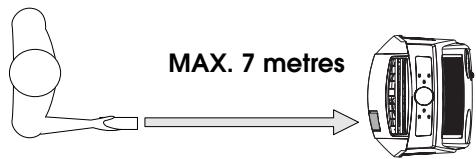
Point the remote control at the receiver on the appliance. The remote control must be no more than 7 metres away from the appliance (without obstacles between the remote control and the receiver).

The remote control must be handled with extreme care. Do not drop it or expose it to direct sunlight or sources of heat.
INSERTING OR REPLACING THE BATTERIES
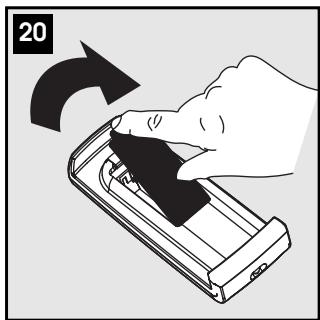
- Remove the cover on the rear of the remote control (fig. 20);
- Insert two R03 "AAA" 1.5V batteries in the correct position (see instructions inside the battery compartment);
- Replace the cover.
If the remote control unit is replaced or disposed of, the batteries must be removed and discarded in accordance with current legislation as they are harm-
ful to the environment.
SETTING THE TIME
After having inserted the batteries, the clock on the display flashes until the time is set.
Proceed as follows:
- Press the + or - button until the correct time is reached. Hold the button down to run rapidly through first the minutes, then the tens of minutes and then the hours.
- Once the correct time has been reached, press the SET button to confirm.
If you need to change the time later, press the SET button, then set as described above.
To cancel the settings programmed on the remote control and restore the original settings, press the RESET button lightly with the point of a pencil or pen.
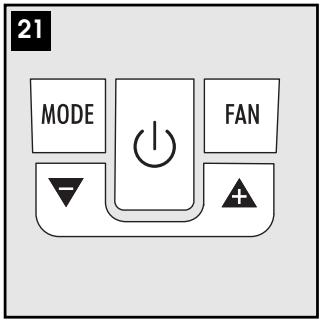
USING THE REMOTE CONTROL UNIT (FIG. 21)
The ON/Standby, MODE, FAN + and - buttons correspond to the equivalent buttons on the control panel.
ON/STANDBY BUTTON: Turn the appliance on and off.
MODE BUTTON: Select modes: AIR CONDITIONING, DEHUMIDIFYING, AIR PURIFYING, FAN, HEATING, SMART
FAN BUTTON: selects fan speed (High, Medium, Low, Auto)
- and - BUTTON: increase and decrease
To use these buttons see the section "Operating from the control panel".
The following section describes the additional functions corresponding to the controls on the bottom part of the remote control.

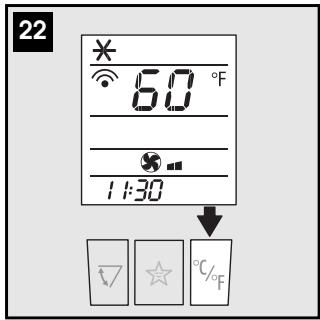
SELECTING THE TEMPERATURE SCALE (FIG. 22)
Press the 0 % F button to switch the temperature display from degrees Centigrade to degrees Fahrenheit and vice versa.

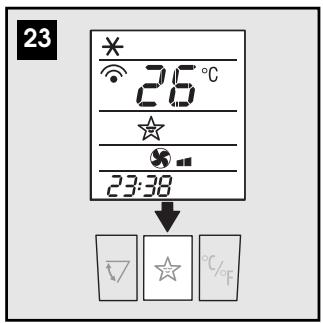
SLEEP FUNCTION (FIG. 23)
This function is useful for the night as it gradually reduces operation of the appliance.
To set this function correctly:
- Select the operating mode (air conditioning, dehumidifying, heating or smart as described above.
- Press the button. The appliance operates in the previously selected mode.
The SLEEP function maintains the room at optimum temperature without excessive fluctuations in either temperature or humidity and with silent operation.
Fan speed is always at minimum, while room temperature and humidity vary gradually to ensure the most comfortable conditions.
During air conditioning, the temperature increases by 1°C every 60 minutes and a further degree after 2 hours.
In dehumidifying mode, the dehumidifying power of the appliance is partially reduced every hour twice.
In heating mode, the temperature drops by 1° C every hour, three times.

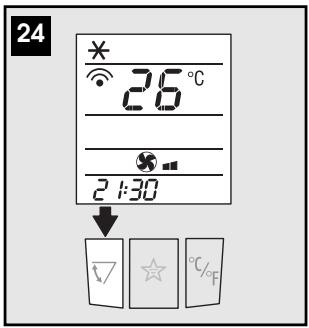
SWING FUNCTION (FIG. 24)
The SWING function moves the grille flaps to distribute the air uniformly in the room.
When the SWING button is pressed and the flaps have begun moving alternately forwards and backwards, pressing the button again will lock the flaps in their current position.
Pressing the button again will restart the flaps moving forwards and backwards.
When the appliance is turned off, the flaps will close irrespective of their position.
PROGRAMMING THE TIMER
The timer can be programmed to start up and shut down to fit in with your needs.
Programming start up
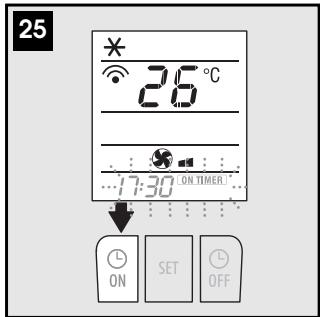
- Press the ON button. The start-up time and message "ON TIMER" flash on the remote control display (fig. 25).
- Press the or buttons to set the time you want the appliance to start up.
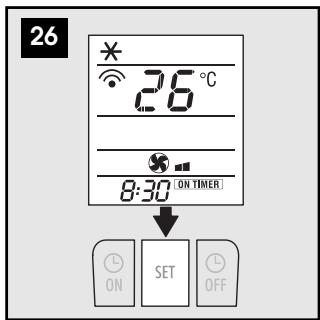
- When that time is reached, press the SET button to confirm (fig. 26). The message "ON TIMER" appears on the remote control display and the symbol is displayed on the appliance to indicate that the timer is active.
Programming shutdown
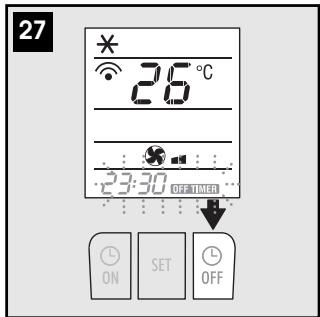
- Press the OFF button. The shutdown time and the message "OFF TIMER" flash on the remote control display (fig. 27).
- Press the or A buttons to set the time you want the appliance to shut down.
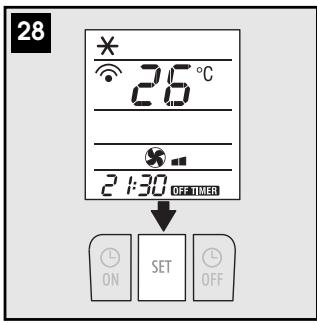
- When that time is reached, press the SET button to confirm (fig. 28). The message "OFF TIMER" appears on the remote control display and the ① symbol is displayed on the appliance to indicate that the timer is active.
SELF-DIAGNOSIS
The appliance has a self diagnosis system to identify a number of malfunctions.
Error messages are displayed on the appliance display.
| IF IS DISPLAYED... | ...WHAT SHOULD I DO? | IF IS DISPLAYED... | ...WHAT SHOULD I DO? |
| LOW MEL MHI AUTO | The appliance is fitted with a frost protection device to avoid excessive formation of ice. The appliance starts up again automatically when the defrosting process is completed. | FULL TANK | Empty the tank on the back of the appliance and replace it correctly. The continuous drain hose is not connected correctly or is obstructed and the air conditioner is draining into the tank. NB: in dehumidifying mode, it is normal for this message to appear. |
| LOW MEL MHI AUTO | If this is displayed, contact your local authorised service centre. | FAILURE 1 (pump failure) | If this is displayed, contact your local authorised service centre. |
| PROBE FAILURE (sensor damaged) |
To get the best from your air conditioner, follow these recommendations:
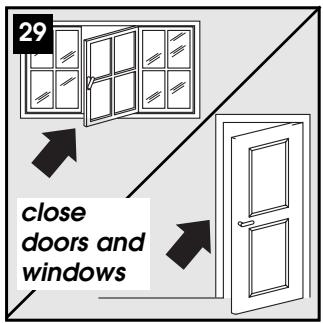
- close the windows and doors in the room to be air conditioned (fig. 29). When installing the air conditioner semi-permanently, you should leave a door slightly open (as little as 1cm ) to guarantee correct ventilation.
- Protect the room from direct exposure to the sun by partially closing curtains and/or blinds to make the appliance much more economical to run (fig. 30);
- never rest objects of any kind on the air conditioner;
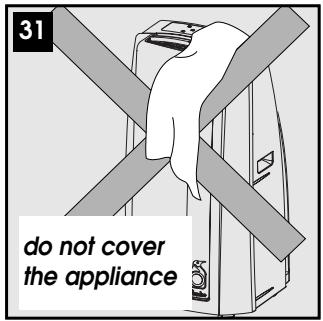
- do not obstruct the air intake and outlet (fig. 31). Leave the grilles free;
make sure there are no heat sources in the room. - never use the appliance in very damp rooms (laundries for example).
- never use the appliance outdoors.
- make sure the air conditioner is standing on a level surface. If necessary, place the castor locks under the front wheels.
AIR PURIFYING FILTERS
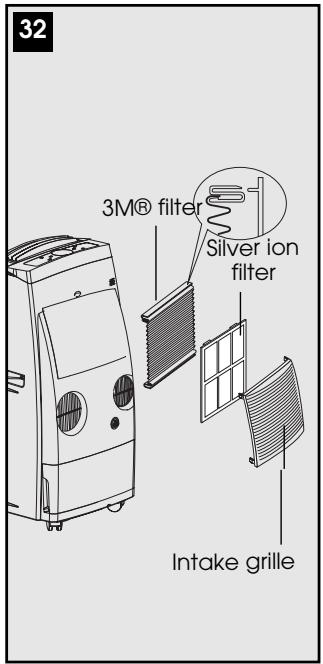
he appliance is fitted with a silver ion dust filter which retains the impurities in the air drawn in from the room and a 3M® electrostatic filter which retains the finest dust particles (fig. 32).
SILVER ION FILTER
The silver ion filter not just retains dust particles, but also has an efficient antibacterial action. It also greatly reduces concentrations of irritants such as pollen and spores.
The filter is treated with small particles of silver (on the scale of millionths of a millimetre) which are able to block the multiplication of and destroy any bacteria or spores they come into contact with.
3M® ELECTROSTATIC FILTER
The 3M® electrostatic filter retains the finest dust particles, thus enhancing the filtering capacity of the appliance.
To use the 3M® electrostatic filter:
A) Remove the intake grille
B) Remove the filter from the packaging
C) Use the two plastic edges of the 3M® filter to hook it to the special attachments on the dust filter already inside the intake grille.
D) Replace the grille on the appliance.

CLEANING
Before cleaning or maintenance, turn the appliance off by pressing the () button on the control panel or remote control, wait for a few minutes then unplug from the mains socket.
CLEANING THE CABINET
You should clean the appliance with a slightly damp cloth then dry with a dry cloth.
- Never wash the air conditioner with water. It could be dangerous.
- Never use petrol, alcohol or solvents to clean the appliance.
- Never spray insecticide liquids or similar.
CLEANING THE AIR FILTERS
To keep your air conditioner working efficiently, you should:
- Clean the silver ion filter every week of operation.
-
Replace the 3M® air purifying filter at the end of each season or when exhausted (see the instructions near the filter housing on the appliance). The filters are housed in the intake grille. To clean the filters, proceed as follows.
-
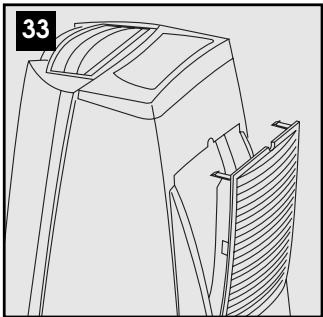
Remove the intake grille by rotating outwards (fig. 33).
- Remove the 3M® air purifying filter (white).
- Remove the silver ion filter by detaching it from the grille.
Use a vacuum cleaner to remove dust accumulations from the silver ion filter.
If it is very dirty, immerse in warm water and rinse a number of times.
The water should never be hotter than 40°C .
After washing, leave the filter to dry.
To replace, put the filters back in the intake grille then attach the intake grille to the appliance.

Never try and wash or clean the 3M® filter as this could reduce its filtering capacity. When the filter is exhausted, replace it.
START OF SEASON CHECKS
Make sure the power cable and plug are undamaged and the earth system is efficient.
Follow the installation instructions precisely.
END OF SEASON OPERATIONS
Place the appliance in STAND-BY.
To empty the internal circuit completely of water, press the MODE and FAN buttons simultaneously for a number of seconds without removing the tank. The water in the internal circuit will drain into the tank or through the continuous drain hose if connected. Make sure the other end of the hose is near a suitable drain. When completely drained, disconnect the continuous drain hose.
Clean the filters and dry thoroughly before putting them back.
| PROBLEM | CAUSE | SOLUTION |
| The air conditioner does not come on | ·there is no current ·it is not plugged into the mains ·the internal safety device has tripped | ·wait ·plug into the mains ·call the Service Centre |
| The air conditioner works for a short time only | ·there are bends or kinks in the air exhaust hose | ·position the air exhaust hose correctly, keeping it as short and free of curves as possible to avoid bottlenecks ·check and remove any obstacles obstructing air discharge |
| ·something is preventing the air from being discharged | ||
| The air conditioner works, but does not cool the room | ·windows, doors and/or curtains open | ·close doors, windows and curtains, bearing in mind the "tips for correct use" given above |
| ·there are heat sources in the room (oven, hairdryer, etc) | ·eliminate the heat sources | |
| ·the air exhaust hose is detached from the appliance | ·fit the air exhaust hose in the housing at the back of the appliance (fig. 1). | |
| ·silver ion and 3M® filter clogged | ·clean the filters as described above | |
| ·the technical specification of the appliance is not adequate for the room in which it is located. | ||
| During operation, there is an unpleasant smell in the room | ·silver ion and 3M® filter clogged. | ·clean the filters as described above |
| The air conditioner does not operate for about three minutes after restarting it | ·the internal compressor safety device prevents the appliance from being restarted until three minutes have elapsed since it was last turned off. | ·wait. This delay is part of normal operation. |
| The following message appears on the display: LT / PF / FT / FI | ·The appliance has a self-diagnosis system to identify a number of malfunctions. | ·See the SELF-DIAGNOSIS chapter. |
TECHNICAL SPECIFICATIONS
Mains voltage
see rating plate
Maximum absorbed power in air conditioning
Maximum absorbed power in heating
Refrigerant
Cooling capacity
Heating power
LIMIT CONDITIONS
Temperature of room in air conditioning 21-35°C
Temperature of room in heating 10 ÷ 27° C
SIZE OF APPLIANCE
width 495 mm
height 950 mm
depth 430 mm
width 34 kg
GUARANTEE
The terms of the guarantee and technical assistance are given in the documentation accompanying your appliance.
- ELECTRICAL CONNECTIONS
- DESCRIPTION
- AIR-CONDITIONING WITHOUT INSTALLATION
- AIR-CONDITIONING WITH INSTALLATION
- KEEP THE AIR HOSE AS SHORT AND FREE OF CURVES AS POSSIBLE TO AVOID BOTTLENECKS
- DESCRIPTION OF CONTROL PANEL
- TURING THE APPLIANCE ON
- AIR CONDITIONING MODE (FIG. 13)
- DEHUMIDIFYING MODE (FIG. 14)
- AIR PURIFYING/FAN MODE (FIG. 17)
- HEATING MODE (FIG. 18)
- SMART MODE (FIG. 19)
- SWING BUTTON (15)
- USING THE REMOTE CONTROL
- INSERTING OR REPLACING THE BATTERIES
- SETTING THE TIME
- USING THE REMOTE CONTROL UNIT (FIG. 21)
- SELECTING THE TEMPERATURE SCALE (FIG. 22)
- SLEEP FUNCTION (FIG. 23)
- SWING FUNCTION (FIG. 24)
- PROGRAMMING THE TIMER
- PROGRAMMING START UP
- PROGRAMMING SHUTDOWN
- SELF-DIAGNOSIS
- AIR PURIFYING FILTERS
- SILVER ION FILTER
- 3M® ELECTROSTATIC FILTER
- CLEANING
- CLEANING THE CABINET
- CLEANING THE AIR FILTERS
- START OF SEASON CHECKS
- END OF SEASON OPERATIONS
- TECHNICAL SPECIFICATIONS
- LIMIT CONDITIONS
- SIZE OF APPLIANCE
- GUARANTEE
Brand : DELONGHI
Model : PACT 10HP
Category : Portable air conditioner