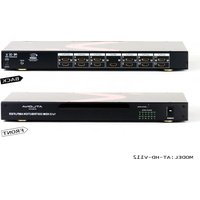
AT-HD-V112 - HDMI switch Atlona - Free user manual and instructions
Find the device manual for free AT-HD-V112 Atlona in PDF.


| Product Type | 1x12 HDMI Distribution Amplifier |
| Brand | Atlona |
| Model | AT-HD-V112 |
| Number of Inputs | 1 x HDMI |
| Number of Outputs | 12 x HDMI |
| Maximum Resolution | Up to 1080p or 1920x1200 (WUXGA) |
| Video Bandwidth | 6.75 Gbps |
| Audio Support | DTS-HD Master Audio, Dolby TrueHD, Dolby Digital Plus |
| Color Depth | Up to 36-bit Deep Color |
| HDCP Compliance | Yes |
| Control Methods | Front panel buttons, IR remote, IR extender (up to 300m) |
| Power Supply | 12V DC (included) |
| Safety Approvals | CE, FCC, RoHS |
| Package Contents | Splitter unit, instruction manual, IR remote, power adapter, 19-inch rack ears, IR extender receiver |
| Rack Mountable | Yes, with included 19-inch rack ears |
| LED Indicators | Input and output status LEDs |
| Color Space Conversion | Bi-directional RGB/YCbCr |
| IR Extender Distance | Up to 300m (1000ft) |
| HDMI Cable Distance | Up to 45ft (13.7m) at 6.75 Gbps |
| Warranty | 3 years limited |
Frequently Asked Questions - AT-HD-V112 Atlona
User questions about AT-HD-V112 Atlona
0 question about this device. Answer the ones you know or ask your own.
Ask a new question about this device
Download the instructions for your HDMI switch in PDF format for free! Find your manual AT-HD-V112 - Atlona and take your electronic device back in hand. On this page are published all the documents necessary for the use of your device. AT-HD-V112 by Atlona.
USER MANUAL AT-HD-V112 Atlona
- Introduction 3
- Features 3
- Specifications 3
- Package Contents 4
- Panel Descriptions 4
5.1 Front Panel 4
5.2 Rear Panel 4 - Remote Control 5
- IR Extender 5
7.1 IR Extender Connection 5 - Applications 6
- Safety Information 7
- Warranty 8
- Atlona Product Registration 9
7.2 The IR Extender Components Setup 6
INTRODUCTION
Atlona Technologies'AT-HD-V112 is a 1x12 HDMI Distribution Amplifier designed to work as a splitter for any High Definition Video application With 1 HDMI Input and 12 HDMI Outputs, the AT-HD-V112 is capable of splitting High Definition signal from one source to twelve separate displays with compatible inputs With a built in amplifier, this unit has the ability to boost thH signal great distances, while preventing both signal loss and picture degradation. This splitter supports data rates up to 6.75 Gbps and enables HDMI formats at resolutions up to 1080p or 1920x1200 and WUXGA DVI resolution at (1920x1200) With HDCP Compatibility, Atlona's 1x12 HDMI Distribution Amplifier is perfect for all applications sending High Definition Video signal to multiple displays.
FEATURES:
• 1x12 HDMI Distribution Amplifier: 12 HDMI Outputs, 1 HDMI Input
• HDMI and HDCP compliant
• Supports video bandwidth up to 675 Gbps
• Supports wide range of PC resolutions from VGA to WUXGA 1920x1200 and HDTV/DTV resolutions 4S0i/4S0p, 576i/576p, 720p, 10S0i and 10S0p
- Compatible with all HDMI sources and displays
• Supports Digital Video TMDS formats in Deep Color 36bits
• Supports color depth of up to 36
- Bi-directional color space conversion (SCS) between RGB and YCBCR color spaces
• Auto-Scan input and outputs status via LED display on front panel
• Control by Select buttons on front panel or IR Remote Controller
- IR Extender with 1000ft long distance
- Rack ear mount and 19 inch Rack mountable type panel
• Power supply 12V DC
• 1x12 HDMI Distributor: 1 x HDMI Input to 12 x HDMI Outputs
• Supports :HDMI Standard, DVI and HDCP Compliant
• Video Support: HDMI formats up to 10S0p or 1920x1200 and DVI up to WUXGA 1920x1200 HD resolutions
• Audio Support: DTS-HD Master Audio, Dolby True -HD & Dolby Digital Plus
SPECIFICATIONS:
| Compliant standard HDMI, DVI and HDCP | |
| HDTV Support HDMI formats up to 10S0p or 1920x1200 and WUXGA 1920x1200 resolution | |
| Controls Manual or IR Remote and IR Extender (Maximum Distance 300M) | |
| Data Rates 675 Gbps | |
| Pixel clocks 25MHz to 225 Mhz | |
| HDMI Cable Distance 45ft at 675Gbps | |
| Supports digital video standards | RGB/YCBCR : 24/30/36-bits; YCBCR :S/10/12/16/20/24-bits; Double data rate interface for RGB/YCBCR : 12/15/1S-bits |
| Infrared frequency 3SKHz | |
| Safety Approvals CE, FCC, RoHS | |
| Power Supply | 12V DC |
PACKAGE CONTENTS:
• 1x12 Splitter Unit (AT-HD-V112)
• Instruction Manual
- IR Remote Control
• Universal AC/DC power adapter: 12VDC
• 19 inch Ear mount pair
- IR Extender receiver
PANEL DESCRIPTIONS
1. Front Panel

- POWER SWITCH. The power switch turns the unit on and off. The LED will illuminate red to indicate that the switcher is ON
- INPUT SOURCES STATUS DISPLAY. Input source 1 LED illuminate blue to indicate desired video source is present on that input.
- OUTPUT SOURCES STATUS DISPLAY. Output 1-12 Status shows by LED display
- IR SENSOR. The IR sensor receives IR commands from the supplied remote control
- 19 INCH RACK EAR PAIR. 19 inch case Ear Mount pair
2. Rear Panel

-
DC POWER INLET Power Input: 12VDC
-
IR EXTENDER CONTROL Support one of IR Extender' extend distance maximum 300Meters
-
VIDEO INPUTS: HDMI Input 1
HDMI digital video/audio connector: HDMI Female connector
3, 5. VIDEO OUTPUTS: HDMI Outputs.
1-12 HDMI digital video/audio connector: HDMI Female connector
REMOTE CONTROL
Ensure the mains voltage supply matches the label on the supplied plug-Pack (+/- 10%)
Ensure that the power switch is OFF
Connect all audio video sources and destination equipment
Power up all HD Source and Displays
For each desired output select the appropriate input by using the front panel select buttons or IR remote control
When powering up the AT-HD-V112 will return to its last used setting before Powered down

1,2 SWITCH POWER ON or OFF
IR EXTENDER
1. IR Extender Connection
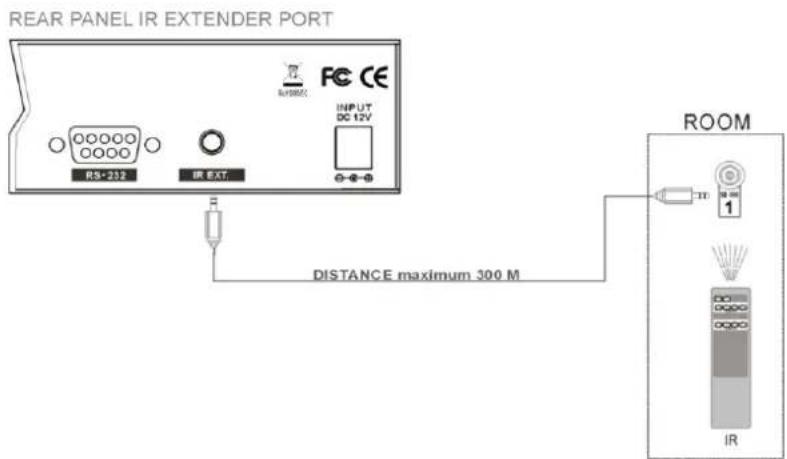
- The IR Extender Components Setup
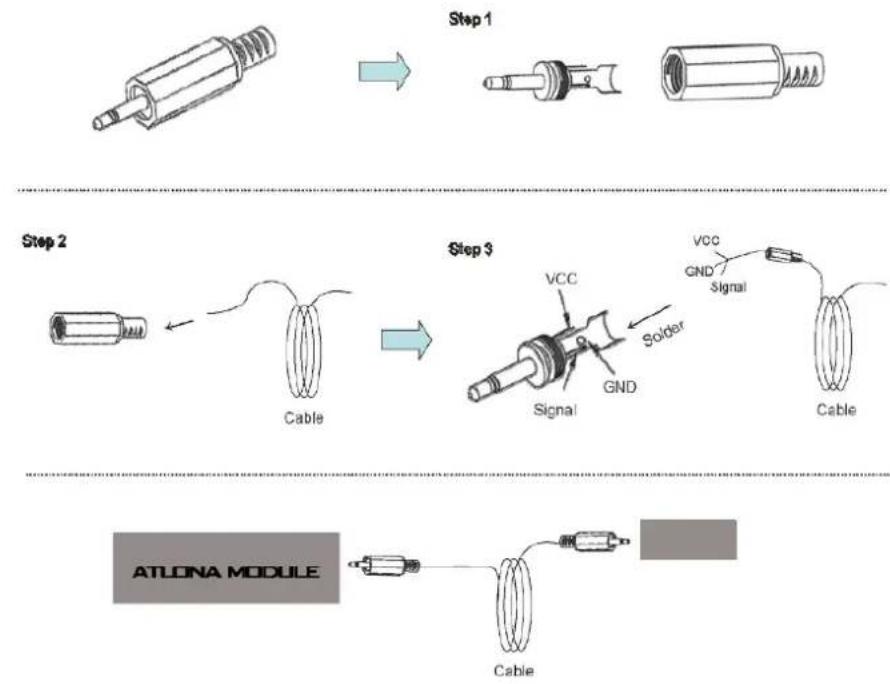
flowchart
graph TD
    A["Step 1: Wire connection"] --> B["Step 2: Cable"]
    B --> C["Step 3: Soldering"]
    C --> D["ATLONA MODULE: Cable"]
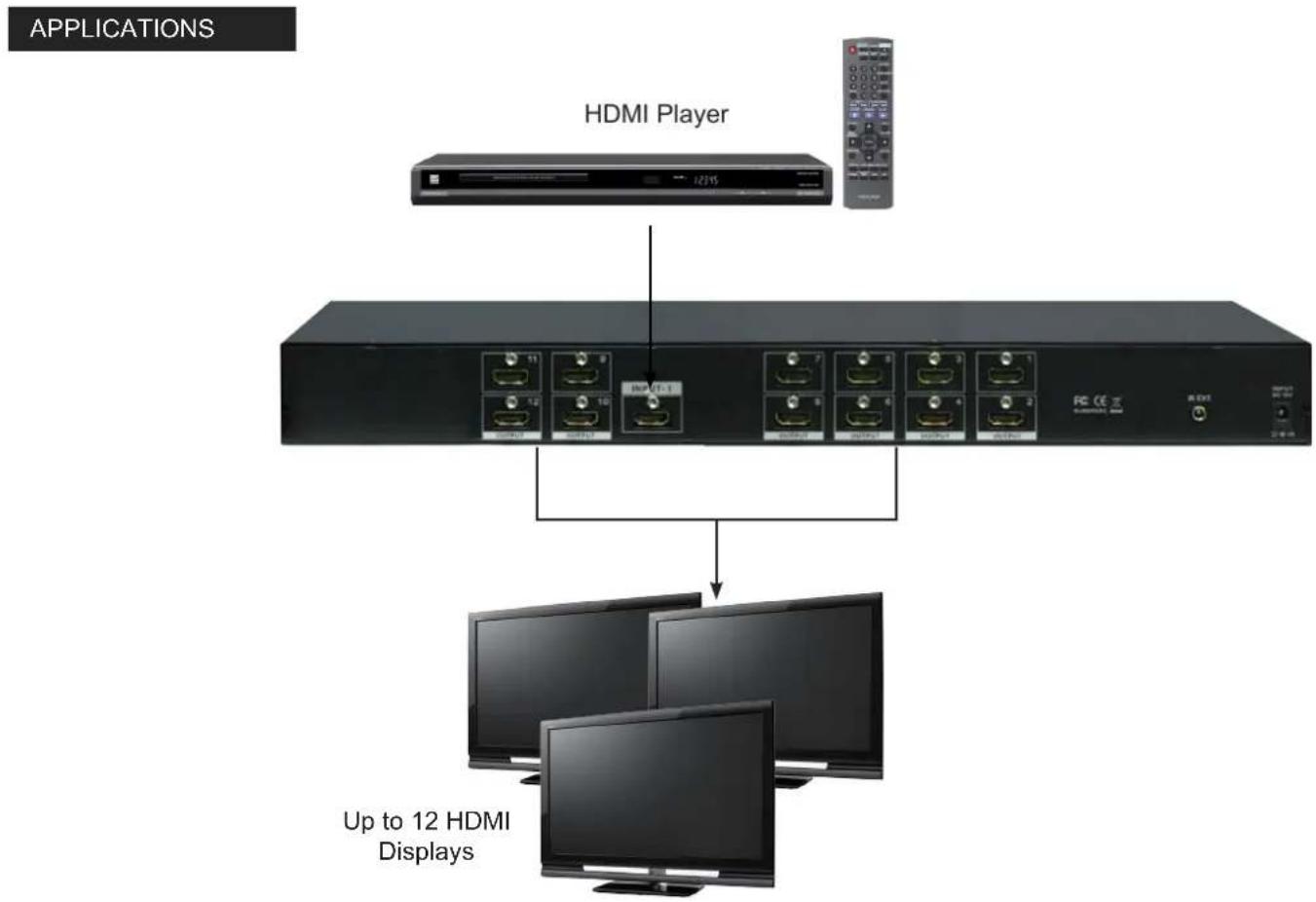
flowchart
graph TD
    A["HDMI Player"] --> B["Up to 12 HDMI Displays"]
    B --> C["HDMs with multiple connected devices"]
    C --> D["HDMs with one or more connected devices"]
    D --> E["HDMs with one or more connected devices"]
    E --> F["HDMs with one or more connected devices"]
    F --> G["HDMs with one or more connected devices"]
    G --> H["HDMs with one or more connected devices"]
    H --> I["HDMs with one or more connected devices"]
    I --> J["HDMs with one or more connected devices"]
    J --> K["HDMs with one or more connected devices"]
    K --> L["HDMs with one or more connected devices"]
    L --> M["HDMs with one or more connected devices"]
    M --> N["HDMs with one or more connected devices"]
    N --> O["HDMs with one or more connected devices"]
    O --> P["HDMs with one or more connected devices"]
    P --> Q["HDMs with one or more connected devices"]
    Q --> R["HDMs with one or more connected devices"]
    R --> S["HDMs with one or more connected devices"]
    S --> T["HDMs with one or more connected devices"]
    T --> U["HDMs with one or more connected devices"]
    U --> V["HDMs with one or more connected devices"]
    V --> W["HDMs with one or more connected devices"]
    W --> X["HDMs with one or more connected devices"]
    X --> Y["HDMs with one or more connected devices"]
    Y --> Z["HDMs with one or more connected devices"]
    Z --> AA["HDMs with one or more connected devices"]
    AA --> AB["HDMs with one or more connected devices"]
    AB --> AC["HDMs with one or more connected devices"]
    AC --> AD["HDMs with one or more connected devices"]
    AD --> AE["HDMs with one or more connected devices"]
    AE --> AF["HDMs with one or more connected devices"]
    AF --> AG["HDMs with one or more connected devices"]
    AG --> AH["HDMs with one or more connected devices"]
    AH --> AI["HDMs with one or more connected devices"]
    AI --> AJ["HDMs with one or more connected devices"]
    AJ --> AK["HDMs with one or more connected devices"]
    AK --> AL["HDMs with one or more connected devices"]
    AL --> AM["HDMs with one or more connected devices"]
    AM --> AN["HDMs with one or more connected devices"]
    AN --> AO["HDMs with one or more connected devices"]
    AO --> AP["HDMs with one or more connected devices"]
    AP --> AQ["HDMs with one or more connected devices"]
    AQ --> AR["HDMs with one or more connected devices"]
    AR --> AS["HDMs with one or more connected devices"]
SAFETY INFORMATION
Safeguards
To reduce the risk of electric shock, do not expose this product to rain or moisture.
If the wall plug does not fit into your local power socket, hire an electrician to replace your obsolete socket.
Do not modify the wall plug. Doing so will void the warranty and safety features.
This equipment should be installed near the socket outlet and the device should be easily accessible in case it requires disconnection.
Precautions
FCC Regulations state that any unauthorized changes or modifications to this equipment not expressly approved by the manufacturer could void the user's authority to operate this equipment.
Operate this product using only the included external power supply. Use of other power supplies could impair performance, damage the product or cause fires.
In the event of an electrostatic discharge, this device may automatically turn off. If this occurs, unplug the device, and plug it back in.
Protect and route power cords so they will not be stepped on or pinched by anything placed on or against them. Be especially careful of plug-ins, or cord exit points from this product.
Avoid excessive humidity, sudden temperature changes or temperature extremes.
Keep this product away from wet locations such as bathtubs, sinks, laundries, wet basements and swimming pools.
Use only accessories recommended by ATLONA to avoid fire, shock or other hazards.
Unplug the product before cleaning. Use a damp cloth for cleaning. Do not use cleaning fluid or aerosols, which could enter the unit and cause damage, fire or electrical shock. Some substances may also mar the finish of the product.
Never open or remove unit panels or make any adjustments not described in this manual. Attempting to do so could expose you to dangerous electrical shock or other hazards. It may also cause damage to your AT-HD-V112. Opening the product will void the warranty.
Do not attempt to service the unit. Instead disconnect it and contact your Authorized ATLONA reseller or contact ATLONA directly.
1. LIMITED WARRANTY
Atlona Technologies warrants that (a) its products (the "Product") will perform substantially in accordance with the accompanying written materials for a period of 3 YEARS from the date of receipt and (b) that the Product will be free from defects in materials and workmanship under normal use and service for a period of 3 years. In the event applicable law imposes any implied warranties, the implied warranty period is limited to 3 years from the date of receipt. Some jurisdictions do not allow such limitations on duration of an implied warranty, so the above limitation may not apply to Customer.
2. CUSTOMER REMEDIES
Atlona Technologies and its suppliers' entire liability and Customer's exclusive remedy shall be, at Atlona Technologies' option, either return of the price paid for the Product, or repair or replacement of the Product that does not meet this Limited Warranty and which is returned to Atlona Technologies with a copy of Customer's receipt. This Limited Warranty is void if failure of the Product has resulted from accident, abuse, or misapplication. Any replacement Product will be warranted for the remainder of the original warranty period or 3 year, whichever is longer.
3. NO OTHER WARRANTIES
TO THE MAXIMUM EXTENT PERMITTED BY APPLICABLE LAW, ATLONA TECHNOLOGIES AND ITS SUPPLIERS DISCLAIM ALL OTHER WARRANTIES, EITHER EXPRESS OR IMPLIED, INCLUDING, BUT NOT LIMITED TO IMPLIED WARRANTIES OF MERCHANTABILITY AND FITNESS FOR A PARTICULAR PURPOSE, WITH REGARD TO THE PRODUCT AND ANY RELATED WRITTEN MATERIALS. THIS LIMITED WARRANTY GIVES CUSTOMER SPECIFIC LEGAL RIGHTS. CUSTOMER MAY HAVE OTHER RIGHTS DEPENDING ON THE JURISDICTION.
4. NO LIABILITY FOR DAMAGES
TO THE MAXIMUM EXTENT PERMITTED BY APPLICABLE LAW, IN NO EVENT SHALL ATLONA TECHNOLOGIES OR ITS SUPPLIERS BE LIABLE FOR ANY DAMAGES WHATSOEVER (INCLUDING WITHOUT LIMITATION, SPECIAL, INCIDENTAL, CONSEQUENTIAL, OR INDIRECT DAMAGES FOR PERSONAL INJURY, LOSS OF BUSINESS PROFITS, BUSINESS INTERRUPTION, LOSS OF BUSINESS INFORMATION, OR ANY OTHER PECUNIARY LOSS) ARISING OUT OF THE USE OF OR INABILITY TO USE THIS PRODUCT, EVEN IF ATLONA TECHNOLOGIES HAS BEEN ADVISED OF THE POSSIBILITY OF SUCH DAMAGES. IN ANY CASE, ATLONA TECHNOLOGIES' AND ITS SUPPLIERS' ENTIRE LIABILITY UNDER ANY PROVISION OF THIS AGREEMENT SHALL BE LIMITED TO THE AMOUNT ACTUALLY PAID BY YOU FOR THE PRODUCT. BECAUSE SOME JURISDICTIONS DO NOT ALLOW THE EXCLUSION OR LIMITATION OF LIABILITY FOR CONSEQUENTIAL OR INCIDENTAL DAMAGES, THE ABOVE LIMITATION MAY NOT APPLY TO YOU.
ATLONA PRODUCT REGISTRATION
Thank you for purchasing this Atlona product — we hope you'll enjoy it.
We also hope that you'll take a few moments to register your new purchase. Registration creates an ownership record if your product is lost or stolen and helps ensure you'll receive notification of performance issues and firmware updates.
At Atlona, we respect and protect your privacy and assure you that your registration information is completely secure. Of course, Atlona product registration is totally voluntary and failure to register will not diminish your limited warranty rights.
To register go to www.atlona.com/registration


Brand : Atlona
Model : AT-HD-V112
Category : HDMI switch