
AT-HD4-V42 - HDMI switch Atlona - Free user manual and instructions
Find the device manual for free AT-HD4-V42 Atlona in PDF.


| Product Type | HDMI Switcher |
| Brand | Atlona |
| Model | AT-HD4-V42 |
| Inputs | 4 x HDMI |
| Outputs | 2 x HDMI, 2 x S/PDIF, 2 x LAN |
| Audio Return Channel (ARC) | Yes |
| HDMI Ethernet Channel (HEC) | Yes, 100Mbps |
| Video Resolution | Up to 1080p, VESA up to 1920x1200 |
| Color Depth | Up to 36-bit at 1080p 60Hz |
| Audio Formats (HDMI) | Dolby TrueHD, DTS-HD Master Audio |
| Audio Formats (S/PDIF) | Dolby Digital, DTS 5.1 |
| HDCP Support | Yes |
| Control Interfaces | RS-232, IR (front panel and external receiver) |
| Smart Switching | Auto-detect via RS-232 |
| EDID Modes | Internal, External, Learned |
| Power Supply | 5V DC, 4.1W |
| Dimensions (W x D x H) | 240 x 110 x 50 mm (9.5 x 4.35 x 2 in) |
| Weight | 0.81 kg (1.8 lbs) |
| Operating Temperature | 0°C to 40°C (32°F to 104°F) |
| Certifications | CE, FCC, RoHS, cULus (power supply) |
| Warranty | 10 years (new products purchased after June 1, 2013) |
| Package Contents | Switcher, 5V DC power supply, IR receiver module, remote control, user manual |
Frequently Asked Questions - AT-HD4-V42 Atlona
User questions about AT-HD4-V42 Atlona
0 question about this device. Answer the ones you know or ask your own.
Ask a new question about this device
Download the instructions for your HDMI switch in PDF format for free! Find your manual AT-HD4-V42 - Atlona and take your electronic device back in hand. On this page are published all the documents necessary for the use of your device. AT-HD4-V42 by Atlona.
USER MANUAL AT-HD4-V42 Atlona
Atlona 4 Input HDMI Switcher with Auto Switching
AT-HD4-V41 & AT-HD4-V42
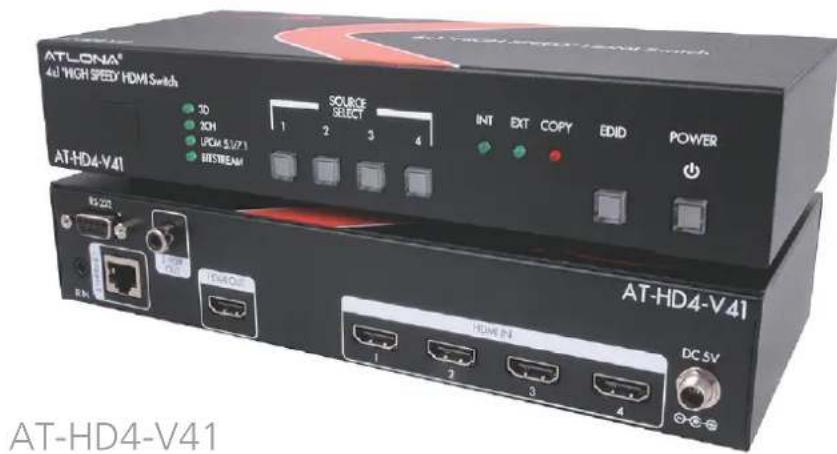
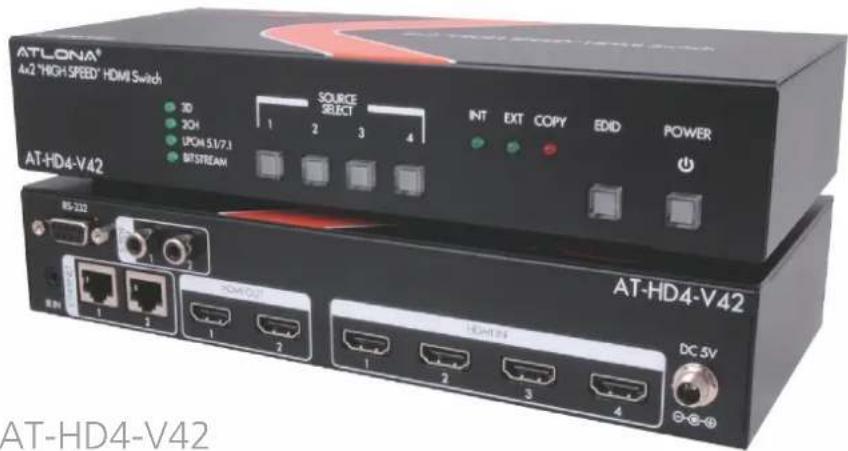
User Manual
Table of Contents
- Introduction
- Package Contents
- Features
- Panel Descriptions
a. Front
b. Back - Infrared Remote Control
- ARC
- EDID
- Step by Step guide
9.RS-232
a. Hyperterminal
a. Connection
b. Command - Installation Diagram 9
- Specifications 10
- Safety Information 11
- Warranty 12-13
- Registration 13
Introduction
The Atlona 4 input HDMI switchers are a great product for homes with multimedia systems and not enough HDMI input options. The Atlona switchers support an Audio Return Channel and a 100Mbps Ethernet port for HDMI Ethernet Channel (HEC), reducing the amount of wires necessary for compatible systems. The Atlona switcher gives you a high digital performance connection, between four sources and a video display, without signal loss.
Package Content
• HDMI 4 by 1 switcher or 4 by 2 switcher
• 5V DC power supply adaptor
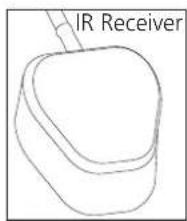
- IR receiver module
- Remote control
- User Manual
Features
- Four HDMI inputs
- Smart switching with auto-detect for inputs (activated through RS-232)
- Allows for a bi-directional HDMI Ethernet Channel pass through on output
• HDMI Audio Return Channel capable
• Supports HDCP
• Supports Deep color up to 36-bit color at 1080p 60Hz
• Supports Dolby TrueHD and DTS-HD Master Audio pass through ability when using an HDMI cable - Digital audio de-embedding through the S/PDIF output for up to DTS 5.1 and Dolby Digital
Panel Descriptions
Front Panel
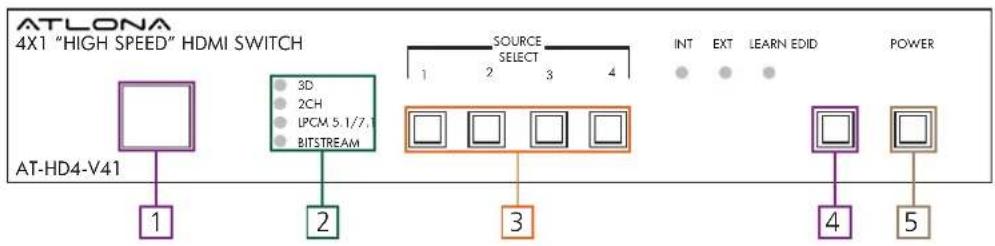
- Infrared Sensor for the remote control
- Green LED indicators will light up when receiving a signal status
- Blue LED indicators will light up when selecting a source or on auto-detect
Note: Pressing the lighted input will de-select the input and put the switcher into ARC mode
- Green LED Extended Display Identification Data (EDID) control which will light up when the option is chosen. When pressed longer than 3 seconds a red LED will light up to indicate that the EDID was copied.
- Red LED will light up when the power is on.
Back Panel
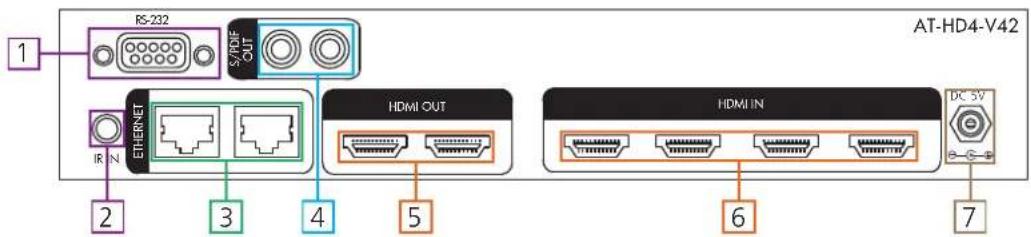
- RS-232 serial port for control
- IR control in port for included infrared receiver module
- Ethernet port for HDMI Ethernet Channel (HEC) capable devices
- Digital (S/PDIF) output for digital audio
- HDMI output for displays
- HDMI input for source components such as: DVD, BluRay player, game consoles, or computer
- Connect included power supply here
Remote Control
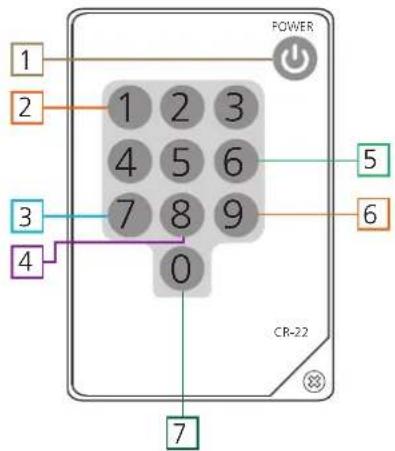
- On and Off Button
- Source selection. Press the number that matches the source you wish to use
- Turns on HDMI output port 1
- Turns off HDMI output port 2*
- Turns off HDMI output port 1
- Turns on HDMI output port 2*
- Turns on both HDMI output ports 1 and 2*
*For use with the AT-HD4-V42
Audio Return Channel (ARC)
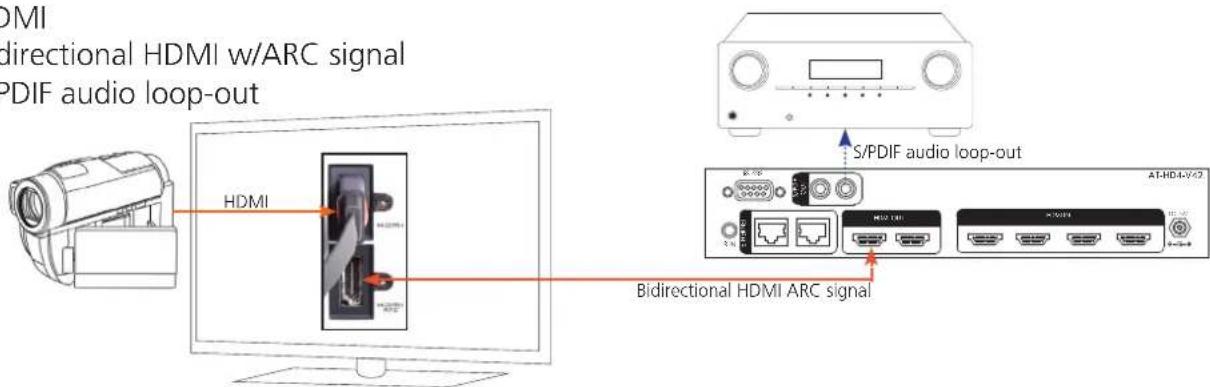
ARC enables a source connected to a display to route audio to an AVR or zone amp.
Steps
- Check to be sure the display supports ARC
- Enable ARC on the HDMI output of the switcher through RS-232 (command x0AVx1) or by de-selecting the active input
- Connect the HDMI output port to the ARC labeled input port on the display
NOTE: The switcher must be connected to the display's HDMI ARC input
-
Connect the source to a non ARC HDMI input port on the display
-
Connect the S/PDIF port to an AVR or Zone Amp
—HDMI —Bidirectional HDMI w/ARC signal •••S/PDIF audio loop-out
EDID (Extended Display Identification Data)
EDID is the exchange of capabilities between a source and display. This handshake ensures the audio and video signals sent are supported by both source and display.
The switcher has 3 EDID modes: internal picks the highest common audio/video signal between the devices and the available supported EDIDs within the switcher, external selects the highest common resolution between the current input and the display, and learned saves the EDID from the current display and locks it to the output.
When switching between EDID modes the unit will need to be power cycled. To power cycle the power cord will need to be unplugged and plugged back in.
Internal EDID
The Internally loaded EDID settings are the most common A/V signals that come standard in most TV displays and computer monitors. The switcher will pick the highest common resolution between the devices.
External EDID
External EDID is the highest common audio/video signal between the current source device and display. It is useful for devices with uncommon resolutions that are not stored internally. When switching from internal to external EDID modes, press the EDID button so the external LED illuminates, then power cycle the unit. When the switcher is turned back on it will sync with the display and determine the EDID.
Learned EDID
Learned EDID allows for a display's EDID to be saved to the switcher's nonvolatile memory. To learn the EDID from the display you first need to be in external EDID mode. Once you're in external EDID, press and hold the EDID button until the red copy LED illuminates. Power cycle the switcher and the display's EDID will be used.
Step by Step Guide
- Place your switcher within 30 feet (10 meters) of your video display.
Note: If using the supplied IR remote control, remember you need to be within 23 feet (7 meters) and within a 60° angle of the infrared receiver.
- Connect the HDMI cables to your sources and the switcher's inputs labelled HDMI IN.
a. If the auto switching feature is turned on (through RS-232) the switcher will change inputs to the source that was powered on last. The source will switch to the previously turned on device when the current input is turned off.
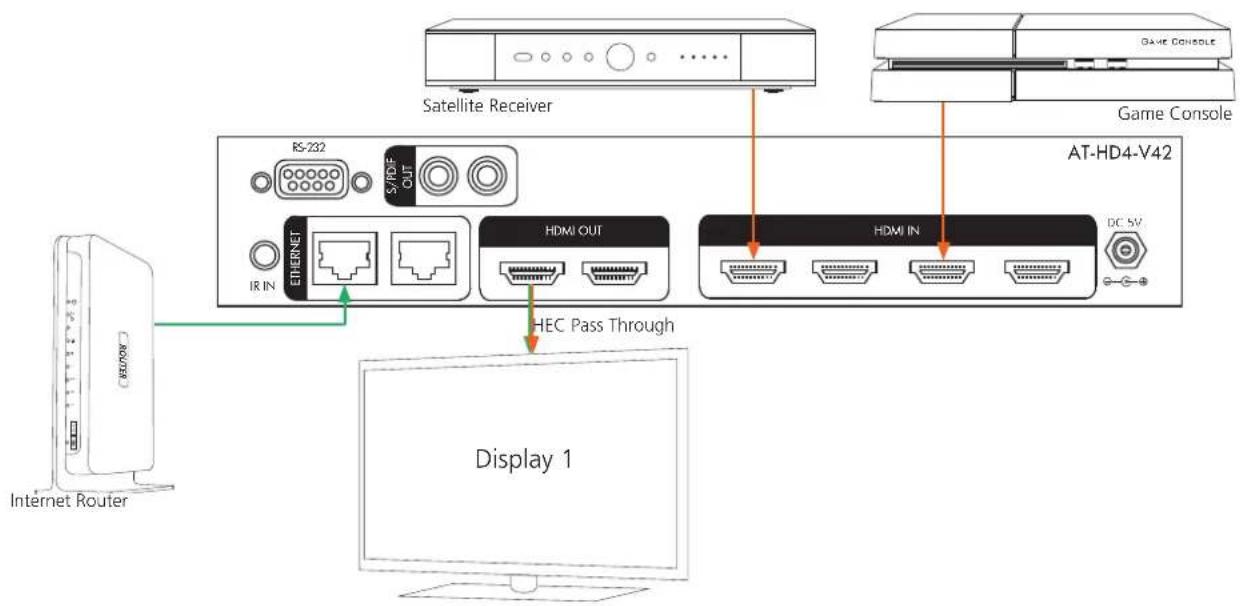
Note: The Ethernet Channel will not pass to your devices if the HEC feature is not supported or you are not using supported HDMI cables.
- (Optional) Plug the supplied infrared module into the IR IN port and place the receiver end somewhere that is within 23 feet (7 meters) of where you will be using the remote.
Note: The supplied infrared module will allow you to control the Atlona switcher when placed in a cabinet.
-
Plug the power cord into the DC 5V labelled port and then plug the other end into the wall.
-
(Optional) Plug the Ethernet cable into the Ethernet port. If your devices and cables are HDMI Ethernet Channel compatible you will be able to pass the internet signal through the HDMI cable to the display.
Note: Please verify that your devices are HDMI Ethernet Channel compatible, most ports will be labelled HEC for easy identification.
- (Optional) Plug the Digital (S/PDIF) cable into the S/PDIF port. If you have an audio system this will allow for 2 channel and multichannel support.
Note: If the Digital Audio is plugged in it will take first priority over the HDMI audio connection. Neither Dolby TrueHD or DTS-HD Master Audio will work with this option.
a. (Optional) ARC Mode – The Audio Return Channel can be accessed through the switcher, by reselecting the source you currently have selected (all source lights will go off) or by entering the RS-232 command. The switcher will then pass through the audio from your video display to your A/V Receiver as an ARC signal (this will only work with ARC capable displays). Your video display will pass through audio from either its internal tuner or from any device plugged into it.
-
Connect one end of the HDMI cable into the video display and the other end into the port labelled HDMI OUT on the switcher.
-
Press the power button ⏻ (on either the remote or the switcher) to turn on the switcher.
-
(Optional) If using the RS-232 connection plug the cable into the switcher, then your computer or third party control.
a. PC control will need a hyperterminal program. If you do not have one then you will need to download or purchase one and follow their instructions for the program's installation.
RS-232
Hyperterminal
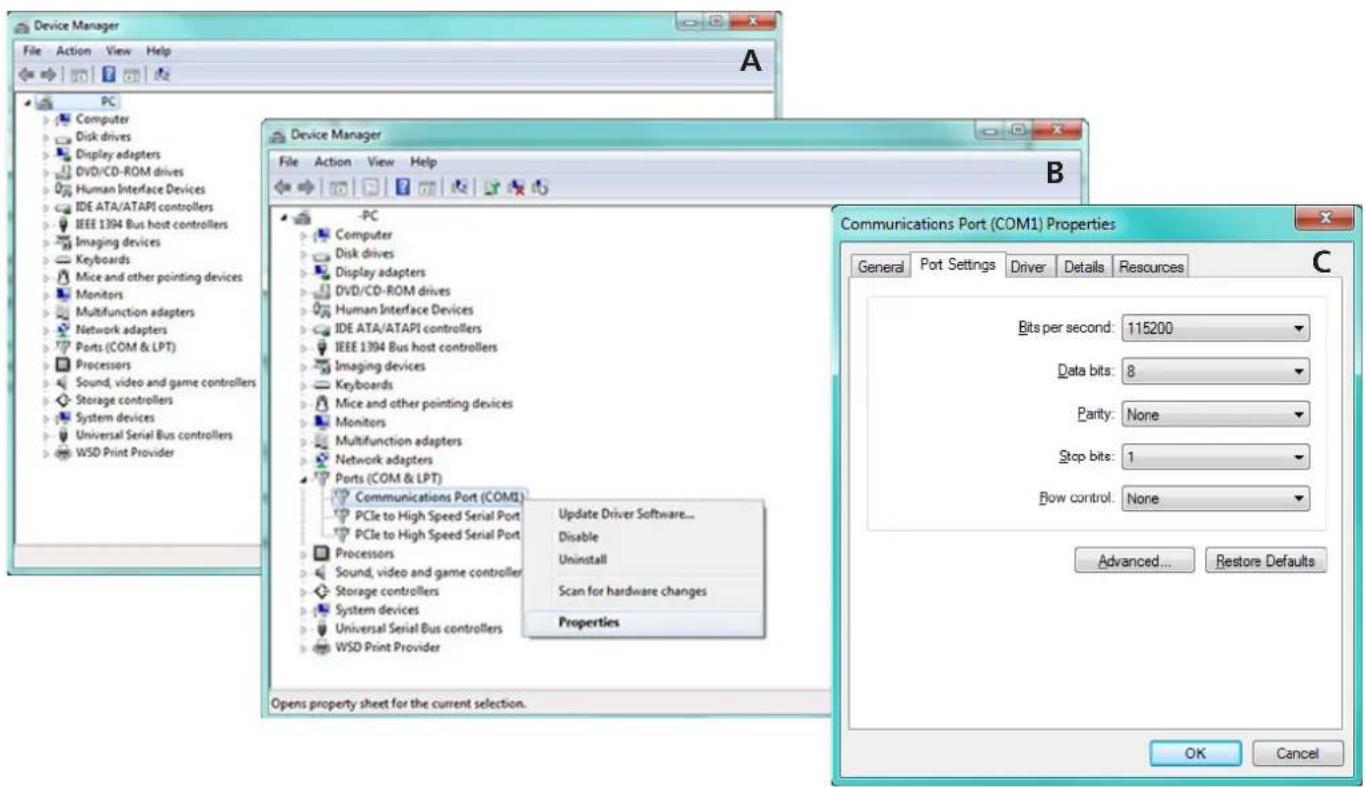
To set up the RS-232 hyperterminal the first thing needed is to find the RS-232 communications port under the computer's device manager. Once there right click the port and select properties. Under the properties menu select the port settings tab and update the menu to the switcher default:
Bits Per Second: 9600, Data Bits: 8, Parity: None, Stop Bits: 1 and Flow Control: None.
Connection
RS-232 is connected through a 9-pin female D connector. The pins will have functions associated with them, some will be unassigned.
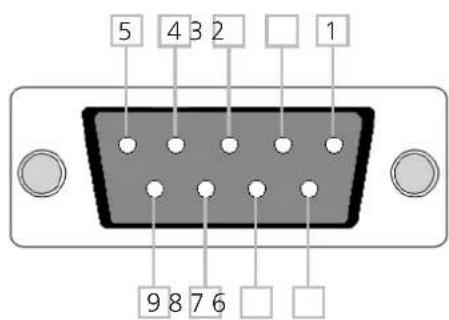
| No. Pin Function | |
| 1 ---- Not used | |
| 2 Tx Transmit | |
| 3 Rx Receive | |
| 4 ---- Not used | |
| 5 Gnd Ground | |
| 6 ---- Not used | |
| 7 ---- Not used | |
| 8 ---- Not used | |
| 9 ---- Not used |
Command
The command codes are case sensitive, do not change capitalization, spacing, or lettering.
| Command Feedback Description | ||
| PWON PWON Power on | ||
| PWOFF PWOFF Power off | ||
| PWSTA PWON / PWOFF Displays the power status | ||
| x1AVx1 x1AVx1 Route input 1 to the output | ||
| x2AVx1 x2AVx1 Route input 2 to the output | ||
| x3AVx1 x3AVx1 Route input 3 to the output | ||
| x4AVx1 x4AVx1 Route input 4 to the output | ||
| HDMI1ON HDMI1ON Turns HDMI out port 1 on | ||
| HDMI1OFF HDMI1OFF Turns HDMI out port 1 off | ||
| HDMI2ON HDMI2ON Turns HDMI out port 2 on *HD4-V42 only* | ||
| HDMI2OFF HDMI2OFF Turns HDMI out port 2 off *HD4-V42 only* | ||
| HDMIALLON HDMIALLON Turns all HDMI out ports on | ||
| HDMIALLOFF HDMIALLOFF Turns all HDMI out ports off | ||
| x0AVx1 x0AVx1 Turns ARC mode on | ||
| ARCSTA ARCON / ARCOFF Displays ARC status for outputs | ||
| AUTOON AUTOON | Turns the auto switching feature on | |
| AUTOOFF AUTOOFF | Turns the auto switching feature off | |
| AUTOSTA AUTOON / AUTOOFF | Displays auto mode status | |
| Status | x1AVx1 Displays which input is currently connected to the output | |
| Mreset | Mreset | Returns the switcher to its default settings |
| VER | V0.91a Displays current firmware version | |
Each command or feedback is terminated with a carriage return.
Note: If the command fails or is incorrect the feedback should be "Command FAILED"
Note: To exit ARC mode select an input (ex. x2AVx1)
Connections and Installation
![graph TD A["Computer"] -->|RS R2| B["BluRay Player"] B --> C["Game Console"] C --> D["AT-HD4-V42"] D --> E["A/V Receiver 5.1Ch"] E --> F["Display 1"] style A fill:#f9f,stroke:#333 style B fill:#ccf,stroke:#333 style C fill:#cfc,stroke:#333 style D fill:#fcc,stroke:#333 style E fill:#cff,stroke:#333…](/content/2026/06/1164854/images/0e68b77f0686fff852bc6668738e412951c61db54e359cc4b7b64165dbf88274.jpg)
HEC
Specifications
| Bandwidth 6.75Gbps | ||
| Ports | AT-HD4-V41 | AT-HD4-V42 |
| Video input | 4 x HDMI | 4 x HDMI |
| Video output | 1 x HDMI | 2 x HDMI |
| Audio output | 1 x S/PDIF | 2 x S/PDIF |
| Ethernet | 1 x LAN | 2 x LAN |
| IR IN | 1 x 3.5mm | 1 x 3.5mm |
| Firmware/Control | 1 x 9pin (RS-232) | 1 x 9pin (RS-232) |
| Power Consumption 4.1W | ||
| Audio HDMI | Passes up to Dolby TrueHD or DTS-HD Master Audio | S/PDIFPasses up to Dolby Digital or DTS 5.1 |
| Resolution Video: up to 1080pVESA: up to 1920x1200 (Reduced Blanking) | ||
| Dimensions 9.5 x 4.35 x 2 in240 x 110 x 50 mm | ||
| Weight 1.8 lbs | 0.81 kg | |
| Temperature Operating | 32°F to 104°F0°C to 40°C | Storage-4°F to 140°F-20°C to 60°C |
| Certifications CE, FCC, RoHS, cULus for power supplies | ||
Safety Information
Safeguards

To reduce the risk of electric shock, do not expose this product to rain or moisture

If the wall plug does not fit into your local power socket, hire an electrician to replace your obsolete socket.

Do not modify the wall plug. Doing so will void the warranty and safety features.

This equipment should be installed near the socket outlet and the device should be easily accessible in the case it requires disconnection.
Precautions
FCC regulations state that any unauthorized changes or modifications to this equipment, not expressly approved by the manufacturer, could void the user's authority to operate this equipment.
Operate this product using only the included external power supply. Use of other power supplies could impair performance, damage the product, or cause fires.
In the event of an electrostatic discharge this device may automatically turn off. If this occurs, unplug the device and plug it back in.
Protect and route power cords so they will not be stepped on or pinched by anything placed on or against them. Be especially careful of plug-ins or cord exit points from this product.
Avoid excessive humidity, sudden temperature changes or temperature extremes.
Keep this product away from wet locations such as bathtubs, sinks, laundries, wet basements, fish tanks, and swimming pools.
Use only accessories recommended by Atlona to avoid fire, shock, or other hazards.
Unplug the product before cleaning. Use a damp cloth for cleaning and not cleaning fluid or aerosols. Such products could enter the unit and cause damage, fire, or electric shock. Some substances may also mar the finish of the product.
Never open, remove unit panels, or make any adjustments not described in this manual. Attempting to do so could expose you to dangerous electrical shock or other hazards. It may also cause damage to your product. Opening the product will void the warranty.
Do not attempt to service the unit. Disconnect the product and contact your authorized Atlona reseller or contact Atlona directly.
Atlona, Inc. ("Atlona") Limited Product Warranty Policy
Coverage
Atlona warrants its products will substantially perform to their published specifications and will be free from defects in materials and workmanship under normal use, conditions and service.
Under its Limited Product Warranty, Atlona, at its sole discretion, will either:
A) repair or facilitate the repair of defective products within a reasonable period of time, restore products to their proper operating condition and return defective products free of any charge for necessary parts, labor and shipping OR
B) replace and return, free of charge, any defective products with direct replacement or with similar products deemed by Atlona to perform substantially the same function as the original products OR
C) refund the pro-rated value based on the remaining term of the warranty period, not to exceed MSRP, in cases where products are beyond repair and/or no direct or substantially similar replacement products exist.
Repair, replacement or refund of Atlona's products is the purchaser's exclusive remedy and Atlona's liability does not extend to any other damages, incidental, consequential or otherwise.
This Limited Product Warranty extends to the original end-user purchaser of Atlona's products and is non-transferrable to any subsequent purchaser(s) or owner(s) of these products.
Coverage Periods
Atlona's Limited Product Warranty Period begins on the date of purchase by the end-purchaser. The date contained on the end-purchaser's sales or delivery receipt is the proof purchase date.
Limited Product Warranty Terms – New Products
• 10 years from proof of purchase date for hardware/electronics products purchased on or after June 1, 2013
• 3 years from proof of purchase date for hardware/electronics products purchased before June 1, 2013
• Lifetime Limited Product Warranty for all cable products
Limited Product Warranty Terms – Refurbished (B-Stock) Products
- 3 years from proof of purchase date for all Refurbished (B-Stock) hardware and electronic products purchased on or after June 1, 2013
Remedy
Atlona recommends that end-purchasers contact their authorized Atlona dealer or reseller from whom they purchased their products. Atlona can also be contacted directly. Visit www.atlona.com for Atlona's contact information and hours of operation. Atlona requires that a dated sales or delivery receipt from an authorized dealer, reseller or end-purchaser is provided before Atlona extends its warranty services. Additionally, a return merchandise authorization (RMA) and/or case number, is required to be obtained from Atlona in advance of returns.
Atlona requires that products returned are properly packed, preferably in the original carton, for shipping. Cartons not bearing a return authorization or case number will be refused. Atlona, at its sole discretion, reserves the right to reject any products received without advanced authorization. Authorizations can be requested by calling 1-877-536-3976 (US toll free) or 1-408-962-0515 (US/international) or via Atlona's website at www.atlona.com.
Exclusions
This Limited Product Warranty excludes:
- Damage, deterioration or malfunction caused by any alteration, modification, improper use, neglect, improper packing or shipping (such claims must be presented to the carrier), lightning, power surges, or other acts of nature.
- Damage, deterioration or malfunction resulting from the installation or removal of this product from any installation, any unauthorized tampering with this product, any repairs attempted by anyone unauthorized by Atlona to make such repairs, or any other cause which does not relate directly to a defect in materials and/or workmanship of this product.
- Equipment enclosures, cables, power supplies, batteries, LCD displays, and any accessories used in conjunction with the product(s).
- Products purchased from unauthorized distributors, dealers, resellers, auction websites and similar unauthorized channels of distribution.
Disclaimers
This Limited Product Warranty does not imply that the electronic components contained within Atlona's products will not become obsolete nor does it imply Atlona products or their electronic components will remain compatible with any other current product, technology or any future products or technologies in which Atlona's products may be used in conjunction with. Atlona, at its sole discretion, reserves the right not to extend its warranty offering in instances arising outside its normal course of business including, but not limited to, damage inflicted to its products from acts of god.
Limitation on Liability
The maximum liability of Atlona under this limited product warranty shall not exceed the original Atlona MSRP for its products. To the maximum extent permitted by law, Atlona is not responsible for the direct, special, incidental or consequential damages resulting from any breach of warranty or condition, or under any other legal theory. Some countries, districts or states do not allow the exclusion or limitation of relief, special, incidental, consequential or indirect damages, or the limitation of liability to specified amounts, so the above limitations or exclusions may not apply to you.
Exclusive Remedy
To the maximum extent permitted by law, this limited product warranty and the remedies set forth above are exclusive and in lieu of all other warranties, remedies and conditions, whether oral or written, express or implied. To the maximum extent permitted by law, Atlona specifically disclaims all implied warranties, including, without limitation, warranties of merchantability and fitness for a particular purpose. If Atlona cannot lawfully disclaim or exclude implied warranties under applicable law, then all implied warranties covering its products including warranties of merchantability and fitness for a particular purpose, shall provide to its products under applicable law. If any product to which this limited warranty applies is a “Consumer Product” under the Magnuson-Moss Warranty Act (15 U.S.C.A. §2301, ET SEQ.) or other applicable law, the foregoing disclaimer of implied warranties shall not apply, and all implied warranties on its products, including warranties of merchantability and fitness for the particular purpose, shall apply as provided under applicable law.
Other Conditions
Atlona's Limited Product Warranty offering gives legal rights, and other rights may apply and vary from country to country or state to state. This limited warranty is void if (i) the label bearing the serial number of products have been removed or defaced, (ii) products are not purchased from an authorized Atlona dealer or reseller. A comprehensive list of Atlona's authorized distributors, dealers and resellers can be found at www.atlona.com.
Atlona Product Registration
Thank you for purchasing this Atlona product. - We hope you enjoy it and will take an extra few moments to register your new purchase.
Registration creates an ownership record if your product is lost or stolen and helps ensure you'll receive notification of performance issues and firmware updates.
At Atlona, we respect and protect your privacy, assuring you that your registration information is completely secure. Atlona product registration is completely voluntary and failure to register will not diminish your limited warranty rights.
To register go to: http://www.atlona.com/registration



- ATLONA 4 INPUT HDMI SWITCHER WITH AUTO SWITCHING
- TABLE OF CONTENTS
- INTRODUCTION
- PACKAGE CONTENT
- FEATURES
- PANEL DESCRIPTIONS
- REMOTE CONTROL
- AUDIO RETURN CHANNEL (ARC)
- STEPS
- EDID (EXTENDED DISPLAY IDENTIFICATION DATA)
- INTERNAL EDID
- EXTERNAL EDID
- LEARNED EDID
- STEP BY STEP GUIDE
- RS-232
- HYPERTERMINAL
- CONNECTION
- COMMAND
- SAFETY INFORMATION
- SAFEGUARDS
- PRECAUTIONS
- ATLONA, INC. ("ATLONA") LIMITED PRODUCT WARRANTY POLICY
- COVERAGE
- COVERAGE PERIODS
- LIMITED PRODUCT WARRANTY TERMS – NEW PRODUCTS
- LIMITED PRODUCT WARRANTY TERMS – REFURBISHED (B-STOCK) PRODUCTS
- REMEDY
- EXCLUSIONS
- DISCLAIMERS
- LIMITATION ON LIABILITY
- EXCLUSIVE REMEDY
- OTHER CONDITIONS
- ATLONA PRODUCT REGISTRATION
Brand : Atlona
Model : AT-HD4-V42
Category : HDMI switch