
AT-PROHD88M-SR - HDMI switch Atlona - Free user manual and instructions
Find the device manual for free AT-PROHD88M-SR Atlona in PDF.


| Product Type | 8x8 HDMI Matrix Switcher |
| Brand | Atlona |
| Model | AT-PROHD88M-SR |
| Inputs | 8 x HDMI |
| Outputs | 8 x HDMI |
| Maximum Resolution | 4K@60Hz 4:4:4 (up to 18Gbps) |
| HDCP Support | HDCP 2.2 compliant |
| Switching Method | Front panel buttons, IR remote, RS-232, TCP/IP |
| Dimensions (W x D x H) | 17.3 x 10.6 x 1.7 in (440 x 270 x 44 mm) |
| Weight | Approx. 5.5 lbs (2.5 kg) |
| Power Supply | 100-240V AC, 50/60Hz, internal power supply |
| Power Consumption | 35W (max) |
| Operating Temperature | 32°F to 104°F (0°C to 40°C) |
| Storage Temperature | -4°F to 140°F (-20°C to 60°C) |
| Key Features | HDMI 2.0, HDR10, EDID management, audio de-embedding, independent switching |
| Maintenance & Cleaning | Use dry cloth; avoid liquids; ensure ventilation |
| Safety | Class I equipment; ground connection required; do not open enclosure |
| Spare Parts & Repairability | Contact Atlona support; no user-serviceable parts |
Frequently Asked Questions - AT-PROHD88M-SR Atlona
User questions about AT-PROHD88M-SR Atlona
0 question about this device. Answer the ones you know or ask your own.
Ask a new question about this device
Download the instructions for your HDMI switch in PDF format for free! Find your manual AT-PROHD88M-SR - Atlona and take your electronic device back in hand. On this page are published all the documents necessary for the use of your device. AT-PROHD88M-SR by Atlona.
USER MANUAL AT-PROHD88M-SR Atlona
AT-PROHD88M-R FRONT VIEW
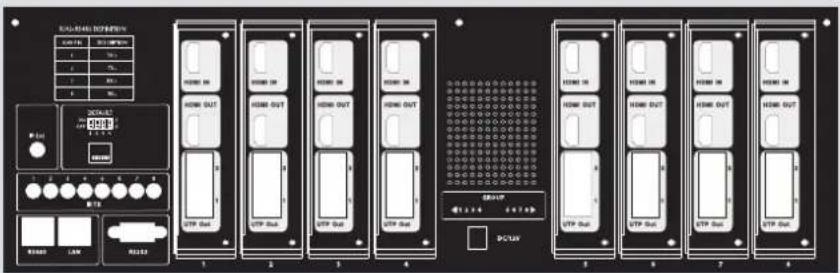
AT-PROHD88M-S REAR VIEW
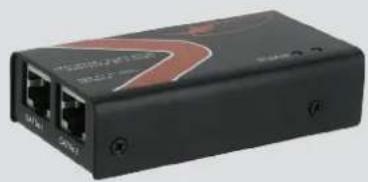
natural_image
Black electronic device with two ports and a red logo (no visible text or symbols)AT-PROHD88M-R REAR VIEW
TABLE OF CONTENTS
- Introduction 3
- Package Contents 3
- Features 3
- Specification 4
- Panel Description 4
5.1 Main Unit 4
5.1.1. Front Panel 4
5.1.2. Rear Panel 5
5.2 HDMI Receiver 5 - Connect and Operation 6
- IR Remote Control 8
7.1.RS232 Control 9
7.2.RS232 Cable Wiring 9 - Safety Information 12
- Warranty 13
- Atlona Product Registration 14
INTRODUCTION
Atlona Technologies' AT-PROHD88M-SR is an 8x8 HDMI Matrix Switcher over Twisted Pair designed to work as a switcher for multiple Audio/Video sources and displays. The Atlona unit is capable of switching HDMI signals between four sources (such as: Blue-Ray player, HD DVD player, satellite receiver, game system, etc.) and eight displays. Because it is a matrix switch, any or all of the 8 inputs can simultaneously be switched to any or all of the outputs. Along with supporting HDMI 1.3 and HDCP Compliance, switcher will support high definition video in multiple resolutions of up to 1080p or 1920x1200. Five switching modes are available including front panel buttons, local IR, IR call back from remote locations, RS485 and TCP/IP. The PROHD88 is capable of routing IR signal from remote locations to the main location where the switcher is. The IR emitters/receivers can control the switch as well as sources next to it.
The Atlona PROHD88M-SR has 8 dual* outputs.
*Dual Output: HDMI + Dual Twisted Pair output where both are active at the same time. Each output could be connected to either 2 displays or AVR and a Display; however the signal from both outputs will be identical.
PACKAGE CONTENTS:
• AT-PROHD88M-SR (main switch)
- 8 x AT-PROHD-REC (CAT5/6/7 receivers)
- 8 x 5 VDC Power Supply (110/240v universal) – for receivers
- 1 x 12 VDC Power Supply (110/240v universal) – for the main switch
- 1 x IR Remote.
- 1x IR receiver extension cable.
- 8x IR (IR emitter cables).
- Rack Ears
- 1 x USB to RS232 adapter cable.
- Manual
FEATURES:
• HDMI 1.3b, HDCP and EDID compatible
- 8 x CAT5/6/7 receivers are included
- Allows up to eight HDMI sources to be independently switched to eight HDMI outputs, where each output is featured with HDMI and Twisted pair connections and both are active at the same time.
• The eight outputs could show the same or different source simultaneously
• Supports high definition resolutions up to 1920x1200 or 1080p
• Supports all latest HDMI audio formats including Dolby TrueHD and DTS-HD
- Switcher is featured with IR call back function which allows each remote location to send IR signal though CAT5/6/7 receivers back to the switch and further down to the nearby sources.
• Each CAT5/6/7 output can go up to 165ft @ 1080p on CAT5/6 cables and up to 250ft @ 1080p on the CAT7 cable (tested with Tyco wire). If more distance is required, Atlona offers CAT5/6/7 repeater (AT-PROHD-RP) unit which can double the distance and allow chain up to 6 units.
• Each input and output port is able to support HDMI or DVI signal. For DVI signal adapter will be required.
- Five switching modes: panel buttons, local IR, IR call back from remote locations, RS485 and TCP/IP.
- Rack Mountable, comes with 19-inch Rack-Ears (4U)
SPECIFICATIONS:
| Operating Temperature Range -5 to +35°C (-41 to +95 °F) | |
| Operating Humidity Range 5 to 90 % RH (no condensation) | |
| Input Video Signal 0.5-1.0 volts p-p | |
| Input DDC Signal 12v (main unit) and 5v (receivers) | |
| Video Format Supported HDTV: 480p/576p/720p/1080i/1080p (50/60Hz)Computer: up to 1920x1200 | |
| Audio Format Supported All latest HDMI audio formats including DolbyTrueHD and DTS-HD | |
| HDMI Standard HDMI 1.3c | |
| Maximum Output Distance(HDM out) | 55ft (16m) |
| Maximum Output DistanceRJ45 outputs | 165ft (50m) @ 1080p on CAT5/6 cables and Up to 250ft (80m) @ 1080p on the CAT7 cable(Tested with Tyco wire) |
| Power Consumption 30wtts (Max) | |
| Dimensions (inch) 17.3”L×11”W×5.5”H - 4U | |
| Main Unit Weight/Receiver 12LB/0.3LB (6kg)/(0.1kg) | |
PANEL DESCRIPTION
Main Unit
1. Front Panel
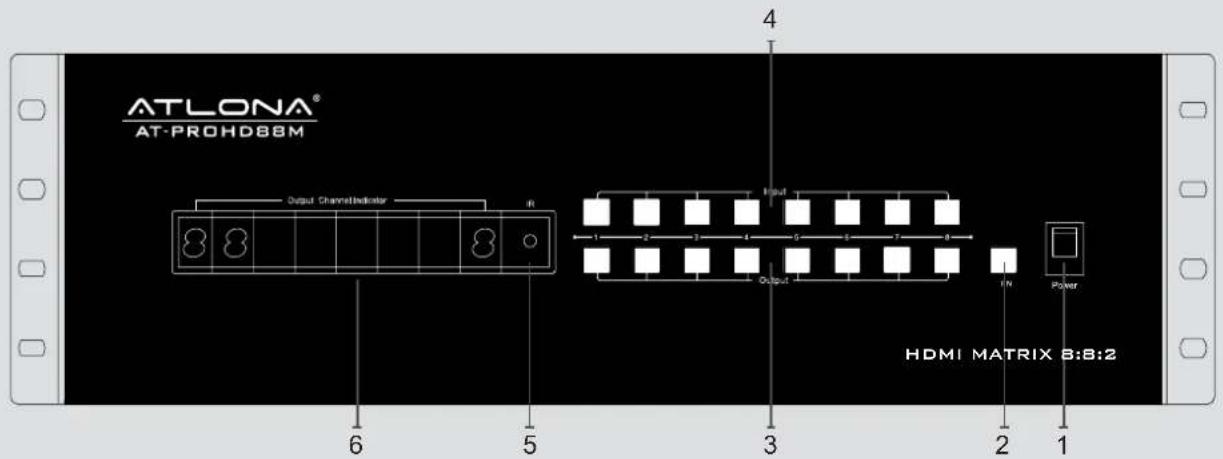
- Power ON/OFF switch
- SET/ENTER (Push the 'FN' button to confirm change of an input channel to an output).
- Output selection push-buttons (Use it to choose the preferred output channel).
- Input selection push-buttons (Use it to choose the preferred input channel).
- IR window.
-
LED indicator of input for output port 1 to 8.
-
Rear Panel
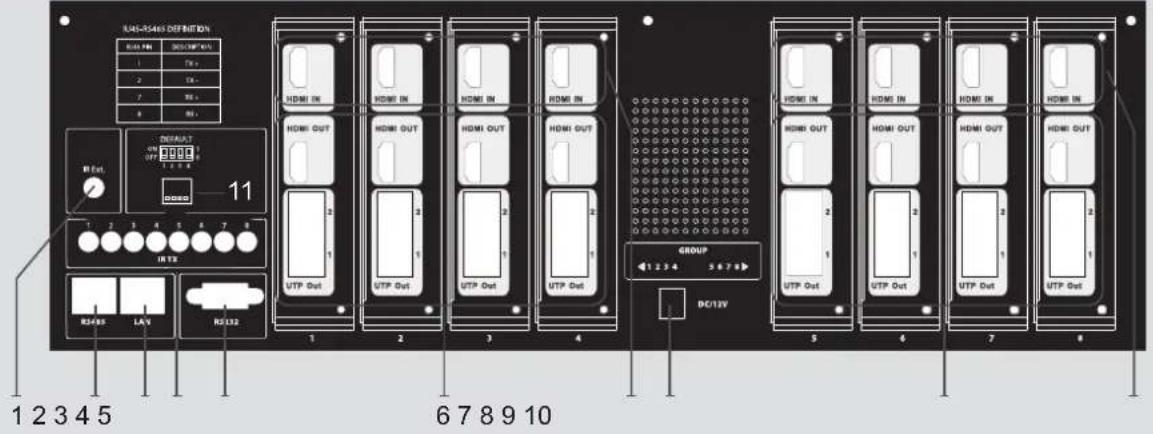
- IR extension.
- Input ports 1 to 4.
- RS485 port.
- Power input.
- LAN port.
- Output 5 and 8 with HDMI and CAT5E.
- IR emitter, corresponding to the Input port from 1 to 8 10. Input ports 5 to 8.
- RS232 port. 11. DIP switch setting.
- Output 1 to 4 with HDMI and CAT5E.
Note: The TCP/IP port has to be connected to the computer via direct Crosswire CAT5/6/7 wire while if connected to the router it needs to be connected though Straight wire.
HDMI Receiver (8 x Receivers included)
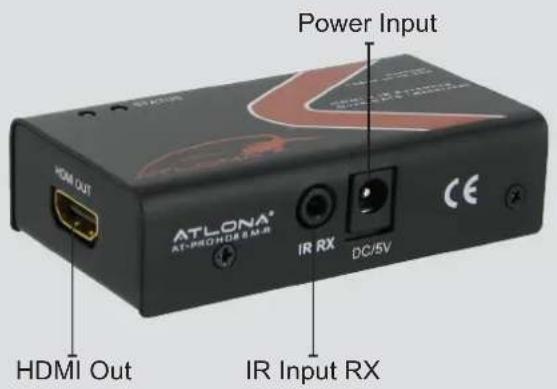
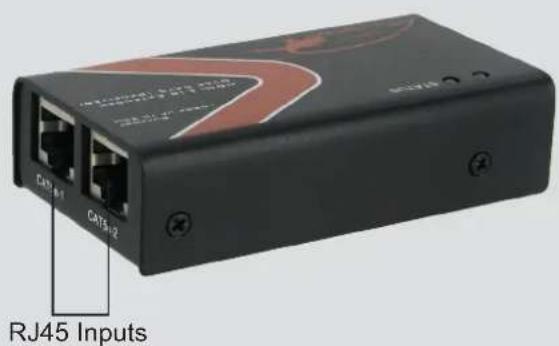
RJ45 inputs – please be careful when connecting RJ45 # 1 and # 2 inputs. They absolutely have to match the outputs on the switch. Output # 1 should be connected to Input # 1 and Output # 2 should be connected to Inputs # 2.
1) Connect the HDMI input sources (such as HD-DVD, PS3, AppleTV, DirecTV etc) into the inputs on AT-PROHD88M-SR.
2) Connect the HDMI outputs from AT-PROHD88M-SR (such as LCD, Plasma, LED, Projector, Monitor)
3) Power on the input source you want to show. (Keep the unused input power OFF, otherwise it may interfere with the normal display.)
4) Use IR remote, front panel, RS232, TCP/IP or RS485 connections to choose desired input source.
5) IR calls back from remote locations allows controlling the matrix switch as well as nearby sources (such as DVD, AppleTV, Satellite, Cable and etc...).
6) Instruction on IR Emitter.
The sequence of "IR1, IR2, IR3, IR4, IR5, IR6, IR7, IR8" one-to-one correspond with "HDMI Inputs 1\~8". When an output chooses certain input, the call-back IR signal of RJ45 on this output will choose the corresponding "IR" port to send the signal out.
For example, OUTPUT#1 chooses INPUT#3, then the call-back IR signal of RJ45 on OUTPUT#1 will choose "IR 3" to send the signal out.
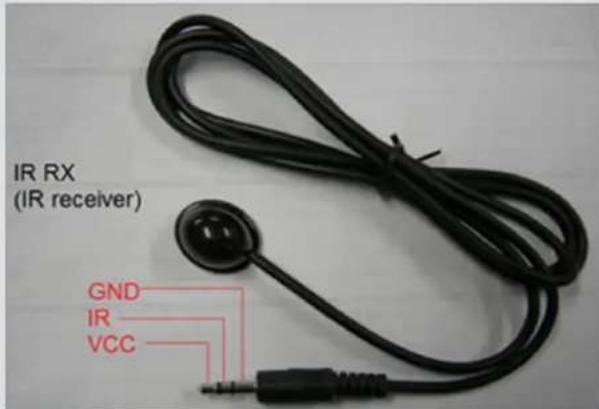
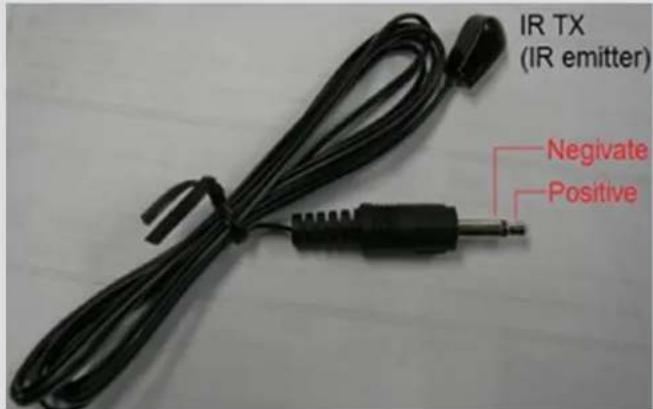
Note: For better functionality of the IR, we suggest to place the IR receiver Eye at the IR Eye of the controlling source.
8) EDID Settings (PLEASE READ, IT IS VERY IMPORTANT):
The functionality of the switch will depend on how you select the Dip Switches below. Please read the instructions and explanations below to understand the purpose of different configurations.
There are four DIP switches on the back of the 8x8 matrix switcher. Below you will find the definition of each one of the dip switches.
Position ID EDID Operational Mode
| 1 2 3 4 |
| OFF ON OFF OFF AUTO EDID MANAGEMENT (DIP # 1) |
| OFF ON ON OFF AUTO EDID MANAGEMENT - LONG CABLES(DIP # 2) |
| ON OFF OFF OFF Up to 1080P with Stereo Audio (no deep-color) ) (DIP#3) |
| ON OFF ON OFF Up to 1080P with 5.1 Audio (no deep-color) (DIP#4) |
| ON ON OFF OFF Up to 1080P with Stereo Audio (deep-color) (DIP#5) |
| ON ON ON OFF Up to 1080P with 5.1 Audio (deep-color) (DIP#6) |
Note: 1 - ON and 0 - OFF
EACH TIME DIP SWITCHES ARE CHANGED; THE ATLONA SWITCH HAS TO POWER CYCLED.
DIP#1: Auto EDID Management (ADM) is a smart function which will allow users to have matrix switch figure out the best and most appropriate EDID.
The way it works: Atlona 8x8 matrix acquires EDID from all the outputs and after processing it, chooses the EDID which will work on all the outputs.
Example # 1: User has 8 outputs connected where 6 of the outputs are 1080P TV's only and the other 2 locations are 720P TV's. The Atlona's EDID would be 720P with 2-channel Stereo (because most TV's will only be able to take stereo audio though HDMI input).
Example # 2: User has 8 outputs connected, where 6 outputs are 1080P TV's and the remaining are 2 x Surround Sound Receivers (after connected to the TV's for video only). The Atlona's EDID would be 1080P with Stereo or PCM (because most TV's will only take Stereo Audio though HDMI input).
Remark: If you don't like the Auto EDID Management functions, switcher has some pre-recorded modes which will certainly satisfy you.
DIP#2: This function is very similar to Note # 1; however it is designed for users who have very long CAT5/6/7 cables and signal is going in and out. This DIP Switch setting will replace some of the hdmi control signals with video, which will allow picture to stabilize.
DIP#3: Atlona Switcher has a few built-in EDID modes; this mode is for resolutions up to 1080P with Stereo Audio. When this mode is selected the deep-color will be disabled. Deep-color will only work on new TV's which were built after April 2009. If you know that one of the displays doesn't support deep color, we suggest to use this setting or DIP # 1 setting for signal to be reliable.
DIP#4: Atlona Switcher has a few built-in EDID modes; this mode is for resolutions up to 1080P with 5.1 Digital Audio. When this mode is selected the deep-color will be disabled. Deep-color will only work on new TV's which were built after April 2009. If you know that one of the displays doesn't support deep color, we suggest to use this setting or DIP # 1 setting for signal to be reliable.
This mode is designed for applications where user has AV Receivers in each remote location which are able to accept Digital Audio from HDMI inputs. If this mode is selected and in even one of the locations user has a TV without an AV receiver, the TV might “mute” or start outputting garbled audio (because most TV’s don’t support digital audio though HDMI input)
DIP#5: Atlona Switcher has a few built-in EDID modes; this mode is for resolutions up to 1080P with Stereo Audio. When this mode is selected the switcher will pass deep-color. Deep-color will only work on new TV's which were built after April 2009. If you know that one of the displays doesn't support deep color, we suggest using DIP # 1 or DIP # 3 setting for signal to be reliable.
DIP#6: Atlona Switcher has a few built-in EDID modes; this mode is for resolutions up to 1080P with 5.1 Digital Audio. When this mode is selected the switcher will pass deep-color. Deep-color will only work on new TV's which were built after April 2009. If you know that one of the displays doesn't support deep color, we suggest using DIP # 1 or DIP # 3 setting for signal to be reliable.
This mode is designed for applications where user has AV Receivers in each remote location which are able to accept Digital Audio from HDMI inputs. If this mode is selected and in even one of the locations user has a TV without an AV receiver, the TV might "mute" or start outputting garbled audio (because most TV's don't support digital audio though HDMI input)
VERY IMPORTANT:
If one of your Output devices is a projector or a display with a unique resolution your sources/source which are/is connected to the switch might not send out a proper video format which will result image to intermit or signal not show up on the display.
Solution: Make sure your DIP switch configuration is either DIP # 1 or # 2. Route the device in question to the output in question. After that's done, please perform the following operation: (Simultaneously press and hold the "Output # (in question) and "FN Key" buttons for three seconds). You shall see the following message to appear on your LED display: "MIX OK"
If you receive a "MIX FL" – please try this operation again.
IR REMOTE CONTROL
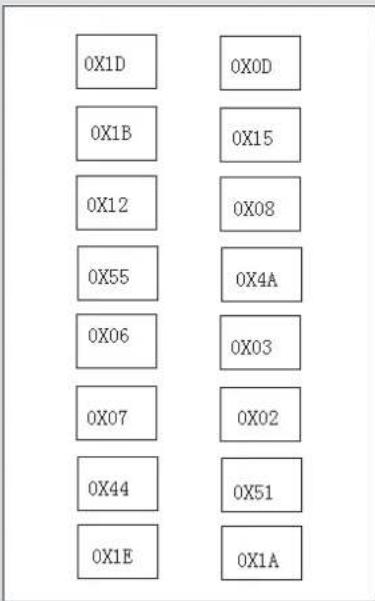
The AT-PROHD88M-Sr comes with 16 button IR remote control, which could be used to control the switcher when pointing at it or controlling the switcher from a remote location by pointing the remote control to the IR Eye connected to the HDMI receiver.
For users who would like to use a 3rd part IR remote control or IR remote system, we recommend either learning IR codes off the remote or copying and pasting the IR HEX code into the remote control software. The file with HEX codes could be found on Atlona website under downloads for AT-PROHD88M-SR.
There are 2 scenarios which codes to use:
- User will need to learn all 64 x codes in order to control each location when pointing at the switcher
- User will only need to learn 8 x codes if there will be a separate remote for each remote location
Note: The switcher can only accept and route IR signal which doesn't exceed 38 KHz. In other words, if you are trying to send IR signal from the remote location though out HDMI receiver and the IR signal is higher than 38 KHz, the IR signal will not pass though.
VERY IMPORTANT:
When connecting IR receivers and IR emitters, be very careful as if they are reversed the IR Eye will burn-out and also may damage the IR module inside of the switch and Receiver.
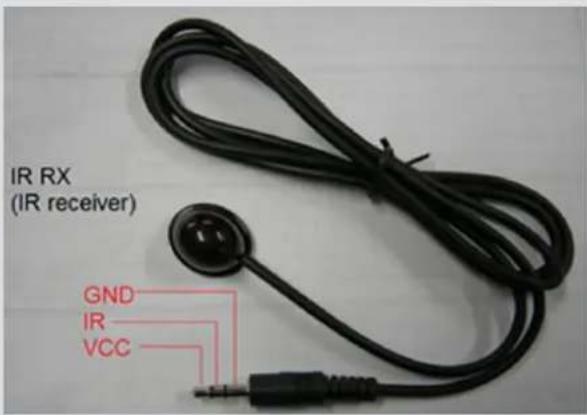
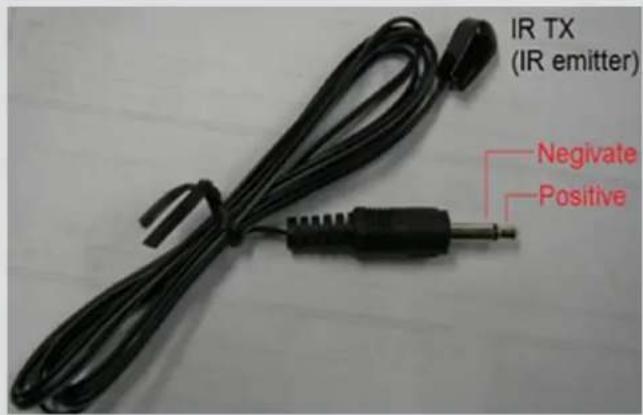
TX – Connects to the Switch
RX – Connects to the HDMI Receivers
RS232 CONTROL:
Baud Rate: 9600 bps
Data bits: 8 bits
Parity: None
Stop bits: 1 bit
Flow control: None
RS232 Cable Wiring:
| AT-PROHD88M-SR Controller | ||||
| Pin Definition | Pin Definition | |||
| 1 NC 1 NC | ||||
| 2 Tx 2 | Rx | |||
| 3 | Rx | 3 | Tx | |
| 4 NC 4 NC | ||||
| 5 | GND | 5 | GND | |
| 6 NC 6 NC | ||||
| 7 NC 7 NC | ||||
| 8 NC 8 NC | ||||
| 9 NC 9 NC | ||||
Note: ‘ ↙’ is carriage return.
| OUTPUT | COMMAND | ACTION |
| Output 1 | cir 00 √ | Output 1 select Input1 |
| cir 01 √ | Output 1 select Input2 | |
| cir 02 √ | Output 1 select Input3 | |
| cir 03 √ | Output 1 select Input4 | |
| cir 04 √ | Output 1 select Input5 | |
| cir 05 √ | Output 1 select Input6 | |
| cir 06 √ | Output 1 select Input7 | |
| cir 07 √ | Output 1 select Input8 | |
| < | cir 08 √ | Output 1 select Input previous |
| > | cir 09 √ | Output 1 select Input next |
| Output 2 | cir 10 √ | Output 2 select Input1 |
| cir 11 √ | Output 2 select Input2 | |
| cir 12 √ | Output 2 select Input3 | |
| cir 13 √ | Output 2 select Input4 | |
| cir 14 √ | Output 2 select Input5 | |
| cir 15 √ | Output 2 select Input6 | |
| cir 16 √ | Output 2 select Input7 | |
| cir 17 √ | Output 2 select Input8 | |
| < | cir 18 √ | Output 2 select Input previous |
| > | cir 19 √ | Output 2 select Input next |
| Output 3 | cir 20 Output 3 select Input1 |
| cir 21 Output 3 select Input2 | |
| cir 22 Output 3 select Input3 | |
| cir 23 Output 3 select Input4 | |
| cir 24 Output 3 select Input5 | |
| cir 25 Output 3 select Input6 | |
| cir 26 Output 3 select Input7 | |
| cir 27 Output 3 select Input8 | |
| < cir 28 Output 3 select Input previous | |
| > cir 29 Output 3 select Input next | |
| Output 4 | cir 30 Output 4 select Input1 |
| cir 31 Output 4 select Input2 | |
| cir 32 Output 4 select Input3 | |
| cir 33 Output 4 select Input4 | |
| cir 34 Output 4 select Input5 | |
| cir 35 Output 4 select Input6 | |
| cir 36 Output 4 select Input7 | |
| cir 37 Output 4 select Input8 | |
| < cir 38 Output 4 select Input previous | |
| > cir 39 Output 4 select Input next | |
| Output 5 | cir 40 Output 5 select Input1 |
| cir 41 Output 5 select Input2 | |
| cir 42 Output 5 select Input3 | |
| cir 43 Output 5 select Input4 | |
| cir 44 Output 5 select Input5 | |
| cir 45 Output 5 select Input6 | |
| cir 46 Output 5 select Input7 | |
| cir 47 Output 5 select Input8 | |
| < cir 48 Output 5 select Input previous | |
| > cir 49 Output 5 select Input next | |
| Output 6 | cir 50 Output 6 select Input1 |
| cir 51 Output 6 select Input2 | |
| cir 52 Output 6 select Input3 | |
| cir 53 Output 6 select Input4 | |
| cir 54 Output 6 select Input5 | |
| cir 55 Output 6 select Input6 | |
| cir 56 Output 6 select Input7 | |
| cir 57 Output 6 select Input8 | |
| < cir 58 Output 6 select Input previous | |
| > cir 59 Output 6 select Input next | |
| Output 7 | cir 60 Output 7 select Input1 |
| cir 61 Output 7 select Input2 | |
| cir 62 Output 7 select Input3 | |
| cir 63 Output 7 select Input4 | |
| cir 64 Output 7 select Input5 | |
| cir 65 Output 7 select Input6 | |
| cir 66 Output 7 select Input7 | |
| cir 67 Output 7 select Input8 | |
| < cir 68 Output 7 select Input previous | |
| > cir 69 Output 7 select Input next | |
| Output 8 | cir 70 Output 8 select Input1 |
| cir 71 Output 8 select Input2 | |
| cir 72 Output 8 select Input3 | |
| cir 73 Output 8 select Input4 | |
| cir 74 Output 8 select Input5 | |
| cir 75 Output 8 select Input6 | |
| cir 76 Output 8 select Input7 | |
| cir 77 Output 8 select Input8 | |
| < cir 78 Output 8 select Input previous | |
| > cir 79 Output 8 select Input next | |
SAFETY INFORMATION
Safeguards
To reduce the risk of electric shock, do not expose this product to rain or moisture.
If the wall plug does not fit into your local power socket, hire an electrician to replace your obsolete socket.
Do not modify the wall plug. Doing so will void the warranty and safety features.
This equipment should be installed near the socket outlet and the device should be easily accessible in case it requires disconnection.
Precautions
FCC Regulations state that any unauthorized changes or modifications to this equipment not expressly approved by the manufacturer could void the user's authority to operate this equipment.
Operate this product using only the included external power supply. Use of other power supplies could impair performance, damage the product or cause fires.
In the event of an electrostatic discharge, this device may automatically turn off. If this occurs, unplug the device, and plug it back in.
Protect and route power cords so they will not be stepped on or pinched by anything placed on or against them. Be especially careful of plug-ins, or cord exit points from this product.
Avoid excessive humidity, sudden temperature changes or temperature extremes.
Keep this product away from wet locations such as bathtubs, sinks, laundries, wet basements and swimming pools.
Use only accessories recommended by ATLONA to avoid fire, shock or other hazards.
Unplug the product before cleaning. Use a damp cloth for cleaning. Do not use cleaning fluid or aerosols, which could enter the unit and cause damage, fire or electrical shock. Some substances may also mar the finish of the product.
Never open or remove unit panels or make any adjustments not described in this manual. Attempting to do so could expose you to dangerous electrical shock or other hazards. It may also cause damage to your AT-PROHD88M-SR. Opening the product will void the warranty.
Do not attempt to service the unit. Instead disconnect it and contact your Authorized ATLONA reseller or contact ATLONA directly.
1. LIMITED WARRANTY
Atlona Technologies warrants that (a) its products (the "Product") will perform substantially in accordance with the accompanying written materials for a period of 3 YEARS from the date of receipt and (b) that the Product will be free from defects in materials and workmanship under normal use and service for a period of 3 years. In the event applicable law imposes any implied warranties, the implied warranty period is limited to 3 years from the date of receipt. Some jurisdictions do not allow such limitations on duration of an implied warranty, so the above limitation may not apply to Customer.
2. CUSTOMER REMEDIES
Atlona Technologies and its suppliers' entire liability and Customer's exclusive remedy shall be, at Atlona Technologies' option, either return of the price paid for the Product, or repair or replacement of the Product that does not meet this Limited Warranty and which is returned to Atlona Technologies with a copy of Customer's receipt. This Limited Warranty is void if failure of the Product has resulted from accident, abuse, or misapplication. Any replacement Product will be warranted for the remainder of the original warranty period or 3 year, whichever is longer.
3. NO OTHER WARRANTIES
TO THE MAXIMUM EXTENT PERMITTED BY APPLICABLE LAW, ATLONA TECHNOLOGIES AND ITS SUPPLIERS DISCLAIM ALL OTHER WARRANTIES, EITHER EXPRESS OR IMPLIED, INCLUDING, BUT NOT LIMITED TO IMPLIED WARRANTIES OF MERCHANTABILITY AND FITNESS FOR A PARTICULAR PURPOSE, WITH REGARD TO THE PRODUCT AND ANY RELATED WRITTEN MATERIALS. THIS LIMITED WARRANTY GIVES CUSTOMER SPECIFIC LEGAL RIGHTS. CUSTOMER MAY HAVE OTHER RIGHTS DEPENDING ON THE JURISDICTION.
4. NO LIABILITY FOR DAMAGES
TO THE MAXIMUM EXTENT PERMITTED BY APPLICABLE LAW, IN NO EVENT SHALL ATLONA TECHNOLOGIES OR ITS SUPPLIERS BE LIABLE FOR ANY DAMAGES WHATSOEVER (INCLUDING WITHOUT LIMITATION, SPECIAL, INCIDENTAL, CONSEQUENTIAL, OR INDIRECT DAMAGES FOR PERSONAL INJURY, LOSS OF BUSINESS PROFITS, BUSINESS INTERRUPTION, LOSS OF BUSINESS INFORMATION, OR ANY OTHER PECUNIARY LOSS) ARISING OUT OF THE USE OF OR INABILITY TO USE THIS PRODUCT, EVEN IF ATLONA TECHNOLOGIES HAS BEEN ADVISED OF THE POSSIBILITY OF SUCH DAMAGES. IN ANY CASE, ATLONA TECHNOLOGIES' AND ITS SUPPLIERS' ENTIRE LIABILITY UNDER ANY PROVISION OF THIS AGREEMENT SHALL BE LIMITED TO THE AMOUNT ACTUALLY PAID BY YOU FOR THE PRODUCT. BECAUSE SOME JURISDICTIONS DO NOT ALLOW THE EXCLUSION OR LIMITATION OF LIABILITY FOR CONSEQUENTIAL OR INCIDENTAL DAMAGES, THE ABOVE LIMITATION MAY NOT APPLY TO YOU.
ATLONA PRODUCT REGISTRATION
Thank you for purchasing this Atlona product — we hope you'll enjoy it.
We also hope that you'll take a few moments to register your new purchase. Registration creates an ownership record if your product is lost or stolen and helps ensure you'll receive notification of performance issues and firmware updates.
At Atlona, we respect and protect your privacy and assure you that your registration information is completely secure. Of course, Atlona product registration is totally voluntary and failure to register will not diminish your limited warranty rights.
To register go to www.atlona.com/registration



- TABLE OF CONTENTS
- INTRODUCTION
- PACKAGE CONTENTS:
- FEATURES:
- SPECIFICATIONS:
- PANEL DESCRIPTION
- Main Unit
- Front Panel
- VERY IMPORTANT:
- IR REMOTE CONTROL
- RS232 CONTROL:
- SAFETY INFORMATION
- Safeguards
- Precautions
- LIMITED WARRANTY
- CUSTOMER REMEDIES
- NO OTHER WARRANTIES
- NO LIABILITY FOR DAMAGES
- ATLONA PRODUCT REGISTRATION
Brand : Atlona
Model : AT-PROHD88M-SR
Category : HDMI switch