
KAWLCSAK03B - Mobile Phone Charger Kogan - Free user manual and instructions
Find the device manual for free KAWLCSAK03B Kogan in PDF.


| Product Type | 3-in-1 15W Wireless Charger |
| Brand | Kogan |
| Model | KAWLCSAK03B |
| Input Power | 5V-2A / 9V-2A |
| Phone Output | 5W / 7.5W / 10W / 15W (max) |
| Earphone Output | 5W |
| Watch Output | 3W |
| Operating Frequency | 110-205 kHz |
| Charging Distance | 0–8 mm |
| Conversion Rate | ≥80% |
| Material | ABS |
| Included Cable | USB-C, 1 metre |
| Foreign Object Detection | Yes (FOD function, blue flashing indicator) |
| Indicator Lights | Blue (standby), Green (charging), off when fully charged (phone) |
| Compatible Devices | Qi-enabled phones, wireless earbuds, iWatch |
| Safety Warning | Keep ≥20 cm from implanted medical devices; avoid high/low temperature/humidity |
| Usage Environment | Temperature: -10°C to +40°C |
| Accessories | Standard accessories only; use of non-standard voids warranty |
| Warranty | Warranty void if disassembled or used with non-standard accessories |
Frequently Asked Questions - KAWLCSAK03B Kogan
User questions about KAWLCSAK03B Kogan
0 question about this device. Answer the ones you know or ask your own.
Ask a new question about this device
Download the instructions for your Mobile Phone Charger in PDF format for free! Find your manual KAWLCSAK03B - Kogan and take your electronic device back in hand. On this page are published all the documents necessary for the use of your device. KAWLCSAK03B by Kogan.
USER MANUAL KAWLCSAK03B Kogan
natural_image
Technical line drawing of a mobile phone holder (no text or symbols)3-IN-1 15W WIRELESS CHARGER
KAWLCSAK03A
SAFETY & WARNINGS
- Do not hit this product, throw it into fire or water to avoid short
- Do not place this product in a high or low temperature or humid environment (temperature range -10°C - +40°C)
- Keep wireless charger away from implanted medical equipment (pacemaker, implantable cochlea, etc.) by at least 20cm to avoid potential interference to medical equipment
- Keep the product away from children to avoid accidents
- Use the standard accessories of this product. If this product is damaged due to the use of non-standard accessories, it is not covered by the warranty
- Do not disassemble the product without permission. If the product is damaged, it will not be covered by the warranty
Foreign Object Detection Function
When the phone or ear buds wireless charging area senses a metal foreign object or the position is misplaced, it will start the FOD warning function and the corresponding indicator will show as blue light flashes continuously; After placing the phone or ear buds in the correct position or removing the metal foreign objects, the normal charging state can be restored.
SPECIFICATIONS
| Input 5V-2A, 9-2A | |
| Phone Output | 5W / 7.5W / 10W / 15W (max) |
| Earphone output 5W | |
| Watch output 3W | |
| Frequency 110-205KHz | |
| Charging distance 0~8mm | |
| Conversion rate ≥80% | |
| Material ABS | |
| Included cable USB-C (1 metre) |
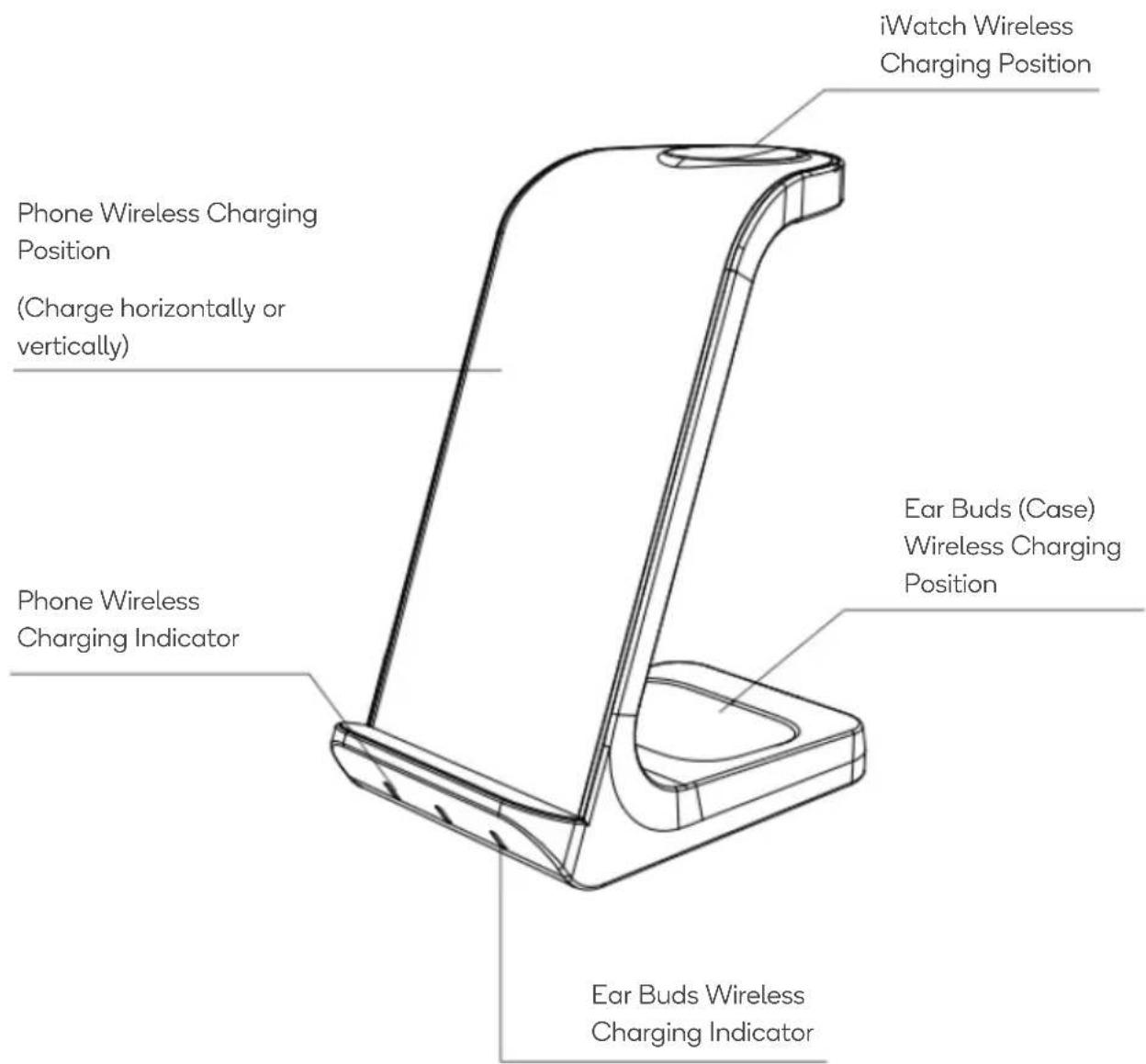
OVERVIEW
OPERATION
1. Connect the Power
Connect one end of the USB-C data cable to product input port, the other end to the power supply (not supplied) – the product will enter standby state. The left and right indicators will be blue lights and remain on; the middle indicator will not make any display.

natural_image
Technical line drawing of a mechanical device with a base, clamped plate, and cable (no text or symbols)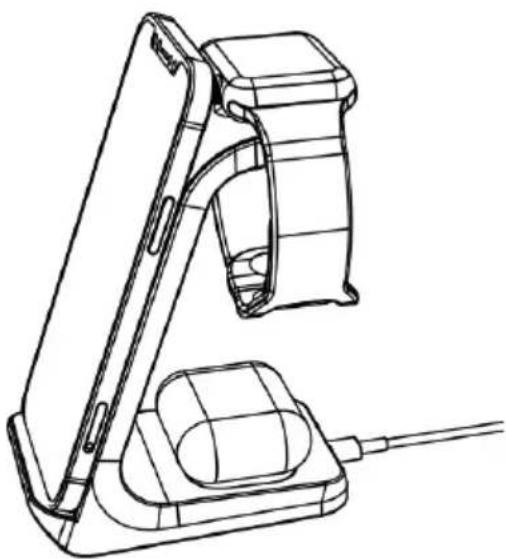
natural_image
Line drawing of a handheld device with a handle and base mount (no text or symbols)
natural_image
Line drawing of a handheld device with a cable and connector (no text or symbols)2. Three Device Charging Models
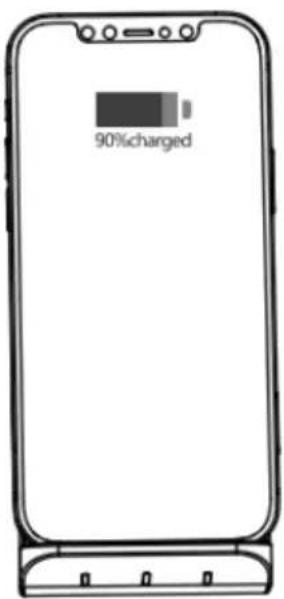
- 5W / 7.5W / 10W / 15W — After placing a mobile phone with wireless charging function on the phone charging position, the phone will begin to charge. The corresponding left indicator will change to green and remain on. When the phone is fully charged, the left green light will flash 3 seconds then go off.
- 5W — After placing ear buds with a wireless charging case on the ear buds charging position, the ear buds will begin to charge. The corresponding right indicator will change to green and remain on.
- 3W — After place the iWatch on the watch charging position, the watch starts to charge. When the watch is charging, the product indicator light has no prompt.
Phone position

natural_image
Technical line drawing of a mechanical clamp or bracket component (no text or symbols)Ear buds position

natural_image
Line drawing of a handheld device with a vertical arm and connector (no text or symbols)iWatch position
Note:
At present, only Samsung mobile phones support full charge feedback, the indicator light does not give any hint when the other mobile phones are fully charged.
Need more information?
We hope that this user guide has given you the assistance needed for a simple set-up.
For the most up-to-date guide for your product, as well as any additional assistance you may require, head online to help.kogan.com
kogan.com


Brand : Kogan
Model : KAWLCSAK03B
Category : Mobile Phone Charger