
KAPBTVLCHGB - Mobile Phone Charger Kogan - Free user manual and instructions
Find the device manual for free KAPBTVLCHGB Kogan in PDF.


| Product Type | 5-in-1 Travel Charger Power Bank |
| Brand | Kogan |
| Model | KAPBTVLCHGB |
| Battery Capacity | 15000mAh (54Wh) |
| AC Input | 100-240V~ 50/60Hz 0.5A |
| USB-C Input | 5V/3A, 9V/2A, 12V/1.5A, 15V/3A, 20V/2.25A (45W max) |
| USB-C Output | 5V/3A, 9V/3A, 12V/3A, 15V/3A, 20V/3.25A (65W max) |
| Built-in USB-C Cable Output | 5V/3A, 9V/3A, 12V/3A, 15V/3A, 20V/3.25A (65W max) |
| USB-A Output | 5V/3A, 9V/2A, 12V/1.5A (18W max) |
| Adapter Mode Output | 30W max |
| Wireless Charging | Compatible with MagSafe and Qi devices |
| Number of Charging Ports | 5 (USB-C input, USB-C output, built-in USB-C cable, USB-A, wireless pad) |
| Display | LED percentage display |
| Safety Features | Overcharge, short circuit, overcurrent protection |
| Material | Plastic |
| Color | Black |
| Included Accessories | Power bank, AU plug, EU plug, UK plug, built-in USB-C cable |
| Usage | Power bank, wall charger, wireless charger |
Frequently Asked Questions - KAPBTVLCHGB Kogan
User questions about KAPBTVLCHGB Kogan
0 question about this device. Answer the ones you know or ask your own.
Ask a new question about this device
Download the instructions for your Mobile Phone Charger in PDF format for free! Find your manual KAPBTVLCHGB - Kogan and take your electronic device back in hand. On this page are published all the documents necessary for the use of your device. KAPBTVLCHGB by Kogan.
USER MANUAL KAPBTVLCHGB Kogan
5-In-1 15000mah 65W PD Travel Charger Power Bank
Magsafe Compatible
KAPBTVLCHGB
Safety & Warnings
- The power bank is not a toy and should be kept away from children.
- Do not use the power bank in direct sunlight or extreme heat for extended periods.
- Do not submerge the power bank in water.
- Do not leave the power bank near fire.
- Do not expose the power bank to harsh chemicals.
- Do not use the power bank if it is damaged or has been modified.
- Do not insert foreign objects into the openings or ports of the power bank.
- Do not attempt to disassemble, repair, or open the power bank.
Components
- Power Bank
- AU Adaptor
- EU Adaptor
- UK Adaptor
Overview
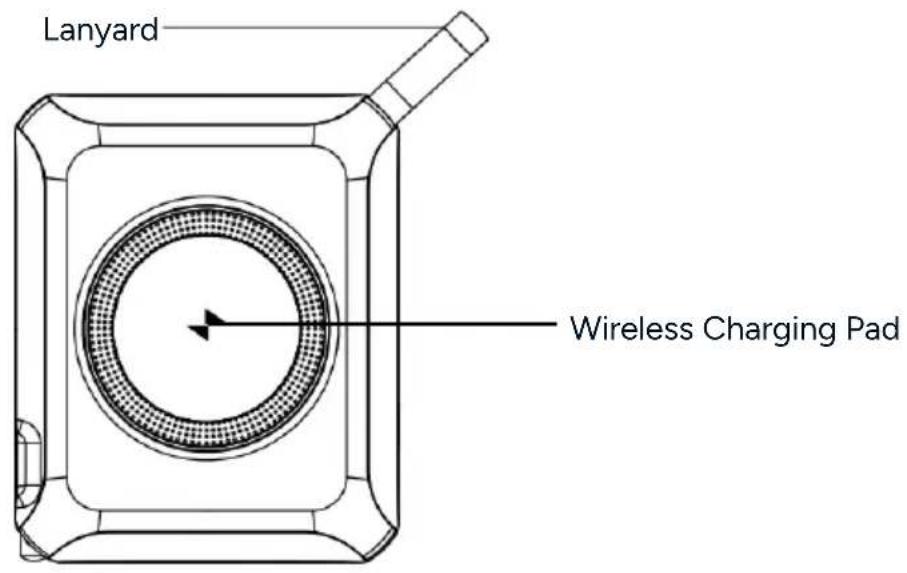
Front View
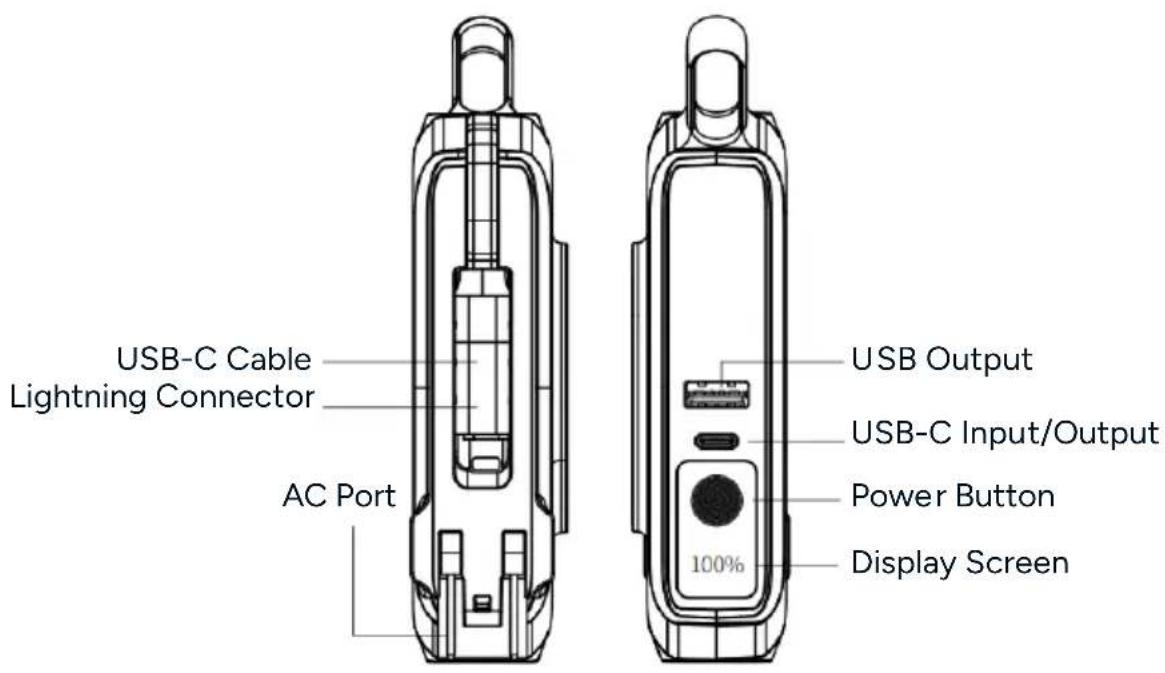
Side View

Side View
Operation
Charging the Power Bank
Directly via Electrical Outlet
-
Pull out the prongs (or connect a power adaptor; you should hear a click when fully inserted).
-
Connect the power bank to an electrical outlet.
USB-C to USB-A Cable
-
Connect the USB-C end of a USB-C to USB-A cable to the USB-C input port on the power bank.
-
Connect the USB-A end to a power adaptor and connect the adaptor to an electrical outlet.
AC Cable
Connect a 100\~240V 50Hz/60Hz 0.5A (max) AC cable (not provided) to the AC port on the power bank.
Checking the Battery Level
- Press the 'Power' button; the current percentage level will illuminate on the display screen.
- Double-click the 'Power' button, or after approximately 35 seconds of standby, the display and power will turn off automatically.
Using the Power Bank to Charge Your Devices
The power bank offers multiple charging methods to suit your needs. You can charge multiple devices at the same time.
Note:
If charging does not start automatically, press the 'Power' button to activate the power bank.
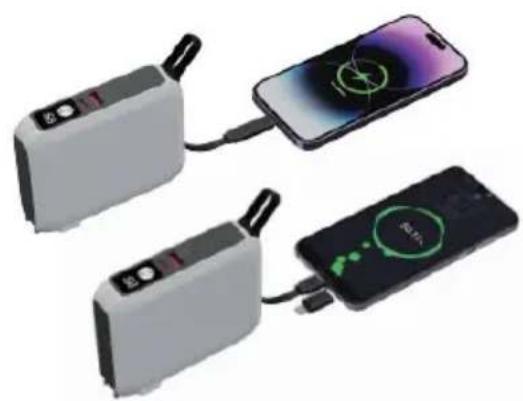
Built-in USB-C Cable
- Locate the built-in USB-C cable on the power bank.
- Extend the cable and connect it to the USB-C port on your device.

USB-A Port
- Insert one end of a USB-A cable (not provided) into the USB-A port on the power bank.
- Connect the other end to your device.
USB-C Port
- Use a USB-C to USB-C or USB-C to USB cable (not provided) depending on your device.
- Connect one end of the cable into the USB-C port on the power bank.
- Connect the other end to your device.
Wireless Charger
-
Ensure your device supports wireless charging.
-
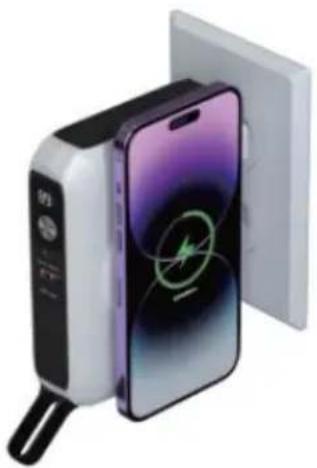
Place your device on the wireless charging pad, aligning it with the charging surface.
Note:
If the power bank detects no wireless charging load, the wireless function will enter a dormant state after 32 seconds. To activate wireless charging again, press the 'Power' button briefly to wake the wireless charging function and start charging your device.
Using as a Wall Charger
-
Pull out the prongs (or connect a power adaptor; you should hear a click when fully inserted).
-
Connect the power bank to an electrical outlet.
-
Insert a cable into the USB-A or USB-C charging port and into your device or place your device on the wireless charging pad.

Specifications
Battery 15000mAh @ 3.6V 54Wh.
AC Input
100-240V\~ 50/60Hz 0.5A.
USB-C Input
5V=3A, 9V=2A, 12V=1.5A, 15V=3A, 20V=2.25A PD 45W max.
USB-C Output
5V=3A, 9V=3A, 12V=3A, 15V=3A, 20V=3.25A PD 65W max.
USB-C Lightning
5V=3A, 9V=3A, 12V=3A, 15V=3A, 20V=3.25A PD 65W max.
Cable Output
USB-A Output
5V=3A, 9V=2A, 12V=1.5A, 18W max.
Adaptor Mode
30W max.
Output
Sharing Output
5V=3A.
Disposal

This marking indicates that this appliance should not be disposed with other household wastes. To prevent possible harm to the environment or human health from uncontrolled waste disposal, recycle it responsibly to promote the sustainable reuse of material resources.
Notes
The Ground Truth image displays a single, solid horizontal line, which is a stylistic or background element (like a ruled paper line). According to Rule 2, such lines must be ignored by the OCR result. The provided OCR content is "____", which consists of underscores. Underscores are not equivalent to a solid line and are not permitted under the “Stylistic/Background Lines (Ignore)” rule. Outputting underscores for a stylistic line is incorrect because it misinterprets the line as a placeholder fill-in-the-blank area. Since the OCR output incorrectly rendered a stylistic line as underscores (which should be ignored), this violates the rule. Therefore, the OCR result is inconsistent with the Ground Truth.
[Non-Text]
[Non-Text]
[EMPTY]
[Non-Text]
[Non-Text]
The Ground Truth image displays a single, continuous horizontal line, which is a stylistic or background element (like a ruled paper line). According to Rule 2, such lines must be ignored by the OCR result. The provided OCR content is "____", which consists of underscores. Underscores are not equivalent to a solid line and are not permitted under the “Stylistic/Background Lines (Ignore)” rule. Outputting underscores for a stylistic line is incorrect because it misinterprets the line as a fill-in-the-blank placeholder. Therefore, the OCR result is inconsistent with the Ground Truth.
[Non-Text]
[Non-Text]
[NO TEXT]
[Non-Text]
[Non-Text]
The Ground Truth image displays a single, continuous horizontal line, which is a stylistic or background element (like a ruled paper line). According to Rule 2, such lines must be ignored by the OCR result. The provided OCR content is "____", which consists of underscores. Underscores are not equivalent to a solid line and are not permitted under the “Stylistic/Background Lines (Ignore)” rule. Outputting underscores for a stylistic line is incorrect because it misinterprets the line as a fill-in-the-blank placeholder. Therefore, the OCR result is inconsistent with the Ground Truth.
[Non-Text]
[Non-Text]
The Ground Truth image displays a single, continuous horizontal line, which is a stylistic or background element (like a ruled paper line). According to Rule 2, such lines must be ignored by the OCR result. The provided OCR content is "____", which consists of underscores. Underscores are not equivalent to a solid line and are not permitted under the “Stylistic/Background Lines (Ignore)” rule. Outputting underscores for a stylistic line is incorrect because it misinterprets the line as a fill-in-the-blank placeholder. Therefore, the OCR result is inconsistent with the Ground Truth.
[Non-Text]
[Non-Text]
____
[Non-Text]
[Non-Text]
The Ground Truth image displays a single, continuous horizontal line, which is a stylistic or background element (like a ruled paper line). According to Rule 2, such lines must be ignored by the OCR result. The provided OCR content is "____", which consists of underscores. Underscores are not equivalent to a solid line and are not permitted under the “Stylistic/Background Lines (Ignore)” rule. Outputting underscores for a stylistic line is incorrect because it misinterprets the line as a fill-in-the-blank placeholder. Therefore, the OCR result is inconsistent with the Ground Truth.
[Non-Text]
[Non-Text]
The Ground Truth image displays a single, continuous horizontal line, which is a stylistic or background element (like a ruled paper line). According to Rule 2, such lines must be ignored by the OCR result. The OCR content provided is "", which consists of no characters. Since the OCR output correctly ignores the background/stylistic line and produces no actual text, it complies with the “Stylistic/Background Lines (Ignore)” rule. Therefore, the OCR result is consistent with the Ground Truth.
[Non-Text]
[Non-Text]
The Ground Truth image displays a single, continuous horizontal line, which is a stylistic or background element (like a ruled paper line). According to Rule 2, such lines must be ignored by the OCR result. The provided OCR content is "____", which consists of underscores. Underscores are not equivalent to a solid line and are not permitted under the “Stylistic/Background Lines (Ignore)” rule. Outputting underscores for a stylistic line is incorrect because it misinterprets the line as a fill-in-the-blank placeholder. Therefore, the OCR result is inconsistent with the Ground Truth.
[Non-Text]
[Non-Text]
The Ground Truth image displays a single, solid horizontal line. According to Rule 2 (UNDERSCORE & LINE RULES), this is a stylistic or background line, not a placeholder underscore. Therefore, the OCR result must ignore it and output nothing or only meaningful text. The provided OCR content is "____", which consists of four underscores. This is an incorrect interpretation of the line as a placeholder, violating the rule that stylistic lines must be ignored. The OCR has hallucinated underscores where none should exist based on the GT's visual context. Hence, the OCR result is inconsistent with the Ground Truth.
[Non-Text]
[Non-Text]
The Ground Truth image displays a single, solid horizontal line, which is a stylistic or background element (like a ruled paper line or separator), not a placeholder for text. According to Rule 2, such stylistic/background lines must be ignored by the OCR result. The OCR content provided is "", which consists of no characters. This correctly represents the absence of any textual content in the GT and correctly matches the visual line as a stylistic element. Therefore, the OCR output should not contain any underscores or line representations. Outputting underscores for a stylistic line violates the rule and constitutes an error.
[Non-Text]
[Non-Text]
[Non-Text]
The Ground Truth image displays a single, solid horizontal line. According to Rule 2 (UNDERSCORE & LINE RULES), this is a stylistic or background line, not a placeholder underscore. Therefore, the OCR result must ignore it. The provided OCR content is "____", which consists of four underscores. This is an incorrect interpretation of the line as a placeholder and violates the rule that stylistic lines must be ignored. The OCR has hallucinated text (underscores) where none should exist based on the GT's visual context. Hence, the OCR result is inconsistent with the Ground Truth.
[Non-Text]
[Non-Text]
The Ground Truth image displays a single, continuous horizontal line, which is a stylistic or background element (like a ruled paper line). According to Rule 2, such lines must be ignored by the OCR result. The provided OCR content is "____", which consists of underscores. Underscores are not equivalent to a solid line and are not permitted under the “Stylistic/Background Lines (Ignore)” rule. Outputting underscores for a stylistic line is incorrect because it misinterprets the line as a fill-in-the-blank placeholder. Therefore, the OCR result is inconsistent with the Ground Truth.
[Non-Text]
The Ground Truth image displays a single, solid horizontal line. According to Rule 2 (UNDERSCORE & LINE RULES), this is a stylistic or background line, not a placeholder underscore. Therefore, the OCR result must ignore it and output nothing or only meaningful text. The provided OCR content is "____", which consists of four underscores. This is an incorrect interpretation of the line as a placeholder, violating the rule that stylistic lines must be ignored. The OCR has hallucinated placeholder underscores where none should exist in the GT. Hence, the OCR result is inconsistent with the Ground Truth.
The Ground Truth image displays a single, solid horizontal line. According to Rule 2 (UNDERSCORE & LINE RULES), this is a stylistic or background line, not a placeholder underscore. Therefore, the OCR result must ignore it and output nothing or only meaningful text. The provided OCR content is "____", which consists of four underscores. This is an incorrect interpretation of the line as a placeholder, violating the rule that stylistic lines must be ignored. The OCR has hallucinated underscores where none should exist based on the GT's visual context. Hence, the OCR result is inconsistent with the Ground Truth.
[Non-Text]
The Ground Truth image displays a single, solid horizontal line. According to Rule 2 (UNDERSCORE & LINE RULES), if the GT contains lines used for stylistic emphasis or as background elements (like ruled paper), the OCR result must ignore them. The line in the GT is clearly a stylistic/background line, not a placeholder for text. Therefore, the OCR should not have output any underscores. Outputting `____` constitutes an error under Rule 2, as it hallucinates placeholder symbols where none are semantically intended. Hence, the OCR result is inconsistent with the Ground Truth.
[Non-Text]
Need more information?
We hope that this user guide has given you the assistance needed for a simple set-up.
For the most up-to-date guide for your product, as well as any additional assistance you may require, head online to help.Kogan.com.
kogan.com


- 5-IN-1 15000MAH 65W PD TRAVEL CHARGER POWER BANK
- SAFETY & WARNINGS
- COMPONENTS
- OVERVIEW
- SIDE VIEW
- OPERATION
- CHARGING THE POWER BANK
- DIRECTLY VIA ELECTRICAL OUTLET
- USB-C TO USB-A CABLE
- AC CABLE
- CHECKING THE BATTERY LEVEL
- USING THE POWER BANK TO CHARGE YOUR DEVICES
- NOTE
- BUILT-IN USB-C CABLE
- USB-A PORT
- USB-C PORT
- WIRELESS CHARGER
- USING AS A WALL CHARGER
- SPECIFICATIONS
- DISPOSAL
- NOTES
- NEED MORE INFORMATION
Brand : Kogan
Model : KAPBTVLCHGB
Category : Mobile Phone Charger