
KACGSTDMGPA - Mobile Phone Charger Kogan - Free user manual and instructions
Find the device manual for free KACGSTDMGPA Kogan in PDF.


| Product Type | 3-in-1 Wireless Charging Stand |
| Model | KACGSTDMGPA |
| Brand | Kogan |
| Input | 5V=2A, 9V=3A |
| Output (Max) | 15W |
| Wireless Frequency | 110-250KHz |
| Charging Efficiency | ≥80% |
| Dimensions | 60 x 93 x 21.9 mm |
| Material | Aluminum |
| Compatibility | MagSafe compatible; charges phone, watch, and earphones |
| Indicator Light | Blue (standby/charged), Green (charging), Blue flashing (FOD) |
| Foreign Object Detection (FOD) | Yes |
| Foldable Design | Yes |
| Adjustable Angle | Yes |
| Charging Cable | USB-C to USB-C (included) |
| Power Adapter | Not included (requires QC 3.0 or PD adapter) |
| Operating Temperature | -10°C to 40°C |
| Safety Features | FOD, overheat protection, short circuit protection |
| Usage Precautions | Keep 20cm away from medical implants; do not use when folded; avoid water/fire |
Frequently Asked Questions - KACGSTDMGPA Kogan
User questions about KACGSTDMGPA Kogan
0 question about this device. Answer the ones you know or ask your own.
Ask a new question about this device
Download the instructions for your Mobile Phone Charger in PDF format for free! Find your manual KACGSTDMGPA - Kogan and take your electronic device back in hand. On this page are published all the documents necessary for the use of your device. KACGSTDMGPA by Kogan.
USER MANUAL KACGSTDMGPA Kogan
natural_image
Line drawing of a smartphone stand with a black base and open top (no text or symbols)3-IN-1 ALUMINUM WIRELESS CHARGING STAND
MAGSAFE COMPATIBLE
KACGSTDMGPA
SAFETY & WARNINGS
- Do not use excessive force against this charging stand or throw it into fire or water to avoid short circuiting.
- Do not place this charging stand in extremely high or low temperatures or humid environments (temperature range -10^ - + 40^ ).
- Keep this charging stand at least 20cm away from implanted medical equipment (pacemakers, implantable cochlea implants, etc.) to avoid potential interference to medical equipment.
- Keep this charging stand away from children.
- Only use the provided accessories or those recommended by Kogan.com.
- Do not disassemble this charging stand without permission. If it is damaged, cease use immediately and contact help.Kogan.com.
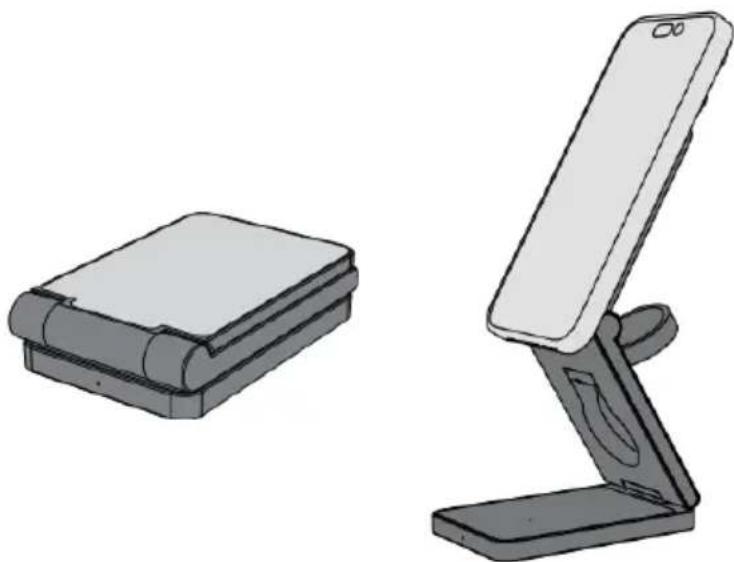
- Do not charge a device when the charging stand is folded. The charging stand is made from metal materials and charging when folded can trigger FOD.
OVERVIEW

OPERATION
Positioning
The charging stand can be folded or unfolded.
natural_image
Illustration of two electronic devices: a flat case and a smartphone stand (no text or symbols)Charging
- Ensure the charging stand is unfolded.
- Connect one end of the USB-C cable to the USB-C port on the charging stand and the other end to a USB-C adapter (not provided).
- Then, plug the adapter into an electrical outlet. The charger will be in standby, and the indicator will illuminate blue while charging.

natural_image
Line drawing of a handheld device with a cable and plug, no text or symbols presentAdjust the Angle

Foreign Object Detection (FOD)
- When a wireless charging area senses a metal foreign object or the position of the device is incorrect, the indicator will flash blue, and the device will be unable to charge.
- Remove the metal foreign object or place the device in the correct position to return to normal charging.
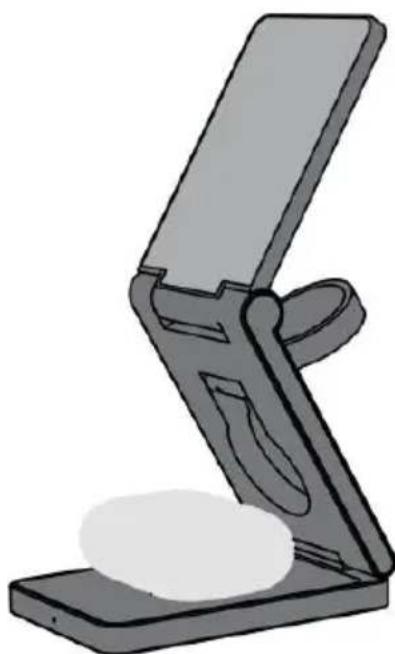
Charging a Device
Place your device on the corresponding charging pad. To charge a watch, unfold the watch charging pad. The device will begin charging and the indicator will illuminate green.

Phone
Watch
natural_image
Illustration of a smartphone stand with a flat top and a curved handle, no text or symbols present.Earphones
SPECIFICATIONS
Input
Output
Frequency
Efficiency
Product Size
5.0V=2.0A, 9.0V=3A
15W (MAX)
110-250KHz
≥80%
60 × 93 × 21.9 mm
Need more information?
We hope that this user guide has given you the assistance needed for a simple set-up.
For the most up-to-date guide for your product, as well as any additional assistance you may require, head online to help.kogan.com
kogan.com


Brand : Kogan
Model : KACGSTDMGPA
Category : Mobile Phone Charger