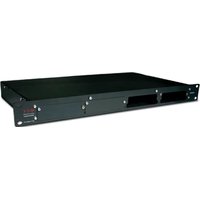
66057 - UPS APC - Free user manual and instructions
Find the device manual for free 66057 APC in PDF.


| Product Type | MultiSlot extension module for communication cards (UPS accessory) |
| Model Number | 66057 |
| Brand | APC by Schneider Electric |
| Dimensions | 1U x 19" (44.45 x 482.6 mm) |
| Weight | 2.8 kg |
| Input Voltage | 230V AC (150 mA 50 Hz) or 120V AC (300 mA 60 Hz), selectable |
| Input Current | 150 mA (230V) or 300 mA (120V) |
| Fuse Protection | 500 mA, 250V AC, delayed type |
| Maximum Operating Temperature | 35°C |
| Number of Communication Card Slots | 4 |
| Connections | UPS BUS (RJ45), UPS COM (DB9), AC power socket (IEC) |
| Supported Protocols | SNMP 10BaseT, JBus RS232/RS485, U-Talk RS232 |
| Package Contents | MultiSlot module, power cord, installation manual, 4 adhesive support pads, 2 M6 screws & 2 cage nuts, 1 spare fuse (500 mA 250V delayed) |
| Mounting Options | 19" rack (with included screws) or flat surface (with adhesive pads) |
| Maintenance | Replace fuse with identical type (500 mA 250V delayed); contact support for other issues |
| Safety | Follow installation instructions; do not operate if damaged; disconnect power before voltage selector change |
| Warranty | Warranty void if instructions not followed; repair by authorized personnel only |
Frequently Asked Questions - 66057 APC
User questions about 66057 APC
0 question about this device. Answer the ones you know or ask your own.
Ask a new question about this device
Download the instructions for your UPS in PDF format for free! Find your manual 66057 - APC and take your electronic device back in hand. On this page are published all the documents necessary for the use of your device. 66057 by APC.
USER MANUAL 66057 APC
natural_image
3D rendering of a gray server rack with mounting holes and internal components (no text or symbols visible)MultiSlot
Extension module for communication cards
Installation and user manual
English
Français
APC®
by Schneider Electric
△……i
English version ..... 1
by Schneider Electric
5102919700-BC
990-5102919700AC
Safety guidelines
The MultiSlot module can be installed and operated by all persons following the instructions given in this manual. However, if you encounter a problem, we recommend that you contact our after-sales support service.

It is imperative that the instructions be followed strictly. Not adhering to these instructions may endanger personnel, result in damage and render the manufacturer's warranty void. All repair or maintenance operations must be carried out by our after-sales support personnel.
For more information on the UPS, please refer to its "installation and user manual".
Contents of package 2
Storage 2
Recycling of packing materials 2
Function 3
Overall view 3
Installation
Input voltage settings 4
Installation 5
Connection to the UPS 6
Operation 7
Special settings
Installation of a second module 8
UPS COM port 10
Troubleshooting
Operating anomalies 11
Fuse replacement 11
Appendices
Glossary 12
Index 12
All APC by Schneider Electric products are protected by patents. They implement original technology which is not available to other competitors of APC by Schneider Electric.
To take evolving standards and technology into account, the technical characteristics contained in this document are not binding unless confirmed by APC by Schneider Electric.
This document may be reproduced only with the consent of APC by Schneider Electric. Authorised copies must be marked "APC by Schneider Electric extension module for communication cards installation and user manual n° 5102919700".
Presentation
Contents of package
The MultiSlot optional module is made up of the following components (see figure 1):
- the MultiSlot module itself (not equipped with the optional cards);
▶ one power cord;
- one installation and user manual for the MultiSlot module (this document);
- four adhesive support pads;
- two M6 screws and two cage nuts;
▶ one spare fuse (500 mA, 250V, delayed).
Storage
If the module is stored prior to installation, it should remain in the original packing in a dry place. The storage temperature range is -40^ to +70^ .
Recycling of packing materials
Packing materials must be disposed of in compliance with applicable laws and regulations.

natural_image
Illustration of a server rack with attached cable, battery, and accessories (no text or symbols on main components)Fig. 1
Presentation
Function
MultiSlot is an extension module for up to four communications cards.
The MultiSlot module may be connected to a UPS (Uninterruptible Power Supply) in either of two connection modes:
- direct connection to the UPS BUS port; - connection via a U-Talk/Basic acquisition card.
Using one of the two connection modes, the MultiSlot module acquires measurements, status information and alarms from the UPS and transmits the information to the installed communications cards.
The communications cards provide the interface for user access to the information via a wide range of communications protocols.
The currently available protocols are:
SNMP 10BaseT;
▶ JBus RS232 or RS485;
- U-Talk RS232 (ASCII-type protocol, property of APC by Schneider Electric);
MultiSlot-module characteristics:
- input voltage: 230 or 120V AC;
- input current: 150 or 300 mA;
- fuse protection: 500 mA, 250V AC, delayed;
▶ maximum operating temperature: 35°C;
- dimensions: 1 U x 19" (44.45 x 482.6 mm);
▶ weight: 2.8 kg.
Overall view

Fig. 2: Front and back of the MultiSlot module.
Key
① slots for communications cards (4 slots including 3 protected by a plate),
② UPS COM (DB9 connector),
③ selector for module number,
④ UPS BUS (RJ45 connector),
⑤ input voltage selector,
⑥ socket for connection to AC power,
⑦ module protection fuse.
Installation
Input voltage settings
Before making any connections, check that the AC power used to supply the MultiSlot module is compatible with module characteristics (230V 150 mA 50Hz or 120V 300 mA 60 Hz).
Set the appropriate voltage (230V or 120V) using the selector ⑤ (see figure 3). A 500 mA 250V delayed fuse protects the module against electrical faults.

The MultiSlot module must be deenergized (cord removed from the socket ⑥ before changing settings on the selector ⑤).
Once the voltage has been correctly set, insert the cord in the socket ⑥ at the back of the MultiSlot module (see figure 4). The cord is made up of two active wires and an earth wire which must be connected to the installation earthing terminal.

Fig. 3
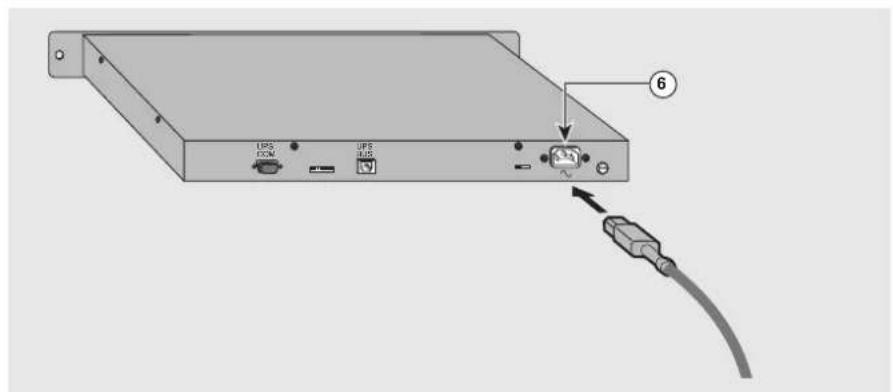
Fig. 4
Installation
Rack mounting
Figure 5 shows how to install the MultiSlot module in a 19" rack using the two M6 screws and the two cage nuts positioned at the desired height on the frame uprights. The module is not as wide as the rack and consequently does not block the circulation of air.

If the temperature inside the cabinet exceeds 35^ C, ventilation is required or the MultiSlot module must be installed outside the cabinet.
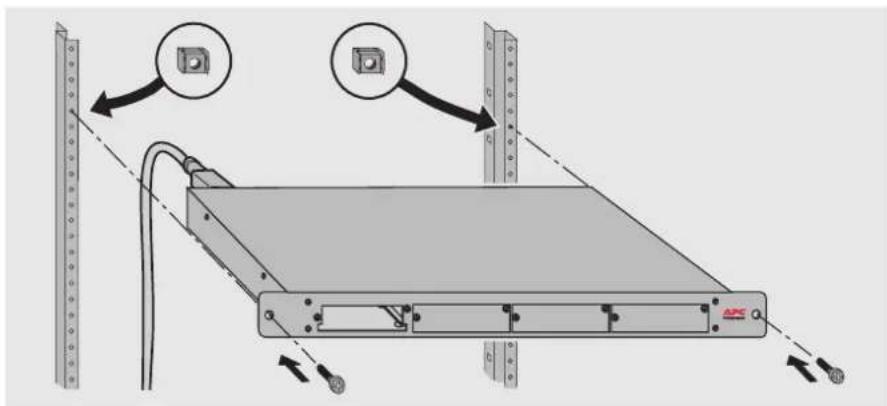
Fig. 5
Adhesive support pads
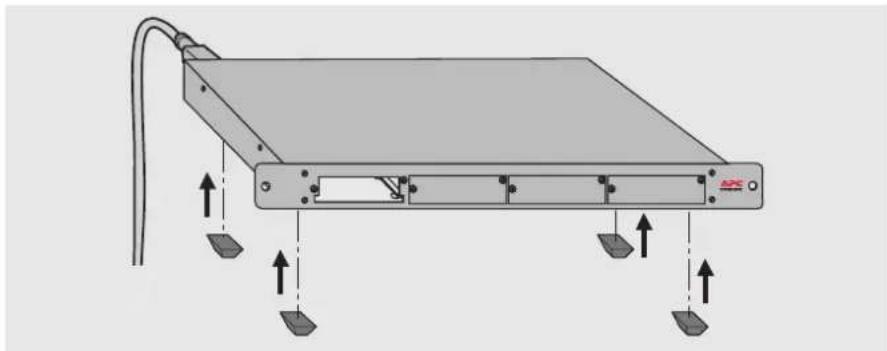
Figure 6 shows how to attach the four adhesive support pads under the MultiSlot module to keep it from slipping on a flat surface.
natural_image
Diagram of a flat electronic device with labeled ports and directional arrows indicating movement (no text or symbols present)Fig. 6
Installation
Connection to the UPS
Figure 7 shows connection of the MultiSlot module to a UPS using an acquisition card intended for a U-Talk/Basic communications port. Consult the user manual of the card concerning configuration in the U-Talk or Basic modes. The cable for connection to the UPS is supplied with the acquisition card.

Fig. 7
Operation
The communications cards may be installed in any of the four slots.
No particular order is required.
Figure 9 shows one possible order.
Before a card may be installed, the protection plate must be removed.
The screws holding the plate are used to secure the card in the module.
The plates for unused slots must be left in place.

Consult the installation and user manuals of the cards prior to their installation in the MultiSlot module.

Fig. 8
Special settings
Installation of a second module
Depending on the surveillance needs for the installation, it may be useful to increase the number of connection points by installing a second MultiSlot module.
Figure 10 shows the parameter settings for each of the two modules.
Installation of a second MultiSlot module is possible only for UPSs equipped with a U-Talk or Basic communications port.

Fig. 9
Special settings
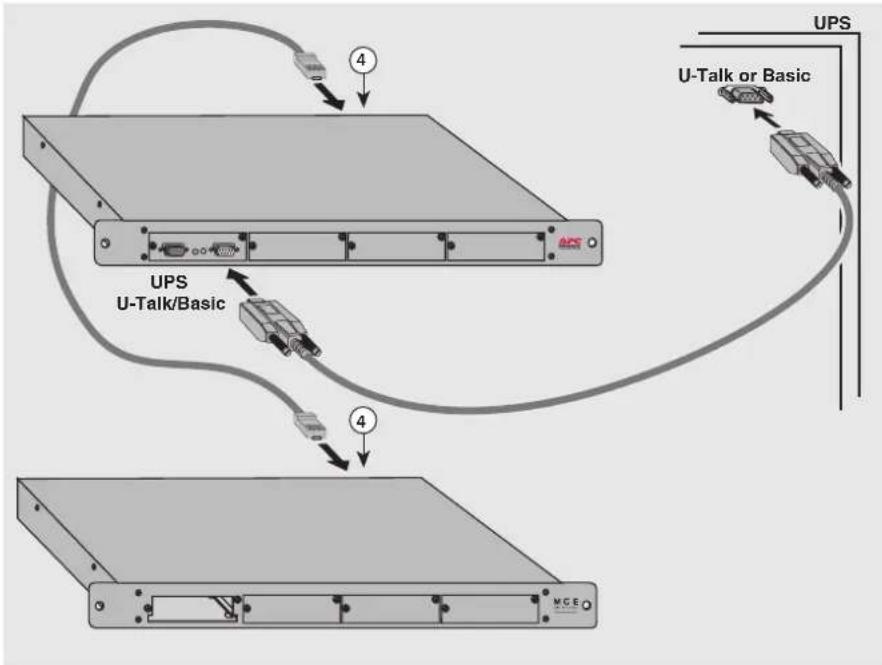
Figure 11 shows how to connect the two MultiSlot modules to the UPS.
Only one acquisition card should be used for the set of two modules.
The two modules are interconnected via the UPS BUS ports ④.
flowchart
graph TD
    A["Server Rack"] -->|4| B["UPS U-Talk/Basic"]
    A -->|4| C["U-Talk or Basic"]
    C --> D["Device 1"]
    C --> E["Device 2"]
    D --> F["Device 3"]
    E --> G["Device 4"]
Fig. 10
Special settings
Figure 12 shows the wiring diagram for the RJ45 cable used to interconnect the two MultiSlot modules or to connect one of the MultiSlot modules to the UPS BUS port on the UPS. The cable is not supplied.

Fig. 11
UPS COM port
This port is reserved for future applications of the MultiSlot module and should not be used.
Troubleshooting
Operating anomalies
AC-power problem
The green lights on the communications cards and the acquisition card are all off:
- check the position of the input voltage selector (see figure 3),
▶ check that the power cable is properly connected (see figure 4),
- check the fuse and replace it if necessary (see below "fuse replacement").
Communications problem
The green lights on the communications cards flash regularly every second for more than one minute:
▶ check the connection between the MultiSlot module and the UPS (see figures 7, 8 and 11),
▶ check that the cards are correctly installed in the MultiSlot module,
- press the reset button on each card installed in the MultiSlot module,
- if necessary, deenergize and reenergize the MultiSlot module.
Card start-up problem
The green light on a communications card remains on or off:
- check that the card is correctly installed in the MultiSlot module,
- press the reset button of the faulty card.
Invalid installation configurations
The following installation configurations are invalid:
- MultiSlot module not connected to a UPS (no U-Talk/Basic acquisition card or no direct connection via the UPS BUS port),
- MultiSlot module equipped with two U-Talk/Basic acquisition cards,
- installation in duo mode (two modules) with an acquisition card in each MultiSlot module,
- MultiSlot module equipped with both a U-Talk/Basic acquisition card and a connection to a UPS via the UPS BUS port.
Fuse replacement
The MultiSlot module is protected by a fuse. If the fuse blows, it must be replaced, as shown in figure 13.
The replacement fuse must imperatively have the same characteristics as the original fuse (500 mA, 250V, delayed).
A replacement fuse is supplied with the MultiSlot module.
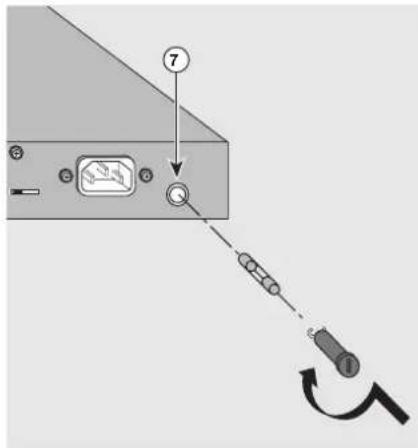
Fig. 12
If the problem continues, contact our after-sales support department.
Appendices
Glossary
Basic: information exchange protocol using dry contacts,
I2C: multi-point and multi-master communications protocol and bus,
JBus: master-slave communications protocol using a point-to-point (RS232) or multi-point (RS485) serial link,
SNMP: Ethernet communications protocol,
UPS: Uninterruptible Power Supply,
U-Talk: point-to-point ASCII communications protocol using an RS232 serial link. U-Talk is the APC by Schneider Electric proprietary protocol.
Index
AC power 4,11
Acquisition card 6,9,11
Acquisition cable 6,9
Adhesive support pads 2,5
Characteristics 3
Communications card 7,11
Contents of package 2
Fuse 2,4,11
I2C RJ45 cable 6,9,10
Power cord 2,4
Protection plates 2,7
Rack 2,5
Second MultiSlot module 8-9
Settings 4,8
Troubleshooting....11
UPS (connection) 6, 9, 11
Warnings (⚠️) ...... i, 4-5, 7

- MultiSlot
- Safety guidelines
- Installation
- Special settings
- Troubleshooting
- Appendices
- Presentation
- Contents of package
- Storage
- Recycling of packing materials
- Function
- Overall view
- Key
- Input voltage settings
- Rack mounting
- Adhesive support pads
- Connection to the UPS
- Operation
- Installation of a second module
- UPS COM port
- Operating anomalies
- AC-power problem
- Communications problem
- Card start-up problem
- Invalid installation configurations
- Fuse replacement
- Glossary
- Index
Brand : APC
Model : 66057
Category : UPS