KASHOFH24PA - Heating Kogan - Free user manual and instructions
Find the device manual for free KASHOFH24PA Kogan in PDF.


User questions about KASHOFH24PA Kogan
0 question about this device. Answer the ones you know or ask your own.
Ask a new question about this device
Download the instructions for your Heating in PDF format for free! Find your manual KASHOFH24PA - Kogan and take your electronic device back in hand. On this page are published all the documents necessary for the use of your device. KASHOFH24PA by Kogan.
USER MANUAL KASHOFH24PA Kogan
natural_image
Black electrical heater with digital display and mounting base (no visible text or symbols)KOGAN SMARTERHOME™ 2400W OIL FREE HEATER
KASHOFH24PA & KASHOFH24PB
SAFETY & WARNINGS

Read these instructions carefully before use and save this user guide for future reference.

Important
Before plugging the power plug into the electrical outlet, inspect the heater to ensure it is intact and has not suffered any damage during transit.

Caution
- The heater must always be placed on a flat and stable surface.
- To avoid a hazard due to inadvertent resetting of the thermal cutout, this heater must not be powered through an external switching device, such as a timer, or connected to a circuit that is regularly switched on and off.
- Use only the voltage specified on the rating label of the heater.
- Do not use extension cords or ungrounded (two prong) adapters.
- Do not operate the heater when no one is home or when you are sleeping. Always unplug the heater when not in use.
- Keep combustible materials such as furniture, cushions, bedding, paper, clothes, curtains etc., at least 1m away from the heater.
- Do not hang anything on, in front of or on top of the heater.
• Always use the heater in an upright position. - Do not place the heater against walls, furniture, curtains, etc.
- Do not use the heater in rooms less than 4m^2 .
- Do not pull the power cord. Firmly hold the plug and pull it out from the electrical outlet.
- Ensure there is at least 1m of free space in front and 50cm of free space behind the heater.
- Do not let animals or children touch or play with the heater. Children should be supervised around the heater as the air outlet gets hot during operation.
- Do not cover the heater to prevent overheating.
- Do not use this heater in the vicinity of showers, bathtubs, sinks, swimming pools, etc.
-
Do not use the heater in rooms containing explosive gas, inflammable solvents, varnish, or glue.
-
Keep the heater clean. Do not allow any objects to enter any ventilation or exhaust opening as this may cause electric shock, fire, or damage to the heater.
- Do not use the heater if it has been dropped or damaged. Do not attempt to repair the heater yourself. If the heater is damaged, contact help.Kogan.com for support.
- Do not use the heater to dry clothes or fabric.
- Do not move the heater while in operation to avoid overheating and the risk of fire.
- If the power cord is damaged, cease use immediately and contact help.Kogan.com to have it replaced.
- The heater must not be located immediately below an electrical outlet.
- Do not use this heater with a programmer, timer or any other device that switches the heater on automatically, as it is a fire risk if the heater is covered or positioned incorrectly.
- Children should be supervised to ensure that they do not play with the heater.
- This heater can be used by children aged from 8 years and above and persons with reduced physical, sensory or mental capabilities or lack of experience or knowledge if they have been given supervision or instruction concerning use of the heater in a safe way and understand the hazards involved.
- Cleaning and user maintenance must not be made by children without supervision.
- Children of less than 3 years should be kept away from the heater unless continuously supervised.
- Children aged from 3 to 8 years shall only switch on/off the heater if it has been placed in its intended normal operating position and they have been given supervision or instruction concerning use of the heater in a safe way and understand the hazards involved.
- Children aged from 3 to 8 years must not plug in, operate, clean, or perform maintenance on the heater.
- Do not leave the heater unattended when plugged in to the electrical outlet.

Caution
Some parts of the heater can become very hot and cause burns. Do not touch hot surfaces. Particular attention must be given where children and vulnerable people are present.

Note
This heater is intended to be portable and for domestic use only.
OVERVIEW
Remote Control
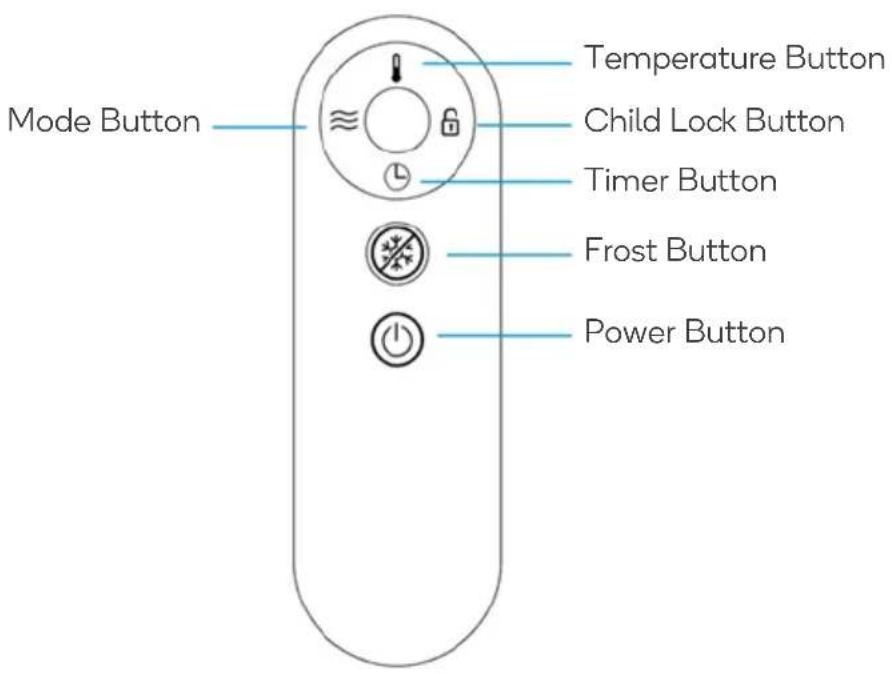
text_image
Mode Button Temperature Button Child Lock Button Timer Button Frost Button Power ButtonDisplay Screen
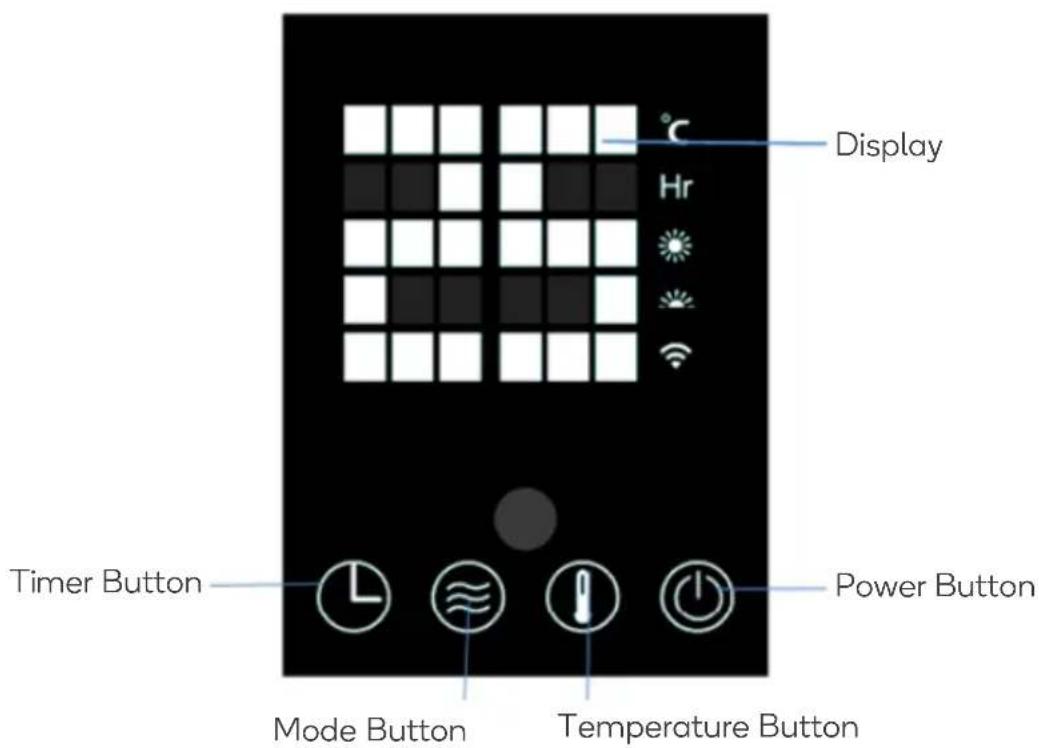
text_image
Display Hr Timer Button Mode Button Temperature Button Power ButtonINSTALLATION
Connect the x2 feet with the wheels attached to the heater's casing and secure using the x6 provided ST4x12mm screws (3 per foot).

natural_image
Exterior view of a black rectangular electronic device with ventilation grilles and two supporting clamps (no visible text or symbols)CONNECT TO SMARTERHOME™ APP
Install app
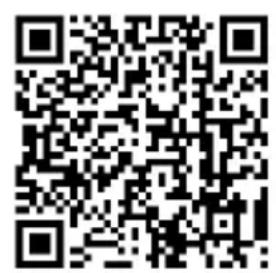
Download the "Kogan SmarterHome" app from the Play Store (Android) or App Store (iOS).
text_image
QR code image containing encoded data, no visible human-readable textPlay Store (Android)

text_image
QR code image containing encoded data, no visible human-readable textApp Store (iOS)

To register:
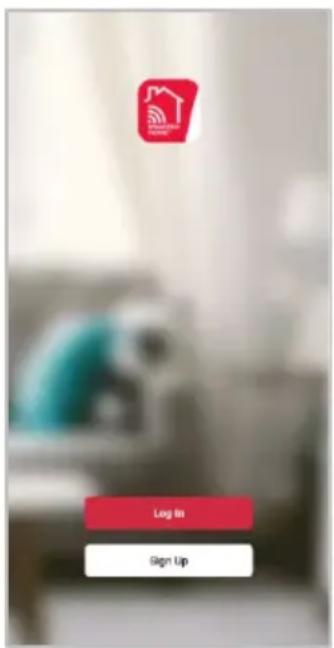
- If you already have a SmarterHome account, select 'Log In'. To register a new account, select 'Sign Up'.
- The system will automatically recognise your country. If needed, you can manually select your country from the drop-down box. Enter your email address and tap 'Get Verification Code' to continue.
- A 6-digit code will be sent to the submitted email address. Enter this code before the one-minute timer expires.
- Continue to the next page and complete your SmarterHome profile.
text_image
Log In Sign Up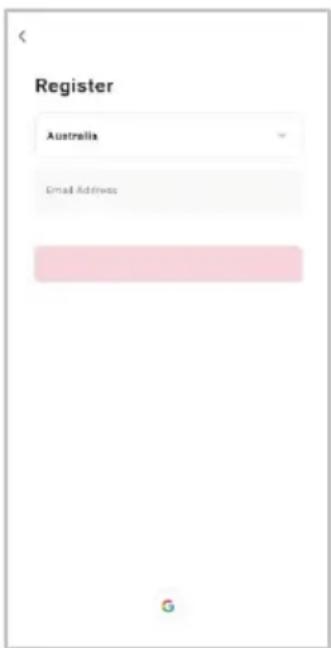
text_image
Register Australia Email Address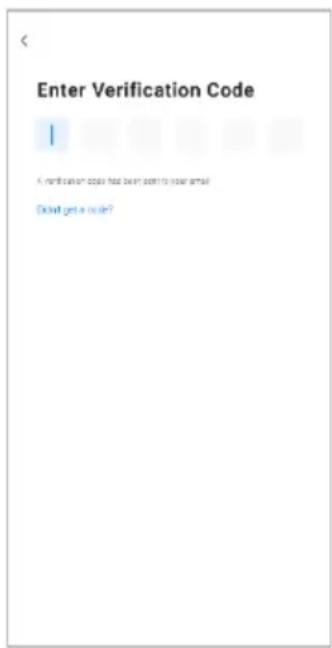
text_image
Enter Verification Code A verification code has been sent to your email. Oknot get a code?Set device in pairing mode
When the device is first turned on, it may automatically enter pairing mode (the Wi-Fi icon will be flashing rapidly).
If not automatically in pairing mode when powered on, you can manually set the device in pairing mode by pressing and holding the mode button on the display screen for 5-10 seconds until you hear a beep, and the Wi-Fi icon starts flashing rapidly (twice per second).
Add device through network
- Once registered, tap "Add Device" on the app's home page, or the "+" in the upper right corner, to add a new device through the network.
- Select the product type from the list of options in the app (Heating & Cooling > Heaters).
- Enter your Wi-Fi details. It is important that your SmarterHome™ device and the app are connected to the same Wi-Fi network during setup.

text_image
Home 14°C Add Device Create Scene 51.7% 100%Pa 5.0mPa Device Monthly Durable All Files... Custom No Files... All Devices Living Room Master Bedroom No devices Add Device
text_image
Add Device Lighting Electrical Pans Air Conditioners Poster Home Security Heating & Cooling Air Treatment Cleaning Appliances Kitchen Appliances Other Spray & Hardery Sensor (Box)
text_image
Cancel Select 2.4 GHz Wi-Fi Network and enter password. If your Wi-Fi is 5GHz, please select to be 2.4GHz Common header setting method ± Wi-Fi: 5GHz W-Fi: 2.4GHz Your Wi-Fi network (2.4GHz) Password NextNotes:
- The device and the app have to use the same Wi-Fi network.
• The device is only compatible with 2.4Ghz networks. -
Depending on the product, Steps 3 and 4 may be in opposite order.
-
Ensure that the device is in pairing mode, with the Wi-Fi indicator flashing rapidly, and tap "Confirm light is rapidly flashing".
- The device will commence the pairing process and connect to the app. Ensure your Wi-Fi router, mobile phone, and the SmarterHome™ device are kept close until connection is complete.
- After successfully being added, you will have the option to rename the device and assign it to a location. It will now be listed on the app's home page. Tap the device listing to enter its control page.

text_image
Reset the device Power on the device and confirm that indicator light rapidly blinks Confirm indicator rapidly blink Next Resetting Devices
text_image
Cancel Adding device... Ensure that the Wi-Fi signal is good. 01:56 Scan devices Registration Cloud 10.000+ 10.000+ 10.000+ 10.000+ 10.000+ 10.000+ 10.000+ 10.000+ 10.000+ 10.000+ 10.000+ 10.000+ 10.000+ 10.56 87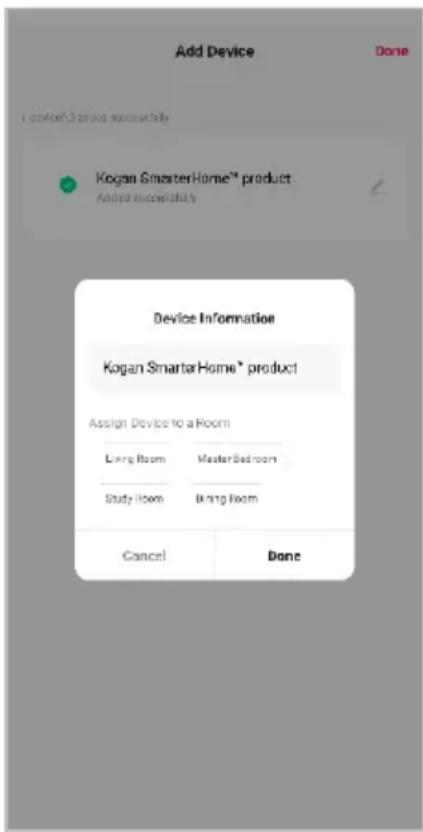
text_image
Add Device Done I do not/Do you successfully Kogan SmartarHome™ product Andred immediately Device Information Kogan SmartarHome® product Assign Device to a Room Large Room Master Bedroom Study Room Bring Room Cancel DoneNote:
Once connected, you can select Create Scene from the “+” in the upper right corner (or from the Scene tab) to group connected SmarterHome™ products and automate their functions.
Having trouble connecting?
The prior steps detail the process for “EZ Mode” connection. If that does not work for your connection, we suggest trying it again, and if still no success, attempting the following method for AP Mode connection.
Set device in AP pairing mode
Set the device in pairing mode by pressing and holding the mode button on the display screen for 5-10 seconds until you hear a beep, and the Wi-Fi icon starts flashing slowly (once per second).
Using AP Mode to add device
- Follow the previous steps to select your product type (Heating & Cooling > Heaters).
- Adjust your connection method by tapping on the mode type in the top-right corner of the screen. Select "AP Mode" for the set-up type.
- Ensure that the device is in pairing mode, with the Wi-Fi icon flashing slowly, and tap "Confirm light is slowly flashing".
- Enter your Wi-Fi details. It is important that your SmarterHome™ device and the app are connected to the same Wi-Fi network during setup.
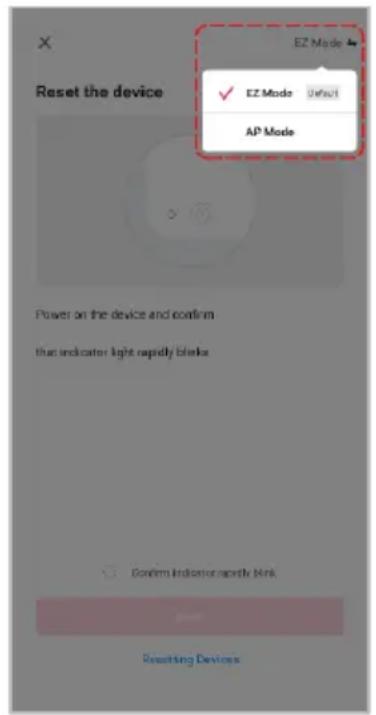
text_image
Reset the device EZ Mode ✓ EZ Mode Default AP Mode Power on the device and confirm that indicator light rapidly blanks Confirm Indicator rapidly blank Resetting Devices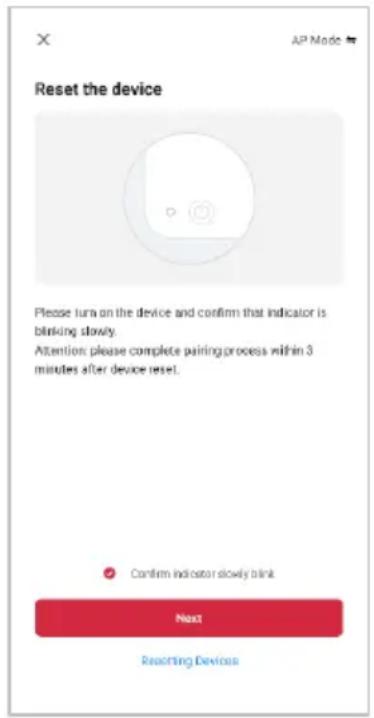
text_image
Reset the device Please turn on the device and confirm that indicator is blinking slowly. Attention: please complete pairing process within 3 minutes after device reset. Confirm indicator slowly blink Next Restarting Devices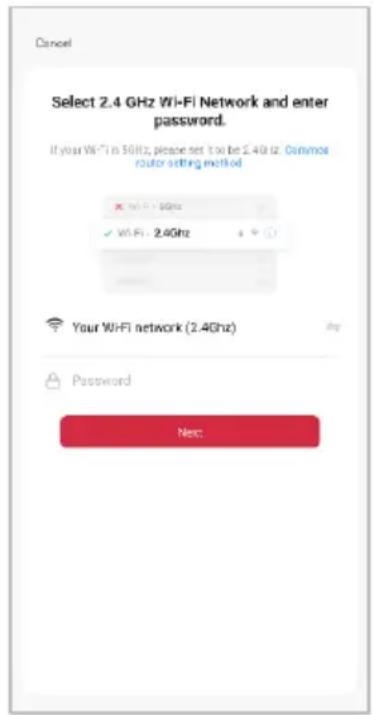
text_image
Cancel Select 2.4 GHz Wi-Fi Network and enter password. If your Wi-Fi is 50Hz, please set it to be 2.4GHz. Common router setting method ✓ Wi-Fi: 2.4Ghz ✓ Wi-Fi: 2.4Ghz Your Wi-Fi network (2.4Ghz) Password Next:Notes:
- The device and the app have to use the same Wi-Fi network.
- The device is only compatible with 2.4Ghz networks.
-
Depending on the product, Steps 3 and 4 may be in opposite order.
-
Follow the in-app prompts to continue AP Mode connection, which will pair your mobile phone to the device's Wi-Fi hotspot to ensure a connection. This may be named "SL-KoganSmart", "SmartLife-XXXX", or another similar name.
Note:
If the Wi-Fi hotspot does not appear on your phone in the list of available networks, your device may not be set in AP Pairing Mode correctly. Try repeating the steps outlined above to ensure your device is ready for connection.
-
The device will commence the pairing process and connect to the app. Ensure your Wi-Fi router, mobile phone, and the SmarterHome™ device are kept close until connection is complete.
-
After successfully being added, you will have the option to rename the device and assign it to a location. It will now be listed on the app's home page. Tap the device listing to enter its control page.
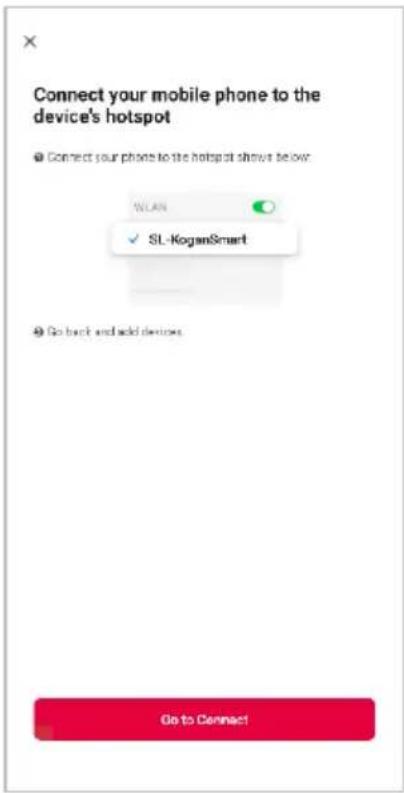
text_image
Connect your mobile phone to the device's hotspot ● Connect your phone to the hotspot shows below: WLAN SL-KoganSmart ● Go back and add devices. Go to Connect!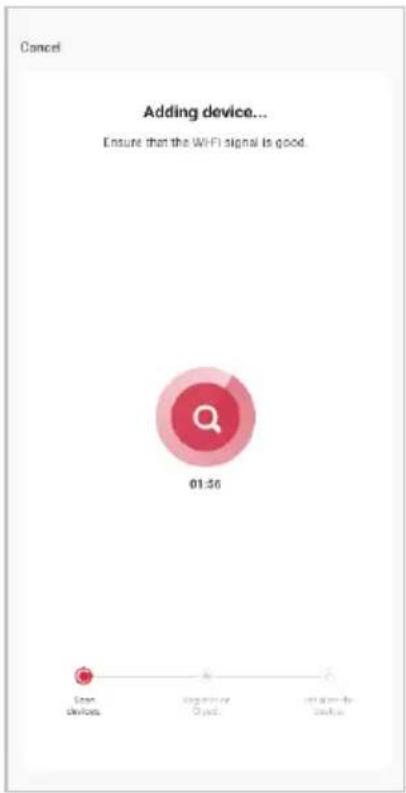
text_image
Cancel Adding device... Ensure that the WIFI signal is good. 01:56 Loan devices Register or Access Reliance-to- charge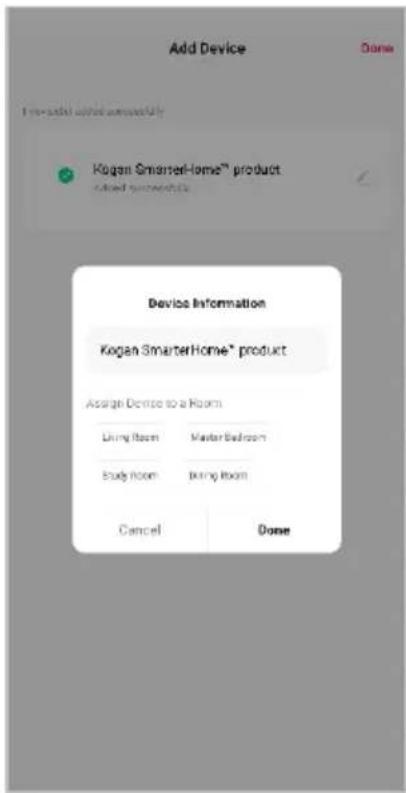
text_image
Add Device Done Kogan SmarterHome™ product Used recommendations Device Information Kogan SmarterHome® product Assist Device to a Room Living Room Master Bedroom Study Room Living Room Cancel DoneNote:
Once connected, you can select Create Scene from the “+” in the upper right corner (or from the Scene tab) to group connected SmarterHome™ products and automate their functions.
GOOGLE HOME CONTROL
Note:
You will need to have set up a Google Home account prior to linking your Kogan SmarterHome™ device.
Adding "SmarterHome" to the Google Home app
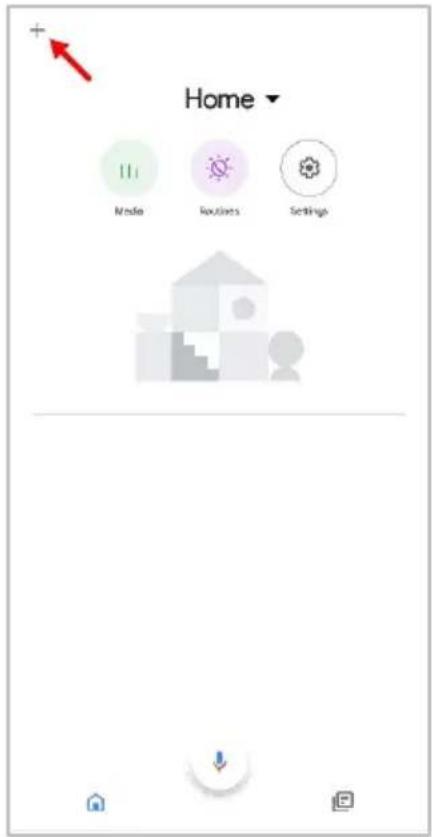
- From the home page of the Google Home app, select the "+" icon (top left corner, see arrow in the below screenshot) to access the 'Add and manage' page.
- Select 'Set up device', then select the 'Works with Google' option.
text_image
+ Home Mode Routes Settings
text_image
Add and manage Add to home Setup device Invite home member Create speaker group Create new home Manage services Music Video Podcasts Next Aware Rebates and rewards Pro services Offers Offora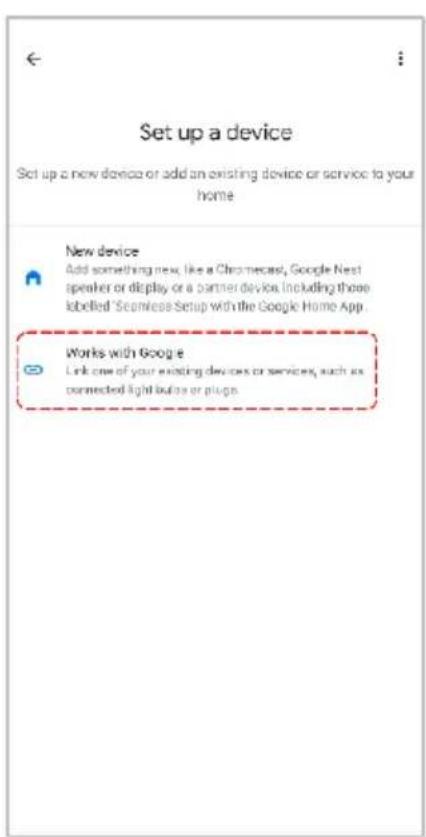
text_image
Set up a device Set up a new device or add an existing device or service to your home New device Add something new, like a Chromecast, Google Nest speaker or display or a partner device, including these labelled 'Seamless Setup with the Google Home App. Works with Google Link one of your existing devices or services, such as connected light buttons or plugs.- Select the search bar and type 'Smarter Home' to locate the Kogan SmarterHome™ service.
- From here, you will be prompted to sign into your SmarterHome™ account using either your email or mobile phone number, depending on which method you used to register your account.
- Select "Kogan SmarterHome™" from the app options.

text_image
smarter home Add new Smarter Home homes home homeless 1 2 3 4 5 6 7 8 9 0 q w e r t y u i o p e * s i * j k l a s d f g h j k l z x c v b n m 123 ,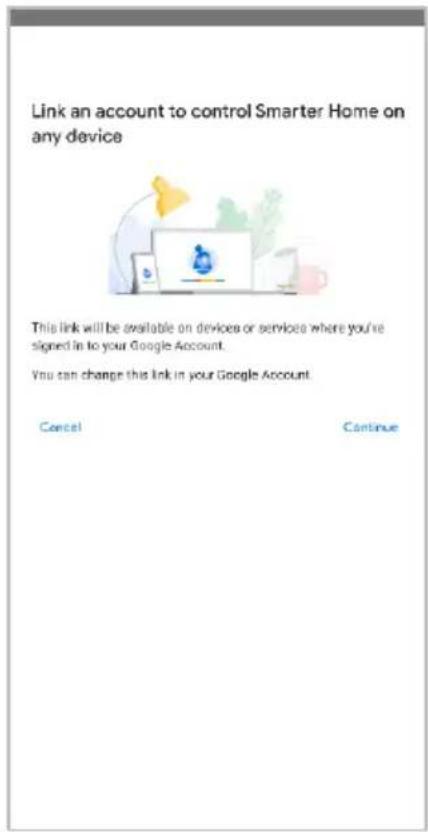
text_image
Link an account to control Smarter Home on any device This link will be available on devices or services where you're signed in to your Google Account. You can change this link in your Google Account. Cancel Continue
text_image
Choose App This account is registered with many apps, please select the account that belongs to the device you want to operate this time. Tuya Smart Kogan Smarterhome Link devices for this App account- Tap 'Authorise' to grant Google permission to access the SmarterHome™ app and your devices.
- Once connected, the app will display any compatible devices linked to your SmarterHome™ account. From here you can assign them to rooms and set up any routines. Tap on any of the devices to view a list of available commands.

text_image
By signing in, you are authorizing Google to control your devices. Authorize You can make permission at any time.
text_image
Add smart home devices Select devices and add to a room Devices connected within the SmarterHome™ app will appear here if compatibleNote:
Please note that Google Home can only control the base/core functions of any compatible SmarterHome™ devices. To make full use of this product's smart functionality, please use the Kogan SmarterHome™ app.
AMAZON ALEXA CONTROL
Note:
You will need to have set up an Alexa account prior to linking your Kogan SmarterHome™ device.
Adding "SmarterHome" to the Alexa app
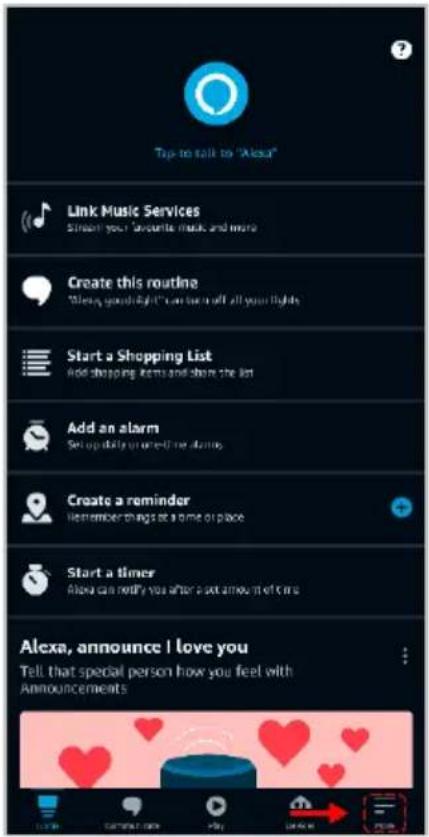
- From the home page of the Alexa app, select the “≡” icon in the bottom-right and select “Skills & Games” from the sidebar.
- Select the search bar and type 'Smarter Home' to locate the Kogan SmarterHome™ skill.
text_image
Tap to talk to "Alexa" Link Music Services Simien your favorite music and more Create this routine "Sleep, good right" can be in all your lights Start a Shopping List Add shopping items and show the list Add an alarm Set up daily or next one alarm Create a reminder Remember things at a time of place Start a timer Alexa can notify you after a set amount of time Alexa, announce I love you Tell that special person how you feel with Announcements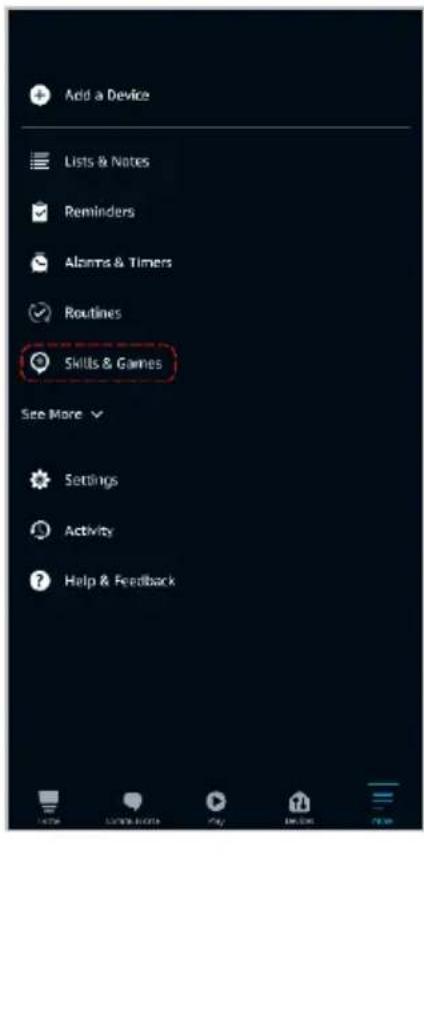
text_image
Add a Device Lists & Notes Reminders Alarms & Timers Routines Skills & Games See More Settings Activity Help & Feedback
text_image
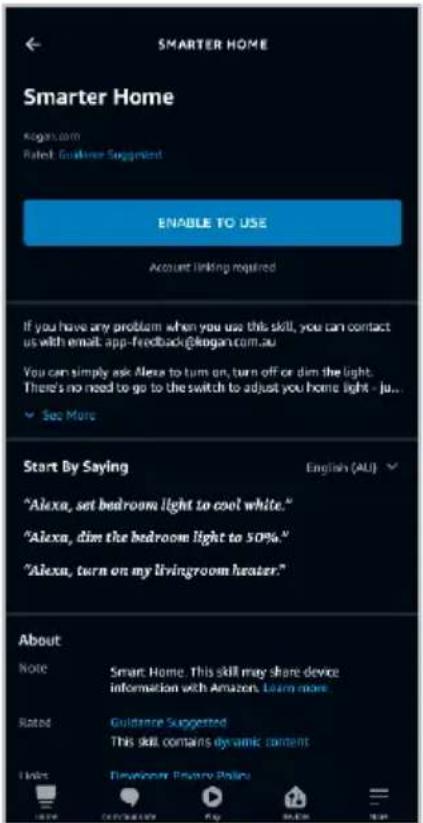
SEARCH Search Keyword or skill name: Kogan smarterhome! Sort: Relevance Smarter Home "Afoaa, aim the bedroom light to 50%." Smart Home smarterhome 1 2 3 4 5 6 7 8 9 0 q w e r t y u i o p @ # $ * - + = ( ) a s d f g h j k l - $ : : / z x c v b n m 123- Tap 'Enable to Use' to add the Kogan SmarterHome™ skill to Alexa.
- From here, you will be prompted to sign into your SmarterHome™ account using either your email or mobile phone number, depending on which method you used to register your account.
- Select "Kogan SmarterHome™" from the app options.
text_image
SMARTER HOME Smarter Home Kogan.com Rated: Guideline Suggested ENABLE TO USE Account linking required If you have any problem when you use this skill, you can contact us with email: app-feedback@kogan.com.au You can simply ask Alexa to turn on, turn off or dim the light. There's no need to go to the switch to adjust you home light - ju... See More Start By Saying "Alexa, set bedroom light to cool white." "Alexa, dim the bedroom light to 50%." "Alexa, turn on my livingroom heater." English (AU) About Note Smart Home. This skill may share device information with Amazon. Learn more. Rated Guidance Suggested This skill contains dynamic content I like Developer Privacy Policy
text_image
pxy1.tuyueb.com/pl/?from=koga English Australia Print Number/Email Address Next Step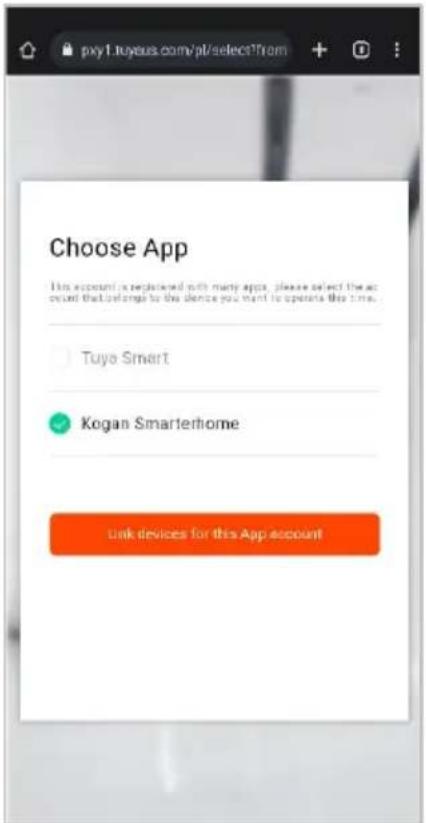
text_image
pxy1.tuyous.com/pt/selectTrom Choose App This account is registered with many apps, please select the account that belongs to the silence you want to operate this time. Tuya Smart Kogan Smarterhome Link devices for this App account- Tap 'Authorise' to grant Alexa permission to access the SmarterHome™ app and your devices.
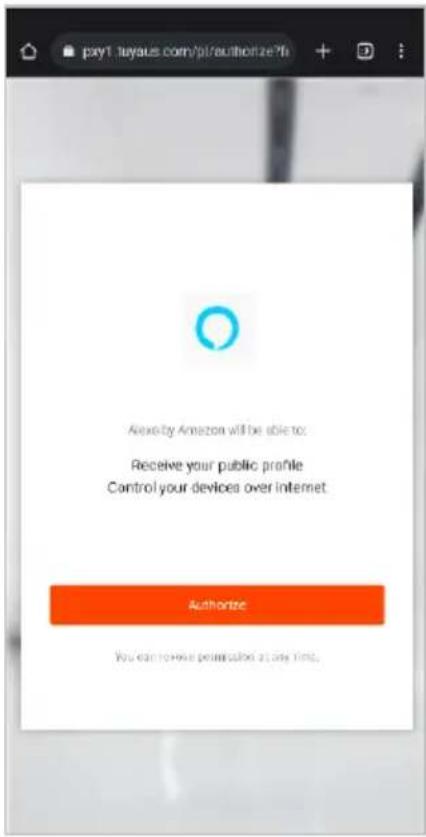
- Once connected, the app will perform a search and display the devices linked to your SmarterHome™ account. When your devices have successfully connected to the Alexa app, you will be able to control your Kogan SmarterHome™ devices via Alexa's voice commands.
text_image
pxy1.tuyaus.com/p/authorization?fi Alexia by Amazon will be able to: Receive your public profile Control your devices over internet Authorize You can review permission at any time.
text_image
ACCOUNT LINKING Your Smarter Home account has been successfully linked. What to do next. Close this window to discover smart home devices you can control with Alexa. CLOSENote:
Please note that Alexa can only control the base/core functions of any compatible SmarterHome™ devices. To make full use of this product's smart functionality, please use the Kogan SmarterHome™ app.
FUNCTIONS
Power
Press the power button on the remote or display screen to power the heater on/off. The room temperature will illuminate on the display screen.
Mode
- Press the mode button on the remote or display screen to select a mode.
- The 📁 icon will illuminate on the display screen when low is selected, and the ⚙️ icon will illuminate when high is selected.
Temperature Selection
- Press the temperature button on the remote or display screen to select the desired temperature from a range of 10^-45^ .
- The temperature icon will illuminate briefly and then the display screen will show the room temperature again.
Timer
Press the timer button on the remote or the display screen to select the desired timer duration between 1 and 24 hours.
Child Lock
- Press the timer and temperature buttons on the display screen at the same time or press the child lock button on the remote to turn the child lock on/off.
- 'CL' will illuminate on the screen when child lock is activated.
Automatic Dimming
If there is no user input for 3 minutes, the digital display screen will dim by 50%.
Frost
- Press the frost button on the remote to turn frost mode on. 'Fr' will illuminate on the display screen.
- The heater will automatically enter low mode when the room temperature is lower than -5°C, and will stop heating when the room temperature reaches 5°C.
- Press the frost button to turn frost mode off.
CLEANING & CARE
- Before cleaning, always unplug the power cord from the electrical outlet.
- Clean the air inlet and outlets frequently.
- Never use abrasive powders or solvents to clean the holder.
SPECIFICATIONS
Voltage
220-240V\~
Frequency 50/60Hz
Power 1200/2400W
Disposal
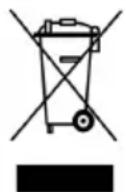
This marking indicates that this heater should not be disposed with other household wastes. To prevent possible harm to the environment or human health from uncontrolled waste disposal, recycle it responsibly to promote the sustainable reuse of material resources.
Need more information?
We hope that this user guide has given you the assistance needed for a simple set-up.
For the most up-to-date guide for your product, as well as any additional assistance you may require, head online to help.kogan.com
kogan.com