DKGM-51 - Kit d'installation radio CRUX - Free user manual and instructions
Find the device manual for free DKGM-51 CRUX in PDF.


User questions about DKGM-51 CRUX
0 question about this device. Answer the ones you know or ask your own.
Ask a new question about this device
Download the instructions for your Kit d'installation radio in PDF format for free! Find your manual DKGM-51 - CRUX and take your electronic device back in hand. On this page are published all the documents necessary for the use of your device. DKGM-51 by CRUX.
USER MANUAL DKGM-51 CRUX
- Retains factory features in select GM LAN 11 Bit vehicles while functioning with an aftermarket radio.
- Pre-programmed to retain factory Steering Wheel Controls.
- Supports Bose, non-Bose and Y-91 audio systems.
- Retains chime functions.
- Retains front and rear parking sensors.
- EIA color coded wiring for easy installation.
NOTES:
- DOES NOT support ONSTAR.
PARTS INCLUDED:

GM-51 Module

GM-2A Harness
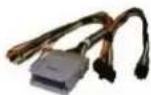
GM-2B Harness
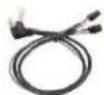
SWC Cables
Antenna Adaptor

Dash Kit
INSTALLATION DIAGRAM:
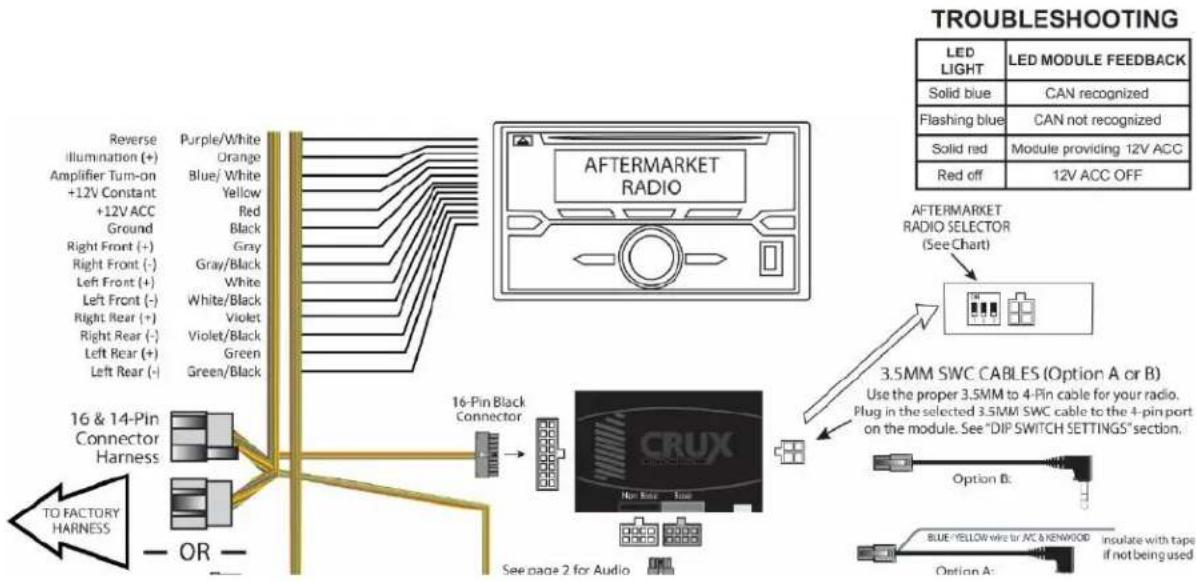
flowchart
graph TD
    A["LED LIGHT"] --> B["LED MODULE FEEDBACK"]
    B --> C["FLashing blue"]
    C --> D["Module providing 12V ACC"]
    D --> E["Red off"]
    E --> F["12V ACC OFF"]
    G["TO FACTORY HARNESS"] --> H["16 & 14-Pin Connector Harness"]
    H --> I["OR"]
    I --> J["Reverse Illumination (+)"]
    I --> K["Amplifier Turn-on +12V Constant +12V ACC Ground Right Front (-) Left Front (+) Right Rear (+) Right Rear (-) Left Rear (+) Left Rear (-)"]
    J --> L["Blue/White Yellow Red Black Gray White/Black Violet Violet Green"]
    L --> M["Aftermarket RADIO"]
    M --> N["Aftermarket RADIO SELECTOR (See Chart)"]
    N --> O["3.5MM SWC CABLES (Option A or B)"]
    O --> P["Use the proper 3.5MM to 4-Pin cable for your radio. Plug in the selected 3.5MM SWC cable to the 4-pin port on the module. See "DIP SWITCH SETTINGS" section."]
    P --> Q["Option B: Blue/Yellow wire by AC&KENWOOD Insulate with tape if not being used"]
DIP SWITCH SETTINGS:
SETTING THE AFTERMARKET RADIO BRAND
With the key in the off position, set the DIP switches to the corresponding radio listed below.
| RADIO BRAND: | DIP#: | 1 | 2 | 3 |
| Atoto, Dual, Fahrenheit, Jensen | OFF | ON | ON | |
| Pioneer, Power Acoustik, Soundstream | OFF | ON | ON | |
| Blaupunkt, Most off-brand Radio | OFF | ON | ON | |
| Alpine | OFF | OFF | OFF | |
| Clarion | ON | ON | OFF | |
| Kenwood | ON | ON | ON | |
| JVC | ON | OFF | ON | |
| Boss, Old Sony | ON | OFF | OFF | |
| New Sony | OFF | ON | OFF | |
SWC MODULE
DIP SWITCH

NOTE: For Atoto, Blaupunkt, Dual, Farenheit, Power Acoustik, Soundstream, and most off-brand radios, check the aftermarket radio's manual to see if the SWC buttons need to be programmed.
3.5MM SWC CABLE
Use the proper 3.5 to 4 pin SWC cable for the aftermarket radio being used:
OPTION A is used for ALPINE, CLARION, (JVC and KENWOOD units will use the Blue/Yellow wire). OPTION B is used for ATOTO, BOSS, DUAL, FAHRENHEIT, JENSEN, POWER ACOUSTIK, PIONEER, SONY, SOUND STREAM and most OFF-BRAND headunits.
NOTE: Cap or insulate the 3.5mm plug or Blue/Yellow wire if not being used.
SELECTING THE AUDIO SYSTEM:
If the vehicle is equipped with a Bose system, the GM-51 has a built-in Bose adaptor that allows the proper audio input gain from the aftermarket radio to the Bose amplifier. To use this feature, plug in the male 8-pin connector on the harness to the GRAY female 8-pin connector on the GM-51 module. The module is also labeled "Bose" and "Non Bose" to avoid confusion. (see picture below)
If the vehicle is NOT equipped with a Bose system, plug in the male 8-pin connector to the BLACK female 8-pin on the GM-51 module.
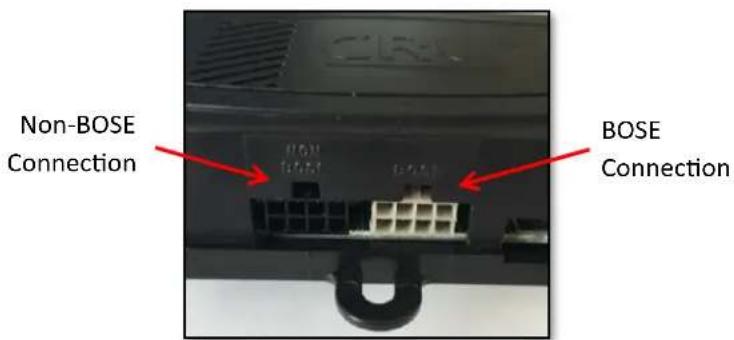
text_image
Non-BOSE Connection BOSE ConnectionCHIME VOLUME ADJUSTMENT:
The GM-51 module has a potentiometer to adjust the chime volume. It is set at half way by default. To adjust the volume, simply use a suitable screw driver and turn the potentiometer clockwise to increase the volume and counter-clockwise to decrease the volume.
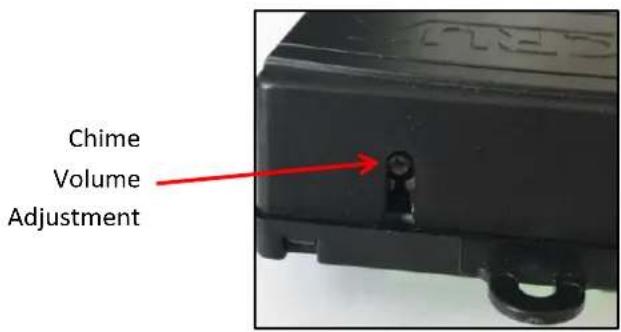
text_image
Chime Volume AdjustmentDASH KIT INSTALLATION:
A double DIN radio replacement dash kit is included in the kit to make the installation quick and easy. You have the option of installing a Double DIN or two Single DIN radios. The DKGM-51 kit includes:

natural_image
Exterior view of a black plastic enclosure with multiple side panels (no text or symbols visible)INSTALLATION:
Before installation:
- Locate the main trim ring.
- Locate the left and right mounting brackets.
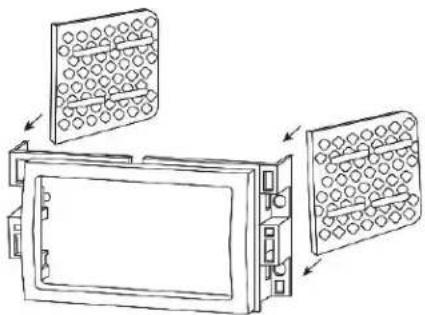
- Slide the appropriate mounting bracket into the trim ring, aligning the holes in the trim ring to the clips on the bracket. (See Diagram A on page 4)
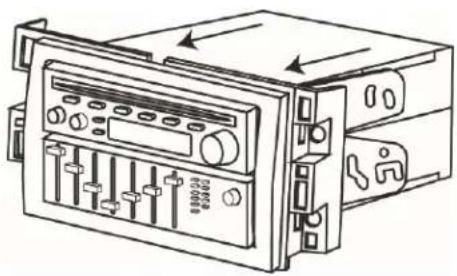
- For two Single DIN radio installation, slide the stacked ISO DIN unit into the trim ring bracket assembly and secure the unit to the kit using the screws supplied with the radio. (See Diagram B on page 4)
natural_image
Diagram of a laboratory filtration or particle separation device with three panels, showing internal structure and flow direction (no text or labels)Diagram A
natural_image
Technical line drawing of a device control panel with buttons and dials (no text or symbols)Diagram B
VEHICLE APPLICATIONS:
16 and 14 PIN CONNECTORS
CHEVROLET
2007-2010
Cobalt
2006-2011
HHR
2008-2012
Malibu
PONTIAC
2007-2010
G5
2006-2010
Solstice
SATURN
2007-2010
Aura
2007
lon
2007-2009
Sky
24 PIN CONNECTOR
CHEVROLET
2005-2006
Cobalt
2004-2007
Malibu
PONTIAC
2005-2009
G6